maintenance INFINITI Q50-HYBRID 2018 Owner's Manual
[x] Cancel search | Manufacturer: INFINITI, Model Year: 2018, Model line: Q50-HYBRID, Model: INFINITI Q50-HYBRID 2018Pages: 442, PDF Size: 2.9 MB
Page 254 of 442

duced, turn off the BCI system and turn
it on again.
. “Unavailable Side Radar Obstruction”:
When side radar blockage is detected.
Action to take:
When the blockage is removed, turn off
the BCI system and turn it on again.
SYSTEM MALFUNCTION
If the BCI system malfunctions, it will turn
off automatically, a chime will sound and BCI
system “malfunction” warning message will
appear in the vehicle information display
.
Action to take
Stop the vehicle in a safe location and place
the shift lever in the P (Park) position. Turn
the hybrid system off and restart the hybrid
system. If the warning message continues to
appear, have the system checked. It is
recommended you visit an INFINITI retailer
for this service.JVS1122X
SYSTEM MAINTENANCE
The two radar sensorsfor the BCI system
are located near the rear bumper. Always
keep the area near the radar sensors clean.
The radar sensors may be blocked by
temporary ambient conditions such as
splashing water, mist or fog.
The blocked condition may also be caused by
objects such as ice, frost or dirt obstructing
the radar sensors.
Check for and remove objects obstructing
the area around the radar sensors.
Do not attach stickers (including transparent
material), install accessories or apply addi-
tional paint near the radar sensors. Do not strike or damage the area around the
radar sensors.
It is recommended you visit an INFINITI
retailer if the area around the radar sensors
is damaged due to a collision.
Radio frequency statement
For USA
This device complies with part 15 of the
FCC Rules.
Operation is subject to the following two
conditions: (1) This device may not cause
harmful interference, and (2) this device
must accept any interference received, in-
cluding interference that may cause unde-
sired operation.
NOTE:
The manufacturer is not responsible for any
radio or TV interference caused by un-
authorized modifications to this equipment.
Such modifications could void the user’s
authority to operate the equipment.
For Canada
This device complies with Industry Canada
Standard RSS-310.
Operation is subject to the following two
conditions: (1) This device may not cause
harmful interference, and (2) this device
must accept any interference received, in-
cluding interference that may cause unde-
Starting and driving5-69
Page 273 of 442

5-88Starting and driving
recommended you visit an INFINITI retailer
for this service.
JVS1123X
System maintenance
The sensor for the ICC systemis located
behind the lower grille of the front bumper.
To keep the ICC system operating properly,
be sure to observe the following:
. Always keep the sensor area of the front
bumper clean.
. Do not strike or damage the areas around
the sensor.
. Do not cover or attach stickers or similar
objects on the front bumper near the
sensor area. This could cause failure or
malfunction.
. Do not attach metallic objects near the
sensor area (brush guard, etc.). This could cause failure or malfunction.
. Do not alter, remove or paint the front
bumper. It is recommended you contact
an INFINITI retailer before customizing
or restoring the front bumper.
FCC Notice:
For USA:
This device complies with Part 15 of the
FCC Rules. Operation is subject to the
following two conditions:
1. This device may not cause harmful
interference, and
2. This device must accept any interfer-
ence received, including interference
that may cause undesired operation.
FCC Warning
Changes or modification not expressly ap-
proved by the party responsible for com-
pliance could void the user’s authority to
operate the equipment.
For Canada:
This device complies with Industry Canada
licence-exempt RSS standard(s). Operation
is subject to the following two conditions:
1. This device may not cause interference,
and
2. This device must accept any interfer-
ence, including interference that may
cause undesired operation of the device.
Page 288 of 442
For details about the VDC system, see
“Vehicle Dynamic Control (VDC) system”
(P.5-130).
. When the VDC or ABS (including the
traction control system) operates
. When the INFINITI Drive Mode Selector
is turned to the SNOW mode (To use the
DCA system, turn the INFINITI Drive
Mode Selector to a mode other than the
SNOW mode, then turn on the dynamic
driver assistance switch
.) For details
about the INFINITI Drive Mode Selector,
see “INFINITI Drive Mode Selector” (P.5-
21).
. When the radar signal is temporarily
interrupted
Action to take:
When the conditions listed above are no
longer present, turn the DCA system back on
to use the system.
Condition B
Under the following conditions, making it
impossible to detect a vehicle ahead, the
DCA system is automatically canceled.
The chime will sound, the driver assist
system forward indicator (orange) and the
“front radar obstruction” warning message
will appear in the vehicle information display.
. When the radar sensor area of the front bumper is covered with dirt or is ob-
structed
Action to take:
If the driver assist system forward indicator
(orange) and the warning message appear,
stop the vehicle in a safe place, place the
shift lever in the P (Park) position and turn
the hybrid system off. When the radar signal
is temporarily interrupted, clean the sensor
area of the front bumper and restart the
hybrid system. If the warning message
continues to be displayed, have the DCA
system checked. It is recommended you visit
an INFINITI retailer for this service.
. When driving on roads with limited road
structures or buildings (for example, long
bridges, deserts, snow fields, driving next
to long walls)
Action to take:
When the above conditions no longer exist,
the DCA system will resume automatically.SYSTEM MALFUNCTION
When the DCA system is not operating
properly, the chime sounds, the driver assist
system forward indicator (orange) and the
system “malfunction” warning message will
appear in the vehicle information display. Action to take:
If the driver assist system forward indicator
(orange) and the warning message appear,
stop the vehicle in a safe place and place the
shift lever in the P (Park) position. Turn the
hybrid system off, restart the hybrid system,
and turn on the DCA system again.
If it is not possible to set the system or the
indicator stays on, it may indicate that the
system is malfunctioning. Although the
vehicle is still driveable under normal con-
ditions, have the vehicle checked. It is
recommended you visit an INFINITI retailer
for this service.
SENSOR MAINTENANCE
The sensor for the DCA system is common
with the Intelligent Cruise Control (ICC)
system and is located behind the lower grille
of the front bumper.
For the sensor maintenance, see “Intelligent
Cruise Control (ICC)” (P.5-72).
FCC Notice:
For USA:
This device complies with Part 15 of the
FCC Rules. Operation is subject to the
following two conditions:
1.
This device may not cause harmful
interference, and
Starting and driving5-103
Page 296 of 442

Action to take:
If the FEB system warning light (orange)
comes on, stop the vehicle in a safe place,
place the shift lever in the P (Park) position
and turn the hybrid system off. Clean the
radar cover on lower grille with a soft cloth,
and restart the hybrid system. If the FEB
system warning light continues to illuminate,
have the FEB system checked. It is recom-
mended you visit an INFINITI retailer for this
service.
.When driving on roads with limited road
structures or buildings (for example, long
bridges, deserts, snow fields, driving next
to long walls)
Action to take:
When the above conditions no longer exist,
the FEB system will resume automatically.
Condition C
When the accelerator pedal actuator detects
that the internal motor temperature is high,
the FEB system is automatically turned off.
The FEB system warning light (orange)
and the driver assist system forward indi-
cator (orange)will illuminate and the
“Unavailable High Accelerator Temperature”
warning message will appear in the vehicle
information display. Action to take:
When the above conditions no longer exist,
the FEB system will resume automatically.
SYSTEM MALFUNCTION
If the FEB system malfunctions, it will be
turned off automatically, a chime will sound,
the FEB system warning light (orange)
and the driver assist system forward indi-
cator (orange)will illuminate and the
system “malfunction” warning message will
appear in the vehicle information display.
Action to take:
If the FEB system warning light (orange)
comes on, stop the vehicle in a safe location
and place the shift lever in the P (Park)
position. Turn the hybrid system off and
restart the hybrid system. If the FEB system
warning light continues to illuminate, have
the FEB system checked. It is recommended
you visit an INFINITI retailer for this service.
JVS1123X
SYSTEM MAINTENANCE
The sensoris located behind the lower
grille of the front bumper.
To keep the system operating properly, be
sure to observe the following:
. Always keep the sensor area of the front
bumper clean.
. Do not strike or damage the areas around
the sensor.
. Do not cover or attach stickers or similar
objects on the front bumper near the
sensor area. This could cause failure or
malfunction.
. Do not attach metallic objects near the
sensor area (brush guard, etc.). This
Starting and driving5-111
Page 305 of 442

5-120Starting and driving
Action to take:
If the FEB warning light (orange)
comes
on, stop the vehicle in a safe place, place the
shift lever in the P (Park) position and turn
the hybrid system off. Clean the radar cover
on lower grille with a soft cloth, and restart
the hybrid system. If the FEB warning light
(orange)
continues to illuminate, have the
PFCW system checked. It is recommended
you visit an INFINITI retailer for this service.
. When driving on roads with limited road
structures or buildings (for example, long
bridges, deserts, snow fields, driving next
to long walls)
Action to take:
When the above conditions no longer exist,
the PFCW system will resume automatically.
NOTE:
If the FEB system stops working, the PFCW
system will also stop working.
SYSTEM MALFUNCTION
If the PFCW malfunctions, it will be turned
off automatically, a chime will sound, the
FEB system warning light (orange)
and
the driver assist system forward indicator
(orange)
will illuminate, and the system
“malfunction” message will appear in the
vehicle information display.
Action to take:
If the FEB warning light (orange)
comes
on, stop the vehicle in a safe location, turn
the hybrid system off and restart the hybrid
system. If the FEB warning light (orange)
continues to illuminate, have the PFCW
system checked. It is recommended you visit
an INFINITI retailer for this service.JVS1123X
SYSTEM MAINTENANCE
The sensoris located behind the lower
grille of the front bumper.
To keep the system operating properly, be
sure to observe the following:
. Always keep the sensor area of the front
bumper clean.
. Do not strike or damage the areas around
the sensor.
. Do not cover or attach stickers or similar
objects on the front bumper near the
sensor area. This could cause failure or
malfunction.
. Do not attach metallic objects near the
sensor area (brush guard, etc.). This
Page 307 of 442
5-122Starting and driving
4. Drive at economical speeds and dis-tances.
.Observing the speed limit and notexceeding 60 MPH (97 km/h) (where
legally allowed) can improve fuel
efficiency due to reduced aerody-
namic drag.
.Maintaining a safe following distance
behind other vehicles reduces unne-
cessary braking.
.Safely monitoring traffic to anticipatechanges in speed permits reduced
braking and smooth acceleration
changes.
.Select a gear range suitable to roadconditions.
5. Use cruise control.
.Using cruise control during highway driving helps maintain a steady speed.
.Cruise control is particularly effectivein providing fuel savings when driving
on flat terrains.
6. Plan for the shortest route.
.Utilize a map or navigation system to determine the best route to save time.
7. Avoid idling.
.Shutting off your engine when safe for stops exceeding 30-60 seconds
saves fuel and reduces emissions. 8. Buy an automated pass for toll roads.
.Automated passes permit drivers to
use special lanes to maintain cruising
speed through the toll and avoid
stopping and starting.
9. Winter warm up.
.Limit idling time to minimize impact to fuel economy.
.Vehicles typically need no more than30 seconds of idling at start-up to
effectively circulate the engine oil
before driving.
.Your vehicle will reach its ideal oper-ating temperature more quickly while
driving versus idling.
10. Keeping your vehicle cool.
.Park your vehicle in a covered parking area or in the shade whenever possi-
ble.
.When entering a hot vehicle, openingthe windows will help to reduce the
inside temperature faster, resulting in
reduced demand on your A/C system. .
Keep your engine tuned up.
. Follow the recommended scheduled
maintenance.
. Keep the tires inflated to the correct
pressure. Low tire pressure increases tire
wear and lowers fuel economy.
. Keep the wheels in correct alignment.
Improper alignment increases tire wear
and lowers fuel economy.
. Use the recommended viscosity engine
oil. (See “Engine oil and oil filter recom-
mendation” (P.10-6).)
INCREASING FUEL ECONOMY
Page 346 of 442

8 Do-it-yourself
Maintenance precautions ................................................ 8-2
Engine compartment check locations ......................... 8-3VQ35HR engine ........................................................... 8-3
Engine cooling system ..................................................... 8-5 Checking engine coolant level .................................. 8-6
Changing engine coolant ........................................... 8-7
Inverter cooling system ................................................... 8-7 Checking inverter coolant level ................................ 8-8
Changing inverter coolant ......................................... 8-9
Engine oil ........................................................................\
..... 8-9
Checking engine oil level ............................................ 8-9
Changing engine oil and oil filter .......................... 8-10
Automatic Transmission Fluid (ATF) ......................... 8-12
Brake fluid ........................................................................\
. 8-12
Window washer fluid ..................................................... 8-13
12-volt battery ................................................................. 8-14
Checking battery fluid level .................................... 8-15
Jump starting .............................................................. 8-15
Spark plugs ........................................................................\
8-15 Replacing spark plugs ............................................... 8-16
Air cleaner ........................................................................\
.. 8-16 Windshield wiper blades ............................................... 8-17
Cleaning ...................................................................... 8-17
Replacing .................................................................... 8-18
Brakes ........................................................................\
........ 8-18 Self-adjusting brakes .............................................. 8-18
Brake pad wear warning ....................................... 8-18
Fuses ........................................................................\
.......... 8-19 Engine compartment and trunk ........................... 8-19
Passenger compartment ....................................... 8-20
Intelligent Key battery replacement .......................... 8-21
Lights ........................................................................\
........ 8-24 Headlights .................................................................. 8-25
Exterior and interior lights .................................... 8-25
Wheels and tires ............................................................ 8-28 Tire pressure ............................................................. 8-28
Tire labeling ............................................................... 8-32
Types of tires ........................................................... 8-34
Tire chains .................................................................. 8-35
Changing wheels and tires .................................... 8-36
Jacking up the vehicle and replacing tires ........ 8-39
Page 347 of 442

8-2Do-it-yourself
When performing any inspection or main-
tenance work on your vehicle, always take
care to prevent serious accidental injury to
yourself or damage to the vehicle. The
following are general precautions which
should be closely observed.
WARNING
.This vehicle has high voltage DC and
AC systems as well as a 12-volt
system. DC and AC high voltage is
very dangerous and can cause severe
burns and electric shock that may
result in serious injury or death.
. Never touch, disassemble, remove or
replace the high voltage parts, har-
nesses and their connectors. High
voltage cables are orange. Touching,
disassembling, removing or replacing
those parts and harnesses can cause
severe burns or electric shock that
may result in serious injury or death.
. Never try to remove the service plug
located in the trunk room. The service
plug is used only when the vehicle is
serviced by trained technicians wear-
ing personal protection equipment
and is part of the high voltage
system. Touching the service plug
can cause severe burns or electric shock that may result in serious injury
or death.
. The INFINITI Direct Response Hy-
brid
®System uses high voltage up to
408 volts. The system can be hot
while and after starting. Be careful of
both the high voltage and the high
temperature. Obey the caution labels
attached to the vehicle.
. Park the vehicle on a level surface,
apply the parking brake securely and
block the wheels to prevent the
vehicle from moving. Move the shift
lever to P (Park).
. Be sure the ignition switch is in the
OFF or LOCK position when per-
forming any parts replacement or
repairs.
. The engine can start at any time
without warning when the hybrid
system is in the READY to drive
mode. If you must work with the
hybrid system in the READY to drive
mode, keep your hands, clothing, hair
and tools away from fans, belts and
any other parts that can move.
. It is advisable to secure or remove
any loose clothing and remove any
jewelry, such as rings, watches, etc.
before working on your vehicle. .
Always wear eye protection when-
ever you work on your vehicle.
. Your vehicle is equipped with an
automatic engine cooling fan. It may
come on at any time without warn-
ing, even if the ignition key is in the
OFF position and the engine is not
running. To avoid injury, always dis-
connect the negative battery cable of
the 12-volt battery before working
near the fan.
. If you must run the engine in an
enclosed space such as a garage, be
sure there is proper ventilation for
exhaust gases to escape.
. Never get under the vehicle while it is
supported only by a jack. If it is
necessary to work under the vehicle,
support it with safety stands.
. Keep smoking materials, flame and
sparks away from the fuel tank and
the 12-volt battery.
CAUTION
.Do not work under the hood while the
engine is hot. Turn the hybrid system
off and wait until it cools down.
MAINTENANCE PRECAUTIONS
Page 350 of 442
The engine cooling system is filled at the
factory with a pre-diluted mixture of 50%
Genuine NISSAN Long Life Antifreeze/
Coolant (blue) and 50% water to provide
year-round anti-freeze and coolant protec-
tion. The anti-freeze solution contains rust
and corrosion inhibitors. Additional engine
cooling system additives are not necessary.
WARNING
.Never remove the radiator cap when
the engine is hot. Wait until the
engine and radiator cool down. Ser-
ious burns could be caused by high
pressure fluid escaping from the
radiator. See precautions in “If your
vehicle overheats” (P.6-8) of this
manual.
. The radiator is equipped with a
pressure type radiator cap. To pre-
vent engine damage, use only a
genuine NISSAN radiator cap.
CAUTION
.Never use any cooling system addi-
tives such as radiator sealer. Addi-
tives may clog the cooling system and
cause damage to the engine, trans- mission and/or cooling system.
. When adding or replacing coolant, be
sure to use only Genuine NISSAN
Long Life Antifreeze/Coolant (blue)
or equivalent. Genuine NISSAN Long
Life Antifreeze/Coolant (blue) is pre-
diluted to provide antifreeze protec-
tion to −34°F(−37°C). If additional
freeze protection is needed due to
weather where you operate your
vehicle, add Genuine NISSAN Long
Life Antifreeze/Coolant (blue) con-
centrate following the directions on
the container. If an equivalent cool-
ant other than Genuine NISSAN Long
Life Antifreeze/Coolant (blue) is
used, follow the coolant manufac-
ture’s instructions to maintain mini-
mum antifreeze protection to −34°F
(−37°C). The use of other types of
coolant solutions other than Genuine
NISSAN Long Life Antifreeze/Cool-
ant (blue) or equivalent may damage
the engine cooling system.
. The life expectancy of the factory-fill
coolant is 105,000 miles (168,000
km) or 7 years. Mixing any other type
of coolant other than Genuine
NISSAN Long Life Antifreeze/Cool-
ant (blue), including Genuine NISSAN
Long Life Antifreeze/ Coolant
(green), or the use of non-distilled water will reduce the life expectancy
of the factory-fill coolant. Refer to
the “9. Maintenance and schedules”
section of this manual for more de-
tails.
Do-it-yourself8-5
ENGINE COOLING SYSTEM
Page 353 of 442
8-8Do-it-yourself
engine and transmission.
. When adding or replacing coolant, be
sure to use only Genuine NISSAN
Long Life Antifreeze/Coolant (blue)
or equivalent. Genuine NISSAN Long
Life Antifreeze/Coolant (blue) is pre-
diluted to provide antifreeze protec-
tion to −34°F(−37°C). If additional
freeze protection is needed due to
weather where you operate your
vehicle, add Genuine NISSAN Long
Life Antifreeze/Coolant (blue) con-
centrate following the directions on
the container. If an equivalent cool-
ant other than Genuine NISSAN Long
Life Antifreeze/Coolant (blue) is
used, follow the coolant manufac-
ture’s instructions to maintain mini-
mum antifreeze protection to −34°F
(−37°C). The use of other types of
coolant solutions other than Genuine
NISSAN Long Life Antifreeze/Cool-
ant (blue) or equivalent may damage
the inverter cooling system.
. The life expectancy of the factory-fill
coolant is 125,000 miles (200,000
km) or 15 years. Mixing any other
type of coolant other than Genuine
NISSAN Long Life Antifreeze/Cool-
ant (blue), including Genuine NISSAN
Long Life Antifreeze/Coolant
(green), or the use of non-distilled water will reduce the life expectancy
of the factory-fill coolant. Refer to
the “9. Maintenance and schedules”
section of this manual for more de-
tails.
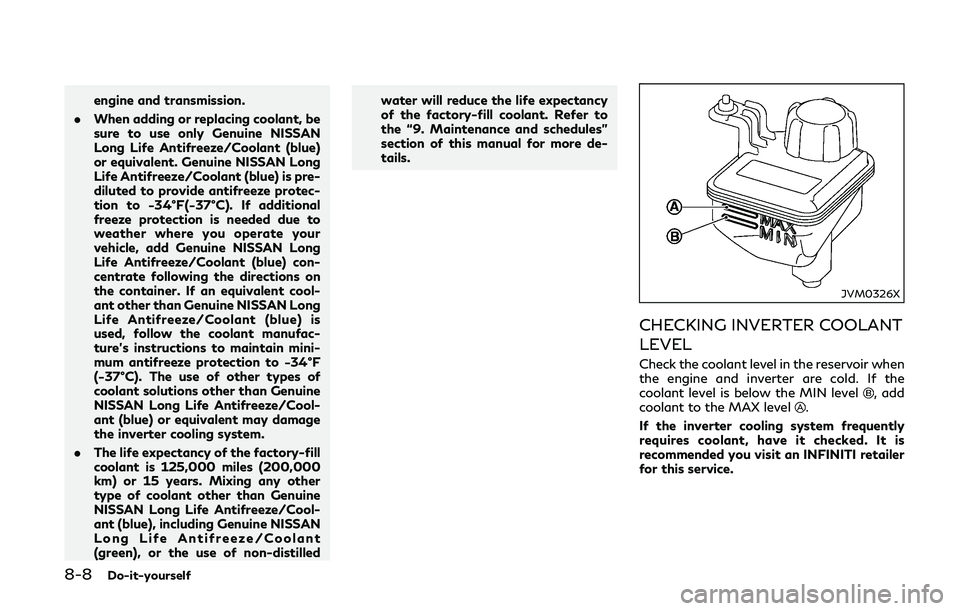
JVM0326X
CHECKING INVERTER COOLANT
LEVEL
Check the coolant level in the reservoir when
the engine and inverter are cold. If the
coolant level is below the MIN level
, add
coolant to the MAX level.
If the inverter cooling system frequently
requires coolant, have it checked. It is
recommended you visit an INFINITI retailer
for this service.