brake light INFINITI Q70 2018 User Guide
[x] Cancel search | Manufacturer: INFINITI, Model Year: 2018, Model line: Q70, Model: INFINITI Q70 2018Pages: 458, PDF Size: 2.21 MB
Page 113 of 458
2-36Instruments and controls
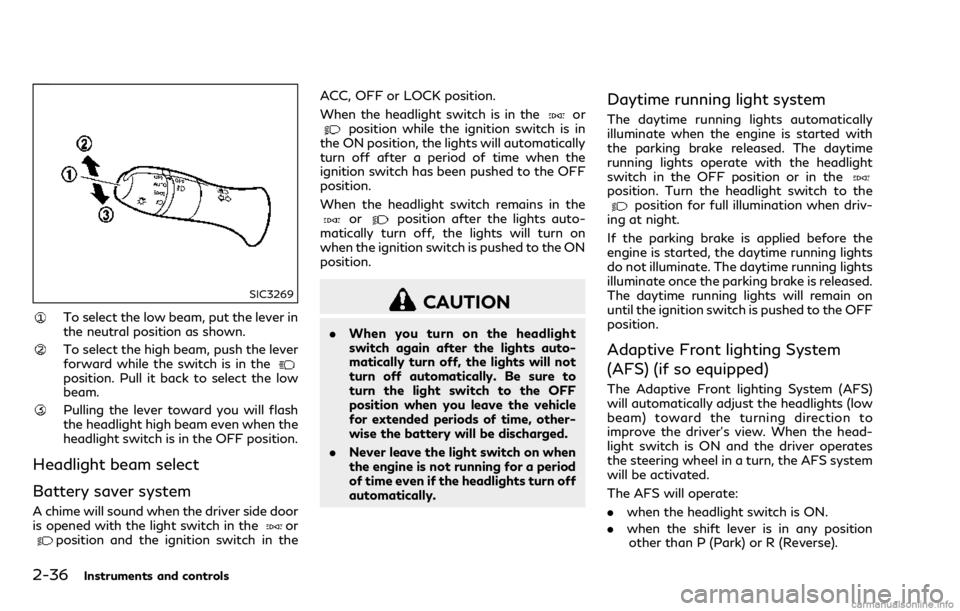
SIC3269
To select the low beam, put the lever in
the neutral position as shown.
To select the high beam, push the lever
forward while the switch is in the
position. Pull it back to select the low
beam.
Pulling the lever toward you will flash
the headlight high beam even when the
headlight switch is in the OFF position.
Headlight beam select
Battery saver system
A chime will sound when the driver side door
is opened with the light switch in theorposition and the ignition switch in theACC, OFF or LOCK position.
When the headlight switch is in the
orposition while the ignition switch is in
the ON position, the lights will automatically
turn off after a period of time when the
ignition switch has been pushed to the OFF
position.
When the headlight switch remains in the
orposition after the lights auto-
matically turn off, the lights will turn on
when the ignition switch is pushed to the ON
position.
CAUTION
. When you turn on the headlight
switch again after the lights auto-
matically turn off, the lights will not
turn off automatically. Be sure to
turn the light switch to the OFF
position when you leave the vehicle
for extended periods of time, other-
wise the battery will be discharged.
. Never leave the light switch on when
the engine is not running for a period
of time even if the headlights turn off
automatically.
Daytime running light system
The daytime running lights automatically
illuminate when the engine is started with
the parking brake released. The daytime
running lights operate with the headlight
switch in the OFF position or in the
position. Turn the headlight switch to theposition for full illumination when driv-
ing at night.
If the parking brake is applied before the
engine is started, the daytime running lights
do not illuminate. The daytime running lights
illuminate once the parking brake is released.
The daytime running lights will remain on
until the ignition switch is pushed to the OFF
position.
Adaptive Front lighting System
(AFS) (if so equipped)
The Adaptive Front lighting System (AFS)
will automatically adjust the headlights (low
beam) toward the turning direction to
improve the driver’s view. When the head-
light switch is ON and the driver operates
the steering wheel in a turn, the AFS system
will be activated.
The AFS will operate:
. when the headlight switch is ON.
. when the shift lever is in any position
other than P (Park) or R (Reverse).
Page 179 of 458

4-8Monitor, climate, audio, phone and voice recognition systems
select “Camera” key, and then select “Dis-
play” key.
NOTE:
Do not adjust any of the display settings of
the RearView Monitor while the vehicle is
moving. Make sure the parking brake is
firmly applied.
PREDICTIVE COURSE LINE SET-
TINGS
To toggle on and off the predictive course
lines:
1. Push the SETTING button while theRearView Monitor screen is not dis-
played.
2. Select the “Camera” key.
3. Select the “Camera” key.
4. Select the “Predictive Course Lines” key to turn the feature on or off. When this
item is turned on, the predictive course
lines will be displayed on the monitor.
REARVIEW MONITOR SYSTEM
LIMITATIONS
WARNING
Listed below are the system limitations
for RearView Monitor. Failure to oper-
ate the vehicle in accordance with these
system limitations could result in serious
injury or death.
.The system cannot completely elim-
inate blind spots and may not show
every object.
. Underneath the bumper and the
corner areas of the bumper cannot
be viewed on the RearView Monitor
because of its monitoring range lim-
itation. The system will not show
small objects below the bumper, and
may not show objects close to the
bumper or on the ground.
. Objects viewed in the RearView
Monitor differ from actual distance
because a wide-angle lens is used.
. Objects in the RearView Monitor will
appear visually opposite compared to
when viewed in the rear view and
outside mirrors. .
Use the displayed lines as a reference.
The lines are highly affected by the
number of occupants, fuel level, ve-
hicle position, road conditions and
road grade.
. Make sure that the trunk lid is
securely closed when backing up.
. Do not put anything on the rearview
camera. The rearview camera is in-
stalled above the license plate.
. When washing the vehicle with high-
pressure water, be sure not to spray
it around the camera. Otherwise,
water may enter the camera unit
causing water condensation on the
lens, a malfunction, fire or an electric
shock.
. Do not strike the camera. It is a
precision instrument. Otherwise, it
may malfunction or cause damage
resulting in a fire or an electric shock.
The following are operating limitations and
do not represent a system malfunction:
. When the temperature is extremely high
or low, the screen may not clearly display
objects.
. When strong light is directly coming on
the camera, objects may not be displayed
clearly.
Page 218 of 458
3. When appropriate, slowly release theaccelerator pedal to gradually slow the
vehicle.
4. Gradually steer the vehicle to a safe location off the road and away from
traffic if possible.
5. Lightly apply the brake pedal to gradu- ally stop the vehicle.
6. Turn on the hazard warning flashers and either contact a roadside emergency
service to change the tire or see “Chan-
ging a flat tire” (P.6-4).
DRINKING ALCOHOL/DRUGS
AND DRIVING
WARNING
Never drive under the influence of alco-
hol or drugs. Alcohol in the bloodstream
reduces coordination, delays reaction
time and impairs judgement. Driving
after drinking alcohol increases the like-
lihood of being involved in an accident
injuring yourself and others. Addition-
ally, if you are injured in an accident,
alcohol can increase the severity of the
injury.
INFINITI is committed to safe driving. How- ever, you must choose not to drive under the
influence of alcohol. Every year thousands of
people are injured or killed in alcohol-related
accidents. Although the local laws vary on
what is considered to be legally intoxicated,
the fact is that alcohol affects all people
differently and most people underestimate
the effects of alcohol.
Remember, drinking and driving don’t mix!
And that is true for drugs, too (over-the-
counter, prescription, and illegal drugs).
Don’t drive if your ability to operate your
vehicle is impaired by alcohol, drugs, or some
other physical condition.
INTELLIGENT ALL-WHEEL
DRIVE (AWD) DRIVING SAFETY
PRECAUTIONS (AWD models)
WARNING
.
Do not drive beyond the performance
capability of the tires, even with
Intelligent AWD engaged. Accelerat-
ing quickly, sharp steering maneuvers
or sudden braking may cause loss of
control.
. Always use tires of the same type,
size, brand, construction (bias, bias-
belted or radial), and tread pattern on all four wheels. Install tire chains
on the rear wheels when driving on
slippery roads and drive carefully.
. This vehicle is not designed for off-
road (rough road) use. Do not drive
on sandy or muddy roads that tires
may get stuck in.
. For AWD equipped vehicles, do not
attempt to raise two wheels off the
ground and shift the transmission to
any D (Drive) or R (Reverse) position
with the engine running. Doing so
may result in drivetrain damage or
unexpected vehicle movement which
could result in serious vehicle damage
or personal injury.
. Do not attempt to test an AWD
equipped vehicle on a 2-wheel dy-
namometer, (such as the dynam-
ometers used by some states for
emissions testing), or similar equip-
ment even if the other two wheels are
raised off the ground. Make sure you
inform test facility personnel that
your vehicle is equipped with AWD
before it is placed on a dynamometer.
Using the wrong test equipment may
result in drivetrain damage or unex-
pected vehicle movement which could
result in serious vehicle damage or
personal injury.
Starting and driving5-9
Page 222 of 458

SSD0860
INTELLIGENT KEY BATTERY DIS-
CHARGE
If the battery of the Intelligent Key is
discharged, or environmental conditions in-
terfere with the Intelligent Key operation,
start the engine according to the following
procedure:
1. Move the shift lever to the P (Park)position.
2. Firmly apply the foot brake.
3. Touch the ignition switch with the Intelligent Key as illustrated. (A chime
will sound.)
4. Push the ignition switch while depressing the brake pedal within 10 seconds after
the chime sounds. The engine will start.
After step 3 is performed, when the ignition
switch is pushed without depressing the
brake pedal, the ignition switch position will
change to ACC.
NOTE:
. When the ignition switch is pushed to
the ACC or ON position or the engine is
started by the above procedures, the
Intelligent Key battery discharge indi-
cator appears on the vehicle information
display even if the Intelligent Key is
inside the vehicle. This is not a malfunc-
tion. To turn off the Intelligent Key
battery discharge indicator, touch the
ignition switch with the Intelligent Key
again.
. If the Intelligent Key battery discharge
indicator appears, replace the battery as
soon as possible. (See “Intelligent Key
battery replacement” (P.8-25).)
. Make sure the area around the vehicle is
clear.
. Check fluid levels such as engine oil,
coolant, brake fluid and window washer
fluid as frequently as possible, or at least
whenever you refuel.
. Check that all windows and lights are
clean.
. Visually inspect tires for their appearance
and condition. Also check tires for proper
inflation.
. Lock all doors.
. Position seat and adjust head restraints.
. Adjust inside and outside mirrors.
. Fasten seat belts and ask all passengers
to do likewise.
. Check the operation of warning lights
when the ignition switch is pushed to the
ON position. (See “Warning lights, in-
dicator lights and audible reminders”
(P.2-10).)
Starting and driving5-13
BEFORE STARTING THE ENGINE
Page 223 of 458

5-14Starting and driving
1. Apply the parking brake.
2. Move the shift lever to the P (Park) or N(Neutral) position. (P is recommended.)
The starter is designed not to operate
unless the shift lever is in either of the
above positions.
3. Push the ignition switch to the ON position. Depress the brake pedal and
push the ignition switch to start the
engine.
To start the engine immediately, push
and release the ignition switch while
depressing the brake pedal with the
ignition switch in any position.
.If the engine is very hard to start inextremely cold weather or when re-
starting, depress the accelerator ped-
al a little (approximately 1/3 to the
floor) and while holding, crank the
engine. Release the accelerator pedal
when the engine starts.
.If the engine is very hard to start
because it is flooded, depress the
accelerator pedal all the way to the
floor and hold it. Push the ignition
switch to the ON position to start
cranking the engine. After 5 or 6
seconds, stop cranking by pushing
the ignition switch to OFF. After
cranking the engine, release the accel-
erator pedal. Crank the engine withyour foot off the accelerator pedal
by
depressing the brake pedal and push-
ing the push-button ignition switch to
start the engine. If the engine starts,
but fails to run, repeat the above
procedure.
CAUTION
Do not operate the starter for more than
15 seconds at a time. If the engine does
not start, push the ignition switch to
OFF and wait 10 seconds before crank-
ing again, otherwise the starter could be
damaged.
4. Warm-up
Allow the engine to idle for at least 30
seconds after starting. Do not race the
engine while warming it up. Drive at
moderate speed for a short distance
first, especially in cold weather. In cold
weather, keep the engine running for a
minimum of 2 - 3 minutes before shut-
ting it off. Starting and stopping the
engine over a short period of time may
make the vehicle more difficult to start.
When racing the engine up to 4,000 rpm
(VK56VD engine) or 4,500 rpm
(VQ37VHR engine) or more under no
load condition, the engine will enter the fuel cut mode.
5. To stop the engine, shift the shift lever to the P (Park) position and push the
ignition switch to the OFF position.
In preparation for the next engine start,
the engine may have a slightly delayed
shutoff after pushing the ignition switch
to the OFF position, depending on the
driving conditions (VK56VD engine mod-
els).
NOTE:
Care should be taken to avoid situations
that can lead to potential battery discharge
and potential no-start conditions such as:
1. Installation or extended use of electro-
nic accessories that consume battery
power when the engine is not running
(Phone chargers, GPS, DVD players,
etc.)
2. Vehicle is not driven regularly and/or
only driven short distances.
In these cases, the battery may need to be
charged to maintain battery health.
STARTING THE ENGINE
Page 229 of 458

5-20Starting and driving
SPA2331
To apply:Fully depress the parking brake
pedal.
To release:
1. Firmly apply the foot brake
.
2. Depress the parking brake pedal
and
the parking brake will be released.
3. Before driving, be sure the brake warning light goes out.
SSD1024
INFINITI Drive Mode Selector
Four driving modes can be selected by using
the INFINITI Drive Mode Selector, STAN-
DARD, SPORT, ECO and SNOW.
NOTE:
. When the INFINITI Drive Mode Selector
selects a mode, the mode may not
switch quickly. This is not a malfunction.
. Select the STANDARD mode for normal
driving.
STANDARD MODE
Recommended for normal driving. Turn the
INFINITI Drive Mode Selector to the
position. “STANDARD” appears in the vehi-
cle information display for 2 seconds.
SPORT MODE
Adjusts the engine and transmission points
to enhance performance. If the vehicle is
equipped with the active trace control
system, the amount of brake control pro-
vided by active trace control is reduced. (See
“Vehicle Dynamic Control (VDC) system”
(P.5-123).) Turn the INFINITI Drive Mode
Selector to the SPORT position. “SPORT”
appears in the vehicle information display for
2 seconds.
NOTE:
In the SPORT mode, fuel economy may be
reduced.
SNOW MODE
Used on snowy roads or slippery areas.
When the SNOW mode is activated, engine
output is controlled to avoid wheel spin.
Turn the SNOW mode off for normal driving.
Turn the INFINITI Drive Mode Selector to
the SNOW position. “SNOW” appears in the
vehicle information display for 2 seconds.
INFINITI DRIVE MODE SELECTOR
Page 232 of 458

.Lane Departure Warning (LDW) system
— warns the driver with a warning light and chime that the vehicle is begin-
ning to leave the driving lane.
. Lane Departure Prevention (LDP) system
— warns the driver with a warning light and chime, and helps assist the driver
to return the vehicle to the center of
the traveling lane by applying the
brakes to the left or right wheels
individually (for a short period of
time).
JVS0691X
The LDW and LDP systems use a camerainstalled behind the windshield to monitor
the lane markers of your traveling lane.
Starting and driving5-23
Page 235 of 458
![INFINITI Q70 2018 User Guide 5-26Starting and driving
JVS1081X
HOW TO ENABLE/DISABLE THE
LDW SYSTEM
Perform the following steps to enable or
disable the LDW system.
1. Push the SETTING button
.
2. Touch [Driver Assistance].
3. To](/img/42/35073/w960_35073-234.png "INFINITI Q70 2018 User Guide 5-26Starting and driving
JVS1081X
HOW TO ENABLE/DISABLE THE
LDW SYSTEM
Perform the following steps to enable or
disable the LDW system.
1. Push the SETTING button
.
2. Touch [Driver Assistance].
3. To")
5-26Starting and driving
JVS1081X
HOW TO ENABLE/DISABLE THE
LDW SYSTEM
Perform the following steps to enable or
disable the LDW system.
1. Push the SETTING button
.
2. Touch [Driver Assistance].
3. Touch [Lane Assist].
4. Touch [Lane Departure Warning] to turn the system ON/OFF.
LDP SYSTEM OPERATION
The LDP system operates above approxi-
mately 45 MPH (70 km/h) and when the
lane markings are clear.
If the vehicle approaches either the left or
right side of the traveling lane, the LDW
indicator light (orange) on the instrument
panel will flash and a warning chime will
sound. Then, the LDP system will automa-
tically apply the brakes for a short period of
time to help assist the driver to return the
vehicle to the center of the traveling lane.
NOTE:
.The LDP system is not designed to work
when you operate the lane change signal
and change traveling lanes in the direc-
tion of the signal. (The LDP system will
become operable again approximately 2
seconds after the lane change signal is
turned off.)
. The LDP braking assist will not operate
or will stop operating and only a warn-
ing chime will sound under the following
conditions.
— When the brake pedal is depressed.
— When the steering wheel is turned as
far as necessary for the vehicle to
change lanes.
— When the accelerator pedal is de-
pressed while brake control assist is provided.
— When the ICC, DCA, BSI, BSW,
PFCW or FEB warnings sound.
— When the hazard warning flashers
are operated.
— When driving on a curve at a high
speed.
. While the LDP system is operating, you
may hear a sound of brake operation.
This is normal and indicates that the
LDP system is operating properly.
Page 252 of 458

JVS1108X
Side indicator light
BSI ON indicator light (green)/BSI
system warning light (orange)
Dynamic driver assistance switch
Center multi-function control panel
BSI SYSTEM OPERATION
The BSI system operates above approxi-
mately 37 MPH (60 km/h).
If the radar sensors detect a vehicle in the
detection zone, the side indicator light
illuminates.
If the turn signal is then activated, the
system chimes (twice) and the side indicator
light flashes. The side indicator light con-
tinues to flash until the detected vehicle
leaves the detection zone.
If the BSI system is ON and your vehicle
approaches a lane marker while another
vehicle is in the detection zone, the system
chimes (three times) and the side indicator
light flashes. Then the BSI system slightly
applies the brakes to help return the vehicle
back to the center of the driving lane. The
BSI system operates regardless of turn
signal usage.
NOTE:
.Warning and system application of the
brakes will only be activated if the side
indicator light is already illuminated
when your vehicle approaches a lane
marker. If another vehicle comes into
the detection zone after your vehicle has
crossed a lane marker, no warning or
system application of the brakes will be
activated. (See “BSI driving situations”
Starting and driving5-43
Page 256 of 458

— When driving with a tire that isnot within normal tire conditions
(for example, tire wear, low tire
pressure, installation of spare tire,
tire chains, non-standard wheels).
— When the vehicle is equipped with non-original brake parts or sus-
pension parts.
. Excessive noise (for example, audio
system volume, open vehicle window)
will interfere with the chime sound,
and it may not be heard.
BSI DRIVING SITUATIONS
Indicator on
Indicator off
Indicator flashing
JVS0737X
Illustration 1 – Approaching from behind
Another vehicle approaching from
behind
Illustration 1: The side indicator light illumi-
nates if a vehicle enters the detection zone
from behind in an adjacent lane.
JVS0738X
Illustration 2 – Approaching from behind
Illustration 2: If the driver activates the turn
signal, then the system chimes (twice) and
the side indicator light flashes.
Starting and driving5-47