battery INFINITI Q70-HYBRID 2018 Owner's Manual
[x] Cancel search | Manufacturer: INFINITI, Model Year: 2018, Model line: Q70-HYBRID, Model: INFINITI Q70-HYBRID 2018Pages: 458, PDF Size: 2.22 MB
Page 111 of 458

2-24Instruments and controls
Key battery is running out of power.
If this indicator appears, replace the battery
with a new one. (See “Intelligent Key battery
replacement” (P.8-21).)
7. Intelligent Key ignition indicator
This indicator appears when the Intelligent
Key battery is running out of power and
when the Intelligent Key System and vehicle
are not communicating normally.
If this indicator appears, touch the ignition
switch with the Intelligent Key while depres-
sing the brake pedal. (See “Intelligent Key
battery discharge” (P.5-12).)
8. Parking brake release warning
This warning appears when the vehicle
speed is above 4 MPH (7 km/h) and the
parking brake is applied.
9. Low fuel warning
This warning appears when the fuel level in
the tank is getting low. Refuel as soon as it is
convenient, preferably before the fuel gauge
reaches the empty (0) position.
There is a small reserve of fuel remaining in
the tank when the fuel gauge reaches the
empty (0) position.
10. Low washer fluid warning
This warning appears when the washer tank
fluid is at a low level. Add washer fluid as
necessary. (See “Window washer fluid” (P.8-
12).)
11. Door/trunk open warning (igni-
tion switch is in the ON position)
This warning appears if any of the doors
and/or the trunk lid are open or not closed
securely. The vehicle icon indicates which
door or the trunk lid is open on the display.
12. Intelligent Key system warning
This warning appears if there is a malfunc-
tion in the steering lock system or Intelligent
Key system.
If this warning appears while the hybrid
system is stopped, the steering lock (if so
equipped) cannot be released or the hybrid
system cannot be started. If this warning
appears while the hybrid system is running,
the vehicle can be driven. However, it is
recommended you contact an INFINITI
retailer for repair as soon as possible.
13. Loose fuel cap warning
This warning appears when the fuel-filler
cap is not tightened correctly after the
vehicle has been refueled. (See “Fuel-filler
cap” (P.3-22).)
14. Check tire pressure warning
This warning appears when the low tire
pressure warning light in the meter illumi-
nates and low tire pressure is detected. If
this warning appears, stop the vehicle and
adjust the pressure to the recommended
COLD tire pressure shown on the recom-
mended COLD tire pressure shown on the
Tire and Loading Information label. (See
“Low tire pressure warning light” (P.2-15)
and “Tire Pressure Monitoring System
(TPMS) ” (P.5-5).)
15. “TIMER” indicator
This indicator appears when the set “TIMER”
indicator activates. You can set the time for
up to 6 hours. (See “Trip computer” (P.2-
28).)
16. Low outside temperature
warning
This warning appears if the outside tem-
perature is below 37°F (3°C). The warning
can be set not to be displayed. (See “Trip
computer” (P.2-28).)
17. Hybrid system over heat warn-
ing
This warning appears when the temperature
of the hybrid system is too high. Stop the
vehicle in a safe location as soon as possible.
Page 115 of 458
2-28Instruments and controls
JVI0203X
SIC4327
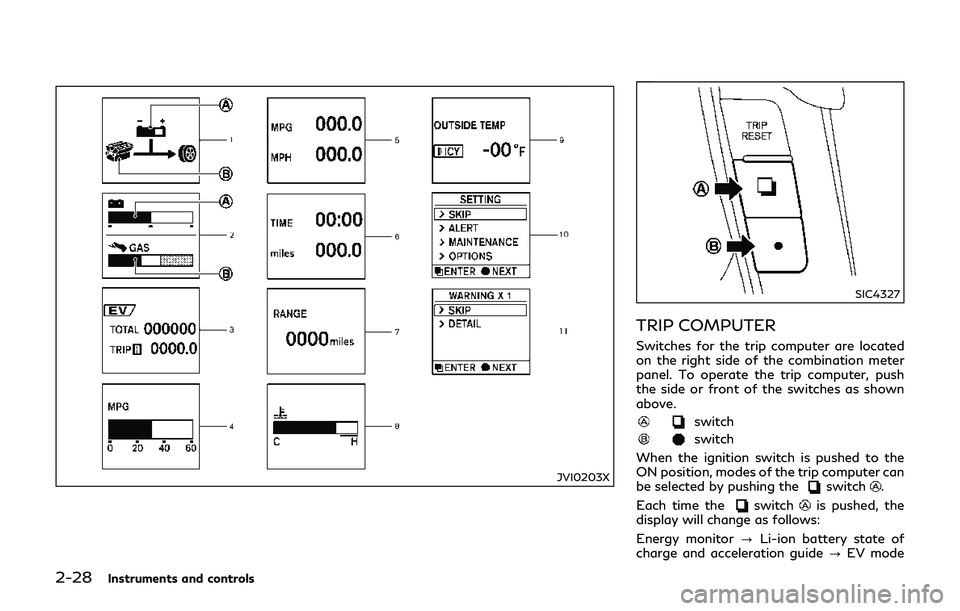
TRIP COMPUTER
Switches for the trip computer are located
on the right side of the combination meter
panel. To operate the trip computer, push
the side or front of the switches as shown
above.
switch
switch
When the ignition switch is pushed to the
ON position, modes of the trip computer can
be selected by pushing the
switch.
Each time the
switchis pushed, the
display will change as follows:
Energy monitor ?Li-ion battery state of
charge and acceleration guide ?EV mode
Page 116 of 458

odometer and twin trip odometer?Current
fuel consumption ?Average fuel consump-
tion and speed ?Elapsed time and trip
odometer ?Distance to empty (dte) ?
Engine coolant temperature gauge? Out-
side air temperature (ICY) ?Setting ?
Warning check
1. Energy monitor
The energy flow related to the hybrid system
is shown by the arrow symbols.
: Li-ion battery
: Engine
shows the charge level of the Li-ion
battery.
+ : Charge level is high
- : Charge level is low
The charge level display will continuously
change as the Li-ion battery charge level
increase or decreases during normal vehicle
operation. Movement of the display from
the far right to the far left of the bar is
normal.
The energy monitor is also displayed on the
center display. (See “Energy monitors” (P.
Hybrid System-5).)
2. Li-ion battery state of charge and
acceleration guide
Li-ion battery state of charge:
This displays the remaining charge in the Li-
ion battery.
The charge level display will continuously
change as the Li-ion battery charge level
increase or decrease during normal vehicle
operation. Movement of the display from
the far right to the far left of the bar is
normal.
This works in conjunction with the remaining
battery display on the center display.
Acceleration guide:
This display provides the driver a visual
display of how efficiently the vehicle is being
driven based on accelerator pedal position.
When the drive mode is set to ECO using the
INFINITI Drive Mode Selector, the accelera-
tion guide operates with the ECO drive
indicator and ECO pedal (if so equipped) to
help you improve fuel economy. (See “ECO
drive indicator light” (P.2-18), “INFINITI
Drive Mode Selector” (P.5-19) and “ECO
pedal system” (P.5-20).)
JVI0258X
: Economy range
: Power range
: Accelerator pedal position indicator
Instruments and controls2-29
Page 126 of 458
SIC3784A
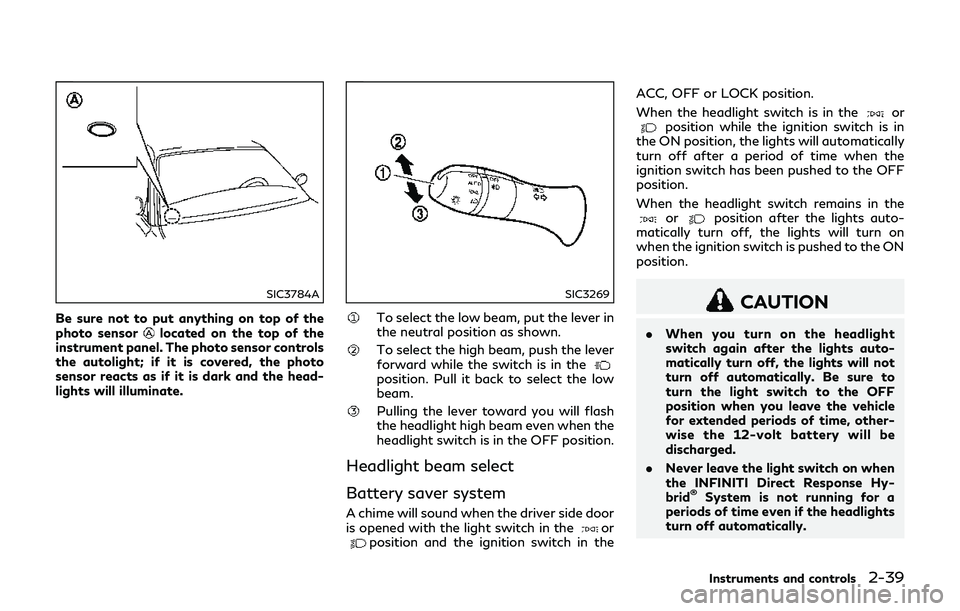
Be sure not to put anything on top of the
photo sensorlocated on the top of the
instrument panel. The photo sensor controls
the autolight; if it is covered, the photo
sensor reacts as if it is dark and the head-
lights will illuminate.
SIC3269
To select the low beam, put the lever in
the neutral position as shown.
To select the high beam, push the lever
forward while the switch is in the
position. Pull it back to select the low
beam.
Pulling the lever toward you will flash
the headlight high beam even when the
headlight switch is in the OFF position.
Headlight beam select
Battery saver system
A chime will sound when the driver side door
is opened with the light switch in theorposition and the ignition switch in the ACC, OFF or LOCK position.
When the headlight switch is in the
orposition while the ignition switch is in
the ON position, the lights will automatically
turn off after a period of time when the
ignition switch has been pushed to the OFF
position.
When the headlight switch remains in the
orposition after the lights auto-
matically turn off, the lights will turn on
when the ignition switch is pushed to the ON
position.
CAUTION
. When you turn on the headlight
switch again after the lights auto-
matically turn off, the lights will not
turn off automatically. Be sure to
turn the light switch to the OFF
position when you leave the vehicle
for extended periods of time, other-
wise the 12-volt battery will be
discharged.
. Never leave the light switch on when
the INFINITI Direct Response Hy-
brid
®System is not running for a
periods of time even if the headlights
turn off automatically.
Instruments and controls2-39
Page 131 of 458
2-44Instruments and controls
SIC4332
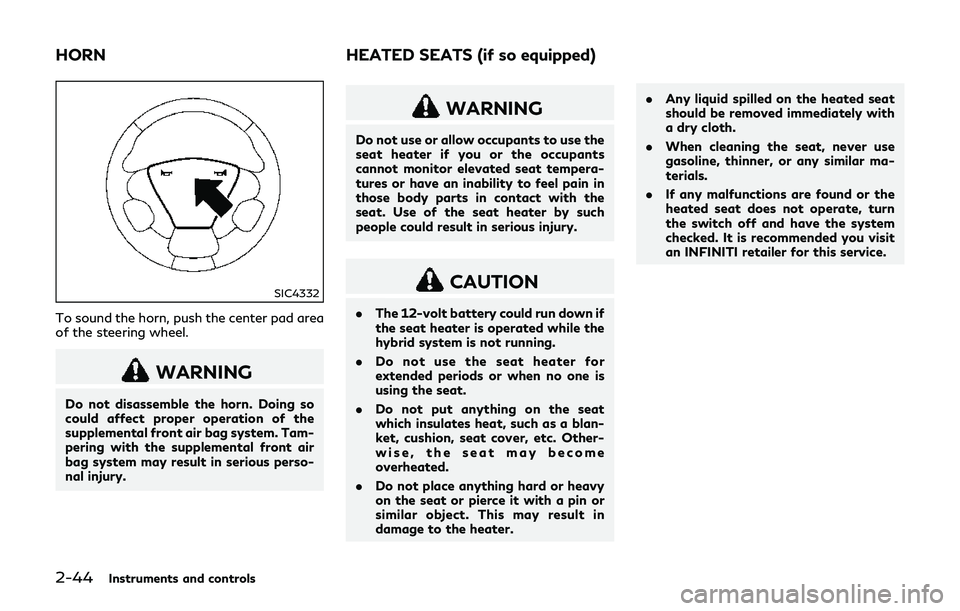
To sound the horn, push the center pad area
of the steering wheel.
WARNING
Do not disassemble the horn. Doing so
could affect proper operation of the
supplemental front air bag system. Tam-
pering with the supplemental front air
bag system may result in serious perso-
nal injury.
WARNING
Do not use or allow occupants to use the
seat heater if you or the occupants
cannot monitor elevated seat tempera-
tures or have an inability to feel pain in
those body parts in contact with the
seat. Use of the seat heater by such
people could result in serious injury.
CAUTION
.The 12-volt battery could run down if
the seat heater is operated while the
hybrid system is not running.
. Do not use the seat heater for
extended periods or when no one is
using the seat.
. Do not put anything on the seat
which insulates heat, such as a blan-
ket, cushion, seat cover, etc. Other-
wise, the seat may become
overheated.
. Do not place anything hard or heavy
on the seat or pierce it with a pin or
similar object. This may result in
damage to the heater. .
Any liquid spilled on the heated seat
should be removed immediately with
a dry cloth.
. When cleaning the seat, never use
gasoline, thinner, or any similar ma-
terials.
. If any malfunctions are found or the
heated seat does not operate, turn
the switch off and have the system
checked. It is recommended you visit
an INFINITI retailer for this service.
HORN HEATED SEATS (if so equipped)
Page 133 of 458

2-46Instruments and controls
cator lighton the control knob goes
off at the OFF position.
The climate controlled seat has air filters.
If the climate controlled seat is not
functioning properly, it may indicate the
air filters may be clogged. To check the
air filters for the climate controlled seat,
it is recommended you visit an INFINITI
retailer.
WARNING
Do not use or allow occupants to use the
climate controlled seats if you or the
occupants can not monitor seat tem-
peratures or have an inability to feel pain
in those body parts in contact with the
seat. Use of the climate controlled seats
by such people could result in serious
injury.
CAUTION
. The 12-volt battery could run down if
the climate controlled seat is oper-
ated while the hybrid system is not
running.
. Do not use the climate controlled seat
for extended periods or when no one is using the seat.
. Do not put anything on the seat
which insulates heat, such as a blan-
ket, cushion, seat cover, etc. Other-
wise, the seat may become
overheated.
. Do not place anything hard or heavy
on the seat or pierce it with a pin or
similar object. This may result in
damage to the climate controlled
seat.
. Any liquid spilled on the seat should
be removed immediately with a dry
cloth.
. The climate controlled seat has an air
filter. Do not operate climate con-
trolled seat without an air filter. This
may result in damage to the system.
. When cleaning the seat, never use
gasoline, thinner, or any similar ma-
terials.
. If any malfunctions are found or the
climate controlled seat does not op-
erate, turn the switch off and have
the system checked. It is recom-
mended you visit an INFINITI retailer
for this service.
SIC4335
The warning systems switch is used to turn
on and off the warning systems (Lane
Departure Warning (LDW) and Blind Spot
Warning (BSW) systems) that are activated
using the settings menu on the center
display.
When the warning systems switch is turned
off, the indicator
on the switch is off. The
indicator will also be off if all of the warning
systems are deactivated using the settings
menu.
The LDW system will sound a warning chime
and blink the LDW indicator light (orange) to
alert the driver if the vehicle is traveling close
to either the left or the right of a traveling
lane with detectable lane markers. (See
WARNING SYSTEMS SWITCH (if
so equipped)
Page 135 of 458

2-48Instruments and controls
SIC4338
If the power supply is disconnected, the
clock will not indicate the correct time.
Readjust the time.
ADJUSTING THE TIME
1. To set the clock forward, push thebutton.
2. To set the clock backward, push the button
.
3. To move forward or backward faster, push and hold the button more than 5
seconds.
For details about display clock adjustment (if
so equipped), see the Infiniti InTouch Own-
er’s Manual.
JVI1133X
JVI1696X
The power outlet is located in the center
console.
CAUTION
. The outlet and plug may be hot
during or immediately after use.
. Do not use with accessories that
exceed a 12 volt, 120W (10A) power
draw. Do not use double adapters or
more than one electrical accessory.
. Use power outlet with the INFINITI
Direct Response Hybrid
®System run-
ning to avoid discharging the vehicle
12-volt battery.
. Avoid using power outlet when the
air conditioner, headlights or rear
window defroster is on.
. This power outlet is not designed for
use with a cigarette lighter unit.
. Push the plug in as far as it will go. If
good contact is not made, the plug
may overheat or the internal tem-
perature fuse may blow.
. Before inserting or disconnecting a
plug, be sure the electrical accessory
being used is turned OFF.
. When not in use, be sure to close the
cap. Do not allow water or any liquid
CLOCK POWER OUTLET
Page 146 of 458
sunshade inlet port. Doing so may
entangle these objects in the sun-
shade when it is extending or retract-
ing, causing improper operation or
damage to the sunshade.
. Do not push the sunshade arm with
your hands, etc., as this may deform
it. Improper operation or damage to
the sunshade may result.
. Do not put any object into the
sunshade inlet port as this may result
in improper operation or damage the
sunshade.
. Do not hang any object on the arm
rail as this may result in improper
operation or damage the sunshade.
. Do not forcefully pull the sunshade.
Doing so may elongate the sunshade.
Improper operation or damage to the
sunshade may result.
SIC4328
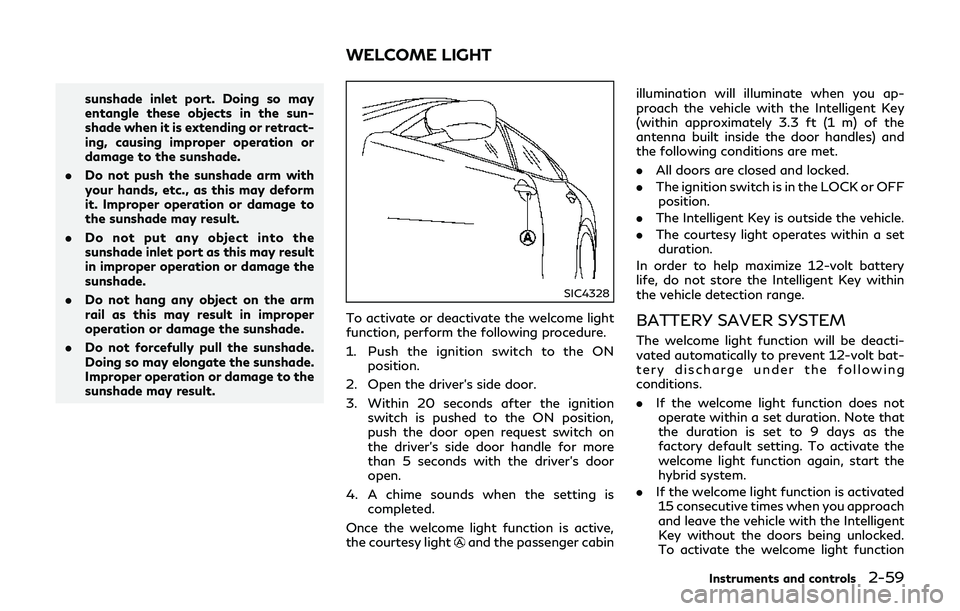
To activate or deactivate the welcome light
function, perform the following procedure.
1. Push the ignition switch to the ON
position.
2. Open the driver’s side door.
3. Within 20 seconds after the ignition switch is pushed to the ON position,
push the door open request switch on
the driver’s side door handle for more
than 5 seconds with the driver’s door
open.
4. A chime sounds when the setting is completed.
Once the welcome light function is active,
the courtesy light
and the passenger cabin illumination will illuminate when you ap-
proach the vehicle with the Intelligent Key
(within approximately 3.3 ft (1 m) of the
antenna built inside the door handles) and
the following conditions are met.
.
All doors are closed and locked.
. The ignition switch is in the LOCK or OFF
position.
. The Intelligent Key is outside the vehicle.
. The courtesy light operates within a set
duration.
In order to help maximize 12-volt battery
life, do not store the Intelligent Key within
the vehicle detection range.
BATTERY SAVER SYSTEM
The welcome light function will be deacti-
vated automatically to prevent 12-volt bat-
tery discharge under the following
conditions.
. If the welcome light function does not
operate within a set duration. Note that
the duration is set to 9 days as the
factory default setting. To activate the
welcome light function again, start the
hybrid system.
. If the welcome light function is activated
15 consecutive times when you approach
and leave the vehicle with the Intelligent
Key without the doors being unlocked.
To activate the welcome light function
Instruments and controls2-59
WELCOME LIGHT
Page 148 of 458

SIC4357
INTERIOR LIGHT CONTROL
SWITCH
ON switch
When the ON switchis pushed on, the
map lights and rear personal lights will
illuminate. When the switch is turned off,
the lights will not illuminate, regardless of
the condition.
DOOR OFF switch
When the DOOR OFF switchis not
pushed on, the map lights and rear personal
lights will illuminate under the following
conditions: .
ignition switch is switched to the OFF
position
— remain on for about 15 seconds.
. doors are unlocked by pushing the UN-
LOCK button on the Intelligent Key or
door handle request switch with the
ignition switch in the LOCK position
— remain on for about 15 seconds.
. any door is opened and then closed with
the ignition switch in the LOCK position
— remain on for about 15 seconds.
. any door is opened
— remain on while the door is opened. When the door is closed, the lights go
off.
When the DOOR OFF switch
is pushed
on, the map and rear personal lights will not
illuminate under the above condition. The
map and rear personal lights can be turned
on only with the ON switch
.
The lights will also turn off after a period of
time when the lights remain illuminated
after the ignition switch has been pushed
to the OFF or LOCK position to prevent the
12-volt battery from becoming discharged.
When the “Lamp ON When Door Unlocks”
key is set to the OFF position (see the Infiniti
InTouch Owner’s Manual), the lights will
illuminate under the following condition: .
any door is opened with the ignition
switch in any position
— remain on while the door is opened. When the door is closed, the lights go
off.
CAUTION
Do not use for extended periods of time
with the INFINITI Direct Response Hy-
brid
®System stopped. This could result
in a discharged 12-volt battery.
Instruments and controls2-61
Page 149 of 458

2-62Instruments and controls
SIC3869
The light on the vanity mirror will turn on
when the cover on the vanity mirror is
opened.
When the cover is closed, the light will turn
off.
The lights will also turn off after a period of
time when the lights remain illuminated to
prevent the 12-volt battery from becoming
discharged.The light illuminates when the trunk lid is
opened. When the trunk lid is closed, the
light will turn off.
The light will also turn off after a period of
time when the light remains illuminated
after the ignition switch has been pushed
to the OFF or LOCK position to prevent the
12-volt battery from becoming discharged.
The HomeLink
®Universal Transceiver pro-
vides a convenient way to consolidate the
functions of up to three individual hand-held
transmitters into one built-in device.
HomeLink
®Universal Transceiver:
. Will operate most Radio Frequency (RF)
devices such as garage doors, gates,
home and office lighting, entry door
locks and security systems.
. Is powered by your vehicle’s 12-volt
battery. No separate batteries are re-
quired. If the vehicle’s 12-volt battery is
discharged or is disconnected,
HomeLink
®will retain all programming.
When the HomeLink®Universal Transceiver
is programmed, retain the original trans-
mitter for future programming procedures
(Example: new vehicle purchases). Upon
sale of the vehicle, the programmed
HomeLink
®Universal Transceiver buttons
should be erased for security purposes. For
additional information, refer to “Program-
ming HomeLink
®” (P.2-63).
WARNING
. Do not use the HomeLink®Universal
Transceiver with any garage door
opener that lacks safety stop and
reverse features as required by fed-
eral safety standards. (These stan-
VANITY MIRROR LIGHTS TRUNK LIGHTHomeLink®UNIVERSAL TRANSCEIVER