brake light INFINITI QX50 2020 User Guide
[x] Cancel search | Manufacturer: INFINITI, Model Year: 2020, Model line: QX50, Model: INFINITI QX50 2020Pages: 580, PDF Size: 7.43 MB
Page 116 of 580
VEHICLE INFORMATION
DISPLAY WARNINGS AND
INDICATORS
1. No Key Detected
2. Key ID Incorrect
3. Key Battery Low
4. Key System Error: See Owner’s Manual
5. Key Registration Complete
6. Push brake and start switch to drive
7. Push Ignition to OFF
8. Shift to Park
9. Engine start operation for Intelligent Keysystem (if I-Key battery level is low)
10. Release Parking Brake
11. Low Fuel
12. Loose Fuel Cap
13. Transmission Shift Position indicator
14. Low Washer Fluid
15. Tire Pressure Low - Add Air
16. Steering Assist Not Available: Cannot Detect Lane (if so equipped) 17. AWD Error: See Owner’s Manual (if so
equipped)
18. AWD High Temp. Stop Vehicle (if so equipped)
19. AWD Tire Size Incorrect: See Owner’s Manual (if so equipped)
20. Door/liftgate Open
21. Steering Assist Alert (if so equipped)
22. Steering Assist status (if so equipped)
23. Chassis Control System Error: See Own- er’s Manual
24. Power will turn off to save the battery
25. Reminder: Turn OFF Headlights
26. When parked apply parking brake
27. Vehicle ahead detection indicator
28. Lane Departure Warning (LDW)/Lane Departure Prevention (LDP) indicator (if
so equipped)
29. Blind Spot Warning (BSW) indicator
30. Malfunction
31. Intelligent Cruise Control (ICC) indica- tors (if so equipped) 32. Stop vehicle and Apply parking brake (if
so equipped)
33. INFINITI Drive Mode Selector indicators
34. Cruise control indicator (if so equipped)
35. AFS System Error: See Owner’s Manual (if so equipped)
36. Flat Tire — Visit dealer
37. Not Available: High Camera Temp (if so equipped)
38. Unavailable: Side Radar Obstruction (if so equipped)
39. Unavailable: Front Radar Blocked (if so equipped)
40. Shipping Mode On Push Storage Fuse
41. CVT (AT) Malfunction Service now
42. Service CVT (AT) Power reduced
43. Headlight System Error: See Owner’s Manual
44. Distance Control Assist (DCA) ON indi- cator (if so equipped)
45. Not Available: Seat Belt Not Fastened (if so equipped)
46. Not Available: Poor Road Conditions (if so equipped)
2-24Instruments and controls
Page 117 of 580
47. Not Available: Visibility is impaired (if soequipped)
48. Press Brake Pedal (if so equipped)
49. Power turned off to save the battery
50. Shift system malfunction. Visit dealer
51. Check position of shift lever
52. Shift to P range
53. Currently not available
54. Rear Automatic Braking (RAB) indicator
55. Speed Limit Sign indicator (if so equipped)
56. System fault See Owner’s Manual
57. Engine Stalled Stop safely
58. Engine Malfunction Power reduced Ser- vice now
59. Engine Malfunction Service now
60. Engine hot Power reduced
61. CVT hot Power reduced
No Key Detected
This warning appears when the Intelligent
Key is left outside the vehicle with the ignition
switch in the ON position. Make sure the
Intelligent Key is inside the vehicle. For additional information, refer to “INFINITI
Intelligent Key System” in the “Pre-driving
checks and adjustments” section of this
manual.
Key ID Incorrect
This warning appears when the ignition
switch is placed in the OFF position and the
Intelligent Key is not recognized by the sys-
tem. You cannot start the engine with an
unregistered key.
For additional information, refer to “INFINITI
Intelligent Key System” in the “Pre-driving
checks and adjustments” section of this
manual.
Key Battery Low
This indicator illuminates when the Intelligent
Key battery is running out of power.
If this indicator illuminates, replace the bat-
tery with a new one. For additional informa-
tion, refer to “Battery replacement” in the
“Do-it-yourself” section of this manual.
Key System Error: See Owner’s Manual
After the ignition switch is pushed to the ON
position, this light comes on for a period of
time and then turns off.
The Key System Error message warns of a
malfunction with the Intelligent Key system.
If the light comes on while the engine is
stopped, it may be impossible to start the
engine.
If the light comes on while the engine is run-
ning, you can drive the vehicle. However in
these cases, have the system checked. It is
recommended that you visit an INFINITI re-
tailer for this service.
Key Registration Complete
This appears when a new Intelligent Key is
registered to the vehicle.
Push brake and start switch to drive
This indicator appears when the shift lever is
in the P (Park) position.
This indicator also appears when the vehicle
has been started using the Remote Engine
Start (if so equipped) function.
This indicator means that the engine will start
by pushing the ignition switch with the brake
pedal depressed. You can start the engine
from any position of the ignition switch.
Instruments and controls2-25
Page 118 of 580
Push Ignition to OFF
After the Push Ignition to OFF warning illu-
minates, the warning will illuminate if the ig-
nition switch is placed in the AUTO ACC
position when the shift lever is moved to the
P (Park) position.
To turn off the Push warning, place the igni-
tion switch in the ON position and then in the
LOCK position.
Shift to Park
This warning appears when the door is
opened while the shift lever is in positions
other than the P (Park) position.
If this warning illuminates, move the shift
lever to the P position.
Engine start operation for Intelligent Key
system (if I-Key battery level is low)
This indicator appears when the battery of
the Intelligent Key is low and when the Intel-
ligent Key system and the vehicle are not
communicating normally.
If this appears, touch the ignition switch with
the Intelligent Key while depressing the brake
pedal. For additional information, refer to
“INFINITI Intelligent Key battery discharge” in
the “Starting and driving” section of this
manual.Release Parking Brake
This warning illuminates in the message area
of the vehicle information display when the
parking brake is set and the vehicle is driven.
Low Fuel
This warning illuminates when the fuel level in
the fuel tank is getting low. Refuel as soon as
it is convenient, preferably before the fuel
gauge reaches 0 (Empty).
There will be a
small reserve of fuel in the tank when the fuel
gauge needle reaches 0 (Empty).
Loose Fuel Cap
This warning appears when the fuel-filler cap
is not tightened correctly after the vehicle has
been refueled. For additional information, re-
fer to “Fuel-filler cap” in the “Pre-driving
checks and adjustments” section of this
manual.
Transmission Shift Position indicator
This indicator shows the transmission shift
position. Low Washer Fluid
This warning illuminates when the
windshield-washer fluid is at a low level. Add
windshield-washer fluid as necessary. For
additional information, refer to “Windshield-
washer fluid” in the “Do-it-yourself” section
of this manual.
Tire Pressure Low - Add Air
This warning appears when the low tire pres-
sure warning light in the meter illuminates
and low tire pressure is detected. The warn-
ing appears each time the ignition switch is
placed in the ON position as long as the low
tire pressure warning light remains illumi-
nated. If this warning appears, stop the ve-
hicle and adjust the tire pressures of all four
tires to the recommended COLD tire pres-
sure shown on the Tire and Loading Informa-
tion label. For additional information, refer to
“Low tire pressure warning light” in this sec-
tion and “Tire Pressure Monitoring System
(TPMS)” in the “Starting and driving” section
of this manual.
Steering Assist Not Available: Cannot De-
tect Lane (if so equipped)
This message may appear when the Steering
Assist system is engaged.
2-26Instruments and controls
Page 119 of 580
Under the following conditions, the Steering
Assist system is automatically canceled:∙ When lane markers in the traveling lane cannot be correctly detected for a period
of time due to such items as a snow rut,
reflection of light on a rainy day or several
unclear lane markers are present
If you want to use the Steering Assist system
again, cancel the ProPILOT Assist system
and set it again when lane markers are clearly
visible.
AWD Error: See Owner’s Manual (if so
equipped)
This warning appears when the all-wheel
drive system is not functioning properly while
the engine is running.
AWD High Temp. Stop Vehicle (if so
equipped)
This warning may appear while trying to free
a stuck vehicle due to increased oil tempera-
ture. The driving mode may change to
2-Wheel Drive (2WD). If this warning is dis-
played, stop the vehicle with the engine idling,
as soon as it is safe to do so. Then if the
warning turns off, you can continue driving. AWD Tire Size Incorrect: See Owner’s
Manual (if so equipped)
This warning may appear if there is a large
difference between the diameters of the
front and rear wheels. Pull off the road in a
safe area, with the engine idling. Check that
all the tire sizes are the same, that the tire
pressure is correct and that the tires are not
excessively worn.
Door/liftgate Open
This warning illuminates when a door or the
liftgate has been opened.
Steering Assist Alert (if so equipped)
This message may appear when the Steering
Assist system is engaged.
It will be displayed under the following con-
dition:
∙ When not holding the steering wheel or when there is no steering wheel opera-
tion
Please hold on the steering wheel immedi-
ately. When the steering operation is de-
tected, the warning turns off and the steering
assist function is automatically restored. Steering Assist status (if so equipped)
This indicator appears when the Steering As-
sist system is engaged.
For additional information, refer to “ProPI-
LOT Assist” in the “Starting and driving” sec-
tion of this manual.
Chassis Control System Error: See Owner’s
Manual
This warning appears if the Integrated
Dynamics-control Module detects an error in
the Active Trace Control, Active Engine
Brake, or the Active Ride Control systems.
Have the system checked. It is recommended
that you visit an INFINITI retailer for this
service. For additional information, refer to
“Chassis Control” in the “Starting and driving”
section of this manual.
Power will turn off to save the battery
This warning appears in the message area of
the vehicle information display after a period
of time if the shift lever has not moved from
the P (Park) position.
Instruments and controls2-27
Page 120 of 580
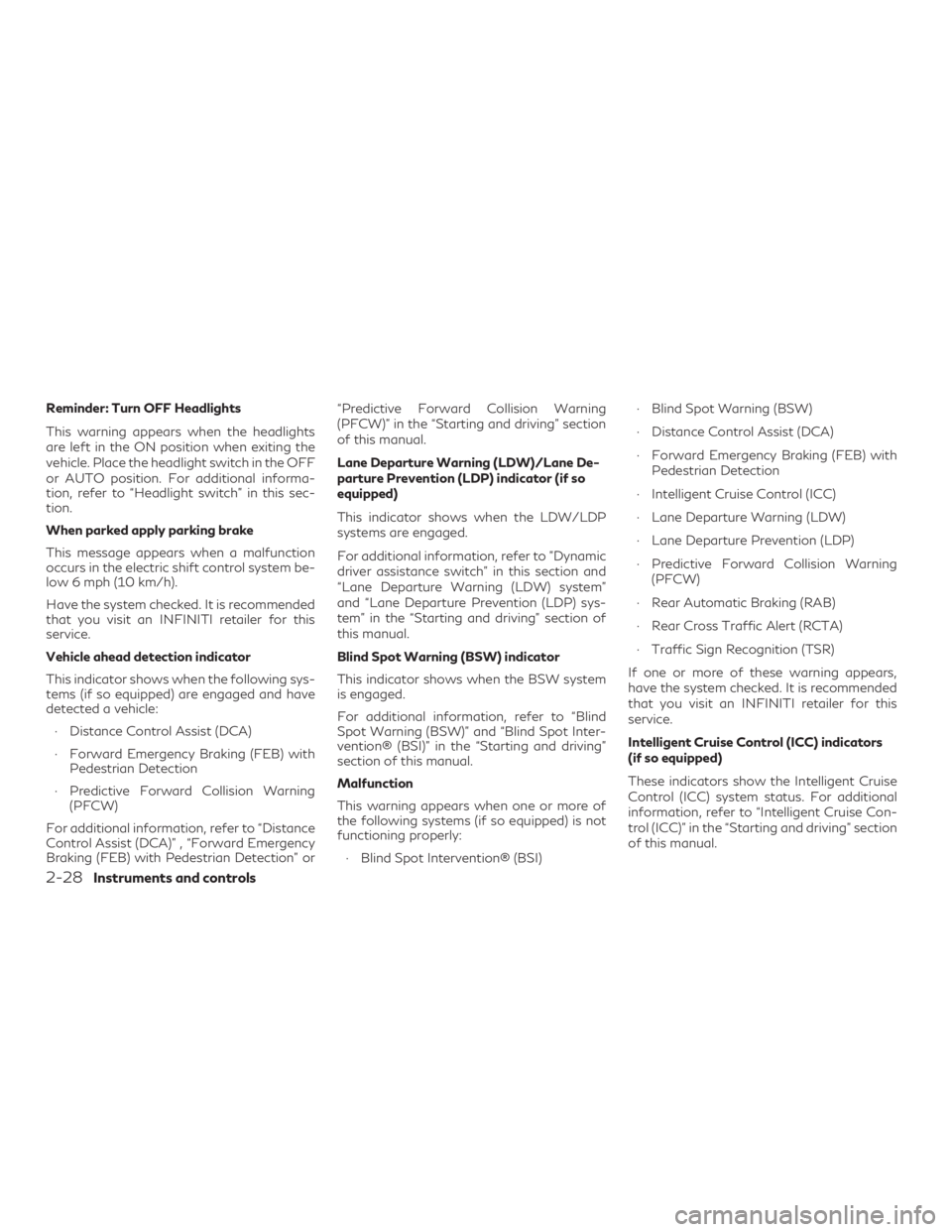
Reminder: Turn OFF Headlights
This warning appears when the headlights
are left in the ON position when exiting the
vehicle. Place the headlight switch in the OFF
or AUTO position. For additional informa-
tion, refer to “Headlight switch” in this sec-
tion.
When parked apply parking brake
This message appears when a malfunction
occurs in the electric shift control system be-
low 6 mph (10 km/h).
Have the system checked. It is recommended
that you visit an INFINITI retailer for this
service.
Vehicle ahead detection indicator
This indicator shows when the following sys-
tems (if so equipped) are engaged and have
detected a vehicle:∙ Distance Control Assist (DCA)
∙ Forward Emergency Braking (FEB) with Pedestrian Detection
∙ Predictive Forward Collision Warning (PFCW)
For additional information, refer to “Distance
Control Assist (DCA)” , “Forward Emergency
Braking (FEB) with Pedestrian Detection” or “Predictive Forward Collision Warning
(PFCW)” in the “Starting and driving” section
of this manual.
Lane Departure Warning (LDW)/Lane De-
parture Prevention (LDP) indicator (if so
equipped)
This indicator shows when the LDW/LDP
systems are engaged.
For additional information, refer to ”Dynamic
driver assistance switch” in this section and
“Lane Departure Warning (LDW) system”
and “Lane Departure Prevention (LDP) sys-
tem” in the “Starting and driving” section of
this manual.
Blind Spot Warning (BSW) indicator
This indicator shows when the BSW system
is engaged.
For additional information, refer to “Blind
Spot Warning (BSW)” and “Blind Spot Inter-
vention® (BSI)” in the “Starting and driving”
section of this manual.
Malfunction
This warning appears when one or more of
the following systems (if so equipped) is not
functioning properly:
∙ Blind Spot Intervention® (BSI) ∙ Blind Spot Warning (BSW)
∙ Distance Control Assist (DCA)
∙ Forward Emergency Braking (FEB) with
Pedestrian Detection
∙ Intelligent Cruise Control (ICC)
∙ Lane Departure Warning (LDW)
∙ Lane Departure Prevention (LDP)
∙ Predictive Forward Collision Warning (PFCW)
∙ Rear Automatic Braking (RAB)
∙ Rear Cross Traffic Alert (RCTA)
∙ Traffic Sign Recognition (TSR)
If one or more of these warning appears,
have the system checked. It is recommended
that you visit an INFINITI retailer for this
service.
Intelligent Cruise Control (ICC) indicators
(if so equipped)
These indicators show the Intelligent Cruise
Control (ICC) system status. For additional
information, refer to “Intelligent Cruise Con-
trol (ICC)” in the “Starting and driving” section
of this manual.
2-28Instruments and controls
Page 121 of 580
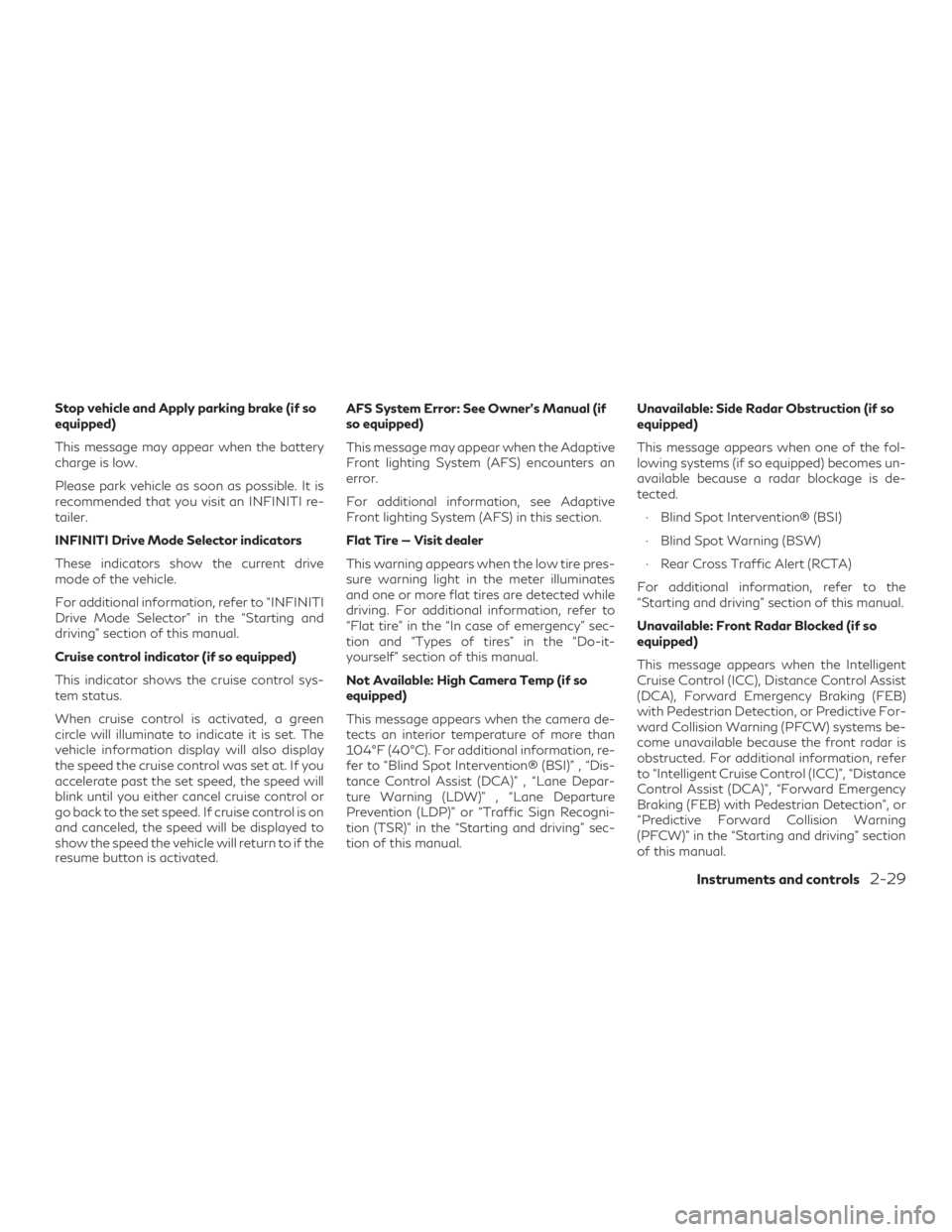
Stop vehicle and Apply parking brake (if so
equipped)
This message may appear when the battery
charge is low.
Please park vehicle as soon as possible. It is
recommended that you visit an INFINITI re-
tailer.
INFINITI Drive Mode Selector indicators
These indicators show the current drive
mode of the vehicle.
For additional information, refer to “INFINITI
Drive Mode Selector” in the “Starting and
driving” section of this manual.
Cruise control indicator (if so equipped)
This indicator shows the cruise control sys-
tem status.
When cruise control is activated, a green
circle will illuminate to indicate it is set. The
vehicle information display will also display
the speed the cruise control was set at. If you
accelerate past the set speed, the speed will
blink until you either cancel cruise control or
go back to the set speed. If cruise control is on
and canceled, the speed will be displayed to
show the speed the vehicle will return to if the
resume button is activated.AFS System Error: See Owner’s Manual (if
so equipped)
This message may appear when the Adaptive
Front lighting System (AFS) encounters an
error.
For additional information, see Adaptive
Front lighting System (AFS) in this section.
Flat Tire — Visit dealer
This warning appears when the low tire pres-
sure warning light in the meter illuminates
and one or more flat tires are detected while
driving. For additional information, refer to
“Flat tire” in the “In case of emergency” sec-
tion and “Types of tires” in the “Do-it-
yourself” section of this manual.
Not Available: High Camera Temp (if so
equipped)
This message appears when the camera de-
tects an interior temperature of more than
104°F (40°C). For additional information, re-
fer to “Blind Spot Intervention® (BSI)” , “Dis-
tance Control Assist (DCA)” , “Lane Depar-
ture Warning (LDW)” , “Lane Departure
Prevention (LDP)” or “Traffic Sign Recogni-
tion (TSR)” in the “Starting and driving” sec-
tion of this manual.
Unavailable: Side Radar Obstruction (if so
equipped)
This message appears when one of the fol-
lowing systems (if so equipped) becomes un-
available because a radar blockage is de-
tected.
∙ Blind Spot Intervention® (BSI)
∙ Blind Spot Warning (BSW)
∙ Rear Cross Traffic Alert (RCTA)
For additional information, refer to the
“Starting and driving” section of this manual.
Unavailable: Front Radar Blocked (if so
equipped)
This message appears when the Intelligent
Cruise Control (ICC), Distance Control Assist
(DCA), Forward Emergency Braking (FEB)
with Pedestrian Detection, or Predictive For-
ward Collision Warning (PFCW) systems be-
come unavailable because the front radar is
obstructed. For additional information, refer
to “Intelligent Cruise Control (ICC)”, “Distance
Control Assist (DCA)”, “Forward Emergency
Braking (FEB) with Pedestrian Detection”, or
“Predictive Forward Collision Warning
(PFCW)” in the “Starting and driving” section
of this manual.
Instruments and controls2-29
Page 123 of 580
Control Assist (DCA) system, or the ICC
(without ProPILOT Assist) system is auto-
matically canceled:∙ When the VDC operates
∙ When a wheel slips
The above system cannot be used in some
situations (VDC operates and wheel slips.)
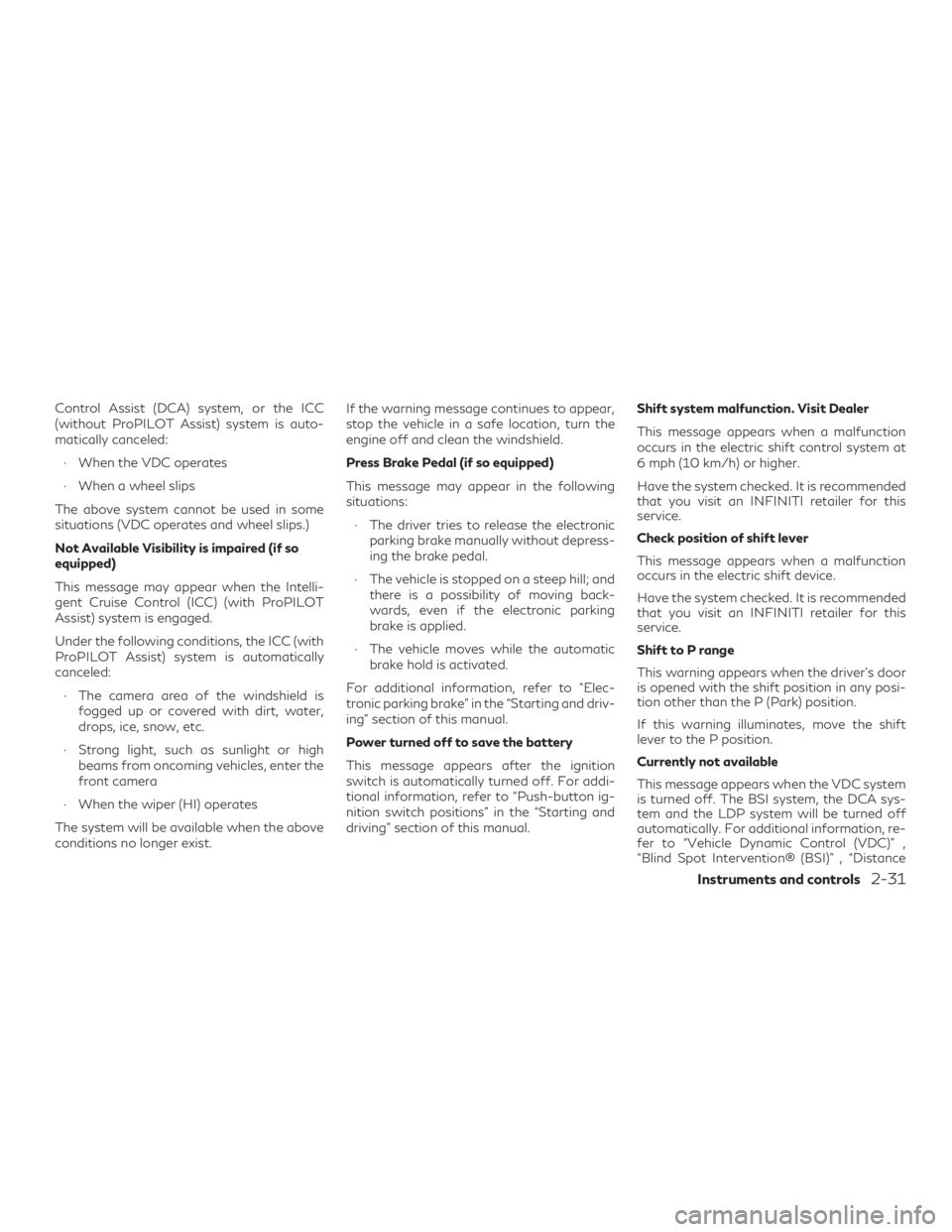
Not Available Visibility is impaired (if so
equipped)
This message may appear when the Intelli-
gent Cruise Control (ICC) (with ProPILOT
Assist) system is engaged.
Under the following conditions, the ICC (with
ProPILOT Assist) system is automatically
canceled: ∙ The camera area of the windshield is fogged up or covered with dirt, water,
drops, ice, snow, etc.
∙ Strong light, such as sunlight or high beams from oncoming vehicles, enter the
front camera
∙ When the wiper (HI) operates
The system will be available when the above
conditions no longer exist. If the warning message continues to appear,
stop the vehicle in a safe location, turn the
engine off and clean the windshield.
Press Brake Pedal (if so equipped)
This message may appear in the following
situations:
∙ The driver tries to release the electronic parking brake manually without depress-
ing the brake pedal.
∙ The vehicle is stopped on a steep hill; and there is a possibility of moving back-
wards, even if the electronic parking
brake is applied.
∙ The vehicle moves while the automatic brake hold is activated.
For additional information, refer to “Elec-
tronic parking brake” in the “Starting and driv-
ing” section of this manual.
Power turned off to save the battery
This message appears after the ignition
switch is automatically turned off. For addi-
tional information, refer to “Push-button ig-
nition switch positions” in the “Starting and
driving” section of this manual. Shift system malfunction. Visit Dealer
This message appears when a malfunction
occurs in the electric shift control system at
6 mph (10 km/h) or higher.
Have the system checked. It is recommended
that you visit an INFINITI retailer for this
service.
Check position of shift lever
This message appears when a malfunction
occurs in the electric shift device.
Have the system checked. It is recommended
that you visit an INFINITI retailer for this
service.
Shift to P range
This warning appears when the driver’s door
is opened with the shift position in any posi-
tion other than the P (Park) position.
If this warning illuminates, move the shift
lever to the P position.
Currently not available
This message appears when the VDC system
is turned off. The BSI system, the DCA sys-
tem and the LDP system will be turned off
automatically. For additional information, re-
fer to “Vehicle Dynamic Control (VDC)” ,
“Blind Spot Intervention® (BSI)” , “Distance
Instruments and controls2-31
Page 136 of 580
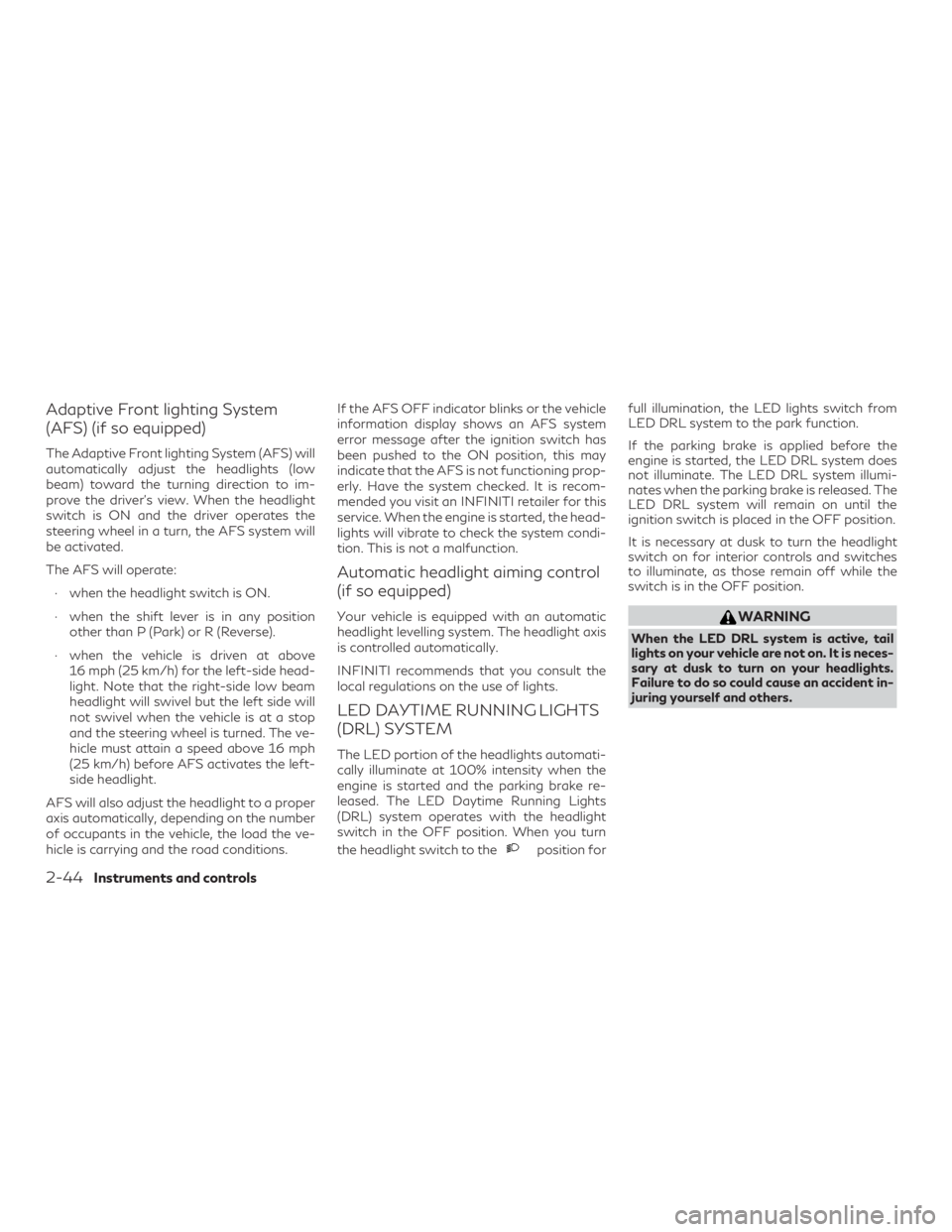
Adaptive Front lighting System
(AFS) (if so equipped)
The Adaptive Front lighting System (AFS) will
automatically adjust the headlights (low
beam) toward the turning direction to im-
prove the driver’s view. When the headlight
switch is ON and the driver operates the
steering wheel in a turn, the AFS system will
be activated.
The AFS will operate:∙ when the headlight switch is ON.
∙ when the shift lever is in any position other than P (Park) or R (Reverse).
∙ when the vehicle is driven at above 16 mph (25 km/h) for the left-side head-
light. Note that the right-side low beam
headlight will swivel but the left side will
not swivel when the vehicle is at a stop
and the steering wheel is turned. The ve-
hicle must attain a speed above 16 mph
(25 km/h) before AFS activates the left-
side headlight.
AFS will also adjust the headlight to a proper
axis automatically, depending on the number
of occupants in the vehicle, the load the ve-
hicle is carrying and the road conditions. If the AFS OFF indicator blinks or the vehicle
information display shows an AFS system
error message after the ignition switch has
been pushed to the ON position, this may
indicate that the AFS is not functioning prop-
erly. Have the system checked. It is recom-
mended you visit an INFINITI retailer for this
service. When the engine is started, the head-
lights will vibrate to check the system condi-
tion. This is not a malfunction.
Automatic headlight aiming control
(if so equipped)
Your vehicle is equipped with an automatic
headlight levelling system. The headlight axis
is controlled automatically.
INFINITI recommends that you consult the
local regulations on the use of lights.
LED DAYTIME RUNNING LIGHTS
(DRL) SYSTEM
The LED portion of the headlights automati-
cally illuminate at 100% intensity when the
engine is started and the parking brake re-
leased. The LED Daytime Running Lights
(DRL) system operates with the headlight
switch in the OFF position. When you turn
the headlight switch to the
position forfull illumination, the LED lights switch from
LED DRL system to the park function.
If the parking brake is applied before the
engine is started, the LED DRL system does
not illuminate. The LED DRL system illumi-
nates when the parking brake is released. The
LED DRL system will remain on until the
ignition switch is placed in the OFF position.
It is necessary at dusk to turn the headlight
switch on for interior controls and switches
to illuminate, as those remain off while the
switch is in the OFF position.
WARNING
When the LED DRL system is active, tail
lights on your vehicle are not on. It is neces-
sary at dusk to turn on your headlights.
Failure to do so could cause an accident in-
juring yourself and others.
2-44Instruments and controls
Page 181 of 580
WARNING
∙ Radio waves could adversely affect elec-tric medical equipment. Those who use a
pacemaker should contact the electric
medical equipment manufacturer for the
possible influences before use.
∙ The Intelligent Key transmits radio waves when the buttons are pressed. The
FAA advises the radio waves may affect
aircraft navigation and communication
systems. Do not operate the Intelligent
Key while on an airplane. Make sure the
buttons are not operated unintentionally
when the unit is stored for a flight.
∙
Before leaving the vehicle, engage the P
(Park) position and check that the elec-
tronic parking brake warning light is illumi-
nated to confirm that the electronic park-
ing brake is applied. The electronic parking
brake warning light will remain on for a pe-
riod of time after the driver’s door is locked.
∙ Make sure to engage the P (Park) posi- tion and apply the parking brake when
parking your vehicle, riding on or off the
vehicle or loading luggage. Failure to do
so could cause the vehicle to move or roll
away unexpectedly and result in serious
personal injury or property damage. The Intelligent Key system can operate all the
door locks using the remote control function
or pushing the request switch on the vehicle
without taking the key out from a pocket or
purse. The operating environment and/or
conditions may affect the Intelligent Key sys-
tem operation.
Be sure to read the following before using the
Intelligent Key system.
CAUTION
∙ Be sure to carry the Intelligent Key with
you when operating the vehicle.
∙ Never leave the Intelligent Key in the ve- hicle when you leave the vehicle.
The Intelligent Key is always communicating
with the vehicle as it receives radio waves.
The Intelligent Key system transmits weak
radio waves. Environmental conditions may
interfere with the operation of the Intelligent
Key system under the following operating
conditions: ∙ When operating near a location where strong radio waves are transmitted, such
as a TV tower, power station and broad-
casting station. ∙ When in possession of wireless equip-
ment, such as a cellular telephone, trans-
ceiver or a CB radio.
∙ When the Intelligent Key is in contact with or covered by metallic materials.
∙ When any type of radio wave remote control is used nearby.
∙ When the Intelligent Key is placed near an electric appliance such as a personal
computer.
∙ When the vehicle is parked near a parking meter.
In such cases, correct the operating condi-
tions before using the Intelligent Key function
or use the mechanical key.
Although the life of the battery varies de-
pending on the operating conditions, the bat-
tery’s life is approximately two years. If the
battery is discharged, replace it with a new
one.
When the Intelligent Key battery is low, a
“Key Battery Low” indicator illuminates in the
vehicle information display. For additional in-
formation, refer to “Vehicle information dis-
play warnings and indicators” in the “Instru-
ments and controls” section of this manual.
INFINITI INTELLIGENT KEY SYSTEM
Pre-driving checks and adjustments3-7
Page 195 of 580
REMOTE STARTING THE
VEHICLE
To use the Remote Engine Start feature to
start the engine perform the following:1. Aim the Intelligent Key at the vehicle.
2. Press the
button to lock all
doors.
3. Within 5 seconds press and hold the
button until the turn signal
lights flash and the tail lamps turn on. If
the vehicle is not within view press and
hold the
button for at least 2 sec-
onds.
The following events will occur when the en-
gine starts:
∙ The parking lights will turn on and remain on as long as the engine is running.
∙ The doors will be locked and the climate control system may come on.
∙ The engine will continue to run for 10 minutes. Repeat the steps to extend
the time for an additional 10 minutes. For
additional information, refer to “Extend-
ing engine run time” in this section.
Depress and hold the brake then push the
push-button ignition switch to the ON posi- tion before driving. For additional informa-
tion, refer to “Driving the vehicle” in the
“Starting and driving” section of this manual.
EXTENDING ENGINE RUN TIME
The Remote Engine Start feature can be ex-
tended one time by performing the steps
listed in “Remote starting the vehicle” in this
section. Run time will be calculated as fol-
lows:
∙ The first 10 minute run time will start when the Remote Engine Start function
is performed.
∙ The second 10 minutes will start immedi- ately when the Remote Engine Start
function is performed again. For ex-
ample, if the engine has been running for
5 minutes, and 10 minutes are added, the
engine will run for a total of 15 minutes.
∙ Extending engine run time will bring you to the two Remote Engine Start limit.
A maximum of two Remote Engine Starts, or
a single start with an extension, are allowed
between ignition cycles.
The ignition switch must be cycled to the ON
position and then back to the OFF position
before the Remote Engine Start procedure
can be used again.
CANCELING A REMOTE ENGINE
START
To cancel a Remote Engine Start, perform
one of the following: ∙ Aim the Intelligent Key at the vehicle and press
until the parking lights turn
off.
∙ Turn on the hazard warning flashers.
∙ Cycle the ignition switch on and then off.
∙ The extended engine run time has ex- pired.
∙ The first 10 minute timer has expired.
∙ The engine hood has been opened.
∙ The vehicle is shifted out of P (Park).
∙ The alarm sounds due to illegal entry into the vehicle.
∙ The ignition switch is pushed without an Intelligent Key in the vehicle.
∙ The ignition switch is pushed with an In- telligent Key in the vehicle but the brake
pedal is not depressed.
Pre-driving checks and adjustments3-21