Tire lock INFINITI QX60 2015 Owner's Manual
[x] Cancel search | Manufacturer: INFINITI, Model Year: 2015, Model line: QX60, Model: INFINITI QX60 2015Pages: 554, PDF Size: 5.84 MB
Page 12 of 554
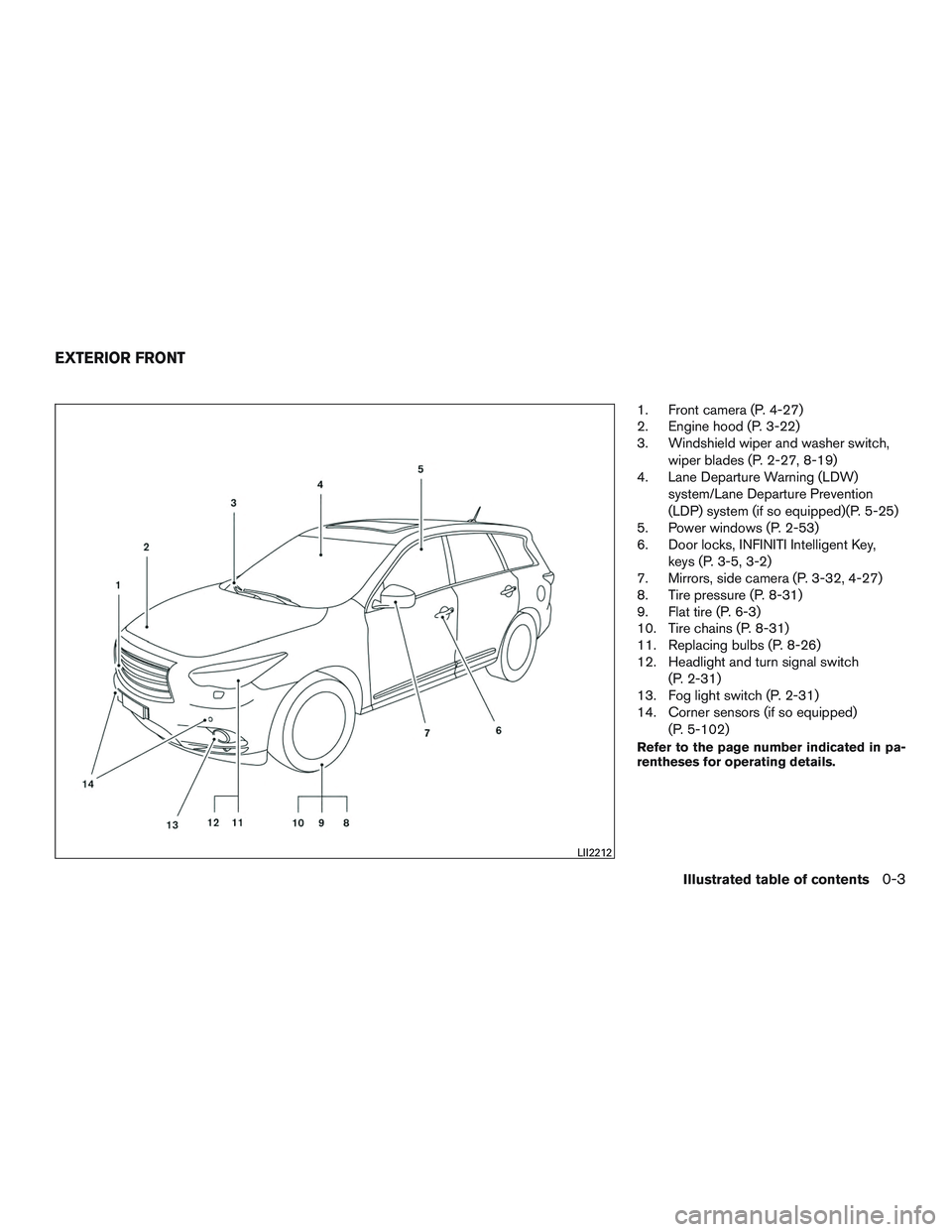
1. Front camera (P. 4-27)
2. Engine hood (P. 3-22)
3. Windshield wiper and washer switch,wiper blades (P. 2-27, 8-19)
4. Lane Departure Warning (LDW)
system/Lane Departure Prevention
(LDP) system (if so equipped)(P. 5-25)
5. Power windows (P. 2-53)
6. Door locks, INFINITI Intelligent Key,
keys (P. 3-5, 3-2)
7. Mirrors, side camera (P. 3-32, 4-27)
8. Tire pressure (P. 8-31)
9. Flat tire (P. 6-3)
10. Tire chains (P. 8-31)
11. Replacing bulbs (P. 8-26)
12. Headlight and turn signal switch
(P. 2-31)
13. Fog light switch (P. 2-31)
14. Corner sensors (if so equipped)
(P. 5-102)
Refer to the page number indicated in pa-
rentheses for operating details.
LII2212
EXTERIOR FRONT
Illustrated table of contents0-3
Page 18 of 554
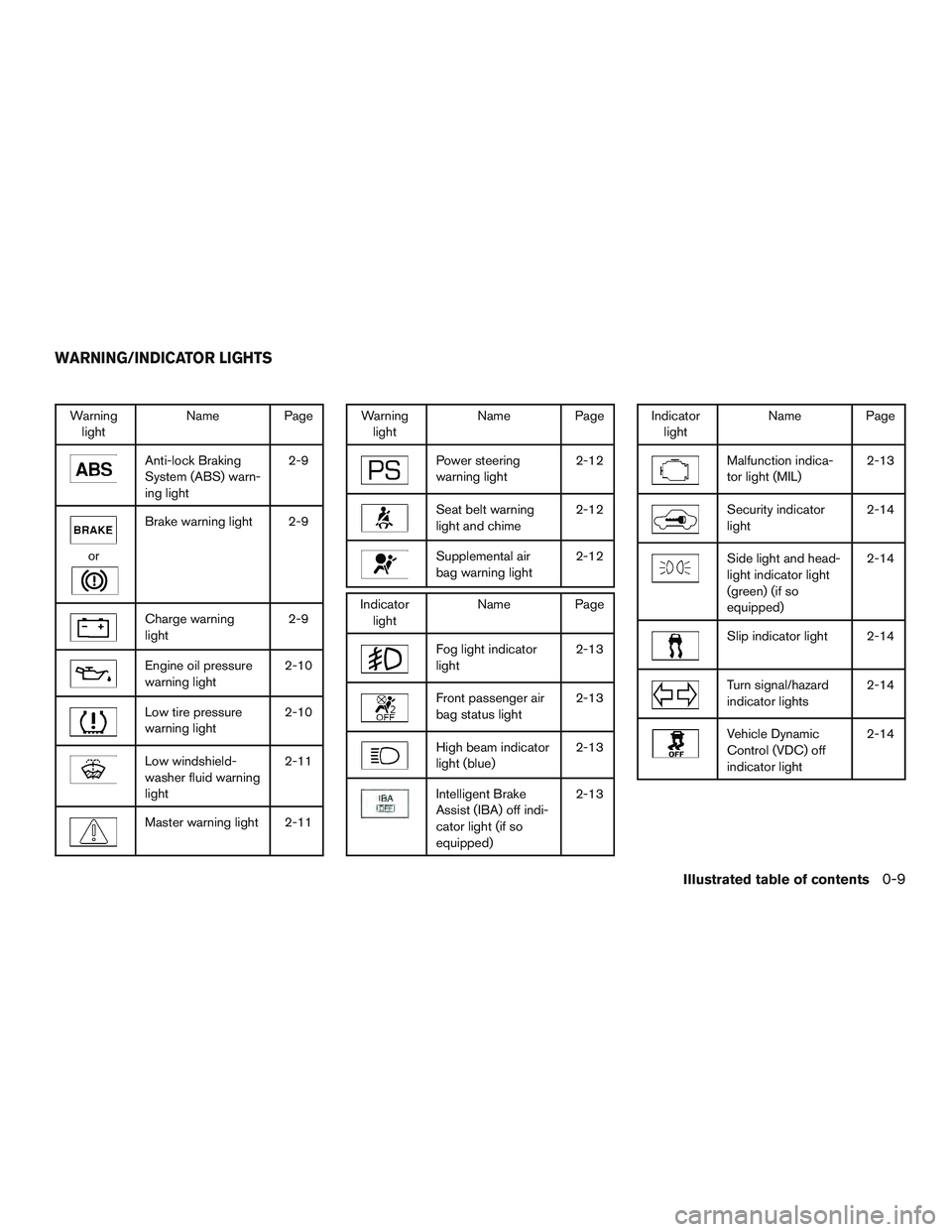
Warninglight Name Page
Anti-lock Braking
System (ABS) warn-
ing light 2-9
or
Brake warning light 2-9
Charge warning
light
2-9
Engine oil pressure
warning light2-10
Low tire pressure
warning light2-10
Low windshield-
washer fluid warning
light2-11
Master warning light 2-11
Warning
light Name Page
Power steering
warning light 2-12
Seat belt warning
light and chime2-12
Supplemental air
bag warning light2-12
Indicator
light Name Page
Fog light indicator
light 2-13
Front passenger air
bag status light2-13
High beam indicator
light (blue)2-13
Intelligent Brake
Assist (IBA) off indi-
cator light (if so
equipped)2-13
Indicator
light Name Page
Malfunction indica-
tor light (MIL) 2-13
Security indicator
light2-14
Side light and head-
light indicator light
(green) (if so
equipped)2-14
Slip indicator light 2-14
Turn signal/hazard
indicator lights
2-14
Vehicle Dynamic
Control (VDC) off
indicator light2-14
WARNING/INDICATOR LIGHTS
Illustrated table of contents0-9
Page 25 of 554
Multi-mode
WARNING
When returning the seat to its original
position, confirm that the seat and seat-
back are locked properly.
CAUTION
●Be careful not to pinch your hand or foot
or bump your head when operating the
walk-in seat.
● Do not drive with the 2nd row seat
tipped up.
● Be careful not to allow the 2nd row seat
to pinch, hit any part of your body or
other people when operating the 2nd
row seat. Make sure the seat path is
clear of all objects before moving the
seat.
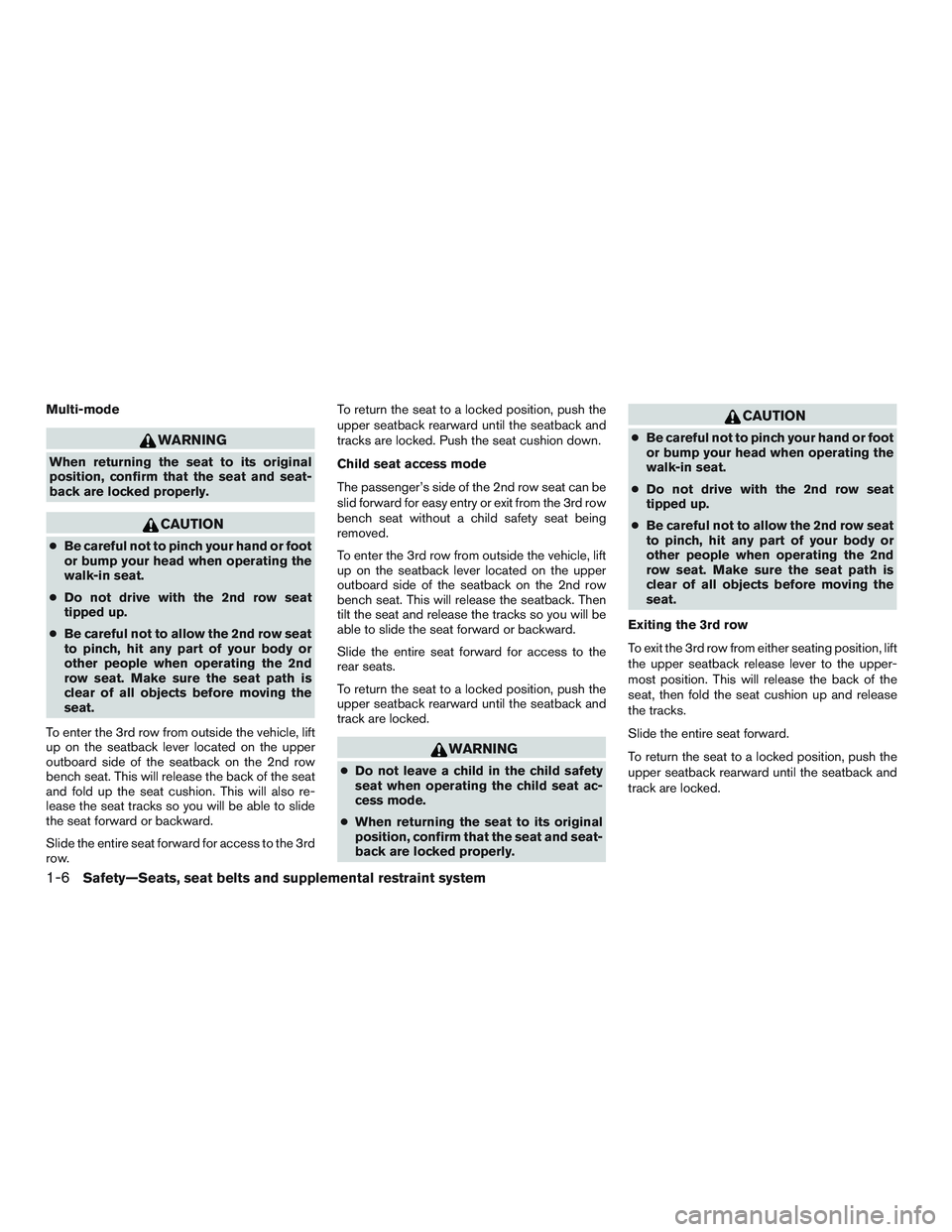
To enter the 3rd row from outside the vehicle, lift
up on the seatback lever located on the upper
outboard side of the seatback on the 2nd row
bench seat. This will release the back of the seat
and fold up the seat cushion. This will also re-
lease the seat tracks so you will be able to slide
the seat forward or backward.
Slide the entire seat forward for access to the 3rd
row. To return the seat to a locked position, push the
upper seatback rearward until the seatback and
tracks are locked. Push the seat cushion down.
Child seat access mode
The passenger’s side of the 2nd row seat can be
slid forward for easy entry or exit from the 3rd row
bench seat without a child safety seat being
removed.
To enter the 3rd row from outside the vehicle, lift
up on the seatback lever located on the upper
outboard side of the seatback on the 2nd row
bench seat. This will release the seatback. Then
tilt the seat and release the tracks so you will be
able to slide the seat forward or backward.
Slide the entire seat forward for access to the
rear seats.
To return the seat to a locked position, push the
upper seatback rearward until the seatback and
track are locked.
WARNING
●
Do not leave a child in the child safety
seat when operating the child seat ac-
cess mode.
● When returning the seat to its original
position, confirm that the seat and seat-
back are locked properly.
CAUTION
● Be careful not to pinch your hand or foot
or bump your head when operating the
walk-in seat.
● Do not drive with the 2nd row seat
tipped up.
● Be careful not to allow the 2nd row seat
to pinch, hit any part of your body or
other people when operating the 2nd
row seat. Make sure the seat path is
clear of all objects before moving the
seat.
Exiting the 3rd row
To exit the 3rd row from either seating position, lift
the upper seatback release lever to the upper-
most position. This will release the back of the
seat, then fold the seat cushion up and release
the tracks.
Slide the entire seat forward.
To return the seat to a locked position, push the
upper seatback rearward until the seatback and
track are locked.
1-6Safety—Seats, seat belts and supplemental restraint system
Page 42 of 554
neck, but not falling off of your shoulder. Release
the adjustment button to lock the shoulder belt
anchor into position.
WARNING
●After adjustment, release the adjust-
ment button and try to move the shoul-
der belt anchor up and down to make
sure it is securely fixed in position.
● The shoulder belt anchor height should
be adjusted to the position best for you.
Failure to do so may reduce the effec-
tiveness of the entire restraint system
and increase the chance or severity of
injury in an accident.
● The shoulder belt should rest on the
middle of the shoulder. It must not rest
against the neck.
● Be sure that the seat belt is not twisted
in any way.
● Be sure that the shoulder belt anchor is
secured by trying to move the shoulder
belt anchor up and down after
adjustment.
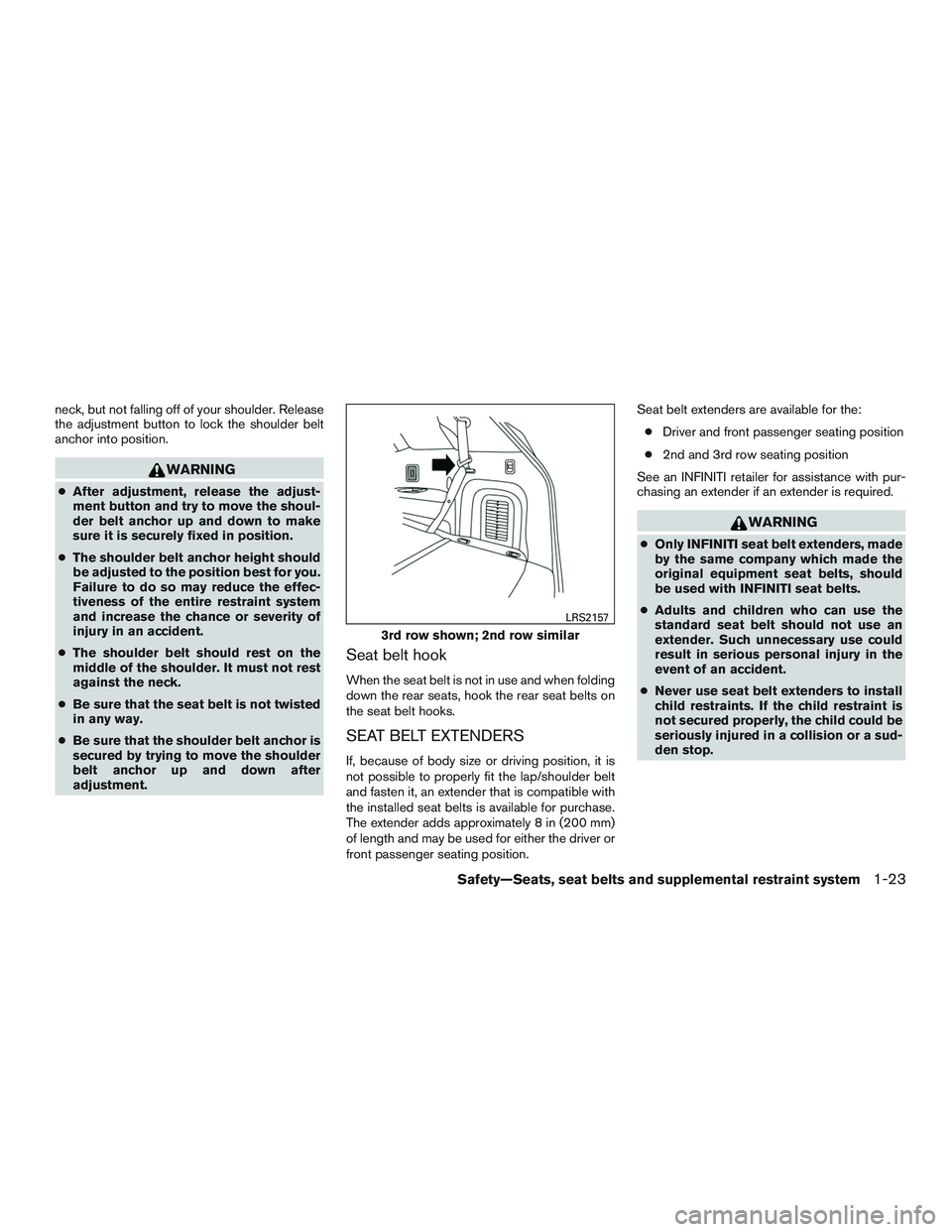
Seat belt hook
When the seat belt is not in use and when folding
down the rear seats, hook the rear seat belts on
the seat belt hooks.
SEAT BELT EXTENDERS
If, because of body size or driving position, it is
not possible to properly fit the lap/shoulder belt
and fasten it, an extender that is compatible with
the installed seat belts is available for purchase.
The extender adds approximately 8 in (200 mm)
of length and may be used for either the driver or
front passenger seating position. Seat belt extenders are available for the:
● Driver and front passenger seating position
● 2nd and 3rd row seating position
See an INFINITI retailer for assistance with pur-
chasing an extender if an extender is required.
WARNING
● Only INFINITI seat belt extenders, made
by the same company which made the
original equipment seat belts, should
be used with INFINITI seat belts.
● Adults and children who can use the
standard seat belt should not use an
extender. Such unnecessary use could
result in serious personal injury in the
event of an accident.
● Never use seat belt extenders to install
child restraints. If the child restraint is
not secured properly, the child could be
seriously injured in a collision or a sud-
den stop.
3rd row shown; 2nd row similar
LRS2157
Safety—Seats, seat belts and supplemental restraint system1-23
Page 43 of 554

SEAT BELT MAINTENANCE
●To clean the seat belt webbing, apply a
mild soap solution or any solution recom-
mended for cleaning upholstery or carpet.
Then wipe with a cloth and allow the seat
belts to dry in the shade. Do not allow the
seat belts to retract until they are completely
dry.
● If dirt builds up in the shoulder belt
guide of the seat belt anchors, the seat
belts may retract slowly. Wipe the shoulder
belt guide with a clean, dry cloth.
● Periodically check to see that the seat
belt and the metal components, such as
buckles, tongues, retractors, flexible wires
and anchors, work properly. If loose parts,
deterioration, cuts or other damage on the
webbing is found, the entire seat belt as-
sembly should be replaced.
WARNING
Do not allow children to play with the seat
belts. Most seating positions are
equipped with Automatic Locking Retrac-
tor (ALR) mode seat belts. If the seat belt
becomes wrapped around a child’s neck
with the ALR mode activated, the child can
be seriously injured or killed if the seat
belt retracts and becomes tight. This can
occur even if the vehicle is parked. Un-
buckle the seat belt to release the child. If
the seat belt cannot be unbuckled or is
already unbuckled, release the child by
cutting the seat belt with a suitable tool
(such as a knife or scissors) to release the
seat belt.
Children need adults to help protect them.
They need to be properly restrained.
In addition to the general information in this
manual, child safety information is available from
many other sources, including doctors, teachers,
government traffic safety offices, and community
organizations. Every child is different, so be sure
to learn the best way to transport your child.
There are three basic types of child restraint
systems: ● Rear-facing child restraint ●
Forward-facing child restraint
● Booster seat
The proper restraint depends on the child’s size.
Generally, infants up to about 1 year and less
than 20 lbs (9 kg) should be placed in rear-facing
child restraints. Forward-facing child restraints
are available for children who outgrow rear-
facing child restraints and are at least 1 year old.
Booster seats are used to help position a vehicle
lap/shoulder belt on a child who can no longer
use a forward-facing child restraint.
WARNING
Infants and children need special protec-
tion. The vehicle’s seat belts may not fit
them properly. The shoulder belt may
come too close to the face or neck. The lap
belt may not fit over their small hip bones.
In an accident, an improperly fitting seat
belt could cause serious or fatal injury.
Always use appropriate child restraints.
All U.S. states and Canadian provinces or territo-
ries require the use of approved child restraints
for infants and small children. For additional infor-
mation, refer to “Child restraints” in this section.
CHILD SAFETY
1-24Safety—Seats, seat belts and supplemental restraint system
Page 95 of 554
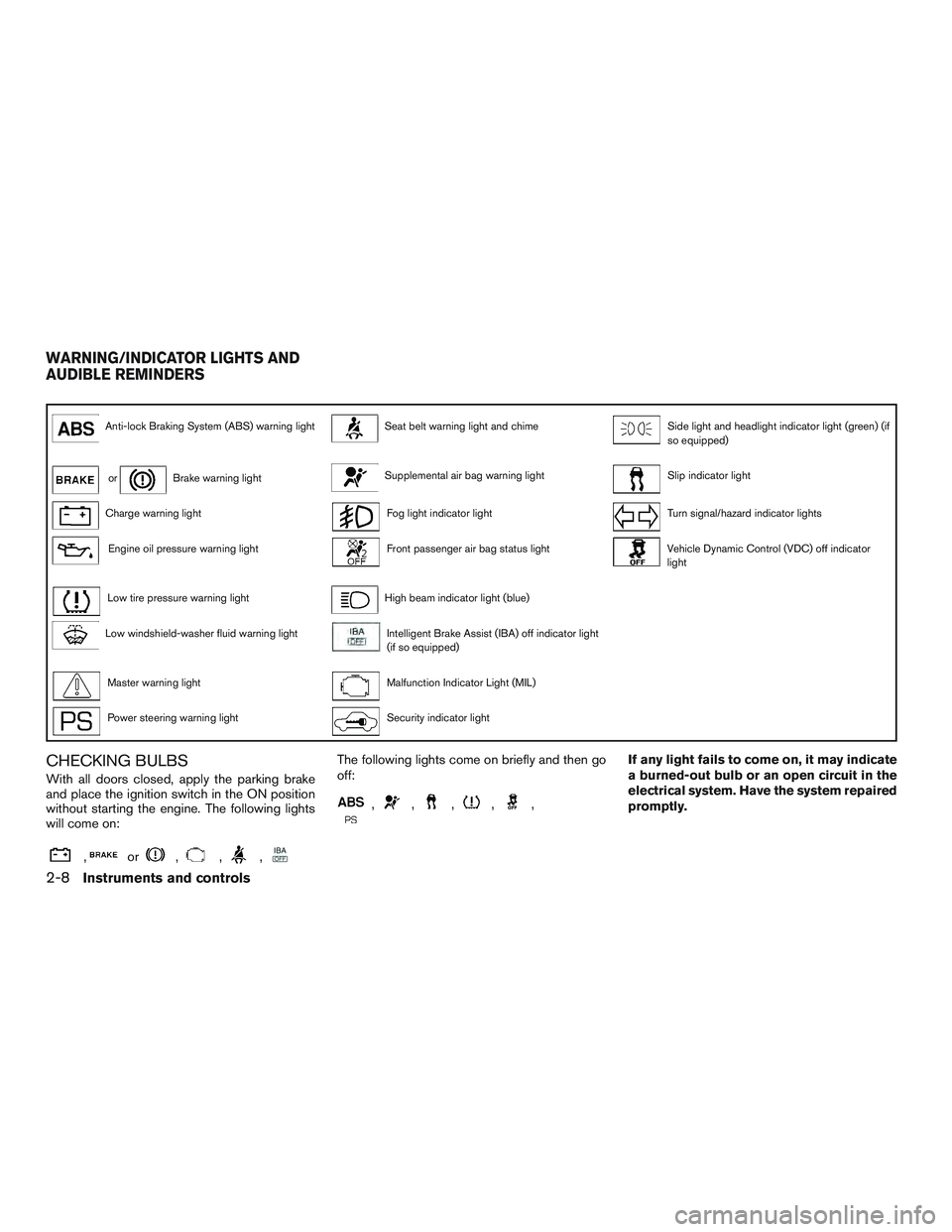
Anti-lock Braking System (ABS) warning lightSeat belt warning light and chimeSide light and headlight indicator light (green) (if
so equipped)
orBrake warning lightSupplemental air bag warning lightSlip indicator light
Charge warning lightFog light indicator lightTurn signal/hazard indicator lights
Engine oil pressure warning lightFront passenger air bag status lightVehicle Dynamic Control (VDC) off indicator
light
Low tire pressure warning lightHigh beam indicator light (blue)
Low windshield-washer fluid warning lightIntelligent Brake Assist (IBA) off indicator light
(if so equipped)
Master warning lightMalfunction Indicator Light (MIL)
Power steering warning lightSecurity indicator light
CHECKING BULBS
With all doors closed, apply the parking brake
and place the ignition switch in the ON position
without starting the engine. The following lights
will come on:
,or,,,
The following lights come on briefly and then go
off:
,,,,,
If any light fails to come on, it may indicate
a burned-out bulb or an open circuit in the
electrical system. Have the system repaired
promptly.
WARNING/INDICATOR LIGHTS AND
AUDIBLE REMINDERS
2-8Instruments and controls
Page 110 of 554
12. Timer Alert – Time for a driver break?
13. Low Outside Temperature
14. Power will turn off to save the battery
15. CVT Error: See Owner’s Manual
16. Reminder: Turn OFF headlights
17. Low Oil Pressure
18. Key Registration Complete
19. Tire Pressure Low - Add Air
20. TPMS Error: See Owner’s Manual
21. Parking Sensor Error
22. Remote Start (if so equipped)
23. Loose Fuel Cap
24. I-Key System Error: See Owners Manual
No Key Detected
This warning appears when the Intelligent Key is
left outside the vehicle with the ignition switch in
the ON or ACC position. Make sure the Intelli-
gent Key is inside the vehicle.
Key ID Incorrect
The warning appears when the ignition switch is
turned from the OFF position and the IntelligentKey is not recognized by the system. You cannot
start the engine with an unregistered key.
For additional information, refer to “INFINITI Intel-
ligent Key System” in the “Pre-driving checks and
adjustments” section of this manual.
Shift to Park
This warning illuminates when the ignition switch
is in the ACC or OFF position and the shift lever
is in any position other than P (Park) . Also, a
chime sounds when the ignition switch is in the
OFF position.
If this warning illuminates, move the shift lever to
the P (Park) position or start the engine.
For additional information, refer to “INFINITI Intel-
ligent Key” in the “Pre-driving checks and adjust-
ments” section of this manual.
Push ignition to OFF
After the Push ignition to OFF warning illumi-
nates, the warning will illuminate if the ignition
switch is placed in the ACC position when the
shift lever is moved to the P (Park) position.
To turn off the Push warning, place the ignition
switch in the ON position and then in the LOCK
position.
Key Battery Low
This indicator illuminates when the Intelligent Key
battery is running out of power.
If this indicator illuminates, replace the battery
with a new one. For additional information, refer
to “Battery replacement” in the “Maintenance and
do-it-yourself” section of this manual.
Engine start operation for Intelligent Key
system
This indicator appears when the battery of the
Intelligent Key is low and when the Intelligent Key
system and the vehicle are not communicating
normally.
If this appears, touch the ignition switch with the
Intelligent Key while depressing the brake pedal.
For additional information, refer to “INFINITI Intel-
ligent Key battery discharge” in the “Starting and
driving” section of this manual.
Release Parking Brake
This warning illuminates in the message area of
the vehicle information display when the parking
brake is set and the vehicle is driven.
Low Fuel
This warning illuminates when the fuel level in the
fuel tank is getting low. Refuel as soon as it is
convenient, preferably before the fuel gauge
Instruments and controls2-23
Page 342 of 554

Cold weather driving............................. 5-104
Freeing a frozen door lock .....................5-104
Antifreeze .................................... 5-104
Battery ...................................... 5-104
Draining of coolant water ......................5-105Tire equipment . .
............................. 5-105
Special winter equipment ......................5-105
Driving on snow or ice ........................ 5-105
Engine block heater (if so equipped) ............5-106
Page 355 of 554
●Make sure the area around the vehicle is
clear.
● Check fluid levels such as engine oil, cool-
ant, brake fluid, and windshield-washer fluid
as frequently as possible, or at least when-
ever you refuel.
● Check that all windows and lights are clean.
● Visually inspect tires for their appearance
and condition. Also check tires for proper
inflation.
● Check that all doors are closed.
● Position seat and adjust head
restraints/headrests.
● Adjust inside and outside mirrors.
● Fasten seat belts and ask all passengers to
do likewise.
● Check the operation of warning lights when
the ignition switch is placed in the ON posi-
tion. For additional information, refer to
“Warning/indicator lights and audible re-
minders” in the “Instruments and controls”
section of this manual. 1. Apply the parking brake.
2. Move the shift lever to P (Park) or N (Neu-
tral) . P (Park) is recommended.
The starter is designed not to operate if
the shift lever is in any of the driving
positions.
3. Push the ignition switch to the ON position. Depress the brake pedal and push the igni-
tion switch to start the engine.
To start the engine immediately, push and
release the ignition switch while depressing
the brake pedal with the ignition switch in
any position.
● If the engine is very hard to start in ex-
tremely cold weather or when restarting,
depress the accelerator pedal a little (ap-
proximately 1/3 to the floor) and while
holding, crank the engine. Release the
accelerator pedal when the engine starts.
● If the engine is very hard to start because
it is flooded, depress the accelerator
pedal all the way to the floor and hold it.
Push the ignition switch to the ON posi-
tion to start cranking the engine. After 5 or
6 seconds, stop cranking by pushing the
ignition switch to LOCK. After cranking
the engine, release the accelerator pedal.
Crank the engine with your foot off the accelerator pedal by depressing the
brake pedal and pushing the push-button
ignition switch to start the engine. If the
engine starts, but fails to run, repeat the
above procedure.
CAUTION
Do not operate the starter for more than
15 seconds at a time. If the engine does
not start, push the ignition switch to the
OFF position and wait 10 seconds before
cranking again, otherwise the starter
could be damaged.
4. Warm-up
Allow the engine to idle for at least 30 sec-
onds after starting. Do not race the engine
while warming it up. Drive at moderate
speed for a short distance first, especially in
cold weather. In cold weather, keep the en-
gine running for a minimum of2-3minutes
before shutting it off. Starting and stopping
the engine over a short period of time may
make the vehicle more difficult to start.
5. To stop the engine, place the shift lever into the P (Park) position and push the ignition
switch to the OFF position.
BEFORE STARTING THE ENGINE STARTING THE ENGINE
5-16Starting and driving
Page 434 of 554

WARNING
●While driving on a slippery surface, be
careful when braking, accelerating or
downshifting. Abrupt braking or accel-
erating could cause the wheels to skid
and result in an accident.
● If the engine is not running or is turned
off while driving, the power assist for
the brakes will not work. Braking will be
harder.
Wet brakes
When the vehicle is washed or driven through
water, the brakes may get wet. As a result, your
braking distance will be longer and the vehicle
may pull to one side during braking.
To dry the brakes, drive the vehicle at a safe
speed while lightly pressing the brake pedal to
heat up the brakes. Do this until the brakes return
to normal. Avoid driving the vehicle at high
speeds until the brakes function correctly.
Parking brake break-in
Break-in the parking brake shoes whenever the
effect of the parking brake is weakened or when-
ever the parking brake shoes and/or rotors are
replaced, in order to assure the best brake per-
formance. This procedure is described in the INFINITI Ser-
vice Manual and can be performed by an INFINITI
retailer.
ANTI-LOCK BRAKING SYSTEM
(ABS)
WARNING
●
The Anti-lock Braking System (ABS) is a
sophisticated device, but it cannot pre-
vent accidents resulting from careless
or dangerous driving techniques. It can
help maintain vehicle control during
braking on slippery surfaces. Remem-
ber that stopping distances on slippery
surfaces will be longer than on normal
surfaces even with ABS. Stopping dis-
tances may also be longer on rough,
gravel or snow covered roads, or if you
are using tire chains. Always maintain a
safe distance from the vehicle in front of
you. Ultimately, the driver is respon-
sible for safety.
● Tire type and condition may also affect
braking effectiveness.
– When replacing tires, install the specified size of tires on all four
wheels. – When installing a spare tire, make
sure that it is the proper size and type
as specified on the Tire and Loading
Information label. For additional in-
formation, refer to “Tire and loading
information label” in the “Technical
and consumer information” section
of this manual.
– For additional information, refer to “Wheels and tires” in the “Mainte-
nance and do-it-yourself” section of
this manual.
The Anti-lock Braking System (ABS) controls the
brakes so the wheels do not lock during hard
braking or when braking on slippery surfaces.
The system detects the rotation speed at each
wheel and varies the brake fluid pressure to pre-
vent each wheel from locking and sliding. By
preventing each wheel from locking, the system
helps the driver maintain steering control and
helps to minimize swerving and spinning on slip-
pery surfaces.
Using the system
Depress the brake pedal and hold it down. De-
press the brake pedal with firm steady pressure,
but do not pump the brakes. The ABS will oper-
ate to prevent the wheels from locking up. Steer
the vehicle to avoid obstacles.
Starting and driving5-95