fuel JEEP COMPASS 2015 1.G User Guide
[x] Cancel search | Manufacturer: JEEP, Model Year: 2015, Model line: COMPASS, Model: JEEP COMPASS 2015 1.GPages: 560, PDF Size: 11.51 MB
Page 227 of 560
oil change indicator system (after performing the sched-
uled maintenance), refer to the following procedure:
1. Turn the ignition switch to the ON/RUN position (do
not start the engine).
2. Fully depress the accelerator pedal, slowly, three times
within 10 seconds.
3. Turn the ignition switch to the OFF/LOCK position.
NOTE:If the indicator message illuminates when you
start the engine, the oil change indicator system did not
reset. If necessary, repeat this procedure.
24. Malfunction Indicator Light (MIL)
The Malfunction Indicator Light (MIL) is part of
an Onboard Diagnostic system called OBD II that
monitors emissions, engine, and automatic trans-
mission control systems. The light will illuminate when
the key is in the ON/RUN position before engine start.
If the bulb does not come on when turning the key from
OFF to ON/RUN, have the condition checked promptly.
Certain conditions, such as a loose or missing gas cap,
poor fuel quality, etc., may illuminate the light after
engine start. The vehicle should be serviced if the light
stays on through several of your typical driving cycles. In
most situations, the vehicle will drive normally and will
not require towing.
CAUTION!
Prolonged driving with the Malfunction Indicator
Light (MIL) on could cause damage to the engine
control system. It also could affect fuel economy and
driveability. If the MIL is flashing, severe catalytic
converter damage and power loss will soon occur.
Immediate service is required.
4
UNDERSTANDING YOUR INSTRUMENT PANEL 225
Page 233 of 560
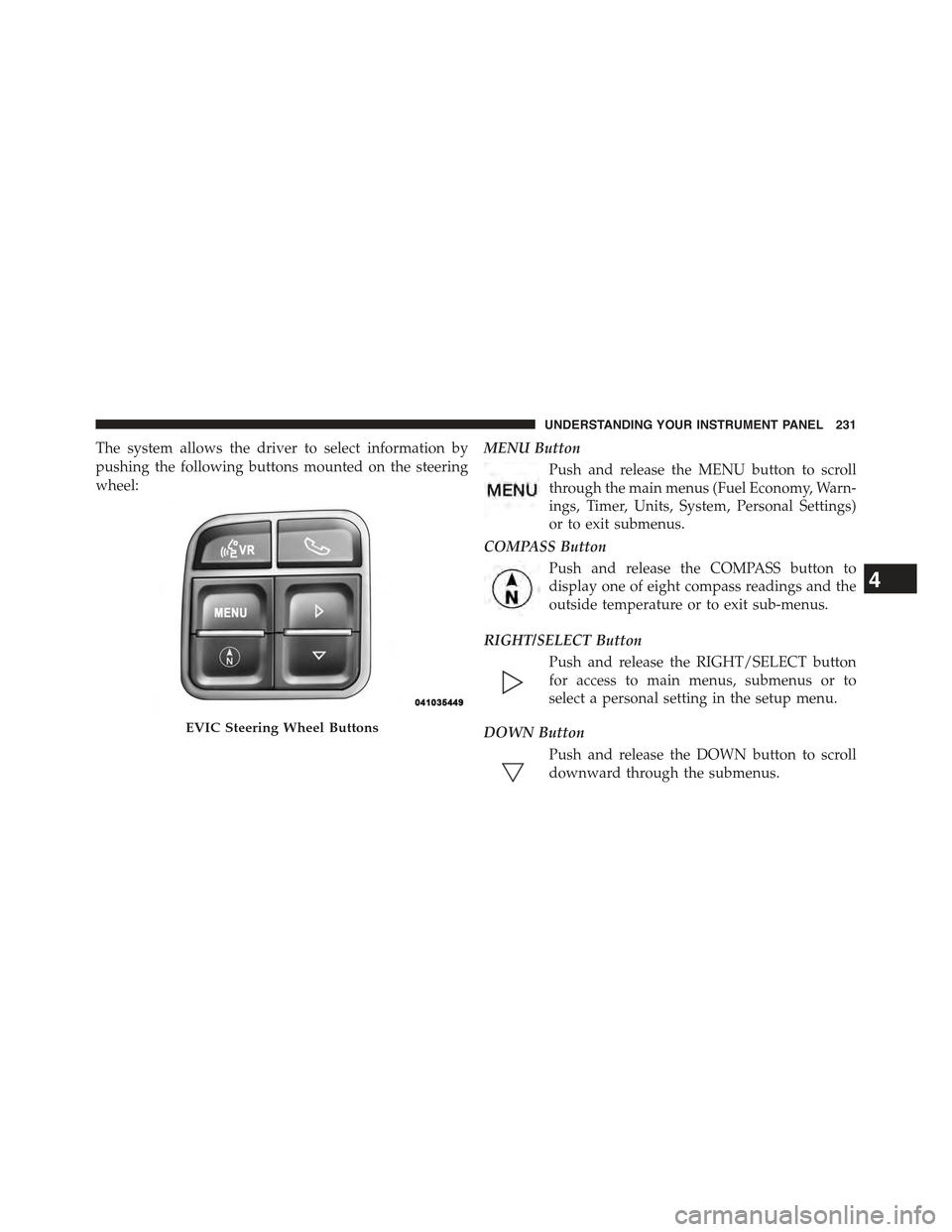
The system allows the driver to select information by
pushing the following buttons mounted on the steering
wheel:
MENU Button
Push and release the MENU button to scroll
through the main menus (Fuel Economy, Warn-
ings, Timer, Units, System, Personal Settings)
or to exit submenus.
COMPASS Button
Push and release the COMPASS button to
display one of eight compass readings and the
outside temperature or to exit sub-menus.
RIGHT/SELECT Button
Push and release the RIGHT/SELECT button
for access to main menus, submenus or to
select a personal setting in the setup menu.
DOWN Button
Push and release the DOWN button to scroll
downward through the submenus.
EVIC Steering Wheel Buttons
4
UNDERSTANDING YOUR INSTRUMENT PANEL 231
Page 234 of 560
When the appropriate conditions exist, the EVIC displays
the following messages:
•Turn Signal On (with a continuous warning chime
after 1 mile (1.6 km) of distance travelled)
•Left Front Turn Signal Lamp Out (with a single chime)
•Left Rear Turn Signal Lamp Out (with a single chime)
•Right Front Turn Signal Lamp Out (with a single chime)
•Right Rear Turn Signal Lamp Out (with a single chime)
•RKE Battery Low (with a single chime)
•Personal Settings Not Avail. — Vehicle not in PARK
(automatic transmission) or vehicle is in motion
(manual transmission).
•Door Ajar (with vehicle graphic showing which door is
open. A single chime sounds if the vehicle is in motion).
•Doors Ajar (with vehicle graphic showing which
doors are open. A single chime sounds if the vehicle is
in motion).
•Gate (with vehicle graphic showing the Liftgate open
and A single chime)
•Headlamps or Park Lamps On
•Remote Start Aborted — Door Ajar
•Remote Start Aborted — Hood Ajar
•Remote Start Aborted — L/Gate Ajar
•Remote Start Aborted — Fuel Low
•Remote Start Aborted — System Fault
•Key In Ignition
232 UNDERSTANDING YOUR INSTRUMENT PANEL
Page 236 of 560
EVIC Functions
•Compass/Temperature/Audio
•Average Fuel Economy
•Distance To Empty (DTE)
•Units In
•Elapsed Time
•Tire Pressure Monitor (TPM)
•Personal Settings
To Reset The Display
Pushing and holding the RIGHT/SELECT arrow button
once will clear the function currently being displayed.
Reset will only occur if a resettable function is currently
being displayed. To reset all resettable functions, push
and release the RIGHT/SELECT arrow button a second
time within three seconds of resetting the currently
displayed function. Reset ALL will be displayed during
this three-second window.
Compass/Temperature/Audio
Push and release the COMPASS button to display one of
eight compass headings to indicate the direction the
vehicle is facing, the outside temperature, and the current
radio station.
For additional information regarding the compass, refer
to Personal Settings (Customer-Programmable Features).
Average Fuel Economy
Shows the average fuel economy since the last reset.
When the fuel economy is reset, the display will read
“RESET” or show dashes for two seconds. Then, the
history information will be erased, and the averaging will
continue from the last fuel reading before the reset.
234 UNDERSTANDING YOUR INSTRUMENT PANEL
Page 237 of 560
Distance To Empty (DTE)
Shows the estimated distance that can be traveled with
the fuel remaining in the tank. This estimated distance is
determined by a weighted average of the instantaneous
and average fuel economy, according to the current fuel
tank level. This is not resettable.
NOTE:Significant changes in driving style or vehicle
loading will greatly affect the actual drivable distance of
the vehicle, regardless of the DTE displayed value.
When the DTE value is less than 30 miles (48 km)
estimated driving distance, the DTE display will change
to a text display of#LOW FUEL#. This display will
continue until the vehicle runs out of fuel. Adding a
significant amount of fuel to the vehicle will turn off the
#LOW FUEL#text and a new DTE value will be dis-
played, based on the current values in the DTE calcula-
tion and the current fuel tank level.
Tire Pressure Monitor (TPM)
Refer to “Starting And Operating”, “Tire Pressure Moni-
toring System (TPMS)” for system operation.
Elapsed Time
Shows the total elapsed time of travel since the last reset.
Elapsed time will increment when the ignition switch is
in the RUN/START position.
Elapsed time is displayed as follows:
hours:minutes:seconds
Elapsed time can be reset by pushing and holding the
SELECT button (as prompted in the EVIC display). Upon
reset all digits will change to zeros and time will start
incrementing again if the ignition switch is in RUN or
START.
4
UNDERSTANDING YOUR INSTRUMENT PANEL 235
Page 302 of 560
NOTE:
•The air conditioning compressor operates in Mix,
Defrost, or a blend of these modes, even if the Air
Conditioning (A/C) button is not pushed. This dehu-
midifies the air to help dry the windshield. To improve
fuel economy, use these modes only when necessary.
•For information on operating the Rear Defrost, refer to
“Rear Window Features” in “Understanding The Fea-
tures Of Your Vehicle”.
•Recirculation Control
Pushing the Recirculation Control button will
put the system in recirculation mode. This can
be used when outside conditions such as
smoke, odors, dust, or high humidity are pres-
ent. Activating recirculation will cause the LED in the
control button to illuminate.
NOTE:
•Continuous use of the Recirculation mode may make
the inside air stuffy and window fogging may occur.
Extended use of this mode is not recommended.
•The use of the Recirculation mode in cold or damp
weather will cause windows to fog on the inside,
because of moisture buildup inside the vehicle. Select
the outside air position for maximum defogging.
•The A/C will engage automatically to prevent fogging
when the recirculation button is pushed and the mode
control is set to panel or panel / floor.
•The A/C can be deselected manually without disturb-
ing the mode control selection.
•When the ignition switch is turned to the LOCK
position, the recirculation feature will be cancelled.
300 UNDERSTANDING YOUR INSTRUMENT PANEL
Page 316 of 560
!TIRE ROTATION RECOMMENDATIONS.....392
!TIRE PRESSURE MONITORING
SYSTEM (TPMS).......................393
▫Base System.........................396
▫Premium System — If Equipped...........398
▫General Information...................402
!FUEL REQUIREMENTS..................403
▫2.0L And 2.4L Engine...................403
▫Reformulated Gasoline.................403
▫Gasoline/Oxygenate Blends..............404
▫E-85 Usage In Non-Flex Fuel Vehicles.......404
▫MMT In Gasoline.....................405
▫Materials Added To Fuel................405
▫Fuel System Cautions...................406
▫Carbon Monoxide Warnings.............407
!ADDING FUEL........................407
▫Fuel Filler Cap (Gas Cap)...............407
▫Loose Fuel Filler Cap Message............409
!VEHICLE LOADING....................410
▫Vehicle Certification Label...............410
!TRAILER TOWING.....................412
▫Common Towing Definitions.............412
▫Trailer Hitch Classification...............415
▫Trailer Towing Weights
(Maximum Trailer Weight Ratings).........416
▫Trailer And Tongue Weight..............417
314 STARTING AND OPERATING
Page 319 of 560
Automatic Transmission — If Equipped
The shift lever must be in the PARK or NEUTRAL
position before you can start the engine. Depress the
brake pedal before shifting to any driving gear.
NOTE:You must press the brake pedal before shifting
out of PARK.
Tip Start
Do notpress the accelerator. Turn the ignition switch to
the START position and release it as soon as the starter
engages. The starter motor will continue to run, and it
will disengage automatically when the engine is running.
If the engine fails to start, the starter will disengage
automatically in 10 seconds. If this occurs, turn the
ignition switch to the LOCK position, wait 10 to 15
seconds, then repeat the “Normal Starting” procedure.
Normal Starting
Normal starting of either a cold or a warm engine does
not require pumping or pressing the accelerator pedal.
Simply turn the ignition switch to the START position
and release when the engine starts. If the engine fails to
start within 15 seconds, turn the ignition switch to the
OFF position, wait 10 to 15 seconds, then repeat the
“Normal Starting” procedure.
WARNING!
Do not attempt to push or tow your vehicle to get it
started. Vehicles equipped with an automatic trans-
mission cannot be started this way. Unburned fuel
could enter the catalytic converter and once the
engine has started, ignite and damage the converter
and vehicle. If the vehicle has a discharged battery,
booster cables may be used to obtain a start from
(Continued)
5
STARTING AND OPERATING 317
Page 320 of 560
WARNING!(Continued)
another vehicle. This type of start can be dangerous if
done improperly, so follow the procedure carefully.
Refer to “Jump Starting” in “What To Do In Emer-
gencies” for further information.
Extreme Cold Weather (Below –20°F Or−29°C)
To ensure reliable starting at these temperatures, use of
an externally powered electric engine block heater (avail-
able from your authorized dealer) is recommended.
If Engine Fails To Start
If the engine fails to start after you have followed the
“Normal Starting” and “Extreme Cold Weather” proce-
dures, it may be flooded. Push the accelerator pedal all
the way to the floor and hold it there. Crank the engine
for no more than 15 seconds. This should clear any excess
fuel in case the engine is flooded. Leave the ignition key
in the ON position, release the accelerator pedal and
repeat the “Normal Starting” procedure.
WARNING!
Never pour fuel or other flammable liquid into the
throttle body air inlet opening in an attempt to start
the vehicle. This could result in flash fire causing
serious personal injury.
CAUTION!
To prevent damage to the starter, do not crank the
engine for more than 15 seconds at a time. Wait 10 to
15 seconds before trying again.
After Starting
The idle speed is controlled automatically and it will
decrease as the engine warms up.
318 STARTING AND OPERATING
Page 323 of 560
Never shift into REVERSE until the vehicle has come to a
complete stop.
NOTE:During cold weather, until the transmission lubri-
cant is warm, you may experience slightly higher shift
efforts. This is normal and not harmful to the transmission.
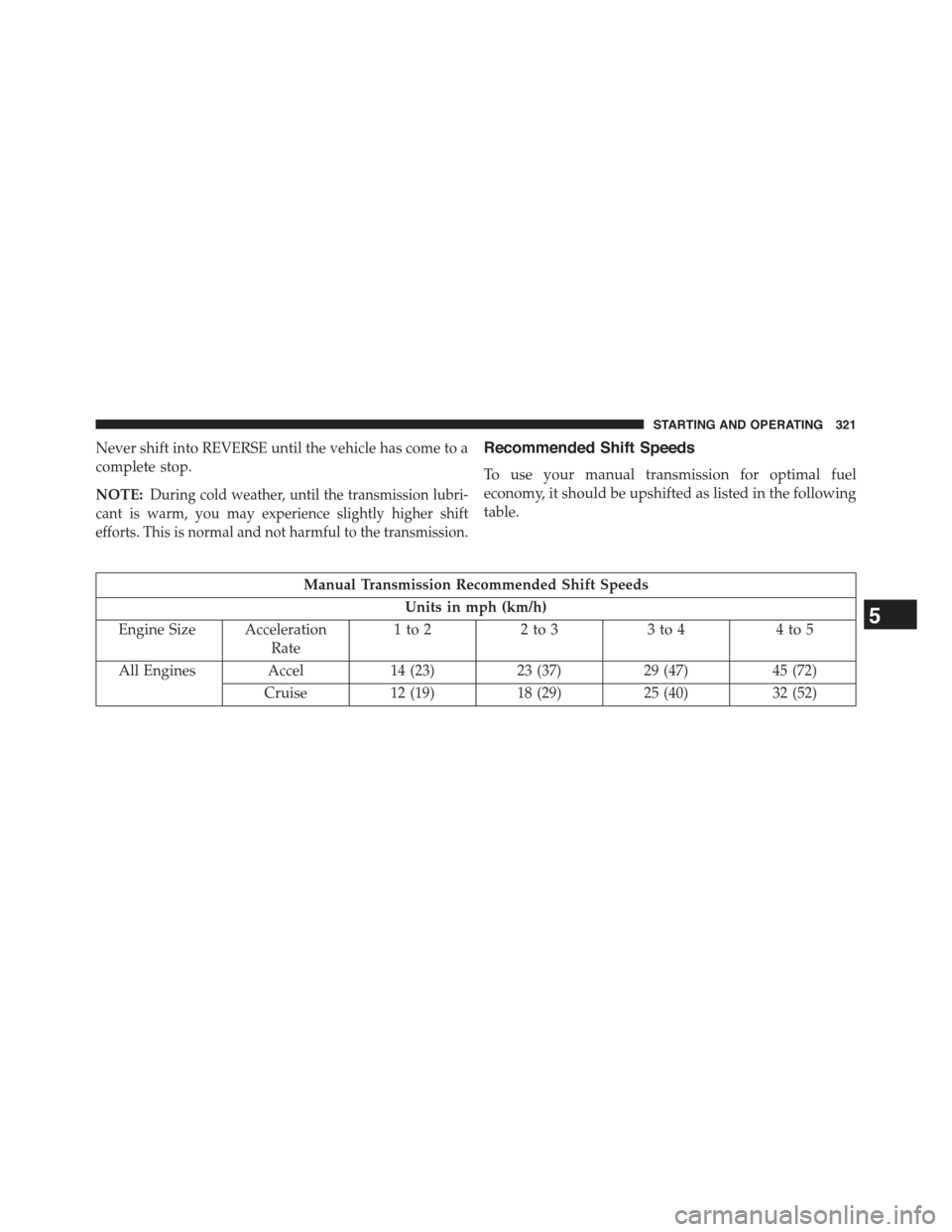
Recommended Shift Speeds
To use your manual transmission for optimal fuel
economy, it should be upshifted as listed in the following
table.
Manual Transmission Recommended Shift Speeds
Units in mph (km/h)
Engine Size Acceleration
Rate
1to22to33to44to5
All Engines Accel14 (23)23 (37)29 (47)45 (72)
Cruise12 (19)18 (29)25 (40)32 (52)
5
STARTING AND OPERATING 321