ignition JEEP GRAND CHEROKEE 2015 WK2 / 4.G SRT Owner's Guide
[x] Cancel search | Manufacturer: JEEP, Model Year: 2015, Model line: GRAND CHEROKEE, Model: JEEP GRAND CHEROKEE 2015 WK2 / 4.GPages: 636, PDF Size: 5.35 MB
Page 169 of 636
detects vehicle specific light and automatically switches
from high beams to low beams until the approaching
vehicle is out of view.
NOTE:
•The Automatic High Beam Headlamp Control can be
turned on or off using the Uconnect® System. Refer to
“Uconnect® Settings” in “Understanding Your Instru-
ment Panel” for further information.
•Broken, muddy, or obstructed headlights and taillights
of vehicles in the field of view will cause headlights to
remain on longer (closer to the vehicle). Also, dirt, film,
and other obstructions on the windshield or camera
lens will cause the system to function improperly.
•To opt out of the Advanced Auto High-Beam Sensitiv-
ity Control (default) and enter Reduced High-BeamSensitivity Control (not recommended), toggle high-
beam lever 6 full on/off cycles within 10 seconds of
ignition ON. System will return to default setting upon
ignition off.
If the windshield or Automatic High Beam Headlamp
Control mirror is replaced, the mirror must be re-aimed
to ensure proper performance. See your local authorized
dealer.
Daytime Running Lights — If Equipped
The Daytime Running Lights (bright intensity) come on
whenever the engine is running, and the transmission is
not in the PARK position. The lights will remain on until
the ignition is switched to the OFF or ACC position or the
parking brake is engaged.
The headlight switch must be used for normal nighttime
driving.
3
UNDERSTANDING THE FEATURES OF YOUR VEHICLE 167
Page 170 of 636
Automatic Headlight Leveling — HID Headlights
Only
This feature prevents the headlights from interfering
with the vision of oncoming drivers. Headlight leveling
automatically adjusts the height of the headlight beam in
reaction to changes in vehicle pitch.
Adaptive Bi-Xenon High Intensity Discharge
Headlights — If Equipped
This system automatically swivels the headlight beam
pattern horizontally to provide increased illumination in
the direction the vehicle is steering.
NOTE:
•Each time the Adaptive Headlight System is turned on,
the headlights will initialize by performing a brief
sequence of rotations.
•The Adaptive Headlight System is active only when
the vehicle is moving forward.The Adaptive Headlight System can be turned On or Off
using the Uconnect® System, refer to “Uconnect® Set-
tings” in “Understanding Your Instrument Panel” for
further information.
Headlight Delay
To aid in your exit, your vehicle is equipped with a
headlight delay that will leave the headlights on for
approximately up to 90 seconds. This delay is initiated
when the ignition is turned OFF while the headlight
switch is on, and then the headlight switch is cycled off.
Headlight delay can be cancelled by either turning the
headlight switch on then off, or by turning the ignition
ON.
NOTE:If your vehicle is equipped with a touchscreen,
this feature can be programmed through the Uconnect®
system. Refer to “Uconnect® Settings” in “Understand-
ing Your Instrument Panel” for further information.
168 UNDERSTANDING THE FEATURES OF YOUR VEHICLE
Page 173 of 636
Lights-On Reminder
If the headlights, parking lights, or cargo lights are left on
after the ignition is turned OFF, a chime will sound when
the driver ’s door is opened.
Battery Saver
To protect the life of your vehicle’s battery, load shedding
is provided for both the interior and exterior lights.
If the ignition is OFF and any door is left ajar for 10
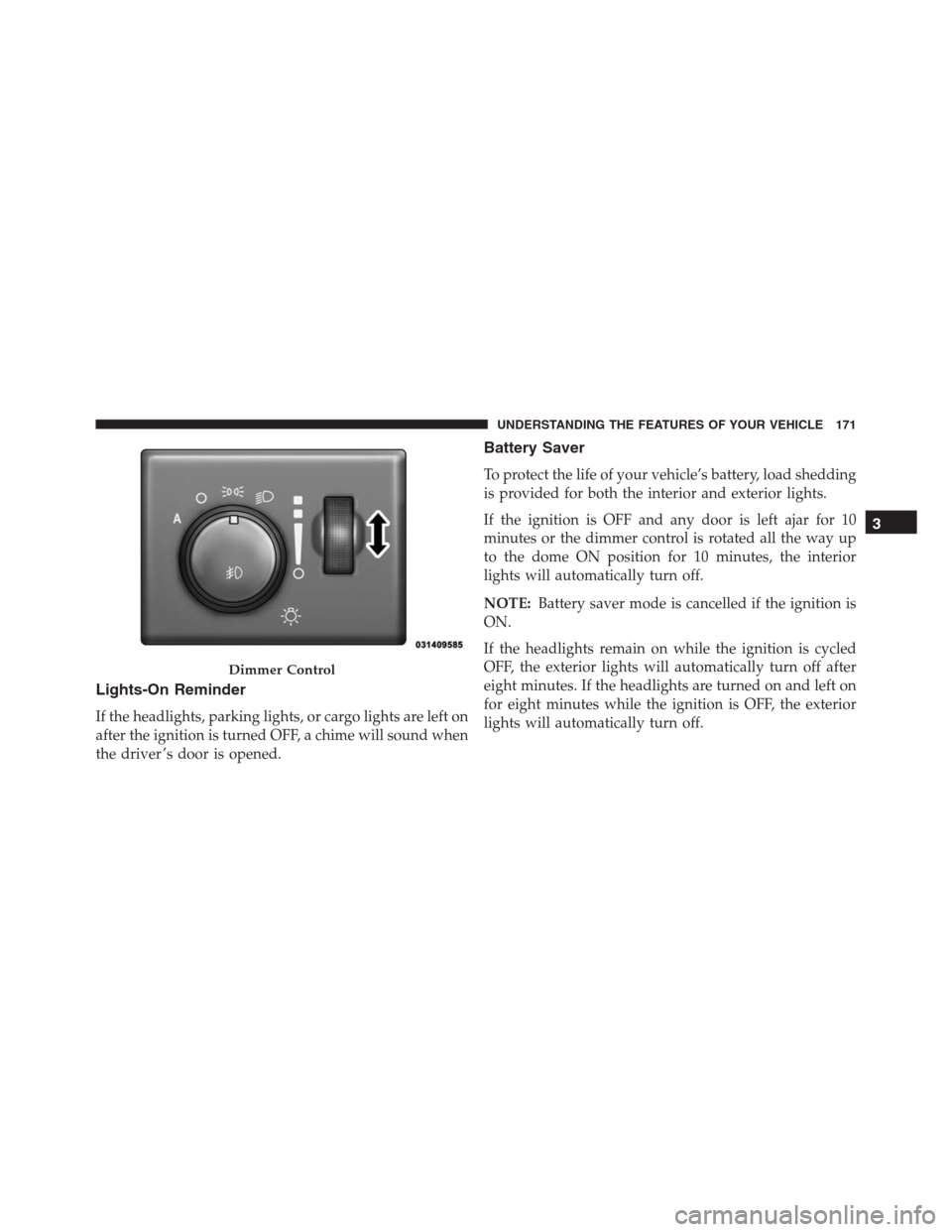
minutes or the dimmer control is rotated all the way up
to the dome ON position for 10 minutes, the interior
lights will automatically turn off.
NOTE:Battery saver mode is cancelled if the ignition is
ON.
If the headlights remain on while the ignition is cycled
OFF, the exterior lights will automatically turn off after
eight minutes. If the headlights are turned on and left on
for eight minutes while the ignition is OFF, the exterior
lights will automatically turn off.
Dimmer Control
3
UNDERSTANDING THE FEATURES OF YOUR VEHICLE 171
Page 181 of 636
Rain Sensing Wipers — If Equipped
This feature senses moisture on the windshield and
automatically activates the wipers for the driver. The
feature is especially useful for road splash or overspray
from the windshield washers of the vehicle ahead. Rotate
the end of the multifunction lever to one of four settings
to activate this feature.
The sensitivity of the system can be adjusted with the
multifunction lever. Wiper delay position one is the least
sensitive, and wiper delay position four is the most
sensitive. Setting three should be used for normal rain
conditions. Settings one and two can be used if the driver
desires less wiper sensitivity. Setting four can be used if
the driver desires more sensitivity. Place the wiper switch
in the OFF position when not using the system.
NOTE:
•The Rain Sensing feature will not operate when the
wiper switch is in the low or high-speed position.•The Rain Sensing feature may not function properly
when ice, or dried salt water is present on the wind-
shield.
•Use of Rain-X® or products containing wax or silicone
may reduce Rain Sensing performance.
•The Rain Sensing feature can be turned on and off
using the Uconnect® System, refer to “Uconnect®
Settings” in “Understanding Your Instrument Panel”
for further information.
The Rain Sensing system has protection features for the
wiper blades and arms, and will not operate under the
following conditions:
•Low Ambient Temperature— When the ignition is
first turned ON, the Rain Sensing system will not
operate until the wiper switch is moved, vehicle speed
is greater than 0 mph (0 km/h), or the outside tem-
perature is greater than 32°F (0°C).
3
UNDERSTANDING THE FEATURES OF YOUR VEHICLE 179
Page 182 of 636
•Transmission In NEUTRAL Position— When the
ignition is ON, and the automatic transmission is in
the NEUTRAL position, the Rain Sensing system will
not operate until the wiper switch is moved, vehicle
speed is greater than 5 mph (8 km/h), or the shift
lever/gear selector is moved out of the NEUTRAL
position.
Remote Start Mode Inhibit— On vehicles equipped
with Remote Starting system, Rain Sensing wipers are
not operational when the vehicle is in the remote start
mode. Once the operator is in the vehicle and has placed
the ignition switch in the RUN position, rain sensing
wiper operation can resume, if it has been selected, and
no other inhibit conditions (mentioned previously) exist.POWER TILT/TELESCOPING STEERING COLUMN
— IF EQUIPPED
This feature allows you to tilt the steering column
upward or downward. It also allows you to lengthen or
shorten the steering column. The power tilt/telescoping
steering column lever is located below the multifunction
lever on the steering column.
180 UNDERSTANDING THE FEATURES OF YOUR VEHICLE
Page 187 of 636
To Deactivate
A soft tap on the brake pedal, pushing the CANCEL
button, or normal brake pressure while slowing the
vehicle will deactivate the Electronic Speed Control with-
out erasing the set speed from memory.
Pushing the ON/OFF button or turning the ignition
switch OFF erases the set speed from memory.
To Resume Speed
To resume a previously set speed, push the RES (+)
button and release. Resume can be used at any speed
above 20 mph (32 km/h).
To Vary The Speed Setting
To Increase Speed
When the Electronic Speed Control is set, you can in-
crease speed by pushing the SET+button.The drivers preferred units can be selected through the
instrument panel settings if equipped. Refer to “Under-
standing Your Instrument Panel” for more information.
The speed increment shown is dependant on the chosen
speed unit of U.S. (mph) or Metric (km/h):
U.S. Speed (mph)
•Pushing the SET+button once will result ina1mph
increase in set speed. Each subsequent tap of the
button results in an increase of 1 mph.
•If the button is continually pushed, the set speed will
continue to increase until the button is released, then
the new set speed will be established.
Metric Speed (km/h)
•Pushing the SET+button once will result in a 1 km/h
increase in set speed. Each subsequent tap of the
button results in an increase of 1 km/h.
3
UNDERSTANDING THE FEATURES OF YOUR VEHICLE 185
Page 196 of 636
•The Normal (Fixed Speed) Electronic Speed Control
ON/OFF button is pushed.
•The ignition is turned OFF.
•You switch to Four-Wheel Drive Low.
To Resume
If there is a set speed in memory push the RES (resume)
button and then remove your foot from the accelerator
pedal. The DID will display the last set speed.
NOTE:
•If your vehicle stays at standstill for longer than two
seconds, then the system will cancel and the brake
force will be ramped-out. The driver will have to apply
the brakes to keep the vehicle at a standstill.
•ACC cannot be resumed if there is a stationary vehicle
in-front of your vehicle in close proximity.
WARNING!
The Resume function should only be used if traffic
and road conditions permit. Resuming a set speed
that is too high or too low for prevailing traffic and
road conditions could cause the vehicle to accelerate
or decelerate too sharply for safe operation. Failure to
follow these warnings can result in a collision and
death or serious personal injury.
To Vary The Speed Setting
To Increase Speed
While ACC is set, you can increase the set speed by
pushing the SET+button.
The drivers preferred units can be selected through the
instrument panel settings if equipped. Refer to “Under-
standing Your Instrument Panel” for more information.
194 UNDERSTANDING THE FEATURES OF YOUR VEHICLE
Page 207 of 636
obstructions, such as mud, dirt, or ice on windshield and
fog on the inside of glass. In these cases, the DID will
display “ACC/FCW Limited Functionality Clean Front
Windshield” and the system will have degraded perfor-
mance.
The “ACC/FCW Limited Functionality Clean Front
Windshield” message can sometimes be displayed while
driving in adverse weather conditions. The ACC/FCW
system will recover after the vehicle has left these areas.
Under rare conditions, when the camera is not tracking
any vehicles or objects in its path this warning may
temporarily occur.
If weather conditions are not a factor, the driver should
examine the windshield and the camera located on the
back side of the inside rear view mirror. They may
require cleaning or removal of an obstruction.When the condition that created limited functionality is
no longer present, the system will return to full function-
ality.
NOTE:If the “ACC/FCW Limited Functionality Clean
Front Windshield” message occurs frequently (e.g. more
than once on every trip) without any snow, rain, mud, or
other obstruction, have the windshield and forward
facing camera inspected at your authorized dealer.
Service ACC/FCW Warning
If the system turns off, and the DID displays “ACC/FCW
Unavailable Service Required” or “Cruise/FCW Unavail-
able Service Required”, there may be an internal system
fault or a temporary malfunction that limits ACC func-
tionality. Although the vehicle is still drivable under
normal conditions, ACC will be temporarily unavailable.
If this occurs, try activating ACC again later, following an
ignition cycle. If the problem persists, see your autho-
rized dealer.
3
UNDERSTANDING THE FEATURES OF YOUR VEHICLE 205
Page 216 of 636
To Turn Off
The system will turn off and erase the set speed in
memory if:
•The Normal (Fixed Speed) Electronic Speed Control
ON/OFF button is pushed.
•The ignition is turned off.
•You engage Four-Wheel Drive Low.
•The Adaptive Cruise Control (ACC) On/Off button is
pushed.
FORWARD COLLISION WARNING (FCW) WITH
MITIGATION — IF EQUIPPED
Forward Collision Warning (FCW) With Mitigation
Operation
The Forward Collision Warning (FCW) system with
mitigation provides the driver with audible warnings,
visual warnings (within the DID), and may apply a brake
jerk to warn the driver when it detects a potential frontal
collision. The warnings and limited braking are intended
to provide the driver with enough time to react, avoid or
mitigate the potential collision.
214 UNDERSTANDING THE FEATURES OF YOUR VEHICLE
Page 218 of 636
NOTE:
•The minimum speed for FCW activation is 5 mph
(8 km/h).
•The FCW alerts may be triggered on objects other than
vehicles such as guard rails or sign posts based on the
course prediction. This is expected and is a part of
normal FCW activation and functionality.
•It is unsafe to test the FCW system. To prevent such
misuse of the system, after four Active Braking events
within an ignition cycle, the Active Braking portion of
FCW will be deactivated until the next ignition cycle.
•The FCW system is intended for on-road use only. If
the vehicle is taken off-road, the FCW system should
be deactivated to prevent unnecessary warnings to the
surroundings. If the vehicle enters 4WD Low Range,
the FCW system will be automatically deactivated.WARNING!
Forward Collision Warning (FCW) is not intended to
avoid a collision on its own, nor can FCW detect
every type of potential collision. The driver has the
responsibility to avoid a collision by controlling the
vehicle via braking and steering. Failure to follow
this warning could lead to serious injury or death.
Turning FCW ON Or OFF
NOTE:The default status of FCW is “On”, this allows
the system to warn you of a possible collision with the
vehicle in front of you.
The forward collision button is located on the switch
panel below the Uconnect® display.
To turn the FCW system OFF, push the forward collision
button once to turn the system OFF (led turns on).
216 UNDERSTANDING THE FEATURES OF YOUR VEHICLE