ad blue JEEP PATRIOT 2021 Owner handbook (in English)
[x] Cancel search | Manufacturer: JEEP, Model Year: 2021, Model line: PATRIOT, Model: JEEP PATRIOT 2021Pages: 332, PDF Size: 1.99 MB
Page 141 of 332
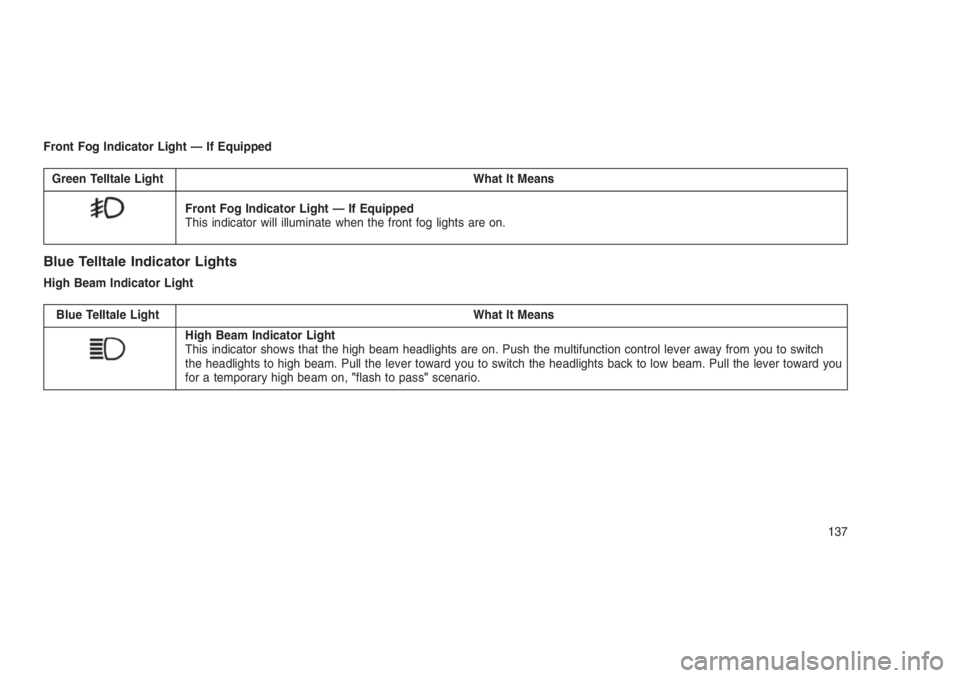
Front Fog Indicator Light — If Equipped
Green Telltale Light What It Means
Front Fog Indicator Light — If Equipped
This indicator will illuminate when the front fog lights are on.
Blue Telltale Indicator Lights
High Beam Indicator Light
Blue Telltale Light What It Means
High Beam Indicator Light
This indicator shows that the high beam headlights are on. Push the multifunction control lever away from you to switch
the headlights to high beam. Pull the lever toward you to switch the headlights back to low beam. Pull the lever toward you
for a temporary high beam on,"flash to pass"scenario.
137
Page 152 of 332
Pushing a PRESET button will display the cur-
rent list on the top line and the first item in that
list on the second line.
To exit List mode without selecting a track, push
the samePRESETbutton again to go back to
Play mode.
LISTbutton: TheLISTbutton will display the top
level menu of the iPod or external USB device.
•Turn theTUNEcontrol knob to list the top-
menu item to be selected and push the
TUNEcontrol knob. This will display the next
sub-menu list item on the audio device, then
follow the same steps to go to the desired
track in that list. Not all iPod or external USB
device sub-menu levels are available on this
system.
MUSIC TYPEbutton: TheMUSIC TYPEbutton
is another shortcut button to the genre listing on
your audio device.CAUTION!
•Leaving the iPod or external USB device
(or any supported device) anywhere in the
vehicle in extreme heat or cold can alter
the operation or damage the device. Fol-
low the device manufacturer’s guidelines.
•Placing items on the iPod or external USB
device, or connections to the iPod or ex-
ternal USB device in the vehicle, can
cause damage to the device and/or to the
connectors.
WARNING!
Do not plug in or remove the iPod or external
USB device while driving. Failure to follow
this warning could result in an accident.
Bluetooth Streaming Audio (BTSA)Music can be streamed from your cellular
phone to the Uconnect phone system.Refer to the Uconnect Owner’s Manual Supple-
ment for further information on Bluetooth con-
nectivity.
Controlling BTSA Using Radio Buttons
To enter BTSA mode, push either “AUX” button
on the radio or push the VR
button and say
“Bluetooth Streaming Audio.”
Play Mode
When switched to BTSA mode, some audio
devices can start playing music over the vehi-
cle’s audio system, but some devices require
the music to be initiated on the device first, then
it will get streamed to the Uconnect phone
system. Seven devices can be paired to the
Uconnect phone system, but just one can be
selected and played.
Selecting A Different Audio Device
1. Push the Phone
button to begin.
2. After the"Ready"prompt and following the
beep, say"Setup", then say"Select Audio
Devices."
148
Page 153 of 332
3. Say the name of the audio device or ask the
Uconnect phone system to list the audio
devices.
Next Track
Use the SEEK UP button, or push the VR
button on the radio and say “Next Track,” to
jump to the next music track on your cellular
phone.
Previous Track
Use the SEEK DOWN button, or push the VR
button on the radio and say “Previous
Track,” to jump to the previous music track on
your cellular phone.
Browse
Browsing is not available on a Bluetooth
Streaming Audio (BTSA) device. Only the cur-
rent song that is playing will display info.
NAVIGATION SYSTEM — IF
EQUIPPED
Refer to your Navigation User’s Manual.
STEERING WHEEL AUDIO
CONTROLS
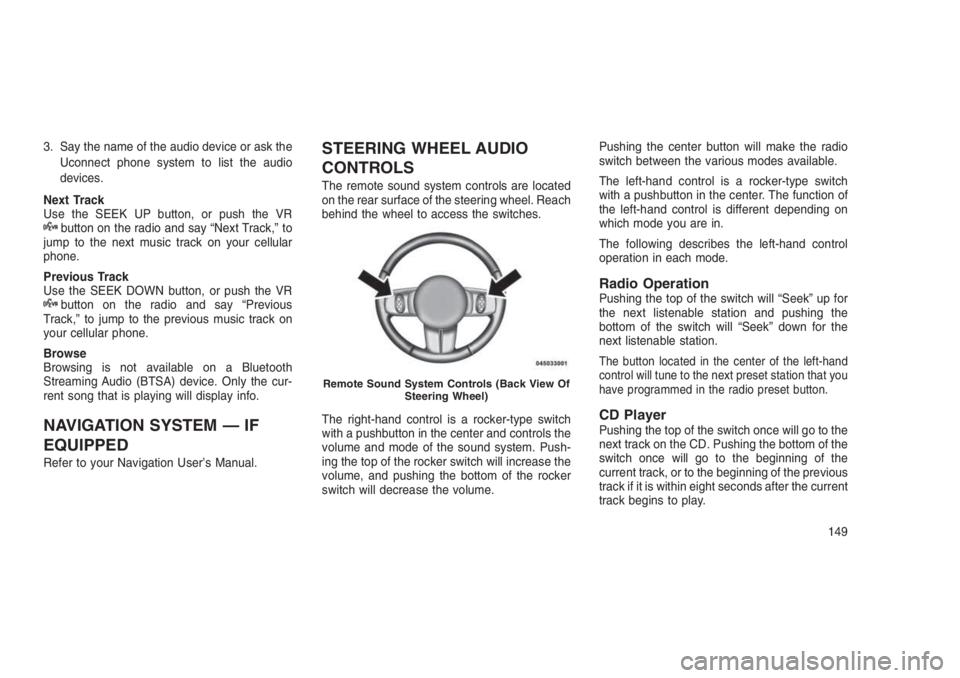
The remote sound system controls are located
on the rear surface of the steering wheel. Reach
behind the wheel to access the switches.
The right-hand control is a rocker-type switch
with a pushbutton in the center and controls the
volume and mode of the sound system. Push-
ing the top of the rocker switch will increase the
volume, and pushing the bottom of the rocker
switch will decrease the volume.Pushing the center button will make the radio
switch between the various modes available.
The left-hand control is a rocker-type switch
with a pushbutton in the center. The function of
the left-hand control is different depending on
which mode you are in.
The following describes the left-hand control
operation in each mode.
Radio OperationPushing the top of the switch will “Seek” up for
the next listenable station and pushing the
bottom of the switch will “Seek” down for the
next listenable station.
The button located in the center of the left-hand
control will tune to the next preset station that you
have programmed in the radio preset button.
CD PlayerPushing the top of the switch once will go to the
next track on the CD. Pushing the bottom of the
switch once will go to the beginning of the
current track, or to the beginning of the previous
track if it is within eight seconds after the current
track begins to play.
Remote Sound System Controls (Back View Of
Steering Wheel)
149
Page 155 of 332
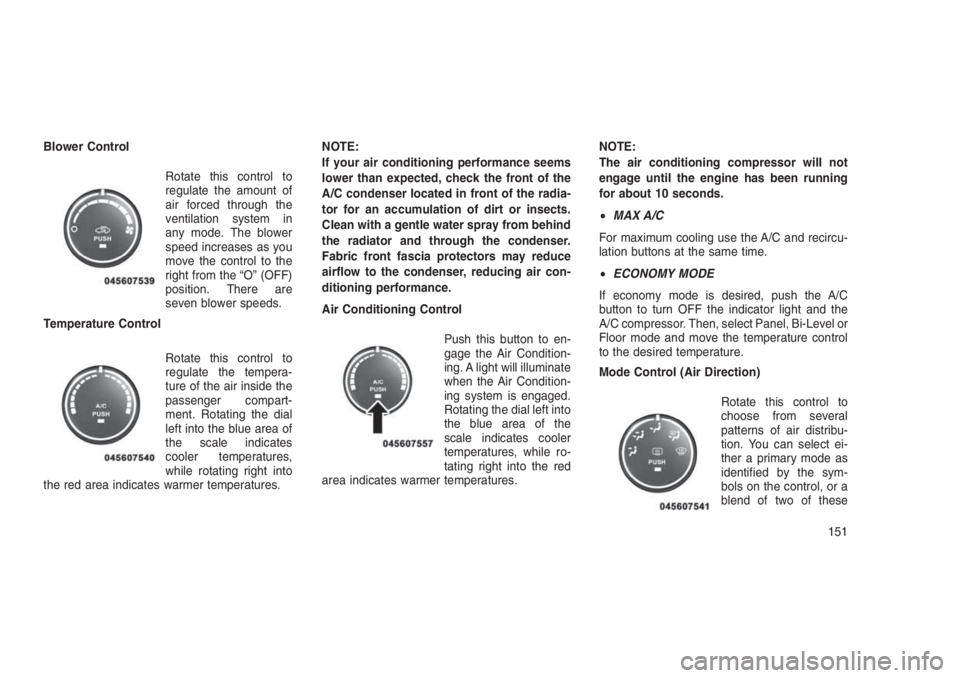
Blower Control
Rotate this control to
regulate the amount of
air forced through the
ventilation system in
any mode. The blower
speed increases as you
move the control to the
right from the “O” (OFF)
position. There are
seven blower speeds.
Temperature Control
Rotate this control to
regulate the tempera-
ture of the air inside the
passenger compart-
ment. Rotating the dial
left into the blue area of
the scale indicates
cooler temperatures,
while rotating right into
the red area indicates warmer temperatures.NOTE:
If your air conditioning performance seems
lower than expected, check the front of the
A/C condenser located in front of the radia-
tor for an accumulation of dirt or insects.
Clean with a gentle water spray from behind
the radiator and through the condenser.
Fabric front fascia protectors may reduce
airflow to the condenser, reducing air con-
ditioning performance.
Air Conditioning Control
Push this button to en-
gage the Air Condition-
ing. A light will illuminate
when the Air Condition-
ing system is engaged.
Rotating the dial left into
the blue area of the
scale indicates cooler
temperatures, while ro-
tating right into the red
area indicates warmer temperatures.NOTE:
The air conditioning compressor will not
engage until the engine has been running
for about 10 seconds.
•MAX A/C
For maximum cooling use the A/C and recircu-
lation buttons at the same time.
•ECONOMY MODE
If economy mode is desired, push the A/C
button to turn OFF the indicator light and the
A/C compressor. Then, select Panel, Bi-Level or
Floor mode and move the temperature control
to the desired temperature.
Mode Control (Air Direction)
Rotate this control to
choose from several
patterns of air distribu-
tion. You can select ei-
ther a primary mode as
identified by the sym-
bols on the control, or a
blend of two of these
151
Page 223 of 332
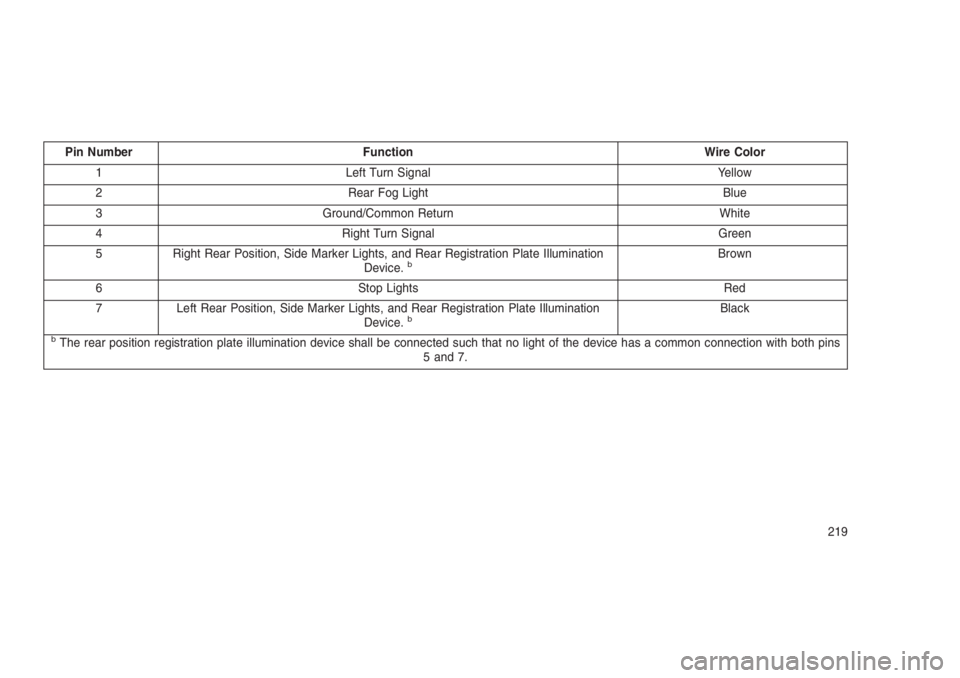
Pin Number Function Wire Color
1 Left Turn Signal Yellow
2 Rear Fog Light Blue
3 Ground/Common Return White
4 Right Turn Signal Green
5 Right Rear Position, Side Marker Lights, and Rear Registration Plate Illumination
Device.
bBrown
6 Stop Lights Red
7 Left Rear Position, Side Marker Lights, and Rear Registration Plate Illumination
Device.
bBlack
bThe rear position registration plate illumination device shall be connected such that no light of the device has a common connection with both pins
5 and 7.
219
Page 224 of 332
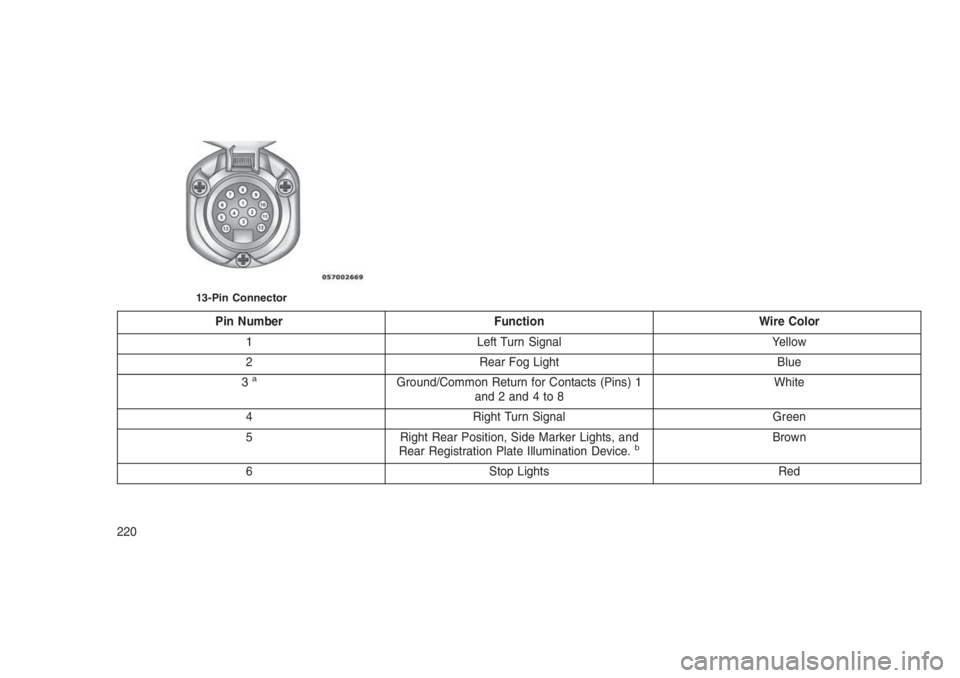
Pin Number Function Wire Color
1 Left Turn Signal Yellow
2 Rear Fog Light Blue
3
aGround/Common Return for Contacts (Pins) 1
and2and4to8White
4 Right Turn Signal Green
5 Right Rear Position, Side Marker Lights, and
Rear Registration Plate Illumination Device.
bBrown
6 Stop Lights Red
13-Pin Connector
220
Page 225 of 332
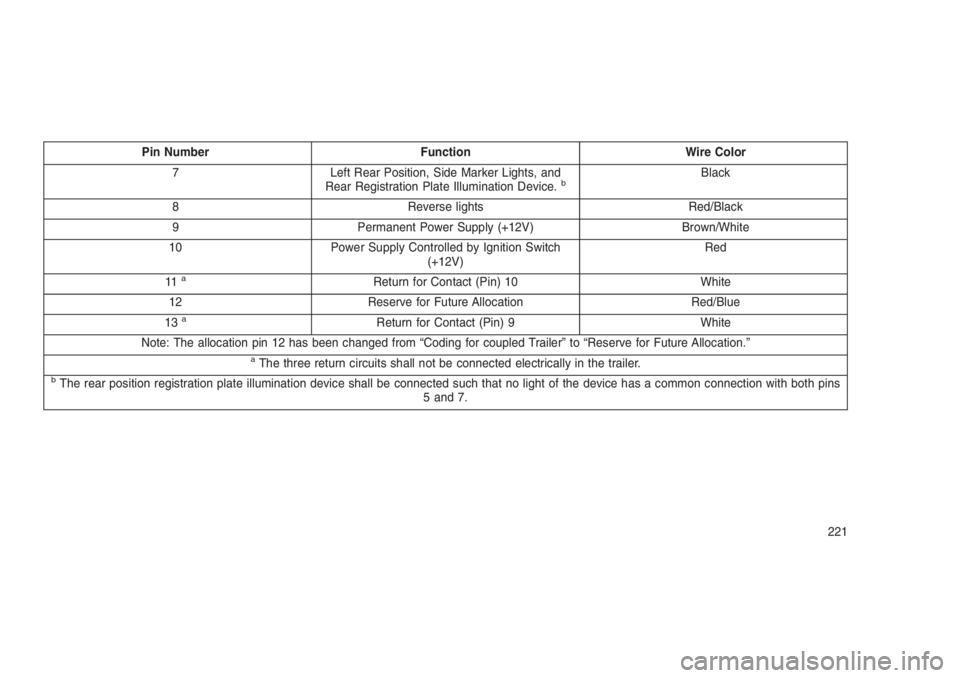
Pin Number Function Wire Color
7 Left Rear Position, Side Marker Lights, and
Rear Registration Plate Illumination Device.
bBlack
8 Reverse lights Red/Black
9 Permanent Power Supply (+12V) Brown/White
10 Power Supply Controlled by Ignition Switch
(+12V)Red
11
aReturn for Contact (Pin) 10 White
12 Reserve for Future Allocation Red/Blue
13
aReturn for Contact (Pin) 9 White
Note: The allocation pin 12 has been changed from “Coding for coupled Trailer” to “Reserve for Future Allocation.”
aThe three return circuits shall not be connected electrically in the trailer.bThe rear position registration plate illumination device shall be connected such that no light of the device has a common connection with both pins
5 and 7.
221
Page 279 of 332
WARNING!(Continued)
•Before replacing a fuse, make sure that the
ignition is off and that all the other services
are switched off and/or disengaged.
•If the replaced fuse blows again, contact
an authorized dealer.
•If a general protection fuse for safety sys-
tems (air bag system, braking system),
power unit systems (engine system, gear-
box system) or steering system blows,
contact an authorized dealer.
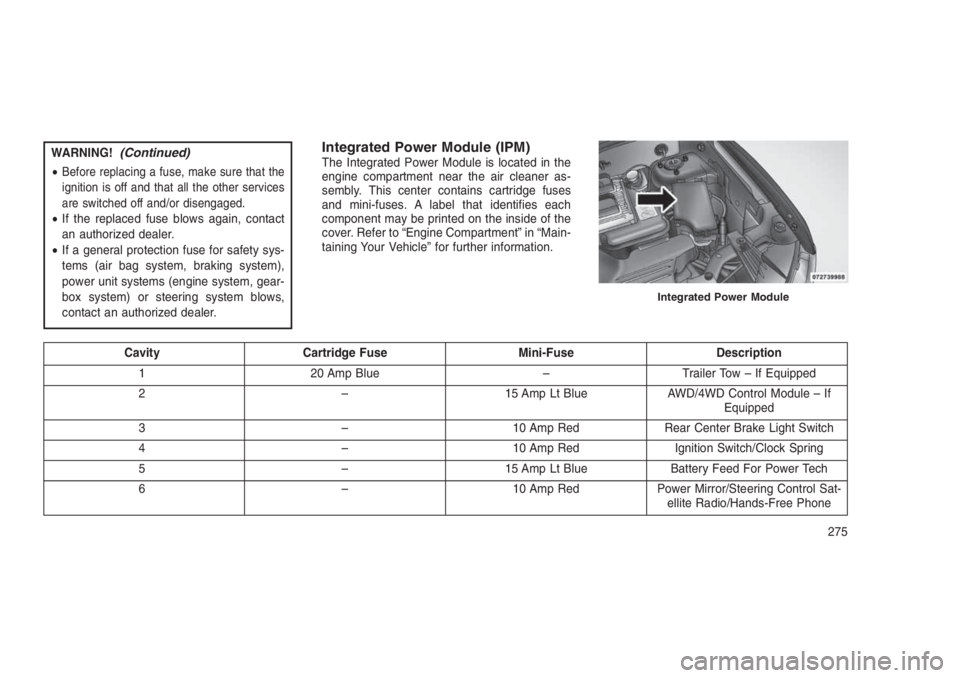
Integrated Power Module (IPM)The Integrated Power Module is located in the
engine compartment near the air cleaner as-
sembly. This center contains cartridge fuses
and mini-fuses. A label that identifies each
component may be printed on the inside of the
cover. Refer to “Engine Compartment” in “Main-
taining Your Vehicle” for further information.
Cavity Cartridge Fuse Mini-Fuse Description
1 20 Amp Blue – Trailer Tow – If Equipped
2 – 15 Amp Lt Blue AWD/4WD Control Module – If
Equipped
3 – 10 Amp Red Rear Center Brake Light Switch
4 – 10 Amp Red Ignition Switch/Clock Spring
5 – 15 Amp Lt Blue Battery Feed For Power Tech
6 – 10 Amp Red Power Mirror/Steering Control Sat-
ellite Radio/Hands-Free Phone
Integrated Power Module
275
Page 280 of 332
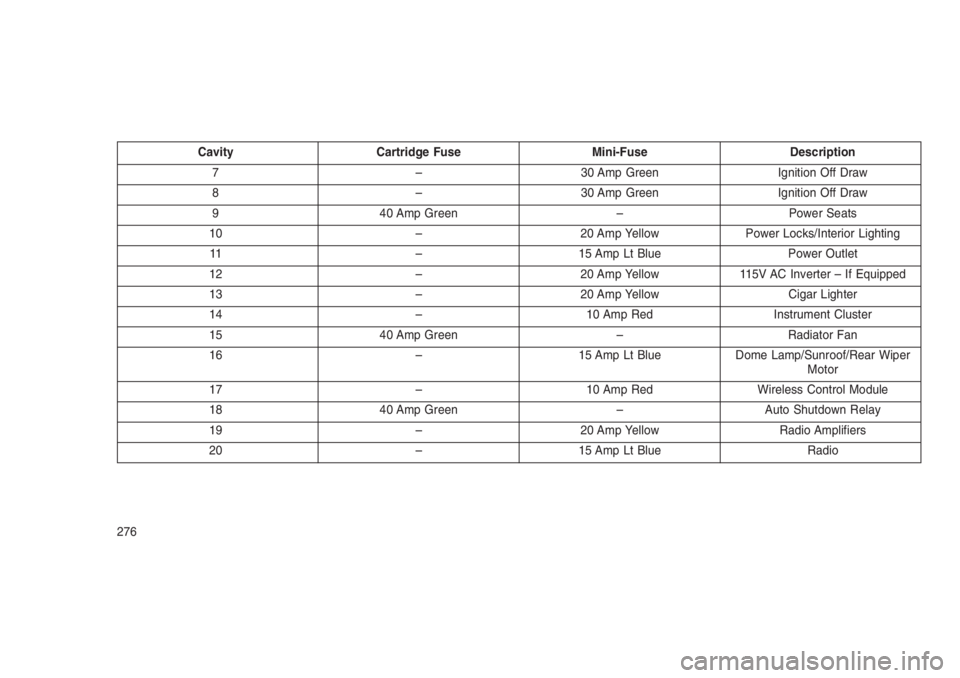
Cavity Cartridge Fuse Mini-Fuse Description
7 – 30 Amp Green Ignition Off Draw
8 – 30 Amp Green Ignition Off Draw
9 40 Amp Green – Power Seats
10 – 20 Amp Yellow Power Locks/Interior Lighting
11 – 15 Amp Lt Blue Power Outlet
12 – 20 Amp Yellow 115V AC Inverter – If Equipped
13 – 20 Amp Yellow Cigar Lighter
14 – 10 Amp Red Instrument Cluster
15 40 Amp Green – Radiator Fan
16 – 15 Amp Lt Blue Dome Lamp/Sunroof/Rear Wiper
Motor
17 – 10 Amp Red Wireless Control Module
18 40 Amp Green – Auto Shutdown Relay
19 – 20 Amp Yellow Radio Amplifiers
20 – 15 Amp Lt Blue Radio
276
Page 281 of 332
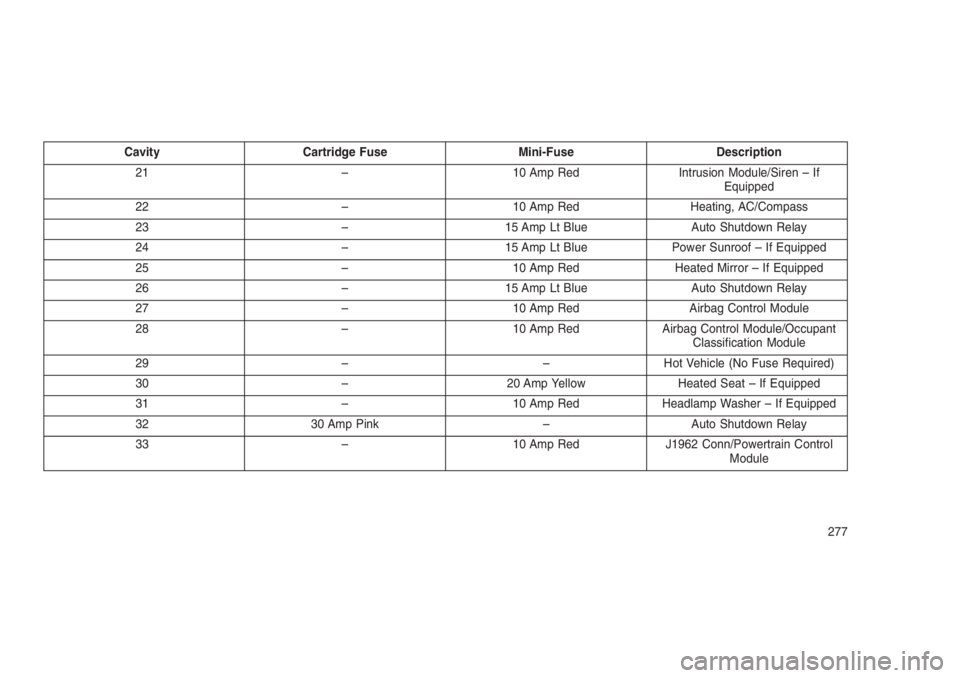
Cavity Cartridge Fuse Mini-Fuse Description
21 – 10 Amp Red Intrusion Module/Siren – If
Equipped
22 – 10 Amp Red Heating, AC/Compass
23 – 15 Amp Lt Blue Auto Shutdown Relay
24 – 15 Amp Lt Blue Power Sunroof – If Equipped
25 – 10 Amp Red Heated Mirror – If Equipped
26 – 15 Amp Lt Blue Auto Shutdown Relay
27 – 10 Amp Red Airbag Control Module
28 – 10 Amp Red Airbag Control Module/Occupant
Classification Module
29 – – Hot Vehicle (No Fuse Required)
30 – 20 Amp Yellow Heated Seat – If Equipped
31 – 10 Amp Red Headlamp Washer – If Equipped
32 30 Amp Pink – Auto Shutdown Relay
33 – 10 Amp Red J1962 Conn/Powertrain Control
Module
277