lights KIA Cadenza 2014 1.G Owner's Guide
[x] Cancel search | Manufacturer: KIA, Model Year: 2014, Model line: Cadenza, Model: KIA Cadenza 2014 1.GPages: 415, PDF Size: 5.09 MB
Page 166 of 415

Features of your vehicle
98
4
Lighting control
The light switch has a Headlight and
a Parking light position.
To operate the lights, turn the knob at
the end of the control lever to one of
the following positions:
(1) OFF/O position
(2) Auto light position
(3) Parking light position
(4) Headlight position
Parking light position ( )
When the light switch is in the park-
ing light position, the tail, license and
instrument panel lights will turn ON.
Headlight position ( )
When the light switch is in the head-
light position, the head, tail, license
and instrument panel lights will turn
ON.
✽ ✽
NOTICE
The ignition switch must be in the
ON position to turn on the head-
lights.
OKH042189OKH042191OKH042192
Page 167 of 415
499
Features of your vehicle
Auto light/AFLS position
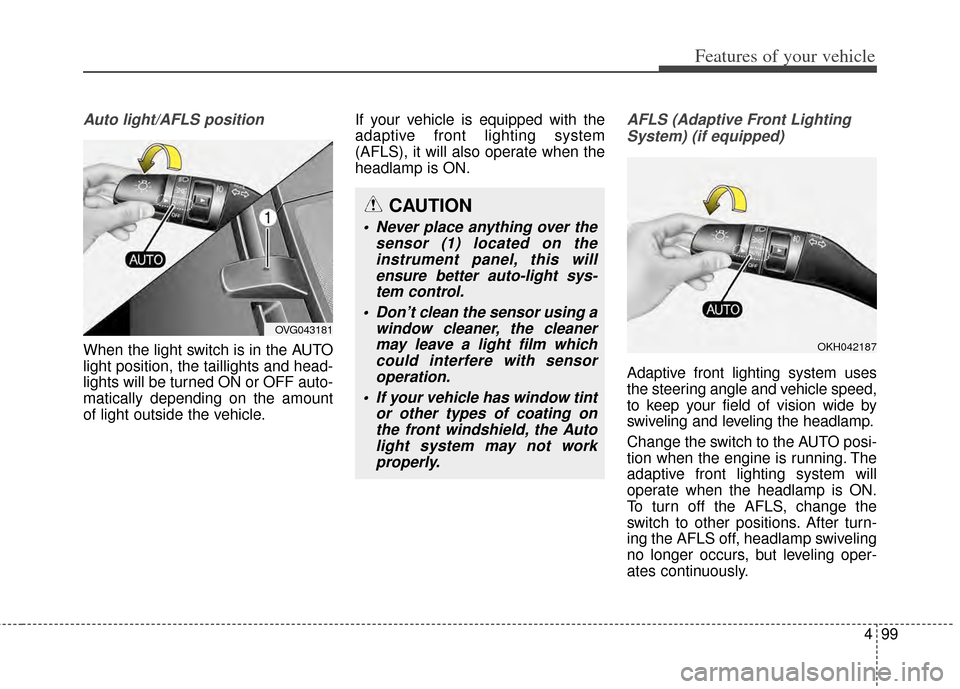
When the light switch is in the AUTO
light position, the taillights and head-
lights will be turned ON or OFF auto-
matically depending on the amount
of light outside the vehicle.If your vehicle is equipped with the
adaptive front lighting system
(AFLS), it will also operate when the
headlamp is ON.
AFLS (Adaptive Front Lighting
System) (if equipped)
Adaptive front lighting system uses
the steering angle and vehicle speed,
to keep your field of vision wide by
swiveling and leveling the headlamp.
Change the switch to the AUTO posi-
tion when the engine is running. The
adaptive front lighting system will
operate when the headlamp is ON.
To turn off the AFLS, change the
switch to other positions. After turn-
ing the AFLS off, headlamp swiveling
no longer occurs, but leveling oper-
ates continuously.
CAUTION
Never place anything over the sensor (1) located on theinstrument panel, this willensure better auto-light sys-tem control.
Don’t clean the sensor using a window cleaner, the cleanermay leave a light film whichcould interfere with sensoroperation.
If your vehicle has window tint or other types of coating onthe front windshield, the Autolight system may not workproperly.
OKH042187
OVG043181
Page 168 of 415
Features of your vehicle
100
4
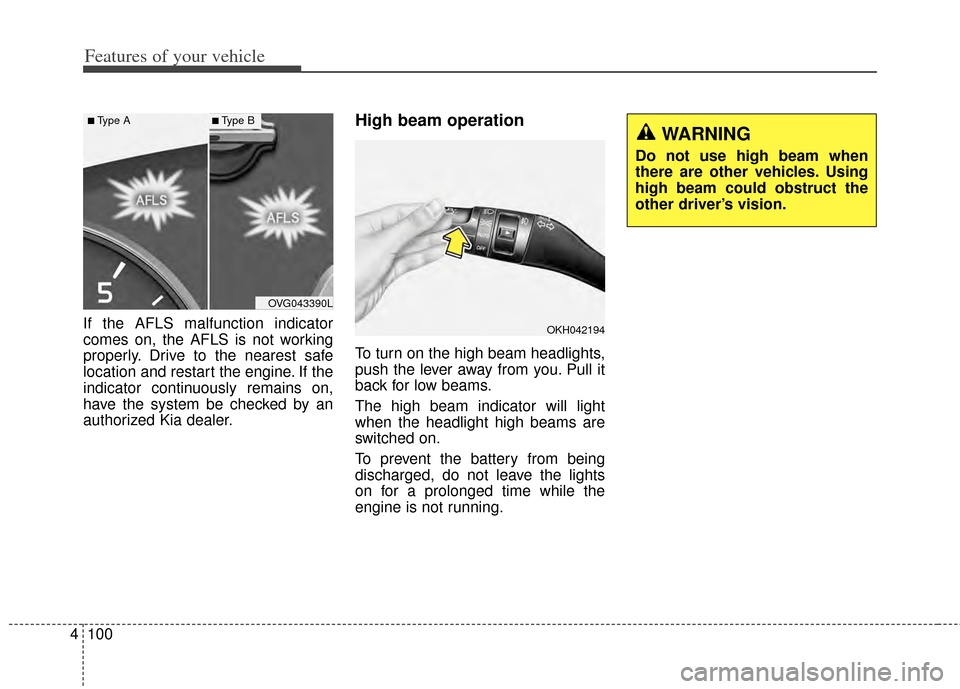
If the AFLS malfunction indicator
comes on, the AFLS is not working
properly. Drive to the nearest safe
location and restart the engine. If the
indicator continuously remains on,
have the system be checked by an
authorized Kia dealer.
High beam operation
To turn on the high beam headlights,
push the lever away from you. Pull it
back for low beams.
The high beam indicator will light
when the headlight high beams are
switched on.
To prevent the battery from being
discharged, do not leave the lights
on for a prolonged time while the
engine is not running.
OVG043390L
■Type A■Type B
WARNING
Do not use high beam when
there are other vehicles. Using
high beam could obstruct the
other driver’s vision.
OKH042194
Page 169 of 415
4101
Features of your vehicle
To flash the headlights, pull the lever
towards you. It will return to the nor-
mal (low beam) position when
released. The headlight switch does
not need to be on to use this flashing
feature.
Turn signals and lane change
signals
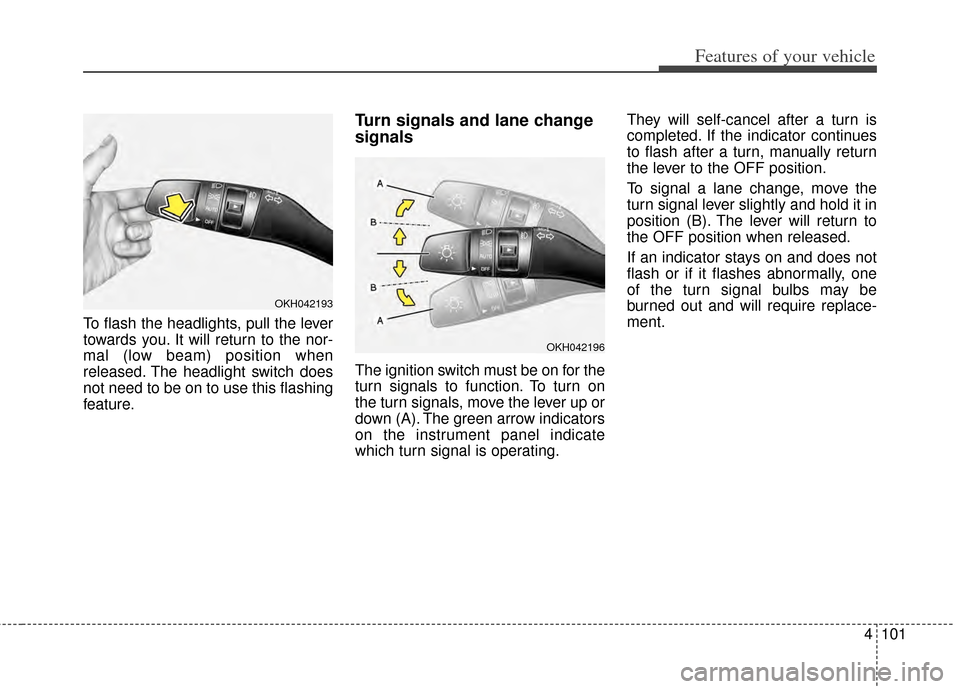
The ignition switch must be on for the
turn signals to function. To turn on
the turn signals, move the lever up or
down (A). The green arrow indicators
on the instrument panel indicate
which turn signal is operating.They will self-cancel after a turn is
completed. If the indicator continues
to flash after a turn, manually return
the lever to the OFF position.
To signal a lane change, move the
turn signal lever slightly and hold it in
position (B). The lever will return to
the OFF position when released.
If an indicator stays on and does not
flash or if it flashes abnormally, one
of the turn signal bulbs may be
burned out and will require replace-
ment.
OKH042193
OKH042196
Page 170 of 415
Features of your vehicle
102
4
One-touch lane change function
To activate an one-touch lane
change function, move the turn sig-
nal lever slightly and then release it.
The lane change signals will blink 3,
5 or 7 times.
You can choose one-touch lane
change blinking function in “One
touch turn lamp” of “User setting”.
Refer to “User setting” in chapter 4.
✽ ✽
NOTICE
If an indicator flash is abnormally
quick or slow, a bulb may be burned
out or have a poor electrical connec-
tion in the circuit.
Front fog light
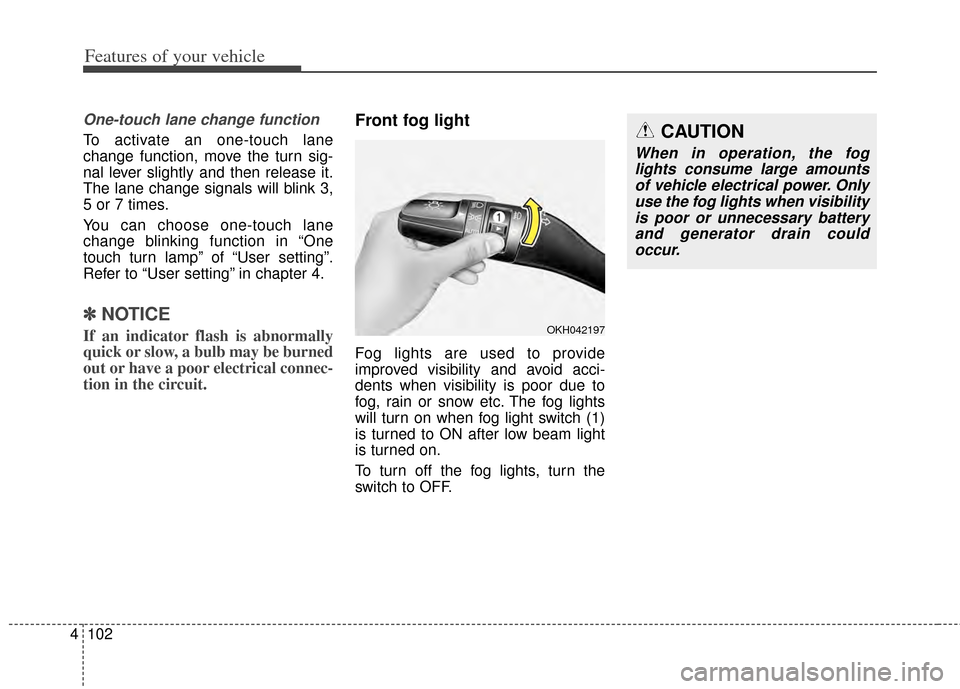
Fog lights are used to provide
improved visibility and avoid acci-
dents when visibility is poor due to
fog, rain or snow etc. The fog lights
will turn on when fog light switch (1)
is turned to ON after low beam light
is turned on.
To turn off the fog lights, turn the
switch to OFF.
OKH042197
CAUTION
When in operation, the fog
lights consume large amountsof vehicle electrical power. Onlyuse the fog lights when visibilityis poor or unnecessary batteryand generator drain couldoccur.
Page 175 of 415
4107
Features of your vehicle
INTERIOR LIGHT
Automatic turn off function
(if equipped)
The interior lights automatically turn
off approximately 20 minutes after
the ignition switch is turned off.
If your vehicle is equipped with the
theft alarm system, the interior lights
automatically turns off approximately
5 seconds after the system is armed
stage.
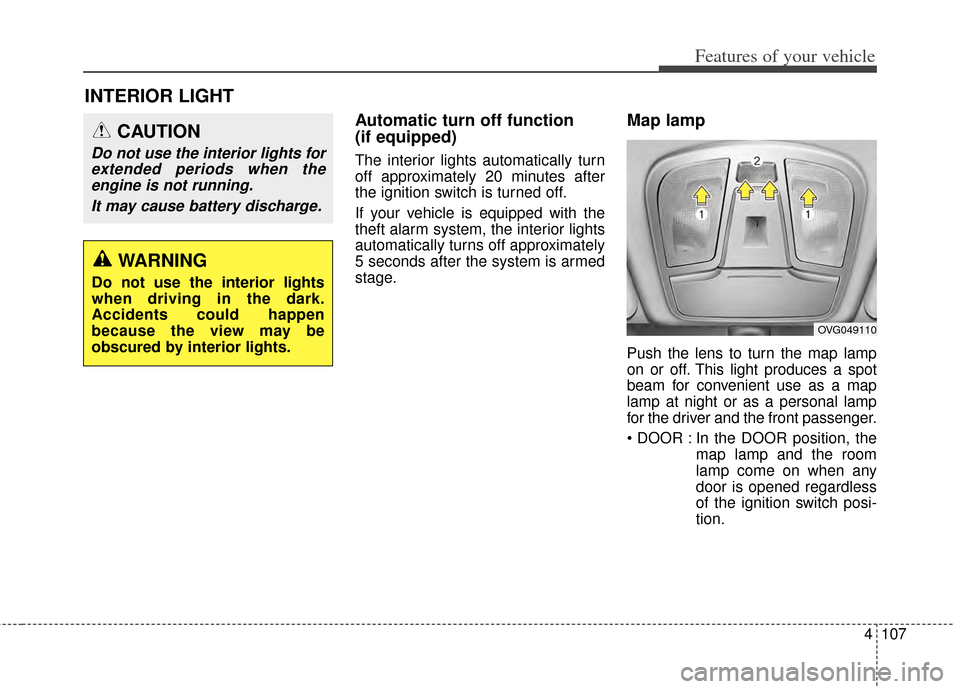
Map lamp
Push the lens to turn the map lamp
on or off. This light produces a spot
beam for convenient use as a map
lamp at night or as a personal lamp
for the driver and the front passenger.
In the DOOR position, themap lamp and the room
lamp come on when any
door is opened regardless
of the ignition switch posi-
tion.
CAUTION
Do not use the interior lights forextended periods when theengine is not running.
It may cause battery discharge.
OVG049110
WARNING
Do not use the interior lights
when driving in the dark.
Accidents could happen
because the view may be
obscured by interior lights.
Page 176 of 415

Features of your vehicle
108
4
When doors are unlocked by
the transmitter (or smart
key), the map lamp and the
room lamp come on for
approximately 30 seconds
as long as any door is not
open.
The map lamp and the room
lamp goes out gradually
after approximately 30 sec-
onds if the door is closed.
However, if the ignition
switch is ON or all doors are
locked, the map lamp and
the room lamp will turn off
immediately. If a door is
opened with the ignition
switch in the ACC or LOCK
position, the map lamp and
the room lamp stays on for
about 20 minutes. However,
if a door is opened with the
ignition switch in the ON
position, the map lamp and
the room lamp stays on con-
tinuously. : The lights turn off even if a
door is opened.
When the lamp is turned
ON by pressing the lens
(1), the lamp does not turn
off even if the switch (2) is
in the OFF position.
: The map lamp and the room lamp stay on at all times.Room lamp
To turn the room lamp push lens (3).
OVG049111
Page 177 of 415
4109
Features of your vehicle
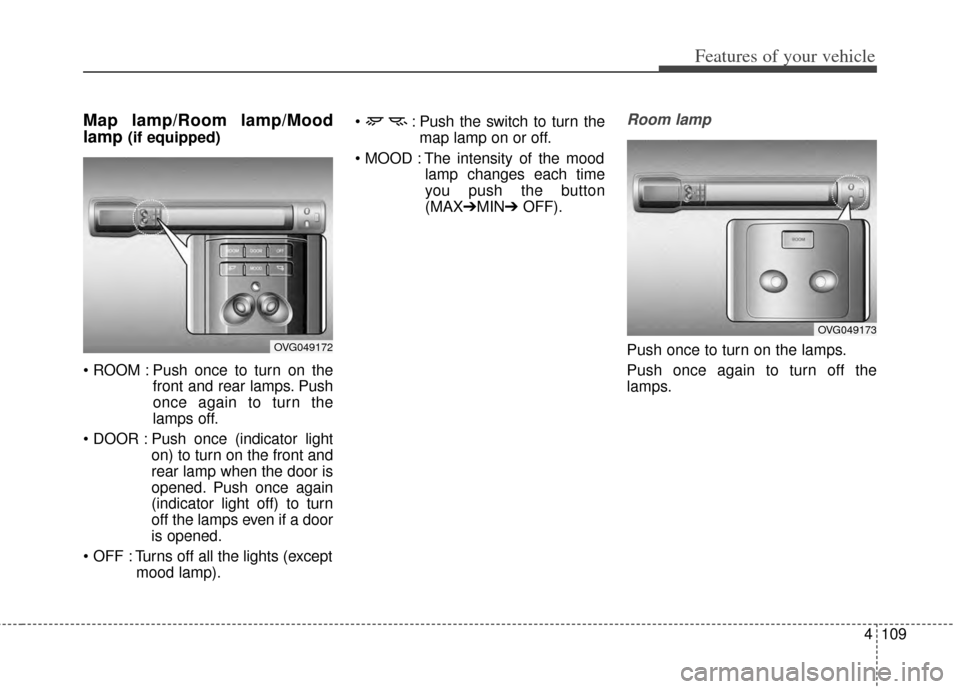
Map lamp/Room lamp/Mood
lamp
(if equipped)
Push once to turn on the front and rear lamps. Push
once again to turn the
lamps off.
Push once (indicator light on) to turn on the front and
rear lamp when the door is
opened. Push once again
(indicator light off) to turn
off the lamps even if a door
is opened.
Turns off all the lights (except mood lamp). : Push the switch to turn the
map lamp on or off.
The intensity of the mood lamp changes each time
you push the button
(MAX➔MIN➔ OFF).
Room lamp
Push once to turn on the lamps.
Push once again to turn off the
lamps.OVG049172
OVG049173
Page 213 of 415
Before entering vehicle
• Be sure that all windows, outsidemirror(s), and outside lights are
clean.
Check the condition of the tires.
Check under the vehicle for any sign of leaks.
Be sure there are no obstacles behind you if you intend to back up.
Necessary inspections
Fluid levels, such as engine oil,
engine coolant, brake fluid, and
washer fluid should be checked on a
regular basis, with the exact interval
depending on the fluid. Further
details are provided in Section 7,
“Maintenance”.
Before starting
Close and lock all doors.
Position the seat so that all con-trols are easily reached.
Buckle your seat belt.
Adjust the inside and outside rearview mirrors.
Be sure that all lights work.
Check all gauges.
Check the operation of warning lights when the ignition switch is
turned to the ON position.
Release the parking brake and make sure the brake warning light
goes off.
For safe operation, be sure you are
familiar with your vehicle and its
equipment.
BEFORE DRIVING
53
Driving your vehicle
WARNING - Distracted driving
Focus on the road while driving.
The driver's primary responsi-
bility is in the safe and legal
operation of the vehicle. Use of
any hand held devices, other
equipment or vehicle systems
that distract the driver should
not be used during vehicle
operation.
WARNING
- Check surrounding
Always check the surrounding
areas near your vehicle for peo-
ple, especially children, before
putting a vehicle into D (Drive)
or R (Reverse).
Page 216 of 415

Driving your vehicle
65
ACC(Accessory)
Press the ENGINE START/STOP
button while it is in the OFF position
without depressing the brake pedal.
The steering wheel unlocks and
electrical accessories are opera-
tional.
If the ENGINE START/STOP button
is in the ACC position for more than
1 hour, the button is turned off auto-
matically to prevent battery dis-
charge.
ON
Press the ENGINE START/STOP
button while it is in the ACC position
without depressing the brake pedal.
The warning lights can be checked
before the engine is started. Do not
leave the ENGINE START/STOP
button in the ON position for a long
time. The battery may discharge,
because the engine is not running.
START/RUN
To start the engine, depress the
brake pedal and press the ENGINE
START/STOP button with the shift
lever in the P (Park) or the N
(Nuetral) position. For your safety,
start the engine with the shift lever in
the P (Park) position.
If you press the ENGINE
START/STOP button without
depressing the brake pedal, the
engine will not start and the button
will change as follows:
OFF ➔ ACC ➔ON ➔OFF
OrangeRedNot illuminated