steering KIA CEED 2017 Service Manual
[x] Cancel search | Manufacturer: KIA, Model Year: 2017, Model line: CEED, Model: KIA CEED 2017Pages: 653, PDF Size: 54.59 MB
Page 206 of 653
Features of your vehicle
122
4
Static bending light (if equipped)
While driving the corner, for your sight
and safety, the static bending light turns
on automatically. The system will operate
automatically as follows:
When vehicle speed is under 10km/h
and steering wheel angle approximate-
ly 80 degrees.
When vehicle speed is over 10km/h and steering wheel angle approximate-
ly 35 degrees.
When the vehicle is at a standstill.
When moving rearwards with one of the above conditions satisfied the lights will light up the opposite direction. Lighting control
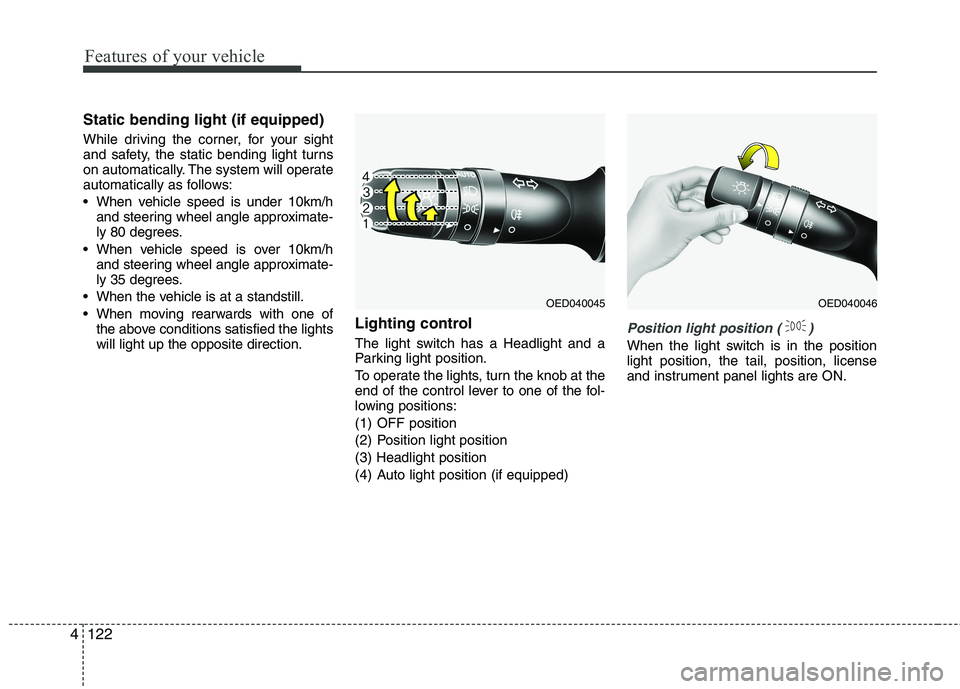
The light switch has a Headlight and a
Parking light position.
To operate the lights, turn the knob at the
end of the control lever to one of the fol-
lowing positions:
(1) OFF position
(2) Position light position(3) Headlight position
(4) Auto light position (if equipped)
Position light position ( )
When the light switch is in the position light position, the tail, position, license
and instrument panel lights are ON.
OED040045OED040046
Page 213 of 653

4129
Features of your vehicle
The higher the number of the switch is
positioned, the lower the headlight beam
level. Always keep the headlight beam at
the proper leveling position, or headlights
may dazzle other road users.
Listed below are the examples of proper
switch settings. For loading conditions
other than those listed below, adjust the
switch position so that the beam level
may be the nearest as the conditionobtained according to the list.Automatic type
It automatically adjusts the headlight
beam level according to the number of
passengers and loading weight in theluggage area.
And it offers proper headlight beam
under various conditions.Adaptive Front Lighting System (AFLS) (if equipped)
Adaptive front lighting system uses the
steering angle and vehicle speed, to
keep your field of vision wide by swiveling
and leveling the headlamp.
Change the switch to the AUTO position
when the engine is running. The adaptive
front lighting system will operate when
the headlamp is ON. To turn off the
AFLS, change the switch to other posi-
tions. After turning the AFLS off, head-
lamp swiveling no longer occurs, but lev-
eling operates continuously.
OYN049201
Loading condition Switch position
Driver only 0
Driver + Front passenger 0 Full passengers
(including driver) 1
Full passengers (including
driver) + Maximum permis-
sible loading 2
Driver + Maximum permis-
sible loading 3
WARNING
If it does not work properly even
though your car is inclined back-
ward according to passenger's
posture, or the headlight beam is
irradiated to the high or low posi-
tion, we recommend that the sys-
tem be inspected by an authorized
Kia dealer. Do not attempt to inspect or
replace the wiring yourself.
Page 270 of 653

Features of your vehicle
186
4 Steering wheel audio controls (If equipped)
The steering wheel may incorporate
audio control buttons.
VOLUME ( / ) (1)
• Press the lever upward ( ) to
increase the volume.
Press the lever downward ( ) to decrease the volume.
SEEK/PRESET ( / ) (2)
The SEEK/PRESET lever has differ- ent functions based on the system
mode. For the following functions the
lever should be pressed for 0.8 sec-
onds or more.
RADIO mode
It will function as the AUTO SEEK
select button.
CD/USB/ i Pod ®
mode
It will function as the FF/REW button.
If the SEEK/PRESET button is
pressed for less than 0.8 seconds, it
will work as follows in each mode. RADIO mode
It will function as the PRESET STA-
TION buttons.
CD/USB/ i Pod
®
mode
It will function as TRACK UP/DOWN
button.
MODE ( ) (3)
Press the button to change audio
source. FM ➟ AM ➟ CD ➟ USB/iPod ®
➟ AUX ➟
MY MUSIC ➟
Bluetooth®Wireless
Technology audio
MUTE ( ) (4, if equipped)
Press the button to mute the sound.
Press the button to turn off the microphone during a telephone call.
Detailed information for audio control
buttons are described in the followingpages in this section.
CAUTION
Do not operate audio remote control buttons simultaneously.
OUM044210L
■
Type A
■ Type B ■
Type C
■ Type D
Page 282 of 653
Features of your vehicle
198
4
✽✽
NOTICE - USING VOICE
COMMAND
The voice recognition feature of this product supports recognition
of the commands listed within this
user’s manual.
While using voice recognition, operating the steering remote con-
trol or the device will terminate
voice recognition and allow you to
manually operate desired func-
tions.
Position the microphone above the head of the driver’s seat. For supe-
rior performance, maintain good
posture when saying voice com-
mands. (Continued)(Continued)
Voice recognition may not func-
tion properly due to outside noise.
The following conditions can
affect the performance of Voice
Recognition:
-When the windows and sunroofare open
-When the heating/cooling system is on
-When passing a tunnel
-When driving on rugged and uneven roads
After downloading Bluetooth®
Wireless Technology phone book,
the system requires some times to
convert the phone book into voice
information. During this time,
voice recognition may not operate
properly.
Upon inputting your phone book, special symbols and numbers can-
not be recognized by voice. For
example, “# John Doe%&” will be
recognized as “John Doe”.
Page 308 of 653
Features of your vehicle
224
4 PHONE (If equipped)
Before using the
Bluetooth®Wireless
Technology
phone features
In order to use
Bluetooth®Wireless
Technology phone, you must first pair and connect the
Bluetooth®
Wireless Technology mobile
phone.
If the mobile phone is not paired or connected, it is not possible to
enter Phone mode. Once a phoneis paired or connected, the guid-
ance screen will be displayed.
If Priority is set upon vehicle igni- tion (IGN/ACC ON), the
Bluetooth®
Wireless Technology phone will be
automatically connected. Even if
you are outside, the
Bluetooth®
Wireless Technology phone will be
automatically connected once you
are in the vicinity of the vehicle. If
you do not want automatic
Bluetooth®Wireless Technology
phone connection, set the
Bluetooth®Wireless Technology
power to OFF. Making a call using the
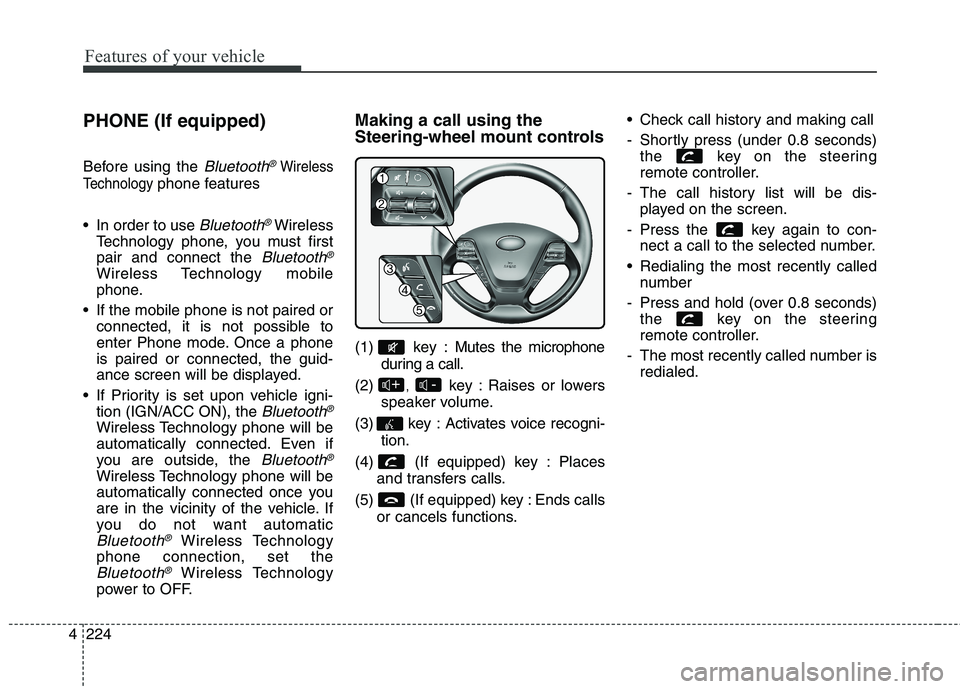
Steering-wheel mount controls
(1) key : Mutes the microphone
during a call.
(2) , key : Raises or lowers
speaker volume.
(3) key : Activates voice recogni- tion.
(4) (If equipped) key : Places and transfers calls.
(5) (If equipped) key : Ends calls or cancels functions. Check call history and making call
- Shortly press (under 0.8 seconds)
the key on the steering
remote controller.
- The call history list will be dis- played on the screen.
- Press the key again to con- nect a call to the selected number.
Redialing the most recently called number
- Press and hold (over 0.8 seconds) the key on the steering
remote controller.
- The most recently called number is redialed.
-+
Page 310 of 653
Features of your vehicle
226
4 VOICE COMMAND (If equipped)
Starting Voice Command
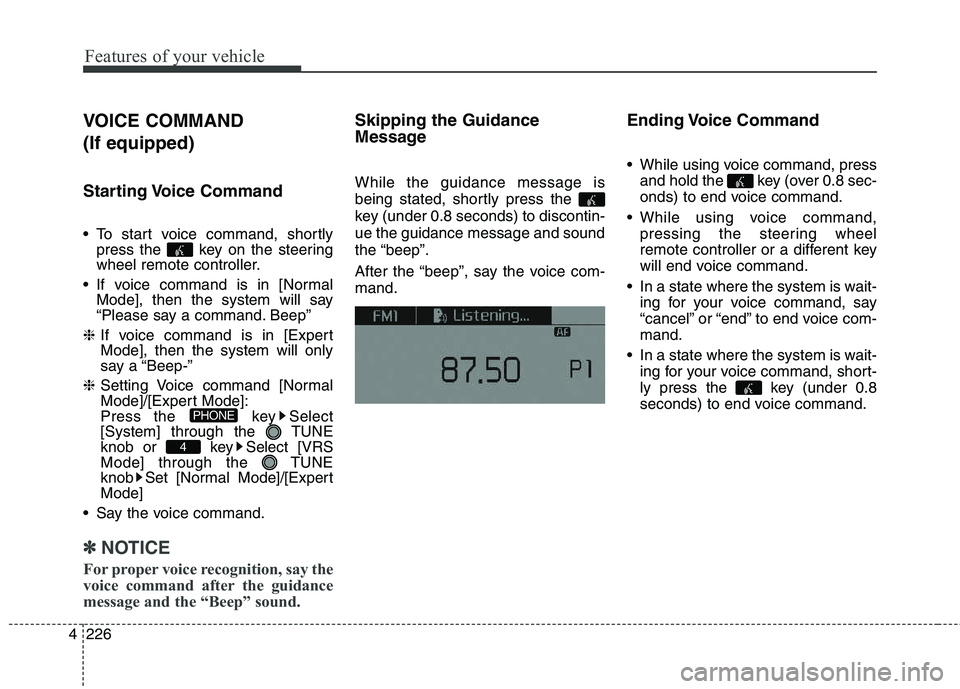
To start voice command, shortly
press the key on the steering
wheel remote controller.
If voice command is in [Normal Mode], then the system will say
“Please say a command. Beep”
❈ If voice command is in [Expert
Mode], then the system will only
say a “Beep-”
❈ Setting Voice command [Normal
Mode]/[Expert Mode]:
Press the key Select
[System] through the TUNE
knob or key Select [VRS
Mode] through the TUNE
knob Set [Normal Mode]/[ExpertMode]
Say the voice command.
✽✽ NOTICE
For proper voice recognition, say the
voice command after the guidance
message and the “Beep” sound.
Skipping the Guidance
Message While the guidance message is
being stated, shortly press the
key (under 0.8 seconds) to discontin-ue the guidance message and soundthe “beep”.
After the “beep”, say the voice com- mand. Ending Voice Command
While using voice command, press
and hold the key (over 0.8 sec-
onds) to end voice command.
While using voice command, pressing the steering wheel
remote controller or a different key
will end voice command.
In a state where the system is wait- ing for your voice command, say
“cancel” or “end” to end voice com-mand.
In a state where the system is wait- ing for your voice command, short-
ly press the key (under 0.8
seconds) to end voice command.
4
PHONE
Page 320 of 653

Features of your vehicle
236
4 Steering-wheel mount controls
(1) : Mutes the microphone dur-
ing a call.
(2) , : Used to control volume. (3) (If
equipped)
When pressed shortly (under 0.8 seconds)
- Starts voice recognition
- When selecting during a voice prompt, stops the prompt and con-
verts to voice command waitingstate
When pressed and held (over 0.8 seconds)
- Ends voice recognition (4)
When pressed shortly (under 0.8 sec- onds)
- When pressed in the phone screen, displays call history screen
- When pressed in the dial screen, makes a call
- When pressed in the incoming call screen, answers the call - When pressed during call waiting,
switches to waiting call (Call Waiting)
When pressed and held (over 0.8 seconds)
- When pressed in the
Bluetooth®
Wireless Technology Handsfree
wait mode, redials the last call
- When pressed during a
Bluetooth®
Wireless Technology Handsfree
call, switches call back to mobile
phone (Private)
- When pressed while calling on the mobile phone, switches call back to
Bluetooth®Wireless Technology
Handsfree (Operates only when
Bluetooth®Wireless Technology
Handsfree is connected)
(5) Ends phone call-+
Page 351 of 653

Features of your vehicle
4 267
Bluetooth®Wireless Technology
Pairing a
Bluetooth®Wireless
Technology Device What is
Bluetooth®Wireless
Technology Pairing?
Pairing refers to the process of syn-
chronizing your
Bluetooth®Wireless
Technology phone or device with the
car audio system for connection.
Pairing is necessary to connect anduse the
Bluetooth®Wireless
Technology feature. The Bluetooth ®
word mark and logos
are registered trademarks owned by
Bluetooth SIG, Inc. and any use of
such marks by Kia is under license.
Other trademarks and trade names
are those of their respective owners.A Bluetooth ®
enabled cell phone is
required to use
Bluetooth®Wireless
Technology. Pairing key
/ key
on the Steering Remote
Controller
When No Devices have been
Paired
1. Press the key or the key on the steering remote con-
troller. The following screen is dis-
played.
2. Press the button to enter the Pair Phone screen.PHONE
PHONEWARNING
Driving while distracted can
result in a loss of vehicle control
that may lead to an accident,
severe personal injury, and
death. The driver’s primary
responsibility is in the safe and
legal operation of a vehicle, and
use of any handheld devices,
other equipment, or vehicle sys-
tems which take the driver’s
eyes, attention and focus away
from the safe operation of a vehi-
cle or which are not permissible
by law should never be used dur-
ing operation of the vehicle.
Page 352 of 653

Features of your vehicle
268
4 (1) Device : Name of device as
shown when searching from your
Bluetooth®Wireless Technology
device
(2) Passkey : Passkey used to pair the device
3. From your
Bluetooth®Wireless
Technology device (i.e. Mobile
Phone), search and select yourcar audio system.
[Non SSP supported device]
(SSP: Secure Simple Pairing)
4. After a few moments, a screen is displayed where the passkey is entered.
Enter the passkey “0000” to pair
your
Bluetooth®Wireless
Technology device with the caraudio system. [SSP supported device]
4. After a few moments, a screen is dis-
played 6 digits passkey.
Check the passkey on your
Bluetooth®Wireless Technology
device and confirm.
5. Once pairing is complete, the fol- lowing screen is displayed.
Some phones (i.e., iPhone ®
, Android
and Blackberry phones) may offer an
option to allow acceptance of allfuture Bluetooth connection requests
by default." and "Visit http://www.kia.
com/#/bluetooth for additional infor-
mation on pairing your Bluetooth-
enabled mobile phone, and to view aphone compatibility list.
✽✽ NOTICE
If Bluetooth ®
Wireless Technology
devices are paired but none are cur-
rently connected, pressing the key or the key on the
steering wheel displays the following
screen. Press the [Pair] button to
pair a new device or press the
[Connect] to connect a previously
paired device.
PHONE
Page 360 of 653

Features of your vehicle
276
4 VOICE RECOGNITION (If equipped)
Using Voice Recognition
Starting Voice Recognition
Shortly press the key on the
steering wheel Say a command.
If voice recognition is in [Normal
Mode], then the system will say
“Please say a command. Beep~”
If voice recognition is in [Expert
Mode], then the system will only
say a “Beep~”
To change the Normal Mode/Expert Mode setting, go to [System] [Voice Recognition
System].
✽✽ NOTICE
For proper recognition, say the com-
mand after the voice insttction and
beep tone.
Phonebook List Best Practice
1) Do not store single-name entries (e.g., “Bob”, “Mom”, “Kim”, etc.).
Instead, always use full names
(including first and last names) for
phonebook (e.g., use “Jacob
Stevenson” instead of “Dad”).
2) Do not use abbreviations (i.e., use “Lieutenant” instead of “Lt.” or
“Sergeant” instead of “Sgt.”).
3) Do not use acronyms (i.e., use “County Finance Department”
instead of “CFD”).
4) Do not use special characters (e.g., “@”, “hyphen -”, “asterisk *”,ampersand &”).
5) If a name is not recognized from the phonebook, change it to a
more descriptive name (e.g., use
“Grandpa Joseph” instead of “PaJoe”).