wheel KIA RIO 2021 User Guide
[x] Cancel search | Manufacturer: KIA, Model Year: 2021, Model line: RIO, Model: KIA RIO 2021Pages: 534, PDF Size: 13.49 MB
Page 70 of 534
351
Safety features of your vehicle
Advanced air bags are combined
with pre-tensioner seat belts to help
provide enhanced occupant protec-
tion in frontal crashes. Front air bags
are not intended to deploy in colli-
sions in which sufficient protection
can be provided by the pre-tensioner
seat belt alone.
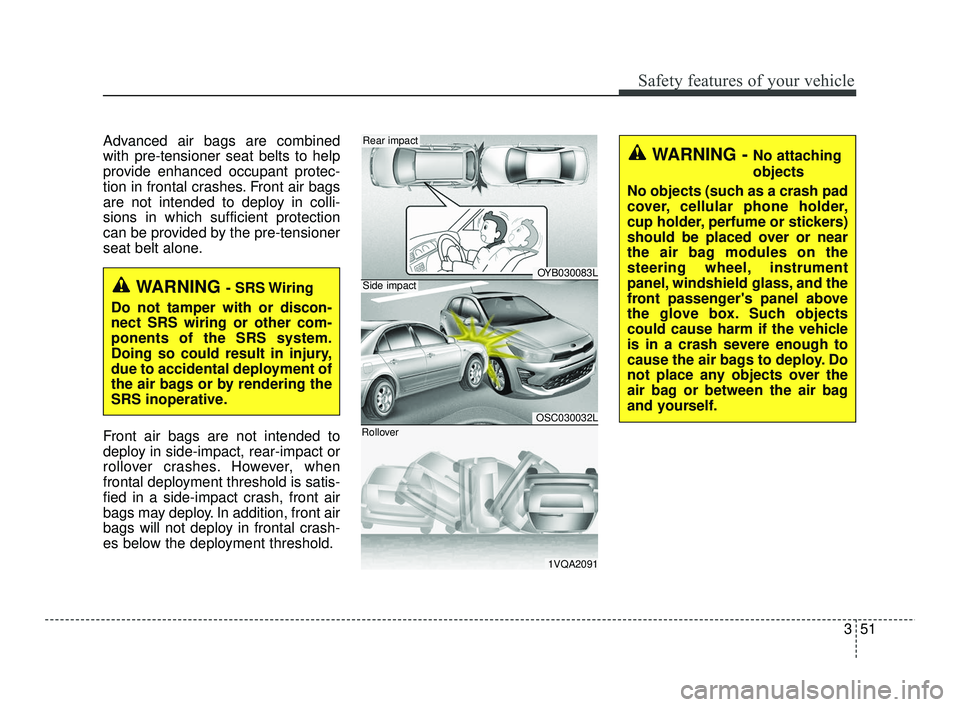
Front air bags are not intended to
deploy in side-impact, rear-impact or
rollover crashes. However, when
frontal deployment threshold is satis-
fied in a side-impact crash, front air
bags may deploy. In addition, front air
bags will not deploy in frontal crash-
es below the deployment threshold.
WARNING - SRS Wiring
Do not tamper with or discon-
nect SRS wiring or other com-
ponents of the SRS system.
Doing so could result in injury,
due to accidental deployment of
the air bags or by rendering the
SRS inoperative.
OYB030083L
OSC030032L
1VQA2091
Side impact
Rear impact
Rollover
WARNING - No attaching
objects
No objects (such as a crash pad
cover, cellular phone holder,
cup holder, perfume or stickers)
should be placed over or near
the air bag modules on the
steering wheel, instrument
panel, windshield glass, and the
front passenger's panel above
the glove box. Such objects
could cause harm if the vehicle
is in a crash severe enough to
cause the air bags to deploy. Do
not place any objects over the
air bag or between the air bag
and yourself.
SC PE USA 3.QXP 10/23/2020 5:36 PM Page 51
Page 72 of 534
353
Safety features of your vehicle
The side air bag is supplemental to
the driver's and the passenger's seat
belt systems and is not a substitute
for them. Therefore your seat belts
must be worn at all times while the
vehicle is in operation.
For best protection from the side air
bag system and to avoid being
injured by the deploying side air bag,
both front seat occupants should sit
in an upright position with the seat
belt properly fastened. The driver's
hands should be placed on the steer-
ing wheel at the 9:00 and 3:00 posi-
tions. The passenger's arms and
hands should be placed on their laps.If the seat or seat cover is damaged,
have the vehicle checked and
repaired by an authorized Kia dealer.
Inform that your vehicle is equipped
with side air bags and an occupant
detection system.
WARNING - Unexpected
deployment
Avoid impact to the side air bag
sensor when the ignition switch
is ON to prevent unexpected
deployment of the side air bag.WARNING - Deployment
Do not install any accessories
including seat covers, on the
side or near the side air bag as
this may affect the deployment
of the side air bags.
WARNING - Flying objects
Do not place any objects (an
umbrella, bag, etc.) between the
front door and the front seat.
Such objects may become dan-
gerous projectiles if the side air
bag inflates.
WARNING - No attaching
objects
Do not place any objects over the air bag or between the air
bag and yourself. Also, do not
attach any objects around the
area in which the air bag
inflates such as the door, side
door glass, front and rear pillar.
Do not place any objects between the door and the
seat. They may become dan-
gerous projectiles if the side
air bag inflates.
Do not install any accessories on the side or near the side air
bags.
Do not hang heavy items on the coat hooks for safety rea-
sons.
(Continued)
SC PE USA 3.QXP 10/23/2020 5:36 PM Page 53
Page 80 of 534
361
Safety features of your vehicle
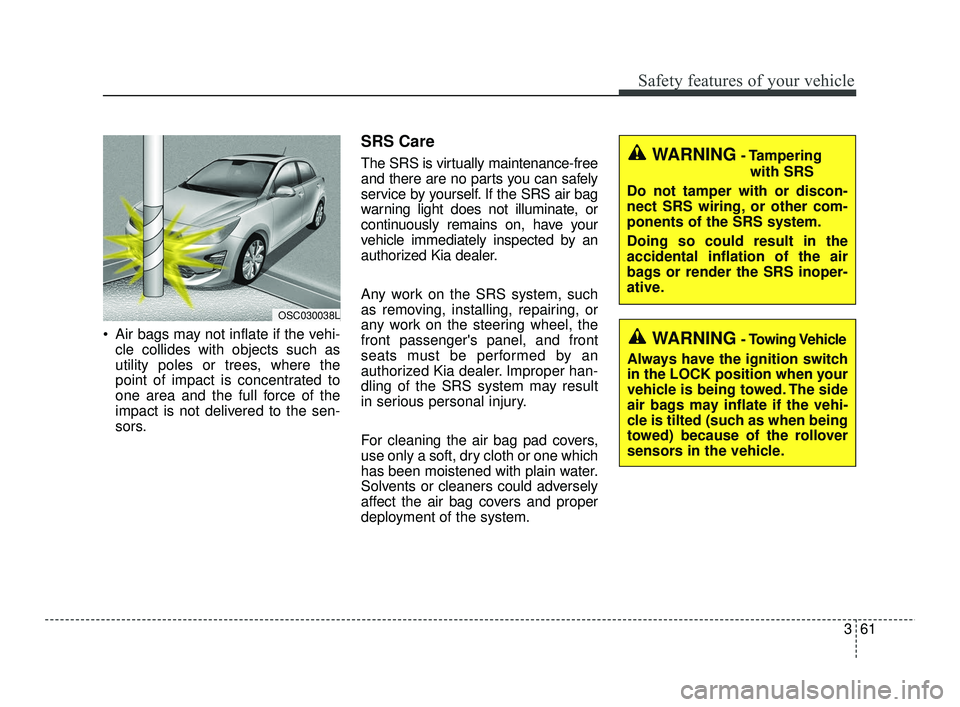
Air bags may not inflate if the vehi-cle collides with objects such as
utility poles or trees, where the
point of impact is concentrated to
one area and the full force of the
impact is not delivered to the sen-
sors.
SRS Care
The SRS is virtually maintenance-free
and there are no parts you can safely
service by yourself. If the SRS air bag
warning light does not illuminate, or
continuously remains on, have your
vehicle immediately inspected by an
authorized Kia dealer.
Any work on the SRS system, such
as removing, installing, repairing, or
any work on the steering wheel, the
front passenger's panel, and front
seats must be performed by an
authorized Kia dealer. Improper han-
dling of the SRS system may result
in serious personal injury.
For cleaning the air bag pad covers,
use only a soft, dry cloth or one which
has been moistened with plain water.
Solvents or cleaners could adversely
affect the air bag covers and proper
deployment of the system.
OSC030038L
WARNING- Tampering
with SRS
Do not tamper with or discon-
nect SRS wiring, or other com-
ponents of the SRS system.
Doing so could result in the
accidental inflation of the air
bags or render the SRS inoper-
ative.
WARNING- Towing Vehicle
Always have the ignition switch
in the LOCK position when your
vehicle is being towed. The side
air bags may inflate if the vehi-
cle is tilted (such as when being
towed) because of the rollover
sensors in the vehicle.
SC PE USA 3.QXP 10/23/2020 5:37 PM Page 61
Page 82 of 534

Features of your vehicle
Keys . . . . . . . . . . . . . . . . . . . . . . . . . . . . . . . . . . . . \
. . 4-4
• Record your key number . . . . . . . . . . . . . . . . . . . . . . . 4-4
• Key operations . . . . . . . . . . . . . . . . . . . . . . . . . . . . . . . . 4-4
• Remote keyless entry system operations . . . . . . . . . . . 4-5
• Transmitter precautions . . . . . . . . . . . . . . . . . . . . . . . . 4-7
• Battery replacement . . . . . . . . . . . . . . . . . . . . . . . . . . . 4-8
• Immobilizer system . . . . . . . . . . . . . . . . . . . . . . . . . . . . 4-9
Smart key . . . . . . . . . . . . . . . . . . . . . . . . . . . . . . . . 4-11
• Smart key functions. . . . . . . . . . . . . . . . . . . . . . . . . . . 4-11
• Smart key precautions . . . . . . . . . . . . . . . . . . . . . . . . 4-13
• Smart key immobilizer system . . . . . . . . . . . . . . . . . . 4-14
Theft-alarm system . . . . . . . . . . . . . . . . . . . . . . . . 4-15
• Armed stage . . . . . . . . . . . . . . . . . . . . . . . . . . . . . . . . . 4-15
• Theft-alarm stage . . . . . . . . . . . . . . . . . . . . . . . . . . . . 4-16
• Disarmed stage. . . . . . . . . . . . . . . . . . . . . . . . . . . . . . . 4-17
Door locks . . . . . . . . . . . . . . . . . . . . . . . . . . . . . . . . 4-18
• Operating door locks from outside the vehicle . . . . 4-18
• Operating door locks from inside the vehicle . . . . . . 4-19
• Impact sensing door unlock system . . . . . . . . . . . . . . 4-21
• Auto door lock/unlock feature . . . . . . . . . . . . . . . . . . 4-21
• Speed sensing door lock system . . . . . . . . . . . . . . . . . 4-21
• Child-protector rear door lock. . . . . . . . . . . . . . . . . . 4-22
• Rear Occupant Alert (ROA) system . . . . . . . . . . . . . 4-22
Trunk (for 4 door) . . . . . . . . . . . . . . . . . . . . . . . . . 4-24
• Opening the trunk . . . . . . . . . . . . . . . . . . . . . . . . . . . . 4-24
• Closing the trunk . . . . . . . . . . . . . . . . . . . . . . . . . . . . . 4-24
• Emergency trunk safety release . . . . . . . . . . . . . . . . . 4-25
Smart trunk release (4 door). . . . . . . . . . . . . . . . . 4-26
Liftgate (for 5 door) . . . . . . . . . . . . . . . . . . . . . . . . 4-30
• Opening the liftgate . . . . . . . . . . . . . . . . . . . . . . . . . . . 4-30
• Closing the liftgate. . . . . . . . . . . . . . . . . . . . . . . . . . . . 4-30
• Emergency liftgate safety release. . . . . . . . . . . . . . . . 4-31
Windows . . . . . . . . . . . . . . . . . . . . . . . . . . . . . . . . . 4-33
• Power windows . . . . . . . . . . . . . . . . . . . . . . . . . . . . . . 4-34
• Manual windows . . . . . . . . . . . . . . . . . . . . . . . . . . . . . 4-38
Hood. . . . . . . . . . . . . . . . . . . . . . . . . . . . . . . . . . . . \
. 4-39
• Opening the hood . . . . . . . . . . . . . . . . . . . . . . . . . . . . 4-39
• Closing the hood . . . . . . . . . . . . . . . . . . . . . . . . . . . . . 4-40
• Hood open warning . . . . . . . . . . . . . . . . . . . . . . . . . . . 4-40
Fuel filler door . . . . . . . . . . . . . . . . . . . . . . . . . . . . 4-42
• Opening the fuel filler door . . . . . . . . . . . . . . . . . . . . 4-42
• Closing the fuel filler door . . . . . . . . . . . . . . . . . . . . . 4-43
Steering wheel . . . . . . . . . . . . . . . . . . . . . . . . . . . . . 4-45
• Electric power steering (EPS) . . . . . . . . . . . . . . . . . . 4-45
• Tilt steering . . . . . . . . . . . . . . . . . . . . . . . . . . . . . . . . . 4-46
• Horn . . . . . . . . . . . . . . . . . . . . . . . . . . . . . . . . . . . . \
. . . 4-47
4
SC PE USA 4.QXP 10/23/2020 5:39 PM Page 1
Page 104 of 534
423
Features of your vehicle
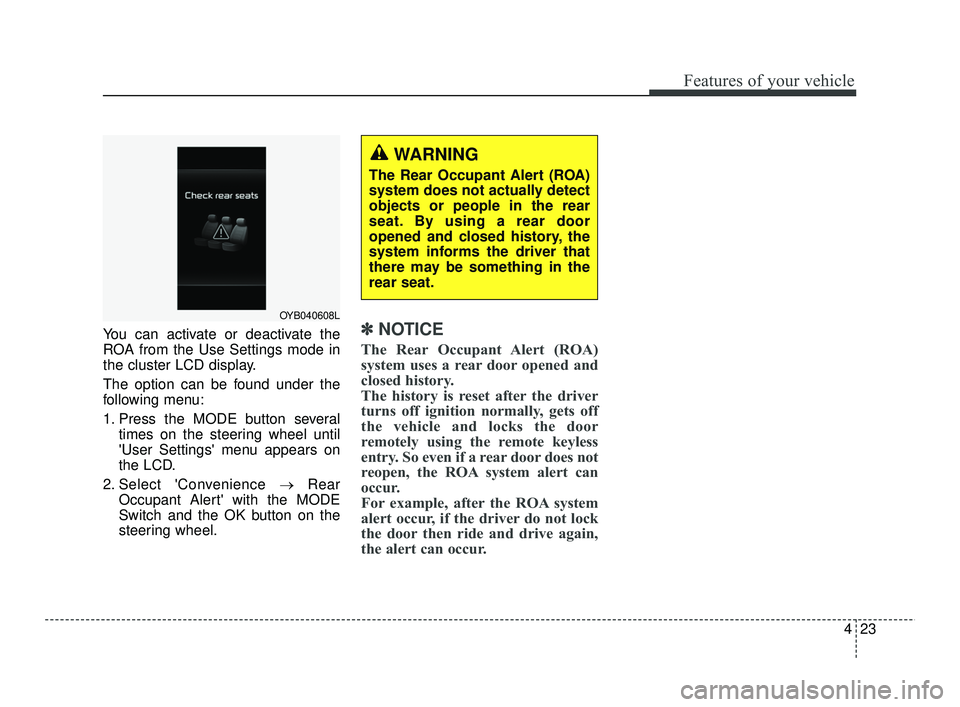
You can activate or deactivate the
ROA from the Use Settings mode in
the cluster LCD display.
The option can be found under the
following menu:
1. Press the MODE button severaltimes on the steering wheel until
'User Settings' menu appears on
the LCD.
2. Select 'Convenience →Rear
Occupant Alert' with the MODE
Switch and the OK button on the
steering wheel.✽ ✽ NOTICE
The Rear Occupant Alert (ROA)
system uses a rear door opened and
closed history.
The history is reset after the driver
turns off ignition normally, gets off
the vehicle and locks the door
remotely using the remote keyless
entry. So even if a rear door does not
reopen, the ROA system alert can
occur.
For example, after the ROA system
alert occur, if the driver do not lock
the door then ride and drive again,
the alert can occur.
OYB040608L
WARNING
The Rear Occupant Alert (ROA)
system does not actually detect
objects or people in the rear
seat. By using a rear door
opened and closed history, the
system informs the driver that
there may be something in the
rear seat.
SC PE USA 4.QXP 10/23/2020 5:40 PM Page 23
Page 126 of 534
445
Features of your vehicle
Electric power steering (EPS)
Power steering uses a motor to
assist you in steering the vehicle. If
the engine is off or if the power steer-
ing system becomes inoperative, the
vehicle may still be steered, but it will
require increased steering effort.
The electric power steering is con-
trolled by the power steering control
unit which senses the steering wheel
torque and vehicle speed to com-
mand the motor.
The steering wheel becomes heavier
as the vehicle’s speed increases and
becomes lighter as the vehicle’s
speed decreases for better control of
the steering wheel.
Should you notice any change in the
effort required to steer during normal
vehicle operation, have the power
steering checked by an authorized
Kia dealer.
✽ ✽NOTICE
The following symptoms may occur
during normal vehicle operation:
• The EPS warning light does not
illuminate.
• The steering effort is increased immediately after turning the igni-
tion switch or ENGINE
START/STOP button to the ON
position. This happens as the sys-
tem performs the EPS system
diagnostics. When the diagnostics
are completed, the steering wheel
will return to its normal condition
• A click noise may be heard from the EPS relay after the ignition
switch is turned to the ON or
LOCK position or ENGINE
START/STOP button to the ON or
OFF position.
• Motor noise may be heard when the vehicle is at a stop or at a low
driving speed. (Continued)(Continued)
• When abnormality is detected in
the electric power steering system,
to prevent a deadly accident, the
steering assist function will stop.
At this time, the warning light
turns on or blinks on the cluster.
The steering wheel may become
difficult to control or operate.
Have your vehicle checked imme-
diately, after moving the vehicle to
a safe zone.
• The steering effort increases if the steering wheel is rotated continu-
ously when the vehicle is not in
motion. However, after a few min-
utes, it will return to its normal
condition.
• When you operate the steering wheel in low temperature, noise
may occur. If the temperature
rises, the noise will likely disap-
pear. This is a normal condition.
• When the charging system warn- ing light comes on or the battery
voltage is low (when the alternator
or battery does not operate nor-
mally), the steering wheel may get
heavy and become difficult to con-
trol or operate abnormally.
STEERING WHEEL
SC PE USA 4.QXP 10/23/2020 5:41 PM Page 45
Page 127 of 534
Features of your vehicle
46
4
If the Electric Power Steering System
does not operate normally, the warn-
ing light will illuminate on the instru-
ment cluster. The steering wheel may
require increased steering effort.
Take your vehicle to an authorized
Kia dealer and have the vehicle
checked as soon as possible.Tilt steering (if equipped)
Tilt steering allows you to adjust the
steering wheel before you drive. You
can also raise it to give your legs
more room when you exit and enter
the vehicle.
The steering wheel should be posi-
tioned so that it is comfortable for
you to drive, while permitting you to
see the instrument panel warning
lights and gauges.
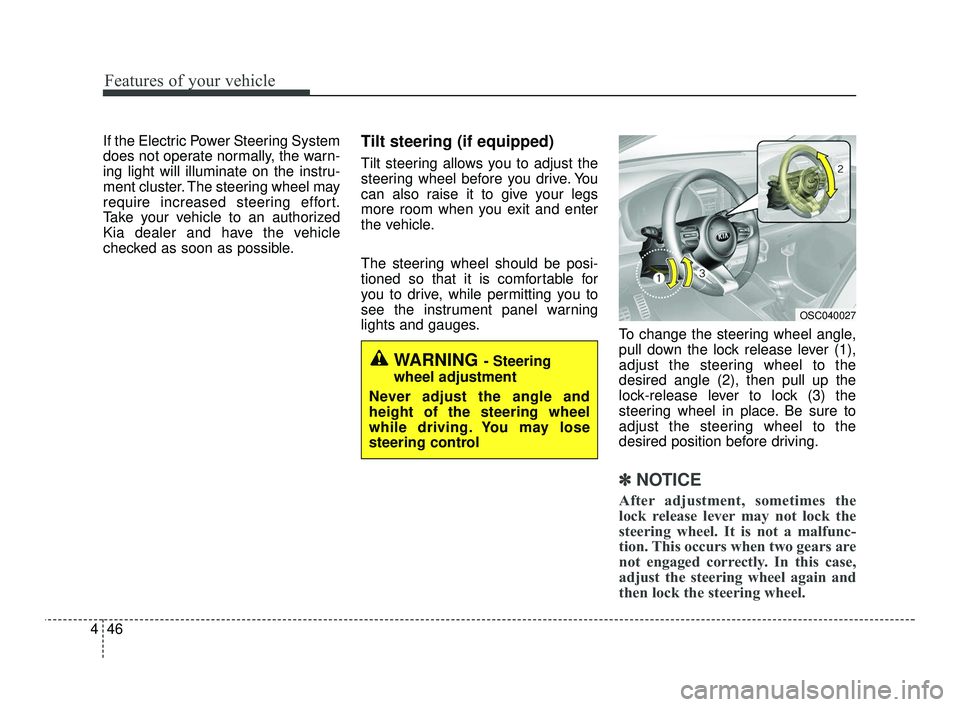
To change the steering wheel angle,
pull down the lock release lever (1),
adjust the steering wheel to the
desired angle (2), then pull up the
lock-release lever to lock (3) the
steering wheel in place. Be sure to
adjust the steering wheel to the
desired position before driving.
✽ ✽NOTICE
After adjustment, sometimes the
lock release lever may not lock the
steering wheel. It is not a malfunc-
tion. This occurs when two gears are
not engaged correctly. In this case,
adjust the steering wheel again and
then lock the steering wheel.
WARNING - Steering
wheel adjustment
Never adjust the angle and
height of the steering wheel
while driving. You may lose
steering control
OSC040027
SC PE USA 4.QXP 10/23/2020 5:41 PM Page 46
Page 128 of 534
447
Features of your vehicle
Horn
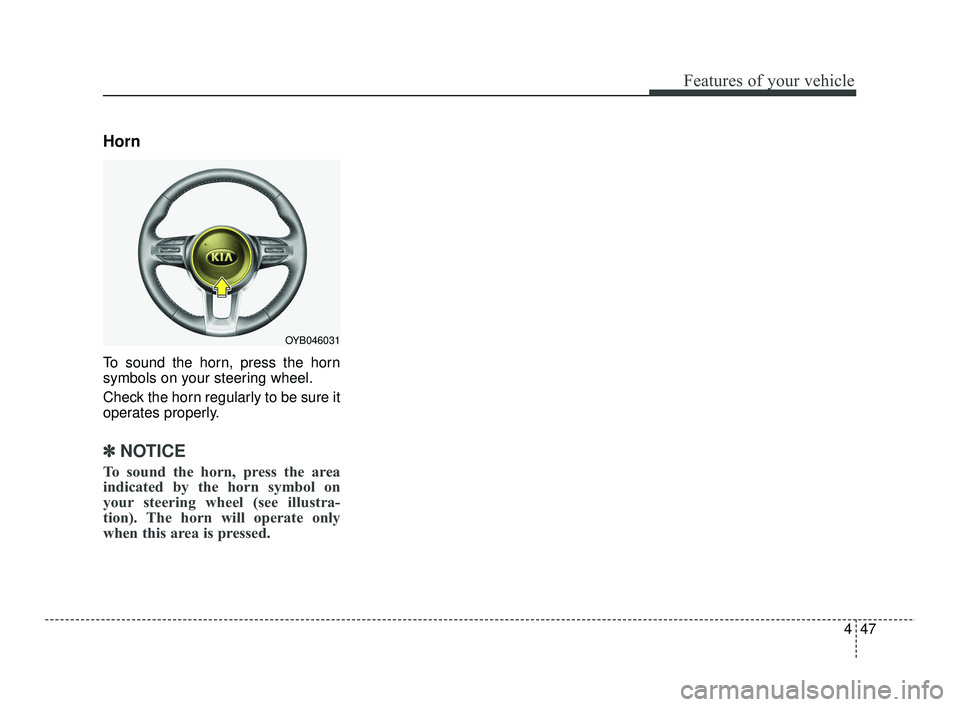
To sound the horn, press the horn
symbols on your steering wheel.
Check the horn regularly to be sure it
operates properly.
✽ ✽
NOTICE
To sound the horn, press the area
indicated by the horn symbol on
your steering wheel (see illustra-
tion). The horn will operate only
when this area is pressed.
OYB046031
SC PE USA 4.QXP 10/23/2020 5:41 PM Page 47
Page 133 of 534

Features of your vehicle
52
4
Instrument Cluster Control
Adjusting Instrument Cluster
Illumination
The instrument panel illumination
intensity can be adjusted by pressing
the control switch with the headlight
switch in any position when the igni-
tion switch or ENGINE
START/STOP button is in the ON
position. If you hold the illumination control
button (“+” or “-”), the brightness
will be changed continuously.
If the brightness reaches the maxi- mum or minimum level, an alarm
will sound.
LCD Display Control
The LCD Display modes can be
changed by using the control buttons
on the steering wheel.
OYB046035
OJA040571L
OSC047127N
■ Type A
■ Type B
OJA040482
OJA040037
■ Type A
■ Type B
SC PE USA 4.QXP 10/23/2020 5:42 PM Page 52
Page 141 of 534
Features of your vehicle
60
4
Fuel Economy
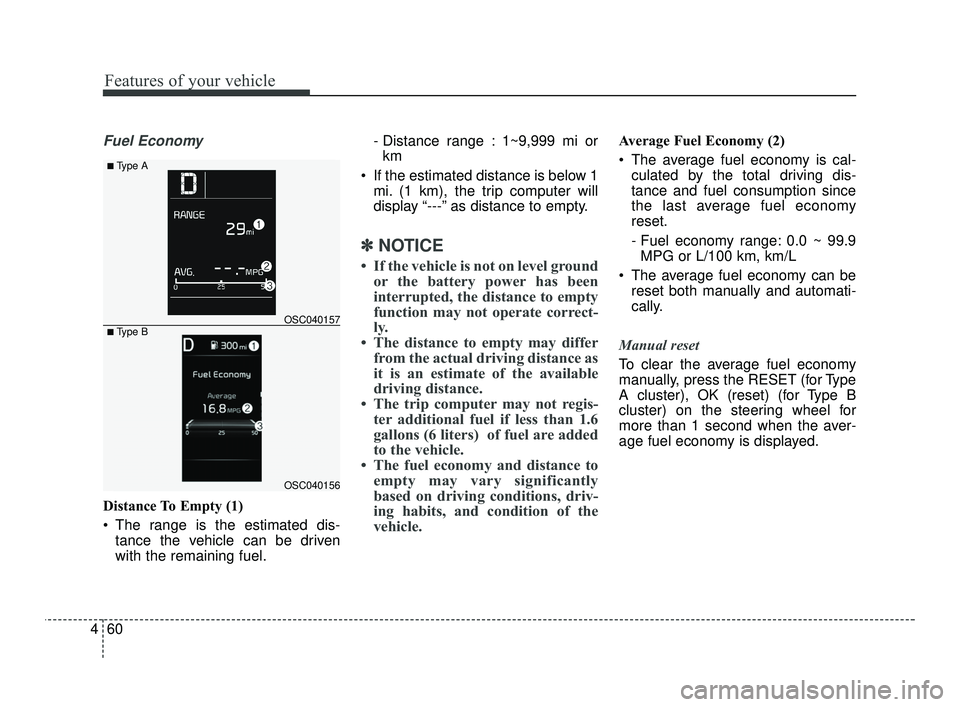
Distance To Empty (1)
The range is the estimated dis-
tance the vehicle can be driven
with the remaining fuel. - Distance range : 1~9,999 mi or
km
If the estimated distance is below 1 mi. (1 km), the trip computer will
display “---” as distance to empty.
✽ ✽ NOTICE
• If the vehicle is not on level ground
or the battery power has been
interrupted, the distance to empty
function may not operate correct-
ly.
• The distance to empty may differ from the actual driving distance as
it is an estimate of the available
driving distance.
• The trip computer may not regis- ter additional fuel if less than 1.6
gallons (6 liters) of fuel are added
to the vehicle.
• The fuel economy and distance to empty may vary significantly
based on driving conditions, driv-
ing habits, and condition of the
vehicle.
Average Fuel Economy (2)
The average fuel economy is cal-
culated by the total driving dis-
tance and fuel consumption since
the last average fuel economy
reset.
- Fuel economy range: 0.0 ~ 99.9MPG or L/100 km, km/L
The average fuel economy can be reset both manually and automati-
cally.
Manual reset
To clear the average fuel economy
manually, press the RESET (for Type
A cluster), OK (reset) (for Type B
cluster) on the steering wheel for
more than 1 second when the aver-
age fuel economy is displayed.
OSC040156
OSC040157
■ Type A
■ Type B
SC PE USA 4.QXP 10/23/2020 5:43 PM Page 60