key KIA SOUL 2019 Service Manual
[x] Cancel search | Manufacturer: KIA, Model Year: 2019, Model line: SOUL, Model: KIA SOUL 2019Pages: 564, PDF Size: 14.2 MB
Page 278 of 564
Audio system
540
✽ ✽NOTICE
• Only supported contacts format
can be downloaded and displayed
from the Bluetooth
®Wireless
device, contacts from some appli-
cations will not be included.
• Up to 2,000 contacts can be saved.
• In some cases, additional confir- mation from your Bluetooth
®
Wireless Technology device is nec-
essary when downloading con-
tacts. If downloading of contacts is
unsuccessful, consult your
Bluetooth
®Wireless Technology
device's settings or the audio
screen to approve the download.
• Contacts without phone numbers are not displayed.
Dial
Press the [PHONE] button on the
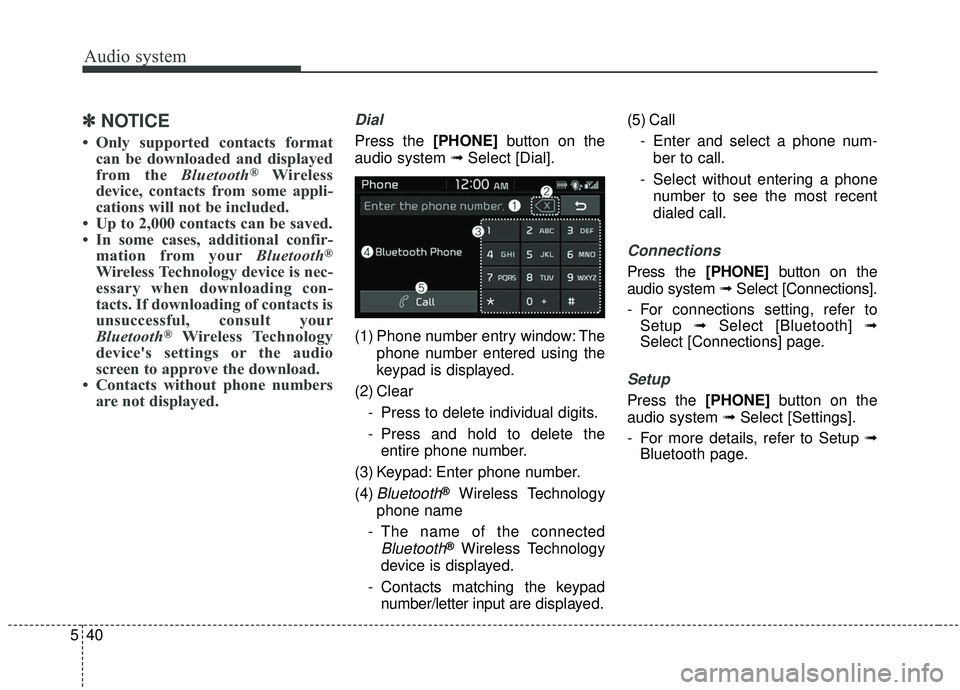
audio system ➟ Select [Dial].
(1) Phone number entry window: The phone number entered using the
keypad is displayed.
(2) Clear - Press to delete individual digits.
- Press and hold to delete theentire phone number.
(3) Keypad: Enter phone number.
(4)
Bluetooth®Wireless Technology
phone name
- The name of the connected
Bluetooth®Wireless Technology
device is displayed.
- Contacts matching the keypad number/letter input are displayed.(5) Call
- Enter and select a phone num-ber to call.
- Select without entering a phone number to see the most recent
dialed call.
Connections
Press the [PHONE] button on the
audio system ➟ Select [Connections].
- For connections setting, refer to Setup ➟Select [Bluetooth] ➟
Select [Connections] page.
Setup
Press the [PHONE] button on the
audio system ➟ Select [Settings].
- For more details, refer to Setup ➟ Bluetooth page.
Page 291 of 564
Driving your vehicle
• Be sure the exhaust system does not leak . . . . . . . . . . 6-3
Before driving . . . . . . . . . . . . . . . . . . . . . . . . . . . . . . 6-4
. . . . . . . . . . . . . . . . . . . . . . . . . 6-4
. . . . . . . . . . . . . . . . . . . . . . . . . . 6-4
. . . . . . . . . . . . . . . . . . . . . . . . . . . . . . . . 6-4
Key positions . . . . . . . . . . . . . . . . . . . . . . . . . . . . . . . 6-6
. . . . . . . . . . . . . . . . . . . . . . 6-6
. . . . . . . . . . . . . . . . . . . . . . . . . 6-6
. . . . . . . . . . . . . . . . . . . . . . . . . . . . 6-7
Engine start/stop button . . . . . . . . . . . . . . . . . . . . . 6-9
. . . . . . . . . . . . . . 6-9
position. . . . . . . . . . . . . . . . . 6-9
. . . . . . . . . . . . 6-11
Manual transaxle . . . . . . . . . . . . . . . . . . . . . . . . . . 6-14
. . . . . . . . . . . . . . . . . . . . 6-14
. . . . . . . . . . . . . . . . . . . . . . . . 6-17
Automatic transaxle . . . . . . . . . . . . . . . . . . . . . . . . 6-19
. . . . . . . . . . . . . . . . . . 6-19
. . . . . . . . . . . . . . . . . . . . . . . . 6-25
Dual Clutch Transmission (DCT) . . . . . . . . . . . . . 6-26
. . . . . . . . . . . . . . 6-26
. . . . . . . . . . . . . . . . . . . . . . . . 6-35
Brake system . . . . . . . . . . . . . . . . . . . . . . . . . . . . . . 6-37
. . . . . . . . . . . . . . . . . . . . . . . . . . . . . . . . 6-37
. . . . . . . . . . . . . . 6-43
. . . . . . . . . . . . 6-47
. . . . . . . . . . . . . . . . . 6-48
Autonomous Emergency Braking (AEB) . . . . . . . 6-50
. . . . . . . . . . . . . . . . . . . 6-50
. . . . . . . . . . . . . . . . . . . . . . . . . . . . . . 6-54
(Front radar) . . . . . . . . . . . . . . . . . . . . . . . . . . . . . . . 6-55
. . . . . . . . . . . . . . . . . . . . . . . . . . . 6-56
. . . . . . . . . . . . . . . . . . . . . . 6-58
Cruise control system. . . . . . . . . . . . . . . . . . . . . . . 6-64
. . . . . . . . . . . . . . . . . . . . . . . . . 6-65
. . . . . . . . . . . . . . . . . . . . . 6-65
. . . . . . . . . . . . . . . . . . 6-66
. . 6-66
. . . . . . . . . . . . . . . . . . . . . . . 6-67
approximately 30 km/h (20 mph) . . . . . . . . . . . . . . 6-67
. . . . . . . . . . . . . . . . . . . . . . . 6-68
Smart Cruise Control system (SCC) . . . . . . . . . . 6-69
. . . . . . . . . 6-75
6
Page 296 of 564
Driving your vehicle
66
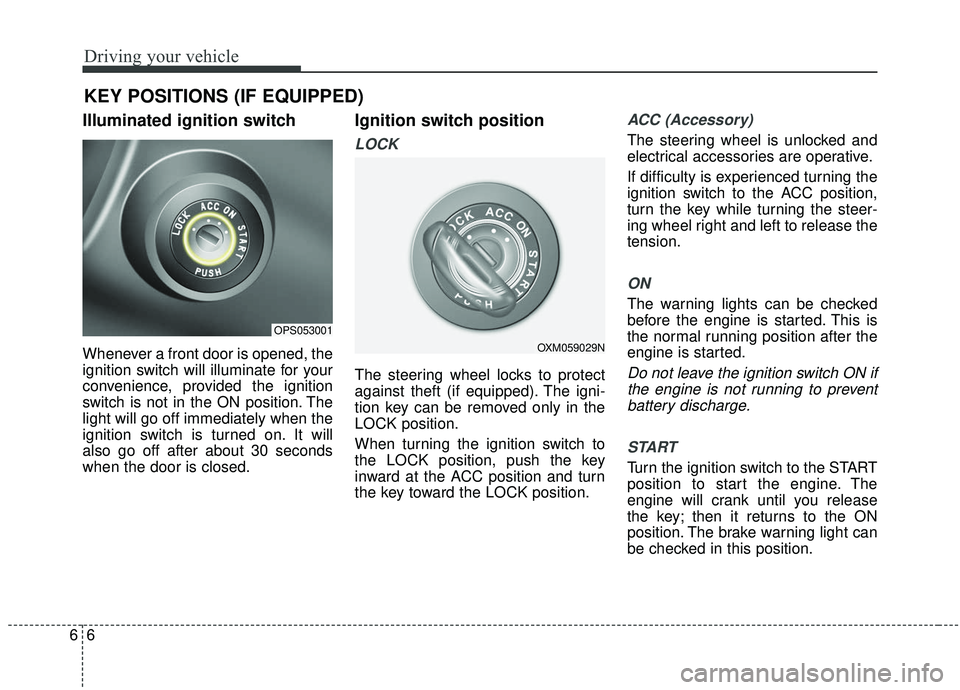
Illuminated ignition switch
Whenever a front door is opened, the
ignition switch will illuminate for your
convenience, provided the ignition
switch is not in the ON position. The
light will go off immediately when the
ignition switch is turned on. It will
also go off after about 30 seconds
when the door is closed.
Ignition switch position
LOCK
The steering wheel locks to protect
against theft (if equipped). The igni-
tion key can be removed only in the
LOCK position.
When turning the ignition switch to
the LOCK position, push the key
inward at the ACC position and turn
the key toward the LOCK position.
ACC (Accessory)
The steering wheel is unlocked and
electrical accessories are operative.
If difficulty is experienced turning the
ignition switch to the ACC position,
turn the key while turning the steer-
ing wheel right and left to release the
tension.
ON
The warning lights can be checked
before the engine is started. This is
the normal running position after the
engine is started.
Do not leave the ignition switch ON ifthe engine is not running to preventbattery discharge.
START
Turn the ignition switch to the START
position to start the engine. The
engine will crank until you release
the key; then it returns to the ON
position. The brake warning light can
be checked in this position.
KEY POSITIONS (IF EQUIPPED)
OPS053001
OXM059029N
Page 297 of 564
67
Driving your vehicle
The anti-theft steering column lock (if
equipped) is not a substitute for the
parking brake. Before leaving the dri-
ver’s seat, always make sure the shift
lever is engaged in 1st gear for the
manual transaxle or P (Park) for
automatic transaxle, set the parking
brake fully and shut the engine off.
Unexpected and sudden vehicle
movement may occur if these pre-
cautions are not taken.Starting the engine1.Make sure the parking brake isapplied.
2. Manual Transaxle - Depress the
clutch pedal fully and shift the
transaxle into Neutral. Keep the
clutch pedal and brake pedal
depressed while turning the igni-
tion switch to the start position.
Automatic Transaxle / Dual clutch
transmission - Place the transaxle
shift lever in P (Park). Depress the
brake pedal fully.
You can also start the engine when
the shift lever is in the N (Neutral)
position.
3.Turn the ignition switch to START and hold it there until the engine
starts (a maximum of 10 seconds),
then release the key.
It should be started withoutdepressing the accelerator.
WARNING- Ignition
switch
Never turn the ignition switch to
LOCK or ACC while the vehicle
is moving. This would result in
loss of directional control and
braking function, which could
cause an accident.
WARNING- Proper footwear
Always wear appropriate shoes
when operating your vehicle.
Unsuitable shoes (high heels, ski
boots, sandals, etc.) may inter-
fere with your ability to use the
brake and accelerator pedals.
Page 299 of 564
69
Driving your vehicle
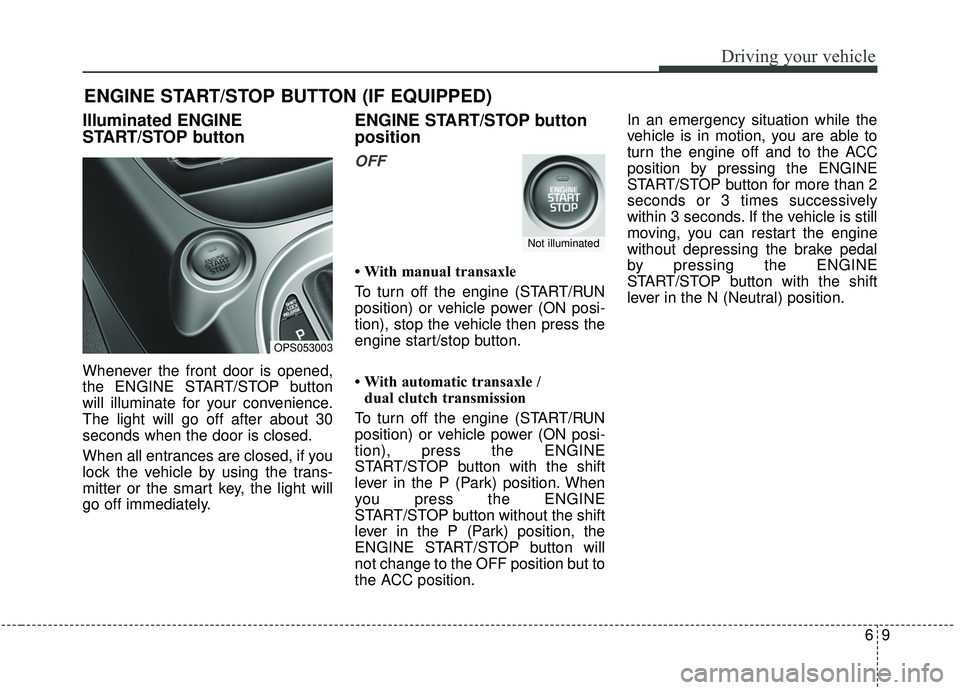
Illuminated ENGINE
START/STOP button
Whenever the front door is opened,
the ENGINE START/STOP button
will illuminate for your convenience.
The light will go off after about 30
seconds when the door is closed.
When all entrances are closed, if you
lock the vehicle by using the trans-
mitter or the smart key, the light will
go off immediately.
ENGINE START/STOP button
position
OFF
• With manual transaxle
To turn off the engine (START/RUN
position) or vehicle power (ON posi-
tion), stop the vehicle then press the
engine start/stop button.
• With automatic transaxle / dual clutch transmission
To turn off the engine (START/RUN
position) or vehicle power (ON posi-
tion), press the ENGINE
START/STOP button with the shift
lever in the P (Park) position. When
you press the ENGINE
START/STOP button without the shift
lever in the P (Park) position, the
ENGINE START/STOP button will
not change to the OFF position but to
the ACC position. In an emergency situation while the
vehicle is in motion, you are able to
turn the engine off and to the ACC
position by pressing the ENGINE
START/STOP button for more than 2
seconds or 3 times successively
within 3 seconds. If the vehicle is still
moving, you can restart the engine
without depressing the brake pedal
by pressing the ENGINE
START/STOP button with the shift
lever in the N (Neutral) position.
ENGINE START/STOP BUTTON (IF EQUIPPED)
OPS053003
Not illuminated
Page 301 of 564
611
Driving your vehicle
If you press the ENGINE
START/STOP button without depress-
ing the clutch pedal for manual
transaxle vehicles or without depress-
ing the brake pedal for automatic
transaxle vehicles, the engine will not
start and the ENGINE START/STOP
button changes as follow:
OFF ➔ACC ➔ON ➔OFF or ACC
✽ ✽
NOTICE
If you leave the ENGINE START/
STOP button in the ACC or ON
position for a long time, the battery
will discharge.
Starting the engine with a
smart key (if equipped)
1.Carry the smart key or leave it
inside the vehicle.
2.Make sure the parking brake is firmly applied
3. Manual Transaxle - Depress the
clutch pedal fully and shift the
transaxle into Neutral. Keep the
clutch pedal and brake pedal
depressed while starting the engine.
Automatic transaxle / Dual
clutch transmission - Place the
transaxle shift lever in P (Park).
Depress the brake pedal fully.
You can also start the engine when the shift lever is in the N (Neutral)position.
4.Press the ENGINE START/STOP button while depressing the brake
pedal.
It should be started withoutdepressing the accelerator.
WARNING- Starting
vehicle
Never press the ENGINE
START/STOP button while the
vehicle is in motion except in an
emergency. If the engine stops
while the vehicle is in motion, this
would result in loss of directional
control and braking function,
which could cause an accident.
WARNING- Leaving the Vehicle
To avoid unexpected or sudden
vehicle movement, never leave
your vehicle if the transmission
is not locked in the P (Park) posi-
tion and the parking brake is
fully engaged. Before leaving the
driver's seat, always make sure
the shift lever is engaged in P
(Park), set the parking brake fully
and shut the engine off.
CAUTION
If the driver takes foot off the clutch pedal of a manualtransaxle vehicle before theengine is fully started, theengine may not start.
Make sure to fully depress theclutch pedal and brake pedal tostart the engine.
Page 302 of 564
Driving your vehicle
12
6
Manual Transaxle
To start the vehicle, keep the clutch
pedal and brake pedal depressed, and
make sure the engine RPM is within
normal range (under 1000 rpm). After
checking, shift the transaxle shift lever
to the desired position.
Unlock the parking brake, and take
your foot off the clutch pedal. Then,
lightly depress the accelerator pedal
and slowly start the vehicle.
5.Do not wait for the engine to warm
up while the vehicle remains sta-
tionary.
Start driving at moderate engine
speeds. (Steep accelerating and
decelerating should be avoided.) Even if the smart key is in the vehi-
cle, if it is far away from you, the
engine may not start.
When the ENGINE START/STOP button is in the ACC position or
above, if any door is opened, the
system checks for the smart key. If
the smart key is not in the vehicle,
a message "key is not in the vehi-
cle" will appear on the LCD display.
And if all doors are closed, the
chime will sound for 5 seconds. The
indicator or warning will turn off
while the vehicle is moving. Always
have the smart key with you. Stopping manual transaxle vehicles
1. After safely parking the vehicle,
press the clutch pedal and brake
pedal at the same time.
2. While depressing the clutch pedal and brake pedal at the same time,
shift the transaxle lever to ‘N’.
CAUTION- Starter
If the engine stalls while thevehicle is in motion, do notattempt to move the shift leverto the P (Park) position. If thetraffic and road conditions per-mit, you may put the shift leverin the N (Neutral) position whilethe vehicle is still moving andpress the ENGINE START/STOPbutton in an attempt to restartthe engine.
Page 303 of 564
613
Driving your vehicle
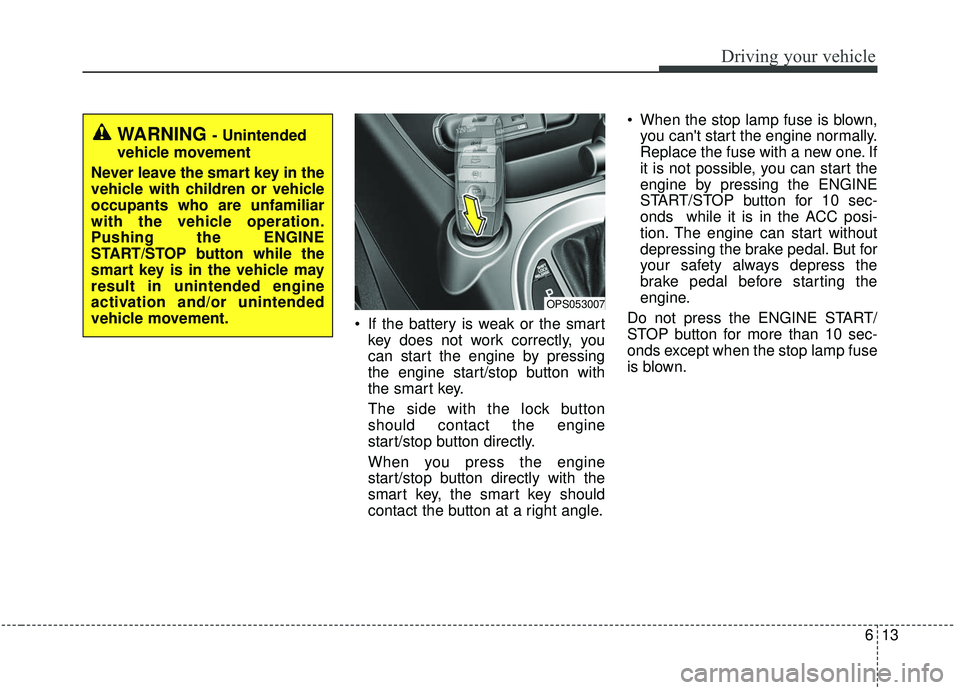
If the battery is weak or the smartkey does not work correctly, you
can start the engine by pressing
the engine start/stop button with
the smart key.
The side with the lock button
should contact the engine
start/stop button directly.
When you press the engine
start/stop button directly with the
smart key, the smart key should
contact the button at a right angle. When the stop lamp fuse is blown,
you can't start the engine normally.
Replace the fuse with a new one. If
it is not possible, you can start the
engine by pressing the ENGINE
START/STOP button for 10 sec-
onds while it is in the ACC posi-
tion. The engine can start without
depressing the brake pedal. But for
your safety always depress the
brake pedal before starting the
engine.
Do not press the ENGINE START/
STOP button for more than 10 sec-
onds except when the stop lamp fuse
is blown.
OPS053007
WARNING - Unintended
vehicle movement
Never leave the smart key in the
vehicle with children or vehicle
occupants who are unfamiliar
with the vehicle operation.
Pushing the ENGINE
START/STOP button while the
smart key is in the vehicle may
result in unintended engine
activation and/or unintended
vehicle movement.
Page 311 of 564
621
Driving your vehicle
R (Reverse)
Use this position to drive the vehicle
backward.
N (Neutral)
The wheels and transaxle are not
engaged. The vehicle will roll freely
even on the slightest incline unless
the parking brake or service brakes
are applied.- Parking in N (Neutral) gear
Follow below steps when parking
and you want the vehicle to move
when pushed.
1.After parking your vehicle, step on
the brake pedal and move the shift
lever to [P] with the ignition button in
[ON] or while the engine is running.
2.If the parking brake is applied, unlock the parking brake
3.While pressing the brake pedal, turn the ignition button [OFF].
- For smart key equipped vehicles,the ignition switch can be moved
to [OFF] only when the shift lever
is in [P].
4.Change the gear shift lever to [N] (Neutral) while pressing the brake
pedal and pushing [SHIFT LOCK
RELEASE] button or inserting,
pressing down a tool (e.g. flathead
screw-driver) into the [SHIFT LOCK
RELEASE] access hole at the same
time. Then, the vehicle will move
when external force is applied.
CAUTION- Shifting
Always come to a complete stopbefore shifting into or out of R(Reverse); you may damage thetransaxle if you shift into R(Reverse) while the vehicle is inmotion, except when “Rockingthe vehicle” explained in thissection.
CAUTION
With the exception of parking in neutral gear, always parkthe vehicle in [P] (Park) forsafety and engage the parkingbrake.
Before parking in [N] (Neutral) gear, first make sure the park-ing ground is level and flat. Donot park in [N] gear on anyslopes or gradients.
If parked and left in [N], thevehicle may move and causeserious damage and injury.
Page 314 of 564
Driving your vehicle
24
6
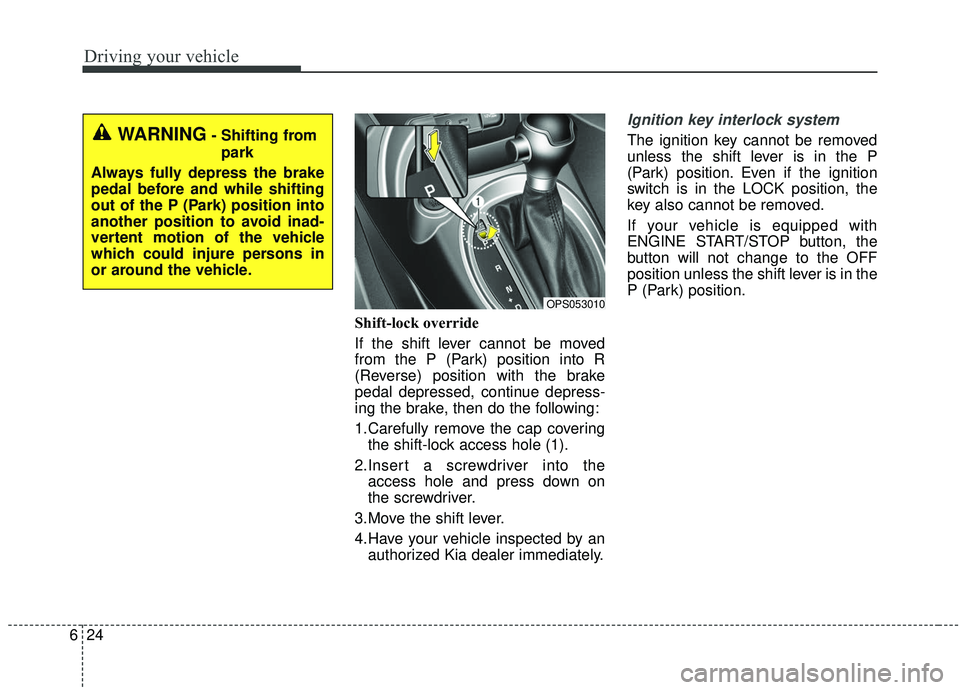
Shift-lock override
If the shift lever cannot be moved
from the P (Park) position into R
(Reverse) position with the brake
pedal depressed, continue depress-
ing the brake, then do the following:
1.Carefully remove the cap covering
the shift-lock access hole (1).
2.Insert a screwdriver into the access hole and press down on
the screwdriver.
3.Move the shift lever.
4.Have your vehicle inspected by an authorized Kia dealer immediately.
Ignition key interlock system
The ignition key cannot be removed
unless the shift lever is in the P
(Park) position. Even if the ignition
switch is in the LOCK position, the
key also cannot be removed.
If your vehicle is equipped with
ENGINE START/STOP button, the
button will not change to the OFF
position unless the shift lever is in the
P (Park) position.WARNING- Shifting from
park
Always fully depress the brake
pedal before and while shifting
out of the P (Park) position into
another position to avoid inad-
vertent motion of the vehicle
which could injure persons in
or around the vehicle.
OPS053010