door lock KIA Soul EV 2017 2.G Owner's Guide
[x] Cancel search | Manufacturer: KIA, Model Year: 2017, Model line: Soul EV, Model: KIA Soul EV 2017 2.GPages: 470, PDF Size: 16.76 MB
Page 120 of 470
Features of your vehicle
50
4
Door
Auto Lock
Off:
The auto door lock operation will
be deactivated.
Enable on speed: All doors will be automatically
locked when the vehicle speed
exceeds 15km/h (9.3mph).
Enable on shift: All doors will be automatically
locked if the reduction gear shift
lever is shifted from the P (Park)
position to the R (Reverse), N
(Neutral), or D (Drive) position. Auto Unlock
Off:
The auto door unlock operation will
be canceled.
Vehicle off: All doors will be automatically
unlocked when the POWER button
is set to the OFF position.
On shift P: All doors will be automatically
unlocked if the reduction gear shift
lever is shifted to the P (Park) posi-
tion.
Driver Door Unlock: All doors will be automatically
unlocked if the driver's door is
unlocked.
Two Press Unlock
Off: The two press unlock function will
be deactivated. Therefore, all doors
will unlock if the door is unlocked.
On: The driver’s door will unlock if the
door is unlocked. When the door is
unlocked again within 4 seconds,
all doors will unlock. Horn Feedback
Off:
The Horn feedback operation will
be deactivated.
On: After locking the door by pressing
the lock button on the transmitter, if
you press the lock button again
within 4 seconds, the warning
sound will operate once to indicate
that all doors are locked.
Lamp
One Touch Turn Lamp (if equipped)
If this item is checked, the lane
change signals will blink 3, 5 or 7
times when the turn signal lever is
moved slightly.
Head Lamp Delay (if equipped)
If this item is checked, the headlamp
delay function will be activated.
Page 151 of 470
481
Features of your vehicle
Headlamp escort (if equipped)
If you turn the POWER button to the
ACC or OFF position with the head-
lights ON, the headlights remain on
for about 5 minutes. However, if the
driver’s door is opened and closed,
the headlights are turned off after 15
seconds.
The headlights can be turned off by
pressing the lock button on the smart
key twice or turning the light switch to
the OFF or Auto position. However, if
you turn the light switch to the Auto
position when it is dark outside, the
headlights will not be turned off
immediately.
Battery saver function
The purpose of this feature is toprevent the battery from being dis-
charged. The system automatically
turns off the parking lights when
the driver turns the vehicle off and
opens the driver-side door (in that
order).
With this feature, the parking lights will turn off automatically if the driv-
er parks on the side of the road at
night.
If necessary, to keep the lights on
when the vehicle is turned off, per-
form the following:
1) Open the driver-side door.
2) Turn the parking lights OFF and ON again using the light switch
on the steering column.
Daytime running light
Daytime Running Lights (DRL) may
help make it easier for others to see
the front of your vehicle during the
day. DRL can be helpful in many dif-
ferent driving conditions, and it is
especially helpful after dawn and
before sunset.
The DRL system turns OFF when:
1. The front fog light or headlight (lowbeam) switch is ON.
2. The POWER button is OFF.
3. The parking brake is applied.
LIGHTING
Page 161 of 470
491
Features of your vehicle
DOOR (3) :- The map lamp and room lampcomes on when a door is opened.
The lamps go out after approxi-
mately 30 seconds.
- The map lamp and room lamp comes on for approximately 30
seconds when doors are unlocked
with a smart key as long as the
doors are not opened.
- The map lamp and room lamp will stay on for approximately 20 min-
utes if a door is opened with the
POWER button in the ACC or
LOCK/OFF position.
- The map lamp and room lamp will stay on continuously if the door is
opened with the POWER button
in the ON position.
- The map lamp and room lamp will go out immediately if the POWER
button is changed to the ON posi-
tion or all doors are locked.
- To turn off the DOOR mode, press the DOOR button (3) once
again (not pressed).✽ ✽ NOTICE
• When the lamp is turned on by
pressing the lens (1), the lamp does
not turn off even if the DOOR
mode or ROOM mode is not
selected (not pressed).
• If the ROOM button and DOOR button are pressed at the same
time, the map lamp and room
lamp will stay on at all times
(ROOM mode will be selected).
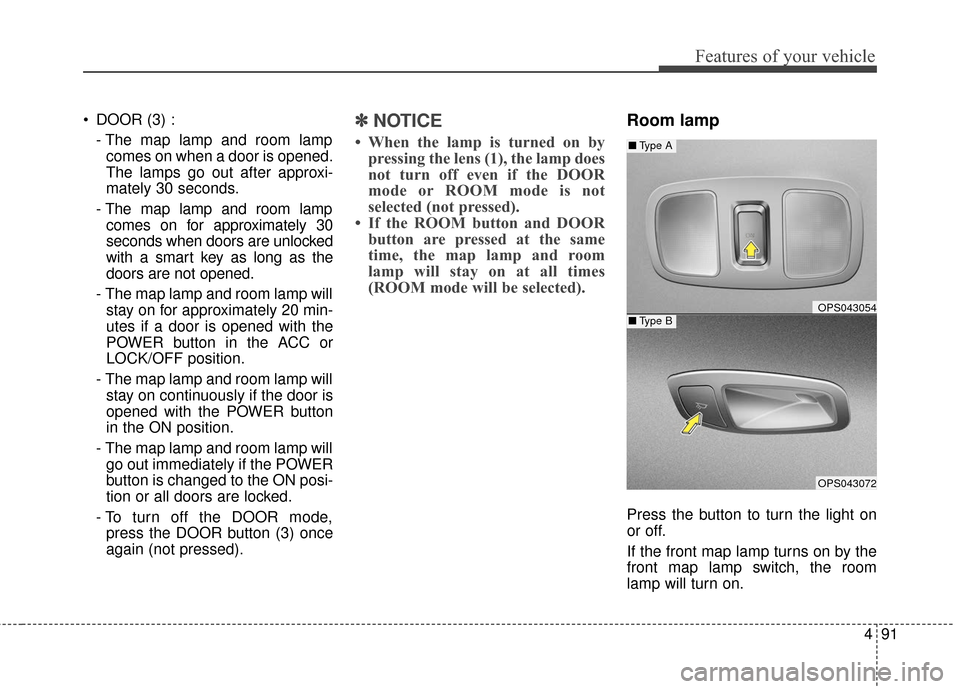
Room lamp
Press the button to turn the light on
or off.
If the front map lamp turns on by the
front map lamp switch, the room
lamp will turn on.
OPS043054
OPS043072
■ Type B
■Type A
Page 248 of 470
53
Driving your vehicle
Before entering vehicle
• Be sure that all windows, outsidemirror(s), and outside lights are
clean.
Check the condition of the tires.
Check under the vehicle for any sign of leaks.
Be sure there are no obstacles behind you if you intend to back up.
Necessary inspections
Fluid levels, such as coolant, brake
fluid, and washer fluid should be
checked on a regular basis, at the
exact interval depending on the fluid.
Further details are provided in chap-
ter 7, “Maintenance”.
Before starting
Close and lock all doors.
Position the seat so that all con-trols are easily reached.
Buckle your seat belt.
Adjust the inside and outside rearview mirrors.
Be sure that all lights work.
Check all gauges.
Check the operation of warning lights when the POWER button is
turned to the ON position.
Release the parking brake and make sure the brake warning light
goes out.
For safe operation, be sure you are
familiar with your vehicle and its
equipment.
BEFORE DRIVING
WARNING - Distracted driving
Focus on the road while driving.
The driver's primary responsibil-
ity is in the safe and legal opera-
tion of the vehicle. Use of any
handled devices, other equip-
ment or vehicle systems that
distract the drive should not be
used during vehicle operation.
Page 250 of 470
55
Driving your vehicle
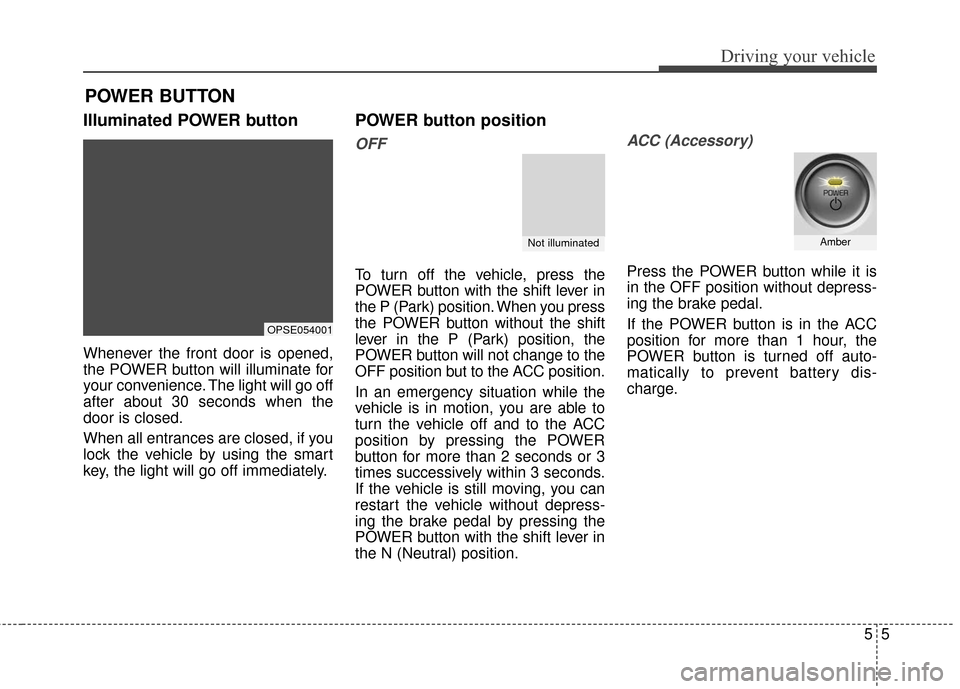
Illuminated POWER button
Whenever the front door is opened,
the POWER button will illuminate for
your convenience. The light will go off
after about 30 seconds when the
door is closed.
When all entrances are closed, if you
lock the vehicle by using the smart
key, the light will go off immediately.
POWER button position
OFF
To turn off the vehicle, press the
POWER button with the shift lever in
the P (Park) position. When you press
the POWER button without the shift
lever in the P (Park) position, the
POWER button will not change to the
OFF position but to the ACC position.
In an emergency situation while the
vehicle is in motion, you are able to
turn the vehicle off and to the ACC
position by pressing the POWER
button for more than 2 seconds or 3
times successively within 3 seconds.
If the vehicle is still moving, you can
restart the vehicle without depress-
ing the brake pedal by pressing the
POWER button with the shift lever in
the N (Neutral) position.
ACC (Accessory)
Press the POWER button while it is
in the OFF position without depress-
ing the brake pedal.
If the POWER button is in the ACC
position for more than 1 hour, the
POWER button is turned off auto-
matically to prevent battery dis-
charge.
POWER BUTTON
OPSE054001
Not illuminatedAmber
Page 325 of 470
Maintenance
67
At least monthly:
Check the coolant level in thecoolant reservoir.
Check the operation of all exterior lights, including the stoplights, turn
signals and hazard warning flash-
ers.
Check the inflation pressures of all tires including the spare.
At least twice a year
(i.e., every Spring and Fall):
Check the radiator, heater and air conditioning hoses for leaks or
damage.
Check the windshield washer spray and wiper operation. Clean
the wiper blades with clean cloth
dampened with washer fluid.
Check the headlight alignment.
Check the muffler, exhaust pipes, shields and clamps.
Check the lap/shoulder belts for wear and function.
Check for worn tires and loose wheel lug nuts.
At least once a year:
Clean the body and door drainholes.
Lubricate the door hinges and checks, and hood hinges.
Lubricate the door and hood locks and latches.
Lubricate the door rubber weather- strips.
Check the air conditioning system.
Inspect and lubricate the reduction gear linkage and controls.
Clean the battery and terminals.
Check the brake fluid level.
Page 372 of 470
753
Maintenance
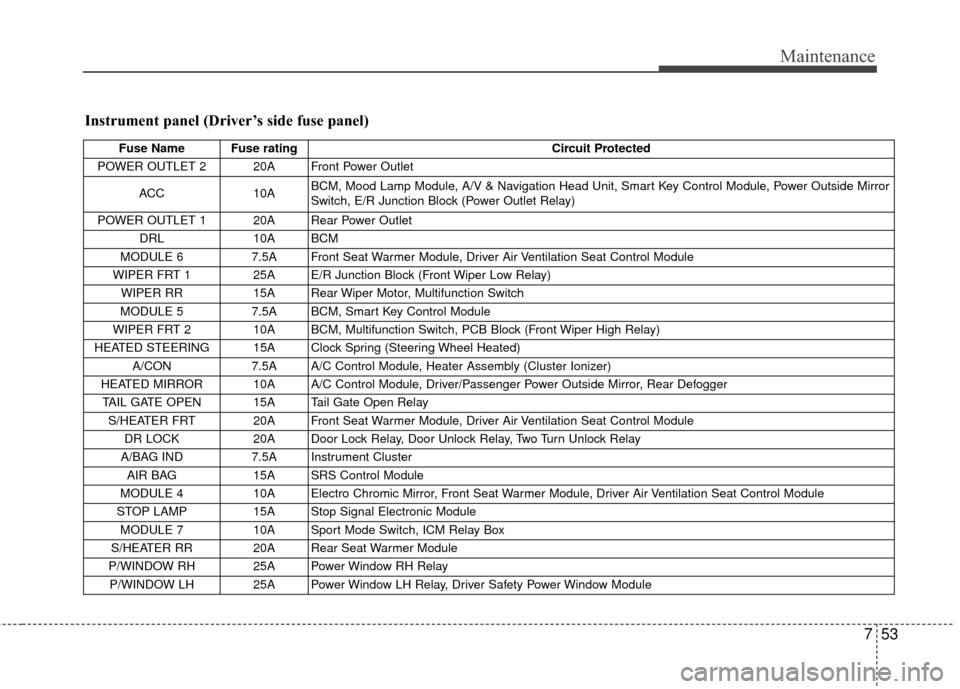
Instrument panel (Driver’s side fuse panel)
Fuse Name Fuse ratingCircuit Protected
POWER OUTLET 2 20A Front Power Outlet
ACC 10A BCM, Mood Lamp Module, A/V & Navigation Head Unit, Smart Key Control Module, Power Outside Mirror
Switch, E/R Junction Block (Power Outlet Relay)
POWER OUTLET 1 20A Rear Power Outlet DRL 10A BCM
MODULE 6 7.5A Front Seat Warmer Module, Driver Air Ventilation Seat Control Module
WIPER FRT 1 25A E/R Junction Block (Front Wiper Low Relay) WIPER RR 15A Rear Wiper Motor, Multifunction Switch
MODULE 5 7.5A BCM, Smart Key Control Module
WIPER FRT 2 10A BCM, Multifunction Switch, PCB Block (Front Wiper High Relay)
HEATED STEERING 15A Clock Spring (Steering Wheel Heated) A/CON 7.5A A/C Control Module, Heater Assembly (Cluster Ionizer)
HEATED MIRROR 10A A/C Control Module, Driver/Passenger Power Outside Mirror, Rear Defogger TAIL GATE OPEN 15A Tail Gate Open Relay S/HEATER FRT 20A Front Seat Warmer Module, Driver Air Ventilation Seat Control Module DR LOCK 20A Door Lock Relay, Door Unlock Relay, Two Turn Unlock Relay
A/BAG IND 7.5A Instrument Cluster
AIR BAG 15A SRS Control Module
MODULE 4 10A Electro Chromic Mirror, Front Seat Warmer Module, Driver Air Ventilation Seat Control Module
STOP LAMP 15A Stop Signal Electronic Module
MODULE 7 10A Sport Mode Switch, ICM Relay Box
S/HEATER RR 20A Rear Seat Warmer Module
P/WINDOW RH 25A Power Window RH Relay P/WINDOW LH 25A Power Window LH Relay, Driver Safety Power Window Module
Page 405 of 470
I3
Index
Electronic parking brake (EPB) . . . . . . . . . . . . . . . . 5-18
Electronic stability control (ESC) . . . . . . . . . . . . . . 5-24
Good braking practices . . . . . . . . . . . . . . . . . . . . . . 5-30
Hill-start assist control (HAC) . . . . . . . . . . . . . . . . . 5-29
Power brakes . . . . . . . . . . . . . . . . . . . . . . . . . . . . . 5-16
Vehicle stability management (VSM) . . . . . . . . . . . 5-28
Bulb wattage . . . . . . . . . . . . . . . . . . . . . . . . . . . . . . . . . . 8-4
Child restraint system . . . . . . . . . . . . . . . . . . . . . . . . . . 3-26 Lower anchor system . . . . . . . . . . . . . . . . . . . . . . . . 3-32
Tether anchor system . . . . . . . . . . . . . . . . . . . . . . . . 3-31
Using a child restraint system . . . . . . . . . . . . . . . . . 3-27
Clean air . . . . . . . . . . . . . . . . . . . . . . . . . . . . . . . . . . . 4-\
113
Climate control air filter . . . . . . . . . . . . . . . . . . . . . . . . 7-25 Filter inspection . . . . . . . . . . . . . . . . . . . . . . . . . . . . 7-25
Filter replacement. . . . . . . . . . . . . . . . . . . . . . . . . . . 7-25
Coolant . . . . . . . . . . . . . . . . . . . . . . . . . . . . . . . . . . . . \
. 7-20 Changing the coolant . . . . . . . . . . . . . . . . . . . . . . . . 7-22
Checking the coolant level . . . . . . . . . . . . . . . . . . . . 7-20
Cruise control system . . . . . . . . . . . . . . . . . . . . . . . . . . 5-32 Cruise control switch . . . . . . . . . . . . . . . . . . . . . . . . 5-33
To cancel cruise control . . . . . . . . . . . . . . . . . . . . . . 5-35
To decrease the cruising speed . . . . . . . . . . . . . . . . . 5-34
To increase cruise control set speed . . . . . . . . . . . . . 5-34
To resume cruising speed at more than approximately30 km/h (20 mph) . . . . . . . . . . . . . . . . . . . . . . . . . 5-35 To set cruise control speed . . . . . . . . . . . . . . . . . . . . 5-33
To temporarily accelerate with the cruise control on. .
5-34
To turn cruise control off . . . . . . . . . . . . . . . . . . . . . 5-36
Defroster . . . . . . . . . . . . . . . . . . . . . . . . . . . . . . . . . . . . \
4-93 Rear window defroster . . . . . . . . . . . . . . . . . . . . . . . 4-93
Dimensions . . . . . . . . . . . . . . . . . . . . . . . . . . . . . . . . . . . 8-\
2
Door locks . . . . . . . . . . . . . . . . . . . . . . . . . . . . . . . . . . 4-11\
Auto door lock/unlock feature . . . . . . . . . . . . . . . . . 4-13
Child-protector rear door lock . . . . . . . . . . . . . . . . . 4-14
Impact sensing door unlock system . . . . . . . . . . . . . 4-13
Operating door locks from inside the vehicle . . . . . 4-12
Operating door locks from outside the vehicle . . . . 4-11
Speed sensing door lock system . . . . . . . . . . . . . . . 4-13
Economical operation . . . . . . . . . . . . . . . . . . . . . . . . . . 5-37
Emergency starting . . . . . . . . . . . . . . . . . . . . . . . . . . . . . 6-5 Jump starting . . . . . . . . . . . . . . . . . . . . . . . . . . . . . . . 6-6
Push-starting . . . . . . . . . . . . . . . . . . . . . . . . . . . . . . . . 6-7
Explanation of scheduled maintenance items . . . . . . . 7-19
Exterior overview . . . . . . . . . . . . . . . . . . . . . . . . . . . . . . 2-2
C
D
E
Page 411 of 470
Electric Vehicle Guide
❈This is an electric vehicle guide to assist drivers with
understanding their vehicle.
Refer to the following content for electric vehicle details
and precautions
Review of Electric Vehicle ........................................................2
Main Components of Electric Vehicle.......................................4
High voltage battery .................................................................5
EV Mode ........................................................................\
..........7
■ Available Range .................................................................7■ Near by stations .................................................................8■ Energy Information. ............................................................8■ ECO Driving .......................................................................9\
■ Setting Charging Times .....................................................9■ Setting Climate Times ......................................................11■ EV Setting ........................................................................\
11
Charge Types for Electric Vehicle...........................................13
Charge Indicator Lamp for Electric Vehicle ............................15
Reserved Charging ................................................................16
Reserved Climate Control. .....................................................18
Precautions for Charging Electric Vehicle ..............................19
Charging Electric Vehicle (Normal Charge) ...........................22
■ How to Connect Normal Charger .....................................22■ Unlock Charging Door in Emergency ...............................25■ Emergency Release of the Charging connector
lock system .......................................................................2\
6
■ Checking Charging Status................................................26■ How to Disconnect Normal Charger ................................27
Charging Electric Vehicle (Quick Charge) ..............................28
■ How to Connect Quick Charger .......................................28■ Unlock Charging Door in Emergency ...............................31■ Checking Charging Status................................................31■ How to Disconnect Quick Charger ...................................32
Charging Electric Vehicle (Trickle Charge) .............................34
■ How to Connect Portable Charging Cable .......................34■ Unlock Charging Door in Emergency ...............................38■ Emergency Release of the Charging connector
lock system .......................................................................3\
9
■ Checking Charging Status................................................39■ Charging Status Indicator Lamp for Portable Charging
Cable ........................................................................\
........40
■ How to Disconnect Portable Charging Cable ..................41■ Precautions for Portable Charging Cable .........................43
Driving Electric Vehicle ...........................................................44
■ How to Start the Vehicle ...................................................44■ How to Stop the Vehicle ...................................................45■ Pedestrian Warning System .............................................46■ Active ECO system ..........................................................46■ Range ........................................................................\
.......47■ Tips for Improving Distance to Empty ..............................48■ Motor Operation Gauge....................................................48■ State of charge (SOC) gauge for high voltage battery.....49■ Warning Message on LCD Display (related to charge)....50■ Warning Lamp and Indicator Lamp
(related to electric vehicle) ...............................................53
Safety Precautions for Electric Vehicle...................................56
■ Service Plug .....................................................................59
Environmental Friendliness Mark ...........................................59
Page 432 of 470
22
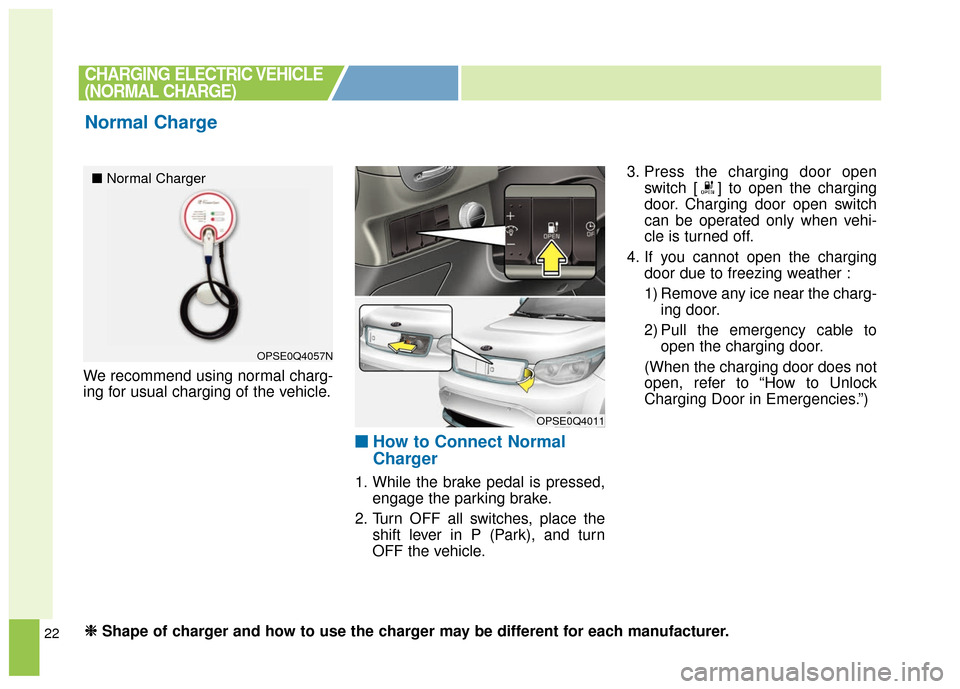
We recommend using normal charg-
ing for usual charging of the vehicle.
■ ■How to Connect Normal
Charger
1. While the brake pedal is pressed,
engage the parking brake.
2. Turn OFF all switches, place the shift lever in P (Park), and turn
OFF the vehicle. 3. Press the charging door open
switch [ ] to open the charging
door. Charging door open switch
can be operated only when vehi-
cle is turned off.
4. If you cannot open the charging door due to freezing weather :
1) Remove any ice near the charg-ing door.
2) Pull the emergency cable to open the charging door.
(When the charging door does not
open, refer to “How to Unlock
Charging Door in Emergencies.”)
CHARGING ELECTRIC VEHICLE
(NORMAL CHARGE)
Normal Charge
OPSE0Q4057N
OPSE0Q4011
■ Normal Charger
❈ ❈
Shape of charger and how to use the charger may be different for each manufacturer.