display KIA Sportage 2015 QL / 4.G User Guide
[x] Cancel search | Manufacturer: KIA, Model Year: 2015, Model line: Sportage, Model: KIA Sportage 2015 QL / 4.GPages: 499, PDF Size: 16.07 MB
Page 164 of 499
477
Features of your vehicle
Press cluch pedal to start engine
If the ENGINE START/STOP button
turns to the ACC position twice by
pressing the button repeatedly with-
out depressing the clutch pedal, the
warning illuminates on the LCD dis-
play for about 10 seconds to indicate
that you should depress the clutch
pedal to start the engine.
Shift to "P" position
If you try to turn off the engine without
the shift lever in the P (Park) position,
the ENGINE START/STOP button will
turn to the ACC position. If the button
is pressed once more it will turn to the
ON position. The warning illuminates
on the LCD display for about 10 sec-
onds to indicate that you should press
the ENGINE START/STOP button
with the shift lever in the P (Park) posi-
tion to turn off the engine.
Also, the warning chime sounds for
about 10 seconds. (if equipped)Check stop lamp fuse
When the stop lamp fuse is discon-
nected, the warning illuminates for
10 seconds on the LCD display.
Replace the fuse with a new one. If
that is not possible you can start the
engine by pressing the engine
start/stop button for 10 seconds with
the engine start/stop button in ACC.
Press start button again
If you can not operate the ENGINE
START/STOP button when there is a
problem with the ENGINE
START/STOP button system, the
warning illuminates for 10 seconds
and the chime sounds continuously
to indicate that you could start the
engine by pressing the ENGINE
START/STOP button once more.
The chime will stop if the ENGINE
START/STOP button system works
normally or the theft alarm system is
armed.
If the warning illuminates each time
you press the ENGINE
START/STOP button, take your vehi-
cle to an authorized Kia dealer and
have the system checked.
Page 165 of 499
Features of your vehicle
78
4
Shift to "P" or "N" to start the engine
If you try to start the engine with the
shift lever not in the P (Park) or N
(Neutral) position, the warning illumi-
nates for about 10 seconds on the
LCD display.
You can also start the engine with
the shift lever in the N (Neutral) posi-
tion, but for your safety start the
engine with the shift lever in the P
(Park) position.
Low washer liquid
This warning light indicates the
washer fluid reservoir is near empty.
Refill the washer fluid as soon as
possible. Align Steering Wheel (left aligned)
If you start the engine when the
wheel is steered to the left at an
angle over 90 degrees, "Align
Steering Wheel" message will
appear on the instrument cluster for
5 seconds after a few seconds of
system check. In this condition, the
warning message will disappear if
the left steered angle comes down to
less than 30 degrees.
Align Steering Wheel (right aligned)
If you start the engine when the
wheel is steered to the right at an
angle over 90 degrees, "Align
Steering Wheel" message will
appear on the instrument cluster for
5 seconds after a few seconds of
system check. In this condition, the
warning message will disappear if
the right steered angle comes down
to less than 30 degrees.Complete
When the steering wheel is aligned
within 30 degrees (left/right) less
than 5 seconds after the "Align
Steering Wheel" message is dis-
played, "Complete" message will
appear for 2 seconds.
Sunroof open
If driver removes the ignition key
(Smart key : turns off the engine) and
opens the driver-side door when the
sunroof is not fully closed, warning
message will appear on the LCD dis-
play. Also, the warning chime sounds
for approximately 7 seconds.
Page 170 of 499
483
Features of your vehicle
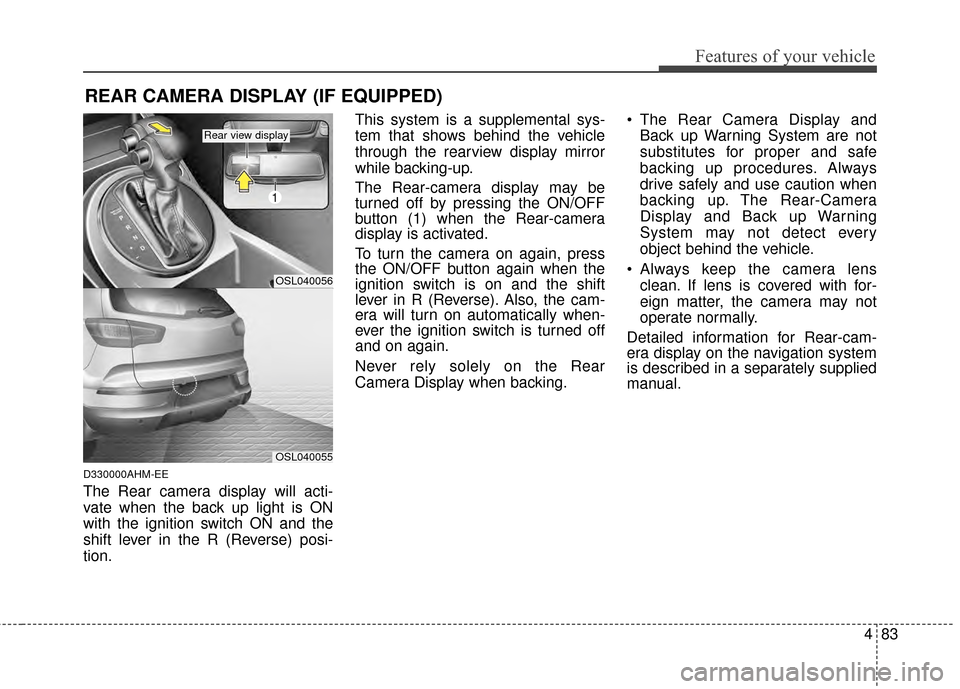
D330000AHM-EE
The Rear camera display will acti-
vate when the back up light is ON
with the ignition switch ON and the
shift lever in the R (Reverse) posi-
tion.This system is a supplemental sys-
tem that shows behind the vehicle
through the rearview display mirror
while backing-up.
The Rear-camera display may be
turned off by pressing the ON/OFF
button (1) when the Rear-camera
display is activated.
To turn the camera on again, press
the ON/OFF button again when the
ignition switch is on and the shift
lever in R (Reverse). Also, the cam-
era will turn on automatically when-
ever the ignition switch is turned off
and on again.
Never rely solely on the Rear
Camera Display when backing.
The Rear Camera Display and
Back up Warning System are not
substitutes for proper and safe
backing up procedures. Always
drive safely and use caution when
backing up. The Rear-Camera
Display and Back up Warning
System may not detect every
object behind the vehicle.
Always keep the camera lens clean. If lens is covered with for-
eign matter, the camera may not
operate normally.
Detailed information for Rear-cam-
era display on the navigation system
is described in a separately supplied
manual.
REAR CAMERA DISPLAY (IF EQUIPPED)
OSL040056
1
OSL040055
Rear view display
Page 194 of 499
4107
Features of your vehicle
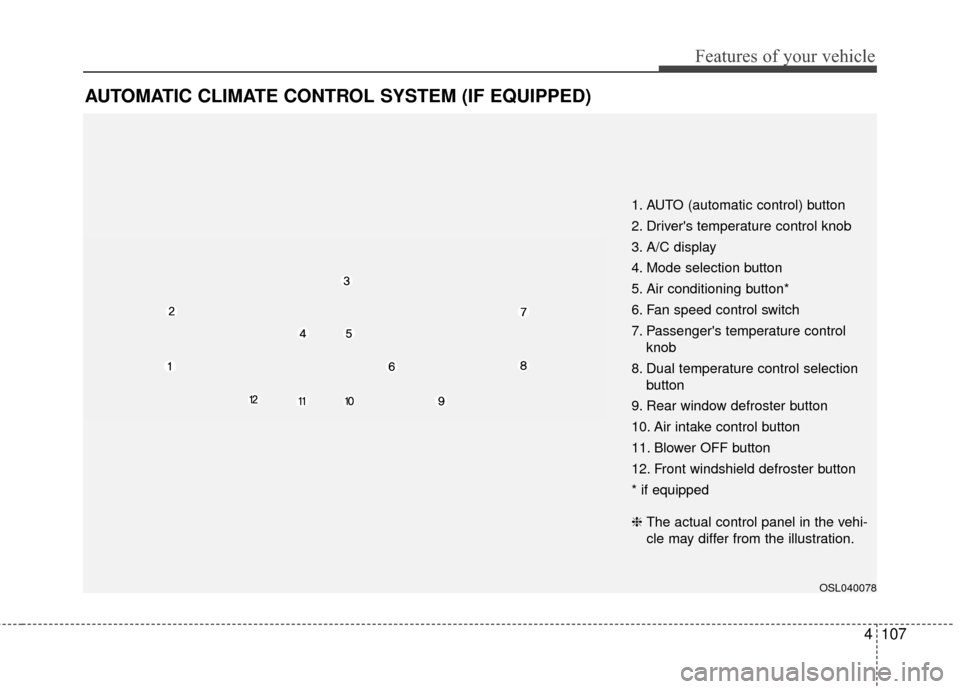
AUTOMATIC CLIMATE CONTROL SYSTEM (IF EQUIPPED)
OSL040078
1. AUTO (automatic control) button
2. Driver's temperature control knob
3. A/C display
4. Mode selection button
5. Air conditioning button*
6. Fan speed control switch
7. Passenger's temperature controlknob
8. Dual temperature control selection button
9. Rear window defroster button
10. Air intake control button
11. Blower OFF button
12. Front windshield defroster button
* if equipped
❈ The actual control panel in the vehi-
cle may differ from the illustration.
Page 199 of 499
Features of your vehicle
112
4
Temperature conversion
You can switch the temperature
mode from Centigrade to Fahrenheit
as follows:
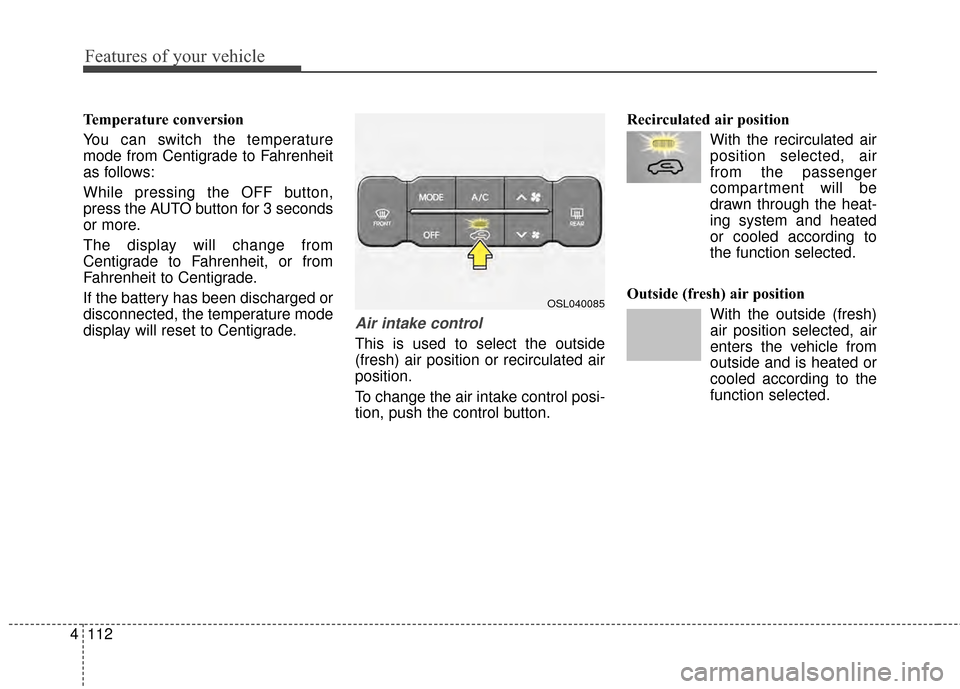
While pressing the OFF button,
press the AUTO button for 3 seconds
or more.
The display will change from
Centigrade to Fahrenheit, or from
Fahrenheit to Centigrade.
If the battery has been discharged or
disconnected, the temperature mode
display will reset to Centigrade.
Air intake control
This is used to select the outside
(fresh) air position or recirculated air
position.
To change the air intake control posi-
tion, push the control button. Recirculated air position
With the recirculated airposition selected, air
from the passenger
compartment will be
drawn through the heat-
ing system and heated
or cooled according to
the function selected.
Outside (fresh) air position With the outside (fresh)
air position selected, air
enters the vehicle from
outside and is heated or
cooled according to the
function selected.
OSL040085
Page 205 of 499
Features of your vehicle
118
4
Automatic climate control system
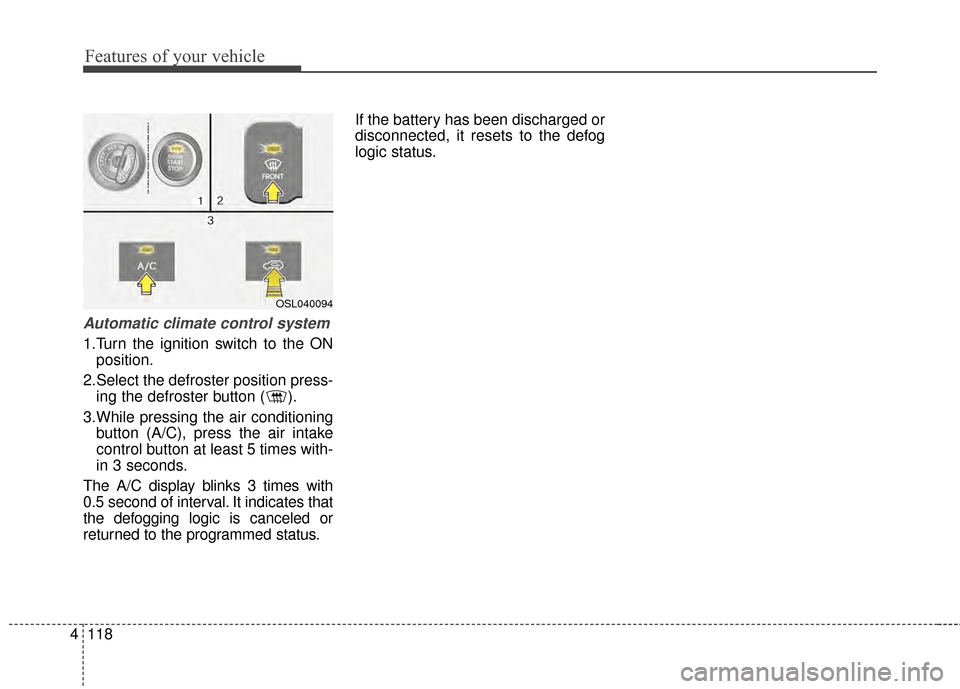
1.Turn the ignition switch to the ON
position.
2.Select the defroster position press- ing the defroster button ( ).
3.While pressing the air conditioning button (A/C), press the air intake
control button at least 5 times with-
in 3 seconds.
The A/C display blinks 3 times with
0.5 second of interval. It indicates that
the defogging logic is canceled or
returned to the programmed status. If the battery has been discharged or
disconnected, it resets to the defog
logic status.
OSL040094
Page 224 of 499
4137
Features of your vehicle
Depending on the type of CD-R/CD-RW CDs, certain CDs may
not operate normally according to
the manufacturing companies. In
such circumstances, continued
use may cause malfunctions to
your audio system.
✽ ✽ NOTICE
-
Playing an Incompatible
Copy Protected Audio CD
Some copy protected CDs, which do
not comply with international audio
CD standards (Red Book), may not
play on your car audio. Please note
that inabilities to properly play a
copy protected CD may indicate
that the CD is defective, not the CD
player.
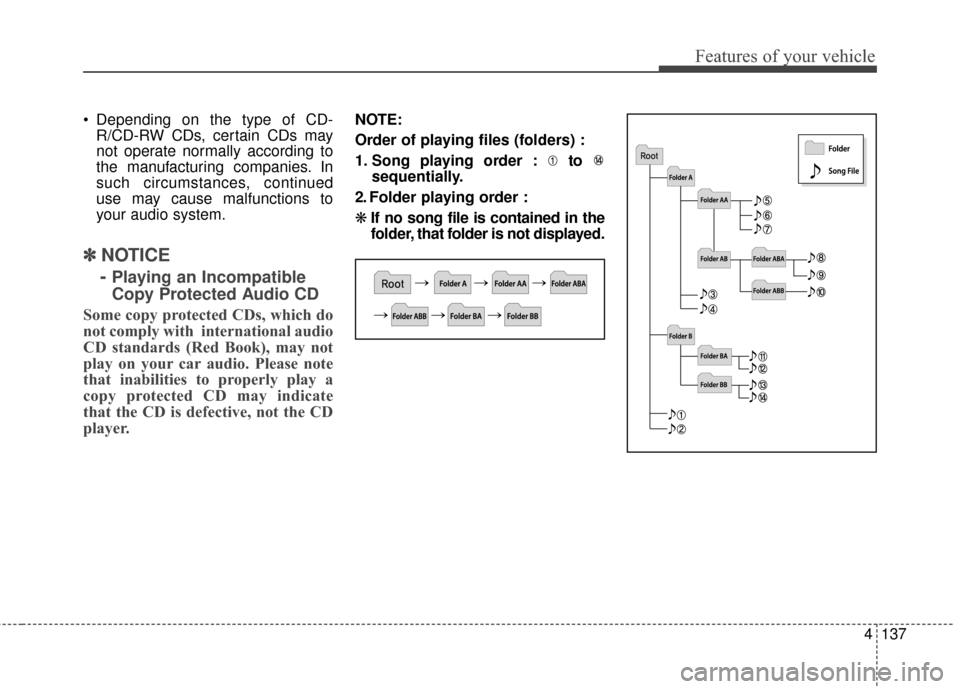
NOTE:
Order of playing files (folders) :
1. Song playing order : to sequentially.
2. Folder playing order :
❋ If no song file is contained in the
folder, that folder is not displayed.
Page 235 of 499
Features of your vehicle
148
4
SYSTEM CONTROLLERS
AND FUNCTIONS
❈ Display and settings may differ
depending on the selected audio.
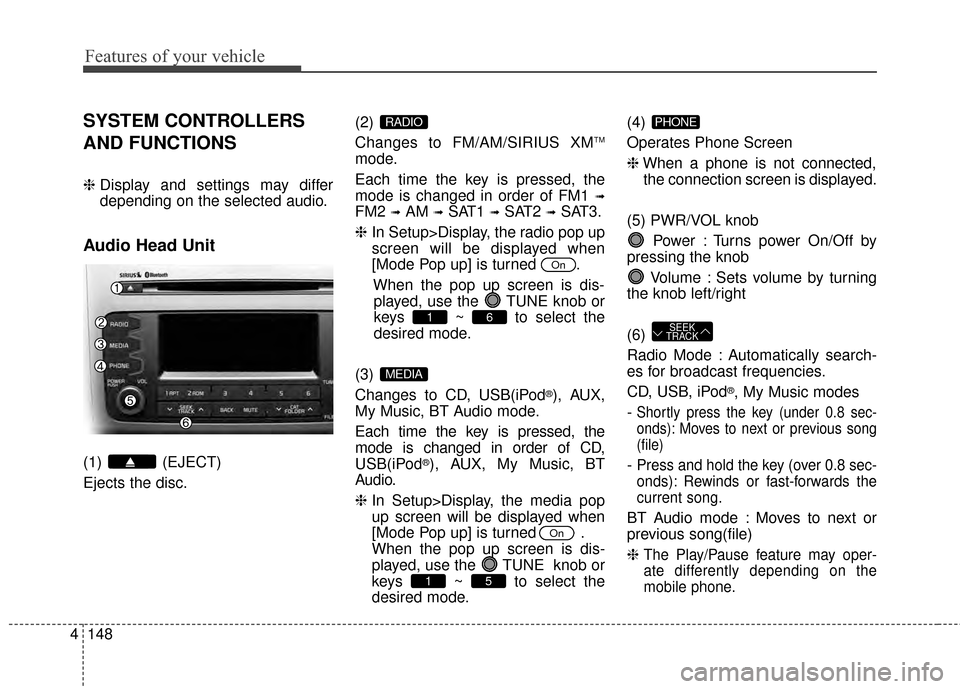
Audio Head Unit
(1) (EJECT)
Ejects the disc. (2)
Changes to FM/AM/SIRIUS XM
TM
mode.
Each time the key is pressed, the
mode is changed in order of FM1
➟
FM2 ➟AM ➟SAT1 ➟SAT2 ➟SAT3.
❈ In Setup>Display, the radio pop up
screen will be displayed when
[Mode Pop up] is turned .
When the pop up screen is dis-played, use the TUNE knob or
keys ~ to select the
desired mode.
(3)
Changes to CD, USB(iPod
®), AUX,
My Music, BT Audio mode.
Each time the key is pressed, the
mode is changed in order of CD,
USB(iPod
®), AUX, My Music, BT
Audio.
❈ In Setup>Display, the media pop
up screen will be displayed when
[Mode Pop up] is turned .
When the pop up screen is dis-
played, use the TUNE knob or
keys ~ to select the
desired mode. (4)
Operates Phone Screen
❈
When a phone is not connected,
the connection screen is displayed.
(5) PWR/VOL knob Power : Turns power On/Off by
pressing the knob
Volume : Sets volume by turning
the knob left/right
(6)
Radio Mode : Automatically search-
es for broadcast frequencies.
CD, USB, iPod
®, My Music modes
-
Shortly press the key (under 0.8 sec-
onds): Moves to next or previous song
(file)
- Press and hold the key (over 0.8 sec-
onds): Rewinds or fast-forwards the
current song.
BT Audio mode : Moves to next or
previous song(file)
❈
The Play/Pause feature may oper-
ate differently depending on the
mobile phone.
SEEK
TRACK
PHONE
51
On
MEDIA
61
On
RADIO
Page 236 of 499
4149
Features of your vehicle
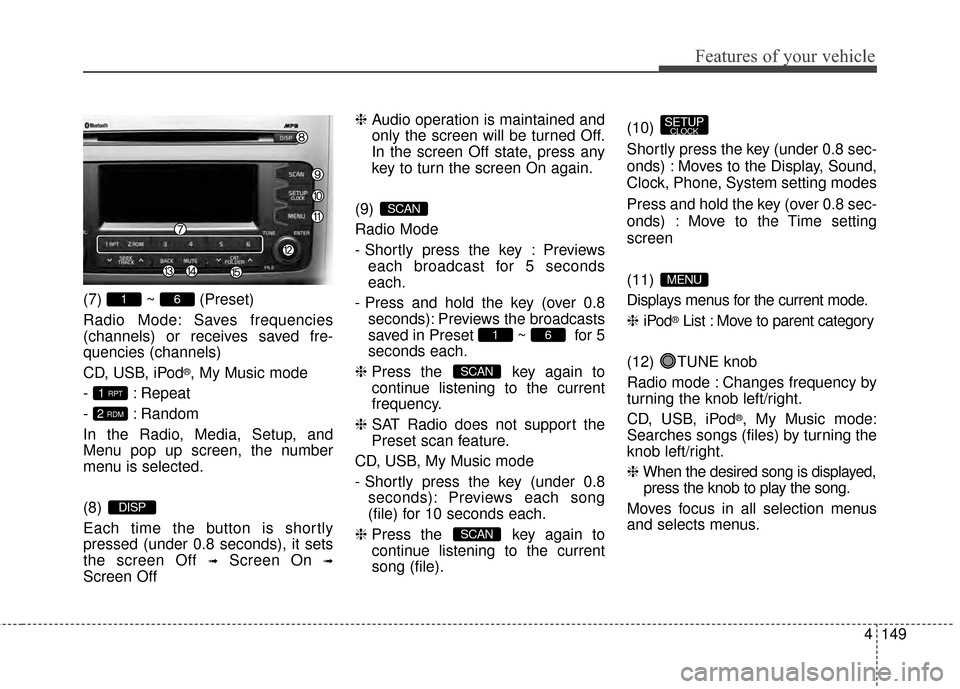
(7) ~ (Preset)
Radio Mode: Saves frequencies
(channels) or receives saved fre-
quencies (channels)
CD, USB, iPod
®, My Music mode
- : Repeat
- : Random
In the Radio, Media, Setup, and
Menu pop up screen, the number
menu is selected.
(8)
Each time the button is shortly
pressed (under 0.8 seconds), it sets
the screen Off
➟Screen On ➟
Screen Off ❈
Audio operation is maintained and
only the screen will be turned Off.
In the screen Off state, press any
key to turn the screen On again.
(9)
Radio Mode
- Shortly press the key : Previews each broadcast for 5 seconds
each.
- Press and hold the key (over 0.8 seconds): Previews the broadcasts
saved in Preset ~ for 5
seconds each.
❈ Press the key again to
continue listening to the current
frequency.
❈ SAT Radio does not support the
Preset scan feature.
CD, USB, My Music mode
- Shortly press the key (under 0.8 seconds): Previews each song
(file) for 10 seconds each.
❈ Press the key again to
continue listening to the current
song (file). (10)
Shortly press the key (under 0.8 sec-
onds) : Moves to the Display, Sound,
Clock, Phone, System setting modes
Press and hold the key (over 0.8 sec-
onds) : Move to the Time setting
screen
(11)
Displays menus for the current mode.
❈
iPod
®List : Move to parent category
(12) TUNE knob
Radio mode : Changes frequency by
turning the knob left/right.
CD, USB, iPod
®, My Music mode:
Searches songs (files) by turning the
knob left/right.
❈ When the desired song is displayed,
press the knob to play the song.
Moves focus in all selection menus
and selects menus.
MENU
SETUPCLOCK
SCAN
SCAN
61
SCAN
DISP
2 RDM
1 RPT
61
Page 237 of 499
Features of your vehicle
150
4
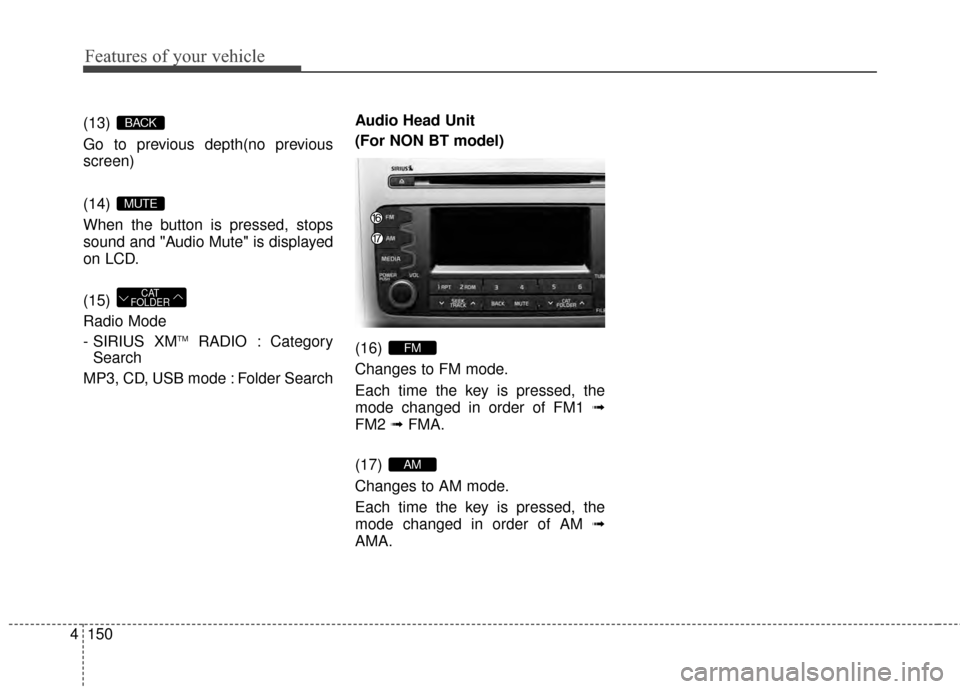
(13)
Go to previous depth(no previous
screen)
(14)
When the button is pressed, stops
sound and "Audio Mute" is displayed
on LCD.
(15)
Radio Mode
- SIRIUS XM
TMRADIO : Category
Search
MP3, CD, USB mode : Folder Search Audio Head Unit
(For NON BT model)
(16)
Changes to FM mode.
Each time the key is pressed, the
mode changed in order of FM1
➟
FM2 ➟FMA.
(17)
Changes to AM mode.
Each time the key is pressed, the
mode changed in order of AM ➟
AMA.
AM
FM
CAT
FOLDER
MUTE
BACK