low KIA TELLURIDE 2021 Navigation System Quick Reference Guide
[x] Cancel search | Manufacturer: KIA, Model Year: 2021, Model line: TELLURIDE, Model: KIA TELLURIDE 2021Pages: 300, PDF Size: 10.06 MB
Page 101 of 300
5-11
Various ways to find routes
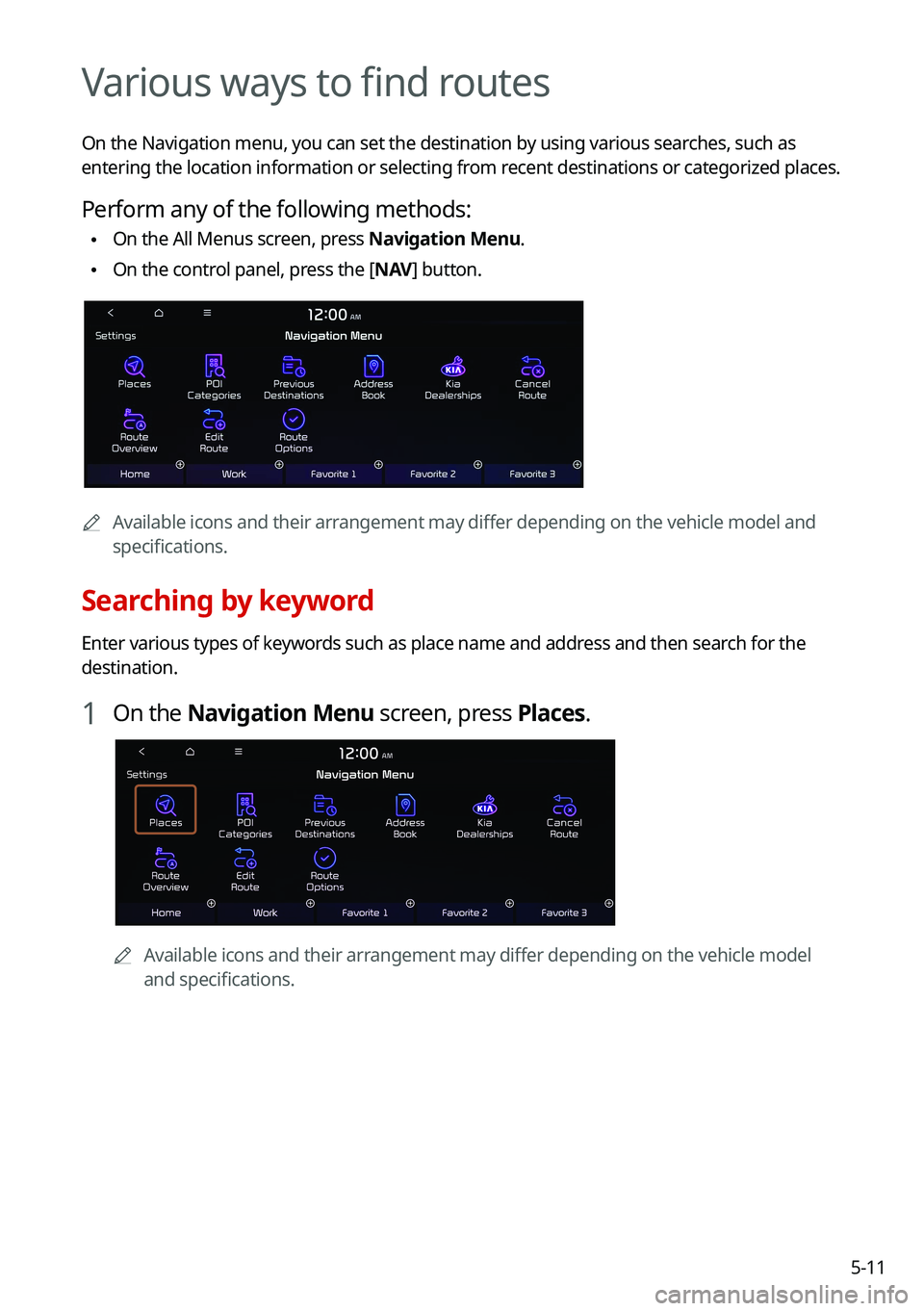
On the Navigation menu, you can set the destination by using various searches, such as
entering the location information or selecting from recent destinations or categorized places.
Perform any of the following methods:
\225On the All Menus screen, press Navigation Menu.
\225On the control panel, press the [
NAV] button.
0000
A
Available icons and their arrangement may differ depending on the vehicle model and
specifications.
Searching by keyword
Enter various types of keywords such as place name and address and then search for the
destination.
1 On the Navigation Menu screen, press Places.
0000AAvailable icons and their arrangement may differ depending on the vehicle model
and specifications.
Page 120 of 300
5-30
END USER LICENSE AGREEMENT
PLEASE READ THIS END USER LICENSE AGREEMENT ("EULA") CAREFULLY BEFORE USING THE
NAVIGATION SYSTEM.
This is a license agreement between you and Hyundai MnSoft, INC. including its affiliates
("COMPANY") regarding a copy of the COMPANY navigable map database together with
associated software, media and explanatory printed documentation published by COMPANY
(jointly the "Product"). The Product is provided for your personal, internal use only and not for
resale. It is protected by copyright and is subject to the following terms which are agreed to
by you, on the one hand, and COMPANY and its licensors (and their licensors and suppliers)
(collectively, "Licensors") on the other hand.
By using the Product, you accept and agree to all terms and conditions in this End User
License Agreement ("EULA"). IF YOU DO NOT AGREE TO THE TERMS OF THIS EULA, YOU
MUST PROMPTLY EXIT THE PRODUCT OPERATION PROGRAM AND DO NOT USE OR ACCESS
TO THE PRODUCT. YOU AGREE THAT YOUR RIGHTS UNDER THIS EULA MAY BE TERMINATED
AUTOMATICALLY WITHOUT NOTICE IF YOU FAIL TO COMPLY WITH ANY TERM(S) OF THIS
EULA.
Terms and Conditions
Personal Use Only. You agree to use this Product together with COMPANY's authorized
application for the solely personal, non-commercial purposes for which you were licensed,
and not for service bureau, time-sharing or other similar purposes. Accordingly, but subject to
the restrictions set forth in the following paragraphs, you agree not to otherwise reproduce,
copy, modify, decompile, disassemble, create any derivative works of, or reverse engineer any
portion of this Data, and may not transfer or distribute it in any form, for any purpose, except
to the extent permitted by mandatory laws. You may not assign this EULA or any of the rights
or licenses granted under this EULA, except when installed in the system for which it was
created.
Restrictions. Except where you have been specifically licensed to do so by COMPANY, and
without limiting the preceding paragraph, you may not use the Product (i) with any products,
systems, or applications installed or otherwise connected to or in commu\
nication with
vehicles, capable of vehicle navigation, positioning, dispatch, real time route guidance, fleet
management or similar applications; or (ii) with or in communication w\
ith any positioning
devices or any mobile or wireless-connected electronic or computer devices, including
without limitation cellular phones, palmtop and handheld computers, page\
rs, and personal
digital assistants or PDAs.
Page 122 of 300
5-32WARNING. THE PRODUCT REFLECTS REALITY AS EXISTING BEFORE YOU RECEIVED THE
PRODUCT AND IT COMPRISES DATA AND INFORMATION FROM GOVERNMENT OTHER
SOURCES. ACCORDINGLY, THE PRODUCT MAY CONTAIN INACCURATE OR INCOMPLETE
INFORMATION DUE TO THE PASSAGE OF TIME, CHANGING CIRCUMSTANCES, SOURCES
USED AND THE NATURE OF COLLECTING COMPREHENSIVE GEOGRAPHIC PRODUCT, ANY
OF WHICH MAY LEAD TO INCORRECT RESULTS. THE PRODUCT AND SERVICES MAY NOT TO
BE USED FOR SAFETY OF LIFE APPLICATIONS, OR FOR ANY OTHER APPLICATION IN WHICH
THE ACCURACY OR RELIABILITY OF THE PRODUCT OR SERVICES COULD CREATE A SITUATION
WHERE PERSONAL INJURY OR DEATH MAY OCCUR. DO NOT ATTEMPT TO CONFIGURE THE
PRODUCT OR INPUT INFORMATION WHILE DRIVING. FAILURE TO PAY FULL ATTENTION
TO THE OPERATION OF YOUR VEHICLE COULD RESULT IN DEATH, SERIOUS INJURY, OR
PROPERTY DAMAGE. BY USING THE PRODUCT, YOU ASSUME ALL RESPONSIBILITY AND
RISK.
Disclaimer of Warranty. The Product is provided to you "as is," and you agree to use it
at your own risk. SUBJECT TO THE APPLICABLE LAWS, COMPANY AND THE LICENSORS
MAKE NO GUARANTEES, REPRESENTATIONS OR WARRANTIES OF ANY KIND, EXPRESS OR
IMPLIED, ARISING BY LAW OR OTHERWISE, INCLUDING BUT NOT LIMITED TO, CONTENT,
QUALITY, ACCURACY, COMPLETENESS, EFFECTIVENESS, RELIABILITY, PERFORMANCE,
MERCHANTABILITY, FITNESS FOR A PARTICULAR PURPOSE, NON-INFRINGEMENT,
USEFULNESS, USE OR RESULTS TO BE OBTAINED FROM THE PRODUCT, OR THAT THE
PRODUCT OR SERVER WILL BE UNINTERRUPTED OR ERROR-FREE, OR THAT ERRORS
IN THE PRODUCT OR NONCONFORMITY TO ITS DOCUMENTATION CAN OR WILL BE
CORRECTED. YOU ACKNOWLEDGE THAT THE PROVISIONS OF THIS SECTION ARE A MATERIAL
INDUCEMENT AND CONSIDERATION TO COMPANY AND THE LICENSORS TO GRANT THE
LICENSE CONTAINED IN THIS EULA AND TO PROVIDE YOU WITH ACCESS TO THE SERVICES.
Limitation of Liability: TO THE MAXIMUM EXTENT PERMITTED UNDER THE APPLICABLE
LAWS, COMPANY AND THE LICENSORS SHALL NOT BE LIABLE TO YOU: IN RESPECT OF ANY
CLAIM, DEMAND OR ACTION, IRRESPECTIVE OF THE NATURE OF THE CAUSE OF THE CLAIM,
DEMAND OR ACTION ALLEGING ANY LOSS, INJURY OR DAMAGES, DIRECT OR INDIRECT,
INCURRED BY YOU OR ANY THIRD PARTY WHICH MAY ARISE IN CONNECTION WITH OR
RESULT FROM THE USE OR POSSESSION OF THE PRODUCT; OR FOR ANY LOSS OF DATA,
PROFIT, REVENUE, CONTRACTS OR SAVINGS, OR OTHER DIRECT, INDIRECT, INCIDENTAL,
SPECIAL OR CONSEQUENTIAL DAMAGES ARISING OUT OF YOUR USE OF OR INABILITY TO
USE THE PRODUCT, ANY DEFECT IN THE PRODUCT, OR THE BREACH OF THESE TERMS OR
CONDITIONS, WHETHER IN AN ACTION IN CONTRACT OR TORT OR BASED ON A WARRANTY,
EVEN IF COMPANY OR THE LICENSORS HAVE BEEN ADVISED OF THE POSSIBILITY OF SUCH
DAMAGES AND NOTWITHSTANDING THE FAILURE OF ANY LIMITED REMEDY PROVIDED
HEREIN.
Exclusions. Some jurisdictions do not allow certain warranty exclusions or the limitation or
exclusion of liability, so to that extent the above exclusion may not apply to you. To the extent
that COMPANY may not, as a matter of applicable law, disclaim any implied warranty or limit
its liabilities, the scope and duration of such warranty and the extent of COMPANY's liability
shall be the minimum permitted under such applicable law. The disclaimer of warranty and
limitation of liability set forth in this EULA does not affect or prejudice your statutory rights
where you have acquired the Product otherwise than in the course of business.
Page 124 of 300

5-34U.S. Government End Users. If the Product is being acquired by or on behalf of the United
States Government or any other entity seeking or applying rights similar to those\
customarily
claimed by the United States Government, this Product and related documentation are
"Commercial Items" as that term is defined at 48 C.F.R. ("FAR") 2.101. This Product and
related documentation are licensed to the United States Government end users (a) only as
"Commercial Items" and (b) with only those rights as are granted to all other end users in
accordance with this EULA, and each copy of Product delivered or otherwise furnished shall
be marked and embedded as appropriate with the following "Notice of Use," and shall be
treated in accordance with such Notice:
NOTICE OF USE
CONTRACTOR (MANUFACTURER/ SUPPLIER) NAME: Hyundai MnSoft, Inc.
CONTRACTOR (MANUFACTURER/SUPPLIER) ADDRESS: 74 Wonhyo-ro, Yongsan-gu, Seoul 140-711, Republic of Korea
This Product and related documentation are commercial items as defined in FAR 2.101 and is subject to this EULA under which this Product is provided.
© 2013 Hyundai MnSoft. All rights reserved
If the Contracting Officer, federal government agency, or any federal official refuses to use
the legend provided herein, the Contracting Officer, federal government agency, or any
federal official must notify COMPANY prior to seeking additional or alternative rights in the
Product.
End-User Terms Required by HERE. The Product utilizes map data that COMPANY licenses
from HERE and the following copyright notices apply to such map data (the "HERE Data"): ©
2013 HERE. All rights reserved.
The HERE Data for areas of Canada includes information taken with permission from
Canadian authorities, including: © Her Majesty the Queen in Right of \
Canada, © Queen's
Printer for Ontario, © Canada Post Corporation, GeoBase
®, © Department of Natural
Resources Canada. All rights reserved.
HERE holds a non-exclusive license from the United States Postal Service
® to publish and sell
ZIP+4® information.
©United States Postal Service
® 2010. Prices are not established, controlled or approved by
the United States Postal Service®.
The following trademarks and registrations are owned by the USPS: United States Postal
Service, USPS, and ZIP+4.
Page 126 of 300
5-36End-User Terms Required by ZENRIN.
The Product utilizes map data that COMPANY licenses
from ZENRIN and the following copyright notices apply to such map data (the "ZENRIN
Data"):
Europe: Junction View Data provided by ZENRIN CO., LTD. Copyright © 20XX, All Rights
Reserved.
Europe: Junction View Data and Exit View Data provided by ZENRIN CO., LTD. Copyright ©
20XX, All Rights Reserved.
North America: Junction View Data provided by ZENRIN USA, INC. Copyright © 20XX, All Rights
Reserved; Junction View Data fourni par ZENRIN USA, INC. Copyright © 20XX. Tous droits
réservés; Las imágenes de las rutas alternas son proveídas por ZENRIN USA, INC. Copyright
© 20XX. Todos los derechos reservados.
© 2013 Hyundai MnSoft. All rights reserved.
Copyright for Brand Icon
The marks of companies displayed by this product to indicate business locations are the
marks of their respective owners. The use of such marks in this product does not imply any
sponsorship, approval, or endorsement by such companies of this product.
Copyright for Junction View
Junction View Data provided by ZENRIN USA, INC. Copyright(C) 20XX, All rights Reserved.
About Map Updates
You can contact your KIA dealer or call at 1-888-757-0010.
The Data and all copyrights and intellectual property or neighboring rights
therein are owned by HERE and Hyundai MnSoft Inc.
Importance Notice: This is protected by U.S. copyright laws.
You may not extract or reutilize substantial parts of the contents of the
Data, nor reproduce, copy, modify, adapt, translate, disassemble, decompile
or reverse engineer any portion of the Data, except to the extent explicitly
permitted by mandatory laws.
© 1987-2020 HERE. All rights reserved.
Page 128 of 300
6-2
Connecting a Bluetooth device
Bluetooth is a short-range wireless networking technology. The Bluetooth communication
function allows you to exchange data by connecting a Bluetooth device to another
neighboring Bluetooth device without a cable connection. With this function, you can use
different types of devices more efficiently.
To make a phone call or play audio from a Bluetooth device, check the following first:
\225For a device that is not registered to the system, > see "
Registering a device."
\225 A registered device will automatically connect to the system when you bring it near
the system. If it does not automatically connect,
> see "
Connecting a registered device ",
" Disconnecting a registered device."
\335Warning
\225 Driving while distracted can result in a loss of vehicle control that may lead to an accident,
severe bodily injury, or death. The driver's primary responsibility is the safe and legal
operation of the vehicle, and the use of any vehicle systems, including the \
touch screen
and steering wheel controls, which take the driver's eyes, attention, and focus away from
the safe operation of the vehicle, or which are not permissible by law, should never be
used during the operation of the vehicle.
\225Park the vehicle at a safe place before connecting a Bluetooth device to the system. It
may take the driver attention off the road and cause a traffic accident which can result in
damages, injuries, and/or death.
0000
A
The Bluetooth connection function supports only the hands-free and audio related
functions. Connect your mobile phone, MP3 player, or device that supports the hands-
free or audio function.
0000
A
For more information on Bluetooth-enabled devices and their functional compatibility,
visit the KIA Motors America website (https://www.kia.com).
Registering a device
To connect a Bluetooth device to the system, first add the device to the list of Bluetooth
devices on the system.
1 On the All Menus screen, press Setup >
Device Connections >
Bluetooth >
Bluetooth Connections >
Add New.
0000
A
To register a device for the first time, press the Call button on the steering wheel or by
pressing Phone on the All Menus screen.
Page 129 of 300
6-3
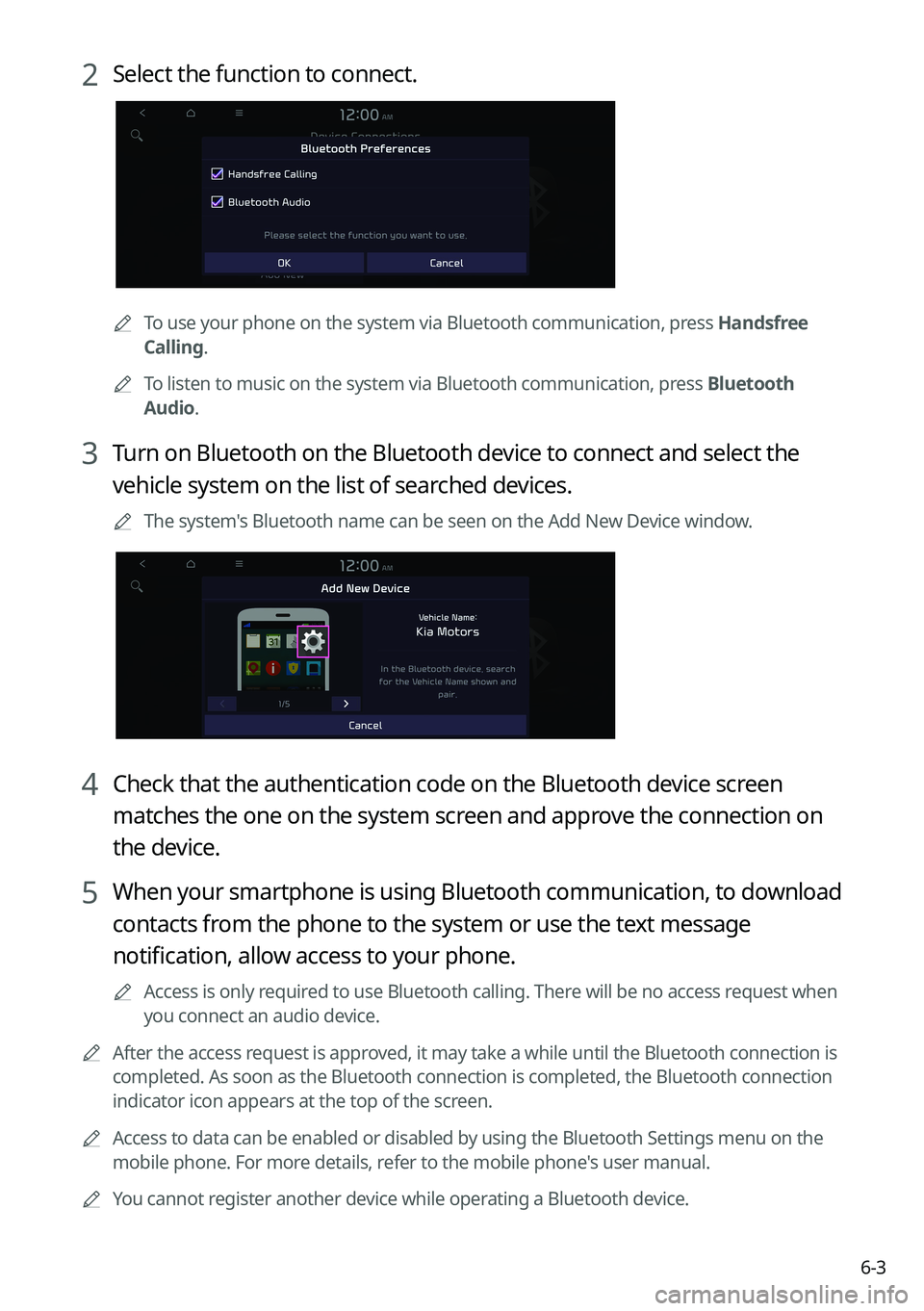
2 Select the function to connect.
0000
A
To use your phone on the system via Bluetooth communication, press Handsfree
Calling.
0000
A
To listen to music on the system via Bluetooth communication, press Bluetooth
Audio.
3 Turn on Bluetooth on the Bluetooth device to connect and select the
vehicle system on the list of searched devices.
0000
A
The system's Bluetooth name can be seen on the Add New Device window.
4 Check that the authentication code on the Bluetooth device screen
matches the one on the system screen and approve the connection on
the device.
5 When your smartphone is using Bluetooth communication, to download
contacts from the phone to the system or use the text message
notification, allow access to your phone.
0000
A
Access is only required to use Bluetooth calling. There will be no access request when
you connect an audio device.
0000
A
After the access request is approved, it may take a while until the Bluetooth connection is
completed. As soon as the Bluetooth connection is completed, the Bluetoo\
th connection
indicator icon appears at the top of the screen.
0000
A
Access to data can be enabled or disabled by using the Bluetooth Settings menu on the
mobile phone. For more details, refer to the mobile phone's user manual.
0000
A
You cannot register another device while operating a Bluetooth device.
Page 132 of 300
6-6
Making a call via Bluetooth
You can connect a Bluetooth device with the hands-free function to use a Bluetooth phone.
The Bluetooth connection allows you to view call details directly from the system screen, and
to make calls safely and easily use your vehicle microphone and speaker.
\335Warning
\225Park the vehicle at a safe place before connecting your mobile phone. It may take the
driver attention off the road and cause a traffic accident which can result in damages,
injuries, and/or death.
\225While driving, do not make a call by dialing a phone number or do not pick up your phone
to talk. Distraction by the use of a mobile phone may cause you not to recognize traffic
flow around and not to cope with unexpected situations. As a result, a traffic accident
may occur. If necessary, use the Bluetooth hands-free function and make the call as short
as possible.
Dialing from the recent call list
Make calls directly from call history of your mobile device.
When you connect your mobile device and system over Bluetooth, the list of recent calls from
the device will be downloaded to the system and you can call them again by selecting them
from the system screen. Your vehicle has a built-in microphone and speaker that make using
mobile phones safe and easy.
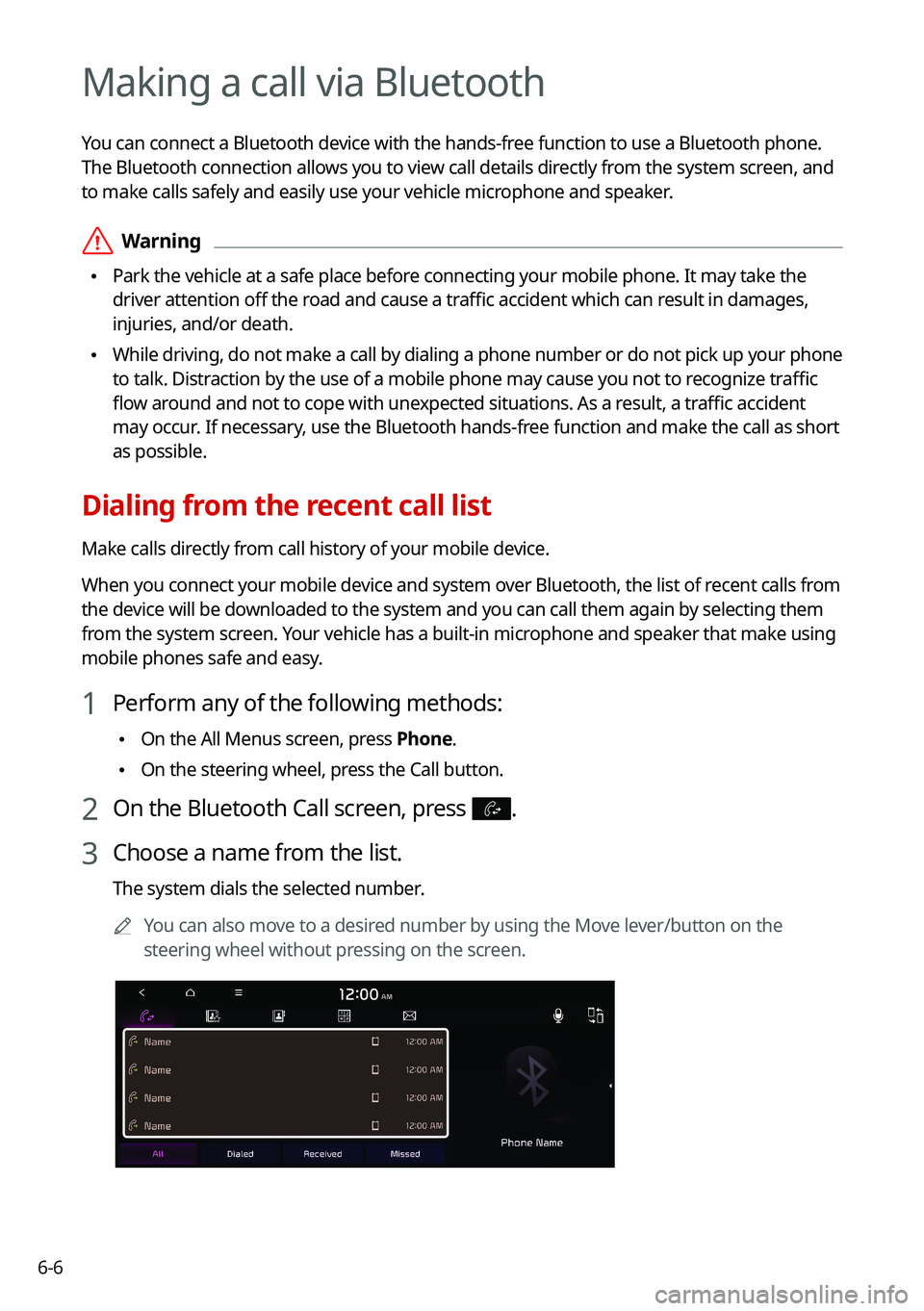
1 Perform any of the following methods:
\225On the All Menus screen, press Phone.
\225On the steering wheel, press the Call button.
2 On the Bluetooth Call screen, press .
3 Choose a name from the list.
The system dials the selected number.
0000
A
You can also move to a desired number by using the Move lever/button on the
steering wheel without pressing on the screen.
Page 134 of 300
6-8
Dialing from the favorites list
Make a list of frequently used phone numbers to call them quickly in the future.
When you connect your mobile device and system over Bluetooth, your contacts stored
on the device will be downloaded to the system, and you can add frequently used phone
numbers to the favorites list. Call your favorite contacts quickly and e\
asily by selecting them
from the list.
1 Perform any of the following methods:
\225On the All Menus screen, press Phone.
\225On the steering wheel, press the Call button.
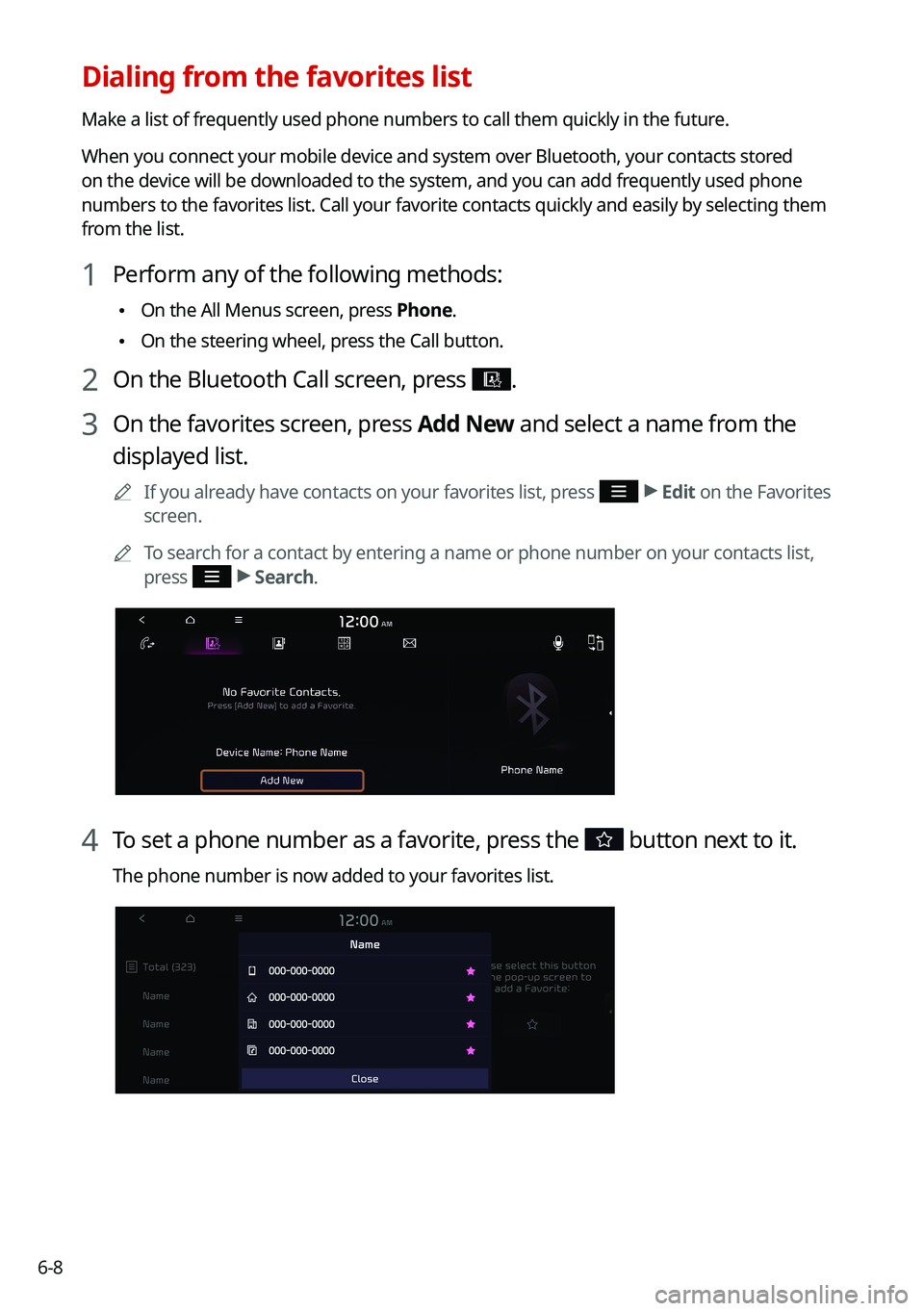
2 On the Bluetooth Call screen, press .
3 On the favorites screen, press Add New and select a name from the
displayed list.
0000
A
If you already have contacts on your favorites list, press >
Edit on the Favorites
screen.
0000
A
To search for a contact by entering a name or phone number on your contacts list,
press
>
Search.
4 To set a phone number as a favorite, press the button next to it.
The phone number is now added to your favorites list.
Page 136 of 300
6-10
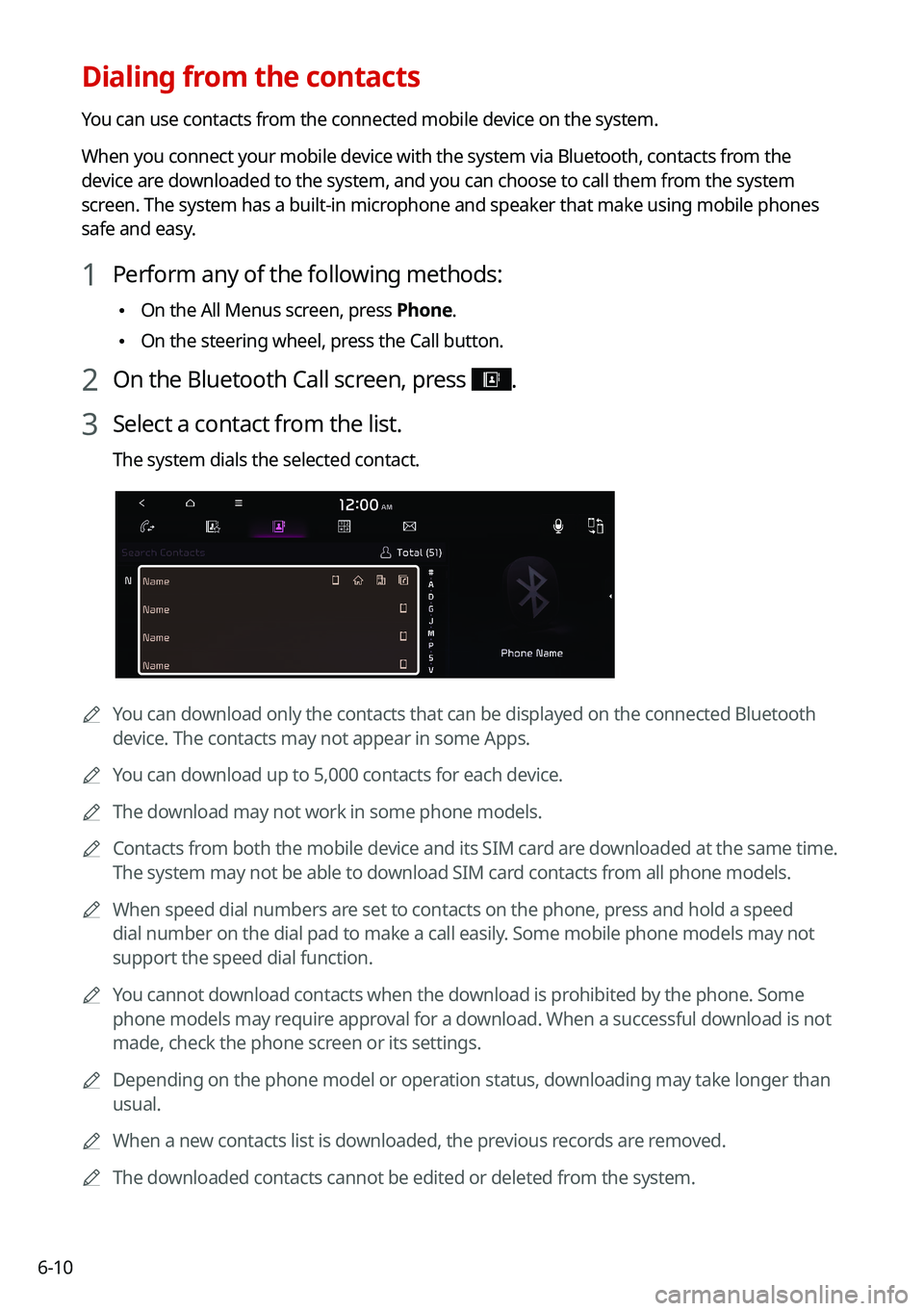
Dialing from the contacts
You can use contacts from the connected mobile device on the system.
When you connect your mobile device with the system via Bluetooth, contacts from the
device are downloaded to the system, and you can choose to call them from the system
screen. The system has a built-in microphone and speaker that make using mobile phones
safe and easy.
1 Perform any of the following methods:
\225On the All Menus screen, press Phone.
\225On the steering wheel, press the Call button.
2 On the Bluetooth Call screen, press .
3 Select a contact from the list.
The system dials the selected contact.
0000A
You can download only the contacts that can be displayed on the connected Bluetoot\
h
device. The contacts may not appear in some Apps.
0000
A
You can download up to 5,000 contacts for each device.
0000
A
The download may not work in some phone models.
0000
A
Contacts from both the mobile device and its SIM card are downloaded at the same time.
The system may not be able to download SIM card contacts from all phone models.
0000
A
When speed dial numbers are set to contacts on the phone, press and hold a speed
dial number on the dial pad to make a call easily. Some mobile phone models may not
support the speed dial function.
0000
A
You cannot download contacts when the download is prohibited by the phone. Some
phone models may require approval for a download. When a successful download is not
made, check the phone screen or its settings.
0000
A
Depending on the phone model or operation status, downloading may take longer than
usual.
0000
A
When a new contacts list is downloaded, the previous records are removed.
0000
A
The downloaded contacts cannot be edited or deleted from the system.