low KIA TELLURIDE 2021 Navigation System Quick Reference Guide
[x] Cancel search | Manufacturer: KIA, Model Year: 2021, Model line: TELLURIDE, Model: KIA TELLURIDE 2021Pages: 300, PDF Size: 10.06 MB
Page 150 of 300
7-4
e e Displays the voice recognition help.
f f The list of menu items appears.
\225Split Screen: Can turn on or off the split screen mode.
Adjusting the voice guidance volume
Adjust the voice guidance volume when the system volume is so low or high and it interferes
with your driving.
When the voice recognition is active, turn the Volume knob on the control
panel.
Seeing the voice recognition help
You can see more details on how to perform various functions by voice commands.
\334\334Caution
Park the vehicle at a safe place and see the help.
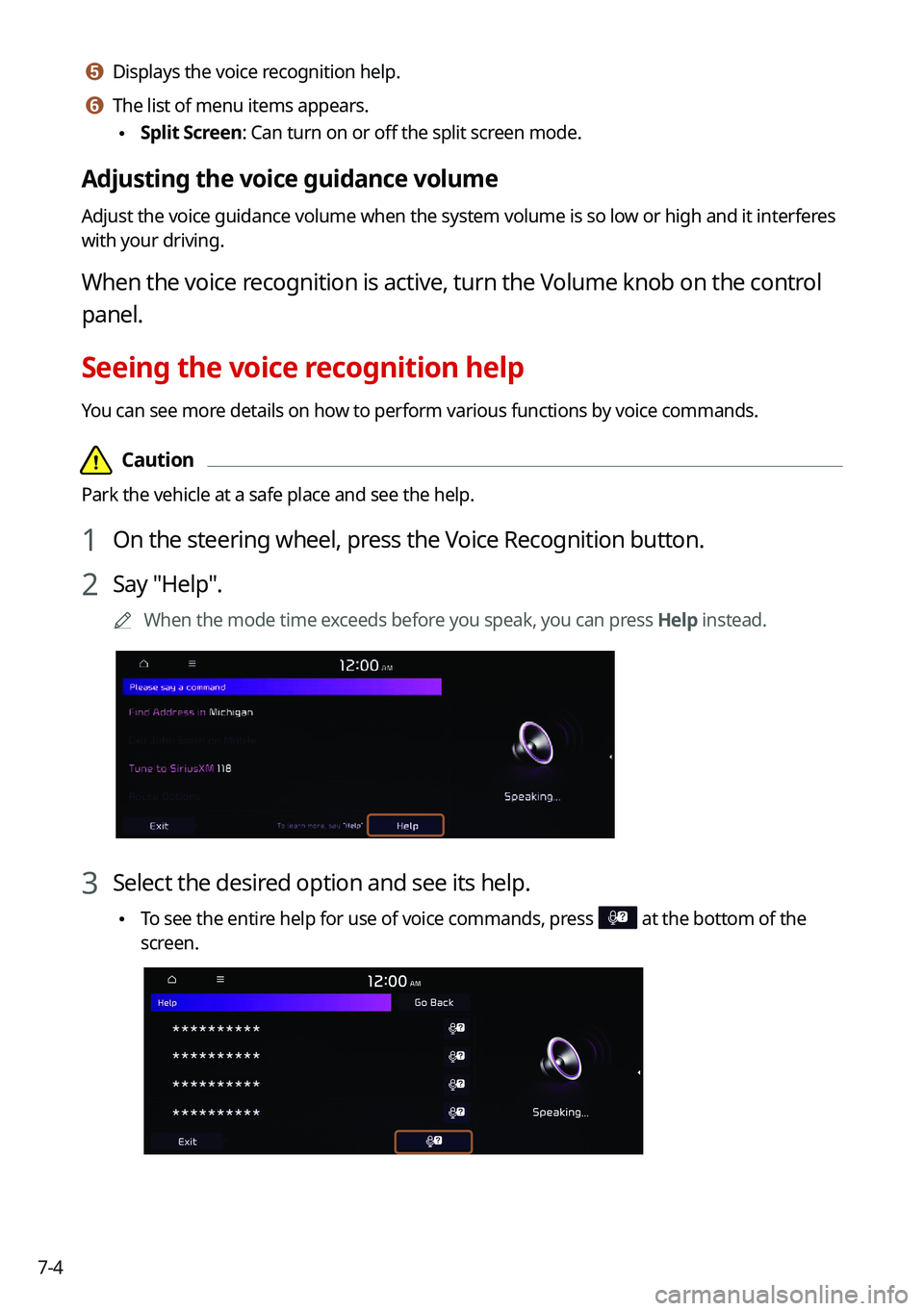
1 On the steering wheel, press the Voice Recognition button.
2 Say "Help".
0000
A
When the mode time exceeds before you speak, you can press Help instead.
3 Select the desired option and see its help.
\225To see the entire help for use of voice commands, press at the bottom of the
screen.
Page 151 of 300
7-5
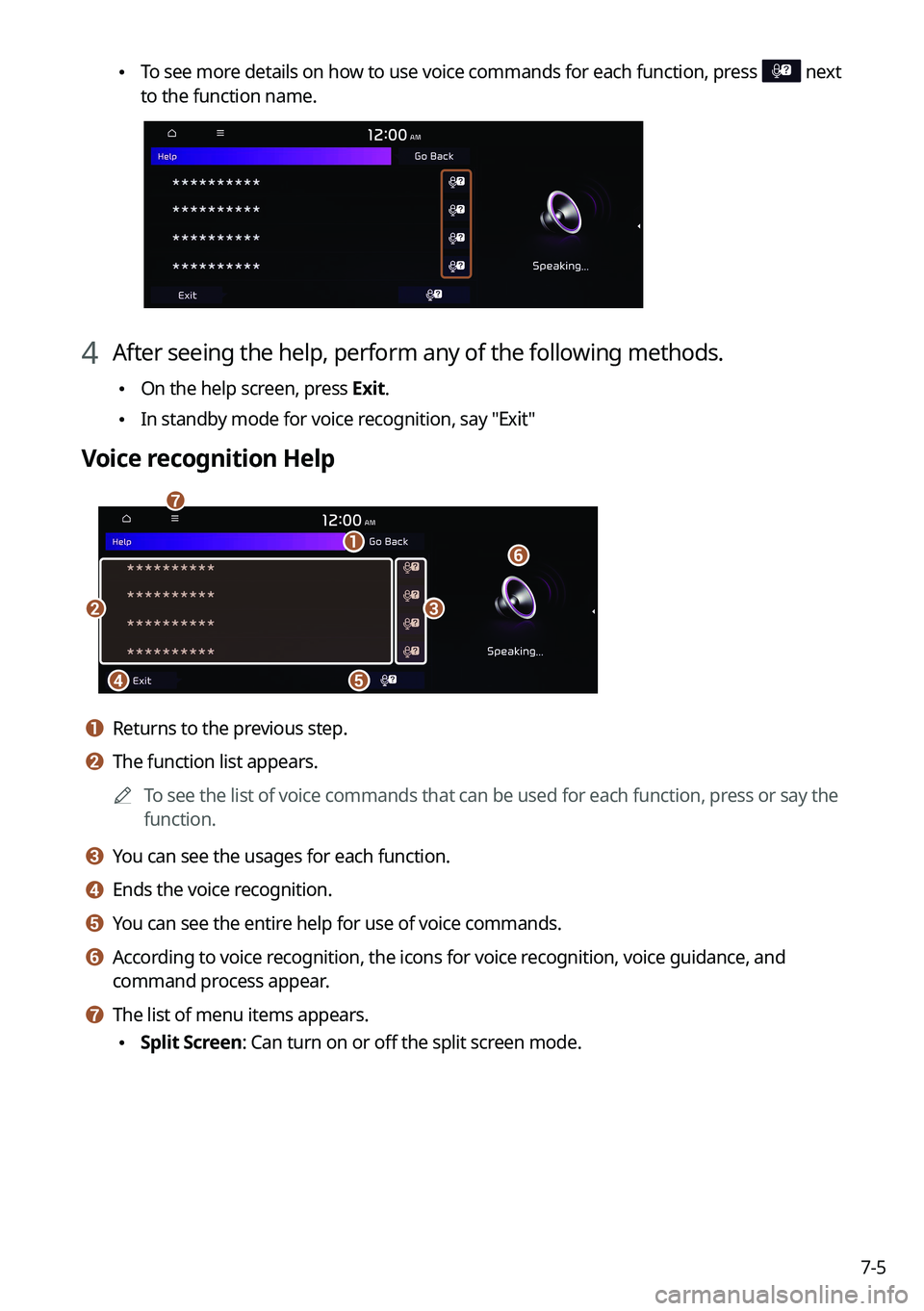
\225To see more details on how to use voice commands for each function, press next
to the function name.
4 After seeing the help, perform any of the following methods.
\225On the help screen, press Exit.
\225In standby mode for voice recognition, say "Exit"
Voice recognition Help
\037
\036
\035
\034\033
\032
\031
a a Returns to the previous step.
b b The function list appears.
0000
A
To see the list of voice commands that can be used for each function, press or say the
function.
c c You can see the usages for each function.
d d Ends the voice recognition.
e e You can see the entire help for use of voice commands.
f f According to voice recognition, the icons for voice recognition, voice guidance, and
command process appear.
g g The list of menu items appears.
\225Split Screen: Can turn on or off the split screen mode.
Page 152 of 300
7-6
Available voice commands
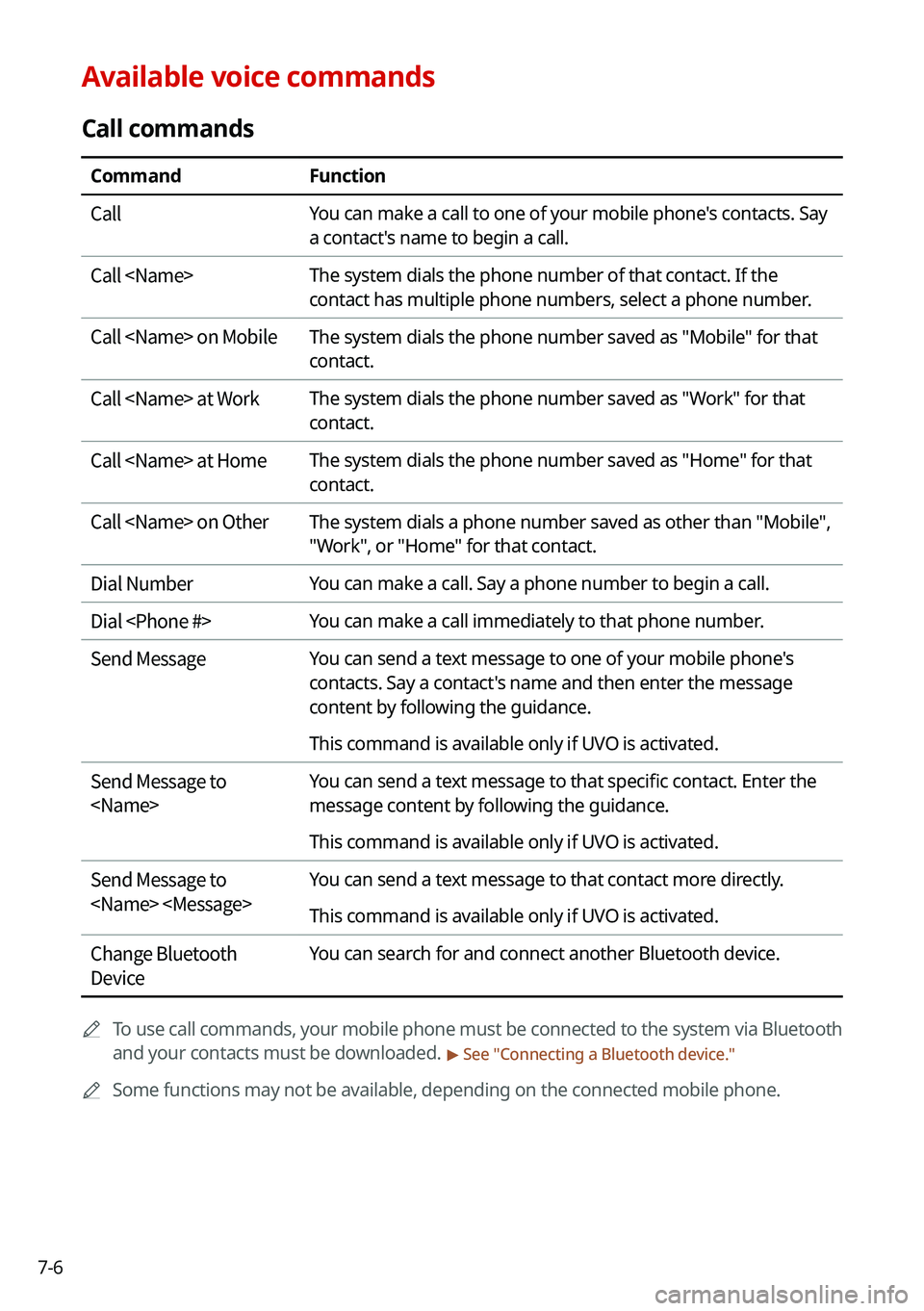
Call commands
CommandFunction
Call You can make a call to one of your mobile phone's contacts. Say
a contact's name to begin a call.
Call
contact has multiple phone numbers, select a phone number.
Call
contact.
Call
contact.
Call
contact.
Call
"Work", or "Home" for that contact.
Dial Number You can make a call. Say a phone number to begin a call.
Dial
Send Message You can send a text message to one of your mobile phone's
contacts. Say a contact's name and then enter the message
content by following the guidance.
This command is available only if UVO is activated.
Send Message to
message content by following the guidance.
This command is available only if UVO is activated.
Send Message to
This command is available only if UVO is activated.
Change Bluetooth
Device You can search for and connect another Bluetooth device.
0000
A
To use call commands, your mobile phone must be connected to the system via Bluetooth
and your contacts must be downloaded.
> See "Connecting a Bluetooth device."
0000
A
Some functions may not be available, depending on the connected mobile p\
hone.
Page 154 of 300
7-80000
A
When you use a command starting with "Find," the system searches for locations within
the state or province where your vehicle is currently located. To search for locations in
another state or province, say the state or province name first and then say the location
you want.
0000
A
Some commands, such as "Cancel Route " or "Show Route," are available only when a
destination is set.
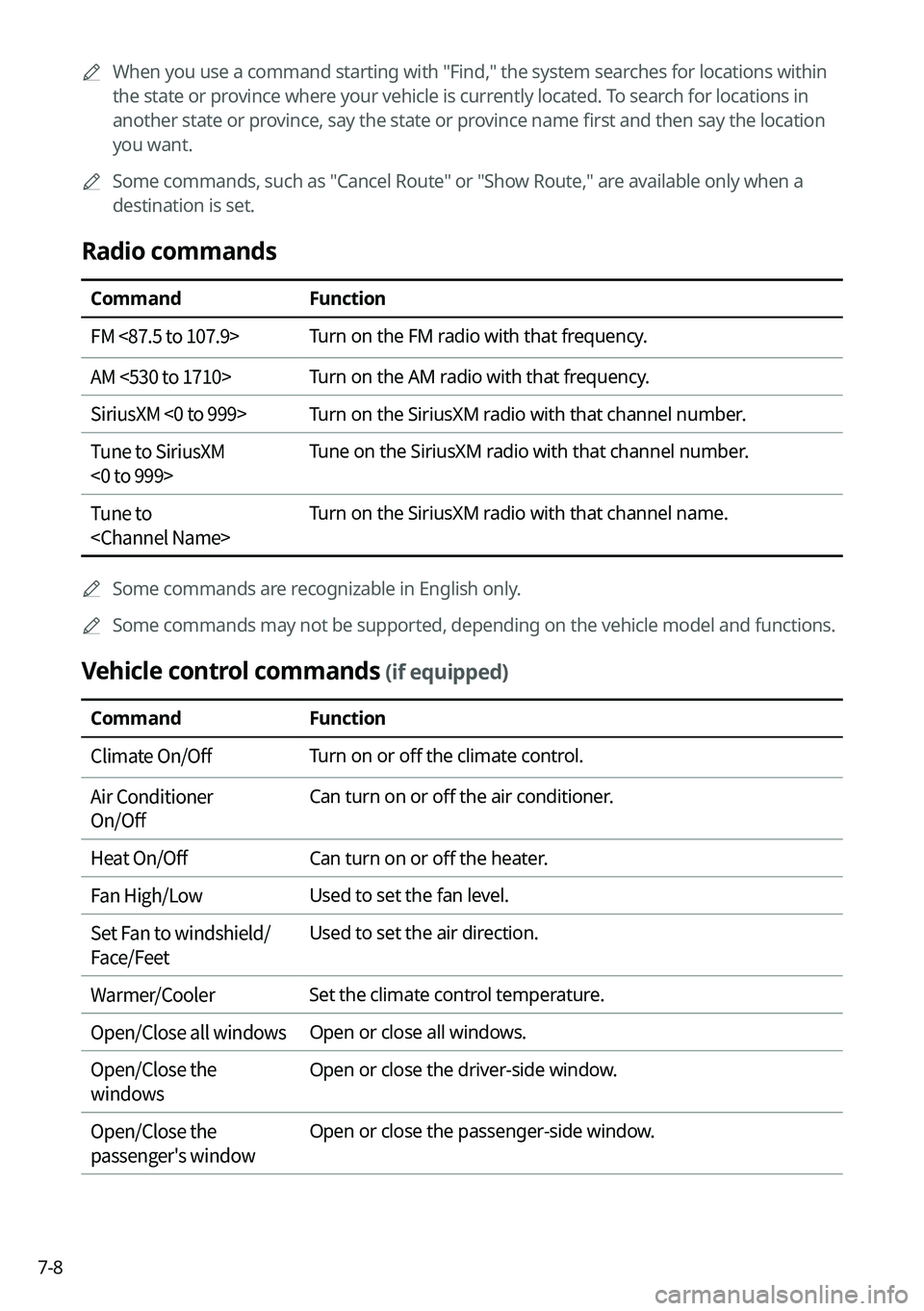
Radio commands
Command Function
FM <87.5 to 107.9> Turn on the FM radio with that frequency.
AM <530 to 1710> Turn on the AM radio with that frequency.
SiriusXM <0 to 999> Turn on the SiriusXM radio with that channel number.
Tune to SiriusXM
<0 to 999> Tune on the SiriusXM radio with that channel number.
Tune to
0000
A
Some commands are recognizable in English only.
0000
A
Some commands may not be supported, depending on the vehicle model and f\
unctions.
Vehicle control commands (if equipped)
Command Function
Climate On/Off Turn on or off the climate control.
Air Conditioner
On/Off Can turn on or off the air conditioner.
Heat On/Off Can turn on or off the heater.
Fan High/Low Used to set the fan level.
Set Fan to windshield/
Face/Feet Used to set the air direction.
Warmer/Cooler Set the climate control temperature.
Open/Close all windows Open or close all windows.
Open/Close the
windows Open or close the driver-side window.
Open/Close the
passenger's window Open or close the passenger-side window.
Page 163 of 300
7-17
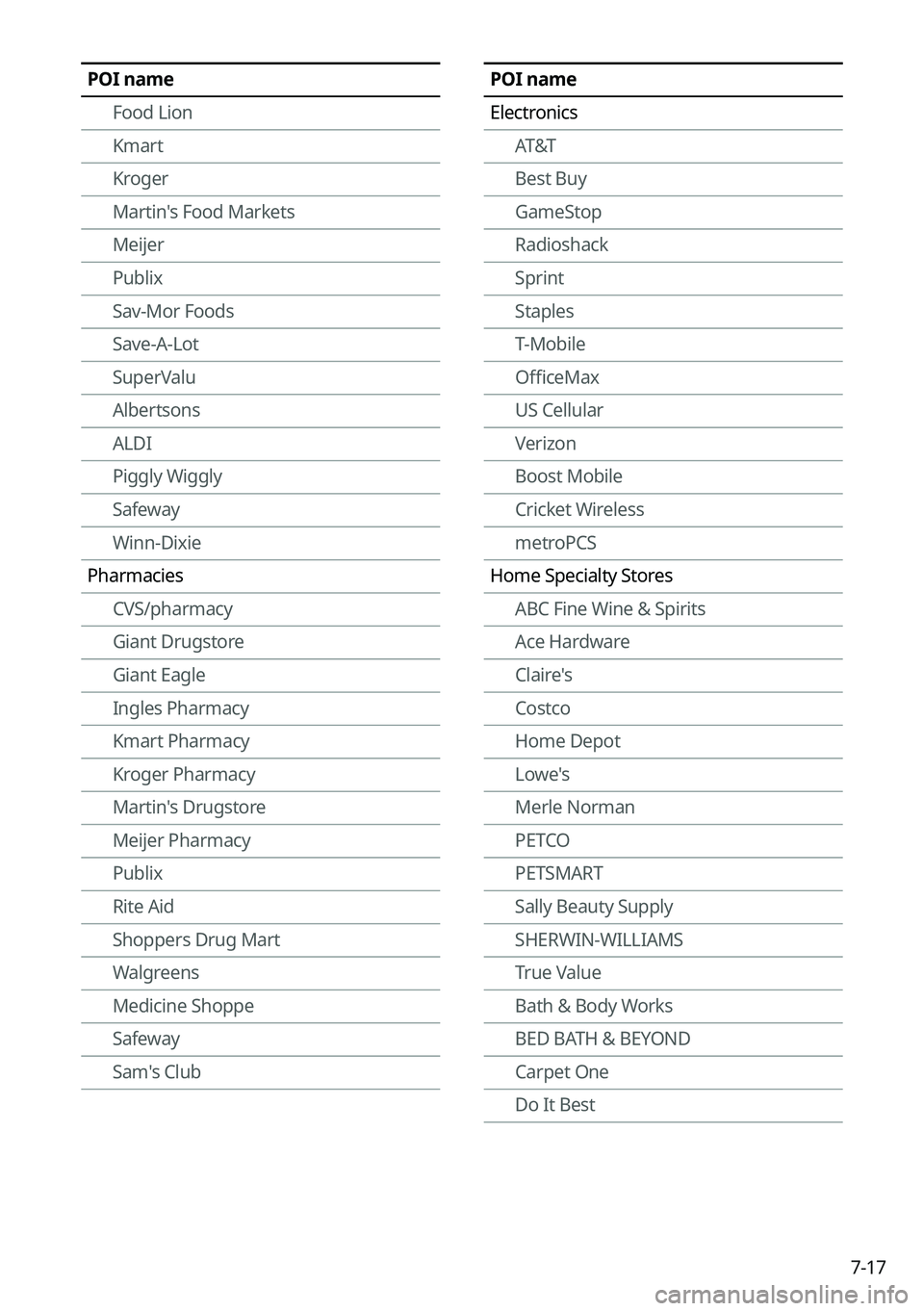
POI name
ElectronicsAT&T
Best Buy
GameStop
Radioshack
Sprint
Staples
T-Mobile
OfficeMax
US Cellular
Verizon
Boost Mobile
Cricket Wireless
metroPCS
Home Specialty Stores ABC Fine Wine & Spirits
Ace Hardware
Claire's
Costco
Home Depot
Lowe's
Merle Norman
PETCO
PETSMART
Sally Beauty Supply
SHERWIN-WILLIAMS
True Value
Bath & Body Works
BED BATH & BEYOND
Carpet One
Do It BestPOI name
Food Lion
Kmart
Kroger
Martin's Food Markets
Meijer
Publix
Sav-Mor Foods
Save-A-Lot
SuperValu
Albertsons
ALDI
Piggly Wiggly
Safeway
Winn-Dixie
Pharmacies CVS/pharmacy
Giant Drugstore
Giant Eagle
Ingles Pharmacy
Kmart Pharmacy
Kroger Pharmacy
Martin's Drugstore
Meijer Pharmacy
Publix
Rite Aid
Shoppers Drug Mart
Walgreens
Medicine Shoppe
Safeway
Sam's Club
Page 167 of 300
7-21
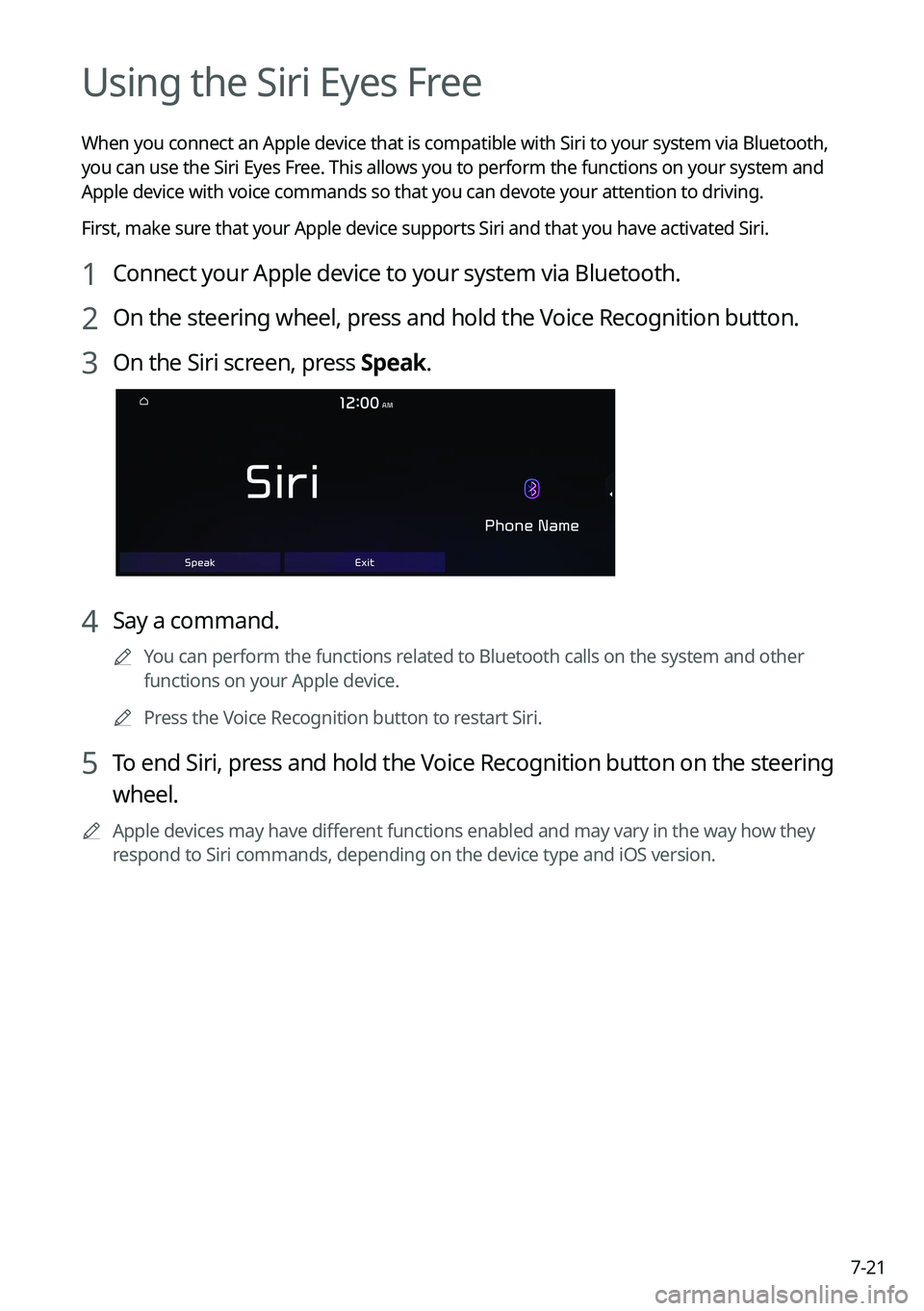
Using the Siri Eyes Free
When you connect an Apple device that is compatible with Siri to your system via Bluetooth,
you can use the Siri Eyes Free. This allows you to perform the functions on your system and
Apple device with voice commands so that you can devote your attention to driving.
First, make sure that your Apple device supports Siri and that you have activated Siri.
1 Connect your Apple device to your system via Bluetooth.
2 On the steering wheel, press and hold the Voice Recognition button.
3 On the Siri screen, press Speak.
4 Say a command.
0000
A
You can perform the functions related to Bluetooth calls on the system and other
functions on your Apple device.
0000
A
Press the Voice Recognition button to restart Siri.
5 To end Siri, press and hold the Voice Recognition button on the steering
wheel.
0000
A
Apple devices may have different functions enabled and may vary in the way how they
respond to Siri commands, depending on the device type and iOS version.
Page 172 of 300
8-2
UVO service
UVO provides connected car services, such as roadside assistance and emergency rescue, via
the latest IT and communication technologies.
When you have subscribed to UVO, you can use the UVO service by using the [
]
buttons. You can also access other useful features using the UVO menu on your system.
0000
A
You must be an active UVO subscriber or within the initial free trial period to receive UVO
services, including Auto Crash Notifications.
0000
A
Depending on the conditions such as vehicle type, system type, and the s\
ubscribed
service package, available services may differ.
0000
A
Some services may incur additional charges.
0000
A
Services may be modified, added, or deleted by changes in the company's policies.
Service restrictions
UVO services are provided via the mobile communication network. Accordingly, the
service may be restricted depending on the mobile communication network condition.
Use the network signal strength icon (
) at the top of the screen to check the mobile
communication status.
0000
A
It is recommended to use the service when the number of signal bars in the icon\
is 4 or
more.
0000
A
Depending on the network signal status, access to UVO may be restricted in the following
locations:
000DInside a building or tunnel
000DMountain or forest area
000DRoad close to a cliff
000DArea densely populated with tall buildings
000DRoad under expressway or multi-level road
000DCommunication shadow area according to the service provider's network coverage
policy
Page 175 of 300
8-5
0000
A
Use the UVO features on the system when the vehicle is stationary with the vehicle turned
on.
Contacting for roadside assistance
When you encounter a disabled vehicle or other problems on the road, you can directly
contact the UVO Center for roadside assistance and receive the service for vehicle towing.
Perform any of the following methods:
\225On the All Menus screen, press UVO
>
Roadside Assist.
\225 Press the [] button on the vehicle.
0000
A
Depending on the network status, this feature may not work correctly.
Checking the weather information (if equipped)
You can see the weather information (temperature, humidity, amount/probability of
precipitation, etc.) for today or the next 3 days.
0000
A
The weather information is accessible only when the system is connected \
to the network.
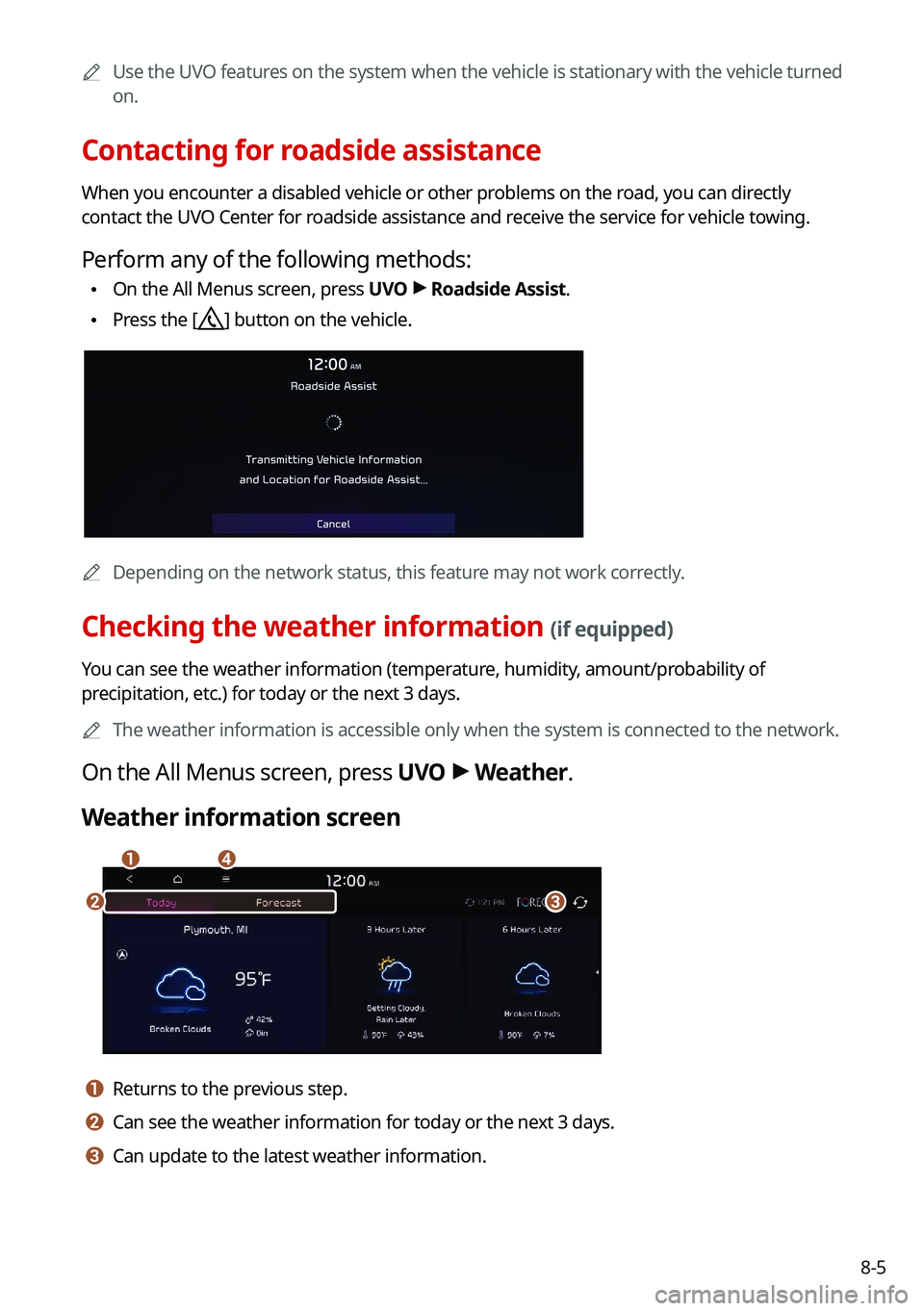
On the All Menus screen, press UVO >
Weather.
Weather information screen
\037\036
\035\034
a a Returns to the previous step.
b b Can see the weather information for today or the next 3 days.
c c Can update to the latest weather information.
Page 176 of 300
8-6
d d The list of menu items appears.
\225Display Off: Turns off the screen. To switch the screen back on, press the screen or
briefly press the power knob.
\225Current Position: Displays the weather of the current position.
\225Waypoint: Displays the weather of the waypoint, if specified.
\225Destination: Displays the weather of the destination, if specified.
\225Search: Can see the weather information by searching for an address.
\225Forecast: Can see the weather information for today or the next 3 days.
\225User's Manual on Web (QR Code): Displays the QR code that provides access to the
online user manual for the system.
\225Split Screen: Can turn on or off the split screen mode.
Diagnosing the vehicle
If you are curious about whether or not there is a problem with your vehicle, you can
diagnose your vehicle. With the diagnosis result, you can also reserve a maintenance service.
1 Park your vehicle in a safe location.
0000
A
The vehicle must be stationary because some components cannot be diagnos\
ed
while driving.
2 On the All Menus screen, press UVO >
Vehicle Diagnostics.
Remote vehicle diagnosis starts.
0000
A
Keep the screen on until the diagnosed result appears. When you switch to another
screen during diagnosis, the diagnosis service is canceled.
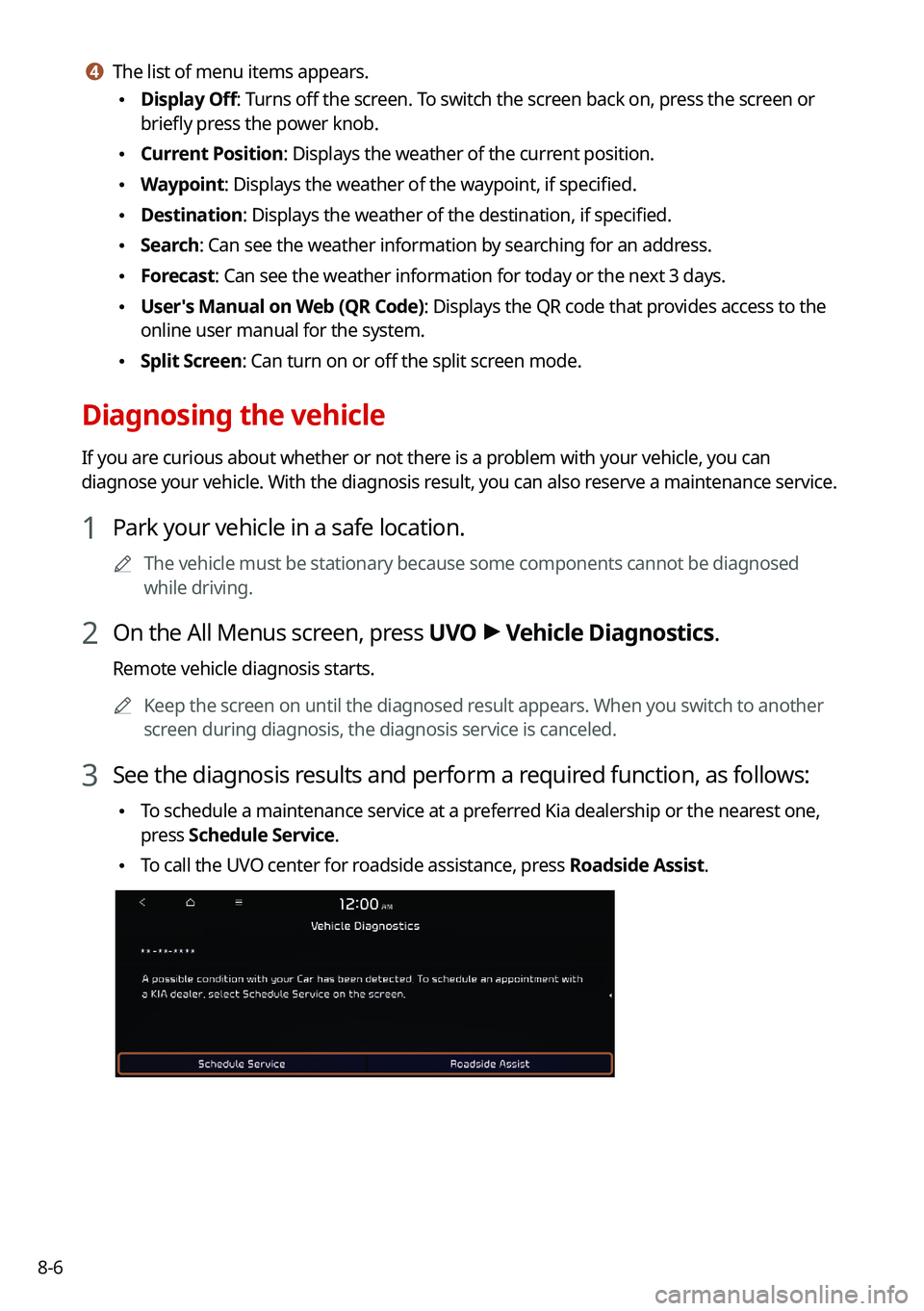
3 See the diagnosis results and perform a required function, as follows:
\225To schedule a maintenance service at a preferred Kia dealership or the nearest one,
press
Schedule Service.
\225To call the UVO center for roadside assistance, press Roadside Assist.
Page 177 of 300

8-7
0000
A
A diagnosis result provided by this service is only an estimated result based on the signals
from your vehicle. Visit a Kia Motors dealership for a detailed diagnosis.\
0000
A
When a critical diagnostics issue is detected on your vehicle, an automa\
tic diagnosis
starts when a warning light illuminates on the instrument cluster. You are notified of the
diagnosis result.
0000
A
Your preferred dealership must be registered on Owners.kia.com for you to schedule a
maintenance service with it.
Checking maintenance service intervals (if equipped)
You can see information about the intervals for the last and next maintenance services. This
feature can help you maintain your vehicle on a regular basis.
1 On the All Menus screen, press UVO >
Maintenance.
2 Check the maintenance information.
0000
A
You can see the distance driven and the number of days remaining before the
vehicle should receive maintenance again. Use the information to determine when to
perform the next maintenance service.
0000
A
To reset the information, press Reset Service Intervals.
0000
A
To access the online user's manual on the Maintenance screen, press >
User's
Manual on Web (QR Code) and then scan the displayed QR code.
Contacting the UVO Center
You can contact a UVO Center representative directly to request help or make inquiries about
using the UVO services.
Perform any of the following methods:
\225 On the All Menus screen, press UVO
>
Virtual Assistant.
\225 Press the [] button on the vehicle.
0000
A
To end the call, press End on the screen or press the [
] button.
0000
A
This feature is not available during a Bluetooth call.