release Lexus CT200h 2014 (in English) User Guide
[x] Cancel search | Manufacturer: LEXUS, Model Year: 2014, Model line: CT200h, Model: Lexus CT200h 2014Pages: 622
Page 145 of 622

145
3
3-3. Adjusting the seats
Operation of each component
CT200h_OM_OM76135E_(EE)
Rear seats
Pull up the seatback lock release lever
until the lock is released, and fold the
seatback down.
To avoid trapping the seat belt between
the seat and the inside of the vehicle,
pass the seat belt inside the seat belt
guide and then return the seatback
securely to the locked position.
The seatbacks of the rear seats can be folded down.
Folding down the rear seatbacks
Returning the rear seatbacks
Seat belt guide
CT200h_OM_OM76135E_(EE).book Page 145 Friday, May 30, 2014 1
1:14 AM
Page 146 of 622

1463-3. Adjusting the seats
CT200h_OM_OM76135E_(EE)
WA R N I N G
■When folding the rear seatbacks down
Observe the following precautions. Failure to do so may result in death or serious
injury.
●Do not fold the seatbacks down while driving.
●Stop the vehicle on level ground, set the parking brake and shift the shift position to P.
●Do not allow anyone to sit on a folded seatback or in the luggage compartment while
driving.
●Do not allow children to enter the luggage compartment.
■When returning the rear seatback to the upright position
Do not put your hand on the seat belt guide.
Doing so may cause you to trap your hand between the guide and the pillar, causing an
injury.
■After returning the rear seatback to the upright position
Observe the following precautions. Failure to do so may result in death or serious
injury.
●Check that the seat belts are not twisted or caught in the seatback.
●Make sure that the seatback is securely
locked in position by lightly pushing it back
and forth.
If the seatback is not securely locked, the red
marking will be visible behind the seatback
lock release lever. Make sure that the red
marking is not visible.
CT200h_OM_OM76135E_(EE).book Page 146 Friday, May 30, 2014 11:14 AM
Page 151 of 622
151
3
3-3. Adjusting the seats
Operation of each component
CT200h_OM_OM76135E_(EE)
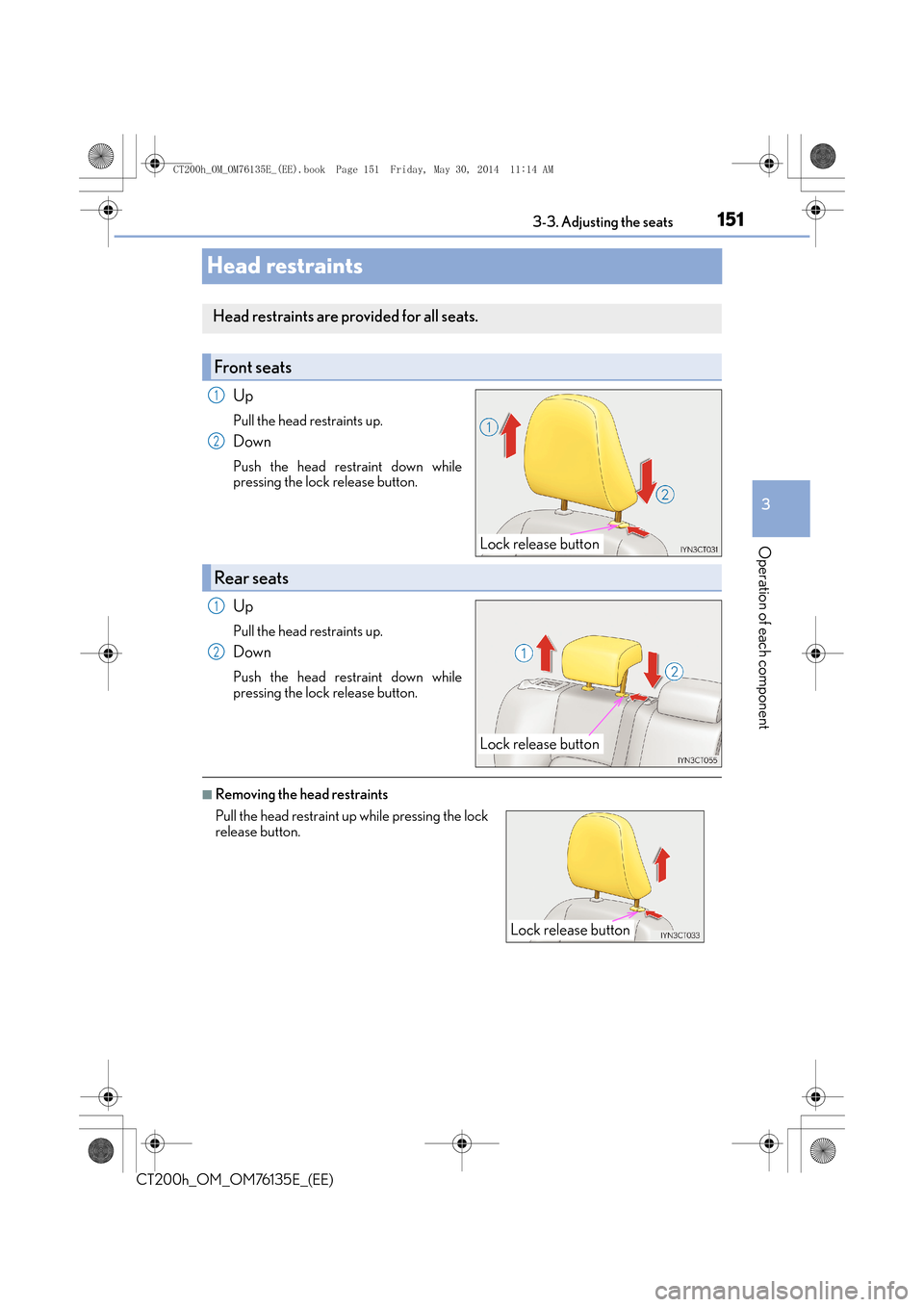
Head restraints
Up
Pull the head restraints up.
Down
Push the head restraint down while
pressing the lock release button.
Up
Pull the head restraints up.
Down
Push the head restraint down while
pressing the lock release button.
■Removing the head restraints
Head restraints are provided for all seats.
Front seats
Lock release button
1
2
Rear seats
Lock release button
1
2
Pull the head restraint up while pressing the lock
release button.
Lock release button
CT200h_OM_OM76135E_(EE).book Page 151 Friday, May 30, 2014 1
1:14 AM
Page 152 of 622
1523-3. Adjusting the seats
CT200h_OM_OM76135E_(EE)
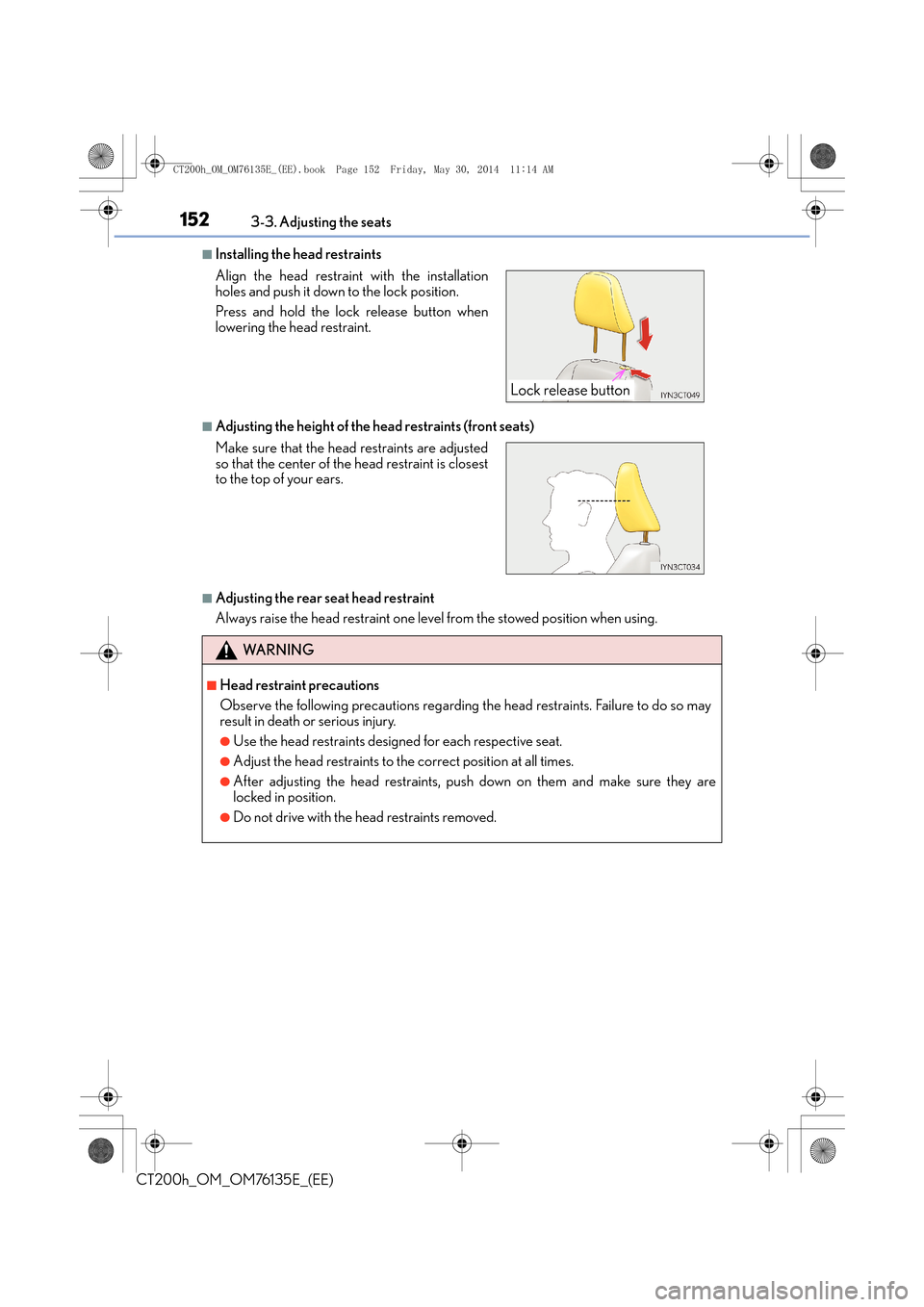
■Installing the head restraints
■Adjusting the height of the head restraints (front seats)
■Adjusting the rear seat head restraint
Always raise the head restraint one level from the stowed position when using. Align the head restraint with the installation
holes and push it down to the lock position.
Press and hold the lock release button when
lowering the head restraint.
Make sure that the head restraints are adjusted
so that the center of the head restraint is closest
to the top of your ears.
WA R N I N G
■Head restraint precautions
Observe the following precautions regarding the head restraints. Failure to do so may
result in death or serious injury.
●Use the head restraints designed for each respective seat.
●Adjust the head restraints to the correct position at all times.
●After adjusting the head restraints, push down on them and make sure they are
locked in position.
●Do not drive with the head restraints removed.
Lock release button
CT200h_OM_OM76135E_(EE).book Page 152 Friday, May 30, 2014 1 1:14 AM
Page 162 of 622

1623-5. Opening, closing the windows and moon roof
CT200h_OM_OM76135E_(EE)
■The power windows can be operated when
The power switch is in ON mode.
■Operating the power windows after turning the hybrid system off
The power windows can be operated for approximately 45 seconds even after the
power switch is turned to ACCESSORY mode or turned off. They cannot, however, be
operated once either front door is opened.
■Jam protection function
If an object becomes caught between the window and the window frame, window travel
is stopped and the window is opened slightly.
■When the power window does not close normally
If the jam protection function is operating abnormally and a window cannot be closed,
perform the following operations using the power window switch on the relevant door.
●After stopping the vehicle, the window can be closed by holding the power window
switch in the one-touch closing position while the power switch is turned to ON mode.
●If the window still cannot be closed even by carrying out the operation explained above,
initialize the function by performing the following procedure.
Hold the power window switch in the one- touch closing position. Continue holding
the switch for a further 6 seconds after the window has closed.
Hold the power window switch in the one- touch opening position. Continue holding
the switch for a further 2 seconds afte r the window has opened completely.
Hold the power window switch in the one-touch closing position once again. Con-
tinue holding the switch for a further 2 seconds after the window has closed.
If you release the switch while the window is moving, start again from the beginning.
If the window continues to close but then re-open slightly even after performing the
above procedure correctly, have the vehicle inspected by any authorized Lexus dealer or
repairer, or another duly qualified and equipped professional.
■Door lock linked window operation
●The power windows can be opened and closed using the mechanical key.* ( → P. 565)
●The power windows can be opened and closed using the wireless remote control.*(→ P. 1 1 9 )
*: These settings must be customized at any authorized Lexus dealer or repairer, or
another duly qualified and equipped professional.
■Customization
Setting (e.g. linked door lock operation) can be changed.
(Customizable features:
→P. 5 8 9 )
1
2
3
CT200h_OM_OM76135E_(EE).book Page 162 Friday, May 30, 2014 1 1:14 AM
Page 165 of 622

1653-5. Opening, closing the windows and moon roof
3
Operation of each component
CT200h_OM_OM76135E_(EE)
■The moon roof can be operated when
The power switch is in ON mode.
■Operating the moon roof after turning the hybrid system off
The moon roof can be operated for approximately 45 seconds even after the power
switch is turned to ACCESSORY mode or turned off. It cannot, however, be operated
once either front door is opened.
■Jam protection function
If an object is detected between the moon roof and the frame while the moon roof is clos-
ing or tilting down, travel is stoppe d and the moon roof opens slightly.
■Sunshade
The sunshade can be opened and closed manually. However, the sunshade will open
automatically to slightly before the fully op en position when the moon roof is opened.
■When the moon roof does not close normally
Perform the following procedure:
●If the moon roof closes but then re-opens slightly
Stop the vehicle.
Press and hold the “CLOSE” switch.
*1
The moon roof will close, reopen an d pause for approximately 10 seconds.*2 Then it
will close again and tilt down. Finally it w ill be adjusted slightly and then stop.
Check to make sure that the moon roof completely stops and then release the
switch.
●If the moon roof tilts down but then tilts back up
Stop the vehicle.
Press and hold the “DOWN” switch.
*1
The moon roof will close, reopen and paus e for approximately 10 seconds in the tilt
up position.
*2 Then it will close again and tilt down . Finally it will be adjusted slightly
and then stop.
Check to make sure that the moon roof has completely stopped and then release
the switch.
*1: If the switch is released at the incorrect time, the procedure will have to be per-
formed again from the beginning.
*2: If the switch is released after the above mentioned 10 second pause, automatic operation will be disabled. In that case, press and hold the “CLOSE” or “DOWN”
switch, and the moon roof will close, be adjusted slightly and then stop. Check to
make sure that the moon roof has completely stopped and then release the switch.
If the moon roof does not fully close even after performing the above procedure cor-
rectly, have the vehicle inspected by any authorized Lexus dealer or repairer, or another
duly qualified and equipped professional.
■Moon roof open warning buzzer
The buzzer sounds and a message is shown on the multi-information display in the instru-
ment cluster when the power switch is turned off and the driver’s door is opened with the
moon roof open.
1
2
3
1
2
3
CT200h_OM_OM76135E_(EE).book Page 165 Friday, May 30, 2014 1 1:14 AM
Page 168 of 622

1684-1. Before driving
CT200h_OM_OM76135E_(EE)
Driving the vehicle
→ P. 1 7 7
With the brake pedal depressed, sh ift the shift position to D. (→P. 1 8 3 )
Check that the shift position indicator shows D.
Release the parking brake. ( →P. 1 8 9 )
Gradually release the brake pedal and gently depress the accelerator pedal
to accelerate the vehicle.
With the shift position in D, depress the brake pedal.
If necessary, set the parking brake.
If the vehicle is to be stopped for an extended period of time, shift the shift position to
P. ( →P. 1 8 4 )
Stop the vehicle completely.
Set the parking brake. ( →P. 1 8 9 )
Shift the shift position to P. ( →P. 1 8 4 )
Check that the shift position indicator shows P.
Press the power switch to stop the hybrid system.
Slowly release the brake pedal.
Lock the door, making sure that you have the electronic key on your person.
If parking on a hill, bl ock the wheels as needed.
The following procedures should be observed to ensure safe driving:
Starting the hybrid system
Driving
Stopping
Parking the vehicle
1
2
3
1
2
1
2
3
4
5
6
CT200h_OM_OM76135E_(EE).book Page 168 Friday, May 30, 2014 1 1:14 AM
Page 169 of 622
1694-1. Before driving
4
Driving
CT200h_OM_OM76135E_(EE)
Firmly set the parking brake with the brake pedal depressed, and then shift the
shift position to D.
Release the brake pedal and gently depress the accelerator pedal.
Release the parking brake.
■When starting off on a uphill
The hill-start assist control is available. (→P. 2 4 2 )
■For fuel-efficient driving
Keep in mind that hybrid vehicles are similar to conventional vehicles, and it is necessary
to refrain from activities such as sudden acceleration, etc. Refer to “Hybrid vehicle
driving tips”. ( →P. 2 5 1 )
■Driving in the rain
●Drive carefully when it is raining, becaus e visibility will be reduced, the windows may
become fogged-up, and the road will be slippery.
●Drive carefully when it starts to rain, beca use the road surface will be especially slip-
pery.
●Refrain from high speeds when driving on an expressway in the rain, because there may
be a layer of water between the tires and the road surface, preventing the steering and
brakes from operating properly.
■Breaking in your new Lexus
To extend the life of the vehicle, observing the following precautions is recommended:
●For the first 300 km (200 miles):
Avoid sudden stops.
●For the first 2000 km (1200 miles):
• Do not drive at extremely high speeds.
• Avoid sudden acceleration.
• Do not drive at a constant speed for extended periods.
■Operating your vehicle in a foreign country
Comply with the relevant vehicle registration laws and confirm the availability of the cor-
rect fuel. ( →P. 5 8 0 )
Starting off on a uphill
1
2
3
CT200h_OM_OM76135E_(EE).book Page 169 Friday, May 30, 2014 1 1:14 AM
Page 178 of 622

1784-2. Driving procedures
CT200h_OM_OM76135E_(EE)
Stop the vehicle completely.
Set the parking brake. (→P. 1 8 9 )
Shift the shift position to P.
( → P. 1 8 4 )
Check that the shift position indicator
shows P. ( →P. 1 8 3 )
Press the power switch.
The hybrid system will stop, an d the meter display will be extinguished (the shift posi-
tion indicator will be extinguished a few seconds after the meter display).
Slowly release the brake pedal and check that the indicator on the power
switch is off.
Modes can be changed by pressing the power switch with the brake pedal
released. (The mode changes each time the switch is pressed.) Off
The emergency flashers can be used.
ACCESSORY mode
Some electrical components such as the
audio system can be used.
The power switch indicator turns amber.
ON mode
All electrical components can be used.
The power switch indicator turns amber.
Stopping the hybrid system
1
2
3
Changing power switch modes
4
5
1
2
3
CT200h_OM_OM76135E_(EE).book Page 178 Friday, May 30, 2014 1 1:14 AM
Page 183 of 622

183
4
4-2. Driving procedures
Driving
CT200h_OM_OM76135E_(EE)
Hybrid transmission
Shift lever
Operate the shift lever gently and ensure correct shifting operation.
Release the shift lever after each shifting operation to allow it to return to the posi-
tion.
When shifting from P to N, D or R, from D to R, or from R to D, ensure that the brake
pedal is being depressed and the vehicle is stationary.
Shift position indicator
The current shift position is illuminated.
When any shift position other than D or B is selected, the arrow toward B and B posi-
tion indicator disappear from
the shift position indicator.
When selecting the shift position, make sure that the shift position has been
changed to the desired position by checki ng the shift position indicator provided
on the instrument cluster.
Shifting the shift lever
1
When shifting to the D or R, move the shift lever along the shift gate.
To shift to the N, slide the shift lever to the left (left-hand drive vehicle) or
right (right-hand drive vehicle) and hold it. The shift position will change to
N.
To shift to the B, pull the shift lever down.
Shifting to B is only possible when shift position D is selected.
2
CT200h_OM_OM76135E_(EE).book Page 183 Friday, May 30, 2014 1 1:14 AM