release Lexus CT200h 2014 (in English) Owner's Guide
[x] Cancel search | Manufacturer: LEXUS, Model Year: 2014, Model line: CT200h, Model: Lexus CT200h 2014Pages: 622
Page 184 of 622

1844-2. Driving procedures
CT200h_OM_OM76135E_(EE)
*: For good fuel economy and noise reduction, the D position should usually be used.
→P. 2 3 7
■When shifting the shift position to P
Fully stop the vehicle and set the
parking brake, and then press the P
position switch.
When the shift position is changed to
P, the switch indicator comes on.
Check that the P position is illumi-
nated on the shift position indicator.
■Shifting the shift position from P to other positions
●While depressing the brake pedal firmly, operate the shift lever. If the shift
lever is operated without depressing the brake pedal, the buzzer will sound
and the shifting operation will be disabled.
●When selecting the shift position, make sure that the shift position has been
changed to the desired position by ch ecking the shift position indicator
provided on the instrument cluster.
●The shift position cannot be changed from P to B directly.
Shift position purpose
Shift positionObjective or function
PParking the vehicle/starting the hybrid system
RReversing
NNeutral
(Condition in which the power is not transmitted)
DNormal driving*
BApplying engine braking or strong braking when the accelera- tor pedal has been released on steep downward slopes etc.
Selecting a driving mode
P position switch
CT200h_OM_OM76135E_(EE).book Page 184 Friday, May 30, 2014 1 1:14 AM
Page 188 of 622
1884-2. Driving procedures
CT200h_OM_OM76135E_(EE)
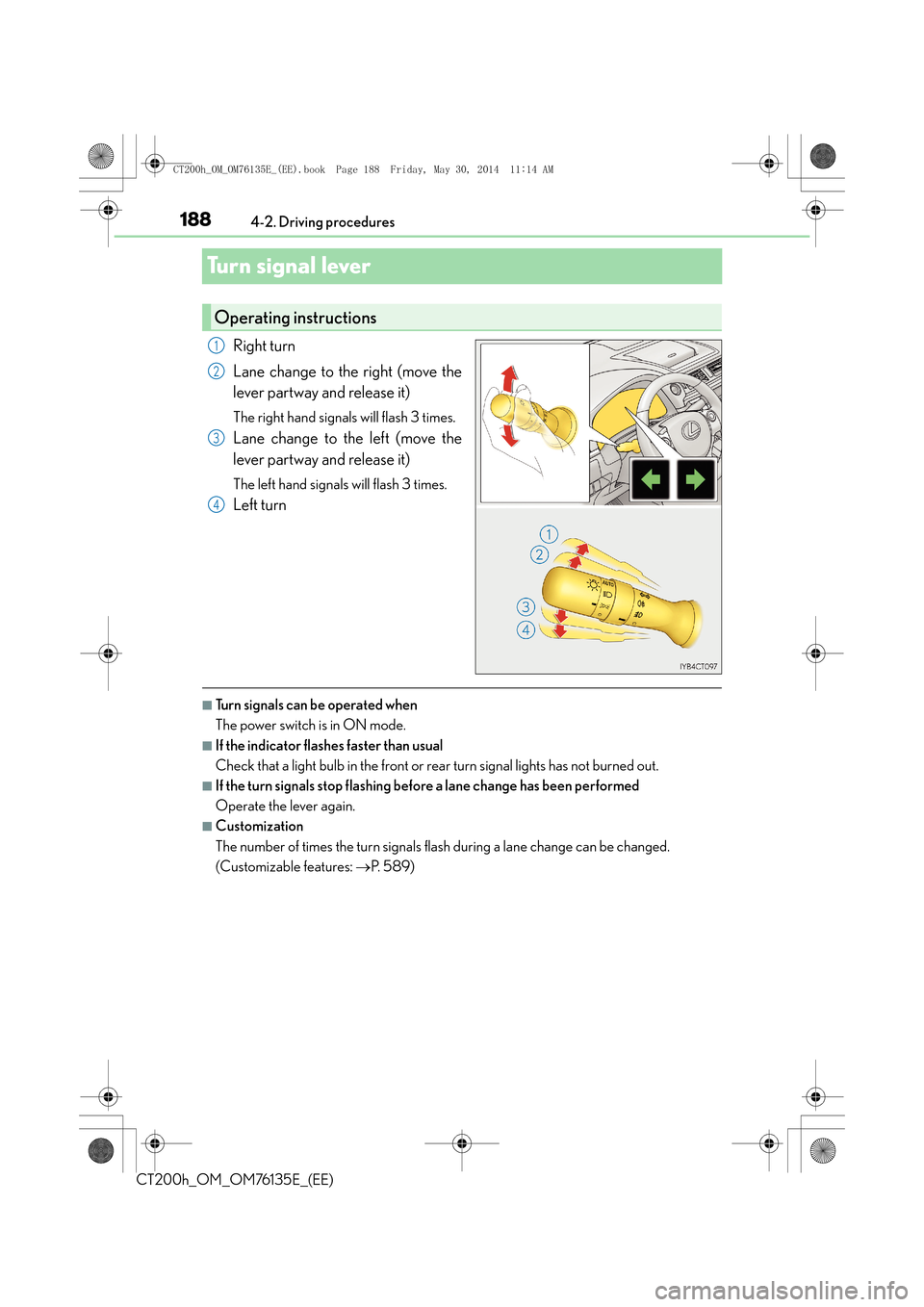
Turn signal lever
Right turn
Lane change to the right (move the
lever partway and release it)
The right hand signals will flash 3 times.
Lane change to the left (move the
lever partway and release it)
The left hand signals will flash 3 times.
Left turn
■Turn signals can be operated when
The power switch is in ON mode.
■If the indicator flashes faster than usual
Check that a light bulb in the front or rear turn signal lights has not burned out.
■If the turn signals stop flashing before a lane change has been performed
Operate the lever again.
■Customization
The number of times the turn signals flash during a lane change can be changed.
(Customizable features: →P. 5 8 9 )
Operating instructions
1
2
3
4
CT200h_OM_OM76135E_(EE).book Page 188 Friday, May 30, 2014 1 1:14 AM
Page 189 of 622

189
4
4-2. Driving procedures
Driving
CT200h_OM_OM76135E_(EE)
Parking brake
To set the parking brake, fully depress
the parking brake pedal with your left
foot while depressing the brake pedal
with your right foot.
(Depressing the pedal again releases
the parking brake.)
■Parking brake engaged warning buzzer
The buzzer sounds to indicate that parking brake is still engaged (with the vehicle having
reached a speed of 5 km/h [3 mph]). (
→P. 5 2 6 )
■Usage in winter time
→P. 2 5 4
Operating instructions
NOTICE
■Before driving
Fully release the parking brake.
Driving the vehicle with the parking brake set will lead to brake components overheat-
ing, which may affect braking performance and increase brake wear.
CT200h_OM_OM76135E_(EE).book Page 189 Friday, May 30, 2014 1 1:14 AM
Page 190 of 622

1904-3. Operating the lights and wipers
CT200h_OM_OM76135E_(EE)
Headlight switch
Turning the end of the lever turns on the lights as follows: The daytime running lights
turn on.
The front position, tail,
license plate and instru-
ment panel lights turn on.
The headlights and all lights
listed above turn on.
The headlights, daytime
running lights and front
position lights turn on and
off automatically.
(When the power switch is
in ON mode.)
With the headlights on, push the
lever away from you to turn on the
high beams.
Pull the lever toward you to the center
position to turn the high beams off.
Pull the lever toward you and release
it to flash the high beams once.
You can flash the high beams with the
headlights on or off.
The headlights can be operated manually or automatically.
Operating instructions
1
2
3
4
Turning on the high beam headlights
1
2
CT200h_OM_OM76135E_(EE).book Page 190 Friday, May 30, 2014 1 1:14 AM
Page 191 of 622

1914-3. Operating the lights and wipers
4
Driving
CT200h_OM_OM76135E_(EE)
This system allows the headlights to be turned on for 30 seconds when the
power switch is off.
Pull the lever toward you and release it
with the light switch is in or
after turning the power switch off.
Pull the lever toward you and release it
again to turn off the lights.
The level of the headlights can be adjusted according to the number of passen-
gers and the loading condition of the vehicle.
Raises the level of the headlights
Lowers the level of the headlights
■Guide to dial settings
Follow me home system
Manual headlight leveling dial (if equipped)
1
2
Occupancy and luggage load conditionsDial positionOccupantsLuggage load
DriverNone0
Driver and front passengerNone0
All seats occupiedNone1.5
All seats occupiedFull luggage loading2.5
DriverFull luggage loading4
CT200h_OM_OM76135E_(EE).book Page 191 Friday, May 30, 2014 1 1:14 AM
Page 192 of 622
1924-3. Operating the lights and wipers
CT200h_OM_OM76135E_(EE)
■Daytime running light system
To make your vehicle more visible to other drivers, the front position lights turn on auto-
matically (at an increased intensity) whenever the hybrid system is started and the park-
ing brake is released. Daytime running lig hts are not designed for use at night.
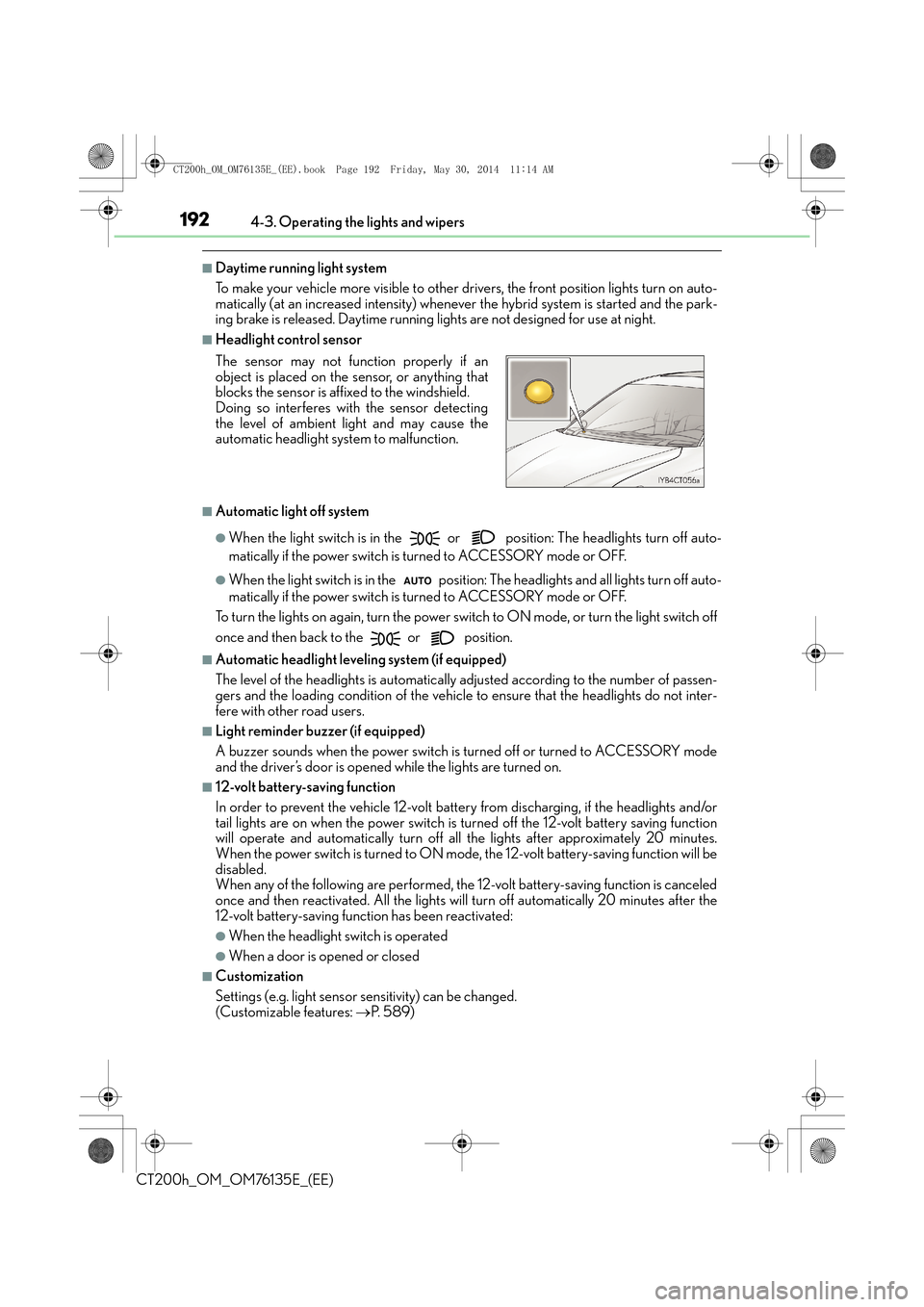
■Headlight control sensor
■Automatic light off system
●When the light switch is in the or position: The headlights turn off auto-
matically if the power switch is turned to ACCESSORY mode or OFF.
●When the light switch is in the position : The headlights and all lights turn off auto-
matically if the power switch is turned to ACCESSORY mode or OFF.
To turn the lights on again, turn the power swit ch to ON mode, or turn the light switch off
once and then back to the
or position.
■Automatic headlight leveling system (if equipped)
The level of the headlights is automatically adjusted according to the number of passen-
gers and the loading condition of the vehicle to ensure that the headlights do not inter-
fere with other road users.
■Light reminder buzzer (if equipped)
A buzzer sounds when the power switch is turned off or turned to ACCESSORY mode
and the driver’s door is opened while the lights are turned on.
■12-volt battery-saving function
In order to prevent the vehicle 12-volt battery from discharging, if the headlights and/or
tail lights are on when the power switch is turned off the 12-volt battery saving function
will operate and automatically turn off all the lights after approximately 20 minutes.
When the power switch is turned to ON mode, the 12-volt battery-saving function will be
disabled.
When any of the following are performed, the 12-volt battery-saving function is canceled
once and then reactivated. A ll the lights will turn off automatically 20 minutes after the
12-volt battery-saving function has been reactivated:
●When the headlight switch is operated
●When a door is opened or closed
■Customization
Settings (e.g. light sensor se nsitivity) can be changed.
(Customizable features: →P. 5 8 9 )
The sensor may not function properly if an
object is placed on the sensor, or anything that
blocks the sensor is affixed to the windshield.
Doing so interferes with the sensor detecting
the level of ambient light and may cause the
automatic headlight system to malfunction.
CT200h_OM_OM76135E_(EE).book Page 192 Friday, May 30, 2014 1
1:14 AM
Page 204 of 622

2044-4. Refueling
CT200h_OM_OM76135E_(EE)
■When the fuel filler door cannot be opened by pressing the inside switch
After refueling, turn the fuel tank cap
until you hear a click. Once the cap is
released, it will turn slightly in the oppo-
site direction.
Remove the cover inside the luggage compart-
ment and pull the lever.
Closing the fuel tank cap
WA R N I N G
■When replacing the fuel cap
Do not use anything but a genuine Lexus fuel tank cap designed for your vehicle. Doing
so may cause a fire or other incident which may result in death or serious injury.
CT200h_OM_OM76135E_(EE).book Page 204 Friday, May 30, 2014 11:14 AM
Page 205 of 622
205
4
4-5. Using the driving support systems
Driving
CT200h_OM_OM76135E_(EE)
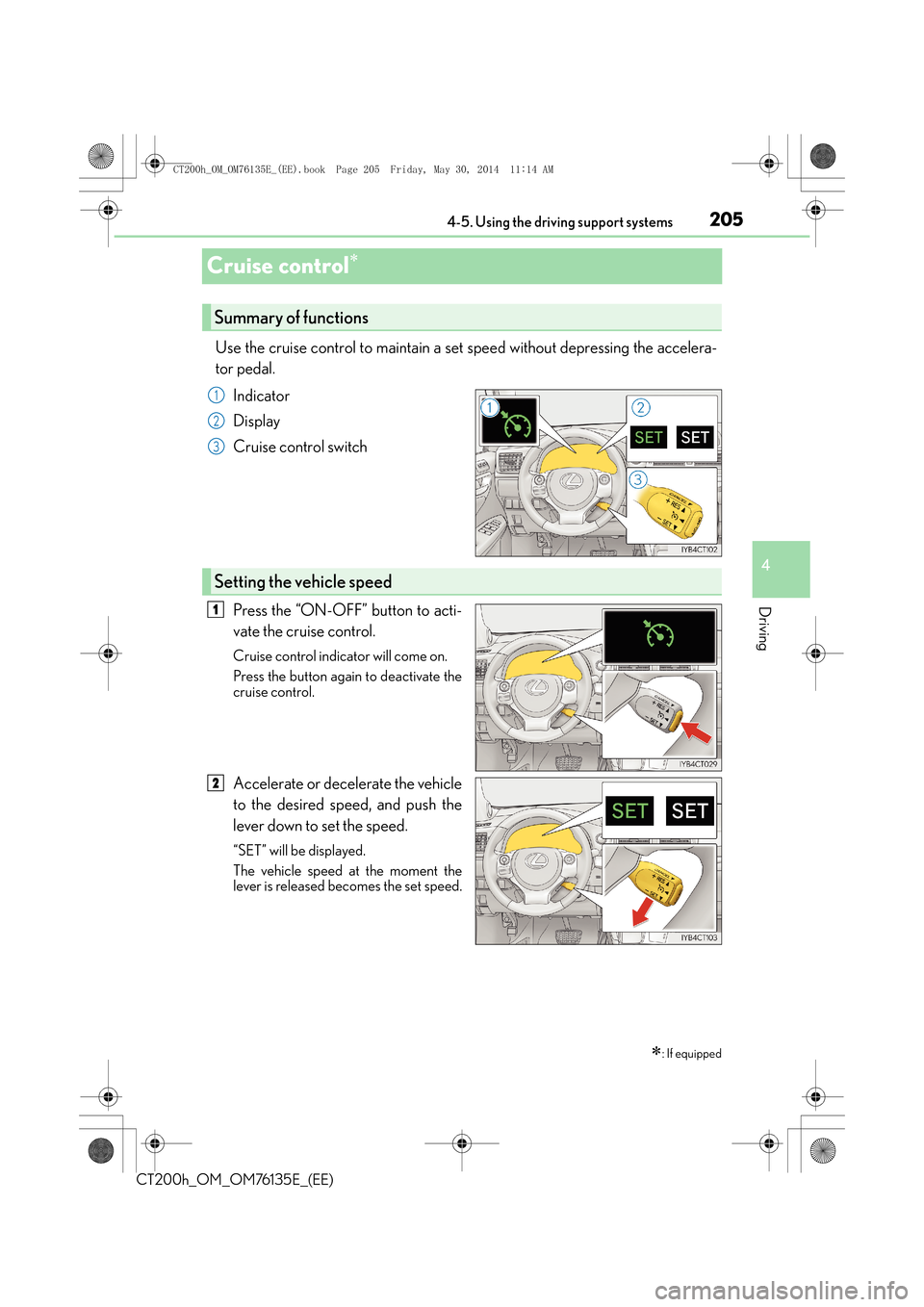
Cruise control∗
Use the cruise control to maintain a set speed without depressing the accelera-
tor pedal.
Indicator
Display
Cruise control switch
Press the “ON-OFF” button to acti-
vate the cruise control.
Cruise control indicator will come on.
Press the button again to deactivate the
cruise control.
Accelerate or decelerate the vehicle
to the desired speed, and push the
lever down to set the speed.
“SET” will be displayed.
The vehicle speed at the moment the
lever is released becomes the set speed.
∗: If equipped
Summary of functions
1
2
3
Setting the vehicle speed
1
2
CT200h_OM_OM76135E_(EE).book Page 205 Friday, May 30, 2014 1 1:14 AM
Page 206 of 622
2064-5. Using the driving support systems
CT200h_OM_OM76135E_(EE)
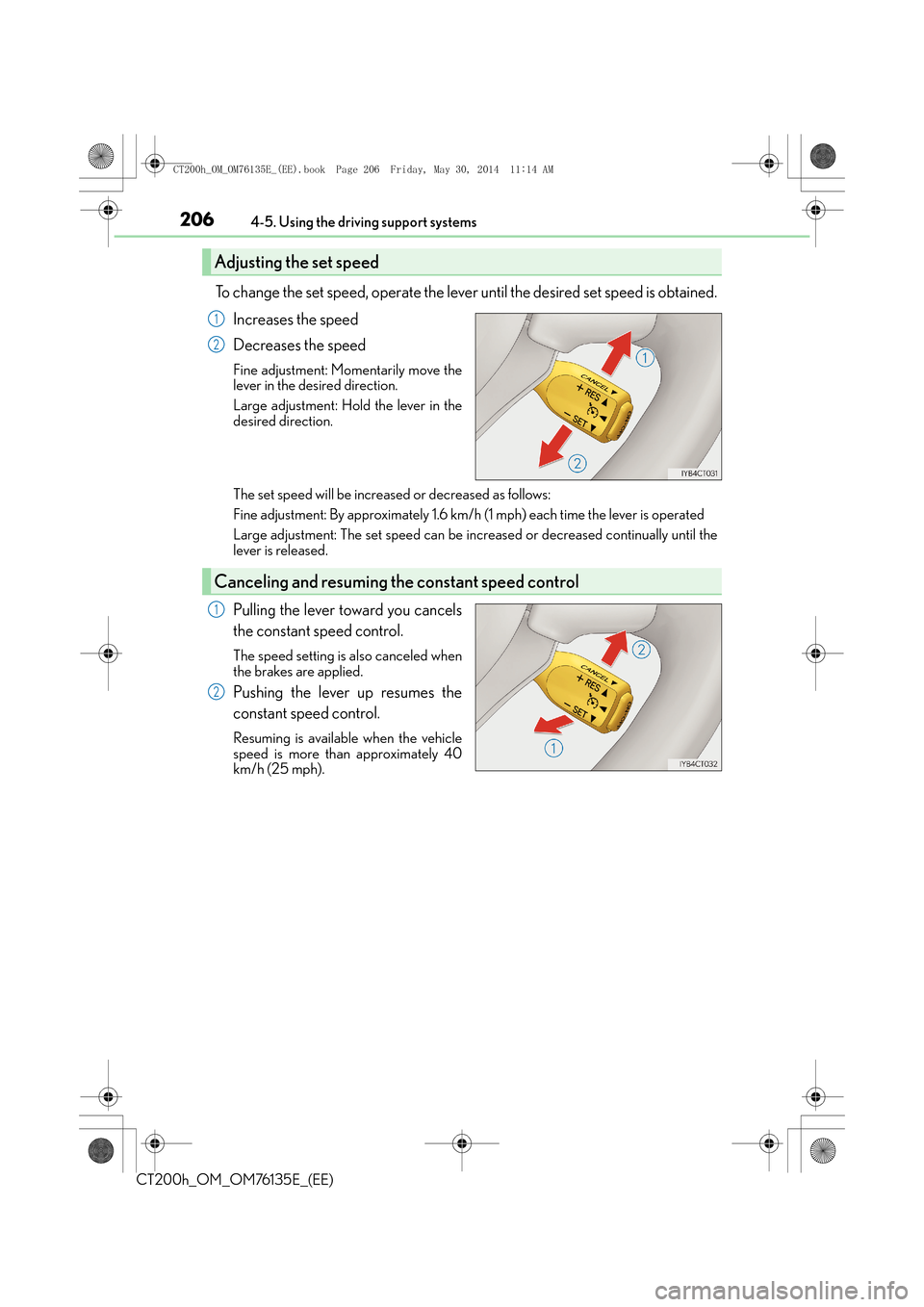
To change the set speed, operate the lever until the desired set speed is obtained.Increases the speed
Decreases the speed
Fine adjustment: Momentarily move the
lever in the desired direction.
Large adjustment: Hold the lever in the
desired direction.
The set speed will be increased or decreased as follows:
Fine adjustment: By approximately 1.6 km/h (1 mph) each time the lever is operated
Large adjustment: The set speed can be incr eased or decreased continually until the
lever is released.
Pulling the lever toward you cancels
the constant speed control.
The speed setting is also canceled when
the brakes are applied.
Pushing the lever up resumes the
constant speed control.
Resuming is available when the vehicle
speed is more than approximately 40
km/h (25 mph).
Adjusting the set speed
1
2
Canceling and resuming th e constant speed control
1
2
CT200h_OM_OM76135E_(EE).book Page 206 Friday, May 30, 2014 1 1:14 AM
Page 209 of 622

2094-5. Using the driving support systems
4
Driving
CT200h_OM_OM76135E_(EE)
Press the “ON-OFF” button to acti-
vate the cruise control.
Radar cruise control indicator will come
on.
Press the button again to deactivate the
cruise control.
Accelerate or decelerate the vehicle
to the desired speed, and push the
lever down to set the speed.
“SET” will be displayed.
The vehicle speed at the moment the
lever is released becomes the set speed.
Setting the vehicle speed (vehicle-to-vehicle distance control mode)
1
2
CT200h_OM_OM76135E_(EE).book Page 209 Friday, May 30, 2014 1 1:14 AM