brake Lexus CT200h 2014 (in English) Owner's Guide
[x] Cancel search | Manufacturer: LEXUS, Model Year: 2014, Model line: CT200h, Model: Lexus CT200h 2014Pages: 622
Page 212 of 622
2124-5. Using the driving support systems
CT200h_OM_OM76135E_(EE)
This mode employs a radar sensor to detect the presence of vehicles up to
approximately 120 m (400 ft.) ahead, determines the current vehicle-to-vehicle
following distance, and operates to maintain a suitable following distance from
the vehicle ahead.
Note that vehicle-to-vehicle distance will close in when traveling on long downhill
slopes.
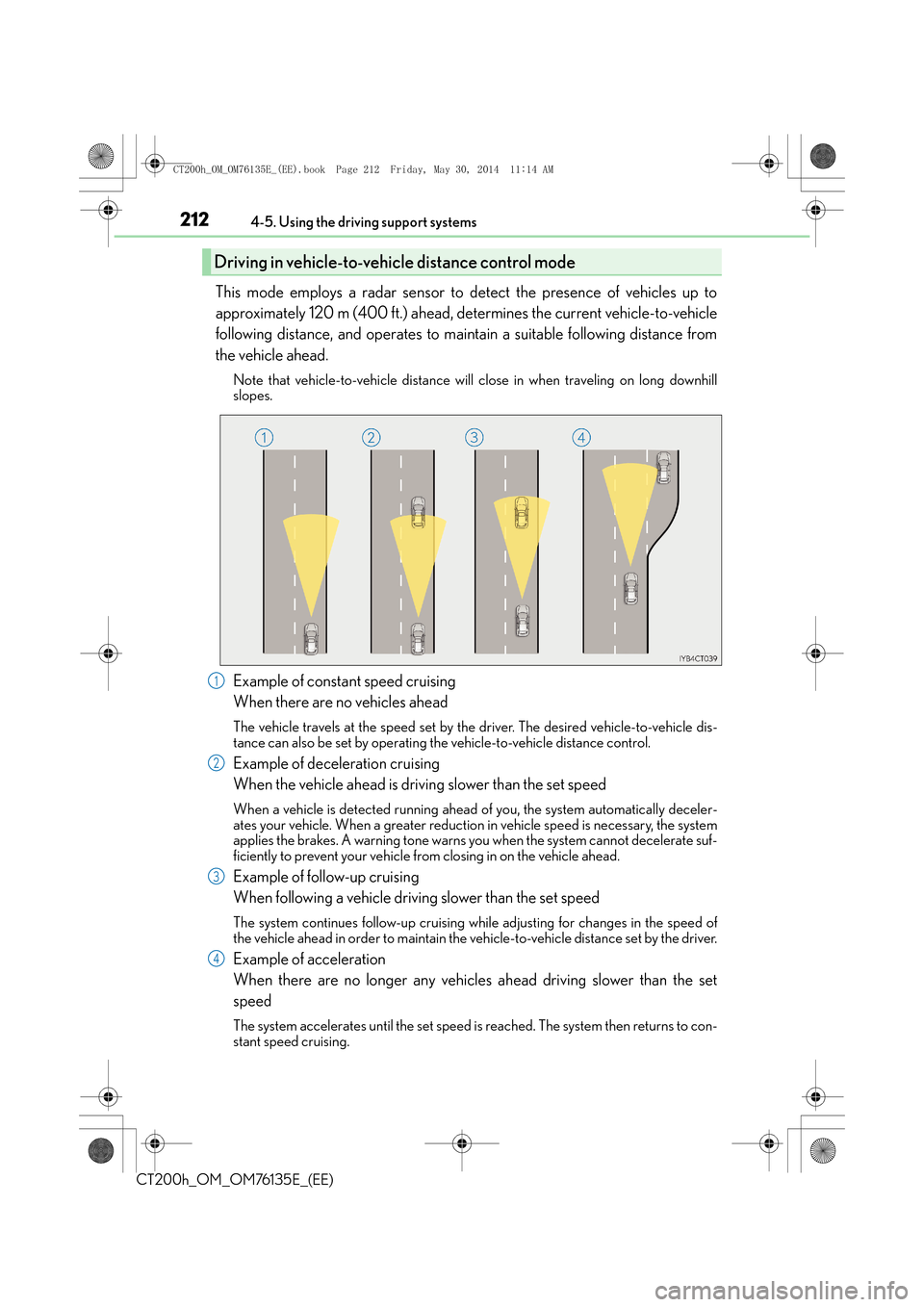
Example of constant speed cruising
When there are no vehicles ahead
The vehicle travels at the speed set by the driver. The desired vehicle-to-vehicle dis-
tance can also be set by operating the vehicle-to-vehicle distance control.
Example of deceleration cruising
When the vehicle ahead is driving slower than the set speed
When a vehicle is detected running ahead of you, the system automatically deceler-
ates your vehicle. When a greater reduction in vehicle speed is necessary, the system
applies the brakes. A warning tone warns you when the system cannot decelerate suf-
ficiently to prevent your vehicle from closing in on the vehicle ahead.
Example of follow-up cruising
When following a vehicle driving slower than the set speed
The system continues follow-up cruising wh ile adjusting for changes in the speed of
the vehicle ahead in order to maintain the vehicle-to-vehicle distance set by the driver.
Example of acceleration
When there are no longer any vehicles ahead driving slower than the set
speed
The system accelerates until the set speed is reached. The system then returns to con-
stant speed cruising.
Driving in vehicle-to-veh icle distance control mode
1
2
3
4
CT200h_OM_OM76135E_(EE).book Page 212 Friday, May 30, 2014 1 1:14 AM
Page 213 of 622
2134-5. Using the driving support systems
4
Driving
CT200h_OM_OM76135E_(EE)
When your vehicle is too close to a vehicle ahead, and sufficient automatic
deceleration via the cruise control is not possible, the display will flash and the
buzzer will sound to alert the driver. An example of this would be if another driver
cuts in front of you while you are following a vehicle. Apply the brakes to ensure
an appropriate vehicle-to-vehicle distance.
■Wa r n i n g s m a y n o t o c c u r w h e n
In the following instances, there is a possibility that the warnings will not occur:
●When the speed of the vehicle ahead matches or exceeds your vehicle
speed
●When the vehicle ahead is traveling at an extremely slow speed
●Immediately after the cruise control speed was set
●At the instant the accelerator is applied
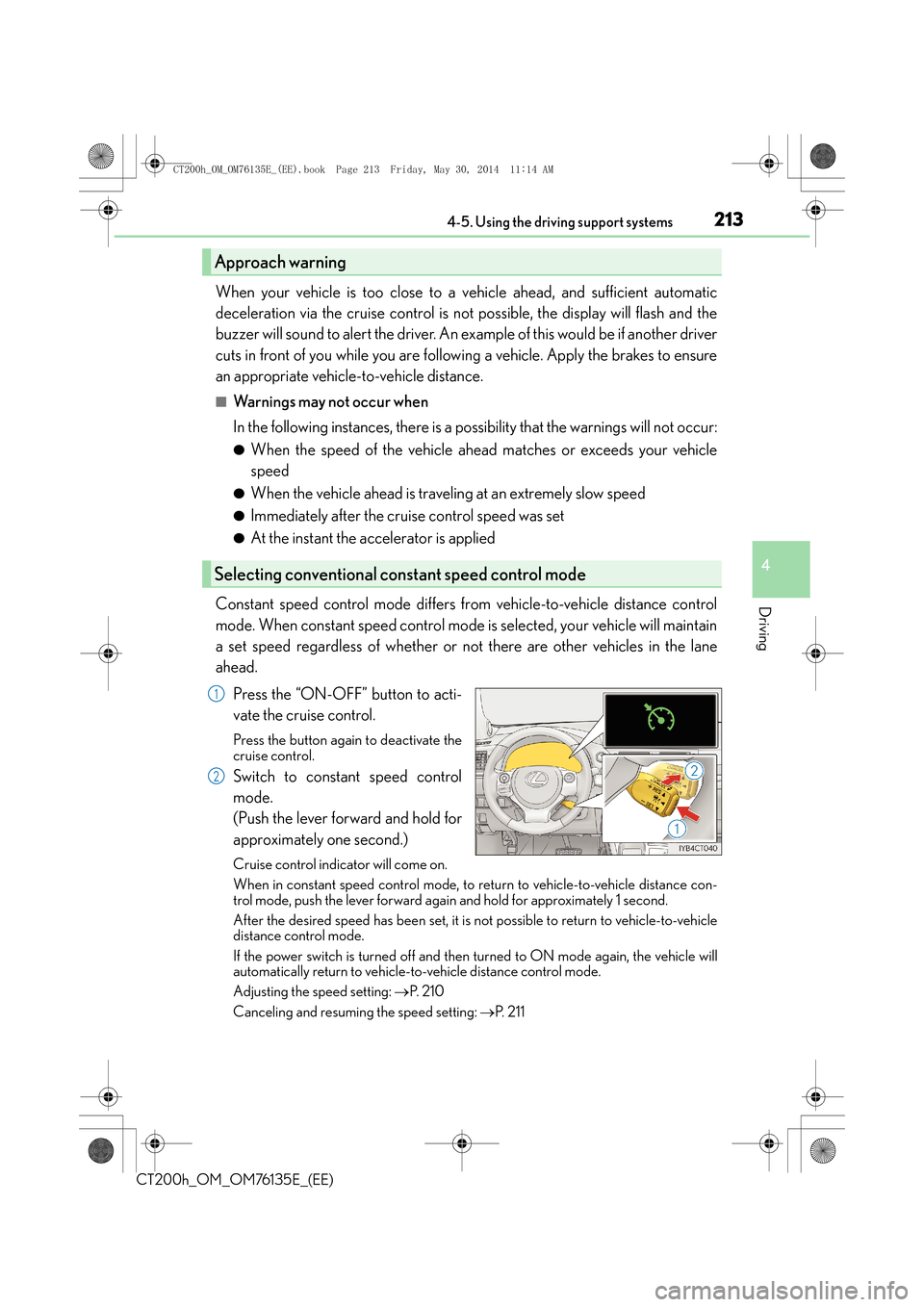
Constant speed control mode differs from vehicle-to-vehicle distance control
mode. When constant speed control mode is selected, your vehicle will maintain
a set speed regardless of whether or not there are other vehicles in the lane
ahead. Press the “ON-OFF” button to acti-
vate the cruise control.
Press the button again to deactivate the
cruise control.
Switch to constant speed control
mode.
(Push the lever forward and hold for
approximately one second.)
Cruise control indicator will come on.
When in constant speed control mode, to return to vehicle-to-vehicle distance con-
trol mode, push the lever forward again and hold for approximately 1 second.
After the desired speed has been set, it is not possible to return to vehicle-to-vehicle
distance control mode.
If the power switch is turned off and then turned to ON mode again, the vehicle will
automatically return to vehicle-to-vehicle distance control mode.
Adjusting the speed setting: →P. 2 1 0
Canceling and resuming the speed setting: →P. 2 1 1
Approach warning
Selecting conventional constant speed control mode
1
2
CT200h_OM_OM76135E_(EE).book Page 213 Friday, May 30, 2014 1 1:14 AM
Page 216 of 622
2164-5. Using the driving support systems
CT200h_OM_OM76135E_(EE)
WA R N I N G
■Before using dynamic radar cruise control
Do not overly rely on vehicle-to-vehicle distance control.
Be aware of the set speed. If automatic deceleration/acceleration is not appropriate,
adjust the vehicle speed, as well as the distance between your vehicle and vehicles
ahead by applying the brakes etc.
CT200h_OM_OM76135E_(EE).book Page 216 Friday, May 30, 2014 11:14 AM
Page 218 of 622
2184-5. Using the driving support systems
CT200h_OM_OM76135E_(EE)
WA R N I N G
■When the sensor may not be correctly detecting the vehicle ahead
Apply the brakes as necessary when any of the following types of vehicles are in front of
you.
As the sensor may not be able to correctly detect these types of vehicles, the approach
warning (→P. 213) will not be activated, and a fatal or serious accident may result.
●Vehicles that cut in suddenly
●Vehicles traveling at low speeds
●Vehicles that are not moving
●Vehicles with small rear ends (trailers with no load on board etc.)
●Motorcycles traveling in the same lane
■Conditions under which the vehicle-to-vehic le distance control may not function cor-
rectly
Apply the brakes as necessary in the following conditions as the radar sensor may not
be able to correctly detect vehicles ahead, and a fatal or serious accident may result:
●When water or snow thrown up by the surrounding vehicles hinders the functioning
of the sensor
●When your vehicle is pointing upwards (caused by a heavy load in the luggage com-
partment etc.)
●When the road curves or when the lanes are narrow
●When steering wheel operation or your position in the lane is unstable
●When the vehicle ahead of you decelerates suddenly
■Handling the radar sensor
Observe the following to ensure the cruise control system can function effectively.
Otherwise, the system may not function correctly and could result in an accident.
●Keep the sensor and grille cover clean at all times.
Clean the sensor and grille cover with a soft cloth so you do not mark or damage
them.
●Do not subject the sensor or surrounding area to a strong impact.
If the sensor moves even slightly off positi on, the system may malfunction. If the sen-
sor or surrounding area is subject to a strong impact, always have the area inspected
and adjusted by any authorized Lexus dealer or repairer, or another duly qualified
and equipped professional.
●Do not disassemble the sensor.
●Do not attach accessories or stickers to the sensor, grille cover or surrounding area.
●Do not modify or paint the sensor and grille cover.
●Do not replace them with non-genuine parts.
CT200h_OM_OM76135E_(EE).book Page 218 Friday, May 30, 2014 1 1:14 AM
Page 224 of 622
2244-5. Using the driving support systems
CT200h_OM_OM76135E_(EE)
■Lexus parking assist-sensor display
When an obstacle is detected while the rear view monitor system or Lexus parking assist
monitor is in use, the warning indicator will appear in the upper corner of the screen even
if the display setting has been set to off.
■Sensor detection information
●The sensor’s detection areas are limited to the areas around the vehicle’s bumper.
●Certain vehicle conditions and the surround ing environment may affect the ability of a
sensor to correctly detect an obstacle. Particular instances where this may occur are
listed below.
• There is dirt, snow or ice on the sensor. (Wiping the sensors will resolve this prob- lem.)
• The sensor is frozen. (Thawing the area will resolve this problem.)
In especially cold weather, if a sensor is frozen the screen may show an abnormal
display, or obstacles may not be detected.
• The sensor is covered in any way.
• The vehicle is leaning considerably to one side.
• On an extremely bumpy road, on an incline, on gravel, or on grass.
• The vicinity of the vehicle is noisy due to vehicle horns, motorcycle engines, air
brakes of large vehicles, or other loud noises producing ultrasonic waves.
• There is another vehicle equipped with parking assist sensors in the vicinity.
• The sensor is coated with a sheet of spray or heavy rain.
• The vehicle is equipped with a fender pole or wireless antenna.
• Towing eyelets are installed.
• The bumper or sensor receives a strong impact.
• The vehicle is approaching a tall or curved curb.
• In harsh sunlight or intense cold weather.
• The area directly under the bumpers is not detected.
• If obstacles draw too close to the sensor.
• A non-genuine Lexus suspension (low ered suspension etc.) is installed.
• People may not be detected if they are wearing certain types of clothing.
In addition to the examples above, there are instances in which, because of their shape,
signs and other objects may be judged by a sensor to be closer than they are.
●The shape of the obstacle may prevent a sensor from detecting it. Pay particular atten-
tion to the following obstacles:
• Wires, fences, ropes, etc.
• Cotton, snow and other materials that absorb sound waves
• Sharply-angled objects
• Low obstacles
• Tall obstacles with upper sections projecting outwards in the direction of your vehi-
cle
CT200h_OM_OM76135E_(EE).book Page 224 Friday, May 30, 2014 1 1:14 AM
Page 225 of 622

2254-5. Using the driving support systems
4
Driving
CT200h_OM_OM76135E_(EE)
●The following situations may occur during use.
• Depending on the shape of the obstacle and other factors, the detection distancemay shorten, or detection may be impossible.
• Obstacles may not be detected if they are too close to the sensor.
• There will be a short delay between obst acle detection and display. Even at slow
speeds, there is a possibility that the obstacl e will come within the sensor’s detection
areas before the display is shown and the buzzer sounds.
• Thin posts or objects lower than the sensor may not be detected when approached, even if they have been detected once.
• It might be difficult to hear beeps due to the volume of audio system or air flow noise of the air conditioning system.
■If a message is displayed on the multi-information display
→ P. 5 2 1
■Customization
Settings (e.g. buzzer sounds volume) can be changed.
(Customizable features: →P. 5 8 9 )
WA R N I N G
■When using the Lexus parking assist-sensor
Observe the following precautions.
Failing to do so may result in the vehicle be ing unable to be driven safely and possibly
cause an accident.
●Do not use the sensor at speeds in excess of 10 km/h (6 mph).
●The sensors’ detection areas and reaction times are limited. When moving forward or
reversing, check the areas surrounding the vehicle (especially the sides of the vehi-
cle) for safety, and drive slowly, using the brake to control the vehicle’s speed.
●Do not install accessories within the sensors’ detection areas.
CT200h_OM_OM76135E_(EE).book Page 225 Friday, May 30, 2014 1 1:14 AM
Page 235 of 622

2354-5. Using the driving support systems
4
Driving
CT200h_OM_OM76135E_(EE)
WA R N I N G
■When using the rear view monitor system
The rear view monitor system is a supplemental device intended to assist the driver
when backing up. When backing up, be sure to check visually behind and all around
the vehicle before proceeding.
Observe the following precautions to avoid an accident that could result in death or
serious injuries.
●Never depend on the rear view monitor system entirely when backing up. The image
and the position of the guide lines displayed on the screen may differ from the actual
state.
Use caution, just as you would when backing up any vehicle.
●Be sure to back up slowly, depressing the brake pedal to control vehicle speed.
●The instructions given are only guide lines.
When and how much to turn the steering wheel will vary according to traffic condi-
tions, road surface conditions, vehicle condition, etc. when parking. It is necessary to
be fully aware of this before using the rear view monitor system.
●When parking, be sure to check that the parking space will accommodate your vehi-
cle before maneuvering into it.
●Do not use the rear view monitor system in the following cases:
• On icy or slick road surfaces, or in snow
• When using tire chains or emergency tires
• When the back door is not closed completely
• On roads that are not flat or straight, such as curves or slopes.
●In low temperatures, the screen may darken or the image may become faint. The
image could distort when the vehicle is moving, or you may become unable to see the
image on the screen. Be sure to check direct visually and with the mirrors all around
the vehicle before proceeding.
●If the tire sizes are changed, the position of the fixed guide lines displayed on the
screen may change.
●The camera uses a special lens. The distances between objects and pedestrians that
appear in the image displayed on the screen will differ from the actual distances.
( → P. 2 3 1 )
CT200h_OM_OM76135E_(EE).book Page 235 Friday, May 30, 2014 1 1:14 AM
Page 238 of 622

2384-5. Using the driving support systems
CT200h_OM_OM76135E_(EE)
Driving assist systems
◆ABS (Anti-lock Brake System)
Helps to prevent wheel lock when the brakes are applied suddenly, or if the
brakes are applied while driving on a slippery road surface
◆Brake assist
Generates an increased level of braking force after the brake pedal is
depressed when the system detects a panic stop situation
◆VSC (Vehicle Stability Control)
Helps the driver to control skidding when swerving suddenly or turning on
slippery road surfaces
◆TRC (Traction Control)
Helps to maintain drive power and pr event the drive wheels from spinning
when starting the vehicle or accelerating on slippery roads
◆EPS (Electric Power Steering)
Employs an electric motor to reduce the amount of effort needed to turn the
steering wheel
◆VSC + (Vehicle Stability Control +)
Provides cooperative control of the ABS, TRC, VSC and EPS.
Helps to maintain directional stability when swerving on slippery road sur-
faces by controlling steering performance.
◆Hill-start assist control
→ P. 2 4 2
To help enhance driving safety and performance, the following systems oper-
ate automatically in response to various driving situations. Be aware, however,
that these systems are supplementary and should not be relied upon too
heavily when operating the vehicle.
CT200h_OM_OM76135E_(EE).book Page 238 Friday, May 30, 2014 1 1:14 AM
Page 239 of 622

2394-5. Using the driving support systems
4
Driving
CT200h_OM_OM76135E_(EE)
◆PCS (Pre-Crash Safety system) (if equipped)
→P. 2 4 4
◆Emergency brake signal
When the brakes are applied suddenly, the stop lights automatically flash to
alert the vehicle behind.
The slip indicator light will flash while
the VSC/TRC/ABS systems are oper-
ating.
If the vehicle gets stuck in mud, dirt or snow, the TRC system may reduce power
from the hybrid system to the wheels. Pressing to turn the system off may
make it easier for you to rock the vehicle in order to free it.
To turn the TRC system off, quickly
press and release .
The “TRC OFF” indicator light will come
on.
Press again to turn the system
back on.
When the VSC/TRC/ABS systems are operating
Disabling the TRC system
CT200h_OM_OM76135E_(EE).book Page 239 Friday, May 30, 2014 1 1:14 AM
Page 240 of 622
2404-5. Using the driving support systems
CT200h_OM_OM76135E_(EE)
■When the “TRC OFF” indicator comes on even if the TRC OFF switch has not been
pressed
TRC cannot be operated. Contact any authorized Lexus dealer or repairer, or another
duly qualified and equipped professional.
■Sounds and vibrations caused by the ABS, brake assist, VSC and TRC
●A sound may be heard from the engine compartment when the hybrid system is
started, just after the vehicle begins to move, if the brake pedal is depressed forcefully
or repeatedly, or 1-2 minutes after the hybrid system is stopped. This sound does not
indicate that a malfunction has occurred in any of these systems.
●Any of the following conditions may occu r when the above systems are operating.
None of these indicates that a malfunction has occurred.
• Vibrations may be felt through the vehicle body and steering.
• A motor sound may be heard after the vehicle comes to a stop.
• The brake pedal may pulsate slig htly after the ABS is activated.
• The brake pedal may move down s lightly after the ABS is activated.
■EPS operation sound
When the steering wheel is operated, a motor sound (whirring sound) may be heard.
This does not indicate a malfunction.
■Reduced effectiveness of the EPS system
The effectiveness of the EPS system is reduced to prevent the system from overheating
when there is frequent steering input over an extended period of time. The steering
wheel may feel heavy as a result. Should this occur, refrain from excessive steering input
or stop the vehicle and turn the hybrid system off. The EPS system should return to nor-
mal within 10 minutes.
■Automatic reactivation of TRC system
After turning the TRC system off, the system will be automatically re-enabled in the fol-
lowing situations:
●When the power switch is turned off
●The TRC will turn on when vehicle speed increases
■Operating conditions of emergency brake signal
When the following three conditions are me t, the emergency brake signal will operate:
●The emergency flashers are off.
●Actual vehicle speed is over 55 km/h (35 mph).
●The brake pedal is depressed in a manner that cause the system to judge from the vehi-
cle deceleration that this is a sudden braking operation.
■Automatic system cancelation of emergency brake signal
The emergency brake signal will turn off in any of the following situations:
●The emergency flashers are turned on.
●The brake pedal is released.
●The system judges from the vehicle deceleration that is not a sudden braking operation.
CT200h_OM_OM76135E_(EE).book Page 240 Friday, May 30, 2014 1 1:14 AM