steering wheel Lexus CT200h 2014 (in English) Owner's Guide
[x] Cancel search | Manufacturer: LEXUS, Model Year: 2014, Model line: CT200h, Model: Lexus CT200h 2014Pages: 622
Page 258 of 622
258
CT200h_OM_OM76135E_(EE)
5-1. Basic OperationsAudio system types ...................260
Using the steering wheel audio switches .......................... 262
AUX port/USB port................. 263
5-2. Using the audio system Optimal use of the audio system .......................................... 265
5-3. Using the radio Radio operation .......................... 267
5-4. Playing audio CDs and MP3/WMA discs
CD player operation ................ 270
5-5. Using an external device Listening to an iPod ................... 277
Listening to a USB memory device...........................................283
Using the AUX port................. 288
5-6. Using Bluetooth
® devices
Bluetooth
® audio/phone........289
Using the steering wheel switches ....................................... 294
Registering a Bluetooth
®
audio system for the
first time ....................................... 295
Registering a Bluetooth
®
phone for the first time .......... 296
5-7. Setup menu Setting up a Bluetooth
®
enabled portable player ....... 297
Bluetooth
® audio system
setup ............................................ 300 Setting a cellular phone............ 301
Security and system setup......303
Using the phone book .............306
5-8. Bluetooth
® Audio
Operating a Bluetooth
®
enabled portable player.......309
5-9. Bluetooth
® Phone
Making a phone call .................... 311
Receiving a phone call .............. 313
Speaking on the phone ............ 314
5-10. Bluetooth
®
Bluetooth®.................................... 315
5-11. Basic Operations (Lexus Display Audio System)
Lexus Display Audio System ...........................................321
Steering wheel audio switches....................................... 327
USB/AUX ports ......................... 328
5-12. Setup (Lexus Display Audio System)
Setup menu ..................................330
General settings.......................... 331
Voice settings .............................. 334
Display settings ........................... 335
5-13. Using the audio system (Lexus Display Audio System)
Selecting the audio source .......................................... 337
Optimal use of the audio system ..........................................338
CT200h_OM_OM76135E_(EE).book Page 258 Friday, May 30, 2014 1 1:14 AM
Page 259 of 622
259
5Audio system
CT200h_OM_OM76135E_(EE)
Audio settings..............................339
Audio menu screen operation .................................... 342
5-14. Using the radio (Lexus Display Audio System)
Radio operation ..........................345
5-15. Playing an audio CD and MP3/WMA/AAC discs
(Lexus Display Audio System)
CD player operation ................ 347
5-16. Using an external device (Lexus Display Audio System)
Listening to an iPod ...................353
Using USB memory device........................................... 357
Using the AUX port.................. 362
5-17. Connecting Bluetooth
®
(Lexus Display Audio System)
Steps for using Bluetooth
®
devices.........................................363
Registering a Bluetooth
®
device...........................................365
Selecting a Bluetooth
®
device...........................................366
Connecting a Bluetooth
®
audio player ............................... 367
Connecting a Bluetooth
®
phone .......................................... 368
Displaying a Bluetooth
®
device details ............................ 369
Detailed Bluetooth
®
settings......................................... 370 5-18. Bluetooth
® Audio (Lexus
Display Audio System)
Listening to Bluetooth
®
Audio ............................................. 371
5-19. Bluetooth
® Phone (Lexus
Display Audio System)
Using a Bluetooth
®
Phone........................................... 373
Making a call................................ 375
Receiving a call ........................... 378
Speaking on the phone ........... 379
Using a Bluetooth
®
phone messages....................... 381
Using the steering wheel switches.......................................383
Bluetooth
® phone settings ....384
5-20.Phonebook (Lexus Display Audio System)
Contact settings .........................386
Messaging setting......................389
5-21. Bluetooth
® (Lexus
Display Audio System)
What to do if... (Troubleshooting)....................390
Bluetooth
®................................... 393
5-22.Other function (Lexus Display Audio System)
“Information” screen ................. 399
MirrorLink™ ................................400
USB photo .................................... 403
Speech command system ......405
Some of the functions cannot be operated while driving.
CT200h_OM_OM76135E_(EE).book Page 259 Friday, May 30, 2014 1 1:14 AM
Page 262 of 622

2625-1. Basic Operations
CT200h_OM_OM76135E_(EE)
Using the steering wheel audio switches
Volume switch: • Press: Increases/decreases vol-
ume
• Press and hold: Continuously
increases/decreases volume
Radio mode: • Press: Selects a radio station
• Press and hold: Seeks up/down
CD, MP3/WMA disc, Bluetooth
®, iPod or USB mode:
• Press: Selects a track/file/song
• Press and hold: Selects a folder or album (MP3/WMA disc, Bluetooth
®,
iPod or USB)
“MODE” switch: • Press: Turns the power on, selects an audio source
• Press and hold: Turns the power off
■Canceling automatic selection of a radio station
Press the “ ∧” or “ ∨” button again.
Some audio features can be controlled using the switches on the steering
wheel.
Operation may differ depending on the type of audio system or navigation
system. For details, refer to the manual provided with the audio system or nav-
igation system.
1
2
3
WA R N I N G
■To reduce the risk of an accident
Exercise care when operating the audio switches on the steering wheel.
CT200h_OM_OM76135E_(EE).book Page 262 Friday, May 30, 2014 1 1:14 AM
Page 294 of 622

2945-6. Using Bluetooth® devices
CT200h_OM_OM76135E_(EE)
Using the steering wheel switches
Vo l u m e
The voice guidance volume cannot
be adjusted using this button.
Off-hook switch
Turns the hands-free system on/
starts a call
On-hook switch
Turns the hands-free system off/ends
a call/refuses a call
Talk switch
Turns the voice command system on (press)/turns the voice command system
off (press and hold)
The steering wheel switches can be used to operate a connected cellular
phone, or portable audio player ( →P. 2 6 2 ) .
Operating Bluetooth® device using the steering wheel switches
1
2
3
4
CT200h_OM_OM76135E_(EE).book Page 294 Friday, May 30, 2014 1 1:14 AM
Page 327 of 622
327
5
5-11. Basic Operations (Lex
us Display Audio System)
Audio system
CT200h_OM_OM76135E_(EE)
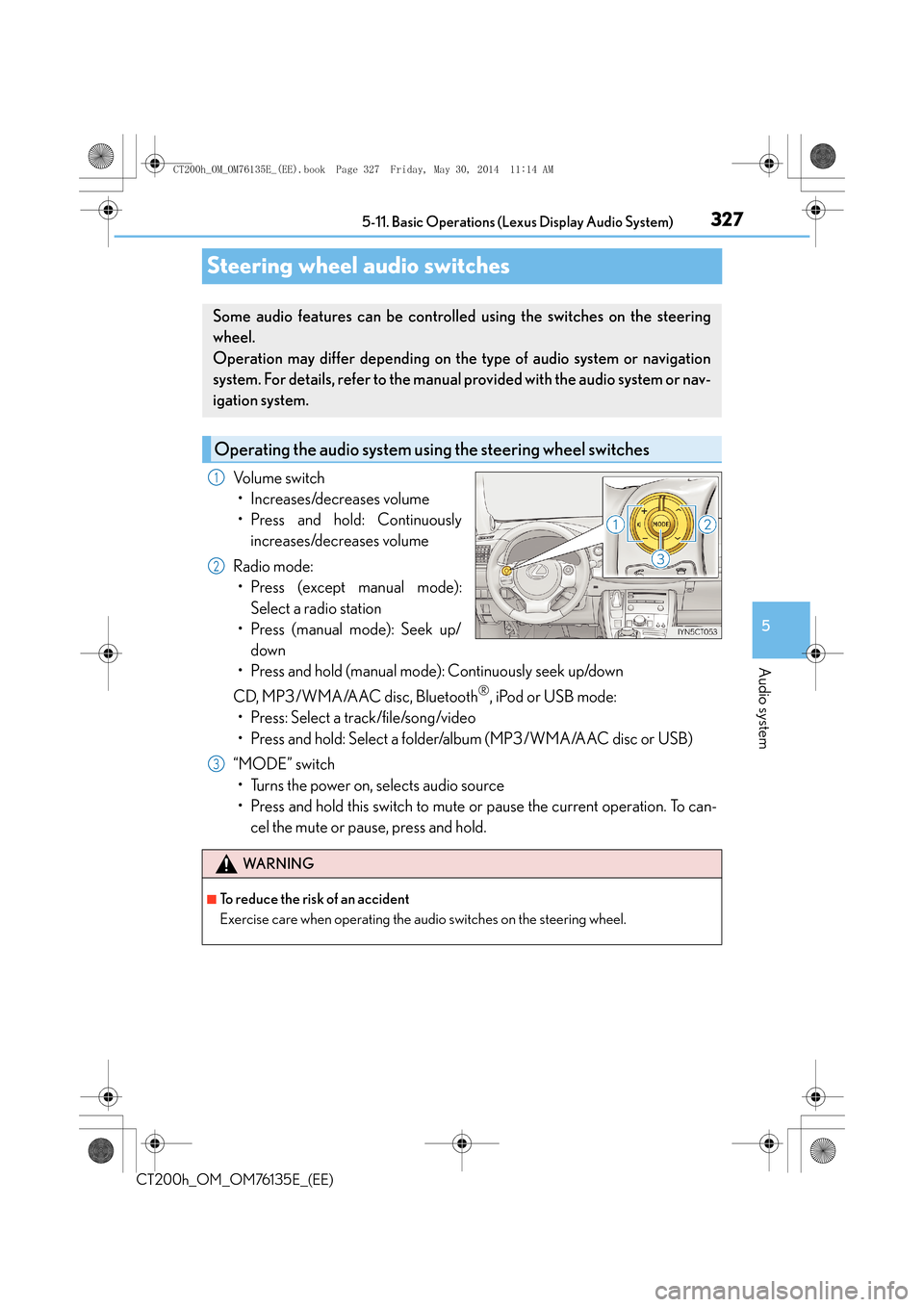
Steering wheel audio switches
Volume switch
• Increases/decreases volume
• Press and hold: Continuously increases/decreases volume
Radio mode: • Press (except manual mode):
Select a radio station
• Press (manual mode): Seek up/
down
• Press and hold (manual mode): Continuously seek up/down
CD, MP3/WMA/AAC disc, Bluetooth
®, iPod or USB mode:
• Press: Select a track/file/song/video
• Press and hold: Select a folder/album (MP3/WMA/AAC disc or USB)
“MODE” switch • Turns the power on, selects audio source
• Press and hold this switch to mute or pause the current operation. To can- cel the mute or pause, press and hold.
Some audio features can be controlled using the switches on the steering
wheel.
Operation may differ depending on the type of audio system or navigation
system. For details, refer to the manual provided with the audio system or nav-
igation system.
Operating the audio system us ing the steering wheel switches
1
2
WA R N I N G
■To reduce the risk of an accident
Exercise care when operating the audio switches on the steering wheel.
3
CT200h_OM_OM76135E_(EE).book Page 327 Friday, May 30, 2014 1 1:14 AM
Page 337 of 622
337
5
5-13. Using the audio system (Lexus Display Audio System)
Audio system
CT200h_OM_OM76135E_(EE)
Selecting the audio source
Press the “AUDIO” button to display the “Source” screen.
If the “Source” screen is not displayed, press the button again.
Select the desired audio source.
The audio source can be selected by pressing the “RADIO” or “MEDIA” button.
Press the “MODE” switch when the audio system is turned on. The audio source
changes each time the “MODE” switch is pressed.
■Rearranging the list
The listing order of the source list can be rearranged.
Move the controller to the left while on the “Source” screen.
Select “Audio source select”.
Select an item you wish to move and th en select where to move the item to.
Switching between audio sources such as radio and CD are explained in this
section.
Changing audio source
Using the steering wheel switches to change audio sources
1
2
1
2
3
CT200h_OM_OM76135E_(EE).book Page 337 Friday, May 30, 2014 1 1:14 AM
Page 373 of 622

373
5
5-19. Bluetooth
® Phone (Lexus Display Audio System)
Audio system
CT200h_OM_OM76135E_(EE)
Using a Bluetooth® Phone
Before making a phone call, check the connection status, battery charge, call
area and signal strength. (
→P. 3 74 )
If a Bluetooth
® device cannot be connected, check the connection status. If the
device is not connected, either register or reconnect it. (
→P. 365, 368)
To display the screen shown below, press the off-hook switch on the steering
wheel or select “Telephone” on the “MENU” screen. Phone name
Bluetooth
® connection status
(
→P. 3 74 )
Display the call history screen
(
→P. 3 76 )
Display the favorites screen
(
→P. 3 76 )
Display the contacts screen
(
→P. 3 7 5 )
Display the dial pad screen (
→P. 3 7 5 )
Display the message inbox screen (
→P. 3 8 1 )
The hands-free system is a function that allows you to use your cellular phone
without touching it.
This system supports Bluetooth
®. Bluetooth® is a wireless data system that
allows the cellular phone to wirelessly connect to the hands-free system and
make/receive calls.
Phone top screen
1
2
3
4
5
6
7
CT200h_OM_OM76135E_(EE).book Page 373 Friday, May 30, 2014 1 1:14 AM
Page 375 of 622

375
5
5-19. Bluetooth
® Phone (Lexus Display Audio System)
Audio system
CT200h_OM_OM76135E_(EE)
Making a call
Go to “Dial pad”: “MENU” button
→ “Telephone” → “Dial pad”
Input a phone number. ( →P. 3 2 4 )
Press the off-hook switch on the steering wheel or select .
You can dial a number from the phoneb ook data imported from your cellular
phone. The system has one phonebook for each registered telephone. Up to
2500 contacts may be stored in each phonebook. ( →P. 3 7 5 )
Go to “Contacts”: “MENU” button → “Telephone” → “Contacts”
Choose the desired contact to call from the list.
Choose the number and then press the off-hook switch on the steering wheel
or press the controller.
You can transfer the phone numbers in a Bluetooth
® phone to the system.
Operation methods differ between PBAP (Phone Book Access Profile) compat-
ible and PBAP incompatible Bluetooth
® phones. If the cellular phone does not
support either PBAP or OPP (Object Push Profile) service, you cannot transfer
contacts.
Press the off-hook switch on the steering wheel.
If the phonebook is empty, a message will be displayed.
Once a Bluetooth® phone is registered, you can make a call using the follow-
ing procedure:
Dialing
Dialing from the phonebook
When the phonebook is empty
1
2
3
1
2
3
1
CT200h_OM_OM76135E_(EE).book Page 375 Friday, May 30, 2014 1 1:14 AM
Page 376 of 622

3765-19. Bluetooth® Phone (Lexus Display Audio System)
CT200h_OM_OM76135E_(EE)
XFor a PBAP compatible Bluetooth® phone and “Automatic transfer” is off
To transfer new contacts from a cel-
lular phone, select “Always” and then
enable “Automatic transfer”.
( → P. 3 8 6 )
Select “Once” if you want to transfer
new contacts from a cellular phone.
XFor a PBAP incompatible and OPP compatible Bluetooth® phone
Select “Transfer” and operate your
cellular phone to transfer new con-
tacts from a cellular phone.
Select “Add” if you want to add a new
contact manually.
You can make a call using numbers registered in the favorites. Go to “Favourites”: “MENU” button → “Telephone” → “Favourites”
Choose the desired contact to call from the list.
Choose the number and then press the off-hook switch on the steering wheel
or press the controller.
You can make a call using the call history. Go to “Call history”: “MENU” button → “Telephone” → “Call history”
Select the desired entry from the list.
Press the off-hook switch on the steering wheel or select .
2
2
Dialing from favorites
Dialing from history
1
2
3
1
2
3
CT200h_OM_OM76135E_(EE).book Page 376 Friday, May 30, 2014 1 1:14 AM
Page 377 of 622

3775-19. Bluetooth® Phone (Lexus Display Audio System)
5
Audio system
CT200h_OM_OM76135E_(EE)
■Call history list
●If you make a call to or receive a call from a number registered in the phonebook, the
name is displayed in the call history.
●If you make multiple calls to the same number, only the last call made is displayed in the
call history.
■International calls
Depending on the mobile phone in use, you ma y not be able to make international calls.
■Calling by using the latest call history entry
Press the
off-hook switch on the steering wheel to display the phone top screen.
Press the switch again to display the “Call history” screen.
Press the switch again to select the latest call history entry.1
2
3
CT200h_OM_OM76135E_(EE).book Page 377 Friday, May 30, 2014 1 1:14 AM