alarm Lexus CT200h 2014 Owner's Manual (in English)
[x] Cancel search | Manufacturer: LEXUS, Model Year: 2014, Model line: CT200h, Model: Lexus CT200h 2014Pages: 622
Page 2 of 622
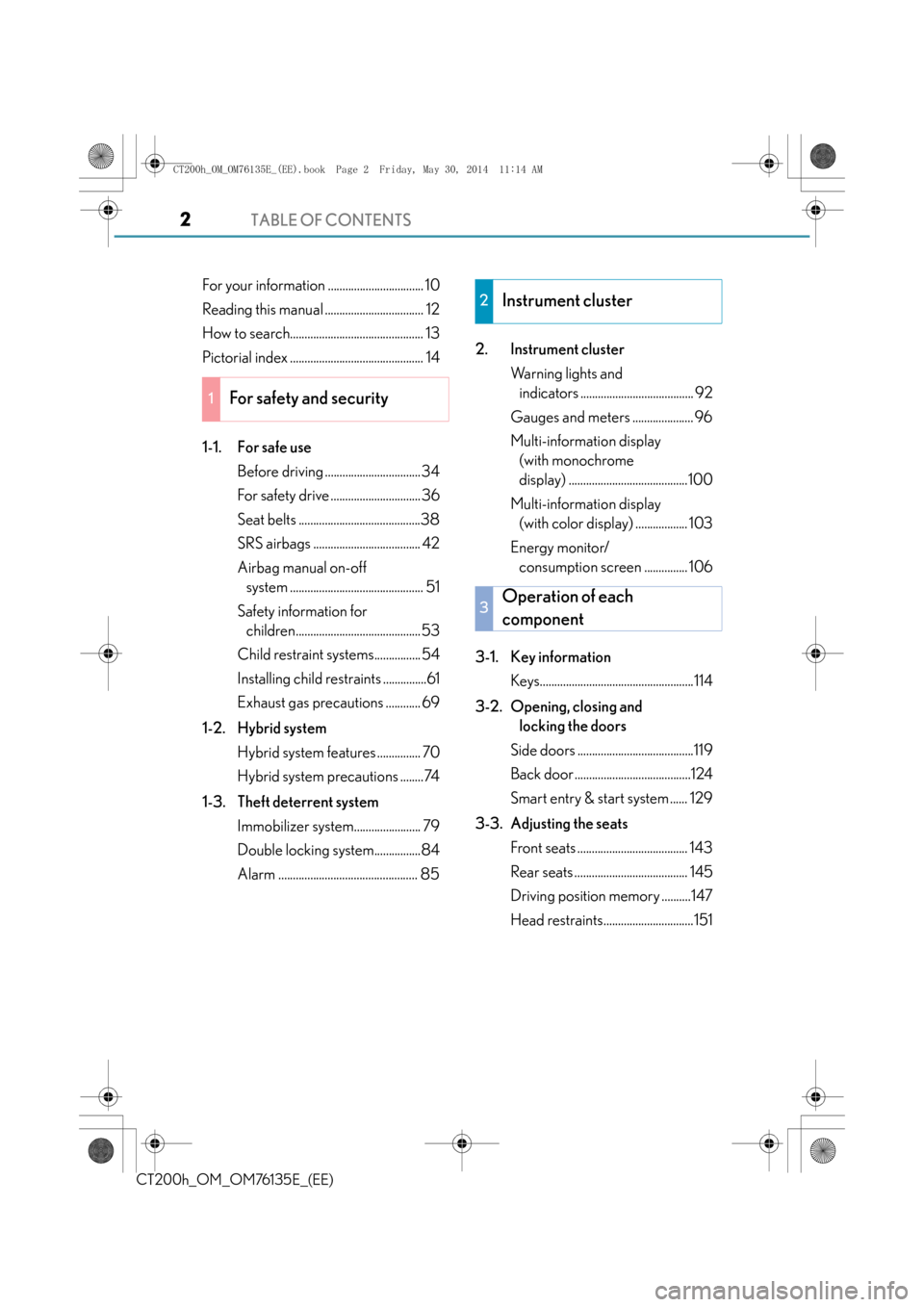
TABLE OF CONTENTS2
CT200h_OM_OM76135E_(EE)
For your information ................................. 10
Reading this manual .................................. 12
How to search.............................................. 13
Pictorial index .............................................. 14
1-1. For safe useBefore driving .................................34
For safety drive ............................... 36
Seat belts ..........................................38
SRS airbags ..................................... 42
Airbag manual on-off system .............................................. 51
Safety information for children...........................................53
Child restraint systems................ 54
Installing child restraints ...............61
Exhaust gas precautions ............ 69
1-2. Hybrid system Hybrid system features ............... 70
Hybrid system precautions ........74
1-3. Theft deterrent system Immobilizer system....................... 79
Double locking system................84
Alarm ................................................ 85 2. Instrument cluster
Warning lights and indicators ....................................... 92
Gauges and meters ..................... 96
Multi-information display (with monochrome
display) .........................................100
Multi-information display (with color display) .................. 103
Energy monitor/ consumption screen ............... 106
3-1. Key information Keys.....................................................114
3-2. Opening, closing and locking the doors
Side doors ........................................119
Back door ........................................124
Smart entry & start system ...... 129
3-3. Adjusting the seats Front seats ...................................... 143
Rear seats ....................................... 145
Driving position memory ..........147
Head restraints...............................151
1For safety and security
2Instrument cluster
3Operation of each
component
CT200h_OM_OM76135E_(EE).book Page 2 Friday, May 30, 2014 11: 14 AM
Page 33 of 622
33
1For safety and security
CT200h_OM_OM76135E_(EE)
1-1. For safe useBefore driving................................. 34
For safety drive............................... 36
Seat belts .......................................... 38
SRS airbags ..................................... 42
Airbag manual on-off system ...............................................51
Safety information for children .......................................... 53
Child restraint systems ............... 54
Installing child restraints ............... 61
Exhaust gas precautions ............ 69
1-2. Hybrid system Hybrid system features............... 70
Hybrid system precautions ........ 74
1-3. Theft deterrent system Immobilizer system ...................... 79
Double locking system ............... 84
Alarm .................................................85
CT200h_OM_OM76135E_(EE).book Page 33 Friday, May 30, 2014 11 :14 AM
Page 85 of 622

85
1
1-3. Theft deterrent system
CT200h_OM_OM76135E_(EE)
For safety and security
Alarm∗
The alarm uses light and sound to give an alert when an intrusion is detected.
The alarm is triggered in the following situations when the alarm is set:
●A locked door is unlocked or opened in any way other than using the entry
function (if equipped) or wireless remote control.
●The hood is opened.
●The intrusion sensor detects something moving inside the vehicle. (An
intruder gets in the vehicle.)
●The tilt sensor detects a change of vehicle inclination. (if equipped)
●The back door window is broken. (if equipped)
Close the doors and hood, and lock all
the doors using the entry function (if
equipped) or wireless remote control.
The system will be set automatically
after 30 seconds.
The indicator light changes from being
on to flashing when the system is set.
Do one of the following to deactivate or stop the alarm.
●Unlock the doors using the entry function (if equipped) or wireless remote
control.
●Start the hybrid system. (The alarm will be deactivated or stopped after a few
seconds.)
∗: If equipped
The alarm
Setting the alarm system
Deactivating or st opping the alarm
CT200h_OM_OM76135E_(EE).book Page 85 Friday, May 30, 2014 11 :14 AM
Page 86 of 622

861-3. Theft deterrent system
CT200h_OM_OM76135E_(EE)
■System maintenance
The vehicle has a maintenance-free type alarm system.
■Items to check before locking the vehicle
To prevent unexpected triggering of the alarm and vehicle theft, make sure of the follow-
ing.
●Nobody is in the vehicle.
●The windows and moon roof (if equipped) are closed before the alarm is set.
●No valuables or other personal items are left in the vehicle.
■Triggering of the alarm
The alarm may be triggered in the following situations:
(Stopping the alarm deactivates the alarm system.)
■Alarm-operated door lock
●When the alarm is operating, the doors are locked automatically to prevent intruders.
●Do not leave the key inside the vehicle when the alarm is operating, and make sure the
key is not inside the vehicle when recharging or replacing the 12-volt battery.
■Customization
The alarm can be set to deactivate when the mechanical key is used to unlock.
(Customizable features: →P. 5 8 9 )
●The doors are unlocked using the mechanical
key.
●A person inside the vehicle opens a door or
hood.
●The 12-volt battery is recharged or replaced
when the vehicle is locked. ( →P. 5 6 9 )
CT200h_OM_OM76135E_(EE).book Page 86 Friday, May 30, 2014 11 :14 AM
Page 87 of 622

871-3. Theft deterrent system
1
CT200h_OM_OM76135E_(EE)
For safety and security●The intrusion sensor detects intruders or movement in the vehicle.
●The tilt sensor detects changes in vehicle inclination, such as when the vehicle
is towed away.
This system is designed to deter and pr event vehicle theft but does not guarantee
absolute security against all intrusions.
■Setting the intrusion sensor and tilt sensor
The intrusion sensor and tilt sensor will be set automatically when the alarm is
set. ( →P. 8 5 )
■Canceling the intrusion sensor and tilt sensor
If you are leaving pets or other moving things inside the vehicle, make sure to
disable the intrusion sensor and tilt sensor before setting the alarm, as they will
respond to movement inside the vehicle.
Turn the power switch off.
Press the intrusion sensor and tilt
sensor cancel switch.
A message will be shown on the
multi-information display in the
instrument cluster.
The intrusion sensor and tilt sensor
will revert to on each time the power
switch is turned to ON mode.
■Canceling and automatic re-enabling of the intrusion sensor and tilt sensor
●The alarm will still be set even when the intr usion sensor and tilt sensor are canceled.
●After the intrusion sensor and tilt sensor are canceled, pressing the power switch or
unlocking the doors using the entry function or wireless remote control will re-enable
the intrusion sensor and tilt sensor.
●The intrusion sensor and tilt sensor will au tomatically be re-enabled when the alarm
system is deactivated.
NOTICE
■To ensure the system operates correctly
Do not modify or remove the system. If modified or removed, the proper operation of
the system cannot be guaranteed.
Intrusion sensor and tilt sensor (if equipped)
1
2
CT200h_OM_OM76135E_(EE).book Page 87 Friday, May 30, 2014 11 :14 AM
Page 88 of 622

881-3. Theft deterrent system
CT200h_OM_OM76135E_(EE)
■Intrusion sensor detection considerations
The sensor may trigger the alarm in the following situations:
• The movement of people outside the vehicle
●Places with extreme vibrations or noises, or situations in which the vehicle is subject to
repeated impacts or vibrations:
• When parked in a parking garage
• When the vehicle is transported by a ferry, trailer, train, etc.
• When ice adhering to the vehicle is removed
• When the vehicle is in an automatic or high-pressure car wash
• When in a hail or lightning storm
■Tilt sensor detection considerations
The sensor may trigger the alarm in the following situations:
●The vehicle is transported by a ferry, trailer, train, etc.
●The vehicle is parked in a parking garage.
●The vehicle is inside a car wash that moves the vehicle.
●Any of the tires loses air pressure.
●The vehicle is jacked up.
●An earthquake occurs or the road caves in.
●A window or the moon roof (if equipped) is
open.
In this case, the sensor may detect the follow-
ing:
• Wind or the movement of objects such asleaves and insects inside the vehicle
• Ultrasonic waves emitted from devices such as the intrusion sensors of other vehi-
cles
●Unstable items, such as dangling accessories
or clothes hanging on the coat hooks, are in
the vehicle.
CT200h_OM_OM76135E_(EE).book Page 88 Friday, May 30, 2014 11 :14 AM
Page 114 of 622

1143-1. Key information
CT200h_OM_OM76135E_(EE)
Keys
The following keys are provided with the vehicle. Electronic keys
• Operating the smart entry & startsystem (if equipped) ( →P. 1 2 9 )
• Operating the wireless remote con- trol function
Mechanical keys
Key number plate
Card key (electronic key) (if
equipped)
Operating the smart entry & start sys-
tem ( →P. 1 2 9 )
Locks all the doors ( →P. 119)
Closes the windows
* ( → P. 119)
Unlocks all the doors ( →P. 1 1 9 )
Opens the windows
* ( → P. 1 1 9 )
Sounds the alarm (if equipped)
( → P. 115)
*: These settings must be customized at
any authorized Lexus dealer or repairer,
or another duly qualified and equipped
professional.
The keys
1
2
3
4
Wireless remote control
1
2
3
4
5
CT200h_OM_OM76135E_(EE).book Page 114 Friday, May 30, 2014 1 1:14 AM
Page 115 of 622
1153-1. Key information
3
Operation of each component
CT200h_OM_OM76135E_(EE)
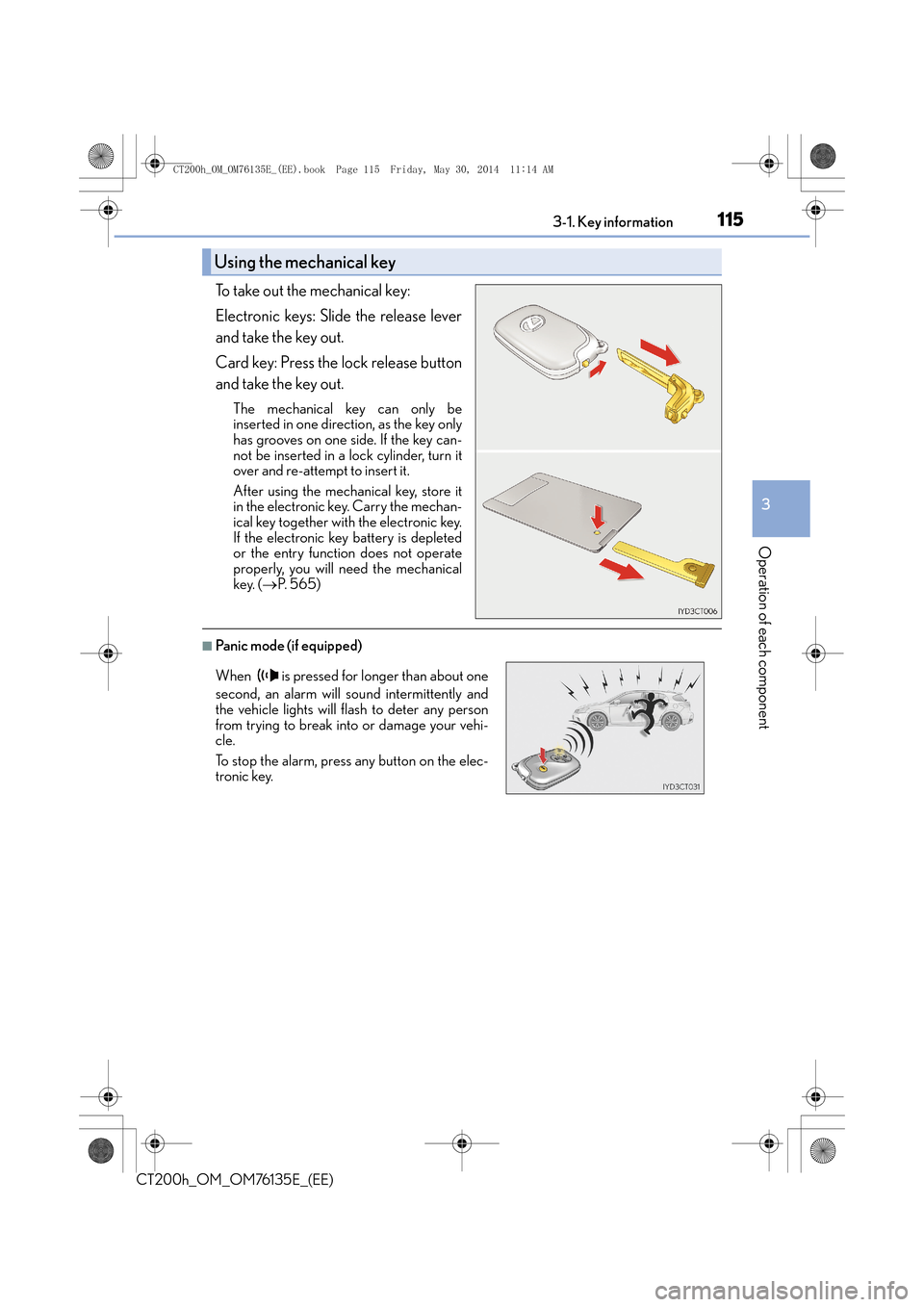
To take out the mechanical key:
Electronic keys: Slide the release lever
and take the key out.
Card key: Press the lock release button
and take the key out.
The mechanical key can only be
inserted in one direction, as the key only
has grooves on one side. If the key can-
not be inserted in a lock cylinder, turn it
over and re-attempt to insert it.
After using the mechanical key, store it
in the electronic key. Carry the mechan-
ical key together with the electronic key.
If the electronic key battery is depleted
or the entry function does not operate
properly, you will need the mechanical
key. (→P. 5 6 5 )
■Panic mode (if equipped)
Using the mechanical key
When is pressed for longer than about one
second, an alarm will sound intermittently and
the vehicle lights will flash to deter any person
from trying to break into or damage your vehi-
cle.
To stop the alarm, press any button on the elec-
tronic key.
CT200h_OM_OM76135E_(EE).book Page 115 Friday, May 30, 2014 1 1:14 AM
Page 117 of 622
1173-1. Key information
3
Operation of each component
CT200h_OM_OM76135E_(EE)
■Electronic key battery depletion
●The standard battery life is 1 to 2 years. (The card key battery life is about a year and a
half.)
●If the battery becomes low, an alarm will sound in the cabin when the hybrid system
stops. (→P. 5 3 8 )
●As the electronic key always receives radio waves, the battery will become depleted
even if the electronic key is not used. The following symptoms indicate that the elec-
tronic key battery may be depleted. Replace the battery when necessary. ( →P. 4 8 3 )
• The smart entry & start system or the wireless remote control does not operate.
• The detection area becomes smaller.
• The LED indicator on the key surface does not turn on.
●To avoid serious deterioration, do not leave the electronic key within 1 m (3 ft.) of the
following electrical appliances that produce a magnetic field:
•TVs
• Personal computers
• Cellular phones, cordless phones and battery chargers
• Recharging cellular phones or cordless phones
• Induction cookers
• Table lamps
■Replacing the battery
→ P. 4 8 3
■Confirmation of the registered key number
The number of keys already registered to the vehicle can be confirmed. Ask any autho-
rized Lexus dealer or repairer, or another duly qualified and equipped professional for
details.
■If a wrong key is used
The key cylinder rotates freely to isolate inside mechanism.
NOTICE
■To prevent key damage
●Do not drop the keys, subject them to strong shocks or bend them.
●Do not expose the keys to high temperatures for long periods of time.
●Do not get the keys wet or wash them in an ultrasonic washer etc.
●Do not attach metallic or magnetic materials to the keys or place the keys close to
such materials.
●Do not disassemble the keys.
●Do not attach a sticker or anything else to the surface of the electronic key.
●Do not place the keys near objects that produce magnetic fields, such as TVs, audio
systems and induction cookers, or medical electrical equipment, such as low-fre-
quency therapy equipment.
■Carrying the electronic key on your person
Carry the electronic key 10 cm (3.9 in.) or more away from electric appliances that are
turned on. Radio waves emitted from electric appliances within 10 cm (3.9 in.) of the
electronic key may interfere with the key, causing the key to not function properly.
CT200h_OM_OM76135E_(EE).book Page 117 Friday, May 30, 2014 1 1:14 AM
Page 120 of 622

1203-2. Opening, closing and locking the doors
CT200h_OM_OM76135E_(EE)
■Security feature
If a door is not opened within approximately 30 seconds after the vehicle is unlocked, the
security feature automatically locks the vehicle again.
■Welcome light illumination control
The front position, tail and license plate lights automatically turn on at night when the
doors are unlocked using the entry function or wireless remote control if the light switch
is in the “AUTO” position.
■When the door cannot be locked by the lock sensor on the upper part of the door han-
dle (vehicles with entry function)
■Door lock buzzer
If an attempt to lock the doors is made when a door is not fully closed, a buzzer sounds
continuously for 5 seconds. Fully close the door to stop the buzzer, and lock the vehicle
once more.
■Setting the alarm (if equipped)
Locking the doors will set the alarm system. ( →P. 8 5 )
■If the smart entry & start system or the wireless remote control does not operate prop-
erly
●Use the mechanical key to lock and unlock the doors. ( →P. 565)
●Replace the key battery with a new one if it is depleted. ( →P. 4 8 3 )
If the door will not lock even when the topside
sensor area is touched, try touching both the
topside and underside sensor areas at the same
time.
WA R N I N G
■When closing the windows using wireless remote control
Observe the following precautions. Failing to do so may result in death or serious
injury.
●Check to make sure that all passengers do not have any part of their body in a posi-
tion where it could be caught when a window is being operated.
●To prevent inadvertent power windows operat
ion, never let a small child have and use
the wireless remote control.
■Jam protection function
●Never try jamming any part of your body to activate the jam protection function
intentionally.
●The jam protection function may not work if something gets caught just before the
window fully closes.
CT200h_OM_OM76135E_(EE).book Page 120 Friday, May 30, 2014 1 1:14 AM