key battery Lexus CT200h 2014 Owner's Manual (in English)
[x] Cancel search | Manufacturer: LEXUS, Model Year: 2014, Model line: CT200h, Model: Lexus CT200h 2014Pages: 622
Page 7 of 622
7
1
8 7
6
5
4
3
2
CT200h_OM_OM76135E_(EE)
9
6-4. Using the other interior featuresOther interior features ............436• Sun visors.................................436
• Vanity mirrors ........................436
• Clock......................................... 437
• Power outlet ........................... 437
• Assist grips ..............................439
7-1. Maintenance and care Cleaning and protecting the vehicle exterior ........................ 442
Cleaning and protecting the vehicle interior..........................446
7-2. Maintenance Maintenance requirements .............................448 7-3. Do-it-yourself maintenance
Do-it-yourself service precautions ................................450
Hood ............................................... 452
Positioning a floor jack ............. 454
Engine compartment ............... 455
12-volt battery..............................463
Tires ..................................................468
Tire inflation pressure................ 477
Wheels ........................................... 479
Air conditioning filter................. 481
Electronic key battery ............. 483
Checking and replacing fuses ..............................................486
Light bulbs .....................................490
8-1. Essential information Emergency flashers.................. 508
If your vehicle has to be stopped in an
emergency ................................ 509
7Maintenance and care
8When trouble arises
CT200h_OM_OM76135E_(EE).book Page 7 Friday, May 30, 2014 11: 14 AM
Page 8 of 622
TABLE OF CONTENTS8
CT200h_OM_OM76135E_(EE)
8-2. Steps to take in an emergencyIf your vehicle needs to be towed............................................. 510
If you think something is wrong ............................................ 514
If a warning light turns on or a warning buzzer
sounds........................................... 515
If a warning message is displayed ...................................... 521
If you have a flat tire (vehicles with a spare tire) ......................539
If you have a flat tire (vehicles without a spare tire)................. 551
If the hybrid system will not start ...............................................563
If the electronic key does not operate properly .....................565
If the 12-volt battery is discharged ................................. 567
If your vehicle overheats ...........571
If the vehicle becomes stuck.............................................. 575 9-1. Specifications
Maintenance data (fuel, oil level, etc.)................... 578
Fuel information .......................... 587
9-2. Customization Customizable features............ 589
9-3. Initialization Item to initialize ...........................599
What to do if... (Troubleshooting) ................................602
Alphabetical index .................................6069Vehicle specifications
Index
For vehicles with a navigation system, refer to the “NAVIGATION SYSTEM
OWNER’S MANUAL” for information regarding the equipment listed below.
• Navigation system
• Lexus parking assist monitor• Audio/visual system
CT200h_OM_OM76135E_(EE).book Page 8 Friday, May 30, 2014 11: 14 AM
Page 86 of 622

861-3. Theft deterrent system
CT200h_OM_OM76135E_(EE)
■System maintenance
The vehicle has a maintenance-free type alarm system.
■Items to check before locking the vehicle
To prevent unexpected triggering of the alarm and vehicle theft, make sure of the follow-
ing.
●Nobody is in the vehicle.
●The windows and moon roof (if equipped) are closed before the alarm is set.
●No valuables or other personal items are left in the vehicle.
■Triggering of the alarm
The alarm may be triggered in the following situations:
(Stopping the alarm deactivates the alarm system.)
■Alarm-operated door lock
●When the alarm is operating, the doors are locked automatically to prevent intruders.
●Do not leave the key inside the vehicle when the alarm is operating, and make sure the
key is not inside the vehicle when recharging or replacing the 12-volt battery.
■Customization
The alarm can be set to deactivate when the mechanical key is used to unlock.
(Customizable features: →P. 5 8 9 )
●The doors are unlocked using the mechanical
key.
●A person inside the vehicle opens a door or
hood.
●The 12-volt battery is recharged or replaced
when the vehicle is locked. ( →P. 5 6 9 )
CT200h_OM_OM76135E_(EE).book Page 86 Friday, May 30, 2014 11 :14 AM
Page 115 of 622
1153-1. Key information
3
Operation of each component
CT200h_OM_OM76135E_(EE)
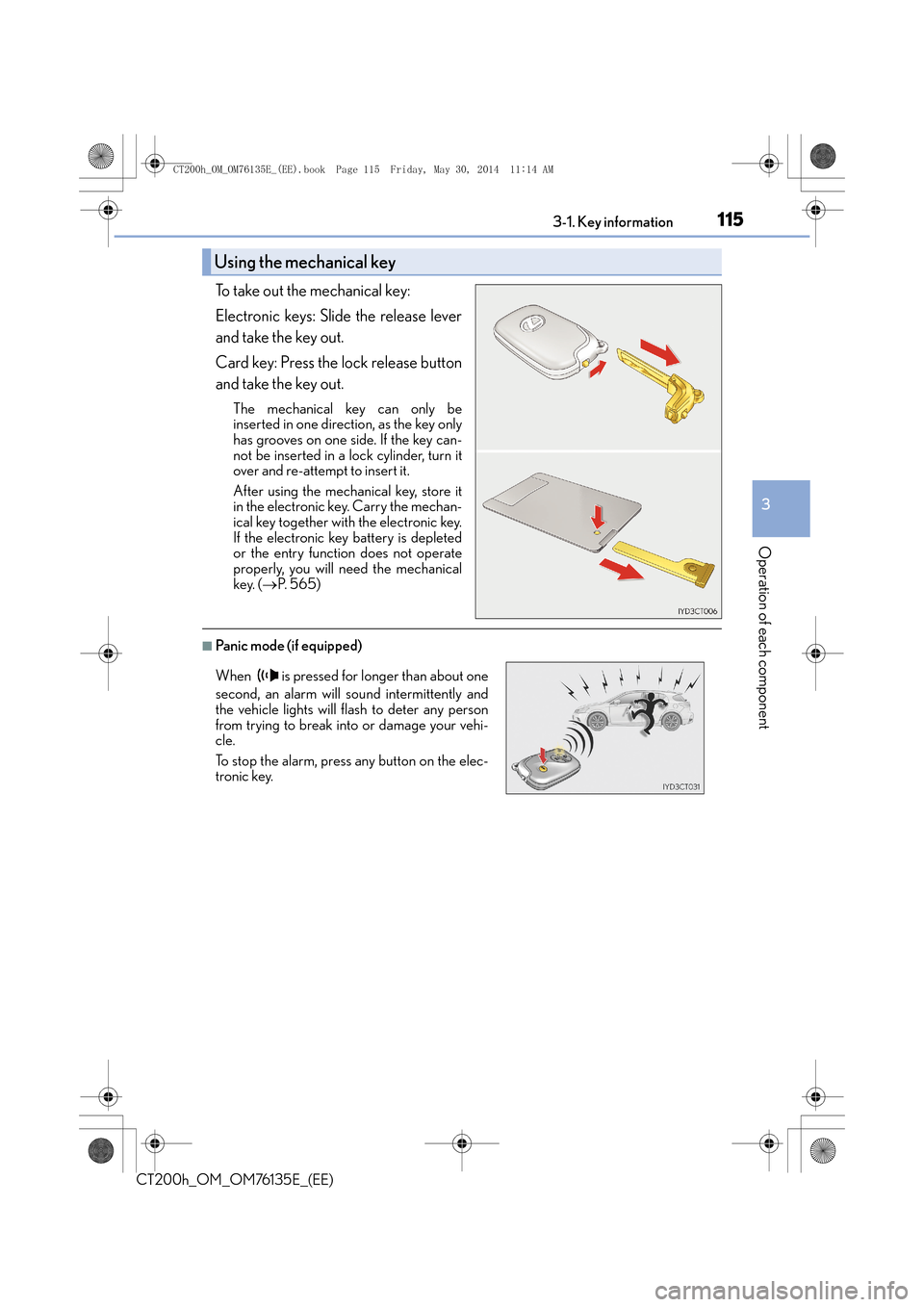
To take out the mechanical key:
Electronic keys: Slide the release lever
and take the key out.
Card key: Press the lock release button
and take the key out.
The mechanical key can only be
inserted in one direction, as the key only
has grooves on one side. If the key can-
not be inserted in a lock cylinder, turn it
over and re-attempt to insert it.
After using the mechanical key, store it
in the electronic key. Carry the mechan-
ical key together with the electronic key.
If the electronic key battery is depleted
or the entry function does not operate
properly, you will need the mechanical
key. (→P. 5 6 5 )
■Panic mode (if equipped)
Using the mechanical key
When is pressed for longer than about one
second, an alarm will sound intermittently and
the vehicle lights will flash to deter any person
from trying to break into or damage your vehi-
cle.
To stop the alarm, press any button on the elec-
tronic key.
CT200h_OM_OM76135E_(EE).book Page 115 Friday, May 30, 2014 1 1:14 AM
Page 116 of 622
1163-1. Key information
CT200h_OM_OM76135E_(EE)
■Card key (if equipped)
●The card key is not waterproof.
●The mechanical key that is stored inside the card key should be used only if a problem
arises, such as when the card key does not operate properly.
●If it is difficult to take out the mechanical key, push down the lock release button using a
pen tip etc. If it is still diffic ult to pull it out, use a coin etc.
■When required to leave the vehicle’s key with a parking attendant
Lock the glove box as circumstances demand. ( →P. 4 2 9 )
Remove the mechanical key for your own use and provide the attendant with the elec-
tronic key only.
■If you lose your mechanical keys
New genuine mechanical keys can be made by any authorized Lexus dealer or repairer,
or another duly qualified and equipped professional using another mechanical key and
the key number stamped on your key number plate. Keep the plate in a safe place such
as your wallet, not in the vehicle.
■When riding in an aircraft
When bringing an electronic key onto an aircraft, make sure you do not press any but-
tons on the electronic key while inside the ai rcraft cabin. If you are carrying an electronic
key in your bag etc., ensure that the buttons are not likely to be pressed accidentally.
Pressing a button may cause the electronic key to emit radio waves that could interfere
with the operation of the aircraft.
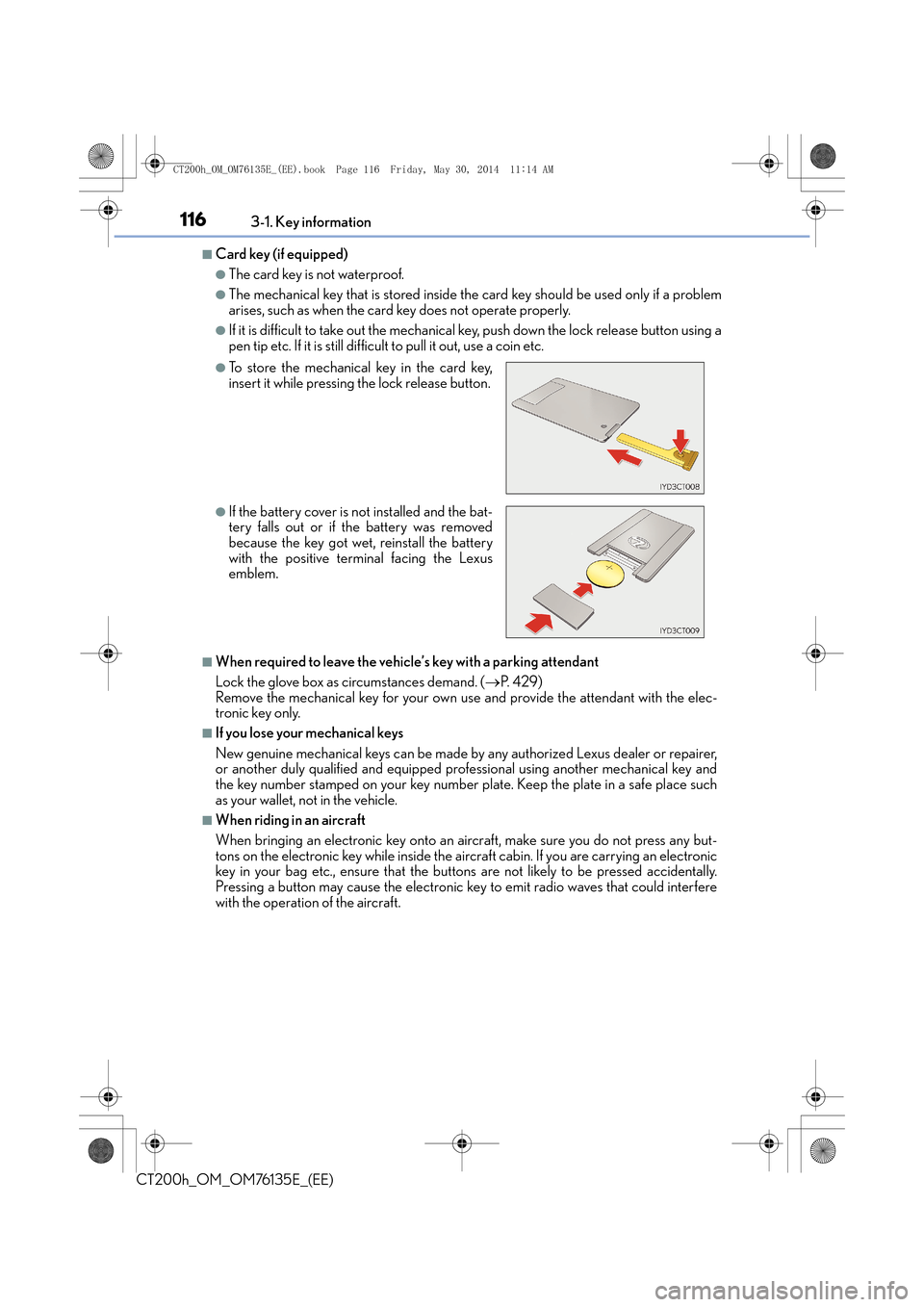
●To store the mechanical key in the card key,
insert it while pressing the lock release button.
●If the battery cover is not installed and the bat-
tery falls out or if the battery was removed
because the key got wet, reinstall the battery
with the positive terminal facing the Lexus
emblem.
CT200h_OM_OM76135E_(EE).book Page 116 Friday, May 30, 2014 1 1:14 AM
Page 117 of 622
1173-1. Key information
3
Operation of each component
CT200h_OM_OM76135E_(EE)
■Electronic key battery depletion
●The standard battery life is 1 to 2 years. (The card key battery life is about a year and a
half.)
●If the battery becomes low, an alarm will sound in the cabin when the hybrid system
stops. (→P. 5 3 8 )
●As the electronic key always receives radio waves, the battery will become depleted
even if the electronic key is not used. The following symptoms indicate that the elec-
tronic key battery may be depleted. Replace the battery when necessary. ( →P. 4 8 3 )
• The smart entry & start system or the wireless remote control does not operate.
• The detection area becomes smaller.
• The LED indicator on the key surface does not turn on.
●To avoid serious deterioration, do not leave the electronic key within 1 m (3 ft.) of the
following electrical appliances that produce a magnetic field:
•TVs
• Personal computers
• Cellular phones, cordless phones and battery chargers
• Recharging cellular phones or cordless phones
• Induction cookers
• Table lamps
■Replacing the battery
→ P. 4 8 3
■Confirmation of the registered key number
The number of keys already registered to the vehicle can be confirmed. Ask any autho-
rized Lexus dealer or repairer, or another duly qualified and equipped professional for
details.
■If a wrong key is used
The key cylinder rotates freely to isolate inside mechanism.
NOTICE
■To prevent key damage
●Do not drop the keys, subject them to strong shocks or bend them.
●Do not expose the keys to high temperatures for long periods of time.
●Do not get the keys wet or wash them in an ultrasonic washer etc.
●Do not attach metallic or magnetic materials to the keys or place the keys close to
such materials.
●Do not disassemble the keys.
●Do not attach a sticker or anything else to the surface of the electronic key.
●Do not place the keys near objects that produce magnetic fields, such as TVs, audio
systems and induction cookers, or medical electrical equipment, such as low-fre-
quency therapy equipment.
■Carrying the electronic key on your person
Carry the electronic key 10 cm (3.9 in.) or more away from electric appliances that are
turned on. Radio waves emitted from electric appliances within 10 cm (3.9 in.) of the
electronic key may interfere with the key, causing the key to not function properly.
CT200h_OM_OM76135E_(EE).book Page 117 Friday, May 30, 2014 1 1:14 AM
Page 118 of 622

1183-1. Key information
CT200h_OM_OM76135E_(EE)
NOTICE
■In case of a smart entry & start system malfunction or other key-related problems
Take your vehicle with all the electronic keys provided with your vehicle, including the
card key, to any authorized Lexus dealer or repairer, or another duly qualified and
equipped professional.
■When an electronic key is lost
If the electronic key remains lost, the risk of vehicle theft increases significantly. Visit
any authorized Lexus dealer or repairer, or another duly qualified and equipped pro-
fessional immediately with all remaining electronic keys and the card key that were
provided with your vehicle.
■Handling the card key
●Do not apply excess force when inserting the mechanical key into the card key. Doing
so may damage the card key.
●If the battery or card key terminals get wet, the battery may corrode.
If the key is dropped into water, or if drinki ng water etc. is spilled on the key, immedi-
ately remove the battery cover and wipe the battery and terminals. (To remove the
battery cover, lightly grasp and pull it.) If the battery is corroded, have any authorized
Lexus dealer or repairer, or another duly qualified and equipped professional replace
the battery.
●Do not crush the battery cover or use a screwdriver to remove the battery cover.
Forcibly removing the battery cover may bend or damage the key.
●If the battery cover is frequently removed, the battery cover may become loose.
●When installing the battery, make sure to check the direction of the battery.
Installing the battery in the wrong direction may cause the battery to deplete rapidly.
●The surface of the card key may be damaged, or its coating may peel off in the follow-
ing situations:
• The card key is carried together with hard objects, such as coins and keys.
• The card key is scraped with a sharp object, such as the tip of a mechanical pencil.
• The surface of the card key is wiped with thinner or benzene.
CT200h_OM_OM76135E_(EE).book Page 118 Friday, May 30, 2014 1 1:14 AM
Page 120 of 622

1203-2. Opening, closing and locking the doors
CT200h_OM_OM76135E_(EE)
■Security feature
If a door is not opened within approximately 30 seconds after the vehicle is unlocked, the
security feature automatically locks the vehicle again.
■Welcome light illumination control
The front position, tail and license plate lights automatically turn on at night when the
doors are unlocked using the entry function or wireless remote control if the light switch
is in the “AUTO” position.
■When the door cannot be locked by the lock sensor on the upper part of the door han-
dle (vehicles with entry function)
■Door lock buzzer
If an attempt to lock the doors is made when a door is not fully closed, a buzzer sounds
continuously for 5 seconds. Fully close the door to stop the buzzer, and lock the vehicle
once more.
■Setting the alarm (if equipped)
Locking the doors will set the alarm system. ( →P. 8 5 )
■If the smart entry & start system or the wireless remote control does not operate prop-
erly
●Use the mechanical key to lock and unlock the doors. ( →P. 565)
●Replace the key battery with a new one if it is depleted. ( →P. 4 8 3 )
If the door will not lock even when the topside
sensor area is touched, try touching both the
topside and underside sensor areas at the same
time.
WA R N I N G
■When closing the windows using wireless remote control
Observe the following precautions. Failing to do so may result in death or serious
injury.
●Check to make sure that all passengers do not have any part of their body in a posi-
tion where it could be caught when a window is being operated.
●To prevent inadvertent power windows operat
ion, never let a small child have and use
the wireless remote control.
■Jam protection function
●Never try jamming any part of your body to activate the jam protection function
intentionally.
●The jam protection function may not work if something gets caught just before the
window fully closes.
CT200h_OM_OM76135E_(EE).book Page 120 Friday, May 30, 2014 1 1:14 AM
Page 130 of 622
1303-2. Opening, closing and locking the doors
CT200h_OM_OM76135E_(EE)
■Alarms and warning messages
An alarm sounds and warning message displays shown on the multi-information display
are used to protect against unexpected accidents or theft of the vehicle resulting from
erroneous operation. When a warning message is displayed, take appropriate measures
based on the displayed message. ( →P. 5 2 1 )
When only an alarm sounds, circumstances and correction procedures are as follows.
■Battery-saving function (vehicles with entry function)
The battery-saving function will be activated in order to prevent the electronic key bat-
tery and the 12-volt battery from being discha rged while the vehicle is not in operation
for a long time.
●In the following situations, the smart entry & start system may take some time to unlock
the doors.
• The electronic key has been left in an area of approximately 2 m (6 ft.) of the outside
of the vehicle for 10 minutes or longer.
• The smart entry & start system has not been used for 5 days or longer.
●If the smart entry & start system has not been used for 14 days or longer, the doors can-
not be unlocked at any doors except the driver’s door. In this case, take hold of the
driver’s door handle, or use the wireless remote control or the mechanical key, to
unlock the doors.
■Conditions affecting operation
The smart entry & start system, wireless re mote control and immobilizer system use
weak radio waves. In the following situations, the communication between the electronic
key and the vehicle may be affected, preventing the smart entry & start system, wireless
remote control and immobilizer sy stem from operating properly.
(Ways of coping: →P. 565)
●When the electronic key battery is depleted
●Near a TV tower, electric power plant, gas station, radio station, large display, airport or
other facility that generates strong radio waves or electrical noise
●When carrying a portable radio, cellular ph one, cordless phone or other wireless com-
munication devices
AlarmSituationCorrection procedure
Exterior alarm
sounds once for 5
seconds (vehicles
with entry function)An attempt was made to lock
the vehicle while a door was
open.Close all of the doors and
lock the doors again.
Interior alarm pings
repeatedly
The power switch was turned to
ACCESSORY mode while the
driver’s door was open (The
driver’s door was opened when
the power switch was in
ACCESSORY mode).
Turn the power switch off
and close the driver’s door.
CT200h_OM_OM76135E_(EE).book Page 130 Friday, May 30, 2014 1 1:14 AM
Page 179 of 622

1794-2. Driving procedures
4
Driving
CT200h_OM_OM76135E_(EE)
■Auto power off function
If the vehicle is left in ACCESSORY mode for more than 20 minutes or ON mode (the
hybrid system is not operating) for more than an hour with the shift position in P, the
power switch will automatically turn off. However, this function cannot entirely prevent
the 12-volt battery discharge. Do not leave the vehicle with the power switch in ACCES-
SORY or ON mode for long periods of time when the hybrid system is not operating.
■Sounds and vibrations specific to a hybrid vehicle
→ P. 7 3
■Electronic key battery depletion
→P. 1 1 7
■When the ambient temperature is low, su ch as during winter driving conditions
When starting the hybrid system, the flashing time of the “READY” indicator may be
long. Leave the vehicle as it is until the “REA DY” indicator is steady on, as steady means
the vehicle is able to move.
■Conditions affecting operation
→ P. 1 3 0
■Note for the entry function
→P. 1 3 1
■If the hybrid system does not start
The immobilizer system may not have been deactivated. ( →P. 7 9 )
Contact any authorized Lexus dealer or repa irer, or another duly qualified and equipped
professional.
■When the power switch indicator flashes in amber
The system may be malfunctioning. Have the vehicle inspected by any authorized Lexus
dealer or repairer, or another duly qualified and equipped professional immediately.
■If the “READY” indicator does not come on
In the event that the “READY” indicator does not come on even after performing the
proper procedures for starting the vehicle, contact any authorized Lexus dealer or
repairer, or another duly qualified and equipped professional immediately.
■If the hybrid system is malfunctioning
→ P. 5 2 6
■If the electronic key battery is depleted
→P. 4 8 3
■Operation of the power switch
●When operating the power switch, one short, firm press is enough. If the switch is
pressed improperly, the hybrid system may no t start or the power switch mode may not
change. It is not necessary to press and hold the switch.
●If attempting to restart the hybrid system immediately after turning the power switch off,
the hybrid system may not start in some cases. After turning the power switch off,
please wait a few seconds before restarting the hybrid system.
CT200h_OM_OM76135E_(EE).book Page 179 Friday, May 30, 2014 1 1:14 AM