towing Lexus CT200h 2015 (in English) User Guide
[x] Cancel search | Manufacturer: LEXUS, Model Year: 2015, Model line: CT200h, Model: Lexus CT200h 2015Pages: 634
Page 205 of 634
204
CT200h_OM_OM76174U_(U)4-5. Using the driving support systems
■Intuitive parking assist display
When an obstacle is detected while the Lexus
parking assist monitor is in use, the warn-
ing indicator will appear in the upper corner of the screen even if the display setting has
been set to off.
■Sensor detection information
●The sensor’s detection areas are limited to the areas around the vehicle’s bumper.
●Certain vehicle conditions and the surround ing environment may affect the ability of a
sensor to correctly detect an obstacle. Particular instances where this may occur are
listed below.
• There is dirt, snow or ice on the sensor . (Wiping the sensors will resolve this prob-
lem.)
• The sensor is frozen. (Thawing th e area will resolve this problem.)
In especially cold weather, if a sensor is frozen the screen may show an abnormal
display, or obstacles may not be detected.
• The sensor is covered in any way.
• The vehicle is leaning co nsiderably to one side.
• On an extremely bumpy road, on an incline, on gravel, or on grass.
• The vicinity of the vehicle is noisy due to vehicle horns, motorcycle engines, air
brakes of large vehicles, or other loud noises producing ultrasonic waves.
• There is another vehicle equipped with parking assist sensors in the vicinity.
• The sensor is coated with a sheet of spray or heavy rain.
• The vehicle is equipped with a fender pole or wireless antenna.
• Towing eyelets are installed.
• The bumper or sensor receives a strong impact.
• The vehicle is approaching a tall or curved curb.
• In harsh sunlight or intense cold weather.
• The area directly under the bumpers is not detected.
• If obstacles draw too close to the sensor.
• A non-genuine Lexus suspension (lowered suspension etc.) is installed.
• People may not be detected if they are wearing certain types of clothing.
In addition to the examples above, there are instances in which, because of their shape,
signs and other objects may be judged by a sensor to be closer than they are.
●The shape of the obstacle may prevent a sensor from detecting it. Pay particular atten-
tion to the following obstacles:
• Wires, fences, ropes, etc.
• Cotton, snow and other materials that absorb sound waves
• Sharply-angled objects
• Low obstacles
• Tall obstacles with upper sections projecting outwards in the direction of your vehi-
cle
●The following situations may occur during use.
• Depending on the shape of the obstacle and other factors, the detection distance may shorten, or detect ion may be impossible.
• Obstacles may not be detected if they are too close to the sensor.
• There will be a short delay between obst acle detection and display. Even at slow
speeds, there is a possibility that the obstacl e will come within the sensor’s detection
areas before the display is shown and the buzzer sounds.
• Thin posts or objects lower than the sensor may not be detected when approached, even if they have been detected once.
• It might be difficult to hear beeps due to the volume of audio system or air flow noise of the air conditioning system.
Page 430 of 634

CT200h_OM_OM76174U_(U)
4296-3. Using the storage features
6
Interior features
■Bottle holders/door pockets
●When storing a bottle, close the cap.
●The bottle may not be stored depending on its size or shape.
●The partition in the cup holder can also be
used to store a small cup or can.
WA R N I N G
Do not place anything other than cups or aluminum cans in the cup holders.
Other items may be thrown out of the holders in the event of an accident or sudden
braking, causing injury. If possible , cover hot drinks to prevent burns.
NOTICE
Put the cap on before stowing a bottle. Do not place open bottles or glass and paper
cups containing liquid in the bottle holders.
The contents may spill and glasses may break.
Page 436 of 634

CT200h_OM_OM76174U_(U)
4356-3. Using the storage features
6
Interior features
■Stowing the luggage coverRemove the side deck boards and
open the center auxiliary box.
Adjust the cover so that the infor-
mation label is facing up.
Fold the rear edge of the cover
over, replace the side deck
boards and close the center auxil-
iary box.
1
2
3
A part of the center auxiliary box can be used as
an Owner’s Manual holder.
Page 457 of 634
456
CT200h_OM_OM76174U_(U)6-4. Using the other interior features
■Enhanced Roadside Assistance
Enhanced Roadside Assistance adds GPS data to the already included war-
ranty-based Lexus roadside service.
Subscribers can press the “SOS” button to reach a Safety Connect response-
center agent, who can help with a wide range of needs, such as: towing, flat
tire, fuel delivery, etc. For a description of the Roadside Assistance services
and their limitations, please see the Safety Connect Terms and Conditions,
which are available at Lexus.com.
Important! Read this information before using Safety Connect.
■Exposure to radio frequency signals
The Safety Connect system installed in your vehicle is a low-power radio
transmitter and receiver. It receives and also sends out radio frequency (RF)
signals.
In August 1996, the Federal Communications Commission (FCC) adopted
RF exposure guidelines with safety levels for mobile wireless phones. Those
guidelines are consistent with the safety standards previously set by the fol-
lowing U.S. and international standards bodies.
●ANSI (American National Standards Institute) C95.1 [1992]
●NCRP (National Council on Radiation Protection and Measurement)
Report 86 [1986]
●ICNIRP (International Commission on Non-Ionizing Radiation Protection)
[1996]
Those standards were based on comprehensive and periodic evaluations of
the relevant scientific literature. Over 120 scientists, engineers, and physi-
cians from universities, and government health agencies and industries
reviewed the available body of research to develop the ANSI Standard
(C95.1).
The design of Safety Connect complies with the FCC guidelines in addition to
those standards.
Safety information for Safety Connect
Page 523 of 634
522
CT200h_OM_OM76174U_(U)8-2. Steps to take in an emergency
If your vehicle needs to be towed
In the following situations, it is not possible to be towed by another vehicle using
cables or chains, as the front wheels may
be locked due to the parking lock. Con-
tact your Lexus dealer or commercial towing service.
●There is a malfunction in the shift control system. ( →P. 5 3 7 )
●There is a malfunction in the immobilizer system. ( →P. 7 3 )
●There is a malfunction in the smart access system with push-button start.
(→ P. 5 5 9 )
●The 12-volt battery is discharged. ( →P. 5 6 1 )
The following may indicate a problem with your hybrid transmission. Contact
your Lexus dealer or commercial towing service before towing.
●The hybrid warning message shows on the multi-information display and the
vehicle does not move.
●The vehicle makes an abnormal sound.
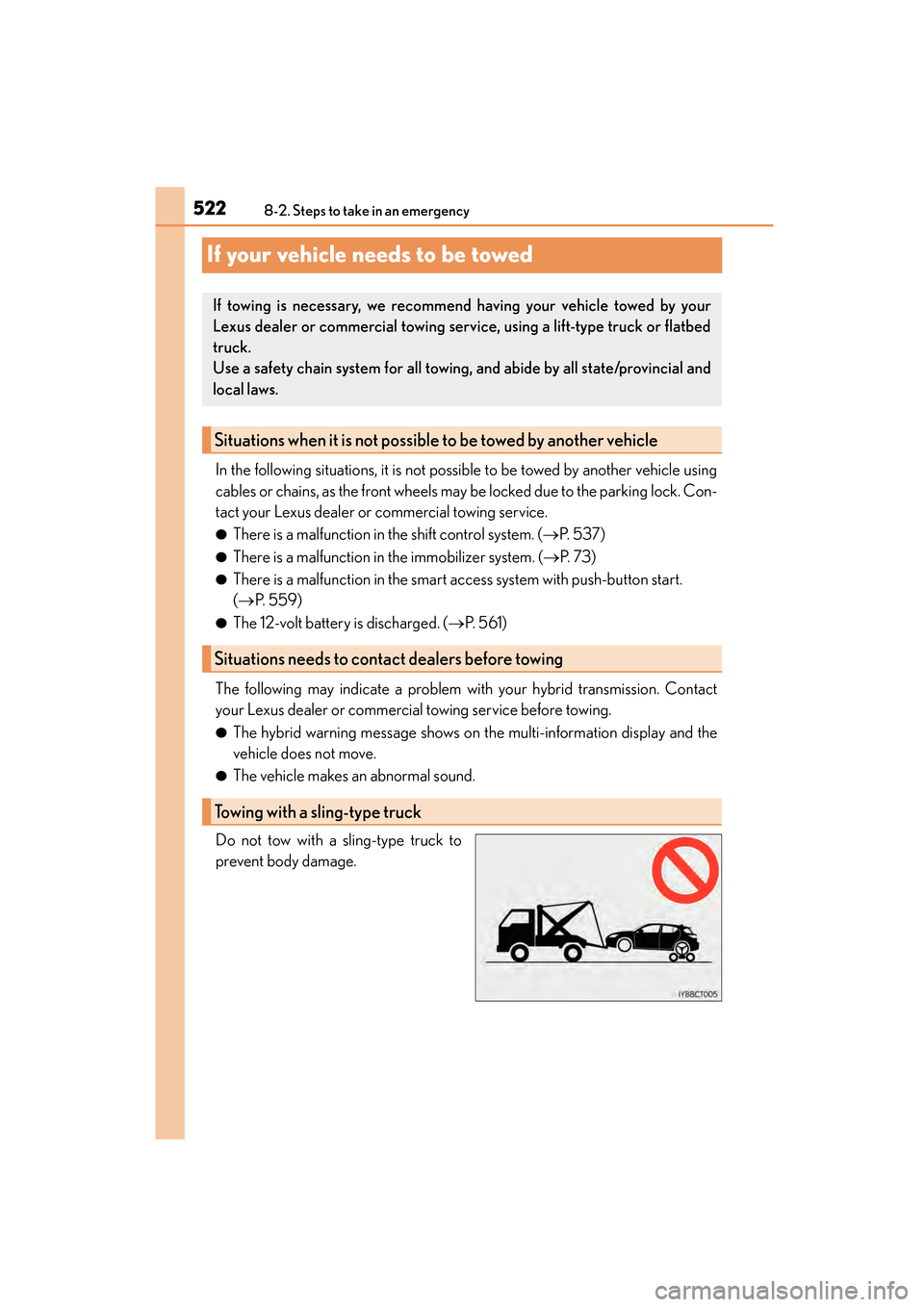
Do not tow with a sling-type truck to
prevent body damage.
If towing is necessary, we recommend having your vehicle towed by your
Lexus dealer or commercial towing servic e, using a lift-type truck or flatbed
truck.
Use a safety chain system for all towing , and abide by all state/provincial and
local laws.
Situations when it is not possible to be towed by another vehicle
Situations needs to contact dealers before towing
Towing with a sling-type truck
Page 524 of 634

5238-2. Steps to take in an emergency
CT200h_OM_OM76174U_(U)
8
When trouble arises
If your Lexus is transported by a flat bed
truck, it should be tied down at the
locations shown in the illustration.
If you use chains or cables to tie down
your vehicle, the angles shaded in black
must be 45 °.
Do not overly tighten the tie downs or
the vehicle may be damaged.
If a tow truck is not available in an emergency, your vehicle may be temporarily
towed using a cable or chain secured to the emergency towing eyelet. This
should only be attempted on hard surfaced roads for short distances at low
speeds.
A driver must be in the vehicle to steer and operate the brakes. The vehicle’s
wheels, drive train, axles, steering and brakes must be in good condition.
Towing with a wheel-lift type truck
XFrom the front XFrom the rear
Release the parking brake. Use a towing dolly under the front
wheels.
Using a flat bed truck
Emergency towing
Page 525 of 634

5248-2. Steps to take in an emergency
CT200h_OM_OM76174U_(U)
Take out the towing eyelet. (→P. 5 4 8 )
Remove the eyelet cover using a flat-
head screwdriver.
To protect the bodywork, place a rag
between the screwdriver and the vehi-
cle body as shown in the illustration.
Insert the towing eyelet into the hole
and tighten partially by hand.
Tighten down the towing eyelet
securely using a wheel nut wrench
or hard metal bar.
Securely attach a cable or chain to the towing eyelet.
Take care not to damage the vehicle body.
Enter the vehicle being towed and start the hybrid system.
If the hybrid system does not start, turn the power switch to ON mode.
Shift the shift position to N and release the parking brake.
Emergency towing procedure
1
2
3
4
5
6
7
Page 526 of 634
5258-2. Steps to take in an emergency
CT200h_OM_OM76174U_(U)
8
When trouble arises
■While towing
If the hybrid system is off, the power assist for the brakes and steering will not function,
making steering and braking more difficult.
■Wheel nut wrench
Wheel nut wrench is installed in luggage compartment. ( →P. 5 4 8 )
WA R N I N G
Observe the following precautions.
Failure to do so may result in death or serious injury.
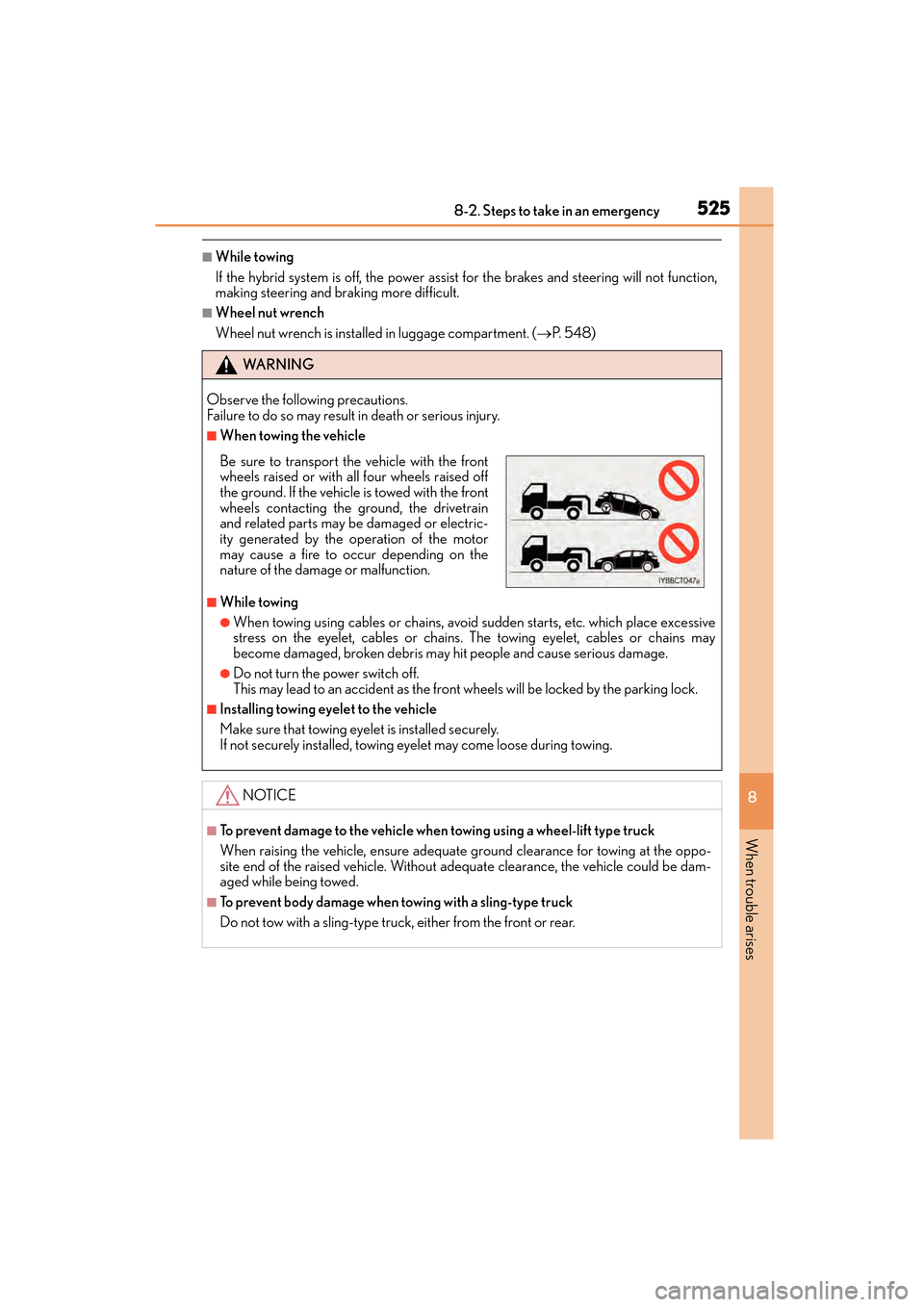
■When towing the vehicle
■While towing
●When towing using cables or chains, avoid sudden starts, etc. which place excessive
stress on the eyelet, cables or chains. The towing eyelet, cables or chains may
become damaged, broken debris may hit people and cause serious damage.
●Do not turn the power switch off.
This may lead to an accident as the front wheels will be locked by the parking lock.
■Installing towing eyelet to the vehicle
Make sure that towing eyelet is installed securely.
If not securely installed, towing eyelet may come loose during towing.
NOTICE
■To prevent damage to the vehicle when towing using a wheel-lift type truck
When raising the vehicle, ensure adequate ground clearance for towing at the oppo-
site end of the raised vehicle. Without adequate clearance, the vehicle could be dam-
aged while being towed.
■To prevent body damage when towing with a sling-type truck
Do not tow with a sling-type truck, either from the front or rear.
Be sure to transport the vehicle with the front
wheels raised or with all four wheels raised off
the ground. If the vehicle is towed with the front
wheels contacting the ground, the drivetrain
and related parts may be damaged or electric-
ity generated by the operation of the motor
may cause a fire to occur depending on the
nature of the damage or malfunction.
Page 549 of 634

5488-2. Steps to take in an emergency
CT200h_OM_OM76174U_(U)
Location of the spare tire, jack and tools
Towing eyelet
Jack
Spare tireJack handle
Wheel nut wrench1
2
3
4
5
Page 555 of 634
5548-2. Steps to take in an emergency
CT200h_OM_OM76174U_(U)
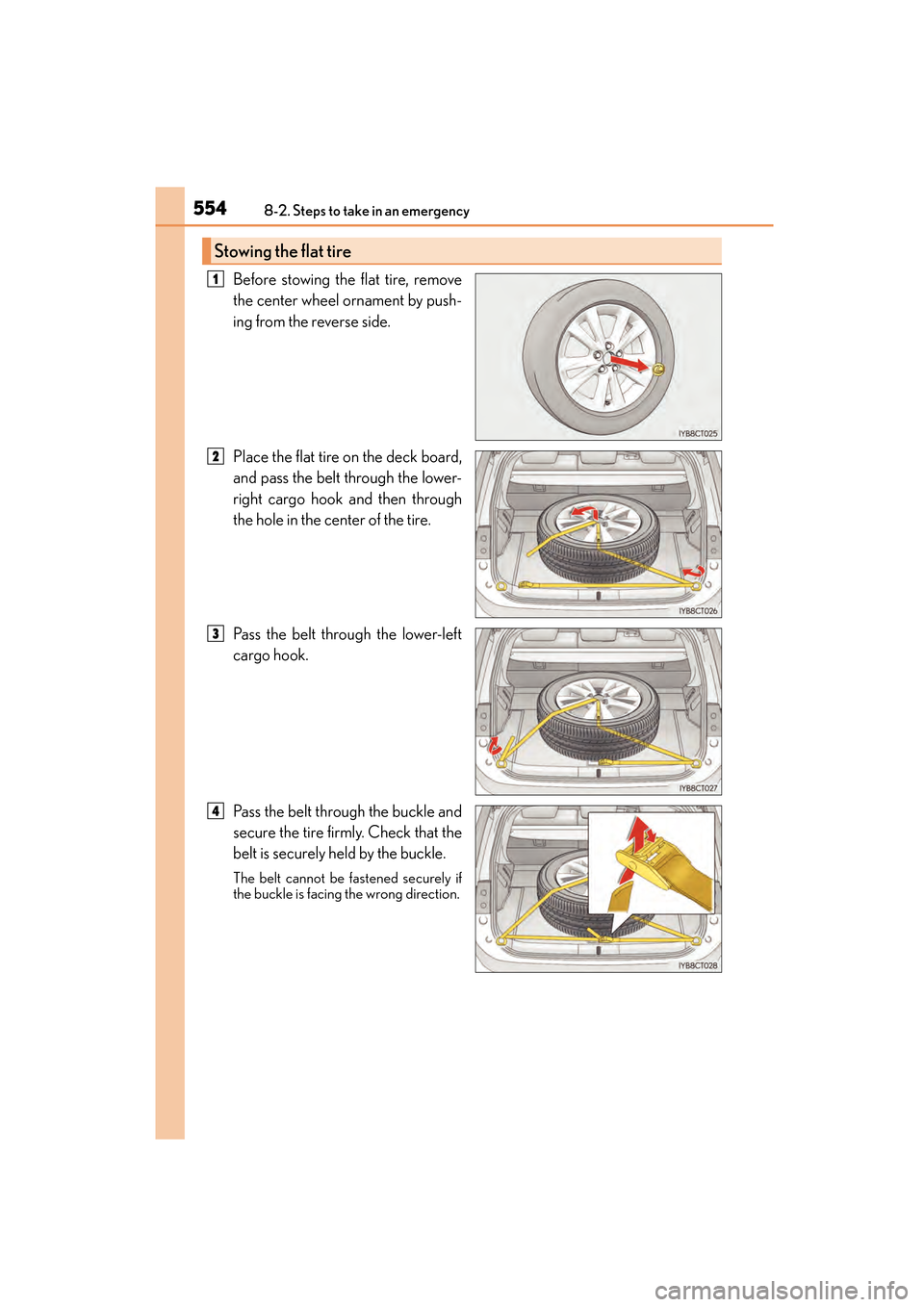
Before stowing the flat tire, remove
the center wheel ornament by push-
ing from the reverse side.
Place the flat tire on the deck board,
and pass the belt through the lower-
right cargo hook and then through
the hole in the center of the tire.
Pass the belt through the lower-left
cargo hook.
Pass the belt through the buckle and
secure the tire firmly. Check that the
belt is securely held by the buckle.
The belt cannot be fastened securely if
the buckle is facing the wrong direction.
Stowing the flat tire
1
2
3
4