AUX Lexus CT200h 2016 (in English) User Guide
[x] Cancel search | Manufacturer: LEXUS, Model Year: 2016, Model line: CT200h, Model: Lexus CT200h 2016Pages: 632, PDF Size: 8.5 MB
Page 268 of 632
2685-4. Playing audio CDs and MP3/WMA discs
CT200h_OM_OM76197U_(U)
■CD player protection feature
To protect the internal components, playback is automatically stopped when a problem is
detected.
■Display
Up to 12 characters can be displayed at a time.
If there are 13 or more characters, pressing and holding the “TEXT” button for 1 second
or more enables to displa y the remaining characters.
A maximum of 24 characters can be displayed.
If the button is pressed for more than 1 se cond again or has not been operated for more
than 6 seconds, the display will return to the first 12 characters.
Depending on the contents recorded, the ch aracters may not be displayed properly or
may not be displayed at all.
■When “ERROR”, “WAIT” or “NO MUSIC” is shown on the display
“ERROR”:
This indicates a trouble either in the CD or inside the player. The CD may be dirty, dam-
aged, or inserted up-side down.
“WAIT”:
This indicates that operation is stopped due to a high temperature inside the player. Wait
for a while and then press the “CD•AUX” butto n. If the CD still cannot be played back,
contact your Lexus dealer.
“NO MUSIC”:
This indicates that an MP3/WMA fi le is not included in the CD.
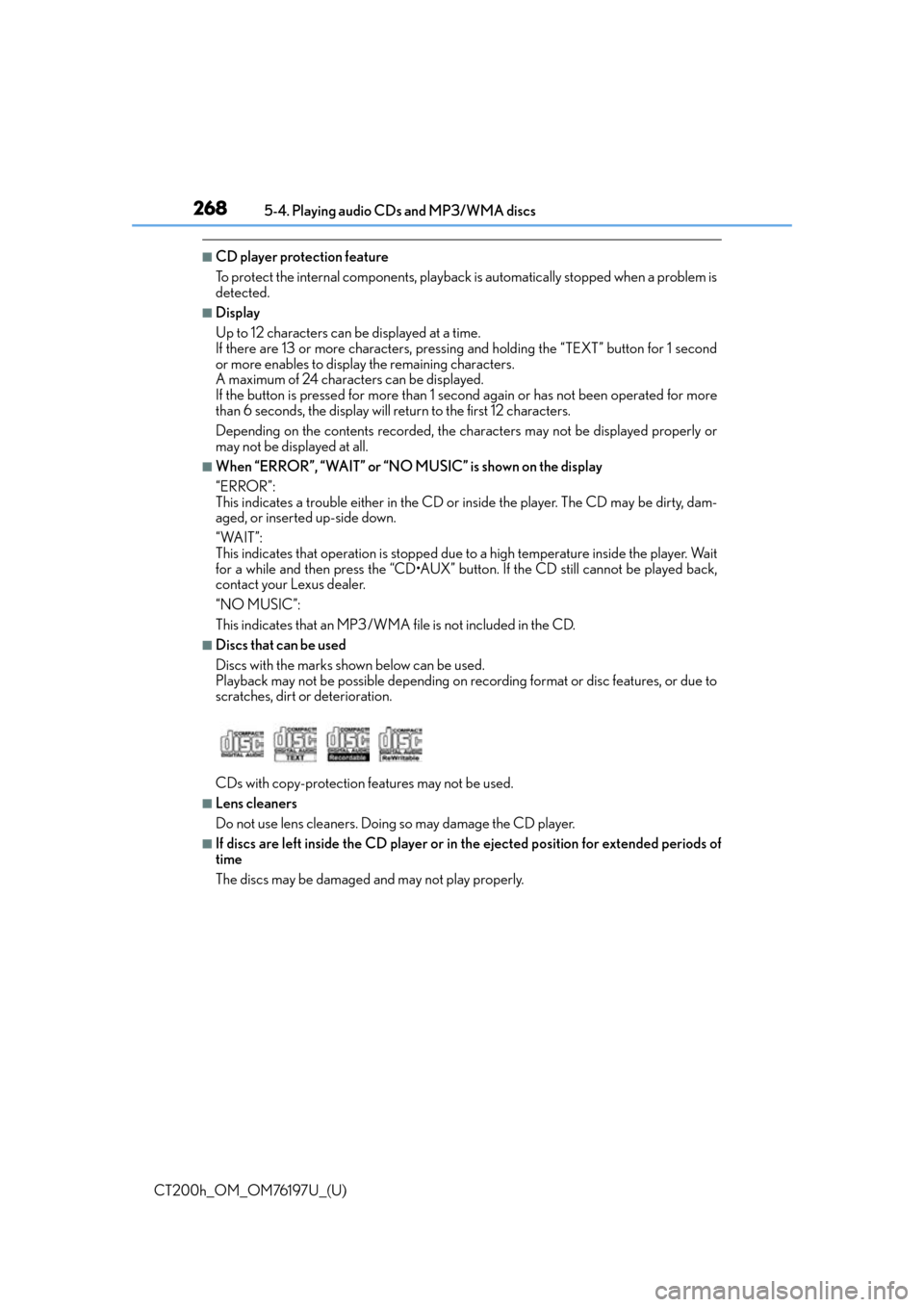
■Discs that can be used
Discs with the marks shown below can be used.
Playback may not be possible depending on recording format or disc features, or due to
scratches, dirt or deterioration.
CDs with copy-protection fe atures may not be used.
■Lens cleaners
Do not use lens cleaners. Doing so may damage the CD player.
■If discs are left inside the CD player or in the ejected position for extended periods of
time
The discs may be damaged and may not play properly.
Page 272 of 632
272
CT200h_OM_OM76197U_(U)5-5. Using an external device
Listening to an iPod
P. 2 5 5
Connecting an iPod enables you to en joy music from the vehicle speakers.
Press the “CD•AUX” button to select “iPod”.
Connecting an iPod
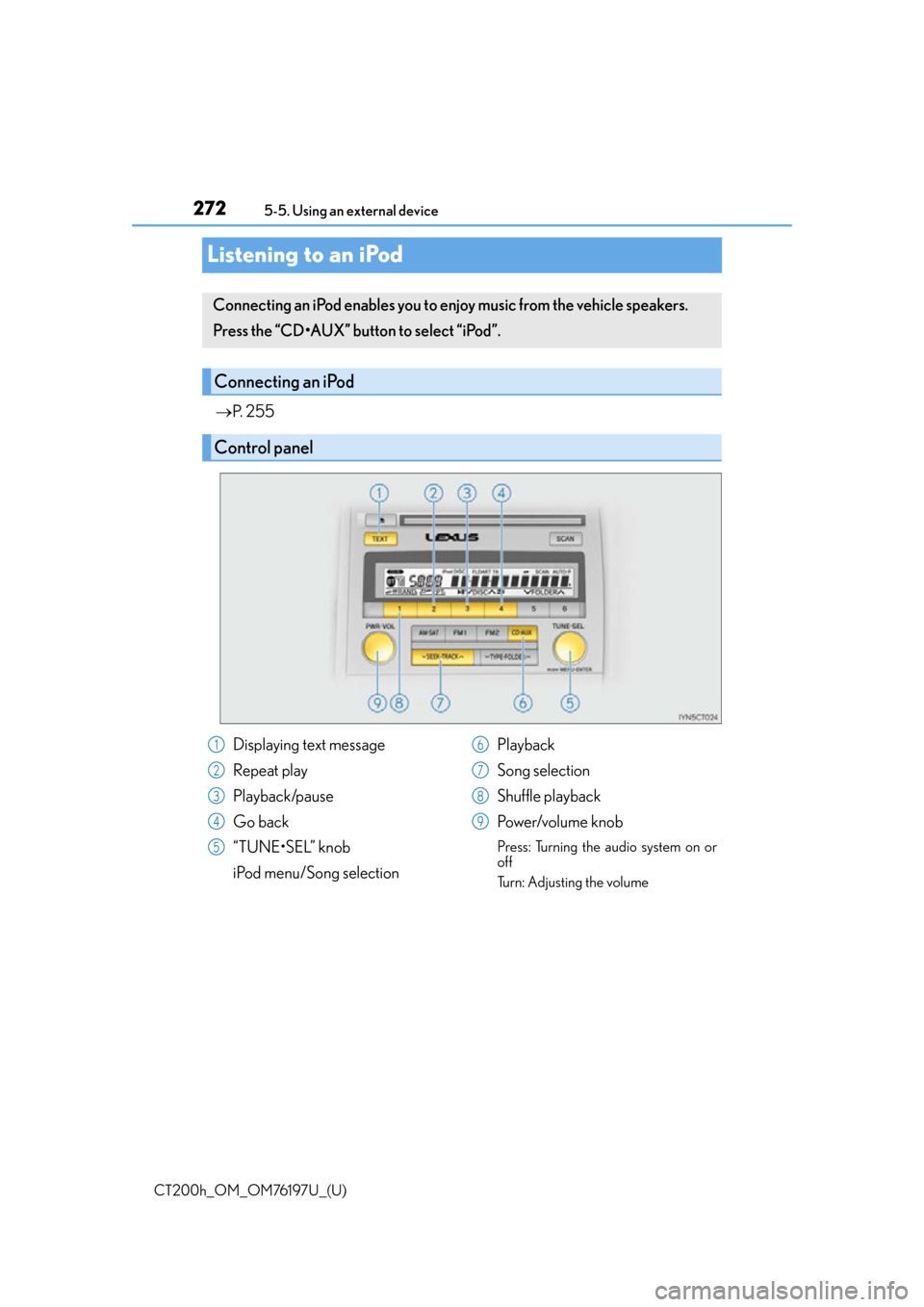
Control panel
Displaying text message
Repeat play
Playback/pause
Go back
“TUNE•SEL” knob
iPod menu/Song selection Playback
Song selection
Shuffle playback
Power/volume knob
Press: Turning the audio system on or
off
Turn: Adjusting the volume
1
2
3
4
5
6
7
8
9
Page 278 of 632
278
CT200h_OM_OM76197U_(U)5-5. Using an external device
Listening to a USB memory device
P. 2 5 5
Connecting a USB memory enables you to enjoy music from the vehicle
speakers. Press the “CD•AUX” button to select “USB”.
Connecting a USB memory
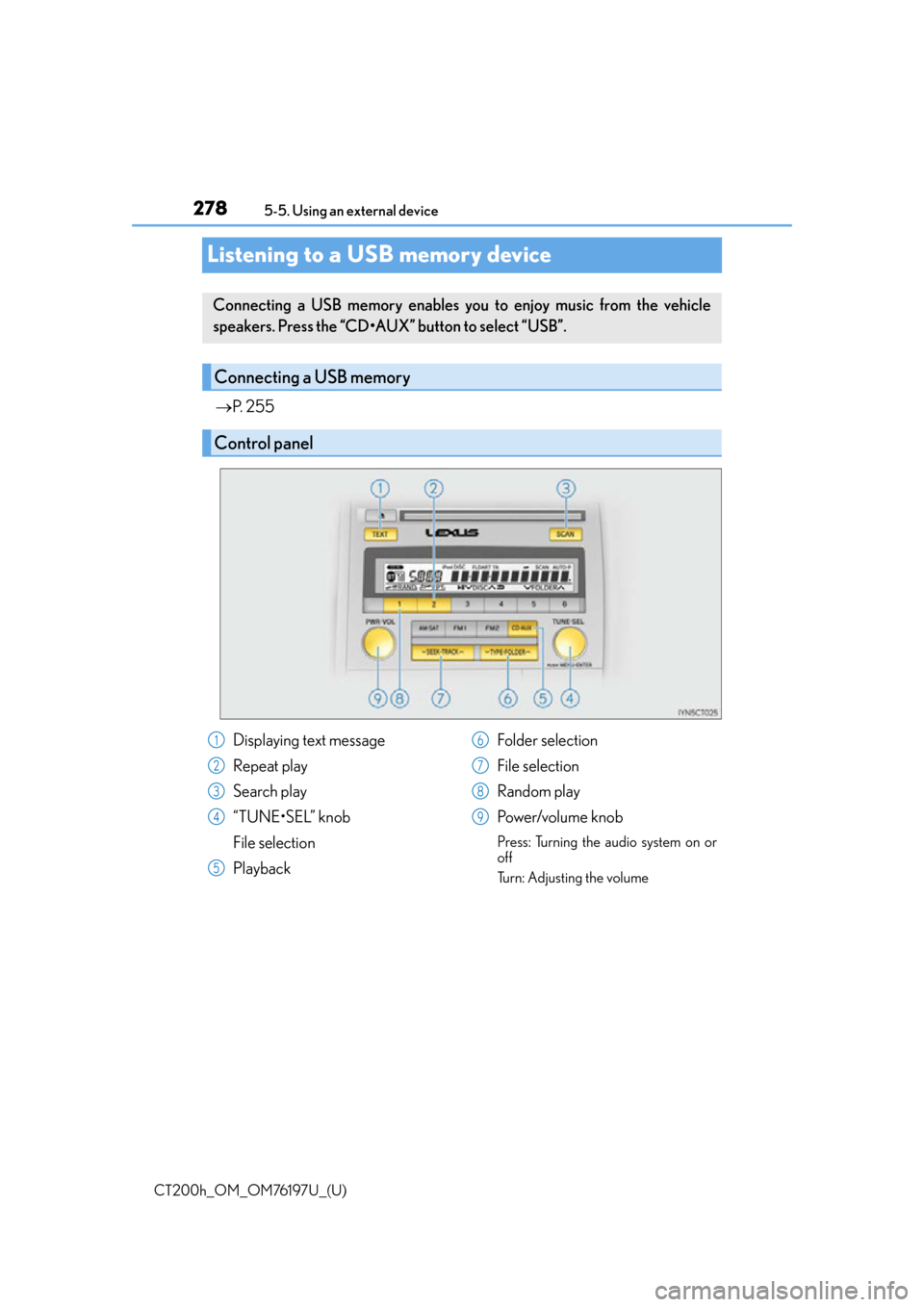
Control panel
Displaying text message
Repeat play
Search play
“TUNE•SEL” knob
File selection
Playback Folder selection
File selection
Random play
Power/volume knob
Press: Turning the audio system on or
off
Turn: Adjusting the volume
1
2
3
4
5
6
7
8
9
Page 283 of 632
283
CT200h_OM_OM76197U_(U)5-5. Using an external device
5
Audio system
Using the AUX port
P. 2 5 5
■Operating portable audio devices connected to the audio system
The volume can be adjusted using the vehi cle’s audio controls. All other adjustments
must be made on the portable audio device itself.
■When using a portable audio devi ce connected to the power outlet
Noise may occur during playback. Use the power source of the portable audio device.
This port can be used to connect a po rtable audio device and listen to it
through the vehicle’s speakers. Press the “CD•AUX” button to select “AUX”.
Connecting a portable player
NOTICE
■To prevent damage to portable audio device
●Do not leave portable audio devices in the vehicle. The temperature inside the vehicle
may become high, resulting in damage to the device.
●Do not push down on or apply unnecessary pressure to the portable audio device
while it is connected as this may damage the portable audio device or its terminal.
●Do not insert foreign objects into the port as this may damage the portable audio
device or its terminal.
Page 287 of 632

CT200h_OM_OM76197U_(U)
2875-6. Using Bluetooth® devices
5
Audio system
By following voice guidance instructions output from the speaker, voice com-
mands enable to the operation of the Bluetooth® audio system without the need
to check the display or operate the “TUNE•SEL” knob.
■Operation procedure when using voice commands
Press the talk switch and follow voice guidance instructions.
■Auxiliary commands when using voice commands
The following auxiliary commands can be used when operating the system
using a voice command:
“Cancel”: Exits the Bluetooth
® audio system and the hands-free phone
system
“Repeat”: Repeats the previous voice guidance instruction
“Go back”: Returns to the previous procedure
“Help”: Reads aloud the function summary if a help comment is registered
for the selected function
Operating the system using voice commands
Page 292 of 632

292
CT200h_OM_OM76197U_(U)5-6. Using Bluetooth
® devices
Registering a Bluetooth® audio system for the first
time
Press the “CD•AUX” button and select “BTA MENU” using the “TUNE•SEL”
knob.
Press the talk switch or select “BTA Setup” using the knob.
The introductory guidance and portable player name registration instructions
are heard.
Select “Pair Audio Player (Pair Audio)” using a voice command or the knob.
Register a portable player name by either of the following methods:
a. Select “Record Name” using the knob, and say the name to be registered.
b. Press the talk switch and say the name to be registered.
A voice guidance instruction to confirm the input is heard.
Select “Confirm” using a voice command or the knob.
A passkey is displayed and heard, and a voice guidance instruction for inputting
the passkey into the portable player is heard.
Input the passkey into the portable player.
Refer to the manual that comes with the portable player for the operation of the por-
table player.
Guidance for registration completion is heard.
If the portable player has a Bluetooth
® phone, the phone can be registered at
the same time. A voice guidance in struction to register a Bluetooth® phone is
heard.
Select “Yes” or “No” using a voice command or the knob.
(Bluetooth
® phone P. 3 1 7 )
■Changing the passkey
P. 2 9 7
Before using the Bluetooth® audio system, it is necessary to register a Blue-
tooth® enabled portable player in the system. Follow the procedure below to
register (pair) a portable player:
1
2
3
4
5
6
7
Page 295 of 632

CT200h_OM_OM76197U_(U)
2955-7. Setup menu
5
Audio system
Pattern B
Press the “CD•AUX” button and select “BTA MENU” using the “TUNE•SEL”
knob.
Press the talk switch or select “BTA Setup” using the knob.
Select one of the following functions using a voice command or the knob.
●Registering a portable player
“Pair Audio Player (Pair Audio)”
●Selecting a portable player to be used
“Connect Audio Player (Connect)”
●Changing the registered name
“Change Name”
●Listing the registered portable players
“List Audio Players (List Audios)”
●Changing the passkey
“Set Passkey”
●Deleting a registered portable player
“Delete Audio Player (Delete Audio)”
Select “Pair Audio Player (Pair Audio)” using a voice command or the
“TUNE•SEL” knob, and perform the procedure for registering a portable player.
( P. 2 9 2 )
Select “Connect Audio Player (Conne ct)” using a voice command or the
“TUNE•SEL” knob.
Pattern A
Select the portable player to be used by either of the following methods, and
select “Confirm” by using a voice command or the knob:
a. Press the talk switch and say the name of the desired portable player.
b. Press the talk switch and say “List Audio Players”. When the name of the desired portable player is read aloud, press the talk switch.
Pattern B
Select the portable player to be used using the knob.
Registering a portable player
Selecting a portable player to be used
1
2
3
1
2
2
Page 326 of 632

326
CT200h_OM_OM76197U_(U)5-11. Basic Operations (Lexus Display Audio System)
USB/AUX ports
Press down and release the lid.
Open the cover.
Connect an iPod, USB memory device or portable audio player to the USB/
AUX port as indicated below. Select “iPod”, “USB”, “AUX” or “A/V” on the
audio source selection screen and the device can be operated via Lexus Dis-
play Audio system.
Connecting using the USB/AUX port
1
2
Page 360 of 632

360
CT200h_OM_OM76197U_(U)5-16. Using an external device
(Lexus Display Audio System)
Using the AUX port
P. 3 2 6
Pressing the “MEDIA” button displays the top screen from any screen of the
selected source.
■Menu screen
P. 3 3 8
■Operating portable players connected to the audio system
Volume can be adjusted using the vehicle’s audio controls. All other adjustments must be
made on the portable player itself.
■When using a portable player connected to the power outlet
Noise may occur during playback. Use the power source of the portable player.
To use the AUX port, connect a portable player, press the “MEDIA” button or
select “AUX” or “A/V” on the “Source” screen.
Connecting a portable player
Top screen
NOTICE
■To prevent damage to the portable player or its terminal
●Do not leave portable player in the vehicl e. The temperature inside the vehicle may
become high.
●Do not push down on or apply unnecessary pressure to the portable player while it is
connected.
●Do not insert foreign objects into the port.
Page 393 of 632

CT200h_OM_OM76197U_(U)
3935-21. Bluetooth® (Lexus Display Audio System)
5
Audio system
■Certification
FCC ID:AJDK074
IC:775E-K074
NOTE:
This device complies with Part 15 of FCC Rules and Industry Canada licence-exempt
RSS standard(s). Operation is subject to the following two conditions: (1) this device may
not cause interference, and (2) this device mu st accept any interference, including inter-
ference that may cause undesired operation of this device.
Le présent appareil est conforme aux la partie 15 des règles de la FCC et CNR
d’Industrie Canada applicables aux appareils radio exempts de licence. L’exploitation est
autorisée aux deux conditions suivantes : (1) l’ appareil ne doit pas produire de brouillage,
et (2) l’utilisateur de l’appare il doit accepter tout brouillage radioélectrique subi, même si
le brouillage est susceptible d’en compromettre le fonctionnement.
FCC WARNING:
Changes or modifications not expressly approved by the party responsible for compli-
ance could void the user’s authority to operate the equipment.
CAUTION:
This equipment complies with FCC/IC radiat ion exposure limits set forth for an uncon-
trolled environment and meets the FCC radio frequency (RF) Exposure Guidelines and
RSS-102 of the IC radio frequency (RF) Ex posure rules. This equipment should be
installed and operated keeping the radiator at least 20cm or more away from person’s
body.
Cet équipement est conforme aux limites d’exposition aux rayonnements énoncées
pour un environnement non contrôlé et respec te les règles les radioélectriques (RF) de
la FCC lignes directrices d’exposition et d’ exposition aux fréquences radioélectriques
(RF) CNR-102 de l’IC. Cet équipement doit être installé et utilisé en gardant une
distance de 20 cm ou plus entre le dispositif rayonnant et le corps.
Co-Location:
This transmitter must not be co-located or operated in conjunction with any other
antenna or transmitter.
Under Industry Canada regulations, this radio transmitter may only operate using an
antenna of a type and maximum (or lesser) gain approved for the transmitter by Industry
Canada. To reduce potential radio interference to other users, the antenna type and its
gain should be so chosen that the equivalent isotropically radiated power (e.i.r.p.) is not
more than that necessary for successful communication.
Conformément à la réglementation d’Indust rie Canada, le présent émetteur radio peut
fonctionner avec une antenne d’un type et d’un gain maximal (ou inférieur) approuvé
pour l’émetteur par Industrie Canada. Dans le but de réduire les risques de brouillage
radioélectrique à l’intention des autres utilisateurs, il faut choisir le type d’antenne et son
gain de sorte que la puissance isotrope rayonnée équivalente (p.i.r.e.) ne dépasse pas
l’intensité nécessaire à l’établisseme nt d’une communication satisfaisante.