brake Lexus CT200h 2016 (in English) Owner's Guide
[x] Cancel search | Manufacturer: LEXUS, Model Year: 2016, Model line: CT200h, Model: Lexus CT200h 2016Pages: 632, PDF Size: 8.5 MB
Page 162 of 632
162
CT200h_OM_OM76197U_(U)4-2. Driving procedures
Hybrid transmission
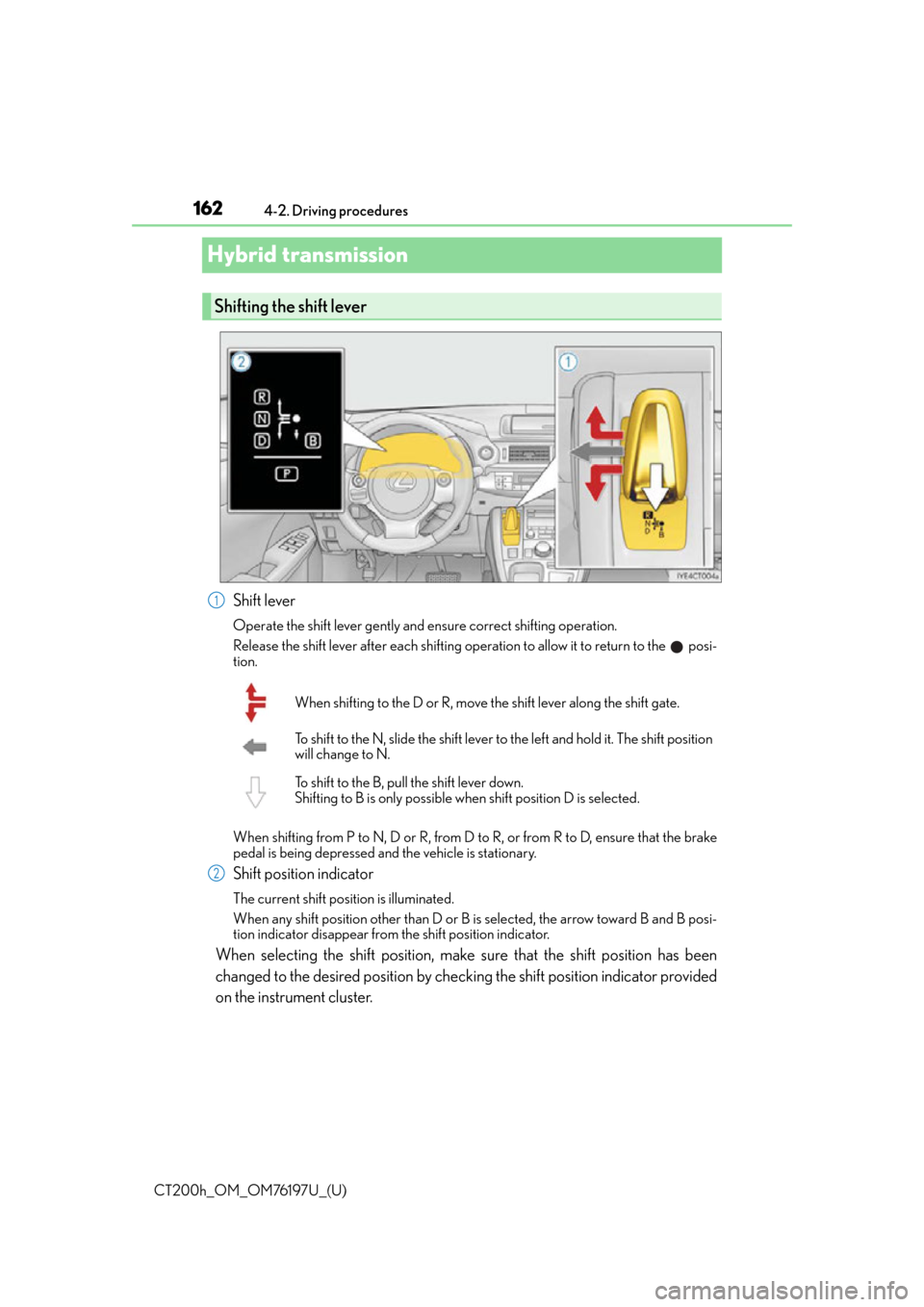
Shift lever
Operate the shift lever gently and ensure correct shifting operation.
Release the shift lever after each shifting oper
ation to allow it to return to the posi-
tion.
When shifting from P to N, D or R, from D to R, or from R to D, ensure that the brake
pedal is being depressed and the vehicle is stationary.
Shift position indicator
The current shift position is illuminated.
When any shift position other than D or B is selected, the arrow toward B and B posi-
tion indicator disappear from the shift position indicator.
When selecting the shift position, make sure that the shift position has been
changed to the desired position by checking the shift position indicator provided
on the instrument cluster.
Shifting the shift lever
1
When shifting to the D or R, move the shift lever along the shift gate.
To shift to the N, slide the shift lever to the left and hold it. The shift position
will change to N.
To shift to the B, pull the shift lever down.
Shifting to B is only possible when shift position D is selected.
2
Page 163 of 632
CT200h_OM_OM76197U_(U)
1634-2. Driving procedures
4
Driving
*: For good fuel economy and noise reduction, the D position should usually be used.
P. 2 3 4
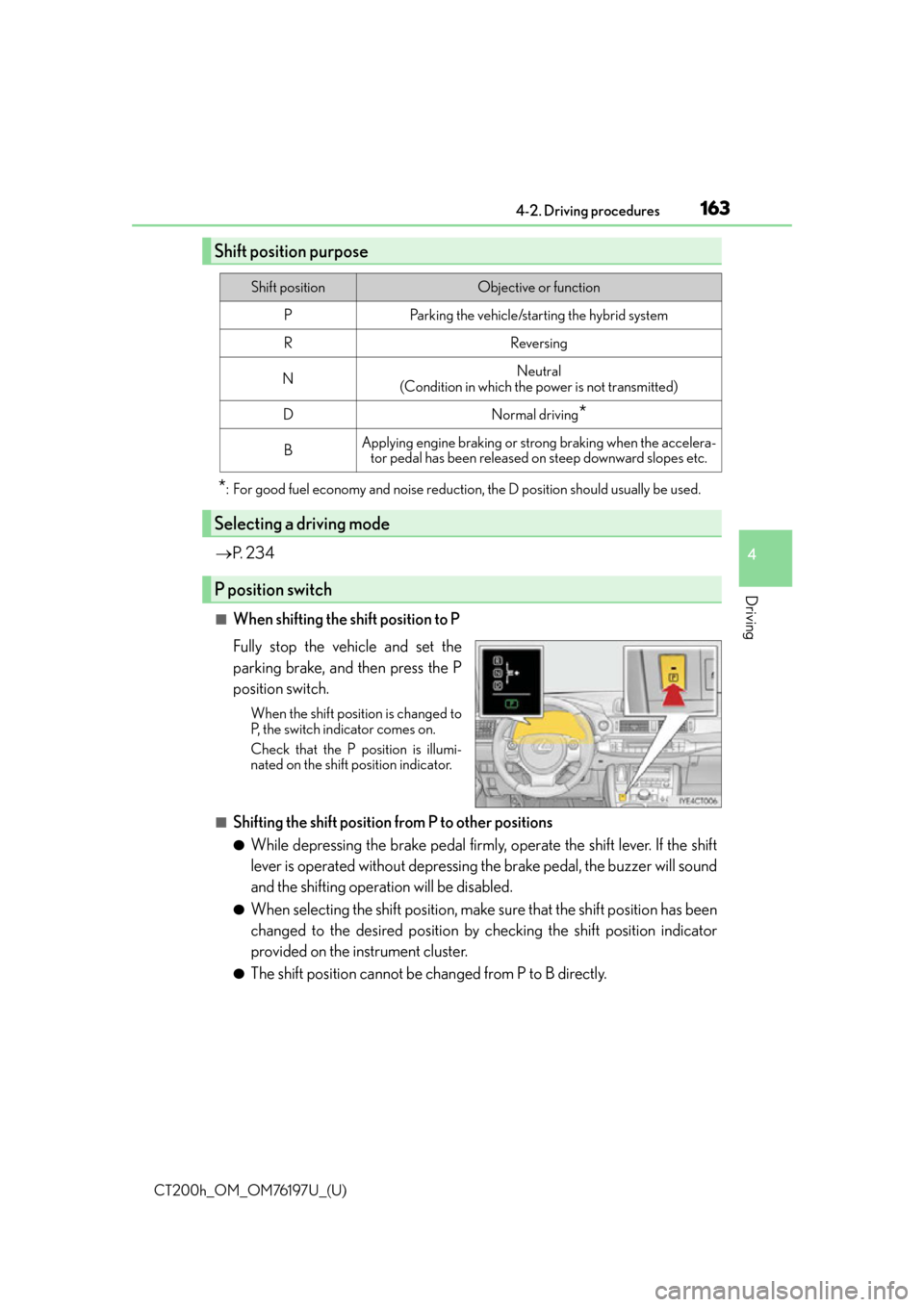
■When shifting the shift position to P
Fully stop the vehicle and set the
parking brake, and then press the P
position switch.
When the shift position is changed to
P, the switch indicator comes on.
Check that the P position is illumi-
nated on the shift position indicator.
■Shifting the shift position from P to other positions
●While depressing the brake pedal firmly, operate the shift lever. If the shift
lever is operated without depressing the brake pedal, the buzzer will sound
and the shifting operation will be disabled.
●When selecting the shift position, make sure that the shift position has been
changed to the desired position by checking the shift position indicator
provided on the instrument cluster.
●The shift position cannot be changed from P to B directly.
Shift position purpose
Shift positionObjective or function
PParking the vehicle/starting the hybrid system
RReversing
NNeutral
(Condition in which the power is not transmitted)
DNormal driving*
BApplying engine braking or strong braking when the accelera- tor pedal has been released on steep downward slopes etc.
Selecting a driving mode
P position switch
Page 164 of 632

164
CT200h_OM_OM76197U_(U)4-2. Driving procedures
■For the shift positions
●When the power switch is off, the shift position cannot be changed.
●When the power switch is in ON mode (the hybrid system is not
operating), the shift
position can only be changed to N. The shift position will be changed to N even if the
shift lever is shifted to D or R and held in that position.
●When the “READY” indicator is on, the shift position can be changed from P to D, N or
R.
●When the “READY” indicator is flashing, the shift position cannot be changed from P to
another position even if the shift lever is operated. Wait until the “READY” indicator
changes from a flashing to a solid light, and then operate the shift lever again.
●The shift position can only be changed to B directly from D.
In addition, if an attempt is made to change the shift position by moving the shift lever or
by pressing the P position switch in any of the following situations, the buzzer will sound
and the shifting operation will be disabled or the shift position will automatically change
to N. When this happens, select an appropriate shift position.
●Situations where the shifting operation will be disabled:
• When an attempt is made to change the sh ift position from P to another position by
moving the shift lever without depressing the brake pedal.
• When an attempt is made to change the shift position from P or N to B by moving
the shift lever.
●Situations where the shift position will automatically change to N:
• When the P position switch is pressed while the vehicle is running.
*1
• When an attempt is made to select the R position by moving the shift lever when the vehicle is moving forward.
*2
• When an attempt is made to select the D position by moving the shift lever when thevehicle is moving in reverse.
*3
• When an attempt is made to change the shift position from R to B by moving the shiftlever.
*1: Shift position may be changed to P when driving at extremely low speeds.
*2: Shift position may be changed to R when driving at low speeds.
*3: Shift position may be changed to D when driving at low speeds.
■Reverse warning buzzer
When shifting into R, a buzzer will sound to info rm the driver that the shift position is in R.
Page 166 of 632
166
CT200h_OM_OM76197U_(U)4-2. Driving procedures
NOTICE
■Hybrid battery (traction battery) charge
If the shift position is in N, the hybrid ba
ttery (traction battery) will not be charged. To
help prevent the battery from discharging, avoid leaving the N position selected for an
extended period of time.
■Situations where shift control system malfunctions are possible
If any of the following situations occurs, sh ift control system malfunctions are possible.
Immediately stop the vehicle in a safe place on level ground, apply the parking brake,
and then contact your Lexus dealer.
●When the warning message indicating the shift control system appears on the multi-
information display. ( P. 5 3 9 )
●When the shift position indicator remains off.
■Notes regarding shift lever and P position switch operation
Avoid repeatedly operating the shift lever an d P position switch in quick succession.
The system protection function may activate and it will not be temporarily possible to
shift the shift position other than P. If th is happens, please wait for a while before
attempting to change the shift position again.
Page 168 of 632
168
CT200h_OM_OM76197U_(U)4-2. Driving procedures
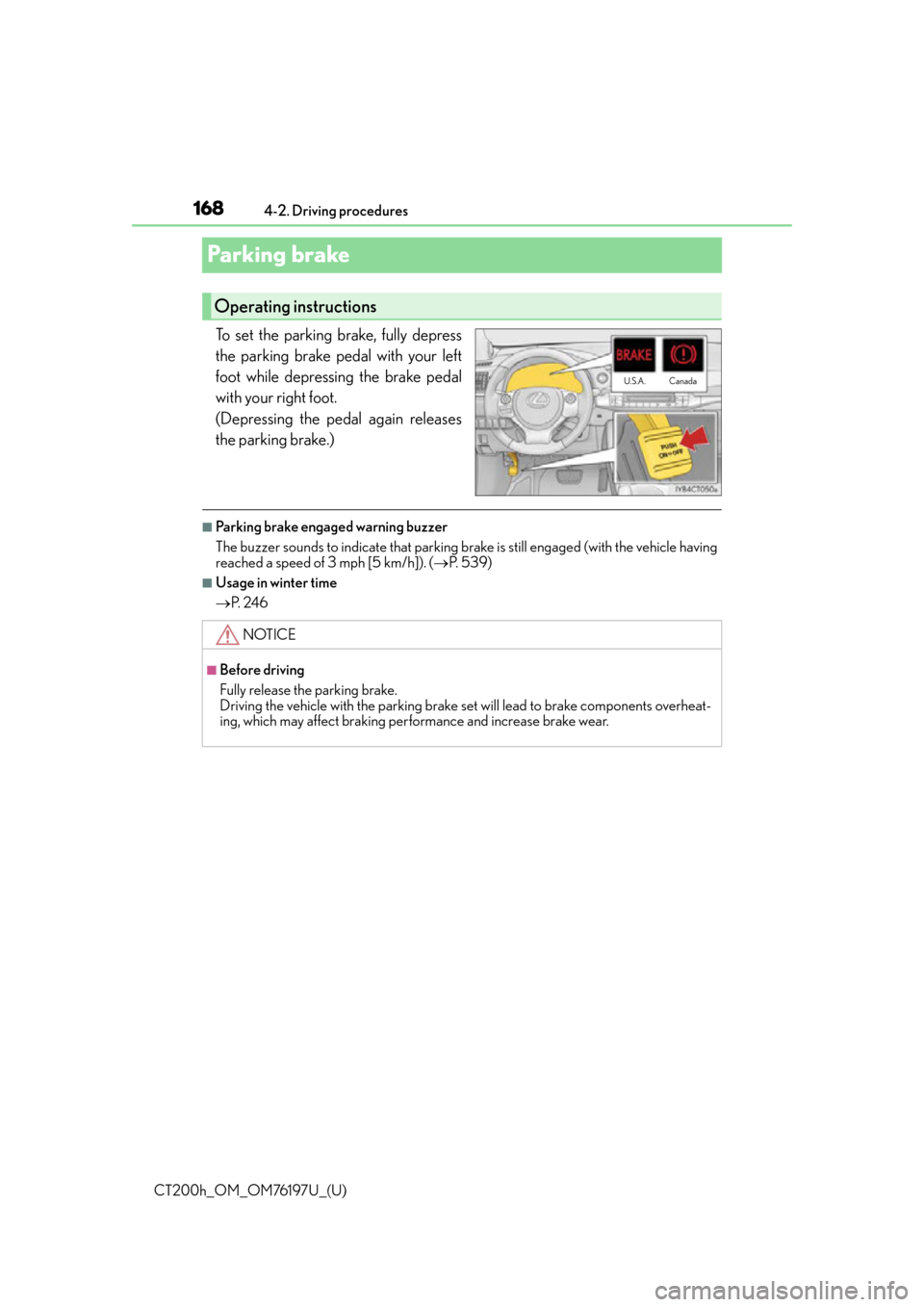
Parking brake
To set the parking brake, fully depress
the parking brake pedal with your left
foot while depressing the brake pedal
with your right foot.
(Depressing the pedal again releases
the parking brake.)
■Parking brake engaged warning buzzer
The buzzer sounds to indicate that parking brake is still engaged (with the vehicle having
reached a speed of 3 mph [5 km/h]). (
P. 5 3 9 )
■Usage in winter time
P. 2 4 6
Operating instructions
U.S.A. Canada
NOTICE
■Before driving
Fully release the parking brake.
Driving the vehicle with the parking brake set will lead to brake components overheat-
ing, which may affect braking perf
ormance and increase brake wear.
Page 170 of 632
170
CT200h_OM_OM76197U_(U)4-3. Operating the lights and wipers
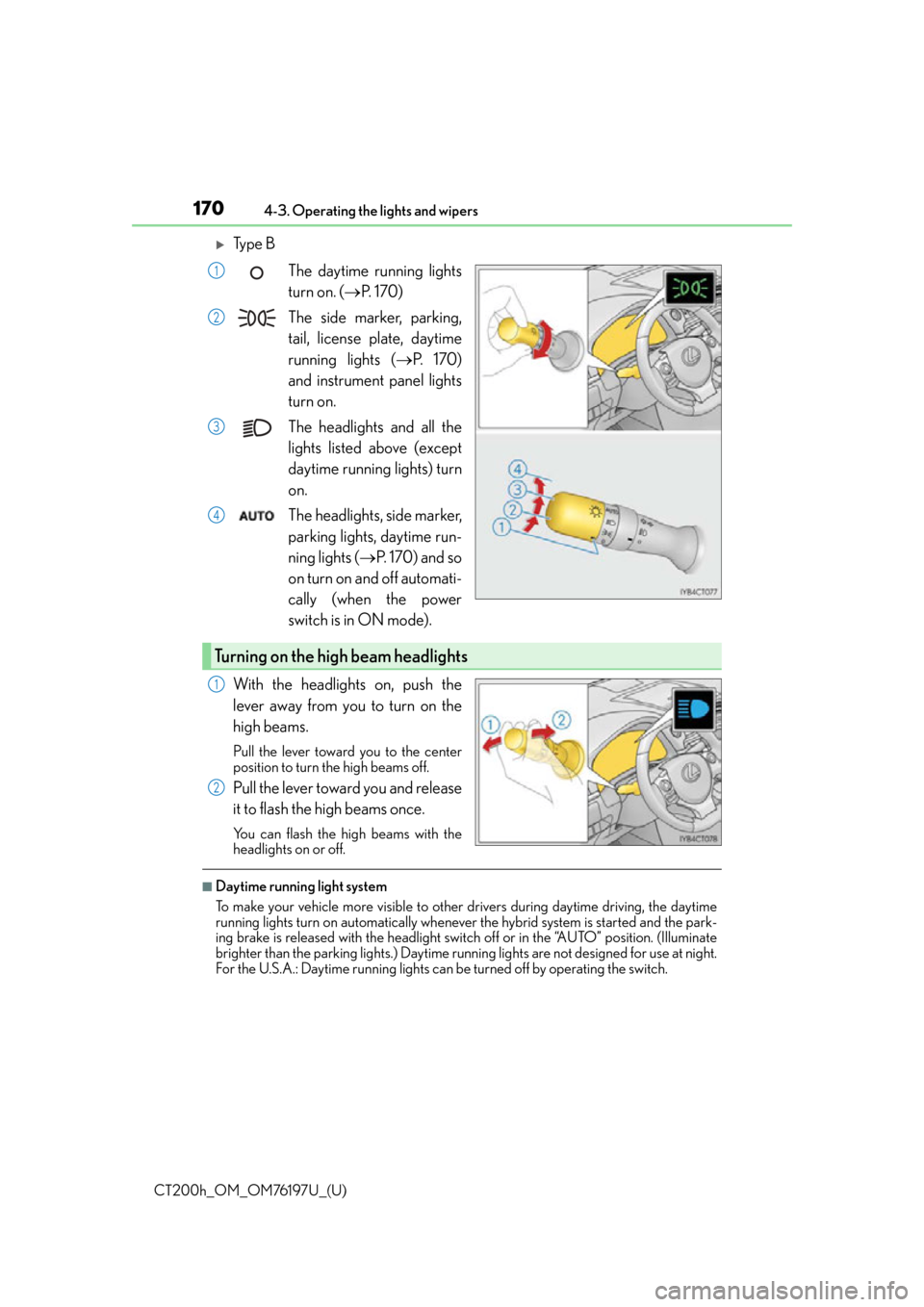
Ty p e B
The daytime running lights
turn on. ( P. 1 7 0 )
The side marker, parking,
tail, license plate, daytime
running lights ( P. 1 7 0 )
and instrument panel lights
turn on.
The headlights and all the
lights listed above (except
daytime running lights) turn
on.
The headlights, side marker,
parking lights, daytime run-
ning lights ( P. 1 7 0 ) a n d s o
on turn on and off automati-
cally (when the power
switch is in ON mode).
With the headlights on, push the
lever away from you to turn on the
high beams.
Pull the lever toward you to the center
position to turn the high beams off.
Pull the lever toward you and release
it to flash the high beams once.
You can flash the high beams with the
headlights on or off.
■Daytime running light system
To make your vehicle more visible to other drivers during daytime driving, the daytime
running lights turn on automatically whenever the hybrid system is started and the park-
ing brake is released with the headlight swit ch off or in the “AUTO” position. (Illuminate
brighter than the parking lights.) Daytime ru nning lights are not designed for use at night.
For the U.S.A.: Daytime running lights can be turned off by operating the switch.
1
2
3
4
Turning on the high beam headlights
1
2
Page 187 of 632
CT200h_OM_OM76197U_(U)
1874-5. Using the driving support systems
4
Driving
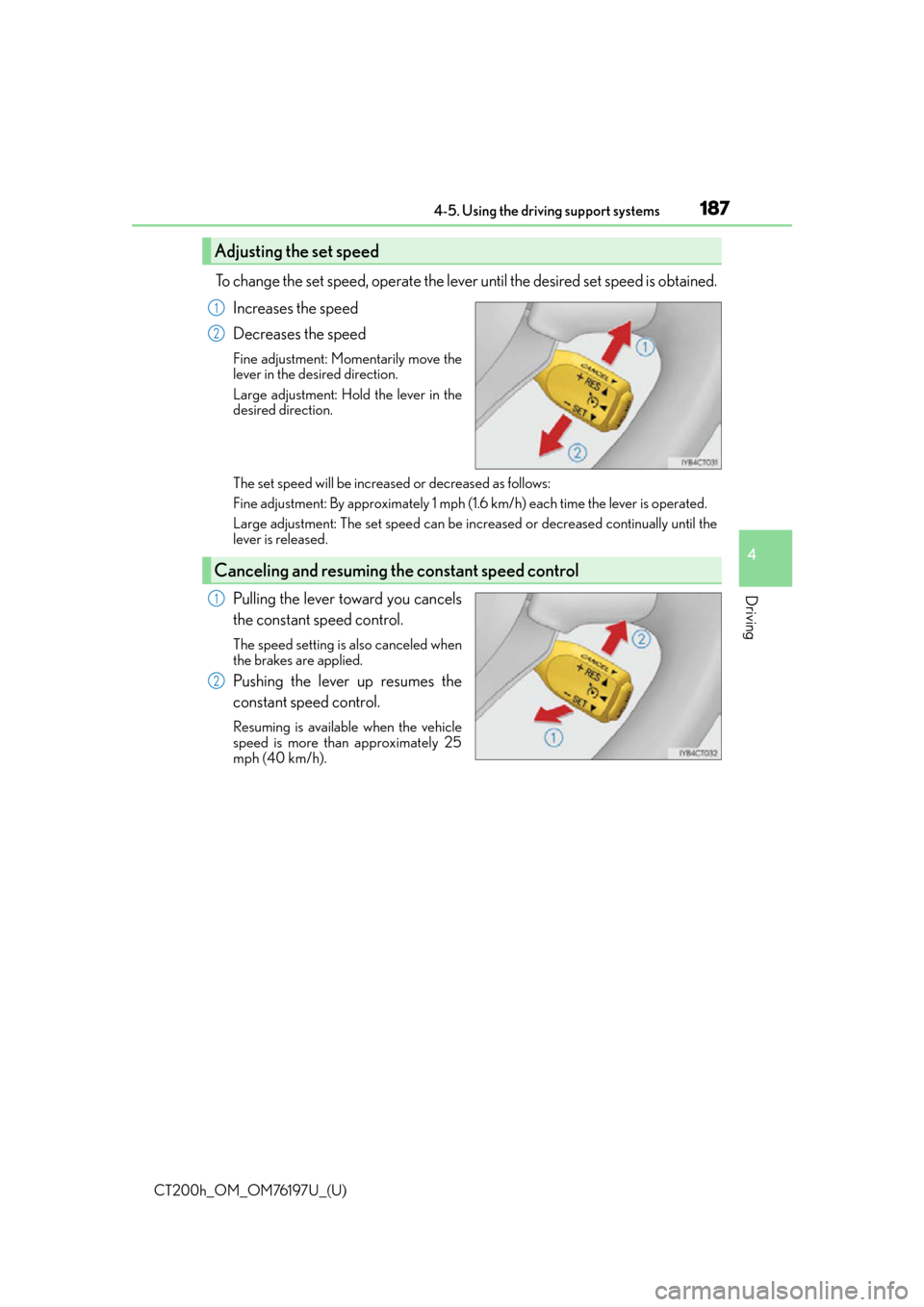
To change the set speed, operate the lever until the desired set speed is obtained.Increases the speed
Decreases the speed
Fine adjustment: Mo mentarily move the
lever in the desired direction.
Large adjustment: Hold the lever in the
desired direction.
The set speed will be increase d or decreased as follows:
Fine adjustment: By approximately 1 mph (1.6 km/h) each time the lever is operated.
Large adjustment: The set speed can be incr eased or decreased continually until the
lever is released.
Pulling the lever toward you cancels
the constant speed control.
The speed setting is also canceled when
the brakes are applied.
Pushing the lever up resumes the
constant speed control.
Resuming is available when the vehicle
speed is more than approximately 25
mph (40 km/h).
Adjusting the set speed
1
2
Canceling and resuming the constant speed control
1
2
Page 191 of 632
CT200h_OM_OM76197U_(U)
1914-5. Using the driving support systems
4
Driving
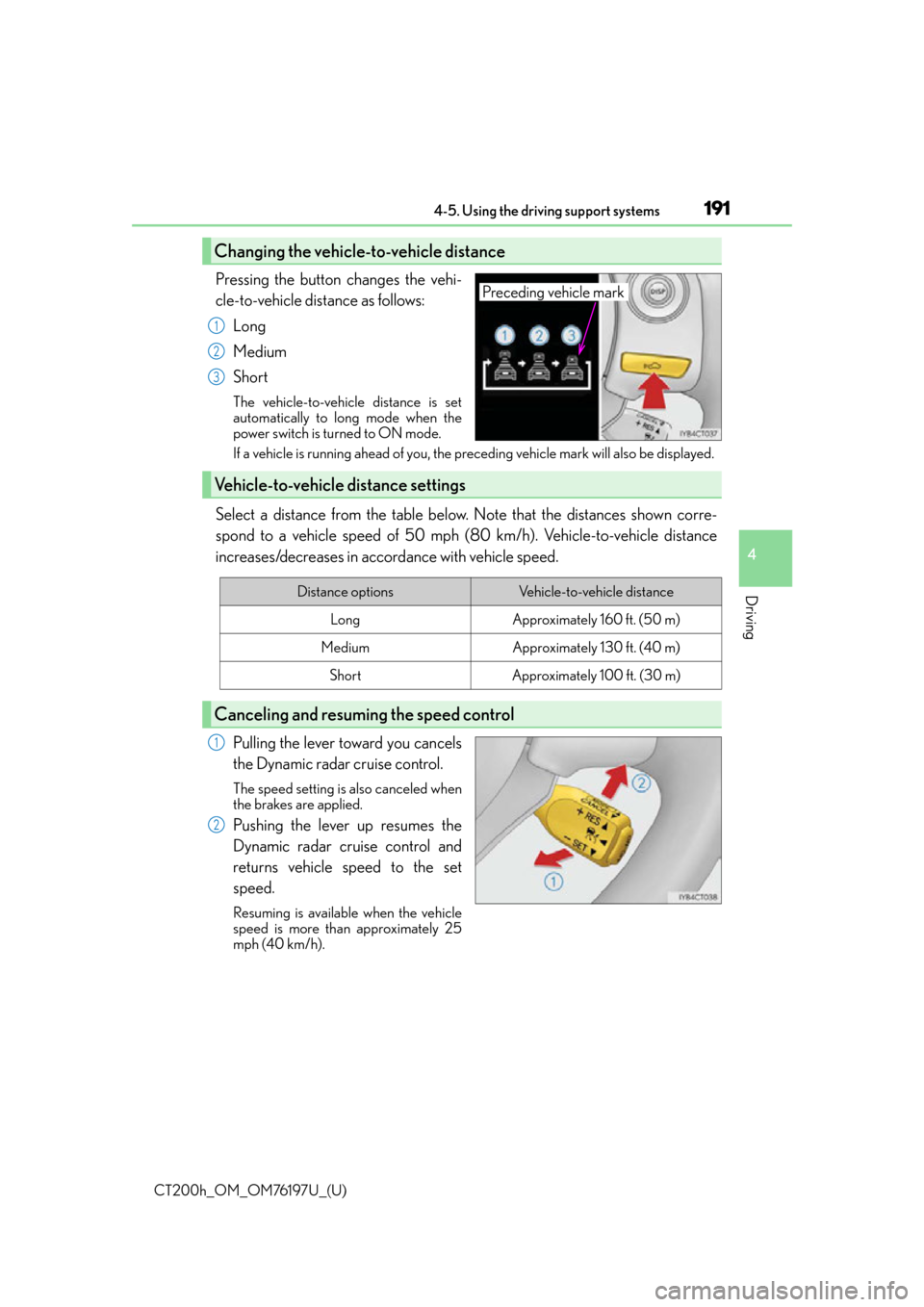
Pressing the button changes the vehi-
cle-to-vehicle distance as follows:Long
Medium
Short
The vehicle-to-vehicle distance is set
automatically to long mode when the
power switch is turned to ON mode.
If a vehicle is running ahead of you, the preceding vehicle mark will also be displayed.
Select a distance from the table below. Note that the distances shown corre-
spond to a vehicle speed of 50 mph (8 0 km/h). Vehicle-to-vehicle distance
increases/decreases in accordance with vehicle speed.
Pulling the lever toward you cancels
the Dynamic radar cruise control.
The speed setting is also canceled when
the brakes are applied.
Pushing the lever up resumes the
Dynamic radar cruise control and
returns vehicle speed to the set
speed.
Resuming is available when the vehicle
speed is more than approximately 25
mph (40 km/h).
Changing the vehicle-to-vehicle distance
Preceding vehicle mark
1
2
3
Vehicle-to-vehicle distance settings
Distance optionsVehicle-to-vehicle distance
LongApproximately 160 ft. (50 m)
MediumApproximately 130 ft. (40 m)
ShortApproximately 100 ft. (30 m)
Canceling and resuming the speed control
1
2
Page 192 of 632
192
CT200h_OM_OM76197U_(U)4-5. Using the driving support systems
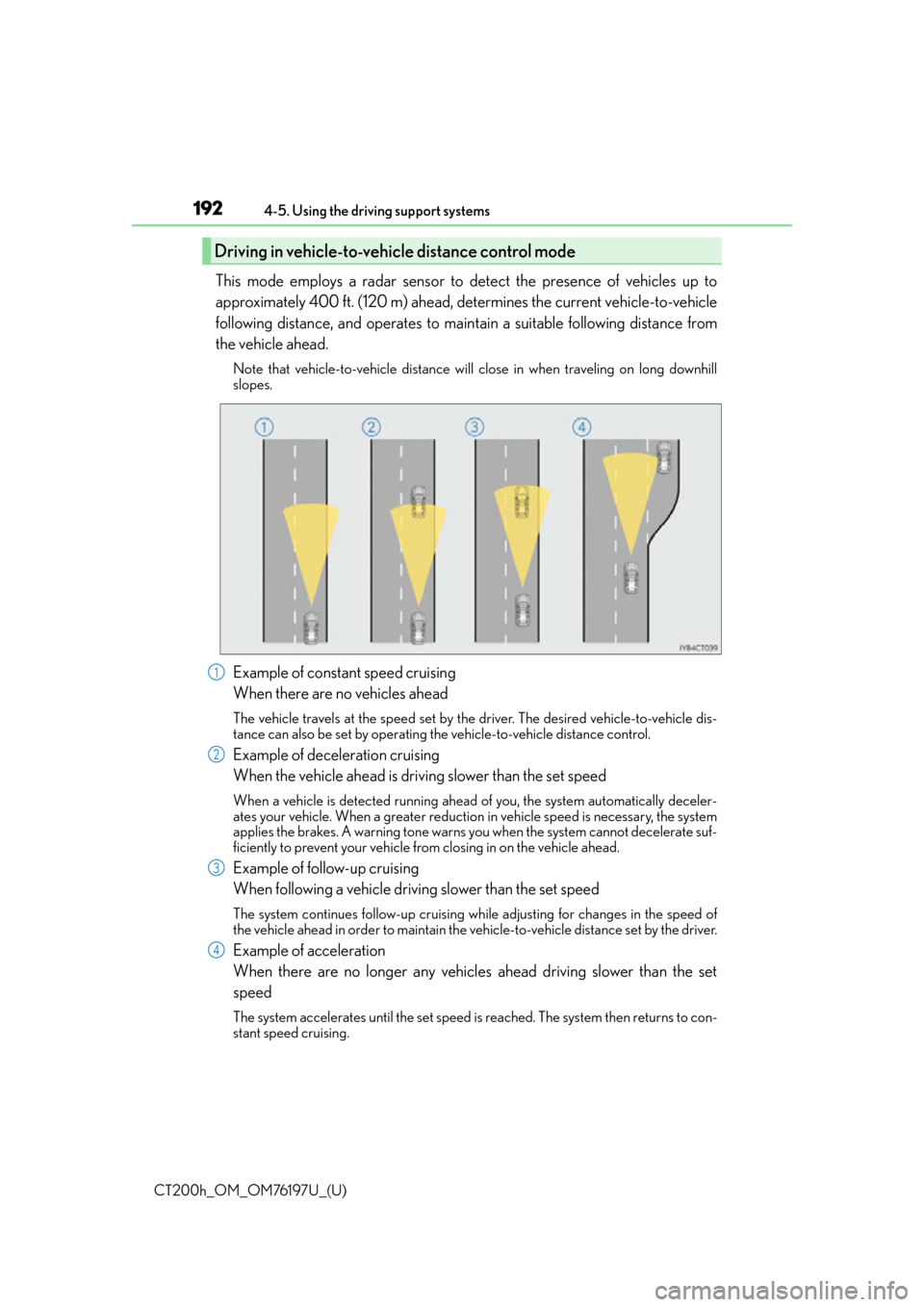
This mode employs a radar sensor to detect the presence of vehicles up to
approximately 400 ft. (120 m) ahead, determines the current vehicle-to-vehicle
following distance, and operates to main
tain a suitable following distance from
the vehicle ahead.
Note that vehicle-to-vehicle distance will close in when traveling on long downhill
slopes.
Example of constant speed cruising
When there are no vehicles ahead
The vehicle travels at the speed set by the driver. The desired vehicle-to-vehicle dis-
tance can also be set by operating the vehicle-to-vehicle distance control.
Example of deceleration cruising
When the vehicle ahead is driving slower than the set speed
When a vehicle is detected running ahead of you, the system automatically deceler-
ates your vehicle. When a greater reduction in vehicle speed is necessary, the system
applies the brakes. A warning tone warns yo u when the system cannot decelerate suf-
ficiently to prevent your vehicle from closing in on the vehicle ahead.
Example of follow-up cruising
When following a vehicle driving slower than the set speed
The system continues follow-up cruising wh ile adjusting for changes in the speed of
the vehicle ahead in order to maintain the vehicle-to-vehicle distance set by the driver.
Example of acceleration
When there are no longer any vehicles ahead driving slower than the set
speed
The system accelerates until the set speed is reached. The system then returns to con-
stant speed cruising.
Driving in vehicle-to-vehicle distance control mode
1
2
3
4
Page 193 of 632
CT200h_OM_OM76197U_(U)
1934-5. Using the driving support systems
4
Driving
When your vehicle is too close to a vehicle ahead, and sufficient automatic
deceleration via the Dynamic radar cruise control is not possible, the display will
flash and the buzzer will sound to alert the driver. An example of this would be if
another driver cuts in front of you while you are following a vehicle. Apply the
brakes to ensure an appropriate vehicle-to-vehicle distance.
■Warnings may not occur when
In the following instances, there is a po ssibility that the warnings will not occur:
●When the speed of the vehicle ahead matches or exceeds your vehicle
speed
●When the vehicle ahead is traveling at an extremely slow speed
●Immediately after the cruise control speed was set
●At the instant the accelerator is applied
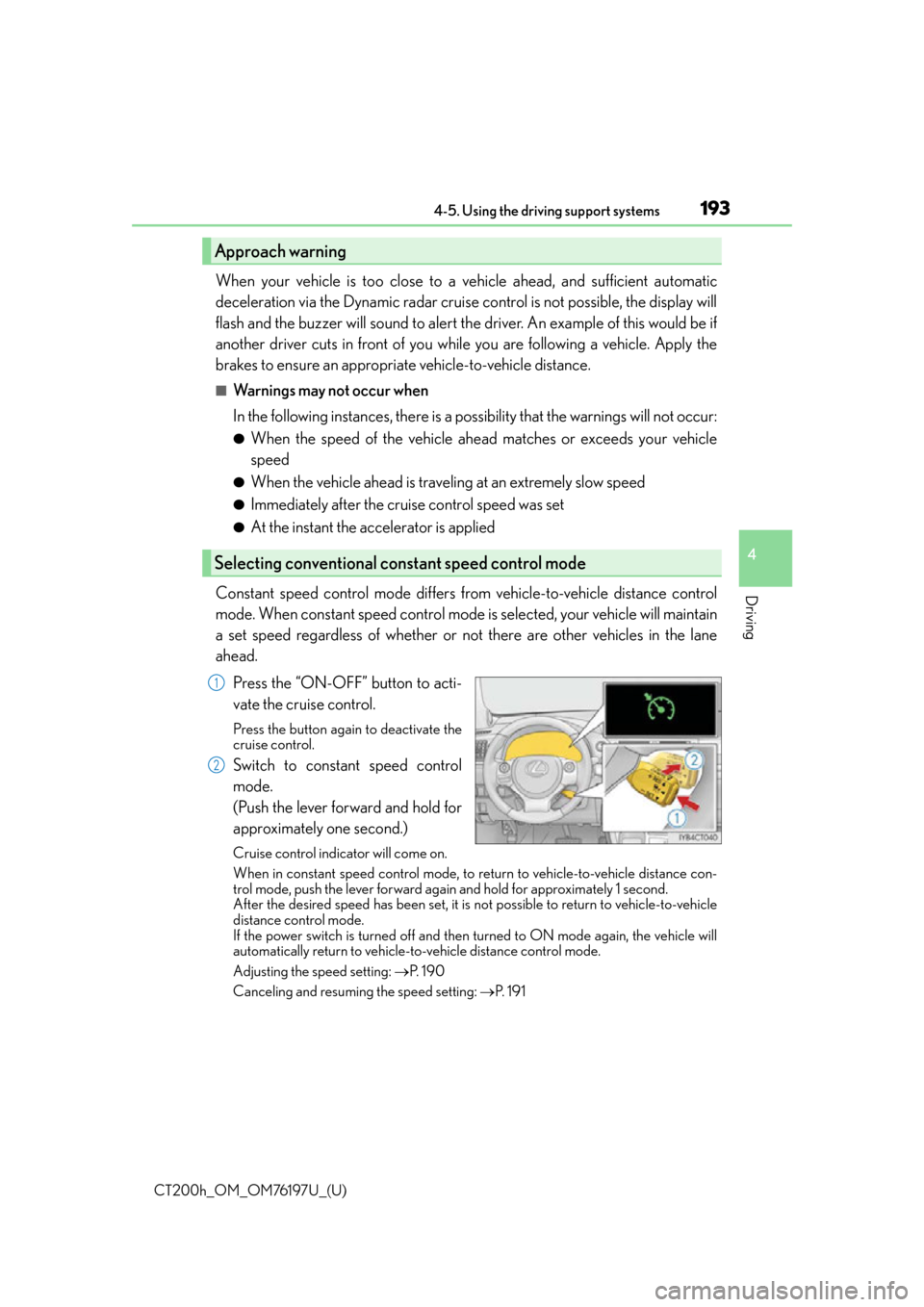
Constant speed control mode differs from vehicle-to-vehicle distance control
mode. When constant speed control mode is selected, your vehicle will maintain
a set speed regardless of whether or not there are other vehicles in the lane
ahead.
Press the “ON-OFF” button to acti-
vate the cruise control.
Press the button again to deactivate the
cruise control.
Switch to constant speed control
mode.
(Push the lever forward and hold for
approximately one second.)
Cruise control indicator will come on.
When in constant speed control mode, to return to vehicle-to-vehicle distance con-
trol mode, push the lever forward agai n and hold for approximately 1 second.
After the desired speed has been set, it is not possible to return to vehicle-to-vehicle
distance control mode.
If the power switch is turned off and then turned to ON mode again, the vehicle will
automatically return to vehicle-to-vehicle distance control mode.
Adjusting the speed setting: P. 1 9 0
Canceling and resuming the speed setting: P. 1 9 1
Approach warning
Selecting conventional constant speed control mode
1
2