audio Lexus CT200h 2016 (in English) Workshop Manual
[x] Cancel search | Manufacturer: LEXUS, Model Year: 2016, Model line: CT200h, Model: Lexus CT200h 2016Pages: 632, PDF Size: 8.5 MB
Page 283 of 632
283
CT200h_OM_OM76197U_(U)5-5. Using an external device
5
Audio system
Using the AUX port
P. 2 5 5
■Operating portable audio devices connected to the audio system
The volume can be adjusted using the vehi cle’s audio controls. All other adjustments
must be made on the portable audio device itself.
■When using a portable audio devi ce connected to the power outlet
Noise may occur during playback. Use the power source of the portable audio device.
This port can be used to connect a po rtable audio device and listen to it
through the vehicle’s speakers. Press the “CD•AUX” button to select “AUX”.
Connecting a portable player
NOTICE
■To prevent damage to portable audio device
●Do not leave portable audio devices in the vehicle. The temperature inside the vehicle
may become high, resulting in damage to the device.
●Do not push down on or apply unnecessary pressure to the portable audio device
while it is connected as this may damage the portable audio device or its terminal.
●Do not insert foreign objects into the port as this may damage the portable audio
device or its terminal.
Page 284 of 632

284
CT200h_OM_OM76197U_(U)5-6. Using Bluetooth
® devices
Bluetooth® audio/phone
The following can be performed using Bluetooth® wireless communication:
■Bluetooth® audio
The Bluetooth
® audio system enables you to enjoy music played on a porta-
ble digital audio player (portable player) from the vehicle speakers via wire-
less communication.
This audio system supports Bluetooth
®, a wireless data system capable of
playing portable audio music without cab les. If your portable player does
not support Bluetooth
®, the Bluetooth® audio system will not function.
■Bluetooth® phone (hands-free phone system)
This system supports Bluetooth
®, which allows you to make or receive calls
without using cables to connect a cellular phone and the system, and with-
out operating the cellular phone.
Page 285 of 632

CT200h_OM_OM76197U_(U)
2855-6. Using Bluetooth® devices
5
Audio system
Device registration/connection flow
AudioHands-free phone
2. Selecting a portable playerto be used ( P. 2 9 5 )2. Selecting a cellular phone
to be used ( P. 3 0 0 )
3. Check connection status
( P. 2 8 6 )3. Check connection status
( P. 2 8 6 )
4. Use Bluetooth® audio
( P. 3 1 0 )4. Use Bluetooth® phone
( P. 3 1 2 )
1. Register the Bluetooth®
device to be used with
audio system ( P. 2 9 2 )
1. Register the Bluetooth®
phone to be used with audio
system ( P. 2 9 3 )
Page 286 of 632

2865-6. Using Bluetooth® devices
CT200h_OM_OM76197U_(U)
Display
A message, name, number, etc. is
displayed.
Lower-case characters and special
characters may not be displayed.
Press and hold: Displays information
that is too long to be displayed at
one time on the display
Selects speed dials (Bluetooth
® phone operation)
“TUNE•SEL” knob
Displays set up menu or select s items such as menu and number
Turn: Selects an item
Press: Displays set up menu or inputs the selected item
Bluetooth
® connection condition
If “BT” is not displayed, the Bluetooth® audio/phone cannot be used.
Reception level
The vehicle’s built-in microphone is
used when talking on the phone.
The person you are speaking to can be
heard from the front speakers.
To use the hands-free system, you must register your Bluetooth
® phone in the
system. ( P. 2 9 3 )
Audio unit
1
2
Microphone
3
4
5
6
Page 287 of 632

CT200h_OM_OM76197U_(U)
2875-6. Using Bluetooth® devices
5
Audio system
By following voice guidance instructions output from the speaker, voice com-
mands enable to the operation of the Bluetooth® audio system without the need
to check the display or operate the “TUNE•SEL” knob.
■Operation procedure when using voice commands
Press the talk switch and follow voice guidance instructions.
■Auxiliary commands when using voice commands
The following auxiliary commands can be used when operating the system
using a voice command:
“Cancel”: Exits the Bluetooth
® audio system and the hands-free phone
system
“Repeat”: Repeats the previous voice guidance instruction
“Go back”: Returns to the previous procedure
“Help”: Reads aloud the function summary if a help comment is registered
for the selected function
Operating the system using voice commands
Page 288 of 632
2885-6. Using Bluetooth® devices
CT200h_OM_OM76197U_(U)
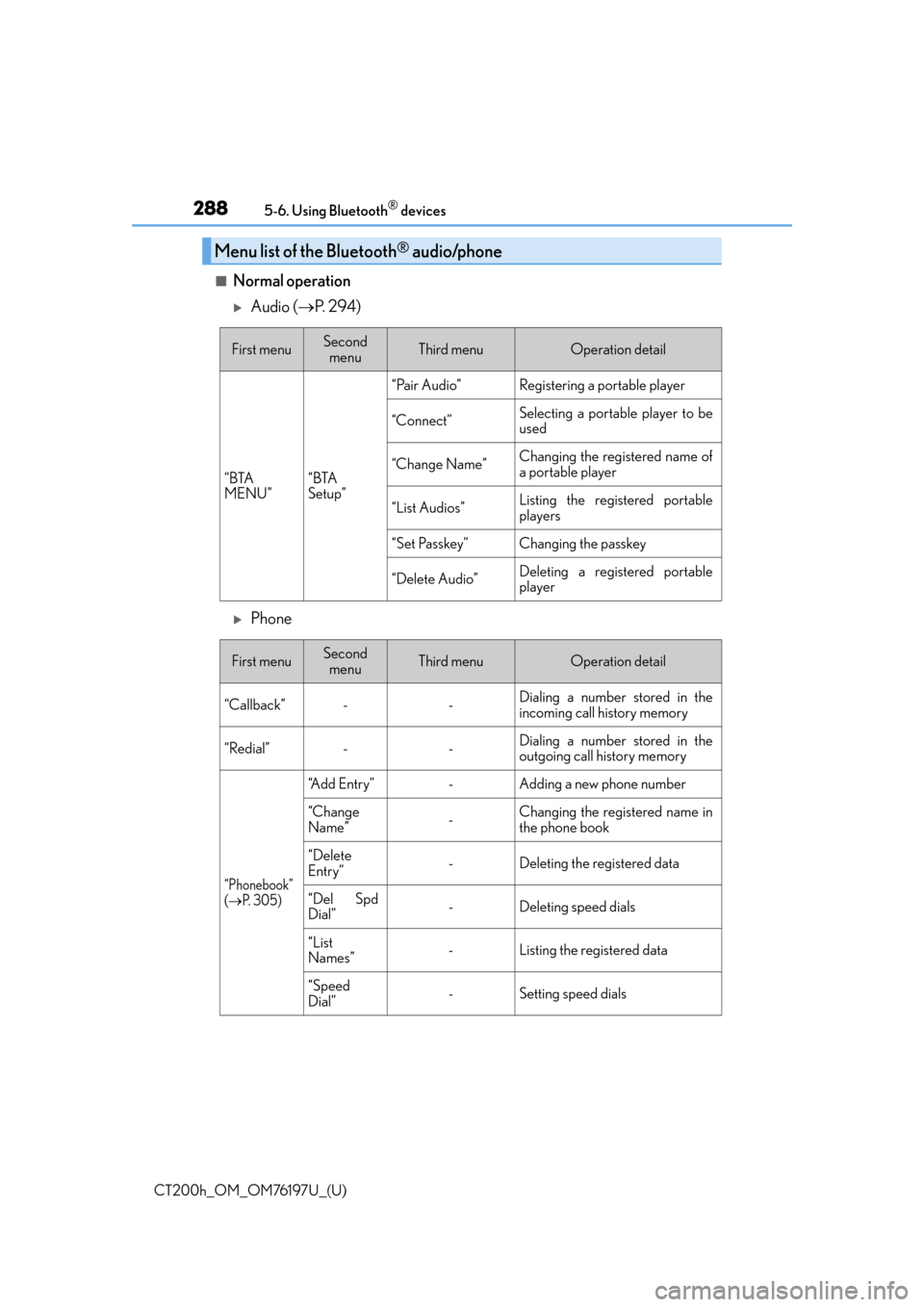
■Normal operation
Audio ( P. 2 9 4 )
Phone
Menu list of the Bluetooth® audio/phone
First menuSecond
menuThird menuOperation detail
“BTA
MENU”“BTA
Setup”
“Pair Audio”Registering a portable player
“Connect”Selecting a portable player to be
used
“Change Name”Changing the registered name of
a portable player
“List Audios”Listing the registered portable
players
“Set Passkey”Changing the passkey
“Delete Audio”Deleting a registered portable
player
First menuSecond menuThird menuOperation detail
“Callback”--Dialing a number stored in the
incoming call history memory
“Redial”--Dialing a number stored in the
outgoing call history memory
“Phonebook”
(P. 3 0 5 )
“A d d E n t r y ”-Adding a new phone number
“Change
Name”-Changing the registered name in
the phone book
“Delete
Entry”-Deleting the registered data
“Del Spd
Dial”-Deleting speed dials
“List
Names”-Listing the registered data
“Speed
Dial”-Setting speed dials
Page 289 of 632

CT200h_OM_OM76197U_(U)
2895-6. Using Bluetooth® devices
5
Audio system
“Setup”
“Security”
( P. 3 0 2 )
“Set PIN”Setting a PIN code
“Phbk Lock”Locking the phone book
“Phbk Unlock”Unlocking the phone book
“Phone
Setup”
( P. 2 9 9 )
“Pair Phone”Registering the cellular phone to
be used
“Connect”Selecting a cellular phone to be
used
“Change Name”Changing a registered name of a
cellular phone
“List Phones”Listing the registered cellular
phones
“Set Passkey”Changing the passkey
“Delete Phone”Deleting a registered cellular
phone
“System
Setup”
( P. 3 0 2 )
“Guidance Vol”Setting voice guidance volume
“Device Name”Displaying the Bluetooth® device
address and name
“Initialize”Initializing the system
First menuSecond menuThird menuOperation detail
Page 291 of 632
291
CT200h_OM_OM76197U_(U)5-6. Using Bluetooth
® devices
5
Audio system
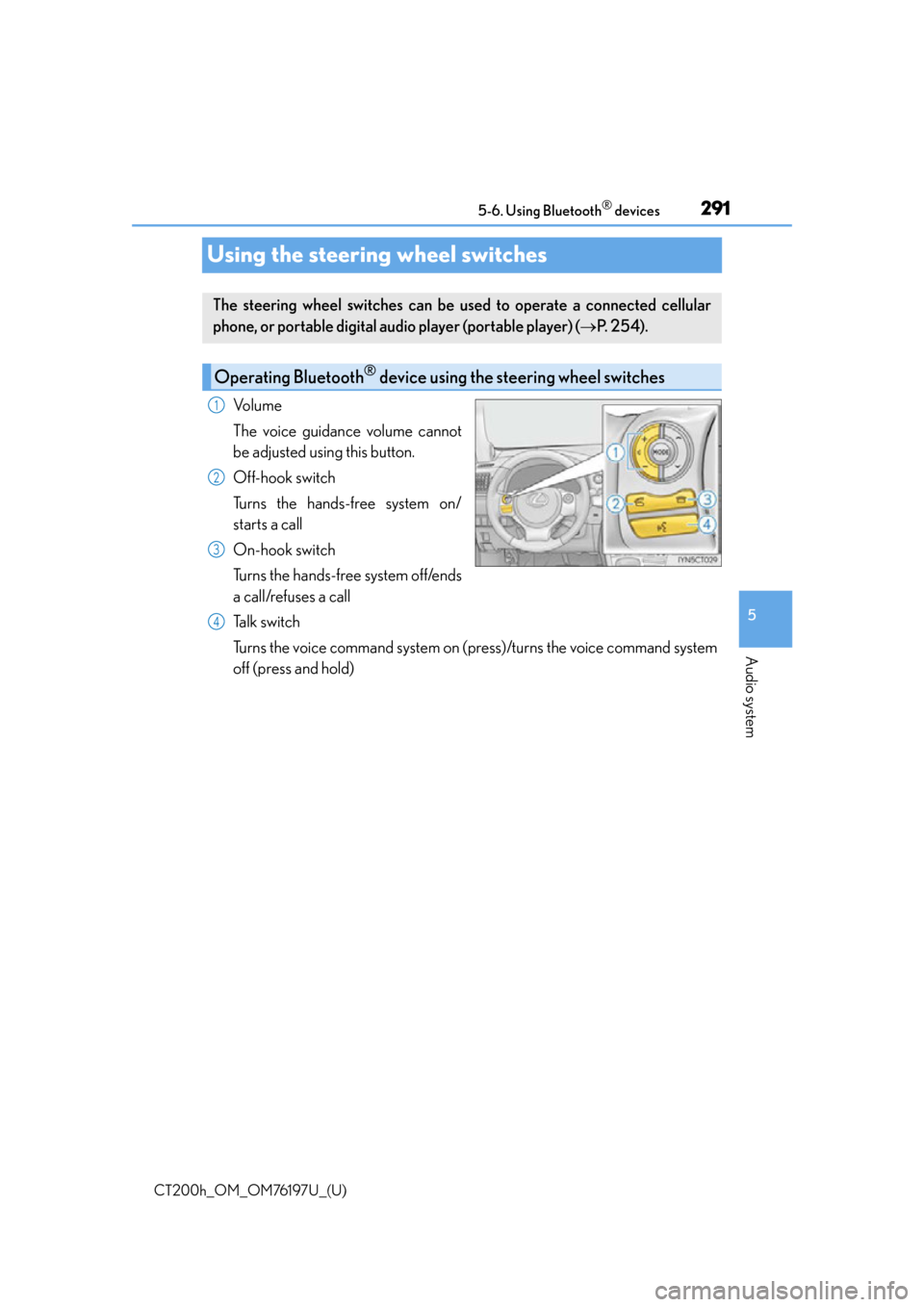
Using the steering wheel switches
Vo l u m e
The voice guidance volume cannot
be adjusted using this button.
Off-hook switch
Turns the hands-free system on/
starts a call
On-hook switch
Turns the hands-free system off/ends
a call/refuses a call
Talk switch
Turns the voice command system on (press)/turns the voice command system
off (press and hold)
The steering wheel switches can be
used to operate a connected cellular
phone, or portable digital au dio player (portable player) ( P. 2 5 4 ) .
Operating Bluetooth® device using the steering wheel switches
1
2
3
4
Page 292 of 632

292
CT200h_OM_OM76197U_(U)5-6. Using Bluetooth
® devices
Registering a Bluetooth® audio system for the first
time
Press the “CD•AUX” button and select “BTA MENU” using the “TUNE•SEL”
knob.
Press the talk switch or select “BTA Setup” using the knob.
The introductory guidance and portable player name registration instructions
are heard.
Select “Pair Audio Player (Pair Audio)” using a voice command or the knob.
Register a portable player name by either of the following methods:
a. Select “Record Name” using the knob, and say the name to be registered.
b. Press the talk switch and say the name to be registered.
A voice guidance instruction to confirm the input is heard.
Select “Confirm” using a voice command or the knob.
A passkey is displayed and heard, and a voice guidance instruction for inputting
the passkey into the portable player is heard.
Input the passkey into the portable player.
Refer to the manual that comes with the portable player for the operation of the por-
table player.
Guidance for registration completion is heard.
If the portable player has a Bluetooth
® phone, the phone can be registered at
the same time. A voice guidance in struction to register a Bluetooth® phone is
heard.
Select “Yes” or “No” using a voice command or the knob.
(Bluetooth
® phone P. 3 1 7 )
■Changing the passkey
P. 2 9 7
Before using the Bluetooth® audio system, it is necessary to register a Blue-
tooth® enabled portable player in the system. Follow the procedure below to
register (pair) a portable player:
1
2
3
4
5
6
7
Page 293 of 632

293
CT200h_OM_OM76197U_(U)5-6. Using Bluetooth
® devices
5
Audio system
Registering a Bluetooth® phone for the first time
Press the off-hook switch or the talk switch.
The introductory guidance and phone name registration instructions are heard.
Select “Pair Phone” using a voice command or the “TUNE•SEL” knob.
Register a phone name by either of the following methods:
a. Select “Record Name” using the knob, and say the name to be registered.
b. Press the talk switch and say the name to be registered.
A voice guidance instruction to confirm the input is heard.
Select “Confirm” using a voice command or the knob.
A passkey is displayed and heard, and a voice guidance instruction for inputting
the passkey into the cellular phone is heard.
Input the passkey into the cellular phone.
Refer to the manual that comes with the cellular phone for the operation of the phone.
Guidance for registration completion is heard.
If the cellular phone has a Bluetooth
® audio player, the audio player can be reg-
istered at the same time. A voice guidance instruction to register a Bluetooth®
audio player is heard.
Select “Yes” or “No” using a voice command or the knob.
(Bluetooth
® audio player P. 3 1 7 )
■Changing the passkey
P. 3 0 1
Before using the hands-free phone system, it is necessary to register a cellular
phone in the system. The system will en ter phone registration mode automati-
cally when starting the system with no cellular phone registered. Follow the
procedure below to register (pair) a cellular phone:
1
2
3
4
5
6