steering Lexus CT200h 2016 (in English) Workshop Manual
[x] Cancel search | Manufacturer: LEXUS, Model Year: 2016, Model line: CT200h, Model: Lexus CT200h 2016Pages: 632, PDF Size: 8.5 MB
Page 334 of 632
334
CT200h_OM_OM76197U_(U)5-13. Using the audio system (Lexus Display Audio System)
Selecting the audio source
Press the “AUDIO” button to display the “Source” screen.
If the “Source” screen is not displayed, press the button again.
Select the desired audio source.
The audio source can be selected by pressing the “RADIO” or “MEDIA” button.
Press the “MODE” switch when the audio
system is turned on. The audio source
changes each time the “MODE” switch is pressed.
■Rearranging the list
The listing order of the sour ce list can be rearranged.
Move the controller to the left while on the “Source” screen.
Select “Audio Source Select”.
Select an item you wish to move and th en select where to move the item to.
Switching between audio sources such as radio and CD are explained in this
section.
Changing audio source
Using the steering wheel switches to change audio sources
1
2
1
2
3
Page 371 of 632
371
CT200h_OM_OM76197U_(U)5-19. Bluetooth
® Phone (Lexus Display Audio System)
5
Audio system
Using a Bluetooth® Phone
Before making a phone call, check the connection status, battery charge, call
area and signal strength. (
P. 3 7 2 )
If a Bluetooth
® device cannot be connected, chec k the connection status. If the
device is not connected, either register or reconnect it. (
P. 363, 366)
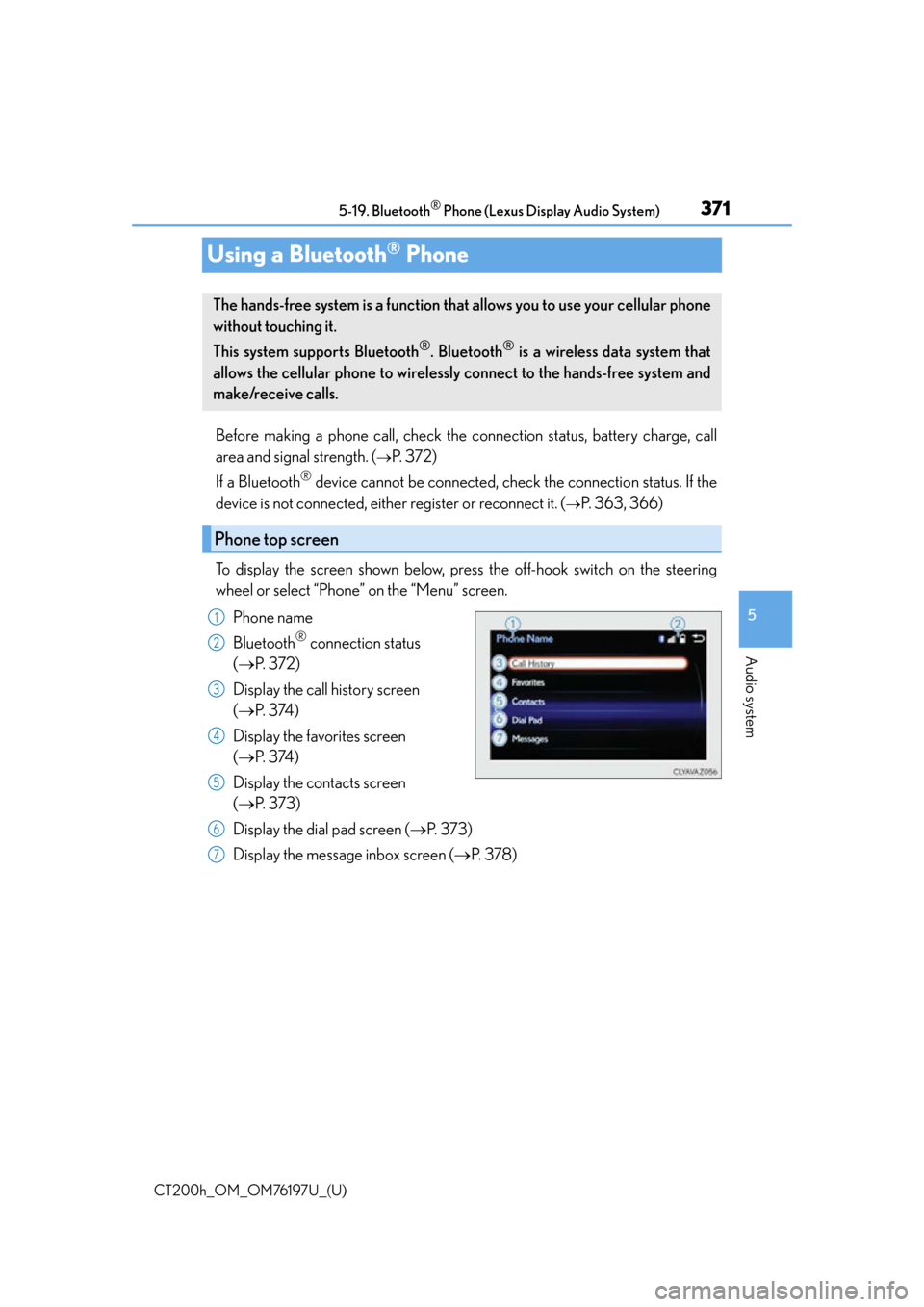
To display the screen shown below, press the off-hook switch on the steering
wheel or select “Phone” on the “Menu” screen. Phone name
Bluetooth
® connection status
( P. 3 7 2 )
Display the call history screen
( P. 3 74 )
Display the favorites screen
( P. 3 74 )
Display the contacts screen
( P. 3 7 3 )
Display the dial pad screen ( P. 3 7 3 )
Display the message inbox screen ( P. 3 7 8 )
The hands-free system is a function that allows you to use your cellular phone
without touching it.
This system supports Bluetooth
®. Bluetooth® is a wireless data system that
allows the cellular phone to wirelessly connect to the hands-free system and
make/receive calls.
Phone top screen
1
2
3
4
5
6
7
Page 373 of 632

373
CT200h_OM_OM76197U_(U)5-19. Bluetooth
® Phone (Lexus Display Audio System)
5
Audio system
Making a call
Go to “Dial Pad”: “MENU” button
“Phone” “Dial Pad”
Input a phone number. ( P. 3 2 3 )
Press the off-hook switch on the steering wheel or select .
You can dial a number from the phoneb ook data imported from your cellular
phone. The system has one phonebook for each registered telephone. Up to
2500 contacts may be stored in each phonebook. ( P. 3 7 3 )
Go to “Contacts”: “MENU” button “Phone” “Contacts”
Choose the desired contact to call from the list.
Choose the number and then press the off-hook switch on the steering wheel
or press the controller.
You can transfer the phone numbers in a Bluetooth
® phone to the system.
Operation methods differ between PBAP (Phone Book Access Profile) compat-
ible and PBAP inco mpatible Bluetooth
® phones. If the cellular phone does not
support either PBAP or OPP (Object Push Profile) service, you cannot transfer
contacts.
Press the off-hook switch on the steering wheel.
If the phonebook is empty, a message will be displayed.
For a PBAP compatible Bluetooth® phone and “Automatic Transfer” is off
To transfer new contacts from a cel-
lular phone, select “Always” and then
enable “Automatic Transfer”.
( P. 3 8 3 )
Select “Once” if you want to transfer
new contacts from a cellular phone.
Once a Bluetooth® phone is registered, you can make a call using the follow-
ing procedure:
Dialing
Dialing from the phonebook
When the phonebook is empty
1
2
3
1
2
3
1
2
Page 374 of 632

3745-19. Bluetooth® Phone (Lexus Display Audio System)
CT200h_OM_OM76197U_(U)
For a PBAP incompatible and OPP compatible Bluetooth® phone
Select “Transfer” and operate your
cellular phone to transfer new con-
tacts from a cellular phone.
Select “Add” if you want to add a new
contact manually.
You can make a call using numbers registered in the favorites. Go to “Favorites”: “MENU” button “Phone” “Favorites”
Choose the desired contact to call from the list.
Choose the number and then press the off-hook switch on the steering wheel
or press the controller.
You can make a call using the call history. Go to “Call History”: “MENU” button “Phone” “Call History”
Select the desired entry from the list.
Press the off-hook switch on the steering wheel or select .
■Call history list
●If you make a call to or receive a call from a number registered in the phonebook, the
name is displayed in the call history.
●If you make multiple calls to the same number , only the last call made is displayed in the
call history.
■International calls
Depending on the mobile phone in use, you ma y not be able to make international calls.
■Calling by using the latest call history entry
Press the
off-hook switch on the steering wheel to display the phone top screen.
Press the
switch again to display the “Call History” screen.
Press the
switch again to select the latest call history entry.
2
Dialing from favorites
Dialing from history
1
2
3
1
2
3
1
2
3
Page 375 of 632
375
CT200h_OM_OM76197U_(U)5-19. Bluetooth
® Phone (Lexus Display Audio System)
5
Audio system
Receiving a call
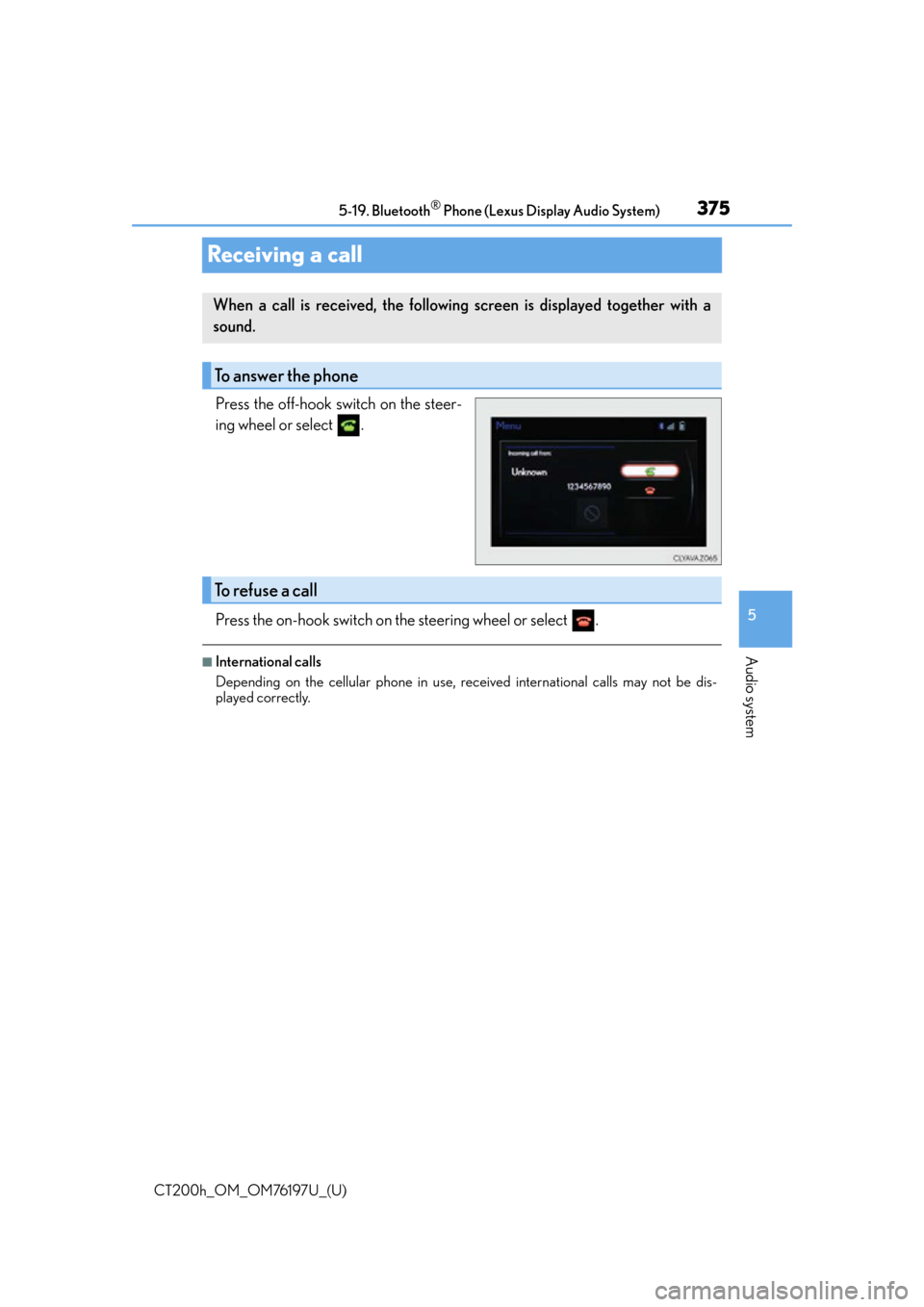
Press the off-hook switch on the steer-
ing wheel or select .
Press the on-hook switch on the steering wheel or select .
■International calls
Depending on the cellular phone in use, re
ceived international calls may not be dis-
played correctly.
When a call is received, the following screen is displayed together with a
sound.
To answer the phone
To refuse a call
Page 376 of 632
376
CT200h_OM_OM76197U_(U)5-19. Bluetooth
® Phone (Lexus Display Audio System)
Speaking on the phone
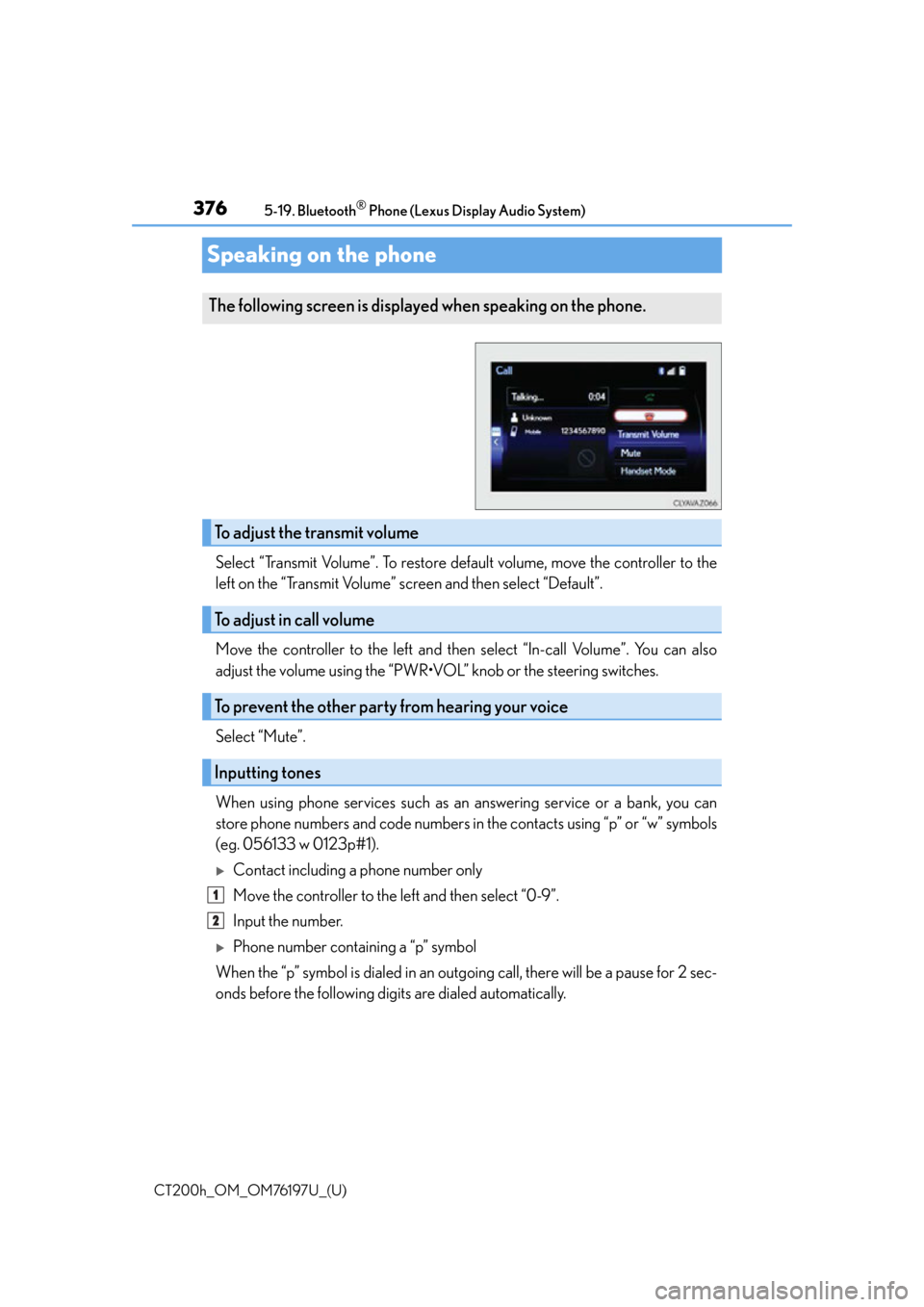
Select “Transmit Volume”. To restore default volume, move the controller to the
left on the “Transmit Volume” screen and then select “Default”.
Move the controller to the left and then select “In-call Volume”. You can also
adjust the volume using
the “PWR•VOL” knob or the steering switches.
Select “Mute”.
When using phone services such as an answering service or a bank, you can
store phone numbers and code numbers in the contacts using “p” or “w” symbols
(eg. 056133 w 0123p#1).
Contact including a phone number only
Move the controller to the left and then select “0-9”.
Input the number.
Phone number containing a “p” symbol
When the “p” symbol is dialed in an outgoing call, there will be a pause for 2 sec-
onds before the following digits are dialed automatically.
The following screen is displayed when speaking on the phone.
To adjust the transmit volume
To adjust in call volume
To prevent the other party from hearing your voice
Inputting tones
1
2
Page 377 of 632
CT200h_OM_OM76197U_(U)
3775-19. Bluetooth® Phone (Lexus Display Audio System)
5
Audio system
Phone number containing a “w” symbol
When the “w” symbol is dialed in an outg oing call, you need to go to the “Release
Tones” screen to dial the following digits . Move the controller to the left and then
select “Release Tones”.
Select “Handset Mode” to change from a hands-free call to a cellular phone call
or vice versa.
Press the on-hook switch on the steering wheel or select .
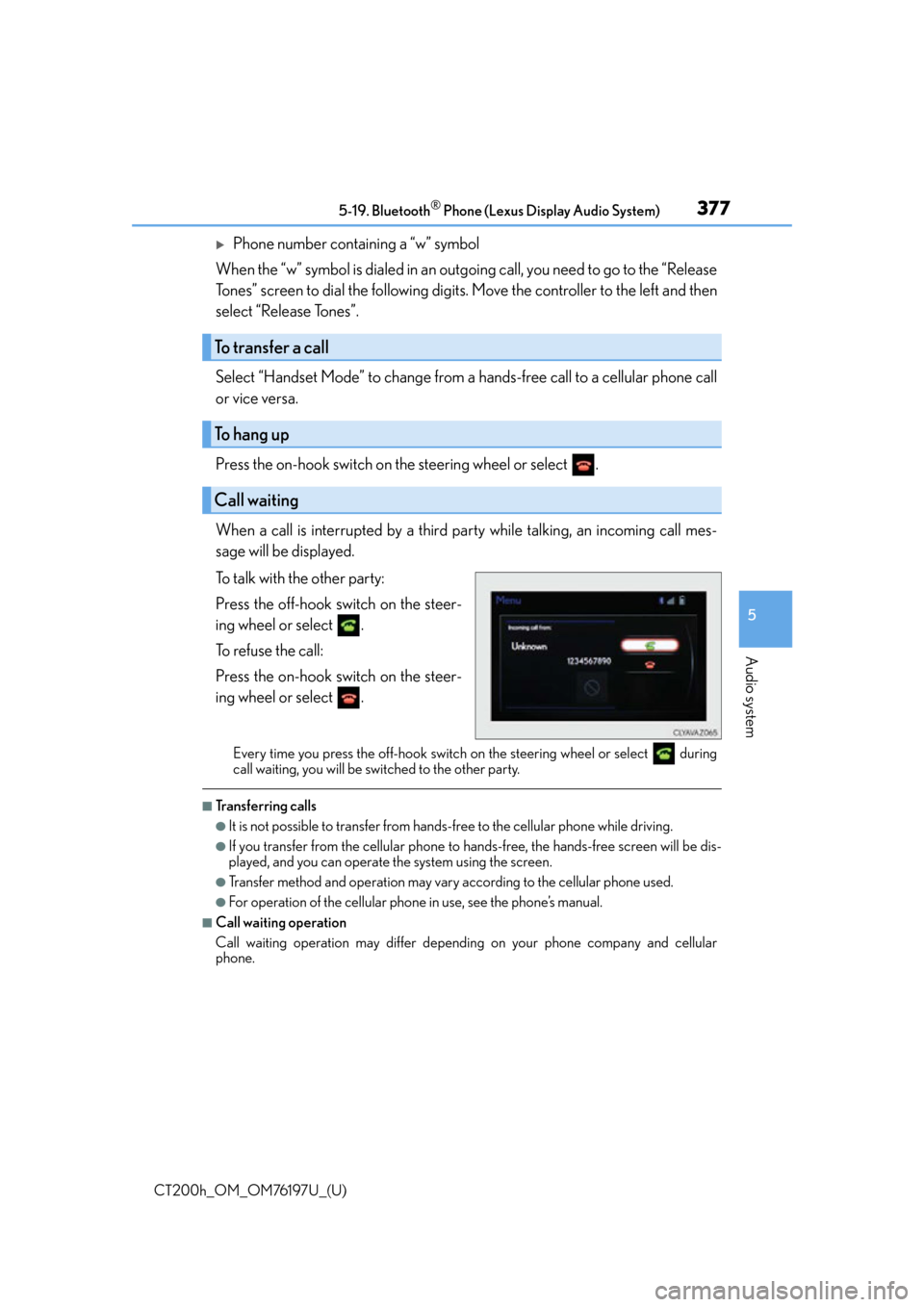
When a call is interrupted by a third party while talking, an incoming call mes-
sage will be displayed.
To talk with the other party:
Press the off-hook switch on the steer-
ing wheel or select .
To refuse the call:
Press the on-hook switch on the steer-
ing wheel or select .
Every time you press the off-hook switch on the steering wheel or select during
call waiting, you will be switched to the other party.
■Transferring calls
●It is not possible to transfer from hand s-free to the cellular phone while driving.
●If you transfer from the cellular phone to ha nds-free, the hands-free screen will be dis-
played, and you can operate the system using the screen.
●Transfer method and operation may vary according to the cellular phone used.
●For operation of the cellular phone in use, see the phone’s manual.
■Call waiting operation
Call waiting operation may differ depend ing on your phone company and cellular
phone.
To transfer a call
To hang up
Call waiting
Page 380 of 632
380
CT200h_OM_OM76197U_(U)5-19. Bluetooth
® Phone (Lexus Display Audio System)
Using the steering wheel switches
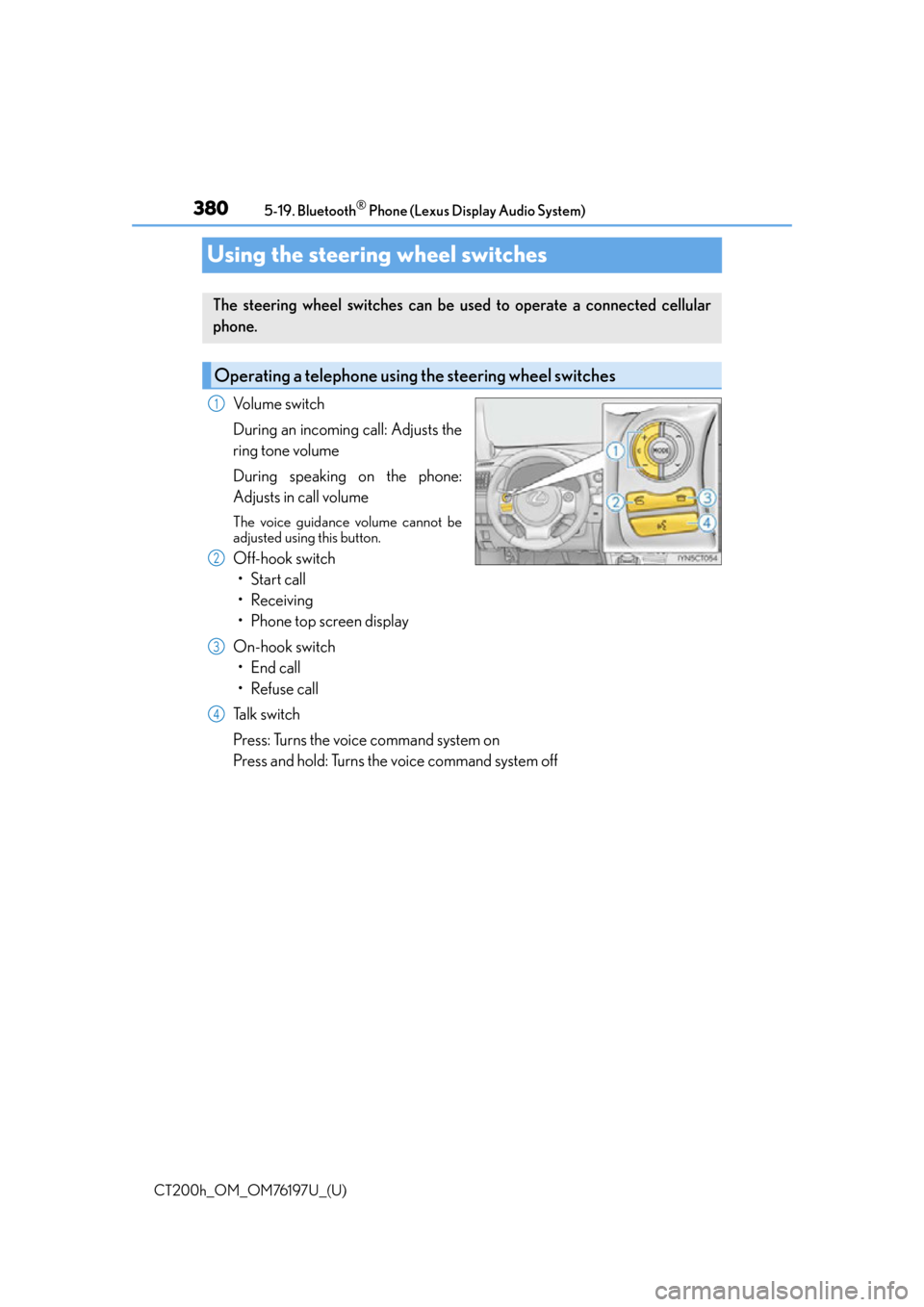
Volume switch
During an incoming call: Adjusts the
ring tone volume
During speaking on the phone:
Adjusts in call volume
The voice guidance volume cannot be
adjusted using this button.
Off-hook switch
• Start call
• Receiving
• Phone top screen display
On-hook switch • End call
• Refuse call
Talk switch
Press: Turns the voice command system on
Press and hold: Turns the voice command system off
The steering wheel switches can be used to operate a connected cellular
phone.
Operating a telephone usin g the steering wheel switches
1
2
3
4
Page 404 of 632

404
CT200h_OM_OM76197U_(U)5-22. Other function (Lex
us Display Audio System)
Mobile Assistant
Press and hold the off hook switch
until you hear the beeps that indicate
the system is listening.
The Mobile Assistant can be used
only when the neighboring screen is
displayed.
To cancel the Mobile Assistant, select
“Cancel”, or press and hold the off hook
switch.
To restart the Mobile Assistant for addi-
tional commands, press the off hook
switch. Mobile Assistant can only be
restarted after the system responds to a
voice command. After some phone and
music commands, the Mobile Assistant
feature will automatically end to com-
plete the requested action.
■Adjusting the volume
The volume of the Mobile Assistant can be adjusted using the “PWR•VOL” knob or
steering wheel volume switches. The Mobile Assistant and phone call volumes are syn-
chronized.
The Mobile Assistant feature on this system allows the activation of Apple’s
Siri® Eyes Free mode via the steering wheel switches. To operate the Mobile
Assistant, a compatible cellular phone must be registered and connected to
this system via Bluetooth
®. ( P. 3 6 1 )
1
2
Page 409 of 632

409
CT200h_OM_OM76197U_(U)
6Interior features
6-1. Using the air conditioning system and defogger
Automatic air conditioning system (Vehicles with a
navigation system or Lexus
Display Audio System)........... 410
Automatic air conditioning system (Vehicles without a
navigation system or Lexus
Display Audio System)........... 418
Heated steering wheel/ seat heaters................................425
• Heated steering wheel....... 426
• Seat heaters............................ 426 6-2. Using the interior lights
Interior lights list ..........................427• Personal/interior light main switch ..............................427
•Front personal/ interior lights .......................... 428
• Rear interior light ................. 428
6-3. Using the storage features List of storage features ............ 429• Glove box ...............................430
• Console box...........................430
•Cup holders/bottle holders/
door pockets ..........................430
• Auxiliary boxes ..................... 432
Luggage compartment features........................................ 434
6-4. Using the other interior features Other interior features ............ 439• Sun visors ................................ 439
• Vanity mirrors ........................ 439
• Clock ........................................ 440
• Power outlet ........................... 440
• Assist grips.............................. 442
Garage door opener................ 443
Compass ....................................... 449
LEXUS Enform Safety Connect ...................................... 455