Voice Lexus CT200h 2016 Owner's Manual (in English)
[x] Cancel search | Manufacturer: LEXUS, Model Year: 2016, Model line: CT200h, Model: Lexus CT200h 2016Pages: 632, PDF Size: 8.5 MB
Page 5 of 632

5
1
9 8
7
6 4 3
2
CT200h_OM_OM76197U_(U)
10
5
5-11. Basic Operations (Lexus Display Audio System)
Lexus Display Audio System ........................................ 320
Steering wheel audio switches...................................... 325
USB/AUX ports ........................ 326
5-12. Setup (Lexus Display Audio System)
Setup menu ................................. 328
General settings ........................ 329
Voice settings.............................. 332
Display settings .......................... 333
5-13. Using the audio system (Lexus Display Audio System)
Selecting the audio source ......................................... 334
Optimal use of the audio system ......................................... 335
Audio settings............................. 336
Audio menu screen operation ................................... 338
5-14. Using the radio (Lexus Display Audio System)
Radio operation ...........................341
5-15. Playing an audio CD and MP3/WMA/AAC discs
(Lexus Display Audio System)
CD player operation ............... 347 5-16. Using an external device
(Lexus Display Audio System)
Listening to an iPod .................. 353
Using USB memory device.......................................... 356
Using the AUX port ................ 360
5-17. Connecting Bluetooth
®
(Lexus Display Audio System)
Steps for using Bluetooth
®
devices.......................................... 361
Registering a Bluetooth
®
device.......................................... 363
Selecting a Bluetooth
®
device.......................................... 364
Connecting a Bluetooth
®
audio player.............................. 365
Connecting a Bluetooth
®
phone .......................................... 366
Displaying a Bluetooth
®
device details ............................367
Detailed Bluetooth
®
settings ....................................... 368
5-18. Bluetooth
® Audio
(Lexus Display Audio System)
Listening to Bluetooth
®
Audio .......................................... 369
Page 6 of 632

TABLE OF CONTENTS6
CT200h_OM_OM76197U_(U)
5-19. Bluetooth® Phone (Lexus
Display Audio System)
Using a Bluetooth
®
Phone ............................................ 371
Making a call ................................373
Receiving a call ...........................375
Speaking on the phone............ 376
Using a Bluetooth
®
phone message....................... 378
Using the steering wheel switches......................................380
Bluetooth
® phone settings .... 381
5-20.Phonebook (Lexus Display Audio System)
Contact settings ........................ 383
Messaging setting..................... 386
5-21. Bluetooth
® (Lexus
Display Audio System)
What to do if... (Troubleshooting)................... 387
Bluetooth
®.................................. 390
5-22. Other function (Lexus Display Audio System)
“Information” screen ................ 395
USB photo ....................................397
Weather information ............... 399
Voice command system .........400
Mobile Assistant........................ 404
LEXUS Enform Remote ........ 406 6-1. Using the air conditioning
system and defogger
Automatic air conditioning system (Vehicles with a
navigation system or Lexus
Display Audio System) .......... 410
Automatic air conditioning system (Vehicles without a
navigation system or Lexus
Display Audio System) ...........418
Heated steering wheel/ seat heaters ............................... 425
• Heated steering wheel .......426
• Seat heaters ............................426
6-2. Using the interior lights Interior lights list .......................... 427• Personal/interior light main switch .............................. 427
•Front personal/ interior lights .......................... 428
• Rear interior light ................. 428
6Interior features
Page 250 of 632

250
CT200h_OM_OM76197U_(U)
5-6. Using Bluetooth® devices
Bluetooth
® audio/phone .......284
Using the steering wheel switches ....................................... 291
Registering a Bluetooth
®
audio system for the
first time ...................................... 292
Registering a Bluetooth
®
phone for the first time ......... 293
5-7. Setup menu Setting up a Bluetooth
®
enabled portable player ...... 294
Bluetooth
® audio system
setup ........................................... 298
Setting a cellular phone ..........299
Security and system setup .... 302
Using the phone book ............ 305
5-8. Bluetooth
® Audio
Operating a Bluetooth
®
enabled portable player ....... 310
5-9. Bluetooth
® Phone
Making a phone call .................. 312
Receiving a phone call ............. 314
Speaking on the phone ............ 315
5-10. Bluetooth
®
Bluetooth®.................................... 316 5-11. Basic Operations
(Lexus Display Audio System)
Lexus Display Audio System.........................................320
Steering wheel audio switches ...................................... 325
USB/AUX ports ........................ 326
5-12. Setup (Lexus Display Audio System)
Setup menu.................................. 328
General settings ........................ 329
Voice settings.............................. 332
Display settings .......................... 333
5-13. Using the audio system (Lexus Display Audio System)
Selecting the audio source ......................................... 334
Optimal use of the audio system ......................................... 335
Audio settings ............................. 336
Audio menu screen operation ...................................338
5-14. Using the radio (Lexus Display Audio System)
Radio operation .......................... 341
5-15. Playing an audio CD and MP3/WMA/AAC discs
(Lexus Display Audio System)
CD player operation................ 347
Page 251 of 632

251
CT200h_OM_OM76197U_(U)
Audio system5
5-16. Using an external device (Lexus Display Audio System)
Listening to an iPod...................353
Using USB memory device ..........................................356
Using the AUX port ................ 360
5-17. Connecting Bluetooth
®
(Lexus Display Audio System)
Steps for using Bluetooth
®
devices ......................................... 361
Registering a Bluetooth
®
device ..........................................363
Selecting a Bluetooth
®
device ..........................................364
Connecting a Bluetooth
®
audio player ..............................365
Connecting a Bluetooth
®
phone...........................................366
Displaying a Bluetooth
®
device details............................ 367
Detailed Bluetooth
®
settings ....................................... 368
5-18. Bluetooth
® Audio
(Lexus Display Audio System)
Listening to Bluetooth
®
Audio ...........................................369 5-19. Bluetooth
® Phone (Lexus
Display Audio System)
Using a Bluetooth
®
Phone ............................................ 371
Making a call ............................... 373
Receiving a call .......................... 375
Speaking on the phone ............ 376
Using a Bluetooth
®
phone message ....................... 378
Using the steering wheel switches ..................................... 380
Bluetooth
® phone settings .... 381
5-20.Phonebook (Lexus Display Audio System)
Contact settings ........................383
Messaging setting .....................386
5-21. Bluetooth
® (Lexus
Display Audio System)
What to do if... (Troubleshooting) ................... 387
Bluetooth
®..................................390
5-22. Other function (Lexus Display Audio System)
“Information” screen ................ 395
USB photo ................................... 397
Weather information................ 399
Voice command system ........ 400
Mobile Assistant ........................ 404
LEXUS Enform Remote.........406
Page 287 of 632

CT200h_OM_OM76197U_(U)
2875-6. Using Bluetooth® devices
5
Audio system
By following voice guidance instructions output from the speaker, voice com-
mands enable to the operation of the Bluetooth® audio system without the need
to check the display or operate the “TUNE•SEL” knob.
■Operation procedure when using voice commands
Press the talk switch and follow voice guidance instructions.
■Auxiliary commands when using voice commands
The following auxiliary commands can be used when operating the system
using a voice command:
“Cancel”: Exits the Bluetooth
® audio system and the hands-free phone
system
“Repeat”: Repeats the previous voice guidance instruction
“Go back”: Returns to the previous procedure
“Help”: Reads aloud the function summary if a help comment is registered
for the selected function
Operating the system using voice commands
Page 289 of 632

CT200h_OM_OM76197U_(U)
2895-6. Using Bluetooth® devices
5
Audio system
“Setup”
“Security”
( P. 3 0 2 )
“Set PIN”Setting a PIN code
“Phbk Lock”Locking the phone book
“Phbk Unlock”Unlocking the phone book
“Phone
Setup”
( P. 2 9 9 )
“Pair Phone”Registering the cellular phone to
be used
“Connect”Selecting a cellular phone to be
used
“Change Name”Changing a registered name of a
cellular phone
“List Phones”Listing the registered cellular
phones
“Set Passkey”Changing the passkey
“Delete Phone”Deleting a registered cellular
phone
“System
Setup”
( P. 3 0 2 )
“Guidance Vol”Setting voice guidance volume
“Device Name”Displaying the Bluetooth® device
address and name
“Initialize”Initializing the system
First menuSecond menuThird menuOperation detail
Page 290 of 632

2905-6. Using Bluetooth® devices
CT200h_OM_OM76197U_(U)
■Using a short cut key
■Automatic volume adjustment
When vehicle speed reaches 50 mph (80 km/h) or more, the volume automatically
increases. The volume returns to the previo us volume setting when vehicle speed drops
to 43 mph (70 km/h) or less.
■When using a voice command
For numbers, say a combination of single digits from zero to nine, # (pound), (star), and
+ (plus).
Say the command correctly and clearly.
■Situations that the system may not recognize your voice
●When driving on rough roads
●When driving at high speeds
●When air is blowing out of the vents onto the microphone
●When the air conditioning fan emits a loud noise
■Operations that cannot be performed while driving
●Operating the system with the “TUNE•SEL” knob.
●Registering a a portable player or cellular phone to the system
First menuSecond menuOperation detail
“Dial XXX (name)”-Dialing a name registered in the
phone book
“Phone book add
Entry”-Adding a new phone number
“Phone book Change
name”-Changing a registered name in
the phone book
“Phone book Delete
Entry”-Deleting the registered data
“Phone book List
names”-Listing the registered data
“Phone book Set Speed
Dial”-Setting speed dials
“Phone book Delete
Speed Dial”-Deleting speed dials
“Dial XXX (number)”-Dialing by inputting a number
“Phonebook”“Phonebook Unlock”Unlocking the phone book
“Phonebook Lock”Locking the phone book
Page 291 of 632
291
CT200h_OM_OM76197U_(U)5-6. Using Bluetooth
® devices
5
Audio system
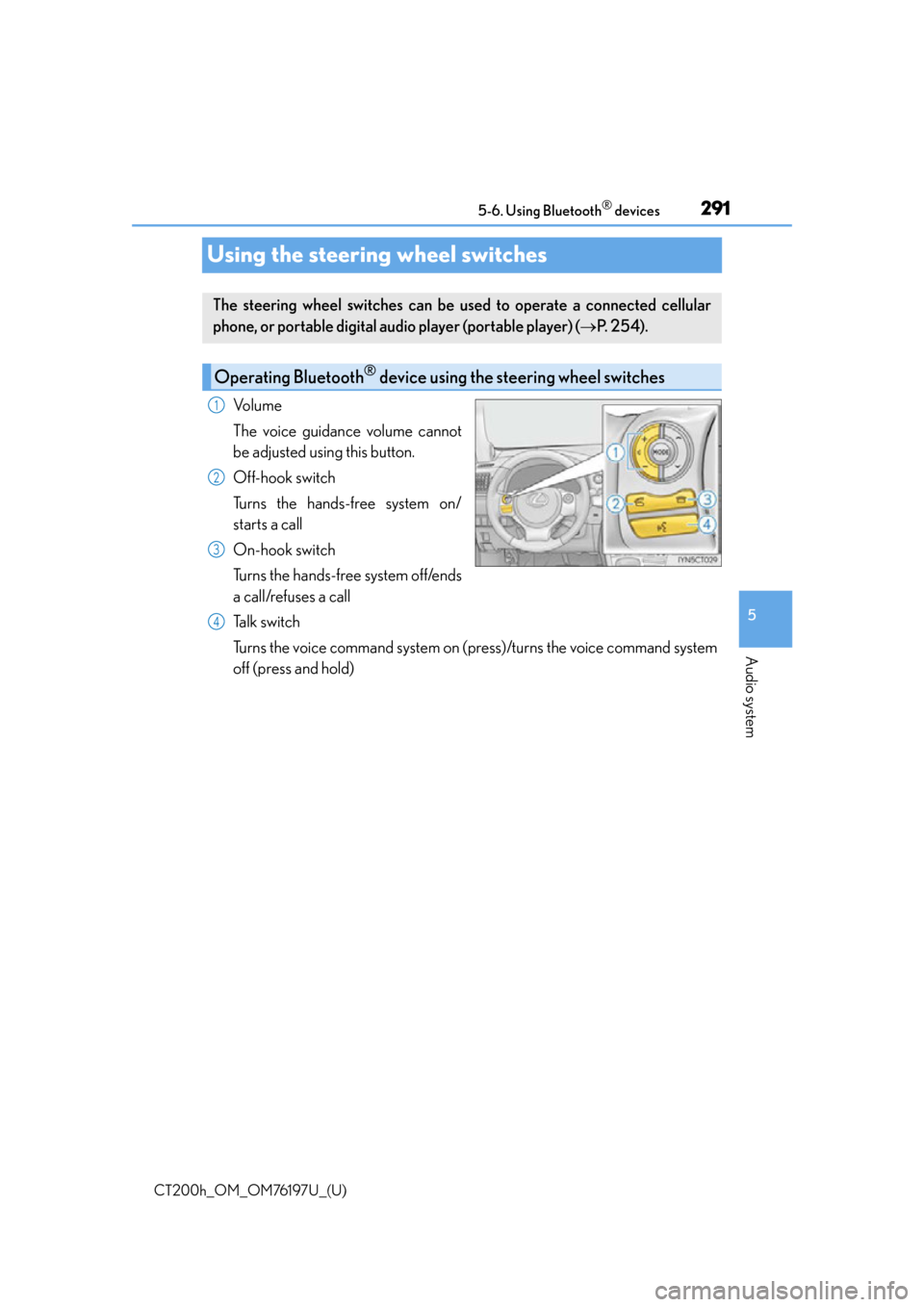
Using the steering wheel switches
Vo l u m e
The voice guidance volume cannot
be adjusted using this button.
Off-hook switch
Turns the hands-free system on/
starts a call
On-hook switch
Turns the hands-free system off/ends
a call/refuses a call
Talk switch
Turns the voice command system on (press)/turns the voice command system
off (press and hold)
The steering wheel switches can be
used to operate a connected cellular
phone, or portable digital au dio player (portable player) ( P. 2 5 4 ) .
Operating Bluetooth® device using the steering wheel switches
1
2
3
4
Page 292 of 632

292
CT200h_OM_OM76197U_(U)5-6. Using Bluetooth
® devices
Registering a Bluetooth® audio system for the first
time
Press the “CD•AUX” button and select “BTA MENU” using the “TUNE•SEL”
knob.
Press the talk switch or select “BTA Setup” using the knob.
The introductory guidance and portable player name registration instructions
are heard.
Select “Pair Audio Player (Pair Audio)” using a voice command or the knob.
Register a portable player name by either of the following methods:
a. Select “Record Name” using the knob, and say the name to be registered.
b. Press the talk switch and say the name to be registered.
A voice guidance instruction to confirm the input is heard.
Select “Confirm” using a voice command or the knob.
A passkey is displayed and heard, and a voice guidance instruction for inputting
the passkey into the portable player is heard.
Input the passkey into the portable player.
Refer to the manual that comes with the portable player for the operation of the por-
table player.
Guidance for registration completion is heard.
If the portable player has a Bluetooth
® phone, the phone can be registered at
the same time. A voice guidance in struction to register a Bluetooth® phone is
heard.
Select “Yes” or “No” using a voice command or the knob.
(Bluetooth
® phone P. 3 1 7 )
■Changing the passkey
P. 2 9 7
Before using the Bluetooth® audio system, it is necessary to register a Blue-
tooth® enabled portable player in the system. Follow the procedure below to
register (pair) a portable player:
1
2
3
4
5
6
7
Page 293 of 632

293
CT200h_OM_OM76197U_(U)5-6. Using Bluetooth
® devices
5
Audio system
Registering a Bluetooth® phone for the first time
Press the off-hook switch or the talk switch.
The introductory guidance and phone name registration instructions are heard.
Select “Pair Phone” using a voice command or the “TUNE•SEL” knob.
Register a phone name by either of the following methods:
a. Select “Record Name” using the knob, and say the name to be registered.
b. Press the talk switch and say the name to be registered.
A voice guidance instruction to confirm the input is heard.
Select “Confirm” using a voice command or the knob.
A passkey is displayed and heard, and a voice guidance instruction for inputting
the passkey into the cellular phone is heard.
Input the passkey into the cellular phone.
Refer to the manual that comes with the cellular phone for the operation of the phone.
Guidance for registration completion is heard.
If the cellular phone has a Bluetooth
® audio player, the audio player can be reg-
istered at the same time. A voice guidance instruction to register a Bluetooth®
audio player is heard.
Select “Yes” or “No” using a voice command or the knob.
(Bluetooth
® audio player P. 3 1 7 )
■Changing the passkey
P. 3 0 1
Before using the hands-free phone system, it is necessary to register a cellular
phone in the system. The system will en ter phone registration mode automati-
cally when starting the system with no cellular phone registered. Follow the
procedure below to register (pair) a cellular phone:
1
2
3
4
5
6