radio antenna Lexus CT200h 2016 Owner's Manual (in English)
[x] Cancel search | Manufacturer: LEXUS, Model Year: 2016, Model line: CT200h, Model: Lexus CT200h 2016Pages: 632, PDF Size: 8.5 MB
Page 116 of 632

116
CT200h_OM_OM76197U_(U)3-2. Opening, closing and locking the doors
●When the electronic key is in contact wi
th, or is covered by the following metallic
objects
• Cards to which aluminum foil is attached
• Cigarette boxes that have aluminum foil inside
• Metallic wallets or bags
•Coins
•Hand warmers made of metal
• Media such as CDs and DVDs
●When other wireless key (that emit radio waves) is being used nearby
●When carrying the electronic key together with the following devices that emit radio
waves
• Another vehicle’s electronic key or a wireless key that emits radio waves
• Personal computers or personal digital assistants (PDAs)
• Digital audio players
• Portable game systems
●If window tint with a metallic content or me tallic objects are attached to the rear win-
dow
■Note for the entry function
●Even when the electronic key is within the effective range (detection areas), the system
may not operate properly in the following cases:
• The electronic key is too close to the window or outside door handle, near the
ground, or in a high place when the doors are locked or unlocked.
• The electronic key is near the ground or in a high place, or too close to the rear
bumper center when the back door is opened.
• The electronic key is on the instrument panel, luggage room, floor, or in the door
pockets or glove box when the hybrid system is started or power switch modes are
changed.
●Do not leave the electronic key on top of th e instrument panel or near the door pockets
when exiting the vehicle. Depending on the radio wave reception conditions, it may be
detected by the antenna outs ide the cabin and the door will become lockable from the
outside, possibly trapping the el ectronic key inside the vehicle.
●As long as the electronic key is within the effective range, the doors may be locked or
unlocked by anyone.
●Even if the electronic key is not inside the ve hicle, it may be possible to start the hybrid
system if the electronic key is near the window.
●The doors may unlock if a large amount of wa ter splashes on the door handle, such as in
the rain or in a car wash when the electronic key is within the effective range. (The door
will automatically be locked after approximately 60 seconds if the doors are not
opened and closed.)
●If the wireless remote control is used to lo ck the doors when the electronic key is near
the vehicle, there is a possibility that the door may not be unlocked by the entry func-
tion. (Use the wireless remote control to unlock the doors.)
●Touching the door lock sensor while wearin g gloves may delay or prevent lock opera-
tion. Remove the gloves and touch the lock sensor again.
●When the lock operation is performed using the lock sensor, recognition signals will be
shown up to two consecutive times. After th is, no recognition signals will be given.
●If the door handle becomes wet while the el ectronic key is within the effective range,
the door may lock and unlock repeatedly. Place the key in a position 6 ft. (2 m) or more
separate from the vehicle while the vehicle is being washed. (Take care to ensure that
the key is not stolen.)
Page 119 of 632

CT200h_OM_OM76197U_(U)
1193-2. Opening, closing and locking the doors
3
Operation of each component
WA R N I N G
■Caution regarding interference with electronic devices
●People with implantable cardiac pacemakers, cardiac resynchronization therapy-
pacemakers or implantable cardioverter de fibrillators should keep away from the
smart access system antennas. ( P. 114)
The radio waves may affect the operation of such devices. If necessary, the entry
function can be disabled. Ask your Lexus dealer for details, such as the frequency of
radio waves and timing of the emitted radio waves. Then, consult your doctor to see if
you should disable the entry function.
●Users of any electrical medical device other than implantable cardiac pacemakers,
cardiac resynchronization therapy-pacemakers or implantable cardioverter defibril-
lators should consult the ma nufacturer of the device for information about its opera-
tion under the influence of radio waves.
Radio waves could have unexpected effe cts on the operation of such medical
devices.
Ask your Lexus dealer for details on disabling the entry function.
Page 195 of 632

CT200h_OM_OM76197U_(U)
1954-5. Using the driving support systems
4
Driving
■Certification
For vehicles sold in the U.S.A.
FCC ID: HYQDNMWR004
This device complies with part 15 of the FC C Rules. Operation is subject to the following
two conditions: (1) This device may not caus e harmful interference, and (2) this device
must accept any interference received, incl uding interference that may cause undesired
operation.
FCC WARNING
Changes or modifications not expressly approved by the party responsible for compli-
ance could void the user’s authority to operate the equipment.
Radiofrequency radiation exposure Information:
This equipment complies with FCC radiation exposure limits set forth for an uncontrolled
environment.
This equipment should be installed and operated with minimum distance of 20 cm
between the radiator (antenna) and your body.
This transmitter must not be co-located or operating in conjunction with any other
antenna or transmitter.
For vehicles sold in Canada
This device complies with Industry Canada licence-exempt RSS standard(s).
Operation is subject to the following two co nditions: (1) this device may not cause inter-
ference, and (2) this device must accept any interference, including interference that
may cause undesired operation of the device.
Page 242 of 632

242
CT200h_OM_OM76197U_(U)4-5. Using the driving support systems
■Automatic cancelation of the pre-collision system
When a malfunction occurs due to sensor cont
amination, etc. that results in the sensors
being unable to detect obstacles, the pre-collision syst em will be automatically disabled.
In this case, the system will not activate even if there is a collision possibility.
■When there is a malfunction in the system, or if the system is temporarily unusable
Warning lights and/or warning mess ages will turn on or flash. (P. 5 2 9 , 5 3 6 )
■Certification
For vehicles sold in the U.S.A.
FCC ID: HYQDNMWR004
This device complies with part 15 of the FC C Rules. Operation is subject to the following
two conditions: (1) This device may not caus e harmful interference, and (2) this device
must accept any interference received, incl uding interference that may cause undesired
operation.
FCC WARNING
Changes or modifications not expressly approved by the party responsible for compli-
ance could void the user’s authority to operate the equipment.
Radiofrequency radiation exposure Information:
This equipment complies with FCC radiation exposure limits set forth for an uncontrolled
environment.
This equipment should be installed and operated with minimum distance of 20 cm
between the radiator (antenna) and your body.
This transmitter must not be co-located or operating in conjunction with any other
antenna or transmitter.
For vehicles sold in Canada
This device complies with Industry Canada licence-exempt RSS standard(s).
Operation is subject to the following two co nditions: (1) this device may not cause inter-
ference, and (2) this device must accept any interference, including interference that
may cause undesired operation of the device.
WA R N I N G
■Limitations of the pre-collision system
The driver is solely responsible for safe driving. Always drive safely, taking care to
observe your surroundings.
Do not use the pre-collisions system instea d of normal braking operations under any
circumstances. This system will not prevent collisions or lessen damage or injuries in all
cases. Do not overly rely on this system. Failu re to do so may cause an accident, result-
ing in death or serious injury.
This system has been designed to help av oid and reduce the impact of collisions. How-
ever, the system operates differently depending on the situation ( P. 240, 241). As a
result, the same level of performance may not be expected in all cases. Also, the pre-
collision’s brakes may not operate if the driver is depressing the brake pedal or turning
the steering wheel, as the system will dete rmine such conditions as collision avoidance
operations.
Page 262 of 632

2625-3. Using the radio
CT200h_OM_OM76197U_(U)
■When the 12-volt battery is disconnected
All preset stations are erased.
■Reception sensitivity
●Cargo loaded on the roof luggage carrier, especially metal objects, may adversely
affect the reception of XM® Satellite Radio.
●Maintaining perfect radio recept ion at all times is difficult due to the continually chang-
ing position of the antenna, differences in signal strength and surrounding objects, such
as trains, transmitters, etc.
●When the “SCAN” button is used, automati c station selection may not be possible.
●The radio antenna is mounted inside the rear window. To maintain clear radio reception,
do not attach metallic window tinting or other metallic objects to the antenna wire
mounted inside the rear window.
■Receiving XM® Satellite Radio
An XM® Satellite Radio is a tuner designed excl usively to receive broadcasts provided
under a separate subscription. Availability is limited to the 48 contiguous states and 10
Canadian provinces.
●XM® subscriptions
For detailed info rmation about XM® Satellite Radio or to subscribe:
U.S.A.
Visit on the web at www.xmradio.com
or call 1-877-515-3987.
Canada
Visit on the web at www.xmradio.ca
or call 1-877-438-9677.
●Radio ID
You will need the radio ID when activating XM® service or reporting a problem. Select
“CH000” using the “TUNE•SEL” knob, and the receiver’s 8-character ID number will
appear.
●Satellite tuner
The tuner supports only Audio Services (Music and Talk) and the accompanying Text
Information of XM
® Satellite Radio.
●Infotainment and Data services
XM offers a variety of advanced Infotainment and data services.
Page 263 of 632
CT200h_OM_OM76197U_(U)
2635-3. Using the radio
5
Audio system
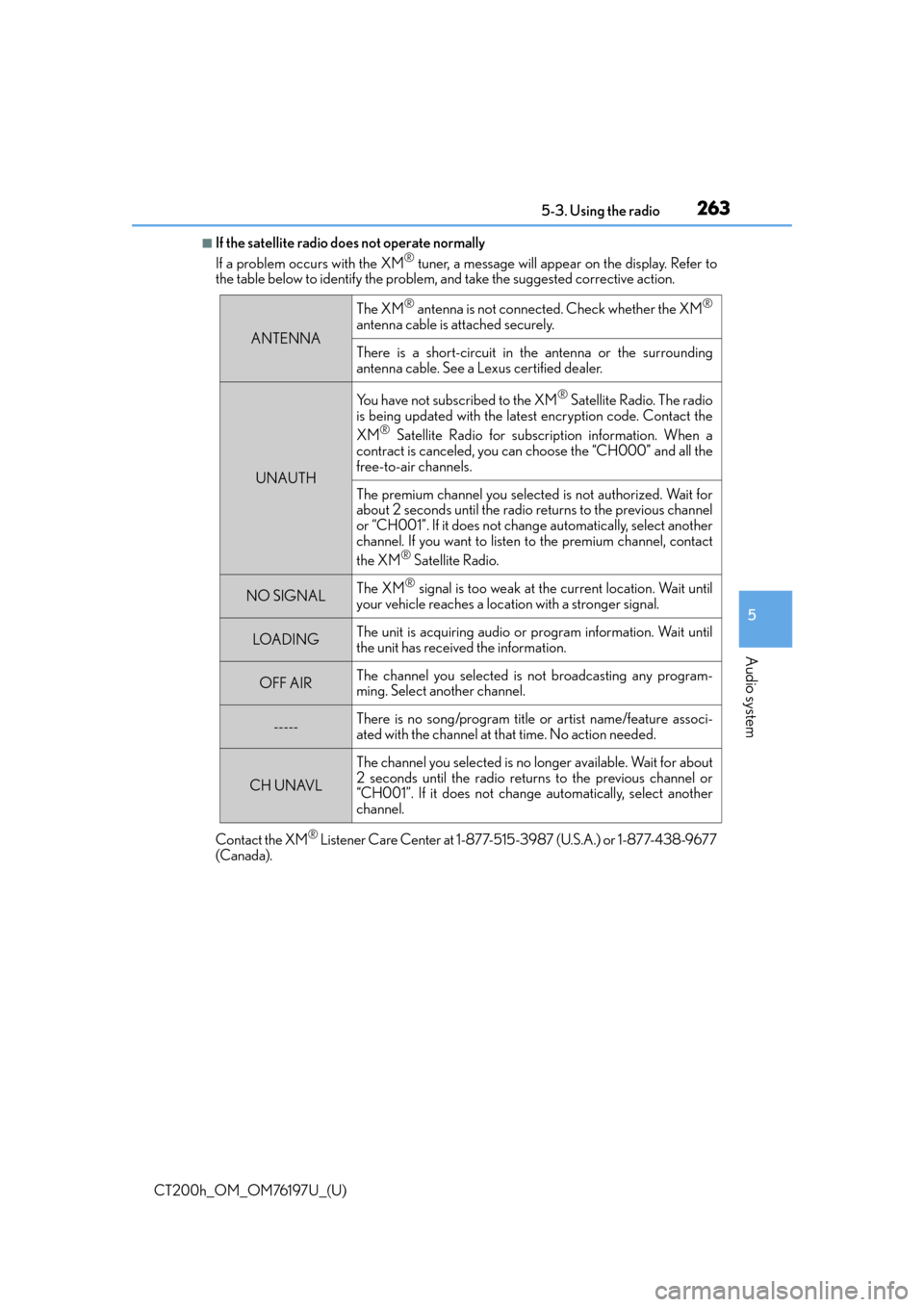
■If the satellite radio does not operate normally
If a problem occurs with the XM® tuner, a message will appear on the display. Refer to
the table below to identify the problem, and take the suggested corrective action.
Contact the XM
® Listener Care Center at 1-877-515-3987 (U.S.A.) or 1-877-438-9677
(Canada).
ANTENNA
The XM® antenna is not connected. Check whether the XM®
antenna cable is attached securely.
There is a short-circuit in the antenna or the surrounding
antenna cable. See a Lexus certified dealer.
UNAUTH
You have not subscribed to the XM® Satellite Radio. The radio
is being updated with the latest encryption code. Contact the
XM
® Satellite Radio for subscription information. When a
contract is canceled, you can choose the “CH000” and all the
free-to-air channels.
The premium channel you selected is not authorized. Wait for
about 2 seconds until the radio returns to the previous channel
or “CH001”. If it does not chan ge automatically, select another
channel. If you want to listen to the premium channel, contact
the XM
® Satellite Radio.
NO SIGNALThe XM® signal is too weak at the current location. Wait until
your vehicle reaches a location with a stronger signal.
LOADI N GThe unit is acquiring audio or program information. Wait until
the unit has received the information.
OFF AIRThe channel you selected is not broadcasting any program-
ming. Select another channel.
-----There is no song/program title or artist name/feature associ-
ated with the channel at that time. No action needed.
CH UNAVL
The channel you selected is no lo nger available. Wait for about
2 seconds until the radio returns to the previous channel or
“CH001”. If it does not change automatically, select another
channel.
Page 264 of 632

2645-3. Using the radio
CT200h_OM_OM76197U_(U)
■Certifications for the radio tuner
This equipment has been tested and found to comply with the limits for a class B digital
device, pursuant to Part 15 of the FCC Rules. These limits are designed to provide rea-
sonable protection against harmful interference in a residential installation. This equip-
ment generates, uses and can radiate radio frequency energy and, if not installed and
used in accordance with the instructions, may cause harmful interference to radio com-
munications. However, there is no guarantee that interference will not occur in a particu-
lar installation.
If this equipment does cause harmful interferen ce to radio or television reception, which
can be determined by turning the equipment off and on, the user is encouraged to try to
correct the interference by trying one or more of the following:
●Reorienting or relocate the receiving antenna.
●Increasing the separation between the equipment and receiver.
●Connecting the equipment into an outlet on a circuit different from that to which the
receiver is connected.
●Consulting the dealer or an experienced radio/TV technician for help.
Page 319 of 632

CT200h_OM_OM76197U_(U)
3195-10. Bluetooth®
5
Audio system
WA R N I N G
■While driving
Do not operate the portable audio player, cellular phone or connect a device to the
Bluetooth
® system.
■Caution regarding interference with electronic devices
●Your audio unit is fitted with Bluetooth® antennas. People with implantable cardiac
pacemakers, cardiac resynchronization ther apy-pacemakers or implantable cardio-
verter defibrillators should maintain a re asonable distance between themselves and
the Bluetooth
® antennas. The radio waves may affect the operation of such devices.
●Before using Bluetooth® devices, users of any electrical medical device other than
implantable cardiac pacemakers, cardiac resynchronization therapy-pacemakers or
implantable cardioverter defibrillators shou ld consult the manufacturer of the device
for information about its operation under the influence of radio waves. Radio waves
could have unexpected effects on the operation of such medical devices.
NOTICE
■When leaving the vehicle
Do not leave your portable audio player or cellular phone in the vehicle. The inside of
the vehicle may become hot, causing damage to the portable audio player or cellular
phone.
Page 344 of 632
3445-14. Using the radio (Lexus Display Audio System)
CT200h_OM_OM76197U_(U)
■Reception sensitivity
●Maintaining perfect radio recept ion at all times is difficult due to the continually chang-
ing position of the antenna, differences in signal strength and surrounding objects, such
as trains, transmitters, etc.
●The radio antenna is mounted inside the rear window. To maintain clear radio reception,
do not attach metallic window tinting or other metallic objects to the antenna wire
mounted inside the rear window.
■XM Radio Services — Descriptions
●Radio and Entertainment
XM offers more than 170 satellite radio channels of commercial-free music and pre-
mier sports, news, talk, and entertainment. XM is broadcast via satellites to millions of
listeners across the continental United States . XM subscribers listen to XM on satellite
radio receivers for the car, home, and port able use. More information about XM is
available online at www.siriusxm.com
(U.S.A.) or www.xmradio.ca (Canada).
●Satellite tuner
The tuner supports only Audio Services (M usic and Talk) and the accompanying Text
Information of XM
® Satellite Radio.
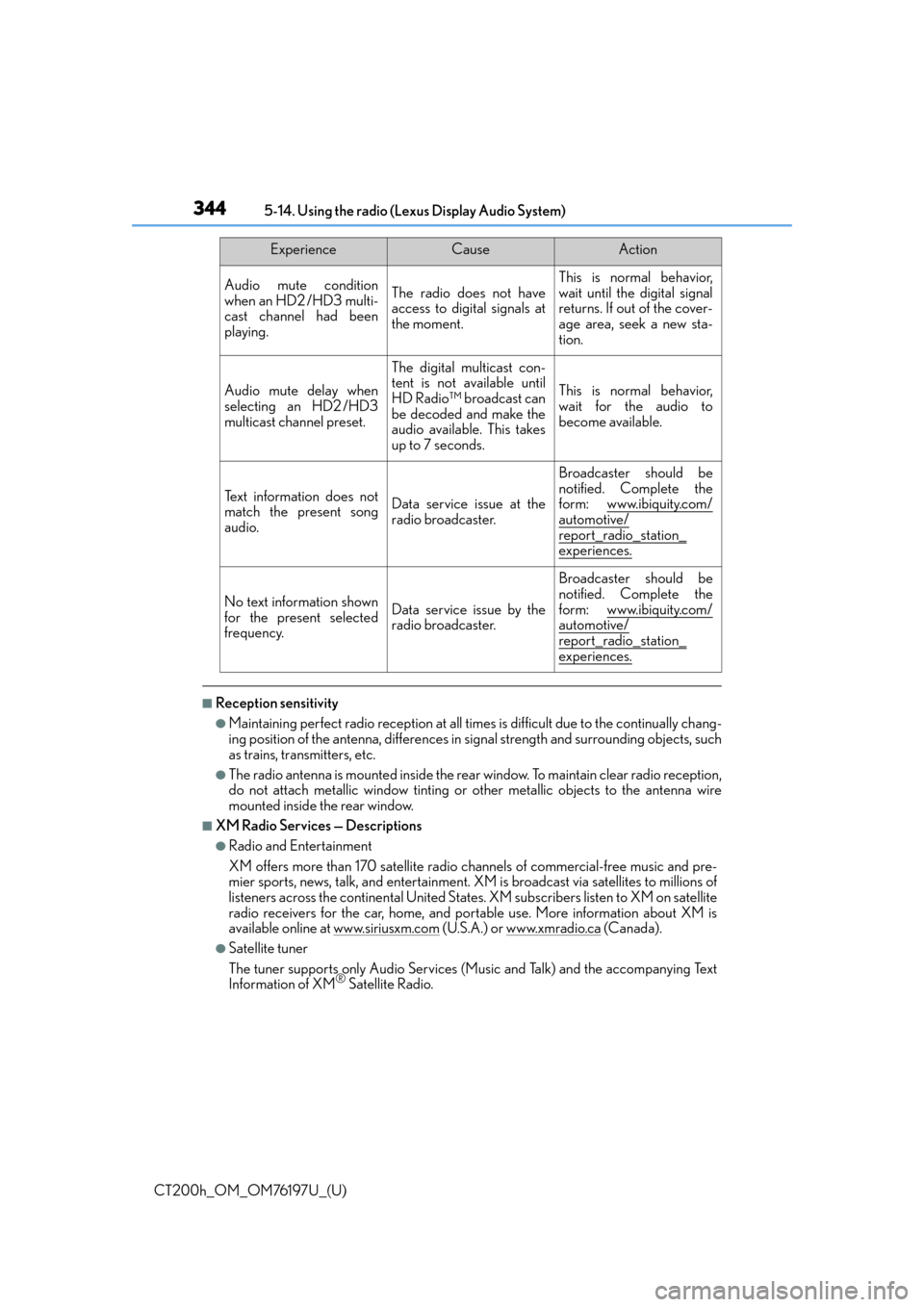
Audio mute condition
when an HD2 /HD3 multi-
cast channel had been
playing.The radio does not have
access to digital signals at
the moment.This is normal behavior,
wait until the digital signal
returns. If out of the cover-
age area, seek a new sta-
tion.
Audio mute delay when
selecting an HD2 /HD3
multicast channel preset.
The digital multicast con-
tent is not available until
HD Radio™ broadcast can
be decoded and make the
audio available. This takes
up to 7 seconds.
This is normal behavior,
wait for the audio to
become available.
Te x t i n f o r m a t i o n d o e s n o t
match the present song
audio.Data service issue at the
radio broadcaster.
Broadcaster should be
notified. Complete the
form: www.ibiquity.com/
automotive/report_radio_station_
experiences.
No text information shown
for the present selected
frequency.Data service issue by the
radio broadcaster.
Broadcaster should be
notified. Complete the
form: www.ibiquity.com/
automotive/
report_radio_station_experiences.
ExperienceCauseAction
Page 346 of 632
3465-14. Using the radio (Lexus Display Audio System)
CT200h_OM_OM76197U_(U)
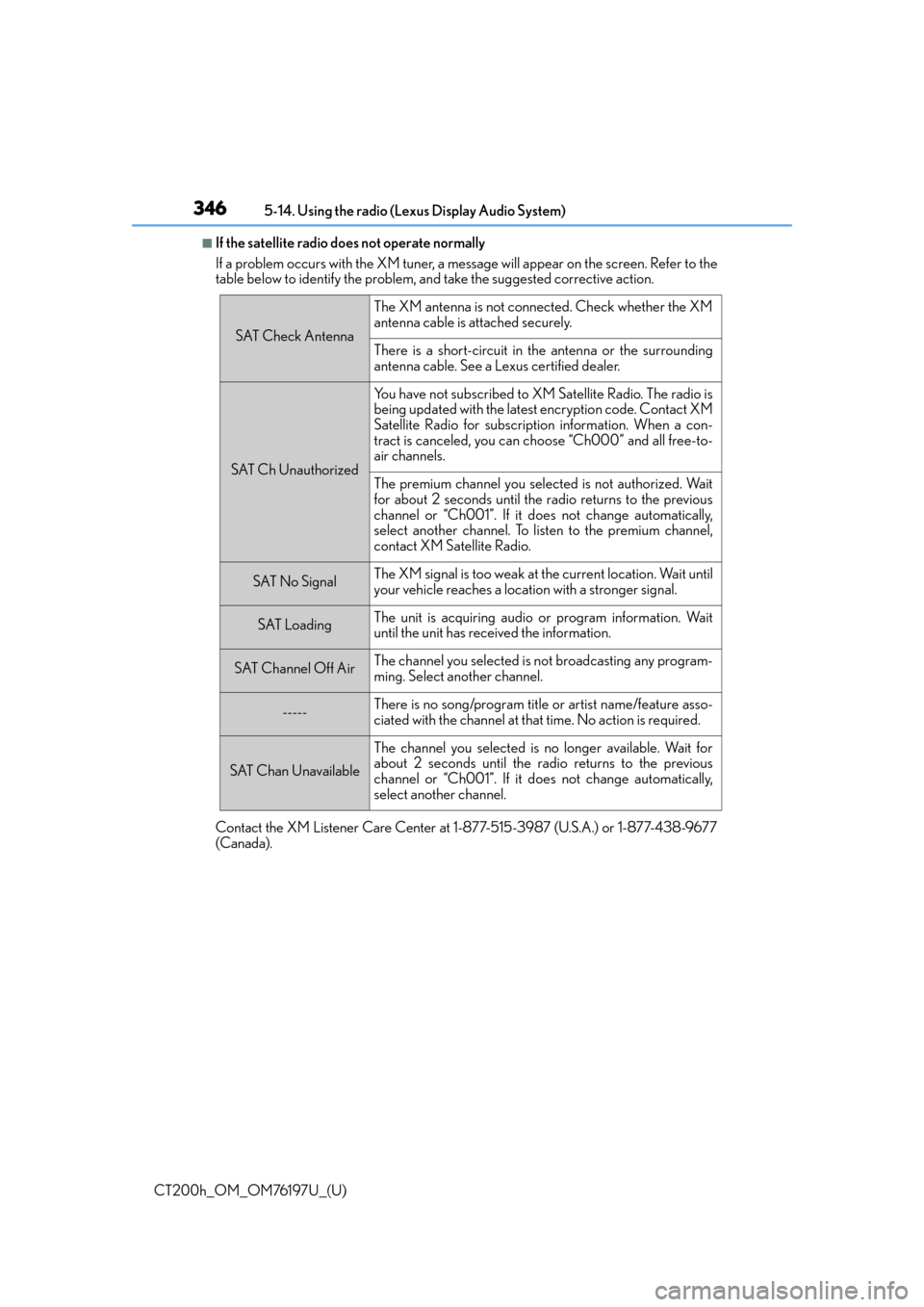
■If the satellite radio does not operate normally
If a problem occurs with the XM tuner, a me ssage will appear on the screen. Refer to the
table below to identify the problem, and take the suggested corrective action.
Contact the XM Listener Care Center at 1-877-515-3987 (U.S.A.) or 1-877-438-9677
(Canada).
SAT Check Antenna
The XM antenna is not connected. Check whether the XM
antenna cable is attached securely.
There is a short-circuit in the antenna or the surrounding
antenna cable. See a Lexus certified dealer.
SAT Ch Unauthorized
Yo u h a v e n o t s u b s c r i b e d t o X M Satellite Radio. The radio is
being updated with the latest encryption code. Contact XM
Satellite Radio for subscription information. When a con-
tract is canceled, you can choose “Ch000” and all free-to-
air channels.
The premium channel you select ed is not authorized. Wait
for about 2 seconds until the radio returns to the previous
channel or “Ch001”. If it does not change automatically,
select another channel. To listen to the premium channel,
contact XM Satellite Radio.
SAT No SignalThe XM signal is too weak at the current location. Wait until
your vehicle reaches a location with a stronger signal.
SAT LoadingThe unit is acquiring audio or program information. Wait
until the unit has received the information.
SAT Channel Off AirThe channel you selected is not broadcasting any program-
ming. Select another channel.
-----There is no song/program title or artist name/feature asso-
ciated with the channel at that time. No action is required.
SAT Chan Unavailable
The channel you selected is no longer available. Wait for
about 2 seconds until the radio returns to the previous
channel or “Ch001”. If it does not change automatically,
select another channel.