steering wheel Lexus ES300h 2014 Instrument cluster / (OM33A60U) Service Manual
[x] Cancel search | Manufacturer: LEXUS, Model Year: 2014, Model line: ES300h, Model: Lexus ES300h 2014Pages: 917, PDF Size: 11.11 MB
Page 334 of 917

334
ES350_300h_OM_OM33A60U_(U)
4-6. Driving tips
CAUTION
■Driving with snow tires
Observe the following precautions to reduce the risk of accidents.
Failure to do so may result in a loss of vehicle control and cause death or serious
injury.
●Use tires of the specified size.
●Maintain the recommended level of air pressure.
●Do not drive in excess of 75 mph (120 km/h), regardless of the type of snow tires
being used.
●Use snow tires on all, not just some wheels.
■Driving with tire chains
Observe the following precautions to reduce the risk of accidents.
Failure to do so may result in the vehicle being unable to be driven safely, and may
cause death or serious injury.
●Do not drive in excess of the speed limit specified for the tire chains being used,
or 30 mph (50 km/h), whichever is lower.
●Avoid driving on bumpy road surfaces or over potholes.
●Avoid sudden acceleration, abrupt steering, sudden braking and shifting opera-
tions that cause sudden engine braking.
●Slow down sufficiently before entering a curve to ensure that vehicle control is
maintained.
●Do not use LDA (Lane Departure Alert) system.
Page 336 of 917

336
ES350_300h_OM_OM33A60U_(U)
5-1. Lexus Display Audio systemLexus Display Audio system ......................................... 338
Display settings .......................... 343
Setup menu...................................345
Mobile Assistant .......................... 351
5-2. Using the air conditioning system and defogger
Automatic air conditioning system (with the Lexus
Display Audio system) ..........353
Automatic air conditioning system (without a navigation
system or the Lexus
Display Audio system) ..........365
Rear window and outside rear view mirror defoggers........... 378
Windshield wiper de-icer ...... 380 5-3. Using the Lexus
Display Audio system
Audio system (with the Lexus Display Audio system) ..........382
Using the radio............................385
Using the CD player................ 400
Playing an audio CD and MP3/WMA discs ................... 401
Listening to an iPod ...................... 411
Listening to a USB memory ......................... 419
Using the AUX port ................. 429
Listening to Bluetooth
® audio .................... 431
Optimal use of the audio system...................... 446
Using the steering wheel audio switches ..........................448
Hands-free system (for cellular phone)...................451
Using the Bluetooth
®
phone ........................................... 459
Setting the hands-free system .......................................... 478
Bluetooth
® settings ................... 491
5Interior features
Page 337 of 917

337
ES350_300h_OM_OM33A60U_(U)
5Interior features
5-4. Using the audio systemAudio system (without a navigation system or
the Lexus Display
Audio system) .......................... 500
Using the radio ........................... 503
Using the CD player .................. 512
Playing MP3 and WMA discs................................. 521
Operating an iPod ..................... 529
Operating a USB memory.....539
Bluetooth
® audio system ...... 548
Using the Bluetooth
®
audio system.............................. 552
Operating a Bluetooth
®
enabled portable player ....... 557
Setting up a Bluetooth
®
enabled portable player ........ 561
Bluetooth
® audio
system setup ............................. 568
Optimal use of the audio system..............................569
Using the AUX port................... 571
Using the steering wheel audio switches .......................... 573
Hands-free system (for cellular phone) ..................576
Using the hands-free system (for cellular phones) ................581
Making a phone call ................. 589
Setting a cellular phone ...........593
Security and system setup ..... 598
Using the phone book............. 603 5-5. Using the interior lights
Interior lights list ............................ 611• Interior light .............................. 612
• Personal lights ......................... 612
5-6. Using the storage features List of storage features ..............614• Glove box .................................616
• Console box............................. 617
• Cup holders ............................ 618
• Auxiliary box ............................619
Trunk features .............................. 620
5-7. Other interior features Sun visors and vanity mirrors ................... 622
Clock............................................... 623
Power outlets ............................... 624
Heated steering wheel ............ 626
Seat heaters and ventilators ................................... 628
Armrest ..........................................630
Rear sunshade/ rear door sunshades ............... 631
Trunk storage extension .......... 634
Coat hooks ................................... 635
Assist grips.................................... 636
Garage door opener................ 637
Compass ....................................... 644
Safety Connect ........................... 649
Page 351 of 917
351
ES350_300h_OM_OM33A60U_(U)
5-1. Lexus Display Audio system
5
Interior features
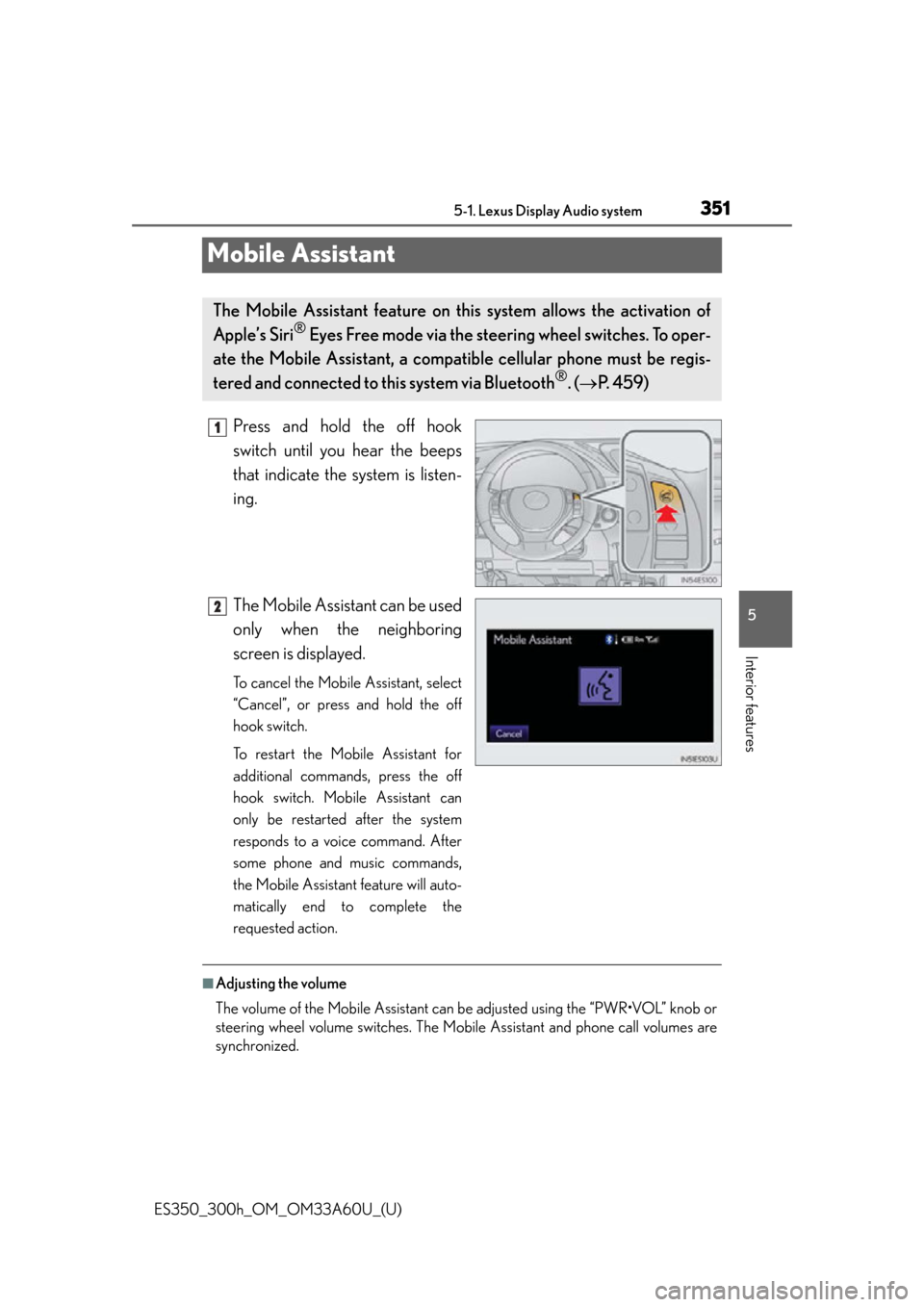
Mobile Assistant
Press and hold the off hook
switch until you hear the beeps
that indicate the system is listen-
ing.
The Mobile Assistant can be used
only when the neighboring
screen is displayed.
To cancel the Mobile Assistant, select
“Cancel”, or press and hold the off
hook switch.
To restart the Mobile Assistant for
additional commands, press the off
hook switch. Mobile Assistant can
only be restarted after the system
responds to a voice command. After
some phone and music commands,
the Mobile Assistant feature will auto-
matically end to complete the
requested action.
■Adjusting the volume
The volume of the Mobile Assistant can be adjusted using the “PWR•VOL” knob or
steering wheel volume switches. The Mobi le Assistant and phone call volumes are
synchronized.
The Mobile Assistant feature on this system allows the activation of
Apple’s Siri
® Eyes Free mode via the steering wheel switches. To oper-
ate the Mobile Assistant, a compa tible cellular phone must be regis-
tered and connected to this system via Bluetooth
®. ( P. 4 5 9 )
1
2
Page 383 of 917

ES350_300h_OM_OM33A60U_(U)
3835-3. Using the Lexus Display Audio system
5
Interior features
Press the “MEDIA” button, “RADIO” button or the “AUDIO” button on
the Lexus Display Audio controller to display the audio control screen.
Select “Source” or press the
“AUDIO” button on the Lexus
Display Audio controller to dis-
play the audio source selection
screen.
Each time the “MEDIA” button is
pressed, an audio source other than
radio is changed to.
Each time the “RADIO” button is
pressed, radio mode is changed.
Select the desired audio source.
ButtonPa g e
Using the radioP. 3 8 5
Using the CD playerP. 4 0 0
Playing an audio CD and MP3/WMA discsP. 4 0 1
Listening to an iPodP. 4 1 1
Listening to a USB memoryP. 4 1 9
Using the AUX portP. 4 2 9
Listening to Bluetooth® audioP. 4 3 1
Optimal use of the audio systemP. 446
Using the steering wheel audio switchesP. 448
Hands-free system for cellular phoneP. 4 5 1
Switching the audio source
1
2
3
Page 448 of 917

448
ES350_300h_OM_OM33A60U_(U)
5-3. Using the Lexus Display Audio system
Using the steering wheel audio switches
Radio mode:
Selects radio stations
CD mode:
Selects tracks/files and folders
(MP3/WMA)
iPod mode: Selects songs
USB memory mode:
Selects files and folders
Bluetooth
® audio mode:
Selects tracks and albums
Increases/decreases volume
Press: Turns the power on, selects
audio source
Press and hold: Pause or mute
To turn the audio system on, press .
Some audio features can be controlled using the switches on the steer-
ing wheel.
Operation may differ depending on the type of audio system or naviga-
tion system. For details, refer to the manual provided with the audio sys-
tem or navigation system.
1
2
3
Turning the audio system on
Page 450 of 917

450
ES350_300h_OM_OM33A60U_(U)
5-3. Using the Lexus Display Audio system
Press to select the CD, Bluetooth® audio, iPod or USB memory
mode.
Press or to select the desired track/file or song.
Press to select the CD (only when MP3/WMA disc is in use),
Bluetooth
® audio or USB memory mode.
Press and hold or until you hear a beep.
Selecting a track/file or song
Selecting a folder or album
CAUTION
■To reduce the risk of an accident
Exercise care when operating the audio switches on the steering wheel.
1
2
1
2
Page 459 of 917

459
ES350_300h_OM_OM33A60U_(U)
5-3. Using the Lexus Display Audio system
5
Interior features
Using the Bluetooth® phone
Device name
Bluetooth
® connection status (P. 453)
Dialing from history ( P. 4 6 9 )
Speed dialing ( P. 4 6 9 )
Dialing from the phonebook ( P. 4 6 7 )
Dialing by inputting a number ( P. 466)
Connecting a Bluetooth
® phone ( P. 4 6 2 )
To display the screen shown above, press on the steering wheel or
press the “MENU” button on the Lexu s Display Audio controller and then
select “Phone” on the “Menu” screen.
1
2
3
4
5
6
7
Page 466 of 917

466
ES350_300h_OM_OM33A60U_(U)
5-3. Using the Lexus Display Audio system
Once the Bluetooth® phone is registered, you can make a call using the
following procedure:
■Dialing
Display the “Phone” screen. ( P. 4 5 9 )
Select “Dial” on the “Phone” screen.
Input the phone number.
To delete the inputted phone num-
ber, select .
For the first digit, you can enter “+”
by selecting “
” for a while.
Press on the steering wheel or select .
Depending on the type of phone, when internet communication functions such
as skype are available, phone operations (selecting between normal phone
communication or internet communication) may be necessary after dialing
operations are performed.
Making a call
1
2
3
4
Page 467 of 917

ES350_300h_OM_OM33A60U_(U)
4675-3. Using the Lexus Display Audio system
5
Interior features
■Dialing from the phonebook
You can dial a number from the phonebook data imported from your
cellular phone. The system has on e phonebook for each telephone. Up
to 1000 entries may be stored in each phonebook. ( P. 4 8 1 )
Display the “Phone” screen. ( P. 4 5 9 )
Select “Contacts” on the “Phone” screen.
Choose the desired data to
call from the list.
If the phonebook is empty, a mes-
sage will be displayed. ( P. 4 6 8 )
Choose the number and then
press on the steering
wheel or select .
1
2
3
4