display Lexus ES350 2018 Owner's Manuals / LEXUS 2018 ES350 OWNER'S MANUAL (OM06134U)
[x] Cancel search | Manufacturer: LEXUS, Model Year: 2018, Model line: ES350, Model: Lexus ES350 2018Pages: 580, PDF Size: 10.39 MB
Page 356 of 580
356
ES350_OM_OM06134U_(U)5-12. Other function
USB photo
Go to “USB Photo”: “MENU” button →
“Info” → “USB1 Photo” or “USB2
Photo”
→ P. 277
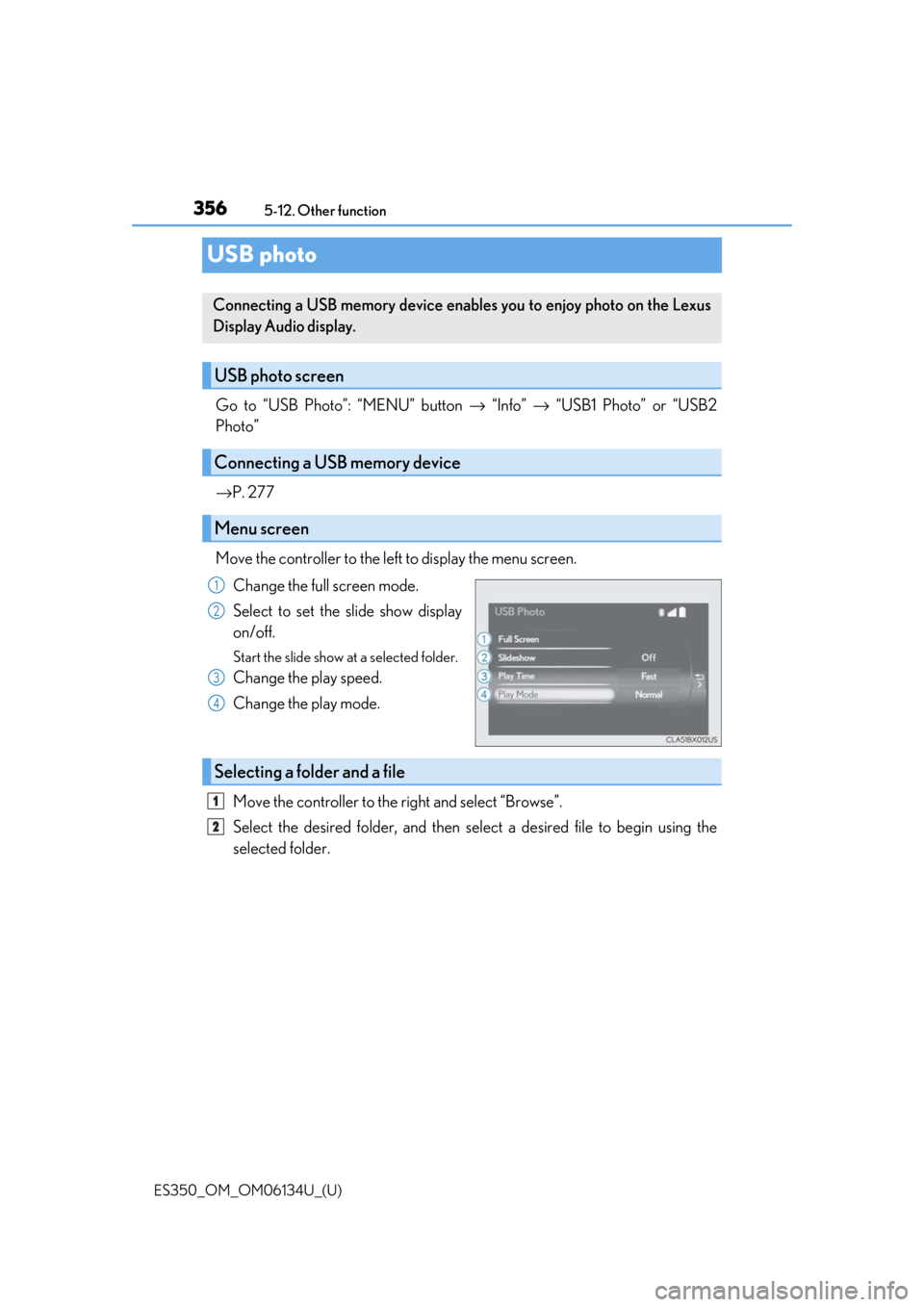
Move the controller to the left to display the menu screen. Change the full screen mode.
Select to set the slide show display
on/off.
Start the slide show at a selected folder.
Change the play speed.
Change the play mode.
Move the controller to the right and select “Browse”.
Select the desired folder, and then sele ct a desired file to begin using the
selected folder.
Connecting a USB memory device enables you to enjoy photo on the Lexus
Display Audio display.
USB photo screen
Connecting a USB memory device
Menu screen
1
2
3
4
Selecting a folder and a file
1
2
Page 357 of 580
ES350_OM_OM06134U_(U)
3575-12. Other function
5
Lexus Display Audio system
■USB memory functions
→P. 312
■USB memory
●Compatible devices
USB memory device that can be used for JPEG display.
●Compatible device formats
The following device format can be used:
• USB communication format: USB2.0 FS (480 Mbps)
• File system format: FAT16/32 (Windows)
• Correspondence class: Mass storage class
●JPEG file compatibility
• Compatible image size: Maximum 10MB
• Compatible pixel size: Maximum 10,000,000 pixels
NOTICE
■To prevent damage to the USB me mory device or its terminals
→ P. 314
Page 358 of 580
358
ES350_OM_OM06134U_(U)5-12. Other function
Weather information
Go to “Weather”: “MENU” button
→ “Info” → “Weather”
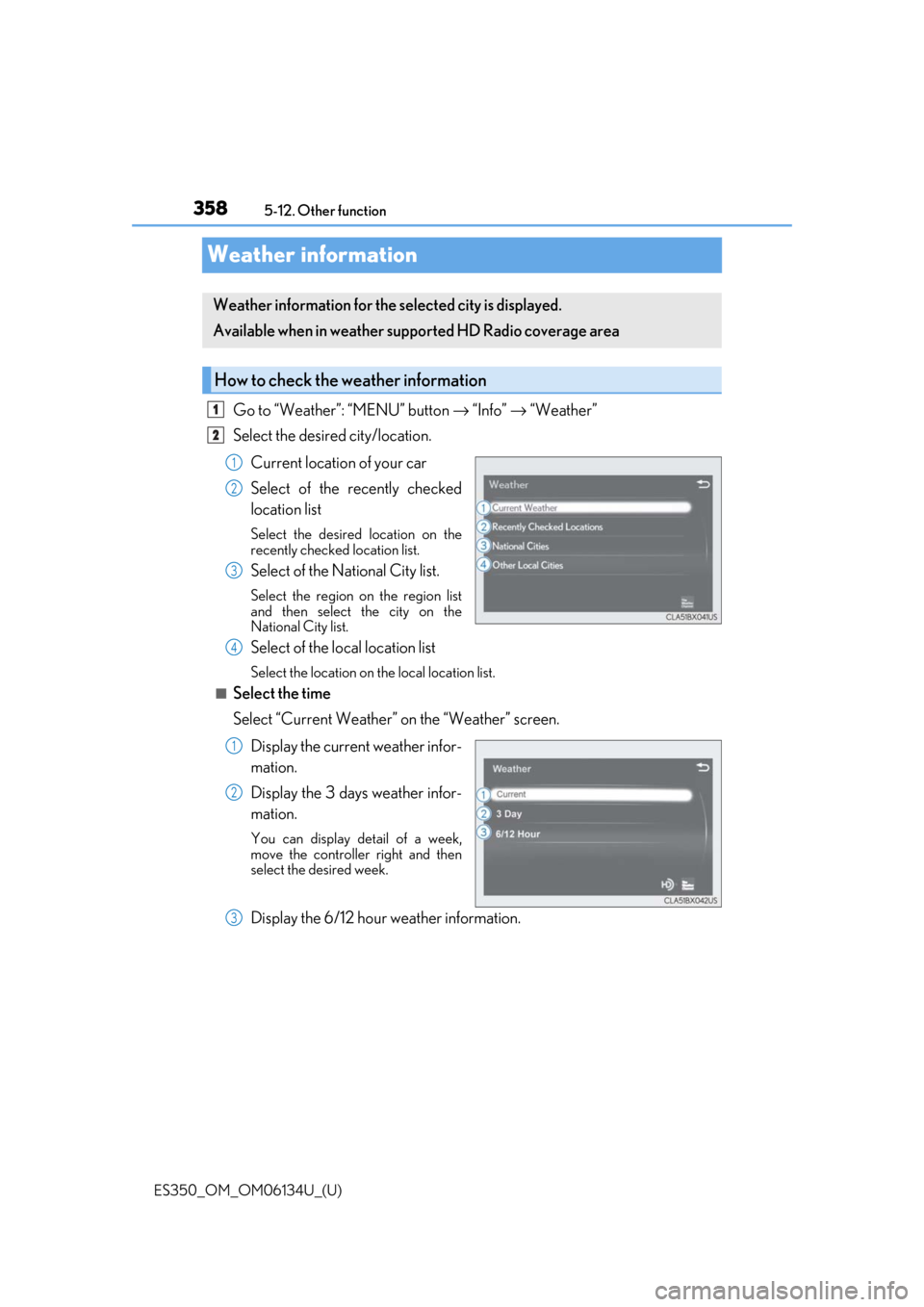
Select the desired city/location.
Current location of your car
Select of the recently checked
location list
Select the desired location on the
recently checked location list.
Select of the National City list.
Select the region on the region list
and then select the city on the
National City list.
Select of the local location list
Select the location on the local location list.
■Select the time
Select “Current Weather” on the “Weather” screen.Display the current weather infor-
mation.
Display the 3 days weather infor-
mation.
You can display detail of a week,
move the controlle r right and then
select the desired week.
Display the 6/12 hour weather information.
Weather information for the selected city is displayed.
Available when in weather suppo rted HD Radio coverage area
How to check the weather information
1
2
1
2
3
4
1
2
3
Page 359 of 580
359
ES350_OM_OM06134U_(U)5-12. Other function
5
Lexus Display Audio system
Voice command system
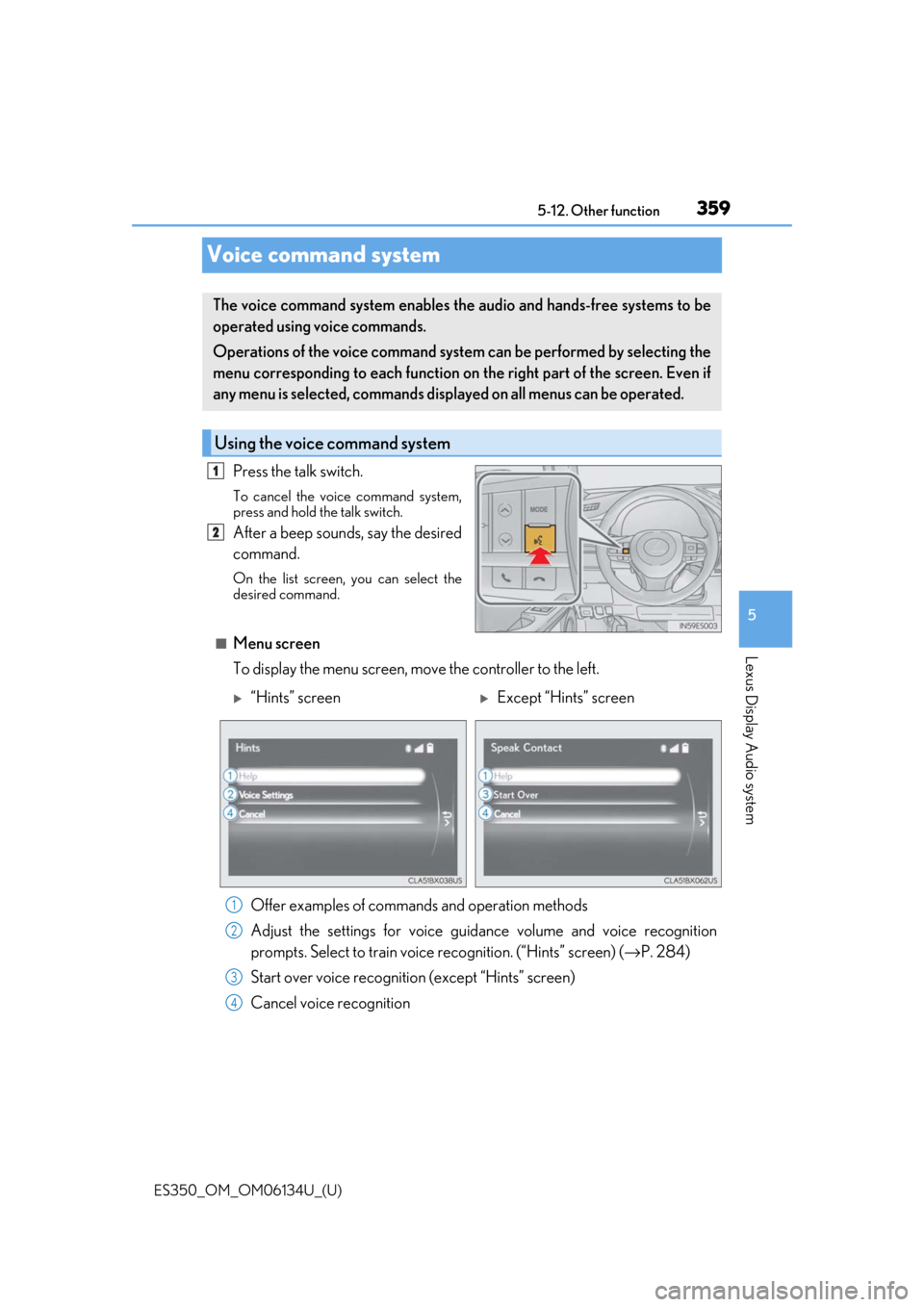
Press the talk switch.
To cancel the voice command system,
press and hold the talk switch.
After a beep sounds, say the desired
command.
On the list screen, you can select the
desired command.
■Menu screen
To display the menu screen, m
ove the controller to the left.
The voice command system enables the audio and hands-free systems to be
operated using voice commands.
Operations of the voice command system can be performed by selecting the
menu corresponding to each function on the right part of the screen. Even if
any menu is selected, commands displayed on all menus can be operated.
Using the voice command system
1
2
“Hints” screenExcept “Hints” screen
Offer examples of commands and operation methods
Adjust the settings for voice guidance volume and voice recognition
prompts. Select to train voice recognition. (“Hints” screen) (→ P. 284)
Start over voice recognition (except “Hints” screen)
Cancel voice recognition
1
2
3
4
Page 361 of 580
ES350_OM_OM06134U_(U)
3615-12. Other function
5
Lexus Display Audio system
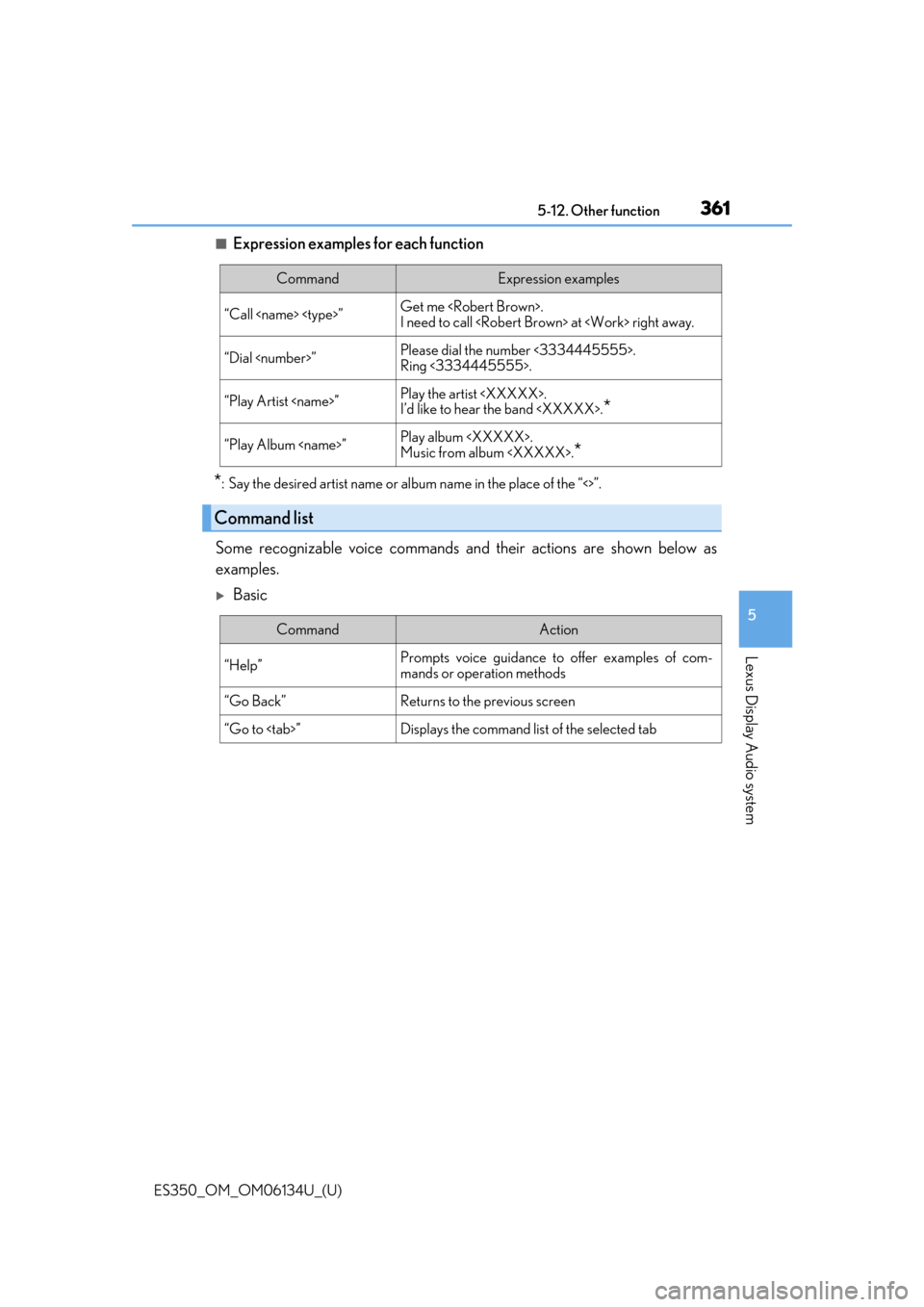
■Expression examples for each function
*: Say the desired artist name or album name in the place of the “<>”.
Some recognizable voice commands an d their actions are shown below as
examples.
Basic
CommandExpression examples
“Call
I need to call
“Dial
Ring <3334445555>.
“Play Artist
I’d like to hear the band
“Play Album
Music from album
*
Command list
CommandAction
“Help”Prompts voice guidance to offer examples of com-
mands or operation methods
“Go Back”Returns to the previous screen
“Go to
Page 362 of 580
3625-12. Other function
ES350_OM_OM06134U_(U)
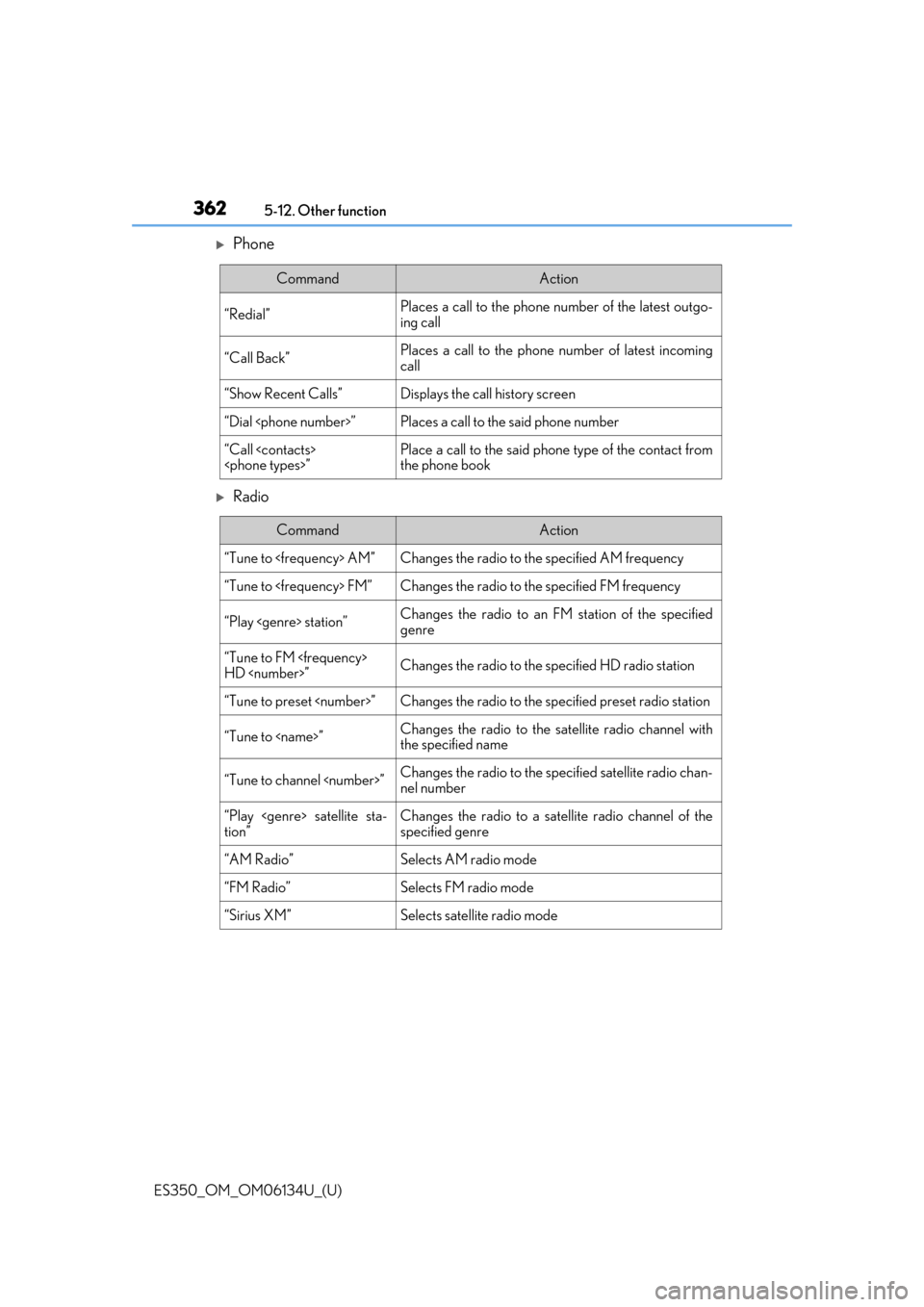
Phone
Radio
CommandAction
“Redial”Places a call to the phone number of the latest outgo-
ing call
“Call Back”Places a call to the phone number of latest incoming
call
“Show Recent Calls”Displays the call history screen
“Dial
“Call
the phone book
CommandAction
“Tune to
“Tune to
“Play
genre
“Tune to FM
HD
“Tune to preset
“Tune to
the specified name
“Tune to channel
nel number
“Play
tion”Changes the radio to a satellite radio channel of the
specified genre
“AM Radio”Selects AM radio mode
“FM Radio”Selects FM radio mode
“Sirius XM”Selects satellit e radio mode
Page 363 of 580
ES350_OM_OM06134U_(U)
3635-12. Other function
5
Lexus Display Audio system
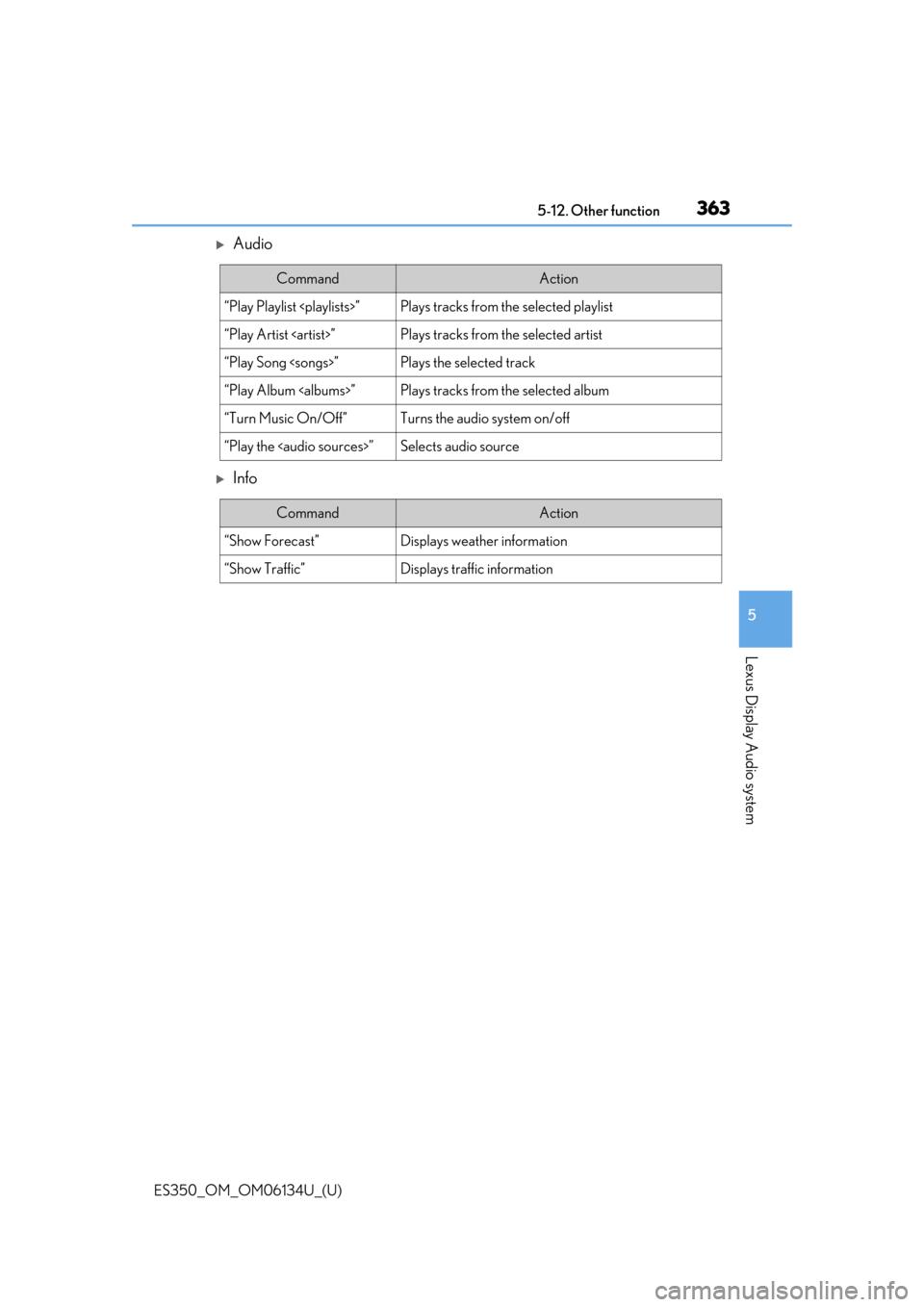
Audio
Info
CommandAction
“Play Playlist
“Play Artist
“Play Song
“Play Album
“Turn Music On/Off”Turns the audio system on/off
“Play the
Page 366 of 580
366
ES350_OM_OM06134U_(U)6-1. Using the air conditioning system and defogger
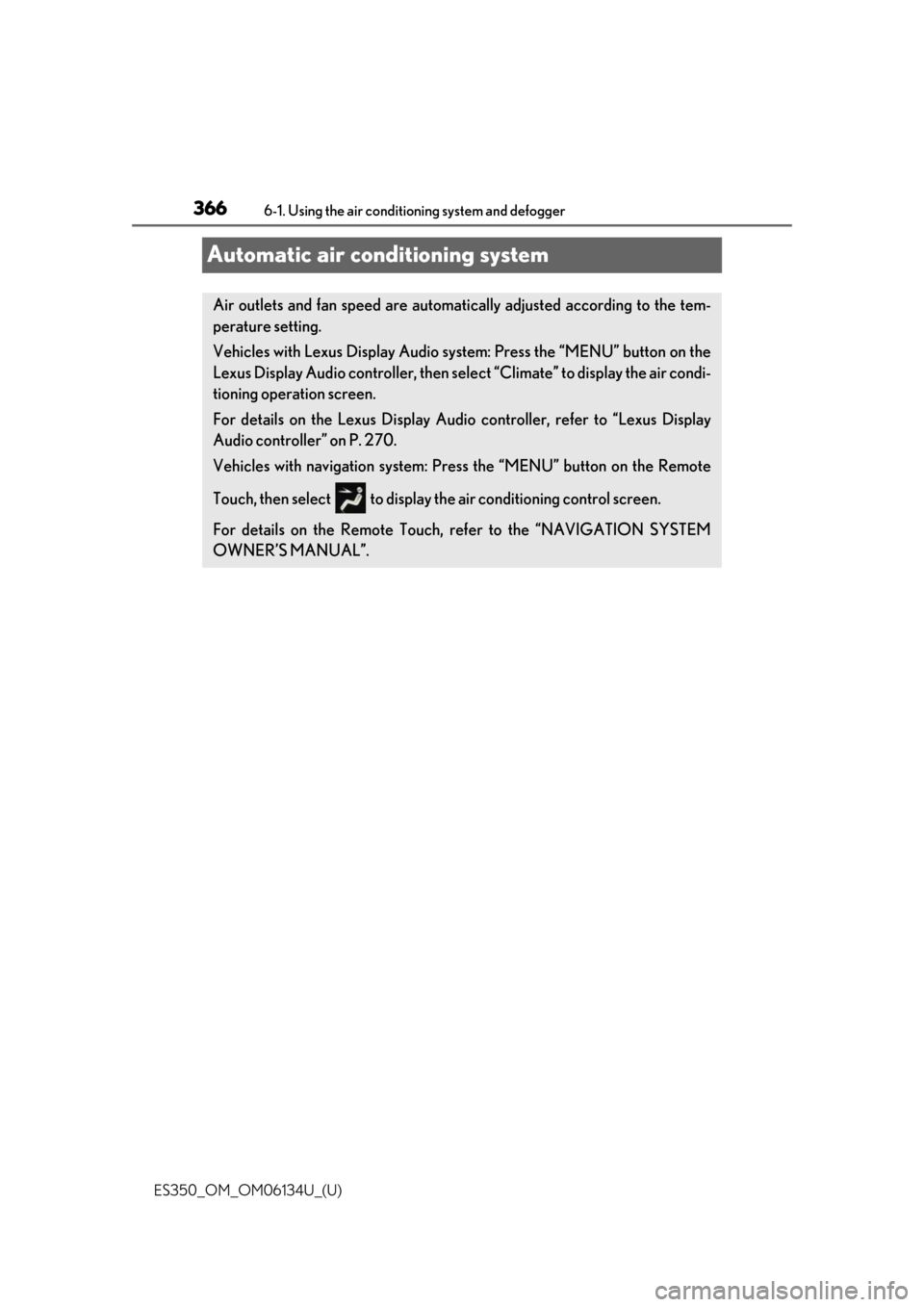
Automatic air conditioning system
Air outlets and fan speed are automati
cally adjusted according to the tem-
perature setting.
Vehicles with Lexus Display Audio system: Press the “MENU” button on the
Lexus Display Audio controller, then sele ct “Climate” to display the air condi-
tioning operation screen.
For details on the Lexus Display Audio controller, refer to “Lexus Display
Audio controller” on P. 270.
Vehicles with navigation system: Press the “MENU” button on the Remote
Touch, then select to display th e air conditioning control screen.
For details on the Remote Touch, refer to the “NAVIGATION SYSTEM
OWNER’S MANUAL”.
Page 367 of 580
ES350_OM_OM06134U_(U)
3676-1. Using the air conditioning system and defogger
6
Interior features
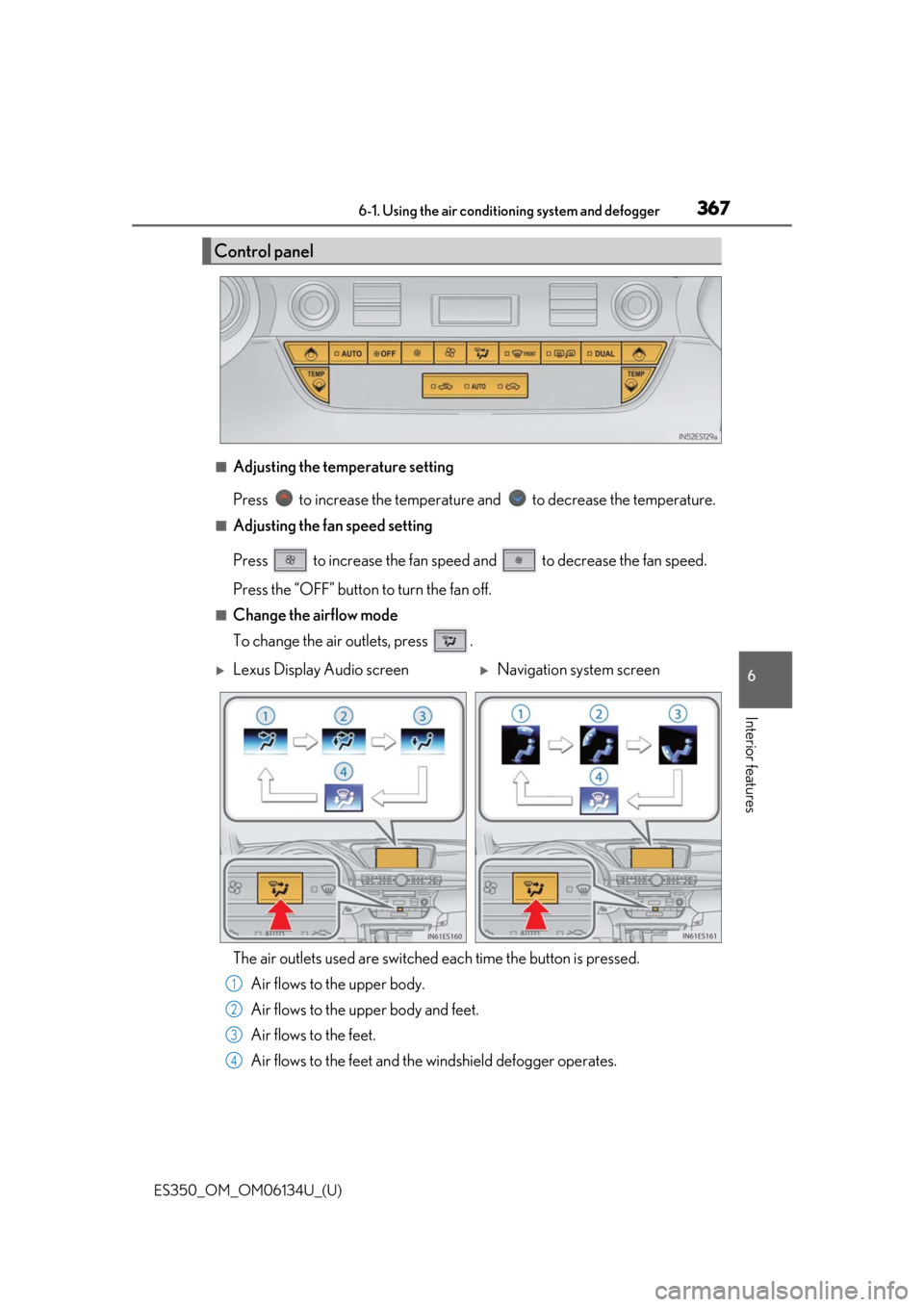
■Adjusting the temperature setting
Press to increase the temperature and to decrease the temperature.
■Adjusting the fan speed setting
Press to increase the fan speed and to decrease the fan speed.
Press the “OFF” button to turn the fan off.
■Change the airflow mode
To change the air outlets, press .
The air outlets used are switched each time the button is pressed. Air flows to the upper body.
Air flows to the upper body and feet.
Air flows to the feet.
Air flows to the feet and the windshield defogger operates.
Control panel
Lexus Display Audio screenNavigation system screen
1
2
3
4
Page 368 of 580
3686-1. Using the air conditioning system and defogger
ES350_OM_OM06134U_(U)
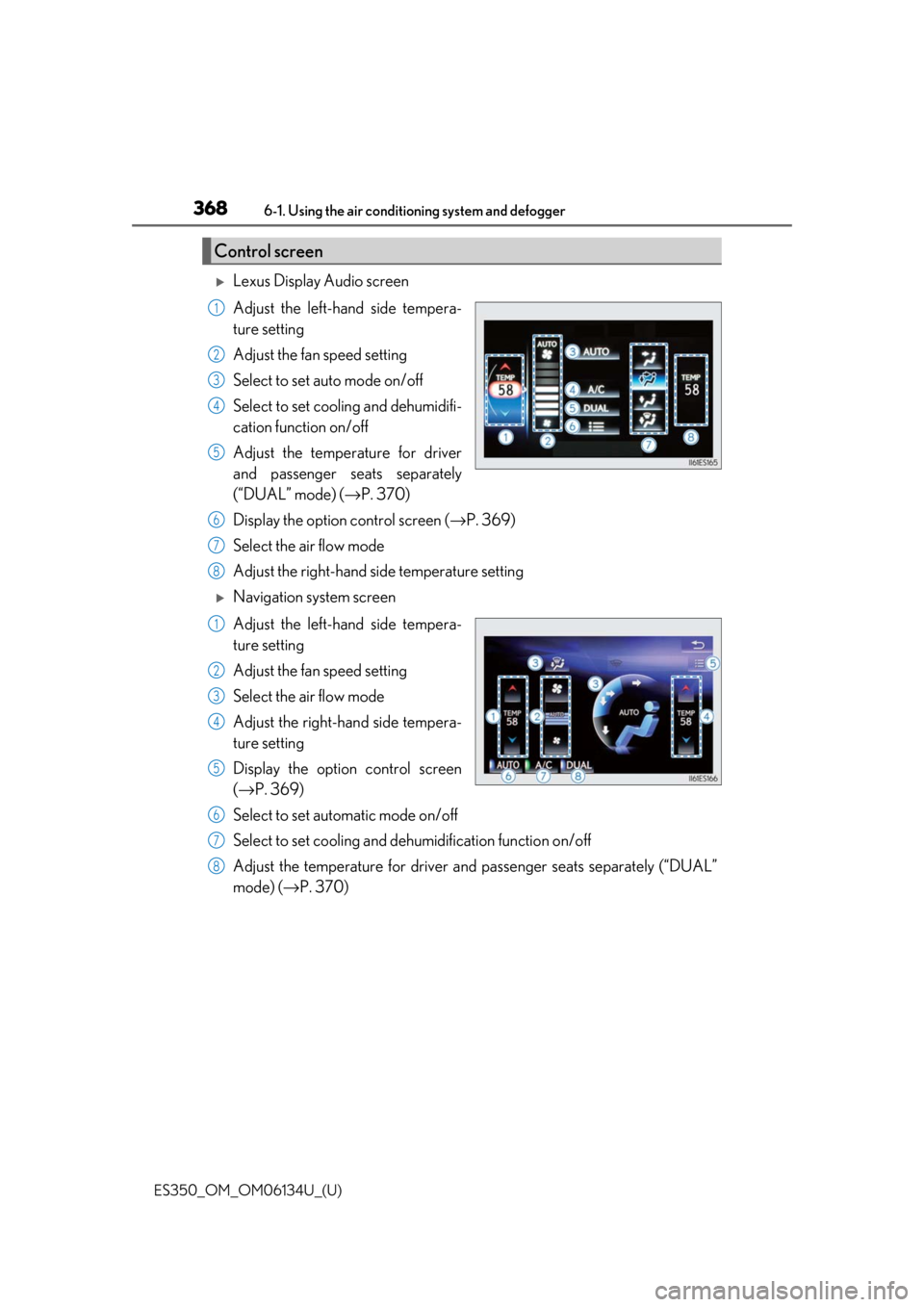
Lexus Display Audio screen
Adjust the left-hand side tempera-
ture setting
Adjust the fan speed setting
Select to set auto mode on/off
Select to set cooling and dehumidifi-
cation function on/off
Adjust the temperature for driver
and passenger seats separately
(“DUAL” mode) ( →P. 370)
Display the option control screen ( →P. 369)
Select the air flow mode
Adjust the right-hand side temperature setting
Navigation system screen
Adjust the left-hand side tempera-
ture setting
Adjust the fan speed setting
Select the air flow mode
Adjust the right-hand side tempera-
ture setting
Display the option control screen
(→ P. 369)
Select to set automatic mode on/off
Select to set cooling and dehumidification function on/off
Adjust the temperature for driver an d passenger seats separately (“DUAL”
mode) (→ P. 370)
Control screen
1
2
3
4
5
6
7
8
1
2
3
4
5
6
7
8