audio Lexus ES350 2018 Owner's Manuals / LEXUS 2018 ES350 OWNER'S MANUAL (OM06134U)
[x] Cancel search | Manufacturer: LEXUS, Model Year: 2018, Model line: ES350, Model: Lexus ES350 2018Pages: 580, PDF Size: 10.39 MB
Page 1 of 580

ES350_OM_OM06134U_(U)
Pictorial indexSearch by illustration
1For safety
and securityMake sure to read through them
2Instrument clusterHow to read the gauges and meters, the variety of
warning lights and indicators, etc.
3Operation of each
componentOpening and closing the doors and windows,
adjustment before driving, etc.
4DrivingOperations and advice which are necessary for driving
5Lexus Display
Audio systemOperating the Lexus Display Audio system
6Interior featuresUsage of the interior features, etc.
7Maintenance
and careCaring for your vehicle and maintenance procedures
8When trouble
arisesWhat to do in case of malfunction or emergency
9Vehicle
specificationsVehicle specifications, customizable features, etc.
10For ownersReporting safety defects for U.S. owners, and seat belt
and SRS airbag instructio ns for Canadian owners
IndexSearch by symptom
Search alphabetically
Page 4 of 580

TABLE OF CONTENTS4
ES350_OM_OM06134U_(U)
5-1. Basic OperationsLexus Display Audio system.......................................... 268
Steering wheel audio switches .......................................274
Mobile Assistant ........................ 275
USB/AUX ports .........................277
5-2. Setup Setup menu ..................................280
General settings.......................... 281
Voice settings.............................. 284
Display settings ........................... 285
5-3. Using the audio system Selecting the audio source .......................................... 286
Optimal use of the audio system.......................................... 287
Audio settings .............................288
Audio menu screen operation ......................................291
5-4. Using the radio Radio operation.......................... 294
5-5. Playing an audio CD and MP3/WMA/AAC discs
CD player operation ................300
5-6. Using an external device Listening to an iPod .................. 307
Using USB memory device ............................................. 311
Using the AUX port .................. 315 5-7. Connecting Bluetooth
®
Steps for using Bluetooth®
devices ..........................................316
Registering a Bluetooth
®
device ........................................... 318
Selecting a Bluetooth
®
device ............................................319
Connecting a Bluetooth
®
audio player .............................. 320
Connecting a Bluetooth
®
phone .............................................321
Displaying a Bluetooth
®
device details ............................ 322
Detailed Bluetooth
®
settings ........................................ 323
5-8. Bluetooth
® Audio
Listening to Bluetooth
®
Audio ........................................... 326
5-9. Bluetooth
® Phone
Using a Bluetooth
®
Phone........................................... 327
Making a call................................ 329
Receiving a call ........................... 332
Speaking on the phone ........... 333
Using a Bluetooth
®
phone message ....................... 335
Using the steering wheel switches ...................................... 337
Bluetooth
® phone
settings ........................................ 338
5Lexus Display Audio system
Page 7 of 580
7
ES350_OM_OM06134U_(U)
1
9 8
7 4 3
2
10
5
6
9-1. SpecificationsMaintenance data (fuel, oil level, etc.) ....................516
Fuel information ......................... 525
Tire information .......................... 528
9-2. Customization Customizable features ............538
9-3. Initialization Items to initialize......................... 548
Reporting safety defects for U.S. owners ....................................550
Seat belt instructions for Canadian owners
(in French)............................................... 551
SRS airbag instructions for Canadian owners
(in French).............................................. 552
What to do if... (Troubleshooting )............................... 560
Alphabetical index ................................ 564
9Vehicle specifications
10For owners
Index
For vehicles with navigation syst em, refer to the “NAVIGATION SYSTEM
OWNER’S MANUAL” for information re garding the equipment listed below.
• Navigation system
• Lexus parking assist monitor
• Audio/video system
• Lexus Enform
Page 17 of 580
17Pictorial index
ES350_OM_OM06134U_(U)
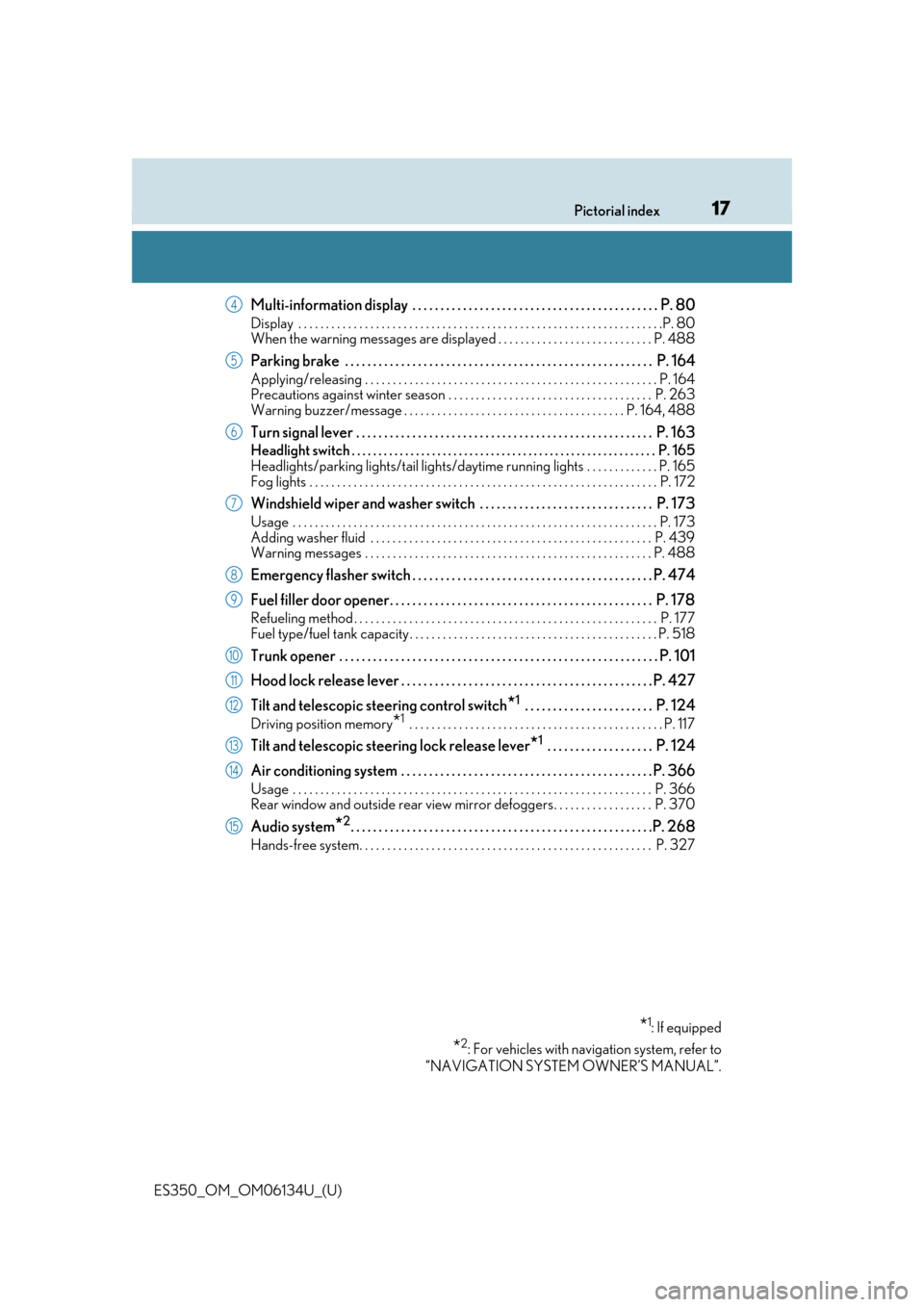
Multi-information display . . . . . . . . . . . . . . . . . . . . . . . . . . . . . . . . . . . . . . . . . . . . P. 80
Display . . . . . . . . . . . . . . . . . . . . . . . . . . . . . . . . . . . . . . . . . . . . . . . . . . . . . . . . . . . . . . . . . .P. 80
When the warning messages are displayed . . . . . . . . . . . . . . . . . . . . . . . . . . . . P. 488
Parking brake . . . . . . . . . . . . . . . . . . . . . . . . . . . . . . . . . . . . . . . . . . . . . . . . . . . . . . . P. 164
Applying/releasing . . . . . . . . . . . . . . . . . . . . . . . . . . . . . . . . . . . . . . . . . . . . . . . . . . . . . P. 164
Precautions against winter season . . . . . . . . . . . . . . . . . . . . . . . . . . . . . . . . . . . . . P. 263
Warning buzzer/message . . . . . . . . . . . . . . . . . . . . . . . . . . . . . . . . . . . . . . . . P. 164, 488
Turn signal lever . . . . . . . . . . . . . . . . . . . . . . . . . . . . . . . . . . . . . . . . . . . . . . . . . . . . . P. 163
Headlight switch . . . . . . . . . . . . . . . . . . . . . . . . . . . . . . . . . . . . . . . . . . . . . . . . . . . . . . . . . P. 165
Headlights/parking lights/tail lights/daytime running lights . . . . . . . . . . . . . P. 165
Fog lights . . . . . . . . . . . . . . . . . . . . . . . . . . . . . . . . . . . . . . . . . . . . . . . . . . . . . . . . . . . . . . . P. 172
Windshield wiper and washer switch . . . . . . . . . . . . . . . . . . . . . . . . . . . . . . . P. 173
Usage . . . . . . . . . . . . . . . . . . . . . . . . . . . . . . . . . . . . . . . . . . . . . . . . . . . . . . . . . . . . . . . . . . P. 173
Adding washer fluid . . . . . . . . . . . . . . . . . . . . . . . . . . . . . . . . . . . . . . . . . . . . . . . . . . . P. 439
Warning messages . . . . . . . . . . . . . . . . . . . . . . . . . . . . . . . . . . . . . . . . . . . . . . . . . . . . P. 488
Emergency flasher switch . . . . . . . . . . . . . . . . . . . . . . . . . . . . . . . . . . . . . . . . . . . P. 474
Fuel filler door opener. . . . . . . . . . . . . . . . . . . . . . . . . . . . . . . . . . . . . . . . . . . . . . . P. 178
Refueling method . . . . . . . . . . . . . . . . . . . . . . . . . . . . . . . . . . . . . . . . . . . . . . . . . . . . . . . P . 177
Fuel type/fuel tank capacity . . . . . . . . . . . . . . . . . . . . . . . . . . . . . . . . . . . . . . . . . . . . . P. 518
Trunk opener . . . . . . . . . . . . . . . . . . . . . . . . . . . . . . . . . . . . . . . . . . . . . . . . . . . . . . . . . P . 101
Hood lock release lever . . . . . . . . . . . . . . . . . . . . . . . . . . . . . . . . . . . . . . . . . . . . . P. 427
Tilt and telescopic steering control switch
*1 . . . . . . . . . . . . . . . . . . . . . . . P. 124
Driving position memory*1 . . . . . . . . . . . . . . . . . . . . . . . . . . . . . . . . . . . . . . . . . . . . . . P. 117
Tilt and telescopic steering lock release lever*1 . . . . . . . . . . . . . . . . . . . P. 124
Air conditioning system . . . . . . . . . . . . . . . . . . . . . . . . . . . . . . . . . . . . . . . . . . . . . P. 366
Usage . . . . . . . . . . . . . . . . . . . . . . . . . . . . . . . . . . . . . . . . . . . . . . . . . . . . . . . . . . . . . . . . . P. 366
Rear window and outside rear view mirror defoggers. . . . . . . . . . . . . . . . . . P. 370
Audio system*2. . . . . . . . . . . . . . . . . . . . . . . . . . . . . . . . . . . . . . . . . . . . . . . . . . . . . .P. 268
Hands-free system. . . . . . . . . . . . . . . . . . . . . . . . . . . . . . . . . . . . . . . . . . . . . . . . . . . . . P. 3 27
*1: If equipped
*2: For vehicles with navigation system, refer to
“NAVIGATION SYSTEM OWNER’S MANUAL”.
4
5
6
7
8
9
10
11
12
13
14
15
Page 20 of 580
20Pictorial index
ES350_OM_OM06134U_(U)
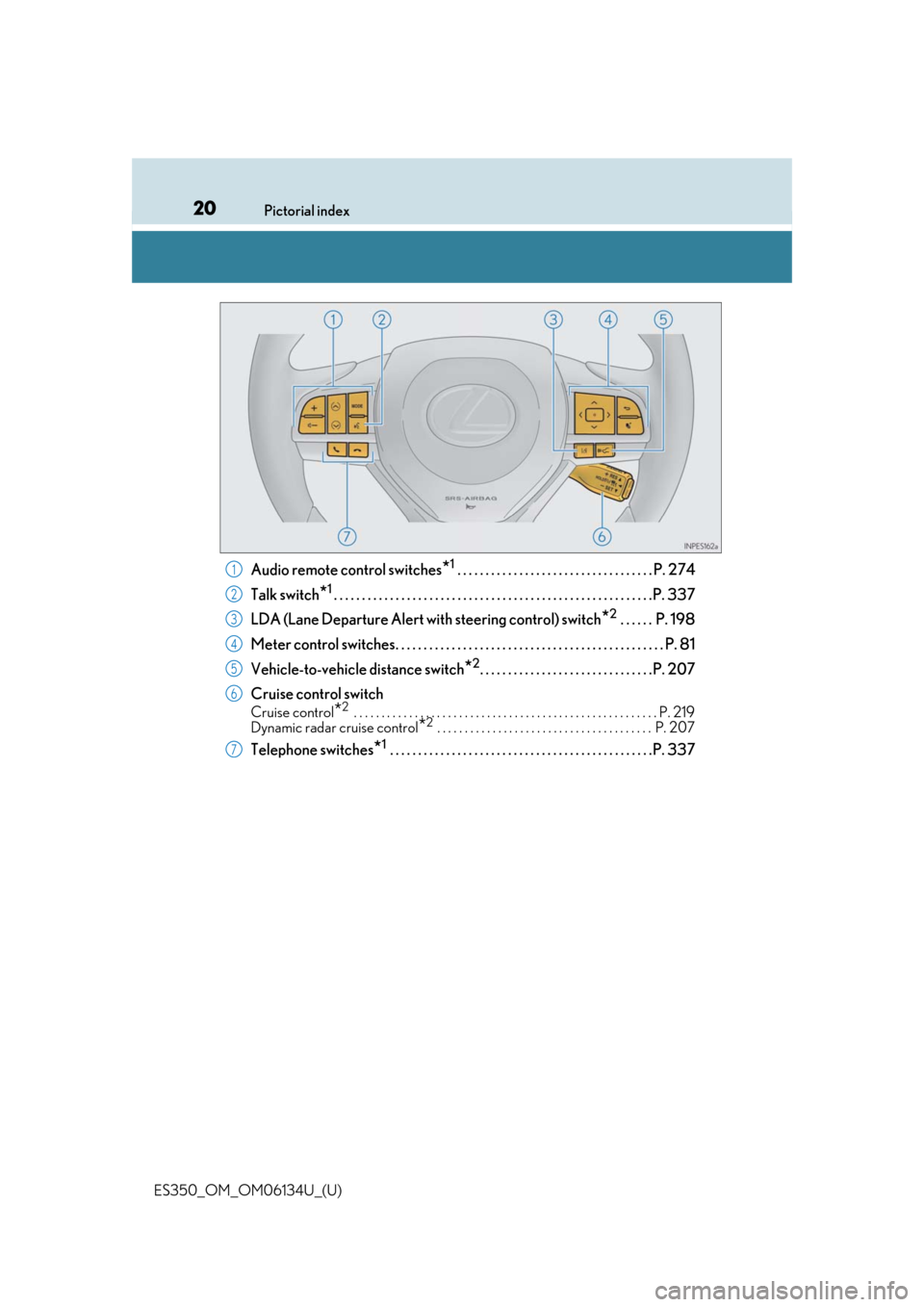
Audio remote control switches*1 . . . . . . . . . . . . . . . . . . . . . . . . . . . . . . . . . . . P. 274
Talk switch
*1. . . . . . . . . . . . . . . . . . . . . . . . . . . . . . . . . . . . . . . . . . . . . . . . . . . . . . . . .P. 337
LDA (Lane Departure Alert with steering control) switch
*2 . . . . . . P. 198
Meter control switches. . . . . . . . . . . . . . . . . . . . . . . . . . . . . . . . . . . . . . . . . . . . . . . . P. 81
Vehicle-to-vehicle distance switch
*2. . . . . . . . . . . . . . . . . . . . . . . . . . . . . . .P. 207
Cruise control switch
Cruise control*2 . . . . . . . . . . . . . . . . . . . . . . . . . . . . . . . . . . . . . . . . . . . . . . . . . . . . . . . P. 219
Dynamic radar cruise control*2 . . . . . . . . . . . . . . . . . . . . . . . . . . . . . . . . . . . . . . . P. 207
Telephone switches*1 . . . . . . . . . . . . . . . . . . . . . . . . . . . . . . . . . . . . . . . . . . . . . . .P. 337
1
2
3
4
5
6
7
Page 21 of 580
21Pictorial index
ES350_OM_OM06134U_(U)
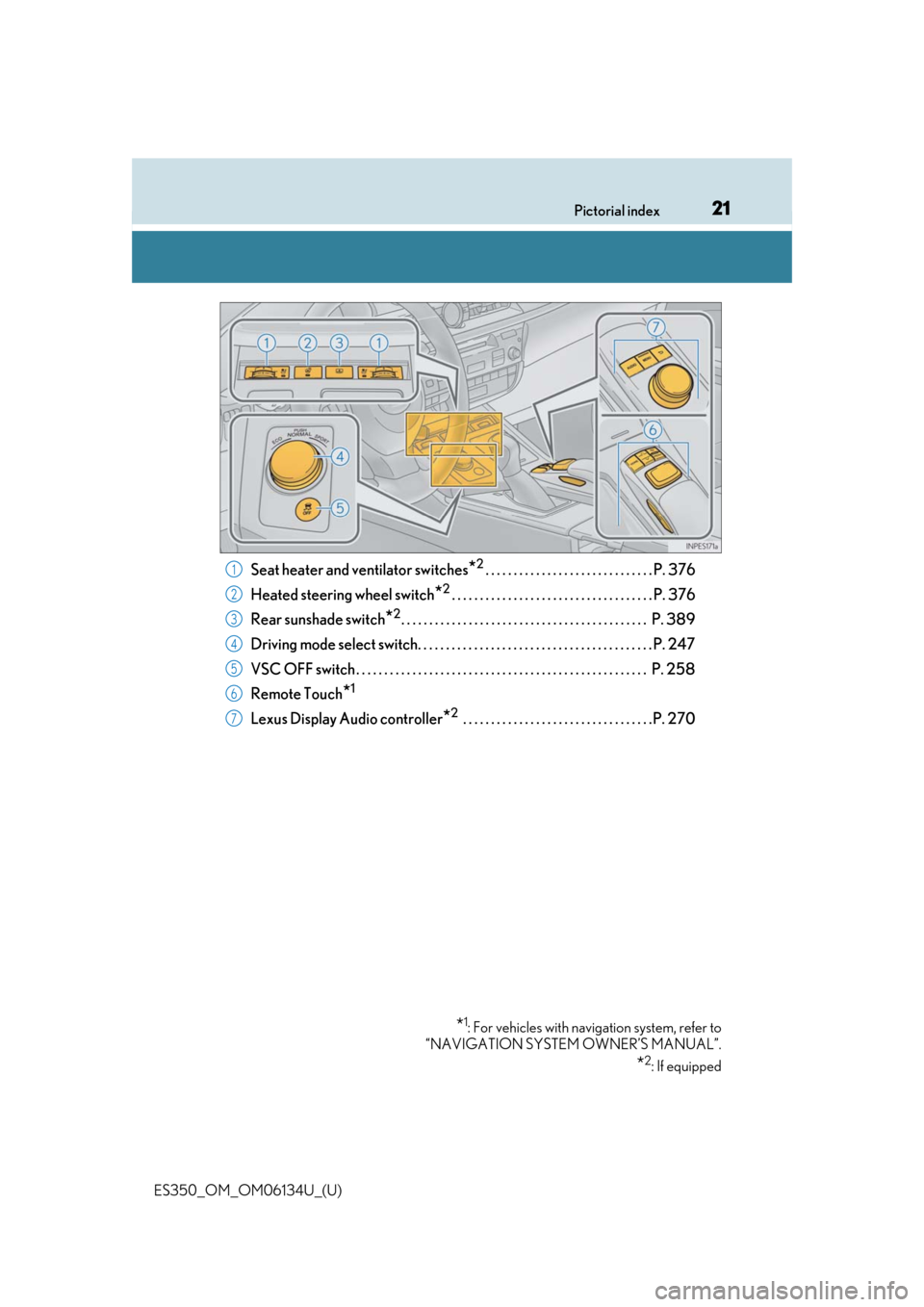
Seat heater and ventilator switches*2. . . . . . . . . . . . . . . . . . . . . . . . . . . . . . P. 376
Heated steering wheel switch
*2. . . . . . . . . . . . . . . . . . . . . . . . . . . . . . . . . . . . P. 376
Rear sunshade switch
*2. . . . . . . . . . . . . . . . . . . . . . . . . . . . . . . . . . . . . . . . . . . . P. 389
Driving mode select switch. . . . . . . . . . . . . . . . . . . . . . . . . . . . . . . . . . . . . . . . . . P. 247
VSC OFF switch . . . . . . . . . . . . . . . . . . . . . . . . . . . . . . . . . . . . . . . . . . . . . . . . . . . . P. 258
Remote Touch
*1
Lexus Display Audio controller*2 . . . . . . . . . . . . . . . . . . . . . . . . . . . . . . . . . .P. 270
*1: For vehicles with navi gation system, refer to
“NAVIGATION SYSTEM OWNER’S MANUAL”.
*2: If equipped
1
2
3
4
5
6
7
Page 80 of 580
80
ES350_OM_OM06134U_(U)2. Instrument cluster
Multi-information display
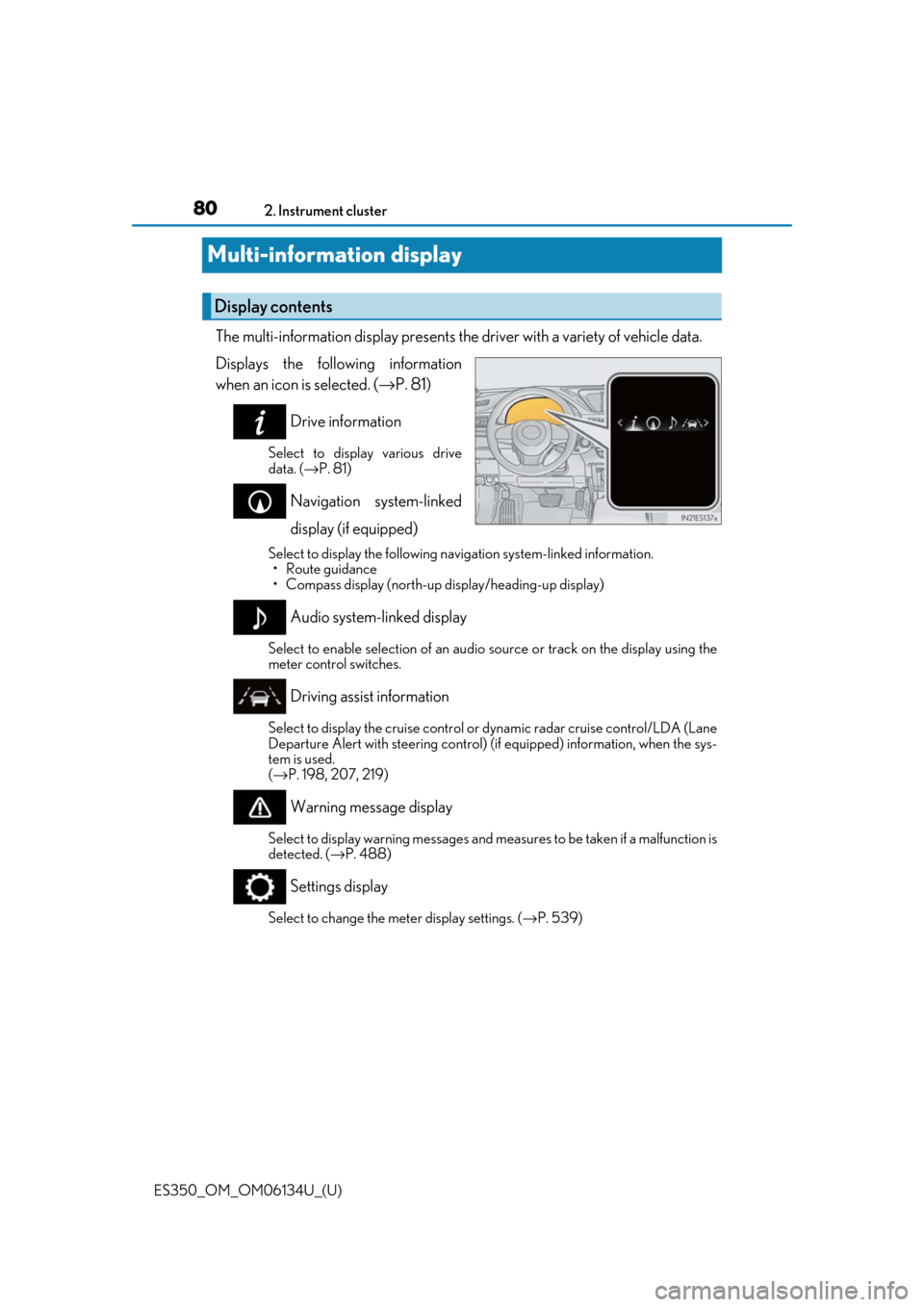
The multi-information display presents the
driver with a variety of vehicle data.
Displays the following information
when an icon is selected. ( →P. 81)
Drive information
Select to display various drive
data. ( →P. 81)
Navigation system-linked
display (if equipped)
Select to display the following na vigation system-linked information.
•Route guidance
• Compass display (north-up display/heading-up display)
Audio system-linked display
Select to enable selection of an audio source or track on the display using the
meter control switches.
Driving assist information
Select to display the cruise control or dynamic radar cruise control/LDA (Lane
Departure Alert with steering control) (if equipped) information, when the sys-
tem is used.
( → P. 198, 207, 219)
Warning message display
Select to display warning messages and measures to be taken if a malfunction is
detected. ( →P. 488)
Settings display
Select to change the meter display settings. ( →P. 539)
Display contents
Page 86 of 580
86
ES350_OM_OM06134U_(U)2. Instrument cluster
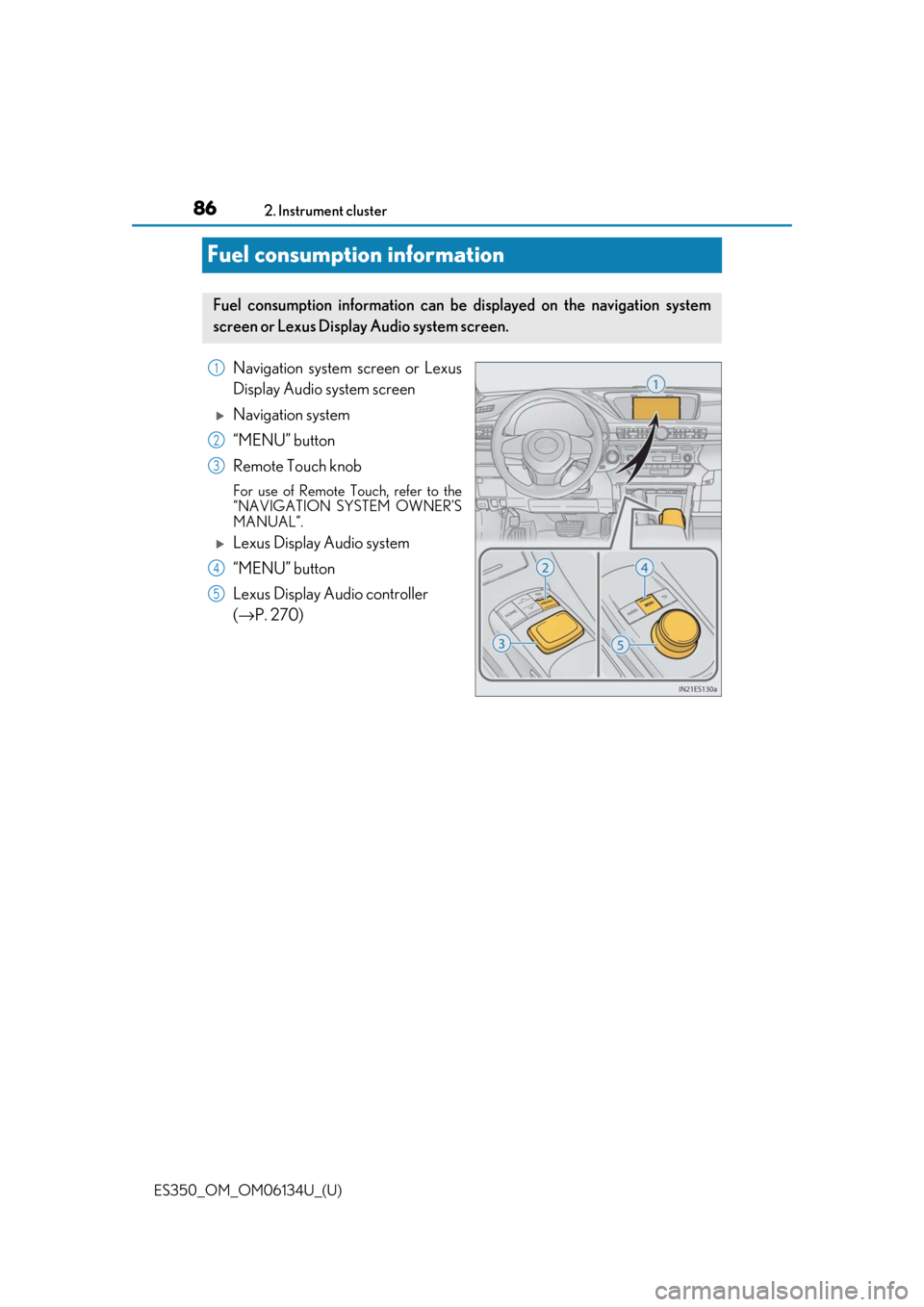
Fuel consumption information
Navigation system screen or Lexus
Display Audio system screen
Navigation system
“MENU” button
Remote Touch knob
For use of Remote Touch, refer to the
“NAVIGATION SYSTEM OWNER’S
MANUAL”.
Lexus Display Audio system
“MENU” button
Lexus Display Au
dio controller
(→ P. 270)
Fuel consumption information can be displayed on the navigation system
screen or Lexus Display Audio system screen.
1
2
3
4
5
Page 87 of 580
ES350_OM_OM06134U_(U)
872. Instrument cluster
2
Instrument cluster
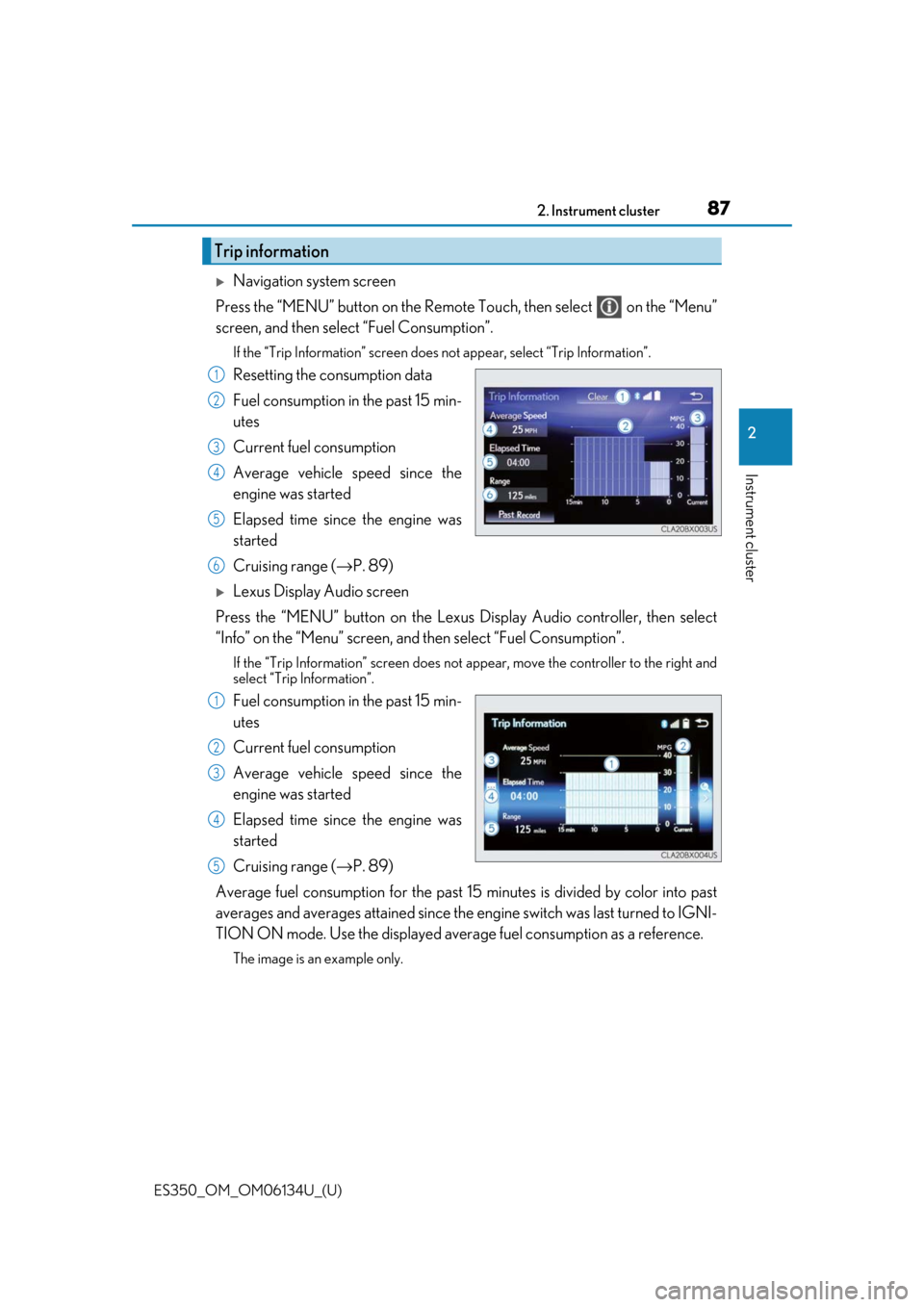
Navigation system screen
Press the “MENU” button on the Remote Touch, then select on the “Menu”
screen, and then select “Fuel Consumption”.
If the “Trip Information” screen does not appear, select “Trip Information”.
Resetting the consumption data
Fuel consumption in the past 15 min-
utes
Current fuel consumption
Average vehicle speed since the
engine was started
Elapsed time since the engine was
started
Cruising range (→P. 89)
Lexus Display Audio screen
Press the “MENU” button on the Lexus Display Audio controller, then select
“Info” on the “Menu” screen, and then select “Fuel Consumption”.
If the “Trip Information” screen does not appear, move the controller to the right and
select “Trip Information”.
Fuel consumption in the past 15 min-
utes
Current fuel consumption
Average vehicle speed since the
engine was started
Elapsed time since the engine was
started
Cruising range (→P. 89)
Average fuel consumption for the past 15 minutes is divided by color into past
averages and averages attained since the engine switch was last turned to IGNI-
TION ON mode. Use the displayed average fuel consumption as a reference.
The image is an example only.
Trip information
1
2
3
4
5
6
1
2
3
4
5
Page 88 of 580
88
ES350_OM_OM06134U_(U)2. Instrument cluster
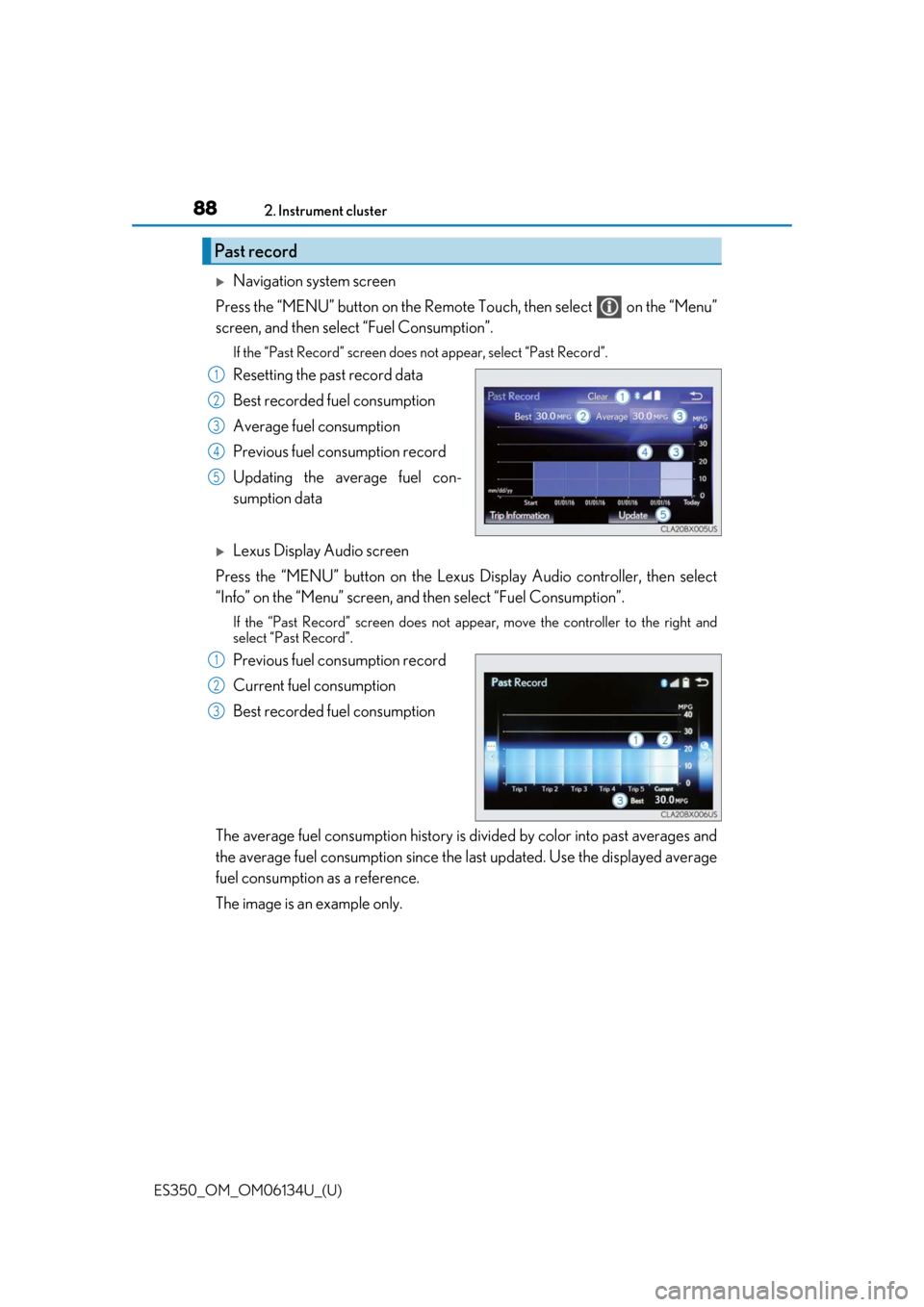
Navigation system screen
Press the “MENU” button on the Remote Touch, then select on the “Menu”
screen, and then select “Fuel Consumption”.
If the “Past Record” screen does not appear, select “Past Record”.
Resetting the past record data
Best recorded fuel consumption
Average fuel consumption
Previous fuel consumption record
Updating the average fuel con-
sumption data
Lexus Display Audio screen
Press the “MENU” button on the Lexus Display Audio controller, then select
“Info” on the “Menu” screen, and then select “Fuel Consumption”.
If the “Past Record” screen does not appe ar, move the controller to the right and
select “Past Record”.
Previous fuel consumption record
Current fuel consumption
Best recorded fuel consumption
The average fuel consumption history is di vided by color into past averages and
the average fuel consumption since the last updated. Use the displayed average
fuel consumption as a reference.
The image is an example only.
Past record
1
2
3
4
5
1
2
3