radio Lexus GS300h 2013 Owner's Guide
[x] Cancel search | Manufacturer: LEXUS, Model Year: 2013, Model line: GS300h, Model: Lexus GS300h 2013Pages: 1014
Page 552 of 1014
5325-3. Using the audio system
GS450h_300h_OM_OM30D53E_(EE)
Listening to stations of the same network
FM alternative frequency:The station among those of the same
network with strong reception is
selected. FM alternative frequency on/
off (P. 530)
Regional code change: The station among those of the same net-
work with strong reception and broad-
casting the same program is selected.
Regional code change on/off (P. 530)
FM Traffic announcement
The system automatically switches to traffic information when a
broadcast with a traffic information signal is received.
“TP” (Traffic program) will appear on the screen. The station returns to
the previous one when the traffic information ends.
FM Traffic announcement on/off (P. 530)
Selecting a channel
Press “<” or “>” on “CH•TRACK” button or select or
on the screen.
Selecting a service
Manual tuning
Turn the “TUNE/SCROLL” knob.
Service list
Select one of the displayed services on the service list screen.
Preset stations
Select the desired preset stations (1 - 6).
RDS (Radio Data System)
DAB (Digital Audio Broadcast)
Page 555 of 1014
5355-3. Using the audio system
5
Interior features
GS450h_300h_OM_OM30D53E_(EE)
Press .
Press the button again to turn the system back on.
If you select
The display returns to the previous screen.
EON (Enhanced Other Network) system (for traffic announcement function)
If the RDS station (with EON data) you are listening to is not broadcasting a
traffic information program and the audio system is in the TA (Traffic
announcement) mode, the radio will be switched automatically to a station
broadcasting a traffic information program in the EON AF list when traffic
information begins.
When listening to a disc
When the traffic information program starts, the disc playback mode is inter-
rupted and the traffic information is automatically broadcasted. When the
program ends, the initial operation resumes.
When the 12-volt battery is disconnected
All preset stations are erased.
Reception sensitivity
Maintaining perfect radio reception at all times is difficult due to the contin-
ually changing position of the antenna, differences in signal strength and
surrounding objects, such as trains, transmitters, etc.
The radio antenna is mounted inside the rear window. To maintain clear
radio reception, do not attach metallic window tinting or other metallic
objects to the antenna wire mounted inside the rear window.
About Time shift
The times at which playback is possible depend on the bit rate of the DAB
station to be recorded, the amount of DAB unit memory, and the time at
which reception of the broadcast began.
Silencing the sound
Page 598 of 1014
5785-3. Using the audio system
GS450h_300h_OM_OM30D53E_(EE)
CAUTION
While driving
Do not use the portable player or connect the Bluetooth
® system.
Caution regarding interference with electronic devices
Your audio unit is fitted with Bluetooth® antennas. People with implant-
able cardiac pacemakers, cardiac resynchronization therapy-pacemakers
or implantable cardioverter defibrillators should maintain a reasonable
distance between themselves and the Bluetooth
® antennas. The radio
waves may affect the operation of such devices.
Before using Bluetooth® devices, users of any electrical medical device
other than implantable cardiac pacemakers, cardiac resynchronization
therapy-pacemakers or implantable cardioverter defibrillators should con-
sult the manufacturer of the device for information about its operation
under the influence of radio waves. Radio waves could have unexpected
effects on the operation of such medical devices.
NOTICE
When leaving the vehicle
Do not leave your portable player in the vehicle. The inside of the vehicle
may become hot, causing damage to the portable player.
Page 628 of 1014
6085-3. Using the audio system
GS450h_300h_OM_OM30D53E_(EE)
Select a radio station
Press to select a frequency band.
Press “” or “” on to seek the frequency.
To scan for receivable stations, press and hold until you hear a
beep.
Select a preset station
Press to select a frequency band.
Press “” or “” on to select a preset station.
Audio CD
Press to select the DVD player.
Press “” or “” on to select a track.
Bluetooth® audio player
Press to select the Bluetooth
® audio player.
Press “” or “” on to select an folder.
Press “” or “” on to select a file.
Selecting a radio station
Selecting a track/folder/file
1
2
1
2
1
2
1
2
3
Page 631 of 1014
6115-3. Using the audio system
5
Interior features
GS450h_300h_OM_OM30D53E_(EE)
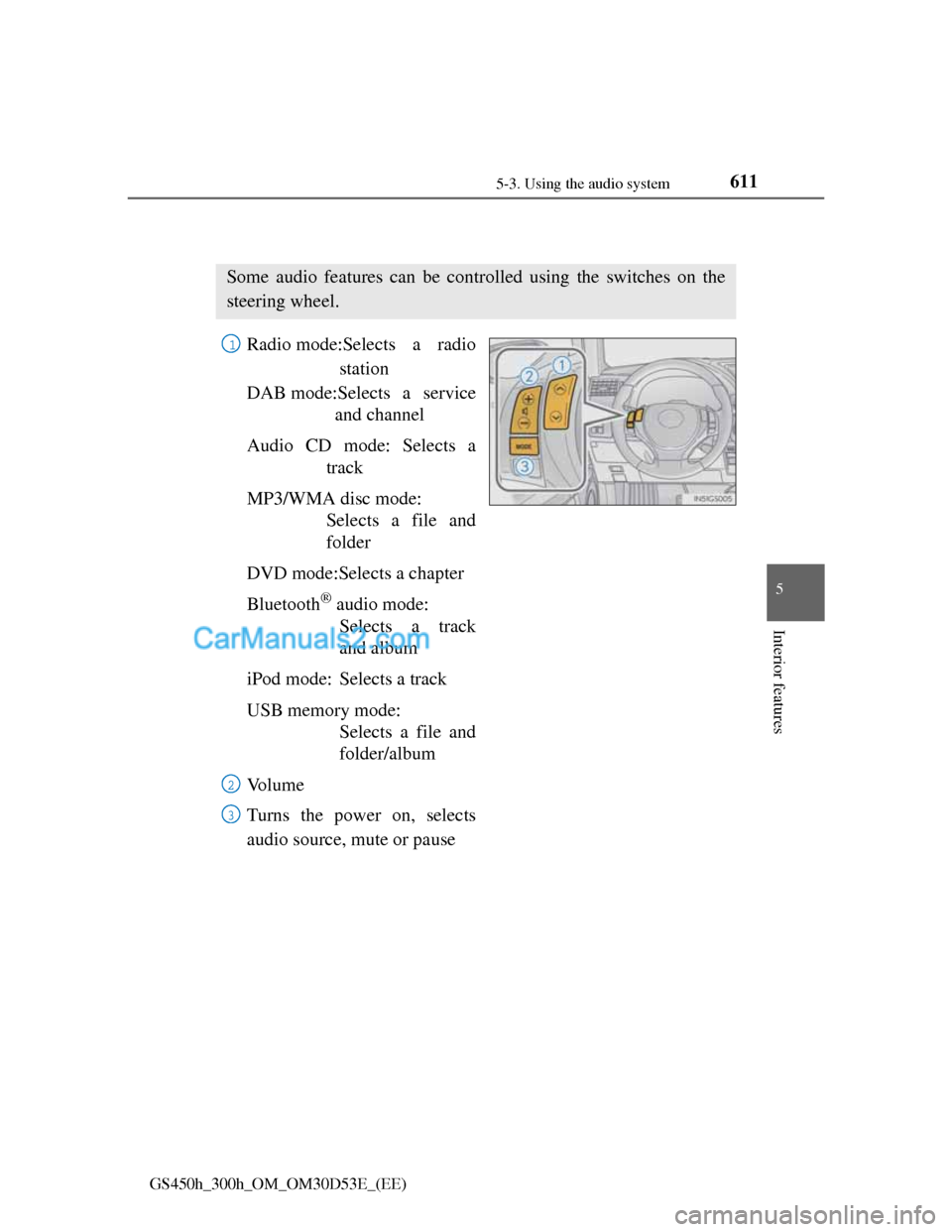
Using the steering wheel audio switches
Radio mode:Selects a radio
station
DAB mode:Selects a service
and channel
Audio CD mode: Selects a
track
MP3/WMA disc mode:
Selects a file and
folder
DVD mode:Selects a chapter
Bluetooth
® audio mode:
Selects a track
and album
iPod mode: Selects a track
USB memory mode:
Selects a file and
folder/album
Vo l u m e
Turns the power on, selects
audio source, mute or pause
Some audio features can be controlled using the switches on the
steering wheel.
1
2
3
Page 632 of 1014
6125-3. Using the audio system
GS450h_300h_OM_OM30D53E_(EE)
Press when the audio system is turned off.
Press to select an audio mode.
Each press changes the mode sequentially if the desired mode is
ready to use.
Press to increase the volume and to decrease the vol-
ume.
Press and hold .
To cancel, press and hold again.
Press to select the radio or DAB mode.
Press or to select.
Turning on the power
Changing the audio source
Adjusting the volume
Silencing a sound or pause the current operation
Selecting the preset station or service
1
2
Page 633 of 1014
6135-3. Using the audio system
5
Interior features
GS450h_300h_OM_OM30D53E_(EE)
Press to select the radio or DAB mode.
Press and hold or switch until you hear a beep.
To cancel, press either switch.
Press to select the audio CD, MP3/WMA disc, DVD,
Bluetooth
® audio, iPod, or USB memory mode.
Press or to select.
To return to the beginning of the current track, file or chapter, press the
switch once quickly.
Press to select Bluetooth® audio or USB memory mode.
Press and hold or until a beep is heard to select.
Press to select the MP3/WMA disc or USB memory
mode.
Press and hold or until a beep is heard to select.
Seeking a radio station or channel
Selecting a track/file or chapter
Selecting an album
Selecting a folder
CAUTION
To reduce the risk of an accident
Exercise care when operating the audio switches on the steering wheel.
1
2
1
2
1
2
1
2
Page 638 of 1014
6155-4. Using the hands-free phone system(for cellular phone)
5
Interior features
GS450h_300h_OM_OM30D53E_(EE)
When using the hands-free system
The audio system is muted when making a call.
If both parties speak at the same time, it may be difficult to hear.
If the incoming call volume is overly loud, an echo may be heard.
Try to face toward the microphone as much as possible when speaking.
In the following circumstances, it may be difficult to hear the other party:
• When driving on unpaved roads
• When driving at high speeds
• If a window is open
• If the air conditioning is blowing directly on the microphone
• If the air conditioning is set to high
• There is an effect from the network of the cellular phone
Conditions under which the system will not operate
If using a cellular phone that does not support Bluetooth®
If the cellular phone is turned off
If you are outside service range
If the cellular phone is not connected
If the cellular phone’s battery is low
Bluetooth® antenna
The antenna is built into the instrument panel. If the cellular phone is behind
the seat or in the console box, or touching or covered by metal objects, con-
nection status may deteriorate.
Battery charge/Signal status
This display may not correspond exactly with the cellular phone itself.
When the cellular phone is not connected, “No connect” is displayed.
When the cellular phone is out of the service area or in a place inaccessible
by radio waves, “No service” is displayed.
When using Bluetooth® audio and hands-free system at the same time
The following problems may occur.
The Bluetooth® connection may be cut.
Noise may be heard on the Bluetooth® audio playback.
Page 647 of 1014
6245-4. Using the hands-free phone system(for cellular phone)
GS450h_300h_OM_OM30D53E_(EE)
For vehicles sold in Albania
For vehicles sold in Croatia
CAUTION
Caution while driving
Vehicles without navigation system
Do not use the cellular phone or connect the Bluetooth
® system.
Vehicles with navigation system
Use a cellular phone or connect the Bluetooth
® phone only when safe and
legal to do so.
Caution regarding interference with electronic devices
Your audio unit is fitted with Bluetooth® antennas. People with implant-
able cardiac pacemakers, cardiac resynchronization therapy-pacemakers
or implantable cardioverter defibrillators should maintain a reasonable
distance between themselves and the Bluetooth
® antennas. The radio
waves may affect the operation of such devices.
Before using Bluetooth® devices, users of any electrical medical device
other than implantable cardiac pacemakers, cardiac resynchronization
therapy-pacemakers or implantable cardioverter defibrillators should con-
sult the manufacturer of the device for information about its operation
under the influence of radio waves. Radio waves could have unexpected
effects on the operation of such medical devices.
NOTICE
When leaving the vehicle
Do not leave your cellular phone in the vehicle. The inside of the vehicle
may become hot, causing damage to the phone.
Page 784 of 1014
7606-3. Do-it-yourself maintenance
GS450h_300h_OM_OM30D53E_(EE)
Low profile tires (except 225/50R17 tires)
Generally, low profile tires will wear more rapidly and tire grip performance
will be reduced on snowy and/or icy roads when compared to standard tires.
Be sure to use snow tires or tire chains on snowy and/or icy roads and drive
carefully at a speed appropriate for road and weather conditions. (P. 436)
If the tread on snow tires wears down below 4 mm (0.16 in.)
The effectiveness of the tires as snow tires is lost.
Situations in which the tire pressure warning system may not operate properly
(vehicles with the tire pressure warning system)
In the following cases, the tire pressure warning system may not operate
properly.
• If non-genuine Lexus wheels are used.
• A tire has been replaced with a tire that is not an OE (Original Equip-
ment) tire.
• A tire has been replaced with a tire that is not of the specified size.
• Tire chains etc. are equipped.
• Lock nuts are equipped.
• An auxiliary-supported run-flat tire is equipped.
• If a window tint that affects the radio wave signals is installed.
• If there is a lot of snow or ice on the vehicle, particularly around the
wheels or wheel housings.
• If the tire inflation pressure is extremely higher than the specified level.
Performance may be affected in the following situations.
• Near a TV tower, electric power plant, gas station, radio station, large
display, airport or other facility that generates strong radio waves or elec-
trical noise
• When carrying a portable radio, cellular phone, cordless phone or other
wireless communication device
Vehicles with the tire inflation pressure display function: If tire position
information is not correctly displayed due to the radio wave conditions, the
display may be corrected by driving and changing the radio wave condi-
tions.
When the vehicle is parked, the time taken for the warning to start or go off
could be extended.
When tire inflation pressure declines rapidly for example when a tire has
burst, the warning may not function.