turn signal Lexus GS300h 2013 Owner's Guide
[x] Cancel search | Manufacturer: LEXUS, Model Year: 2013, Model line: GS300h, Model: Lexus GS300h 2013Pages: 1014
Page 652 of 1014
6295-4. Using the hands-free phone system(for cellular phone)
5
Interior features
GS450h_300h_OM_OM30D53E_(EE)
Reconnecting to the Bluetooth® phone
If the system cannot connect due to poor signal strength with the power
switch in ACCESSORY or ON mode, the system will automatically attempt
to reconnect.
If the phone is turned off, the system will not attempt to reconnect. In this
case, it must be connected manually, or the phone must be re-selected or re-
entered.
Connecting the phone while Bluetooth® audio is playing
Bluetooth® audio will stop temporarily.
It may take time to connect.
Connecting the phone while another Bluetooth® device is connected
When another Bluetooth
® device is currently connected, a confirmation mes-
sage will be displayed. To disconnect the Bluetooth® device, select “Yes”.
Connecting the phone while 5 Bluetooth® devices have already been regis-
tered
When 5 Bluetooth
® devices have already been registered, a registered device
needs to be deleted. Select “Yes” to delete one or more.
Select the device to be deleted, then select “Remove”, and “Yes”.
If the Bluetooth® phone has a Bluetooth® audio function
When the Bluetooth
® phone to be registered has a Bluetooth® audio function,
this audio function will be registered automatically at the same time and con-
firmation message may be displayed. If this screen is displayed, select “Yes”
to connect the audio function or select “No” to cancel the connection.
Page 817 of 1014
793 6-3. Do-it-yourself maintenance
6
Maintenance and care
GS450h_300h_OM_OM30D53E_(EE)
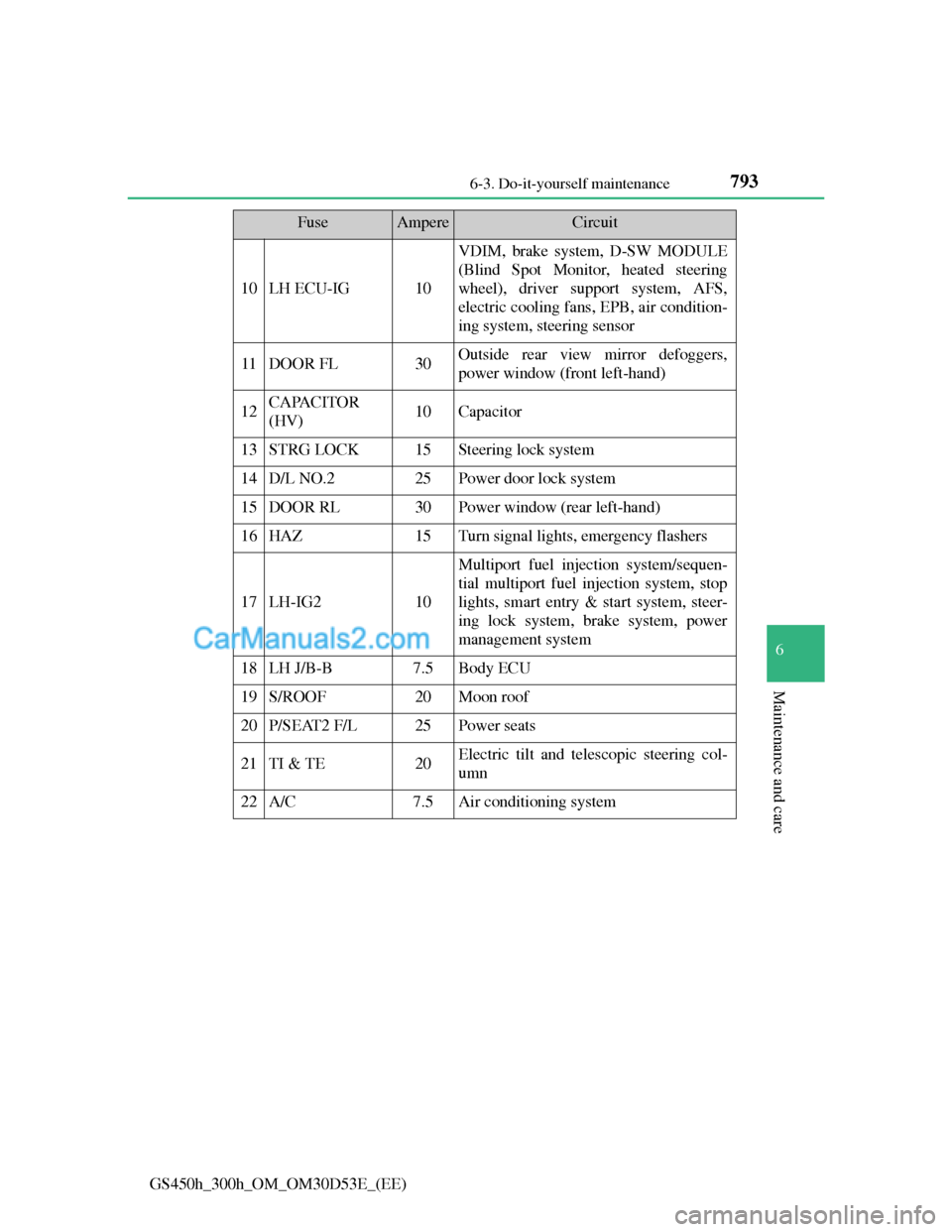
10LH ECU-IG10
VDIM, brake system, D-SW MODULE
(Blind Spot Monitor, heated steering
wheel), driver support system, AFS,
electric cooling fans, EPB, air condition-
ing system, steering sensor
11DOOR FL30Outside rear view mirror defoggers,
power window (front left-hand)
12CAPACITOR
(HV)10Capacitor
13STRG LOCK15Steering lock system
14D/L NO.225Power door lock system
15DOOR RL30Power window (rear left-hand)
16HAZ15Turn signal lights, emergency flashers
17LH-IG210
Multiport fuel injection system/sequen-
tial multiport fuel injection system, stop
lights, smart entry & start system, steer-
ing lock system, brake system, power
management system
18LH J/B-B7.5Body ECU
19S/ROOF20Moon roof
20P/SEAT2 F/L25Power seats
21TI & TE20Electric tilt and telescopic steering col-
umn
22A/C7.5Air conditioning system
FuseAmpereCircuit
Page 819 of 1014
795 6-3. Do-it-yourself maintenance
6
Maintenance and care
GS450h_300h_OM_OM30D53E_(EE)
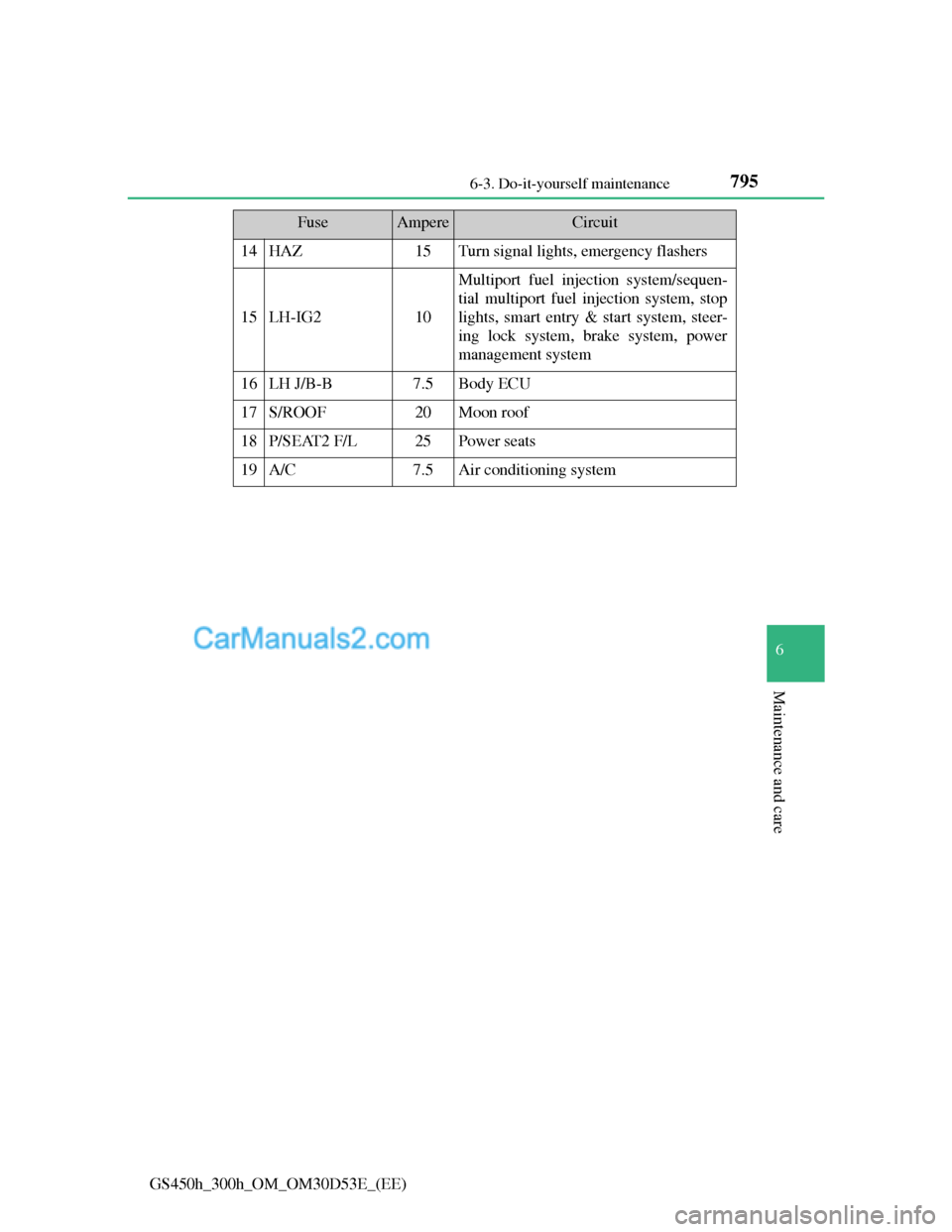
14HAZ15Turn signal lights, emergency flashers
15LH-IG210
Multiport fuel injection system/sequen-
tial multiport fuel injection system, stop
lights, smart entry & start system, steer-
ing lock system, brake system, power
management system
16LH J/B-B7.5Body ECU
17S/ROOF20Moon roof
18P/SEAT2 F/L25Power seats
19A/C7.5Air conditioning system
FuseAmpereCircuit
Page 827 of 1014
803 6-3. Do-it-yourself maintenance
6
Maintenance and care
GS450h_300h_OM_OM30D53E_(EE)
Light bulbs
Check the wattage of the light bulb to be replaced. (P. 939)
P. 740
Front
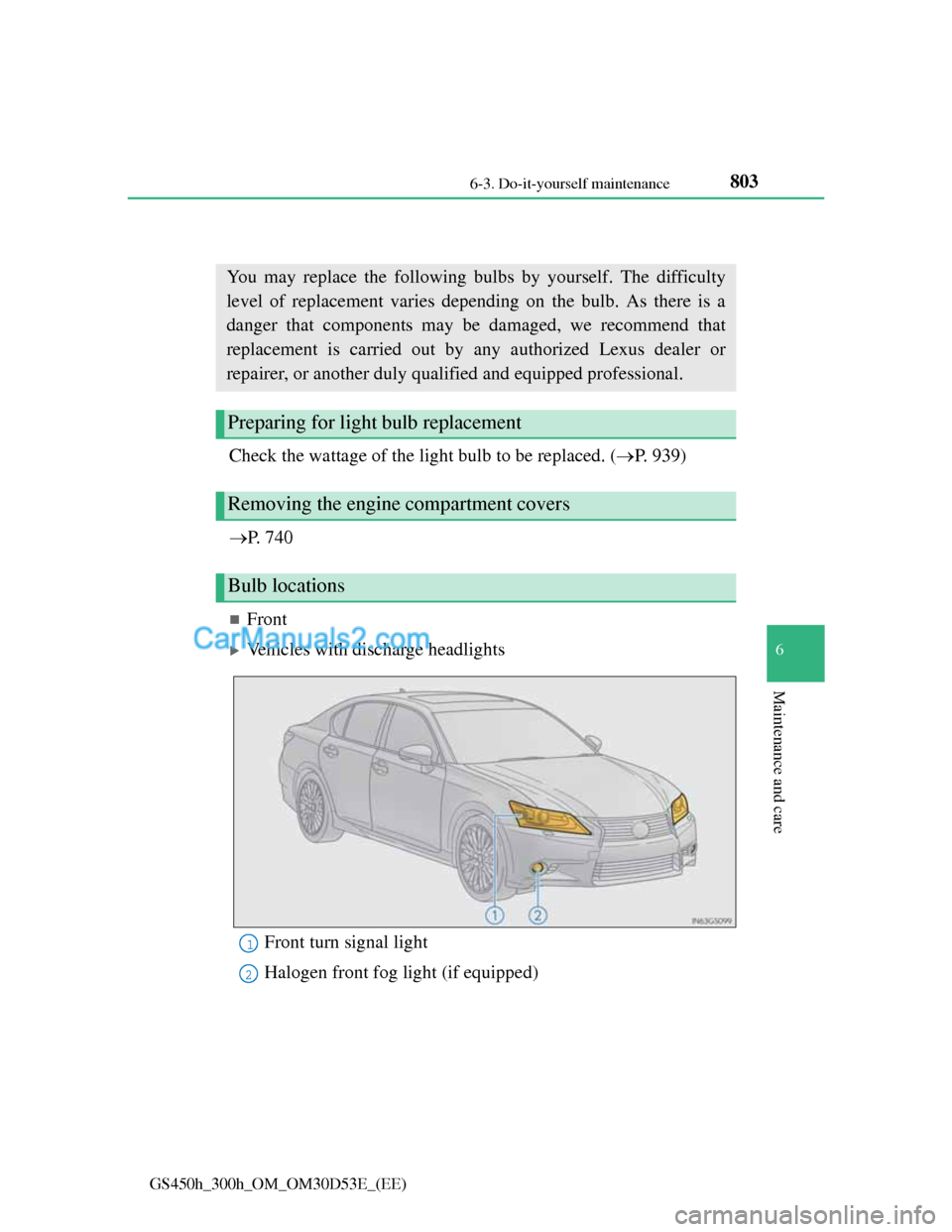
Vehicles with discharge headlights
You may replace the following bulbs by yourself. The difficulty
level of replacement varies depending on the bulb. As there is a
danger that components may be damaged, we recommend that
replacement is carried out by any authorized Lexus dealer or
repairer, or another duly qualified and equipped professional.
Preparing for light bulb replacement
Removing the engine compartment covers
Bulb locations
Front turn signal light
Halogen front fog light (if equipped)1
2
Page 828 of 1014
8046-3. Do-it-yourself maintenance
GS450h_300h_OM_OM30D53E_(EE)
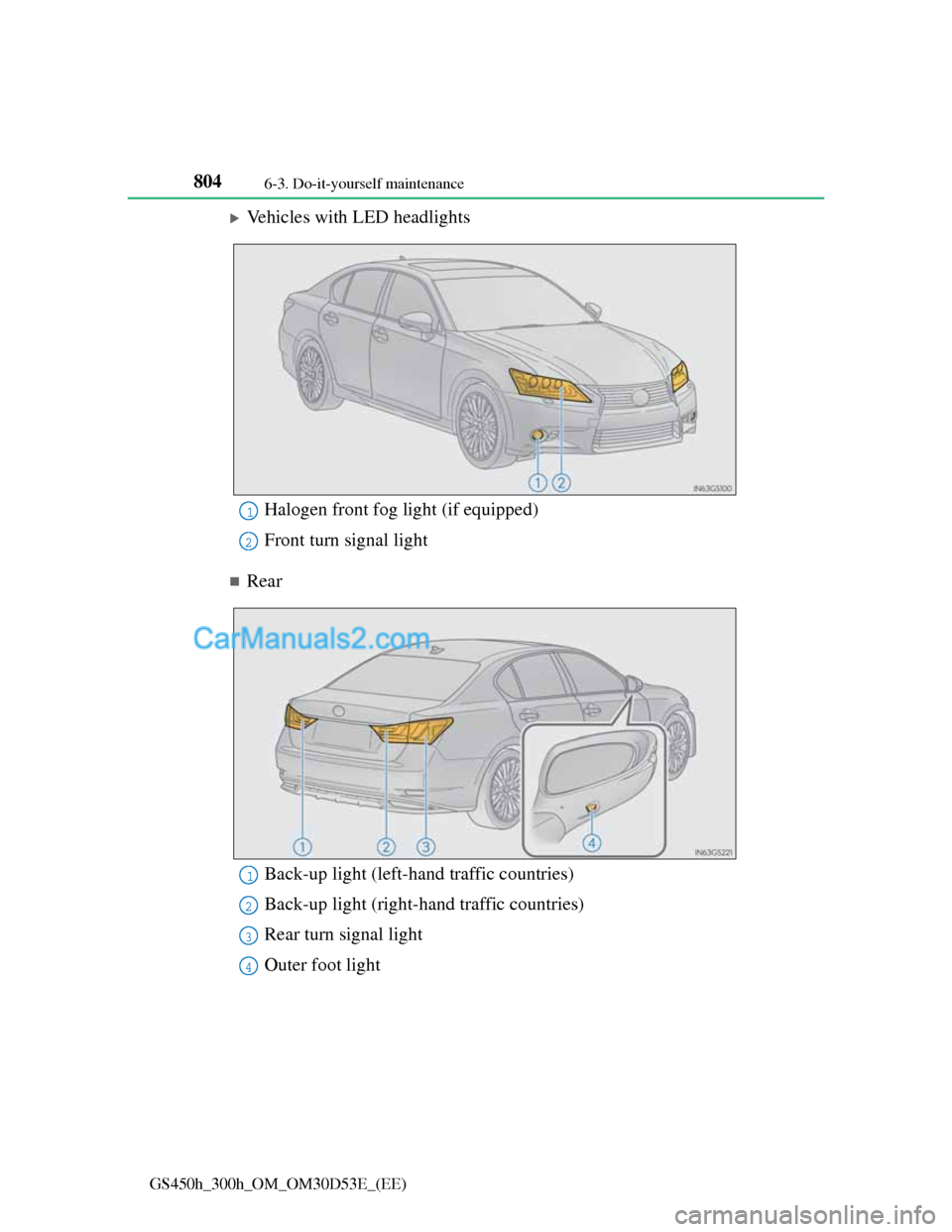
Vehicles with LED headlights
Rear
Halogen front fog light (if equipped)
Front turn signal light1
2
Back-up light (left-hand traffic countries)
Back-up light (right-hand traffic countries)
Rear turn signal light
Outer foot light1
2
3
4
Page 831 of 1014
807 6-3. Do-it-yourself maintenance
6
Maintenance and care
GS450h_300h_OM_OM30D53E_(EE)
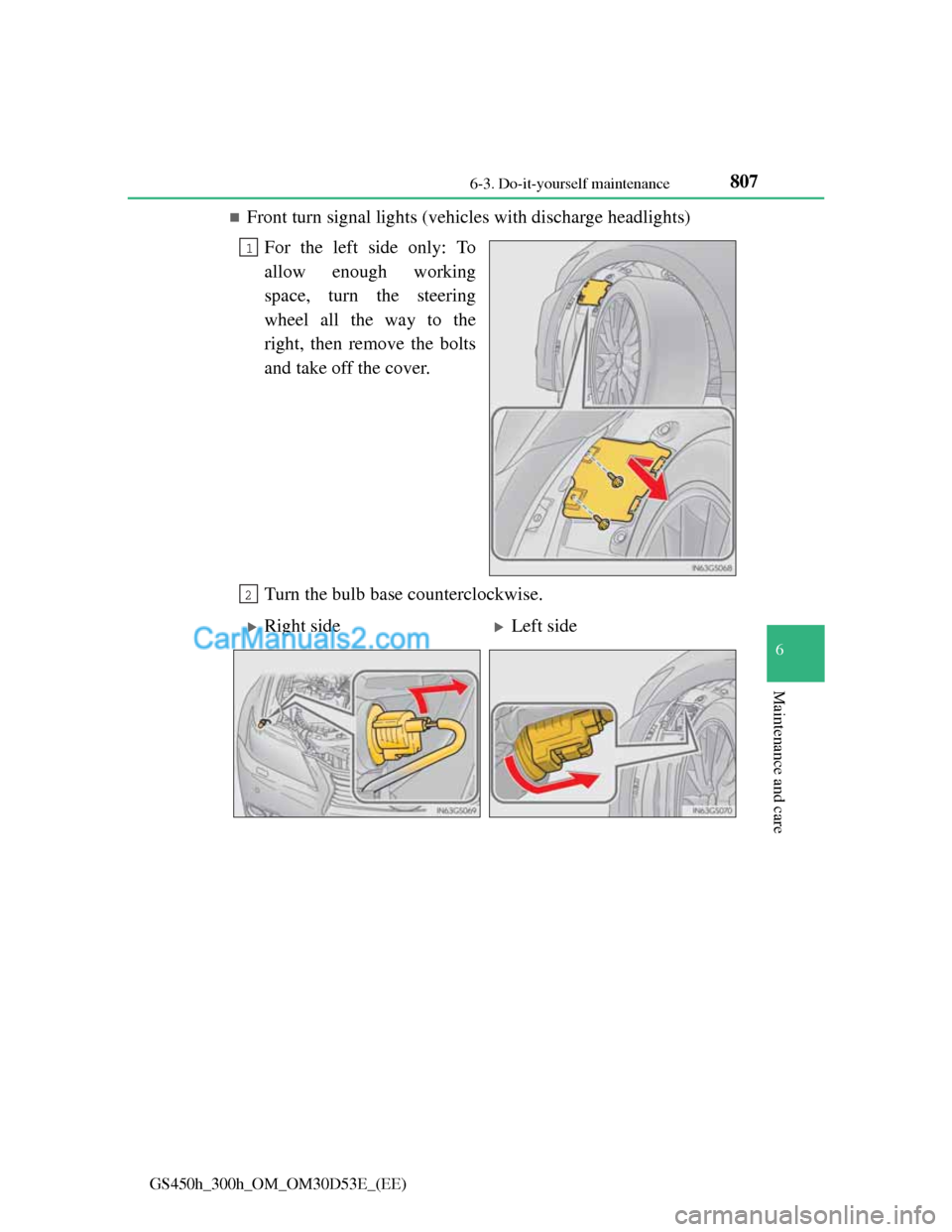
Front turn signal lights (vehicles with discharge headlights)
For the left side only: To
allow enough working
space, turn the steering
wheel all the way to the
right, then remove the bolts
and take off the cover.
Turn the bulb base counterclockwise.
1
2
Right sideLeft side
Page 833 of 1014
809 6-3. Do-it-yourself maintenance
6
Maintenance and care
GS450h_300h_OM_OM30D53E_(EE)
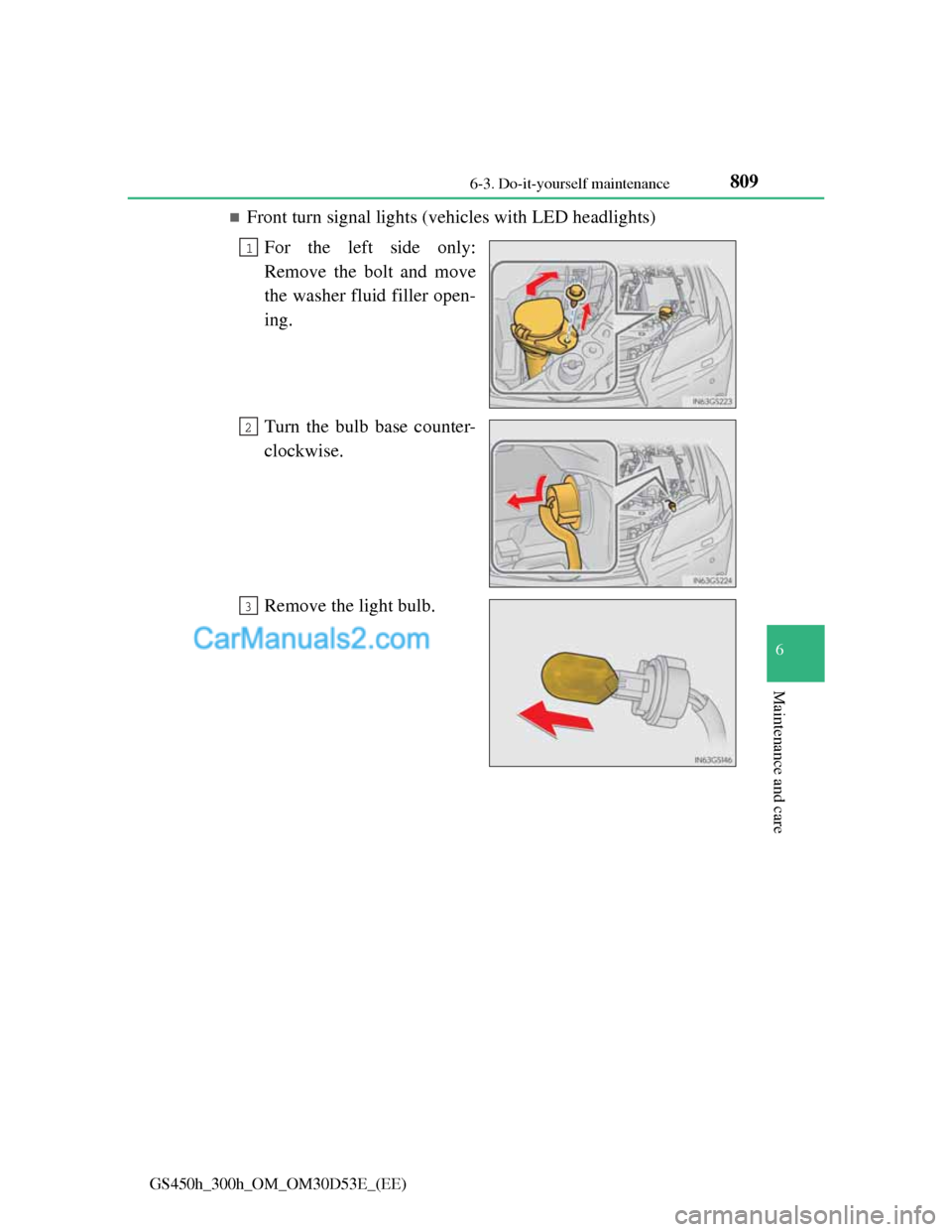
Front turn signal lights (vehicles with LED headlights)
For the left side only:
Remove the bolt and move
the washer fluid filler open-
ing.
Turn the bulb base counter-
clockwise.
Remove the light bulb.
1
2
3
Page 835 of 1014
811 6-3. Do-it-yourself maintenance
6
Maintenance and care
GS450h_300h_OM_OM30D53E_(EE)
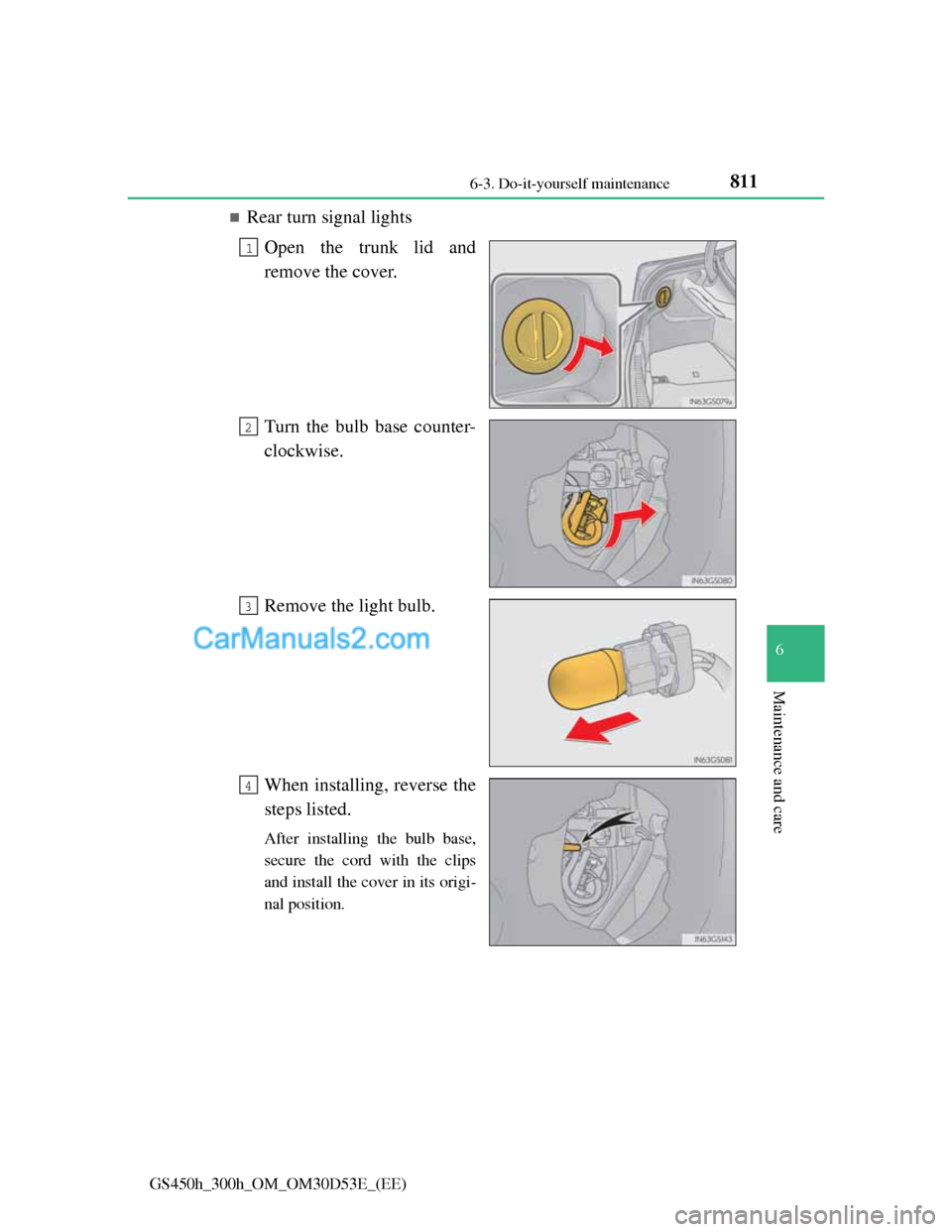
Rear turn signal lights
Open the trunk lid and
remove the cover.
Turn the bulb base counter-
clockwise.
Remove the light bulb.
When installing, reverse the
steps listed.
After installing the bulb base,
secure the cord with the clips
and install the cover in its origi-
nal position.
1
2
3
4
Page 840 of 1014
8166-3. Do-it-yourself maintenance
GS450h_300h_OM_OM30D53E_(EE)
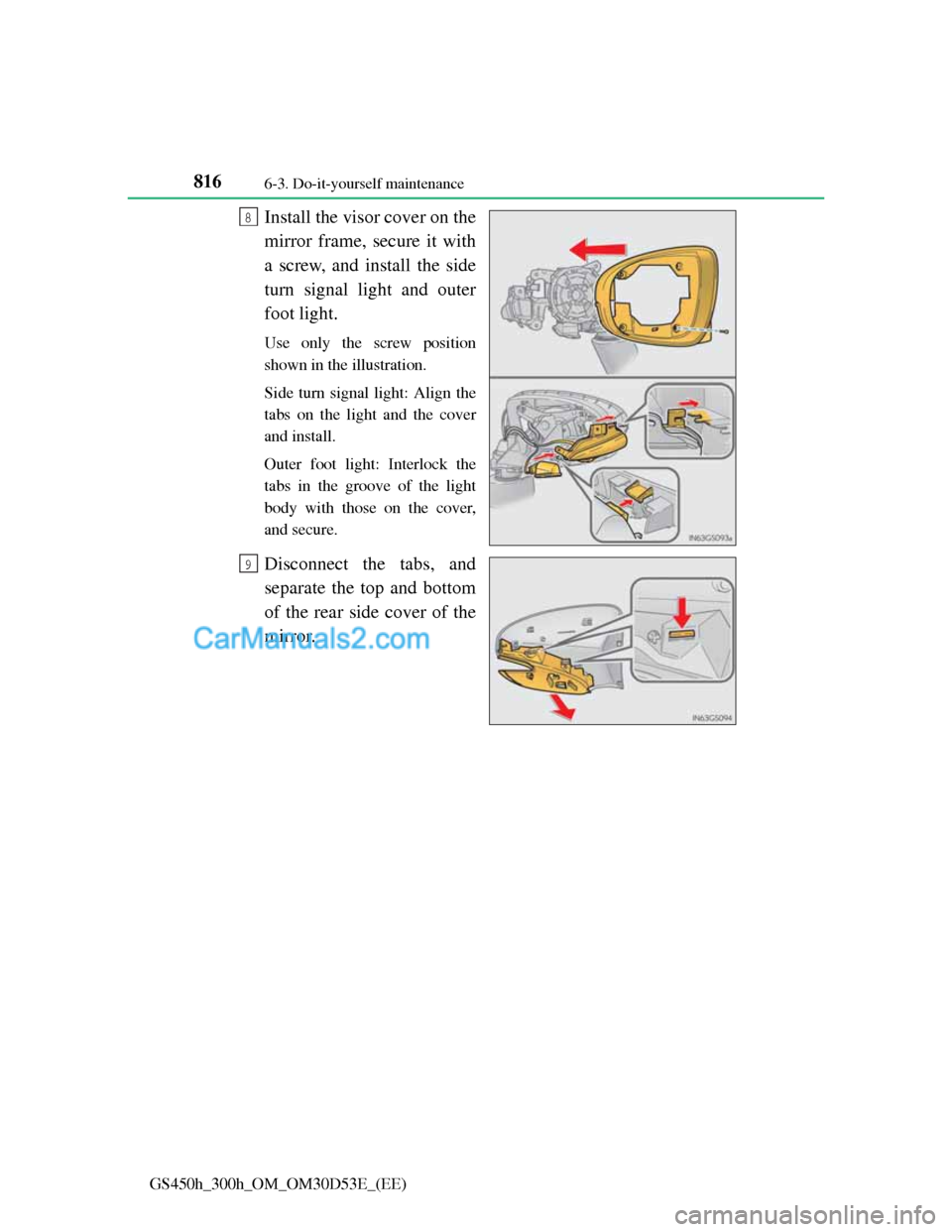
Install the visor cover on the
mirror frame, secure it with
a screw, and install the side
turn signal light and outer
foot light.
Use only the screw position
shown in the illustration.
Side turn signal light: Align the
tabs on the light and the cover
and install.
Outer foot light: Interlock the
tabs in the groove of the light
body with those on the cover,
and secure.
Disconnect the tabs, and
separate the top and bottom
of the rear side cover of the
mirror.
8
9
Page 841 of 1014
817 6-3. Do-it-yourself maintenance
6
Maintenance and care
GS450h_300h_OM_OM30D53E_(EE)
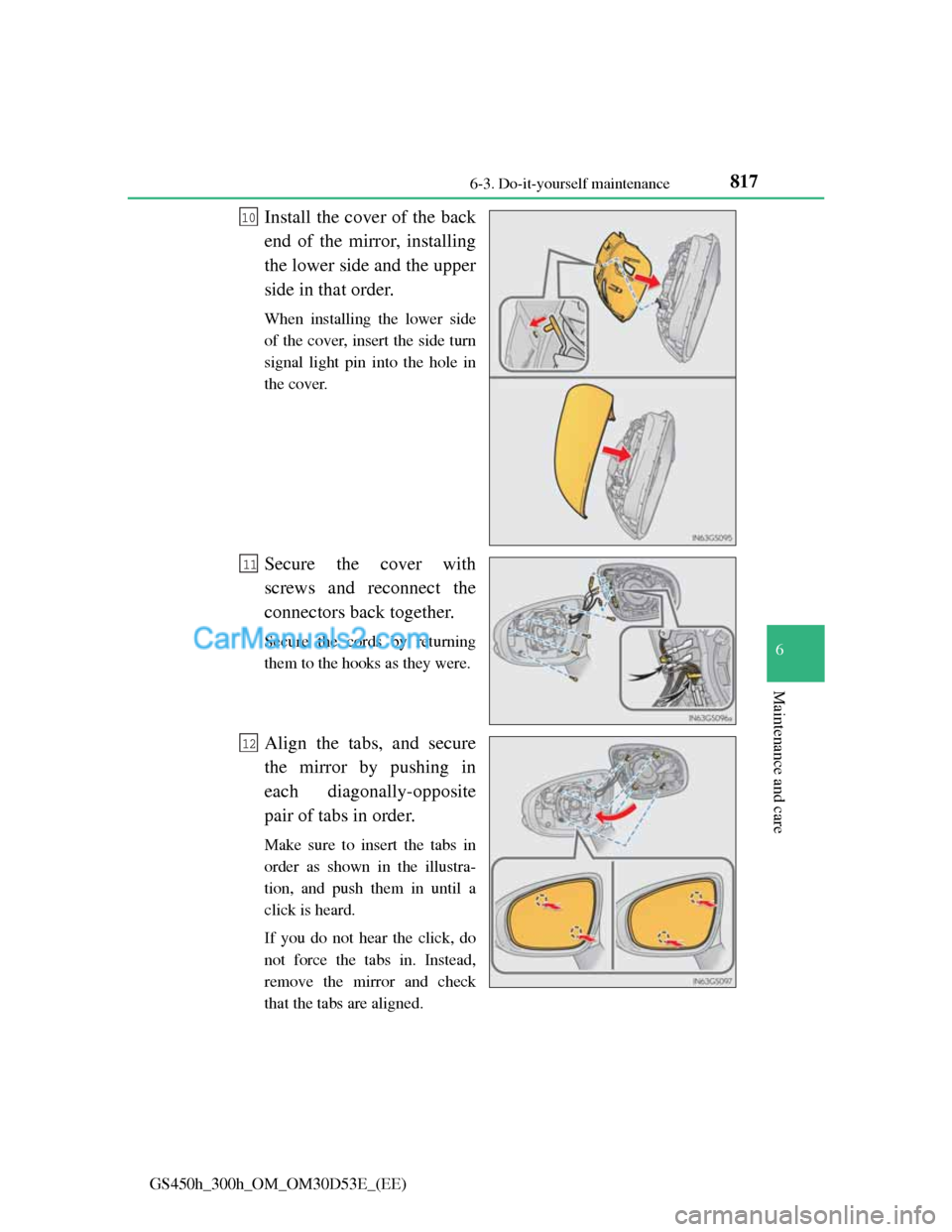
Install the cover of the back
end of the mirror, installing
the lower side and the upper
side in that order.
When installing the lower side
of the cover, insert the side turn
signal light pin into the hole in
the cover.
Secure the cover with
screws and reconnect the
connectors back together.
Secure the cords by returning
them to the hooks as they were.
Align the tabs, and secure
the mirror by pushing in
each diagonally-opposite
pair of tabs in order.
Make sure to insert the tabs in
order as shown in the illustra-
tion, and push them in until a
click is heard.
If you do not hear the click, do
not force the tabs in. Instead,
remove the mirror and check
that the tabs are aligned.
10
11
12