brake Lexus GS350 2007 Specifications / LEXUS 2007 GS430/350 (OM30A04U) User Guide
[x] Cancel search | Manufacturer: LEXUS, Model Year: 2007, Model line: GS350, Model: Lexus GS350 2007Pages: 562, PDF Size: 17.95 MB
Page 120 of 562
100
2-1. Driving procedures
Transmission
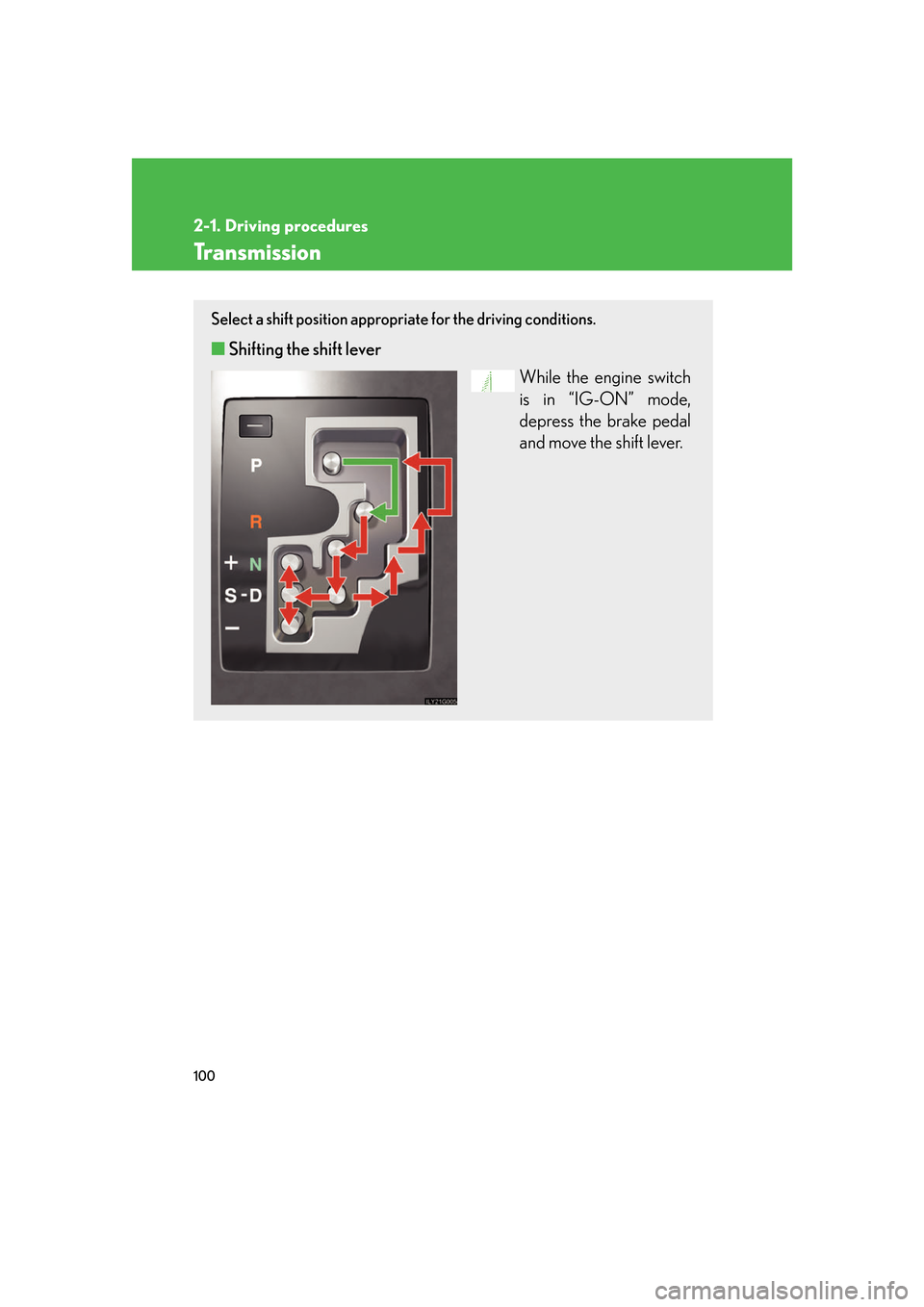
Select a shift position appropriate for the driving conditions.
■Shifting the shift lever
While the engine switch
is in “IG-ON” mode,
depr
ess the brake pedal
and move the shift lever.
Page 123 of 562
103
2-1. Driving procedures
2
When driving
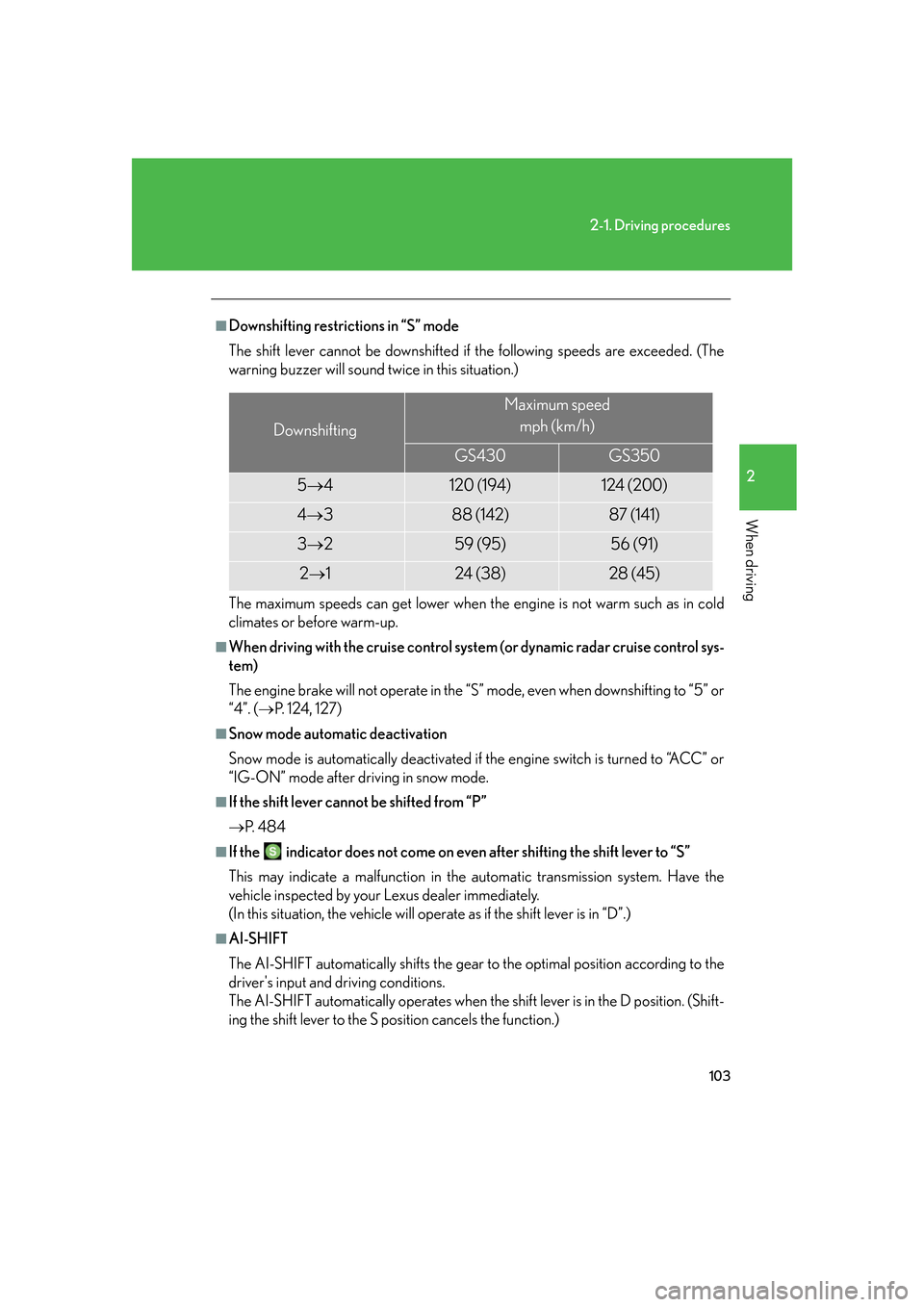
■Downshifting restrictions in “S” mode
The shift lever cannot be downshifted if the following speeds are exceeded. (The
w
arning buzzer will sound twice in this situation.)
The maximum speeds can get lower when the engine is not warm such as in cold
climates or before warm-up.
■When driving with the cruise control syst em (or dynamic radar cruise control sys-
tem)
The engine brake will not operate in the “S” mode, e
ven when downshifting to “5” or
“4”. ( P. 1 2 4 , 127 )
■Snow mode automatic deactivation
Snow mode is automatically deactivated if the e
ngine switch is turned to “ACC” or
“IG-ON” mode after driving in snow mode.
■If the shift lever cannot be shifted from “P”
P.
4 8 4
■If the indicator does not come on even after shifting the shift lever to “S”
This may indicate a malfunction in the automatic transmission system. Have the
v
ehicle inspected by your Lexus dealer immediately.
(In this situation, the vehicle will operate as if the shift lever is in “D”.)
■AI-SHIFT
The AI-SHIFT automatically shifts the gear to
the optimal position according to the
driver's input and driving conditions.
The AI-SHIFT automatically operates when th e
shift lever is in the D position. (Shift-
ing the shift lever to the S position cancels the function.)
Downshifting
Maximum speed
mph (km/h)
GS430GS350
5 4120 (194)124 (200)
4 388 (142)87 (141)
3 259 (95)56 (91)
2 124 (38)28 (45)
Page 125 of 562
105
2-1. Driving procedures
2
When driving
Parking brake
NOTICE
■Before driving
Fully release the parking brake.
Driving the vehicle with the parking brake set will lead to brake components over-
heating, which may affect braking performance and increase brake wear.
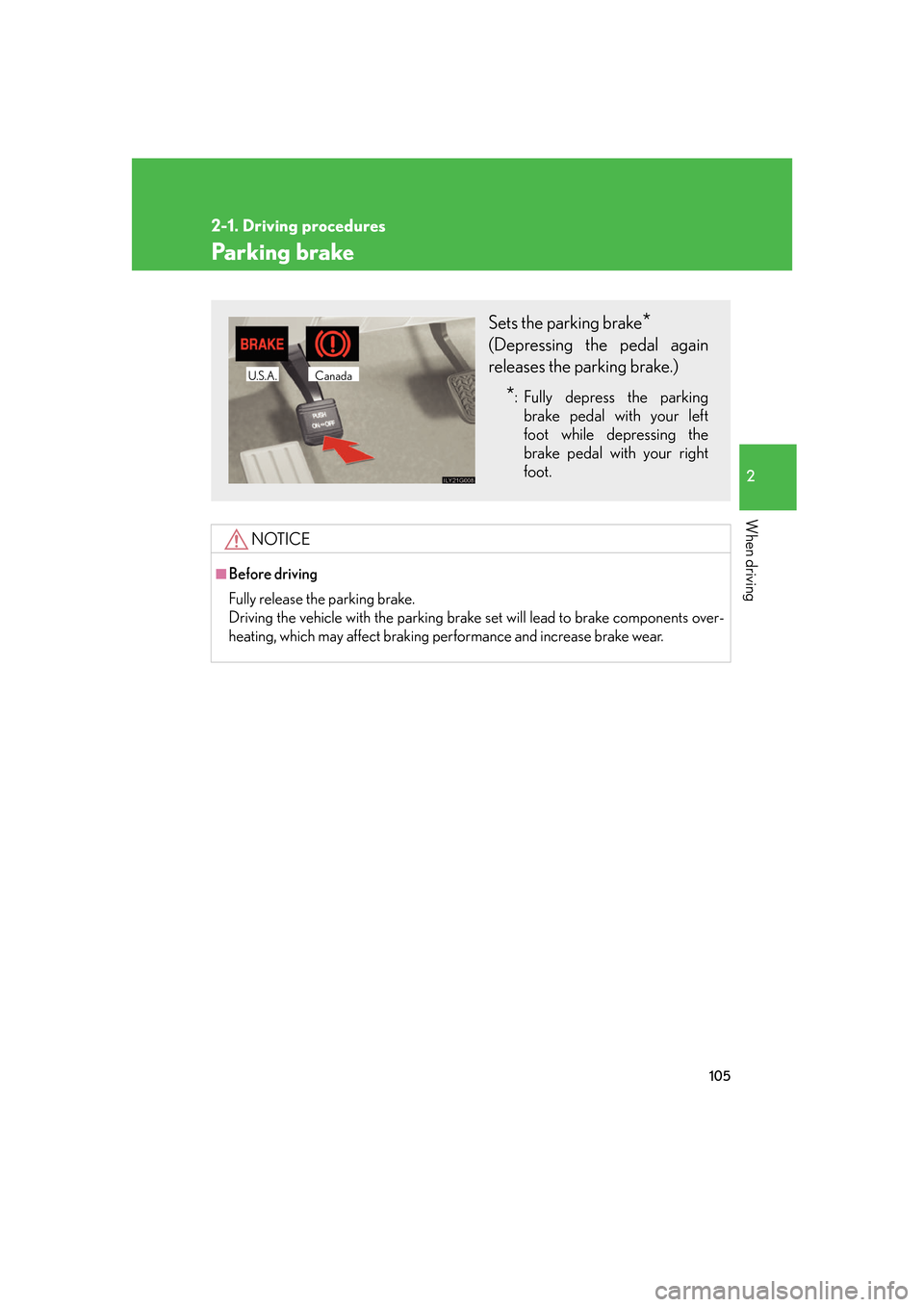
Sets the parking brake*
(Depressing the pedal again
releases the parking brake.)
*: Fully depress the parking
brake pedal with your left
foot while depressing the
brake pedal with your right
foot.
CanadaU.S.A.
Page 137 of 562
117
2-3. Operating the lights and windshield wipers
2
When driving
AFS (Adaptive Front lighting System)
AFS improves visibility at intersectio ns and on curves by automatically
adjusting the level of the headlights according to vehicle speed and the
degree of the tire angle that are controlled by steering input.
Operates at speeds of 6 mph (10 km/h) or higher.
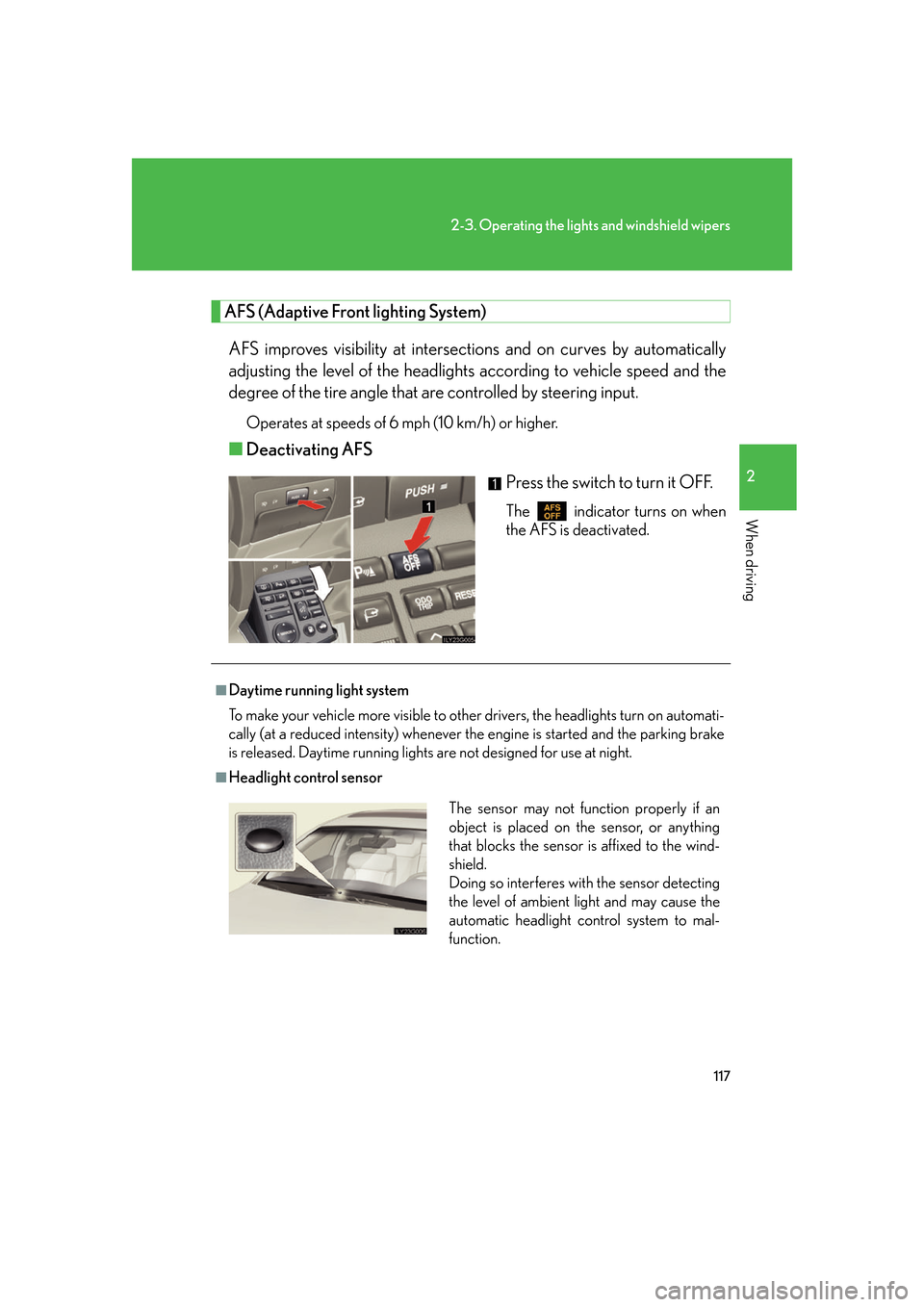
■ Deactivating AFS
Press the switch to turn it OFF.
The indicator turns on when
the AFS is deactivated.
■Daytime running light system
To make your vehicle more visible to other drivers, the headlights turn on automati -
cally (at a reduced intensity) whenever the engine is started and the parking brake
is
released. Daytime running lights are not designed for use at night.
■Headlight control sensor
The sensor may not function properly if an
object is placed on the sensor, or anything
that blocks the sensor is affixed to the wind-
shield.
Doing so interferes with the sensor detecting
the level of ambient light and may cause the
automatic headlight control system to mal-
function.
Page 145 of 562
125
2-4. Using other driving systems
2
When driving
■Cruise control can be set when
●The shift lever is in the “D” or “4”, “5”, or “6” range of “S”.
●Vehicle speed is between approximately 25 mph (40 km/h) and 125 mph
(200 km/h).
■Accelerating
The vehicle can be accelerated normally. After acceleration, the set speed
r
esumes.
■Automatic cruise control cancelation
The set speed is automatically canceled in any of the following situations.
●Actual vehicle speed falls more than 10 mph (16 km/h) below the preset vehicle
speed
●Actual vehicle speed is below 25 mph (40 km/h)
●VSC is activated
■If the cruise control indicator light flashes
Turn the “ON-OFF” button off once, and
then reactivate the system.
If the cruise control speed cannot be set or i
f the cruise control cancels immediately
after being activated, there may be a malfun ction in the cruise control system. Have
the vehicle inspected by your Lexus dealer.
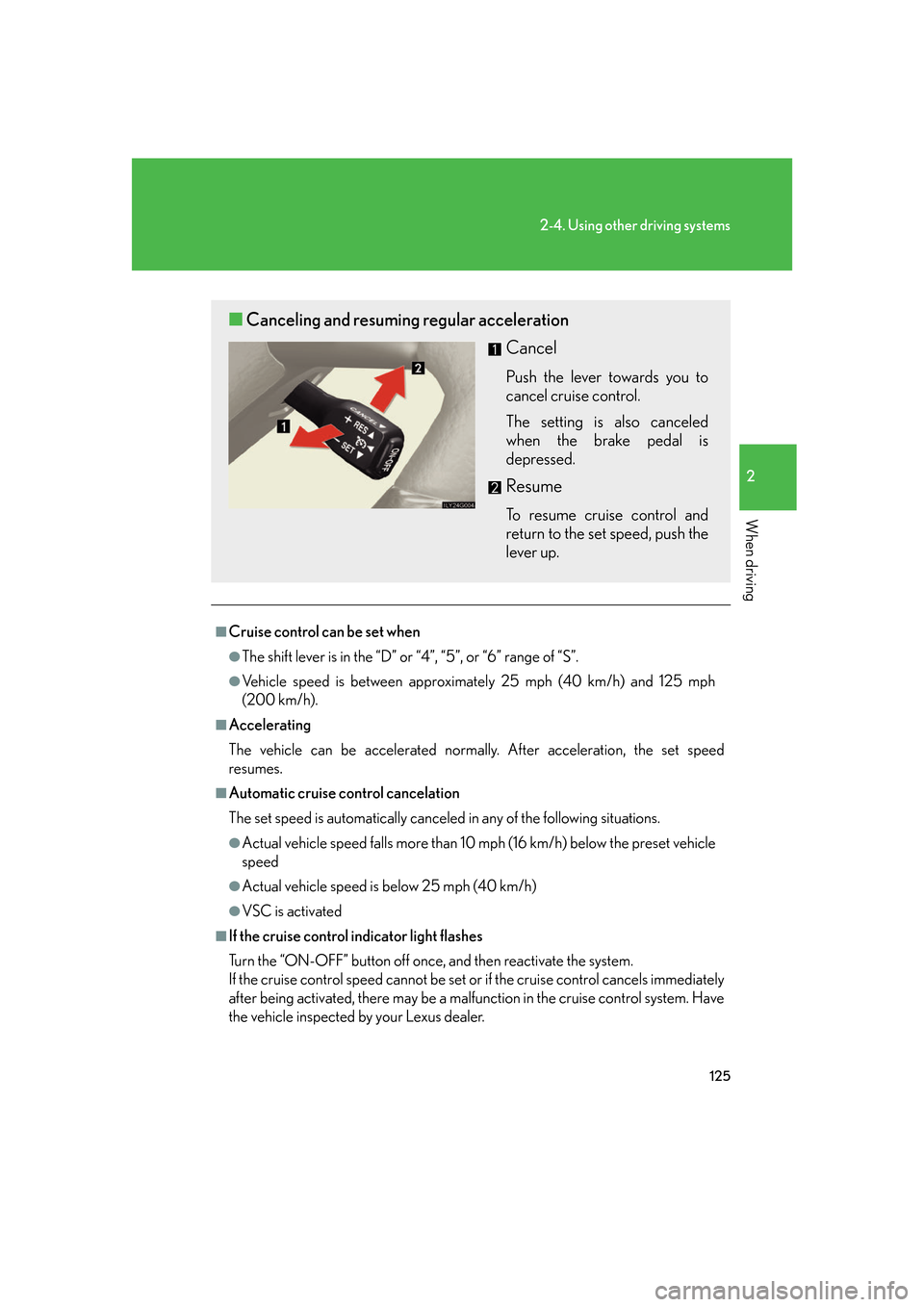
■ Canceling and resuming regular acceleration
Cancel
Push the lever towards you to
cancel cruise control.
The setting is also canceled
when th
e brake pedal is
depressed.
Resume
To resume cruise control and
return to the set speed, push the
lever up.
Page 148 of 562
128
2-4. Using other driving systems
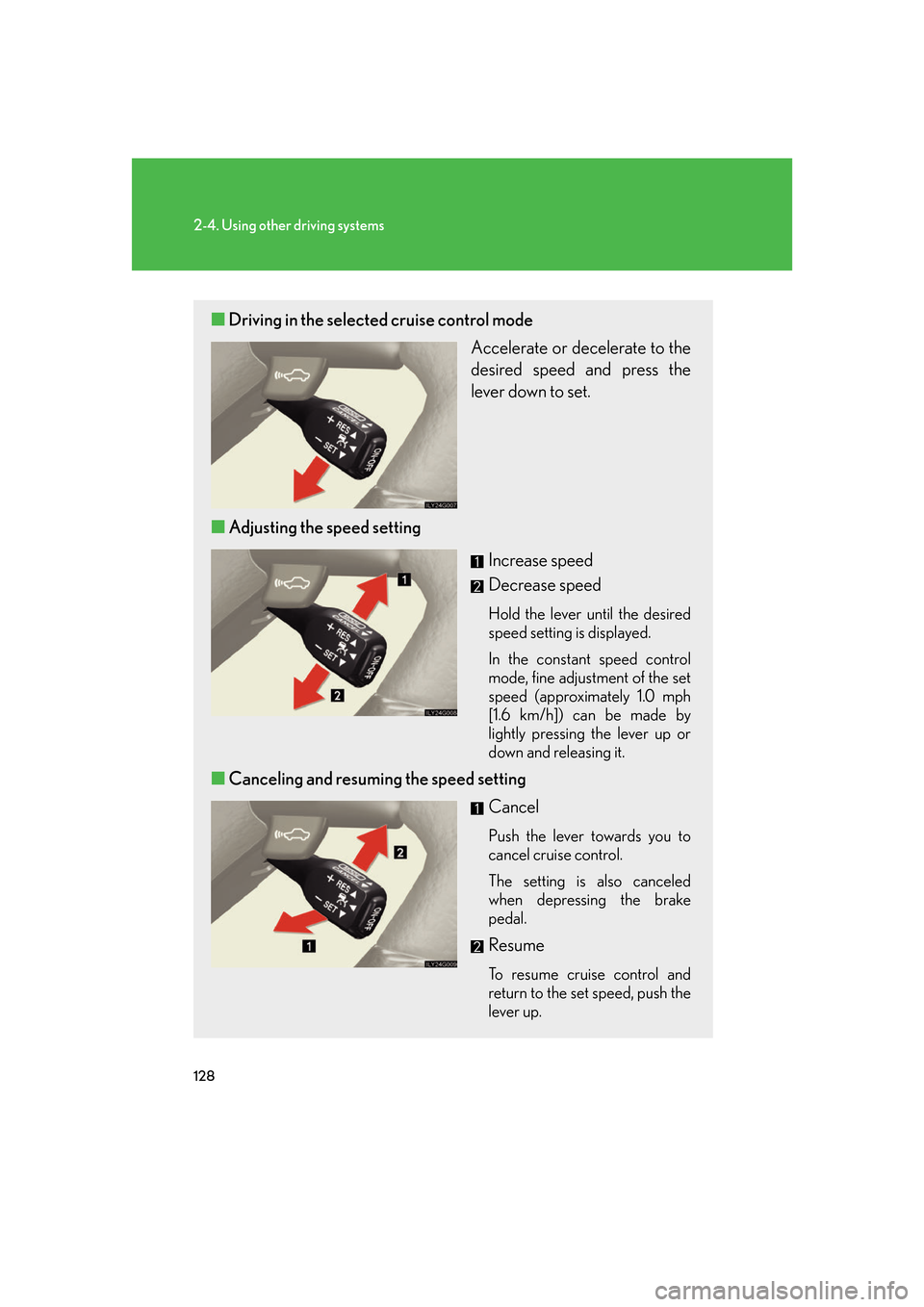
■Driving in the selected cruise control mode
Accelerate or decelerate to the
desired speed and press the
lever down to set.
■ A
djusting the speed setting
Increase speed
Decrease speed
Hold the lever until the desired
speed setting is displayed.
In the constant speed control
mode,
fine adjustment of the set
speed (approximately 1.0 mph
[1.6 km/h]) can be made by
lightly pressing the lever up or
down and releasing it.
■ Canceling and resuming the speed setting
Cancel
Push the lever towards you to
cancel cruise control.
The setting is also canceled
when depr
essing the brake
pedal.
Resume
To resume cruise control and
return to the set speed, push the
lever up.
Page 150 of 562
130
2-4. Using other driving systems
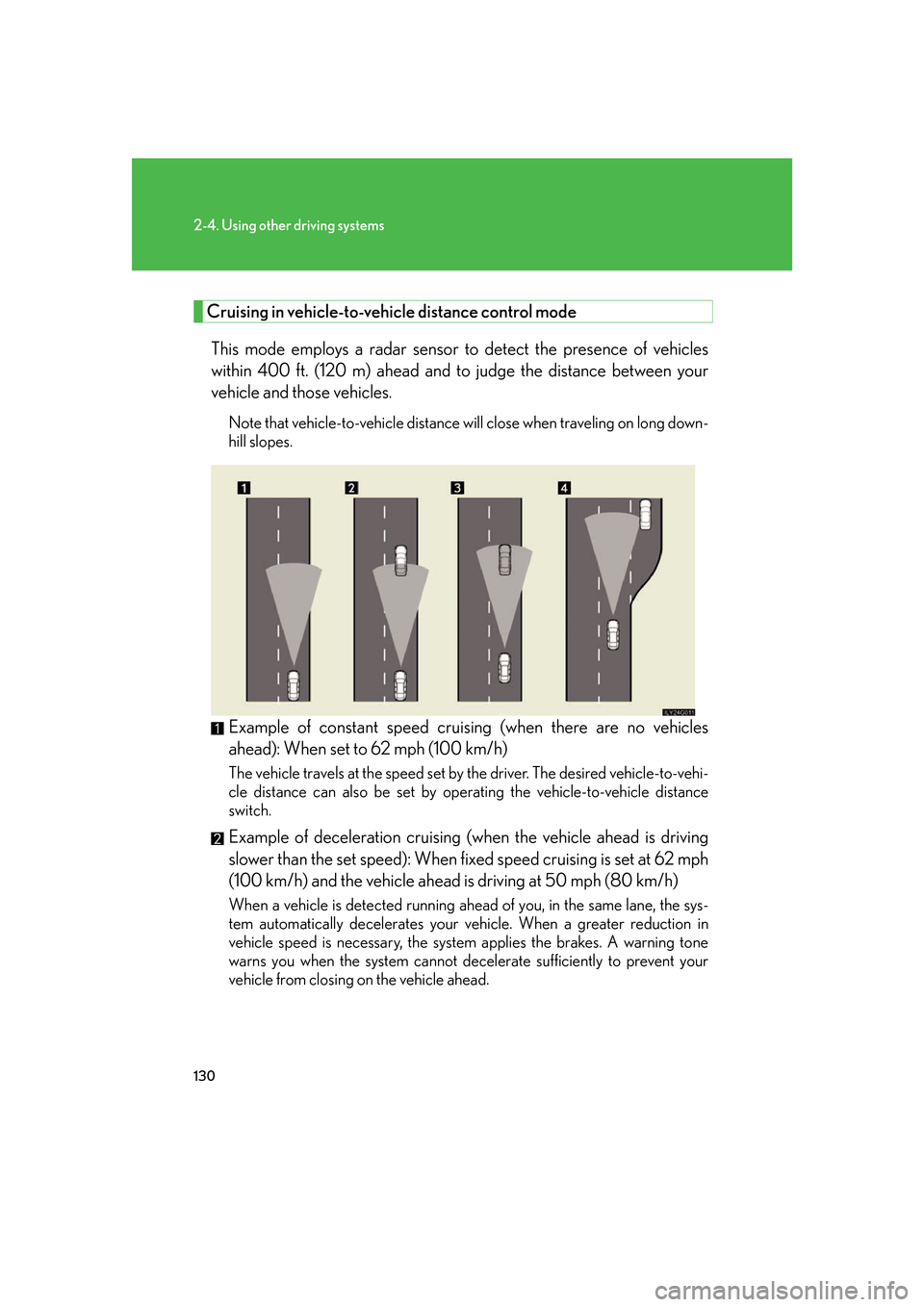
Cruising in vehicle-to-vehicle distance control mode
This mode employs a radar sensor to detect the presence of vehicles
within 400 ft. (120 m) ahead and to judge the distance between your
vehicle and those vehicles.
Note that vehicle-to-vehicle distance will close when traveling on long down -
hill slopes.
Example of constant speed cruising (when there are no vehicles
ahead): When set to 62 mph (100 km/h)
The vehicle travels at the speed set by the driver. The desired vehicle-to-vehi-
cle distance can also be set by oper ating the v
ehicle-to-vehicle distance
switch.
Example of deceleration cruising (wh en the vehicle ahead is driving
slower than the set speed): When fixed speed cruising is set at 6
2 mph
(100 km/h) and the vehicle ahead is driving at 50 mph (80 km/h)
When a vehicle is detected running ahead of you, in the same lane, the sys -
tem automatically decelerates your vehicle. When a greater reduction in
v
ehicle speed is necessary, the system applies the brakes. A warning tone
warns you when the system cannot decelerate sufficiently to prevent your
vehicle from closing on the vehicle ahead.
Page 154 of 562
134
2-4. Using other driving systems
CAUTION
■Before using dynamic radar cruise control
Do not overly rely on vehicle-to-vehicle distance control.
Be aware of the set vehicle speed. If au tomatic deceleration/acceleration is not
appropriate, adjust the vehicle speed, as well as the distance between your vehicle
and vehicles ahead by applying the brakes, etc.
■To avoid operating the dynamic radar cruise control by mistake
Keep the “ON-OFF” button off when not in use.
■Situations unsuitable for dynamic radar cruise control
Do not use dynamic radar cruise contro l in any of the following situations.
Doing so may result in inappropriate cont rol of speed and could cause serious or
fatal accident.
●In heavy traffic
●On roads with sharp bends
●On winding roads
●On slippery roads, such as thos e covered with rain, ice or snow
●Where there are sudden changes between sharp up and down gradients
●At entrances to expressways
●When weather conditions are bad enough that they may prevent the sensors
from functioning correctly (f og, snow, sandstorm, etc.)
●Where buzzer can be heard often
Page 155 of 562
135
2-4. Using other driving systems
2
When driving
CAUTION
■When the radar sensor may not be correctly detecting the vehicle ahead
Apply the brakes as necessary when any of the following types of vehicles are in
front of you.
As the sensor may not be able to correctl y detect these types of vehicles, the prox-
imity alarm ( P. 466) will not be activated, and an accident may result.
●Vehicles that cut in suddenly
●Vehicles traveling at low speeds
●Vehicles that are not moving
●Vehicles with small rear ends (tra ilers with no load on board etc.)
●Motorcycles traveling in the same lane
■Conditions under which the vehicle-to-vehicle distance control may not function
correctly
Apply the brakes as necessary in the foll owing conditions as the radar sensor may
not be able to correctly detect vehicles ahead, and an accident may result.
●When water or snow thrown up by the surrounding vehicles hinders the function-
ing of the sensor
●When your vehicle is pointing upwards (c aused by a heavy load in the trunk etc.)
●When the road curves or when the lanes are narrow
●When steering wheel operation or your position in the lane is unstable
■To ensure the radar sensor functions correctly
Do not do the following to the sensor or grille cover as doing so may cause the sen-
sor not to function correctly and could result in an accident.
●Stick or attach anything to them
●Leave them dirty
●Disassemble, subject them to strong shocks
●Modify or paint them
●Replace them with non-genuine parts
Page 171 of 562
151
2-4. Using other driving systems
2
When driving
■When the system malfunctions
●If a malfunction occurs and no obstacles have been detected, a warning is dis-
played, and a malfunction beep sounds for 7 seconds.
If an obstacle has been detected, or another malfunction occurs in a different
sensor
, the malfunction beeps will not sound.
●In the following circumstances the displayed warning will disappear:
• If you switch the screen to a different mode.
• If you turn OFF the intuitive parking assist main switch.
• If the vehicle speed exceeds 6 mph (10 km/h). Once the vehicle speed drops
b
elow 6 mph (10 km/h), the warning will be displayed again.
●If the malfunction screen is displayed, the detection range of the dual sensors is
shortened. In this case, the necessity fo r obstacle evasion (whether the obstacle
will come within 0.8 ft. (25 cm) of the vehicle or not) will not be calculated.
■When using intuitive parking assist
●The sensors' detection areas and reaction times are limited. When moving for -
ward or reversing, check the areas surrounding the vehicle (especially the sides
of the
vehicle) for safety, and drive slowly, using the brake to control the vehicle’s
speed.
• The sensors' detection areas are limited to the ar
eas around the vehicle’s front
and rear bumpers.
• Depending on the shape of the obstacle an
d other factors, the detection dis-
tance may shorten, or dete c
tion may be impossible.
• There will be a short delay between ob stacl
e detection and display. Even at
slow speeds, there is a possibility that the obstacle will come within 0.8 ft. (25
cm) of the vehicle before the display is shown and the warning beep sounds.
• Braking distance may differ according to the road conditions (rain, gravel et
c.).
• It might be difficult to hear beeps due to the volume of audio system or air
fl
ow noise of air conditioning system.
• For long obstacles such as walls, the obstacle warning may change as the o
bstacle gets closer.