ad blue Lexus GS350 2013 Do-it-yourself maintenance / LEXUS 2013 GS350 (OM30C34U) Workshop Manual
[x] Cancel search | Manufacturer: LEXUS, Model Year: 2013, Model line: GS350, Model: Lexus GS350 2013Pages: 828, PDF Size: 10.43 MB
Page 538 of 828
538
GS350_U (OM30C34U)
5-4. Using the hands-free phone system (for cellular phone)
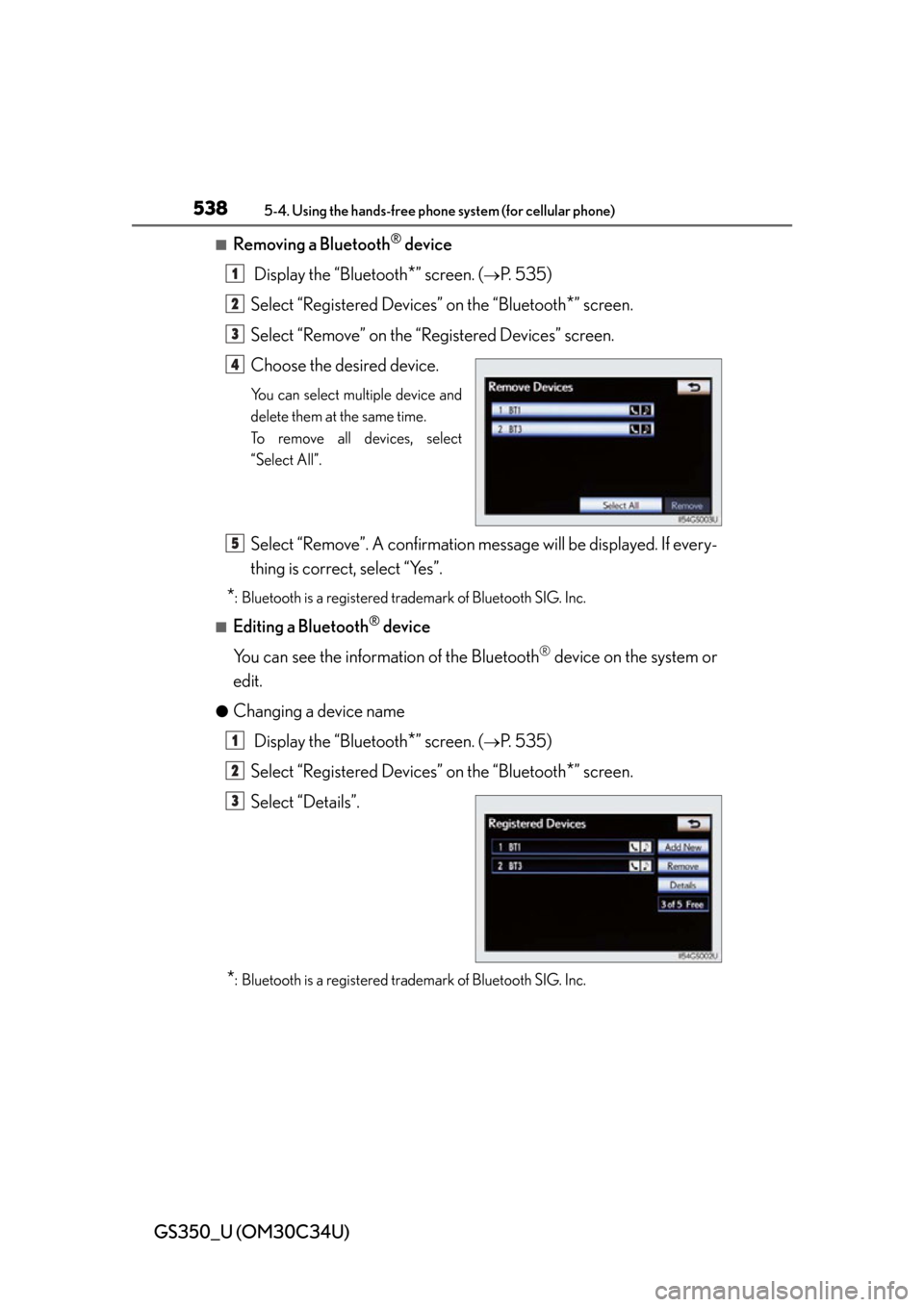
■Removing a Bluetooth® device
Display the “Bluetooth
*” screen. (P. 535)
Select “Registered Devices” on the “Bluetooth
*” screen.
Select “Remove” on the “Registered Devices” screen.
Choose the desired device.
You can select multiple device and
delete them at the same time.
To remove all devices, select
“Select All”.
Select “Remove”. A confirmation mes sage will be displayed. If every-
thing is correct, select “Yes”.
*: Bluetooth is a registered trademark of Bluetooth SIG. Inc.
■Editing a Bluetooth® device
You can see the information of the Bluetooth
® device on the system or
edit.
●Changing a device name
Display the “Bluetooth
*” screen. (P. 535)
Select “Registered Devices” on the “Bluetooth
*” screen.
Select “Details”.
*: Bluetooth is a registered trademark of Bluetooth SIG. Inc.
1
2
3
4
5
1
2
3
Page 540 of 828
540
GS350_U (OM30C34U)
5-4. Using the hands-free phone system (for cellular phone)
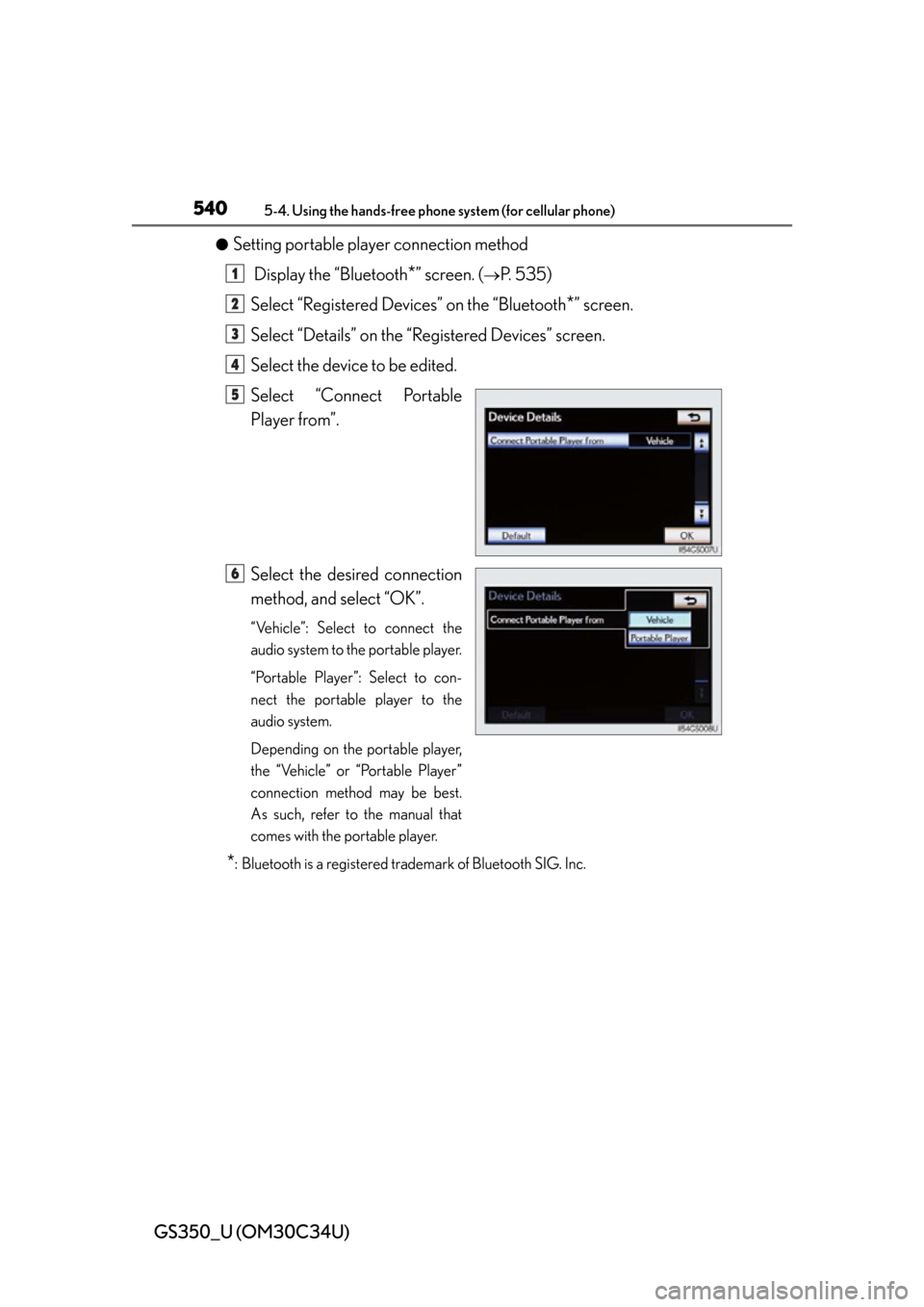
●Setting portable player connection method
Display the “Bluetooth
*” screen. (P. 535)
Select “Registered Devices” on the “Bluetooth
*” screen.
Select “Details” on the “Registered Devices” screen.
Select the device to be edited.
Select “Connect Portable
Player from”.
Select the desired connection
method, and select “OK”.
“Vehicle”: Select to connect the
audio system to the portable player.
“Portable Player”: Select to con-
nect the portable player to the
audio system.
Depending on the portable player,
the “Vehicle” or “Portable Player”
connection method may be best.
As such, refer to the manual that
comes with the portable player.
*: Bluetooth is a registered trademark of Bluetooth SIG. Inc.
1
2
3
4
5
6
Page 541 of 828

GS350_U (OM30C34U)
5415-4. Using the hands-free phone system (for cellular phone)
5
Interior features
■Editing the “Device Name”
If you change a device name, the name registered in your cellular phone is not
changed.
■About “Device Address”
The address peculiar to the system. It cannot be changed. If you have registered two
Bluetooth
® phones with the same device name and you cannot distinguish one from
the other, refer to this address.
■“My Phone Number”:
The phone number of the Bluetooth
® phone is displayed on the screen. Depending
on the type of phone, the phon e number may not be displayed.
■“Profiles”:
The compatibility profile of the Bluetooth
® device is displayed on the screen.
■“Connect Portable Player from”:
There are 2 portable player connection settings available; “Vehicle” and “Portable
Player”.
■When you delete a Bluetooth® phone
The phonebook data will be deleted at the same time.
Page 542 of 828
542
GS350_U (OM30C34U)
5-4. Using the hands-free phone system (for cellular phone)
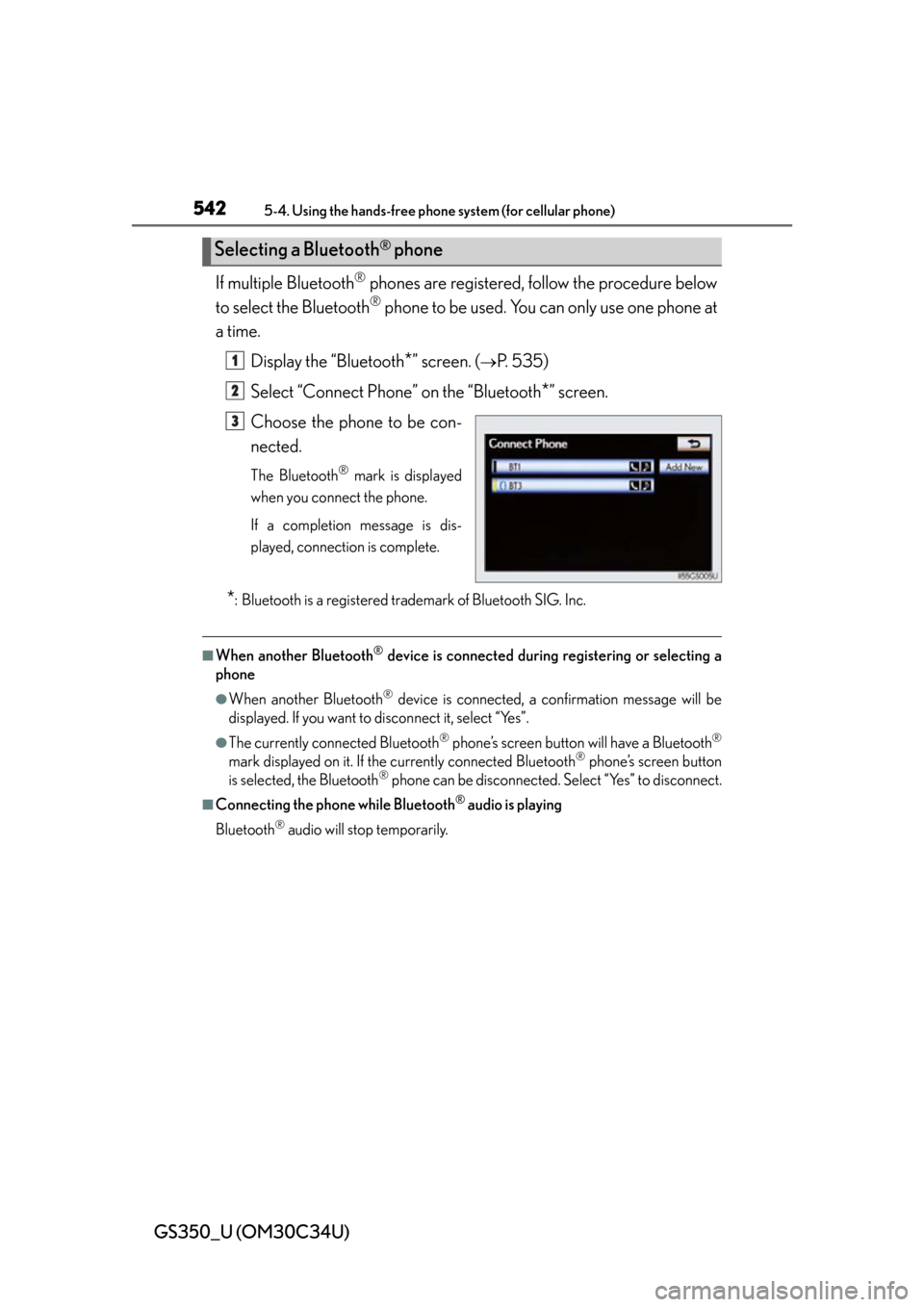
If multiple Bluetooth® phones are registered, follow the procedure below
to select the Bluetooth
® phone to be used. You can only use one phone at
a time.
Display the “Bluetooth
*” screen. (P. 535)
Select “Connect Phone” on the “Bluetooth
*” screen.
Choose the phone to be con-
nected.
The Bluetooth® mark is displayed
when you connect the phone.
If a completion message is dis-
played, connection is complete.
*: Bluetooth is a registered trademark of Bluetooth SIG. Inc.
■When another Bluetooth® device is connected during registering or selecting a
phone
●When another Bluetooth® device is connected, a confirmation message will be
displayed. If you want to disconnect it, select “Yes”.
●The currently connected Bluetooth® phone’s screen button will have a Bluetooth®
mark displayed on it. If the currently connected Bluetooth® phone’s screen button
is selected, the Bluetooth® phone can be disconnected. Select “Yes” to disconnect.
■Connecting the phone while Bluetooth® audio is playing
Bluetooth
® audio will stop temporarily.
Selecting a Bluetooth® phone
1
2
3
Page 543 of 828
GS350_U (OM30C34U)
5435-4. Using the hands-free phone system (for cellular phone)
5
Interior features
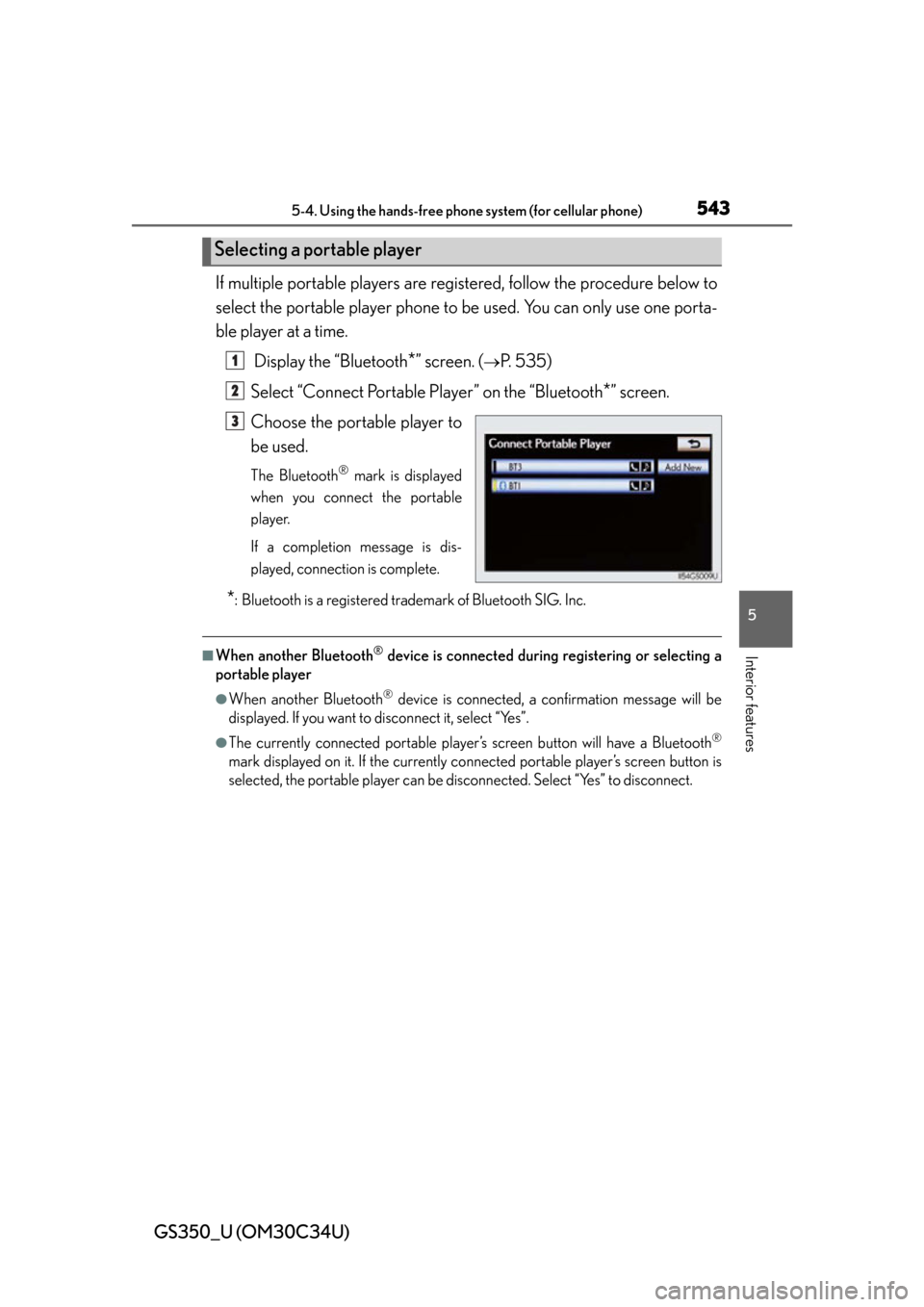
If multiple portable players are registered, follow the procedure below to
select the portable player phone to be used. You can only use one porta-
ble player at a time.
Display the “Bluetooth
*” screen. (P. 535)
Select “Connect Portable Player” on the “Bluetooth
*” screen.
Choose the portable player to
be used.
The Bluetooth® mark is displayed
when you connect the portable
player.
If a completion message is dis-
played, connection is complete.
*: Bluetooth is a registered trademark of Bluetooth SIG. Inc.
■When another Bluetooth® device is connected during registering or selecting a
portable player
●When another Bluetooth® device is connected, a confirmation message will be
displayed. If you want to disconnect it, select “Yes”.
●The currently connected portable player’s screen button will have a Bluetooth®
mark displayed on it. If the currently conn ected portable player’s screen button is
selected, the portable player can be di sconnected. Select “Yes” to disconnect.
Selecting a portable player
1
2
3
Page 544 of 828
544
GS350_U (OM30C34U)
5-4. Using the hands-free phone system (for cellular phone)
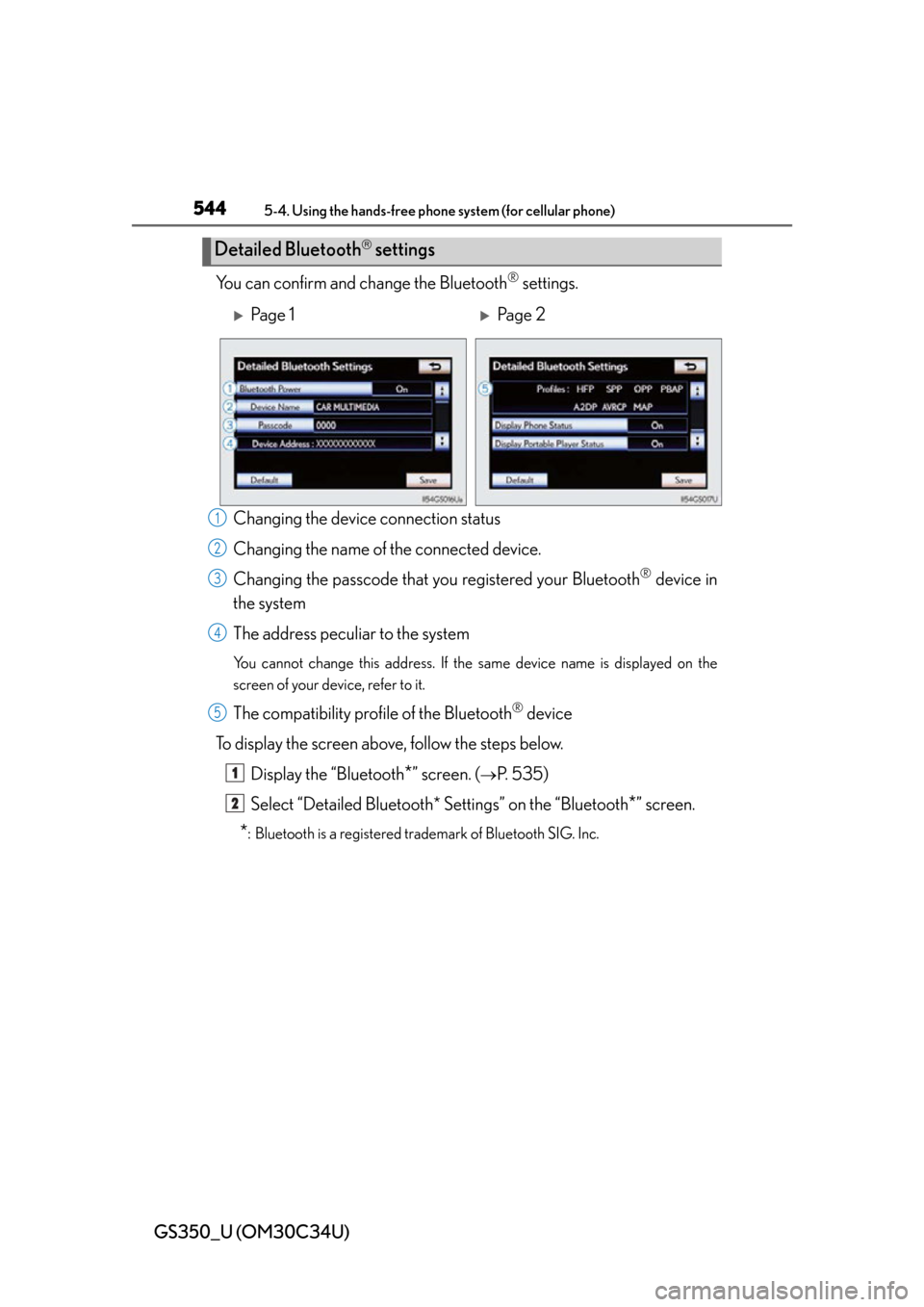
You can confirm and change the Bluetooth® settings.
Changing the devic e connection status
Changing the name of the connected device.
Changing the passcode that y ou registered your Bluetooth
® device in
the system
The address peculiar to the system
You cannot change this address. If the same device name is displayed on the
screen of your device, refer to it.
The compatibility prof ile of the Bluetooth® device
To display the screen above, follow the steps below. Display the “Bluetooth
*” screen. (P. 535)
Select “Detailed Bluetooth* Settings” on the “Bluetooth
*” screen.
*: Bluetooth is a registered trademark of Bluetooth SIG. Inc.
Detailed Bluetooth settings
Pa g e 1Pa g e 2
1
2
3
4
5
1
2
Page 545 of 828
GS350_U (OM30C34U)
5455-4. Using the hands-free phone system (for cellular phone)
5
Interior features
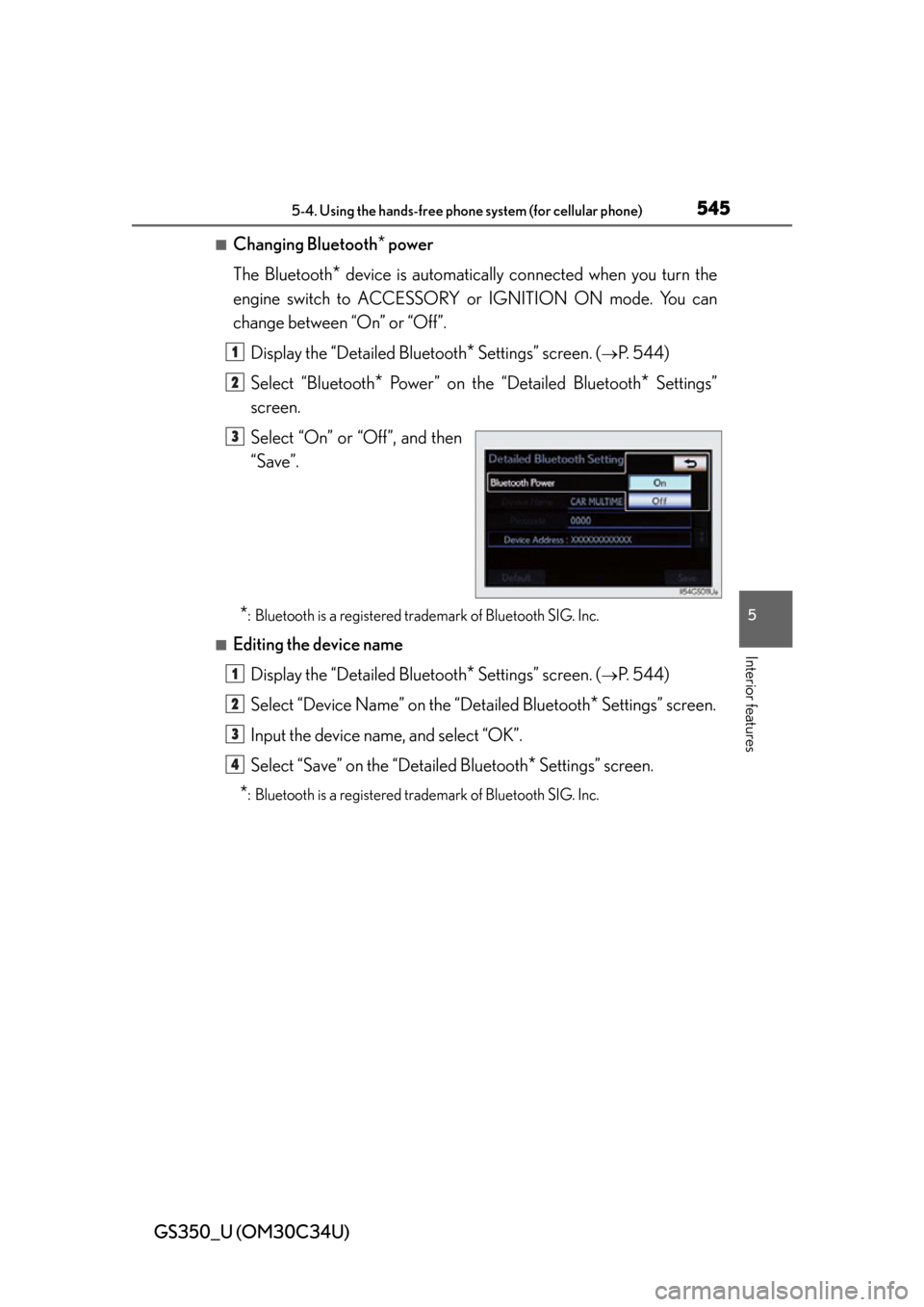
■Changing Bluetooth* power
The Bluetooth
* device is automatically co nnected when you turn the
engine switch to ACCESSORY or IGNITION ON mode. You can
change between “On” or “Off”.
Display the “Detailed Bluetooth
* Settings” screen. (P. 544)
Select “Bluetooth
* Power” on the “Detailed Bluetooth* Settings”
screen.
Select “On” or “Off”, and then
“Save”.
*: Bluetooth is a registered tr ademark of Bluetooth SIG. Inc.
■Editing the device name
Display the “Detailed Bluetooth
* Settings” screen. (P. 544)
Select “Device Name” on the “Detailed Bluetooth
* Settings” screen.
Input the device name, and select “OK”.
Select “Save” on the “Detailed Bluetooth
* Settings” screen.
*: Bluetooth is a registered tr ademark of Bluetooth SIG. Inc.
1
2
3
1
2
3
4
Page 546 of 828
546
GS350_U (OM30C34U)
5-4. Using the hands-free phone system (for cellular phone)
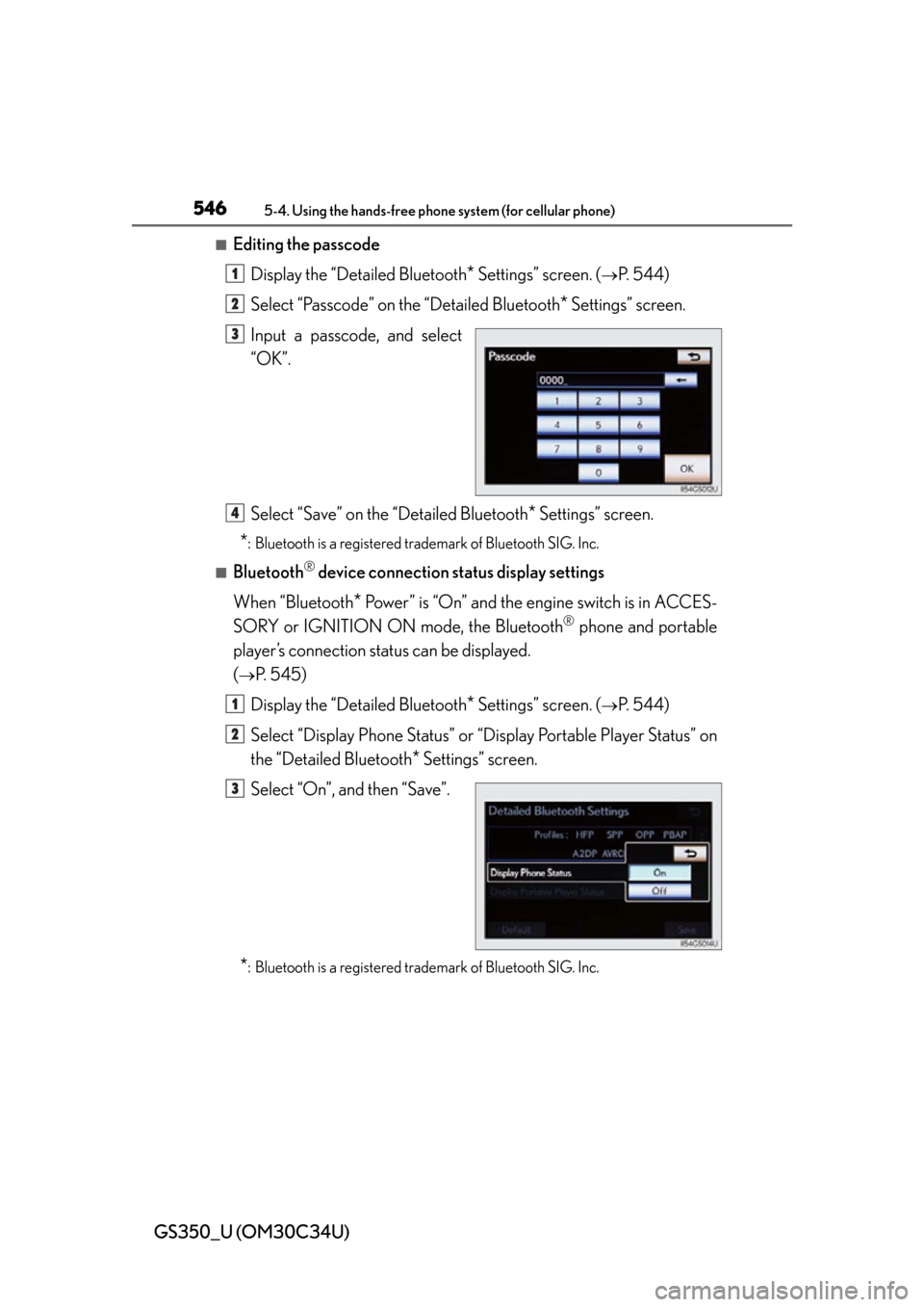
■Editing the passcode
Display the “Detailed Bluetooth
* Settings” screen. (P. 544)
Select “Passcode” on the “Detailed Bluetooth
* Settings” screen.
Input a passcode, and select
“OK”.
Select “Save” on the “Detailed Bluetooth
* Settings” screen.
*: Bluetooth is a registered tr ademark of Bluetooth SIG. Inc.
■Bluetooth® device connection status display settings
When “Bluetooth
* Power” is “On” and the engine switch is in ACCES-
SORY or IGNITION ON mode, the Bluetooth
® phone and portable
player’s connection status can be displayed.
(
P. 545)
Display the “Detailed Bluetooth
* Settings” screen. (P. 544)
Select “Display Phone Status” or “Display Portable Player Status” on
the “Detailed Bluetooth
* Settings” screen.
Select “On”, and then “Save”.
*: Bluetooth is a registered tr ademark of Bluetooth SIG. Inc.
1
2
3
4
1
2
3
Page 547 of 828

GS350_U (OM30C34U)
5475-4. Using the hands-free phone system (for cellular phone)
5
Interior features
■While driving
You cannot change the state of “Bluetooth
* Power” from “On” to “Off” while driving,
but it can be changed from “Off” to “On”.
■To return to the default Bluetooth® settings
Select “Default”, and then “Yes”.
If the state of “Bluetooth
* Power” is changed from “Off” to “On”, Bluetooth® con-
nection will begin.
*: Bluetooth is a registered tr ademark of Bluetooth SIG. Inc.
Page 588 of 828

588
GS350_U (OM30C34U)
5-7. Other interior features
■Safety Connect Services Information
●Phone calls using the vehicles Bluetooth® technology will not be possible during
Safety Connect.
●Safety Connect is available beginning Fall 2009 on select Lexus models. Contact
with the Safety Connect response center is dependent upon the telematics device
being in operative condition, cellular conn ection availability, and GPS satellite sig-
nal reception, which can limit the ability to reach the response center or receive
emergency service support. Enrollment and Telematics Subscription Service
Agreement required. A variety of subscription terms is available; charges vary by
subscription term selected.
●Automatic Collision Notification, Emergency Assistance and Stolen Vehicle Loca-
tion will function in the United States, including Hawaii and Alaska, and in Canada,
and Enhanced Roadside Assistance will function in the United States (except
Hawaii) and in Canada. No Safety Connect services will function outside of the
United States in countries other than Canada.
●Safety Connect services are not subject to section 255 of the Telecommunications
Act and the device is not TTY compatible.
■Languages
The Safety Connect response center will offer support in multiple languages. The
Safety Connect system will offer voice prompts in English and Spanish. Please indi-
cate your language of choice when enrolling.
■When contacting the response center
You may be unable to contact the response center if the network is busy.