air conditioning lexus LC500C 2021 / LEXUS 2021 LC500 CONVERTIBLE (OM11498U) Owner's Guide
[x] Cancel search | Manufacturer: LEXUS, Model Year: 2021, Model line: LC500C, Model: Lexus LC500C 2021Pages: 410, PDF Size: 8.71 MB
Page 243 of 410
2415-3. Using the air conditioning system
5
Interior features
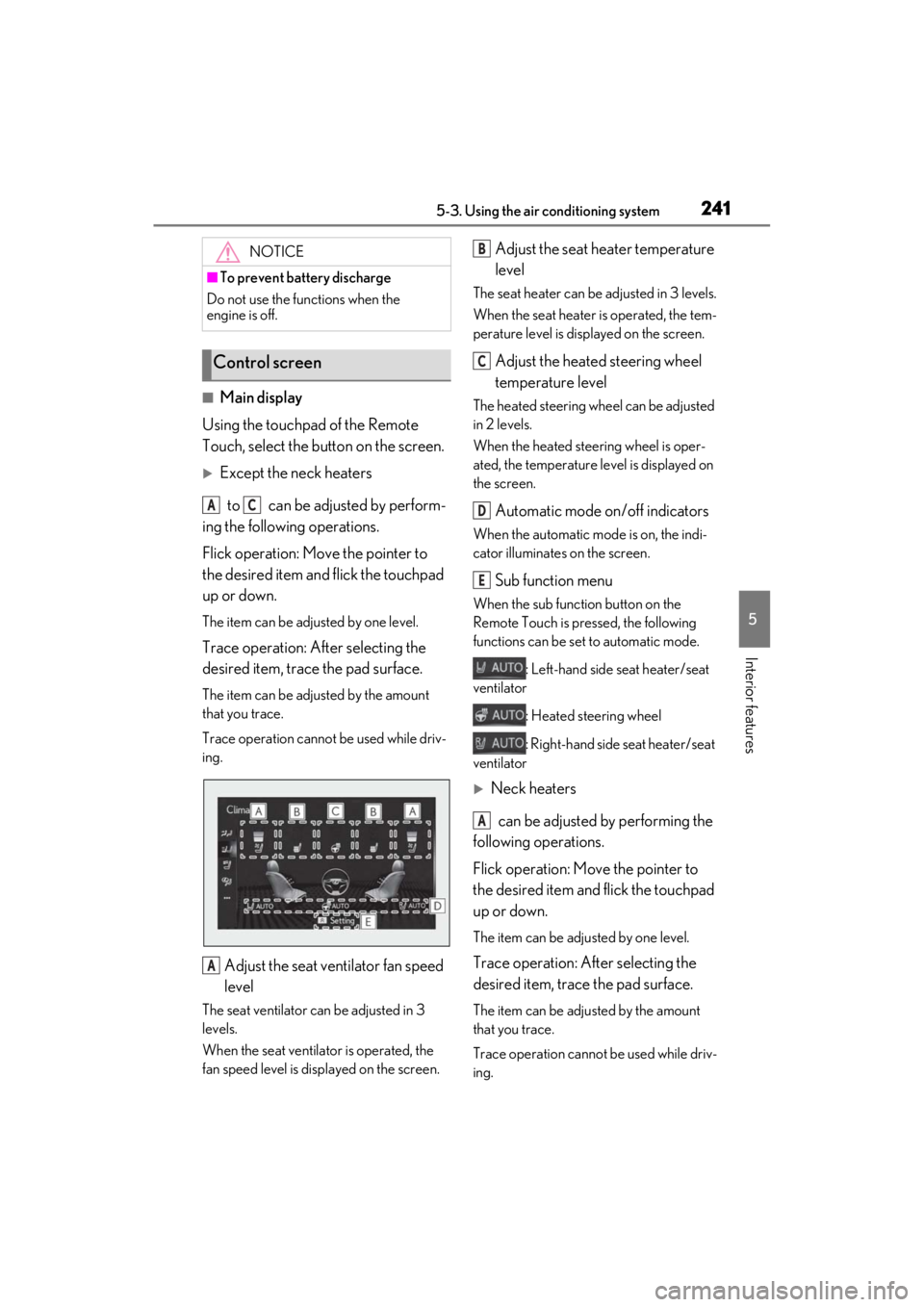
■Main display
Using the touchpad of the Remote
Touch, select the button on the screen.
Except the neck heaters
to can be adjusted by perform-
ing the following operations.
Flick operation: Move the pointer to
the desired item and flick the touchpad
up or down.
The item can be adjusted by one level.
Trace operation: After selecting the
desired item, trace the pad surface.
The item can be adjusted by the amount
that you trace.
Trace operation cannot be used while driv-
ing.
Adjust the seat ventilator fan speed
level
The seat ventilator ca n be adjusted in 3
levels.
When the seat ventilator is operated, the
fan speed level is disp layed on the screen.
Adjust the seat heater temperature
level
The seat heater can be adjusted in 3 levels.
When the seat heater is operated, the tem-
perature level is displayed on the screen.
Adjust the heated steering wheel
temperature level
The heated steering wheel can be adjusted
in 2 levels.
When the heated steering wheel is oper-
ated, the temperature le vel is displayed on
the screen.
Automatic mode on/off indicators
When the automatic mode is on, the indi-
cator illuminates on the screen.
Sub function menu
When the sub function button on the
Remote Touch is pressed, the following
functions can be set to automatic mode.
: Left-hand side seat heater/seat
ventilator
: Heated steering wheel
: Right-hand side seat heater/seat
ventilator
Neck heaters
can be adjusted by performing the
following operations.
Flick operation: Move the pointer to
the desired item and flick the touchpad
up or down.
The item can be adjusted by one level.
Trace operation: After selecting the
desired item, trace the pad surface.
The item can be adjusted by the amount
that you trace.
Trace operation cannot be used while driv-
ing.
NOTICE
■To prevent battery discharge
Do not use the functions when the
engine is off.
Control screen
AC
A
B
C
D
E
A
Page 244 of 410
2425-3. Using the air conditioning system
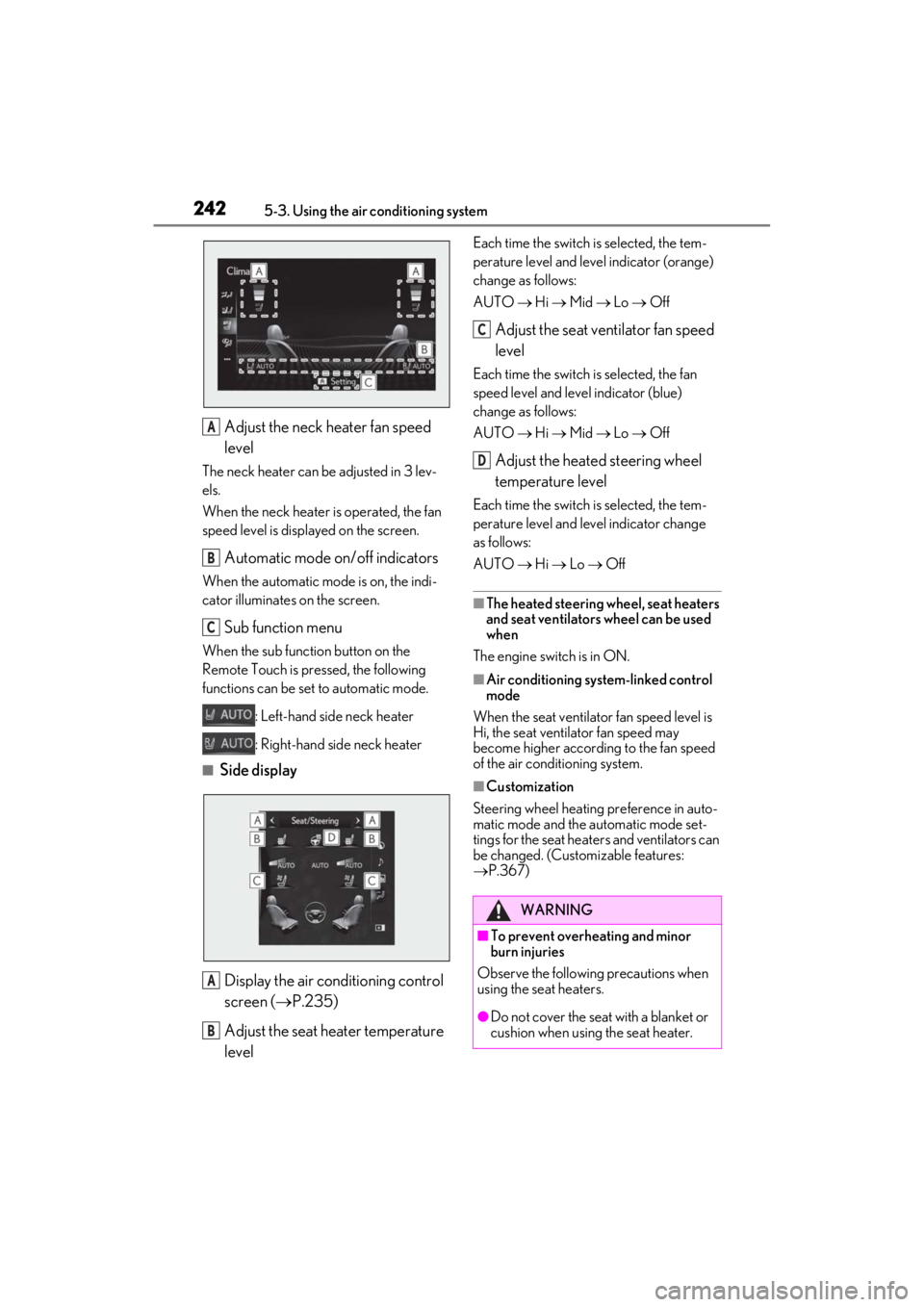
Adjust the neck heater fan speed
level
The neck heater can be adjusted in 3 lev-
els.
When the neck heater is operated, the fan
speed level is displayed on the screen.
Automatic mode on/off indicators
When the automatic mode is on, the indi-
cator illuminates on the screen.
Sub function menu
When the sub function button on the
Remote Touch is pressed, the following
functions can be set to automatic mode.
: Left-hand side neck heater
: Right-hand side neck heater
■Side display
Display the air conditioning control
screen ( P.235)
Adjust the seat heater temperature
level
Each time the switch is selected, the tem-
perature level and level indicator (orange)
change as follows:
AUTO Hi Mid Lo Off
Adjust the seat ventilator fan speed
level
Each time the switch is selected, the fan
speed level and level indicator (blue)
change as follows:
AUTO Hi Mid Lo Off
Adjust the heated steering wheel
temperature level
Each time the switch is selected, the tem-
perature level and le vel indicator change
as follows:
AUTO Hi Lo Off
■The heated steering wheel, seat heaters
and seat ventilators wheel can be used
when
The engine switch is in ON.
■Air conditioning system-linked control
mode
When the seat ventilator fan speed level is
Hi, the seat ventilator fan speed may
become higher according to the fan speed
of the air conditioning system.
■Customization
Steering wheel heating preference in auto-
matic mode and the automatic mode set-
tings for the seat heaters and ventilators can
be changed. (Customizable features:
P.367)
A
B
C
A
B
WARNING
■To prevent overheating and minor
burn injuries
Observe the following precautions when
using the seat heaters.
●Do not cover the seat with a blanket or
cushion when using the seat heater.
C
D
Page 245 of 410
2435-3. Using the air conditioning system
5
Interior features
*: : If equipped
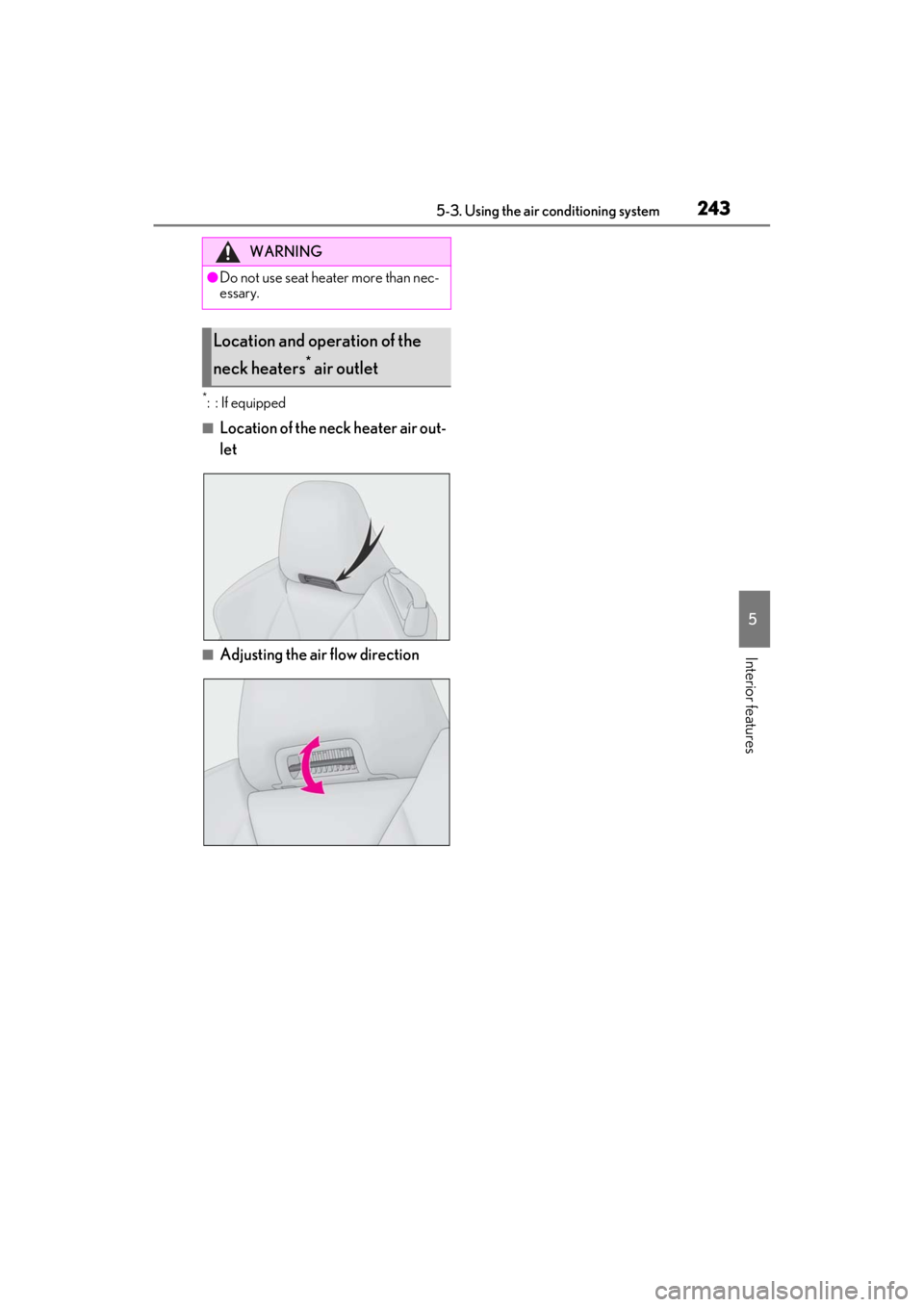
■Location of the neck heater air out-
let
■Adjusting the air flow direction
WARNING
●Do not use seat heater more than nec-
essary.
Location and operation of the
neck heaters
* air outlet
Page 249 of 410
2475-5. Using the storage features
5
Interior features
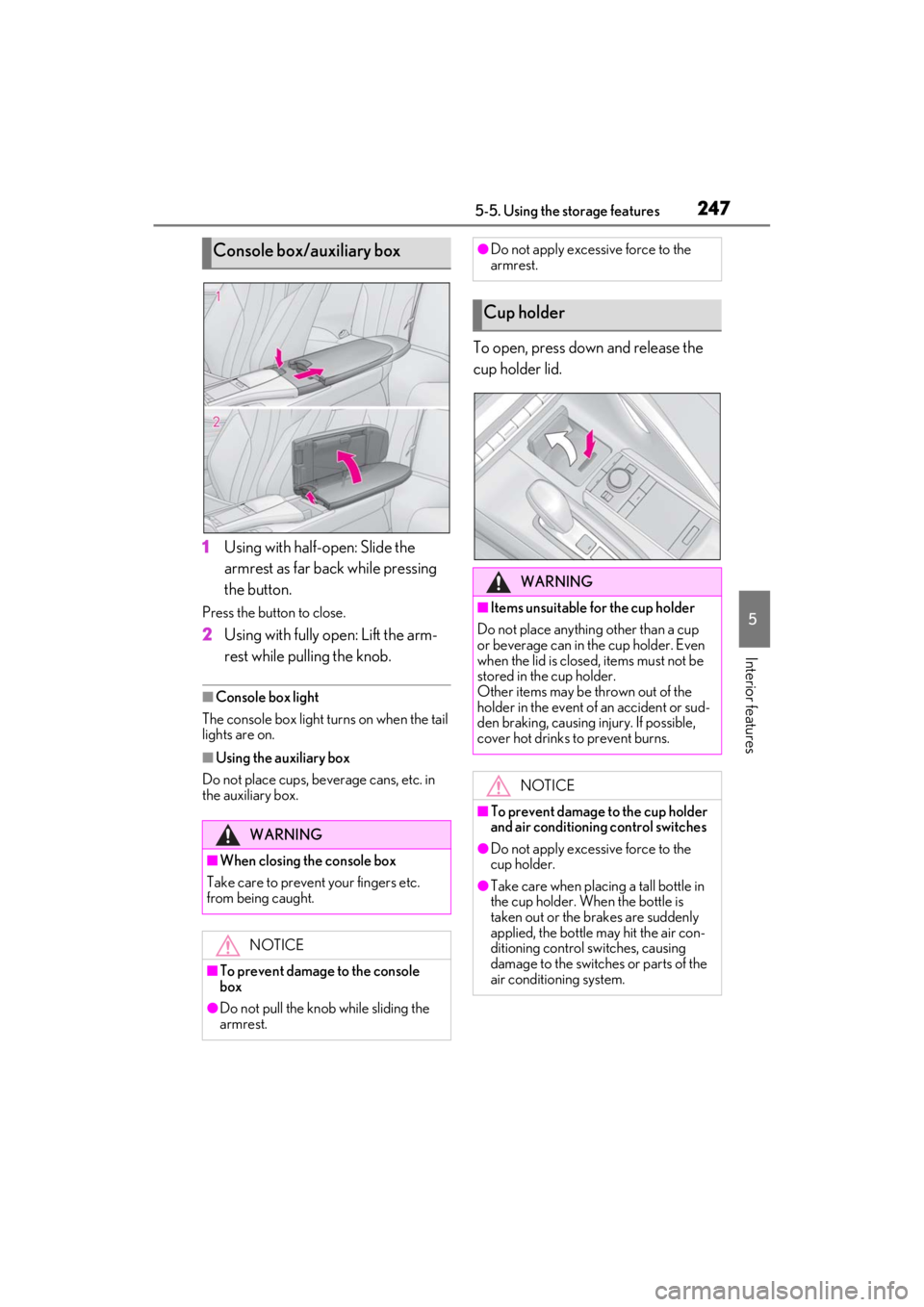
1Using with half-open: Slide the
armrest as far back while pressing
the button.
Press the button to close.
2Using with fully open: Lift the arm-
rest while pulling the knob.
■Console box light
The console box light turns on when the tail
lights are on.
■Using the auxiliary box
Do not place cups, beverage cans, etc. in
the auxiliary box.
To open, press down and release the
cup holder lid.
Console box/auxiliary box
WARNING
■When closing the console box
Take care to prevent your fingers etc.
from being caught.
NOTICE
■To prevent damage to the console
box
●Do not pull the knob while sliding the
armrest.
●Do not apply excessive force to the
armrest.
Cup holder
WARNING
■Items unsuitable for the cup holder
Do not place anything other than a cup
or beverage can in the cup holder. Even
when the lid is closed, items must not be
stored in the cup holder.
Other items may be thrown out of the
holder in the event of an accident or sud-
den braking, causing injury. If possible,
cover hot drinks to prevent burns.
NOTICE
■To prevent damage to the cup holder
and air conditioning control switches
●Do not apply excessive force to the
cup holder.
●Take care when placing a tall bottle in
the cup holder. When the bottle is
taken out or the brakes are suddenly
applied, the bottle may hit the air con-
ditioning control switches, causing
damage to the switches or parts of the
air conditioning system.
Page 259 of 410
257
6
6
Maintenance and care
Maintenance and care
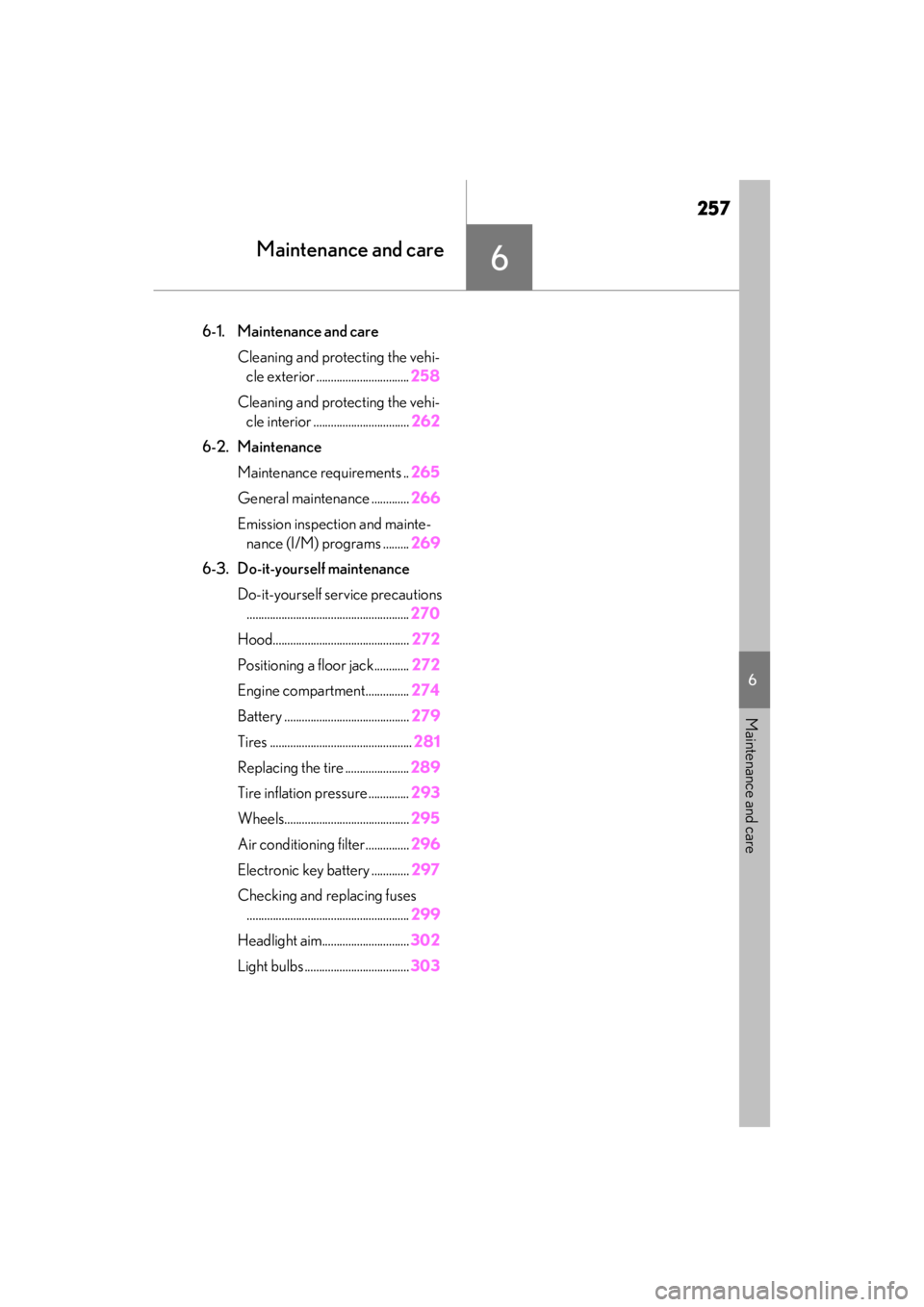
6-1. Maintenance and careCleaning and protecting the vehi-cle exterior ................................ 258
Cleaning and protecting the vehi- cle interior ................................. 262
6-2. Maintenance Maintenance requirements .. 265
General maintenance ............. 266
Emission inspection and mainte- nance (I/M) programs ......... 269
6-3. Do-it-yourself maintenance Do-it-yourself service precautions........................................................ 270
Hood............................................... 272
Positioning a floor jack............ 272
Engine compartment............... 274
Battery ........................................... 279
Tires ................................................. 281
Replacing the tire ...................... 289
Tire inflation pressure .............. 293
Wheels........................................... 295
Air conditioning filter...............296
Electronic key battery ............. 297
Checking and replacing fuses ........................................................ 299
Headlight aim.............................. 302
Light bulbs .................................... 303
Page 263 of 410
2616-1. Maintenance and care
6
Maintenance and care
NOTICE
●Do not open the soft top roof with dirt
or snow adhered.
■Cleaning the soft top roof
Do not strongly press a soft brush such
as a horsehair brush or an adhesive roller
to the soft top roof. Doing so may cause
damage to the soft top roof.
■Cleaning the exterior lights
●Wash carefully. Do not use organic
substances or scrub with a hard brush.
This may damage the surfaces of the
lights.
●Do not apply wax to the surfaces of the
lights.
Wax may cause damage to the lenses.
■When using an automatic car wash
Set the wiper switch to the off position.
If the wiper switch is in “AUTO”, the wip-
ers may operate and the wiper blades
may be damaged.
■When using a high-pressure car wash
●When washing the vehicle, do not let
water from the high -pressure washer
directly hit the camera, the area
around the camera or inside of the
outside door handles. Due to the
shock from high-pressure water, it is
possible that the device may not oper-
ate normally.
●Do not bring the nozzle tip close to
boots (rubber or re sin manufactured
cover), connectors or the following
parts. The parts may be damaged if
they come into contact with high-pres-
sure water.
• Traction related parts
• Steering parts
• Suspension parts
• Brake parts
●Keep the cleaning nozzle at least 11.9
in. (30 cm) away from the vehicle
body. Otherwise resin section, such as
moldings and bumpers, may be
deformed and damaged. Also, do not
continuously hold the nozzle in the
same place.
●Do not spray the lower part of the
windshield continuously. If water
enters the air conditioning system
intake located near the lower part of
the windshield, the air conditioning
system may not operate correctly.
●Do not wash the underside of the vehi-
cle using a high pressure car washer.
Page 273 of 410
2716-3. Do-it-yourself maintenance
6
Maintenance and care
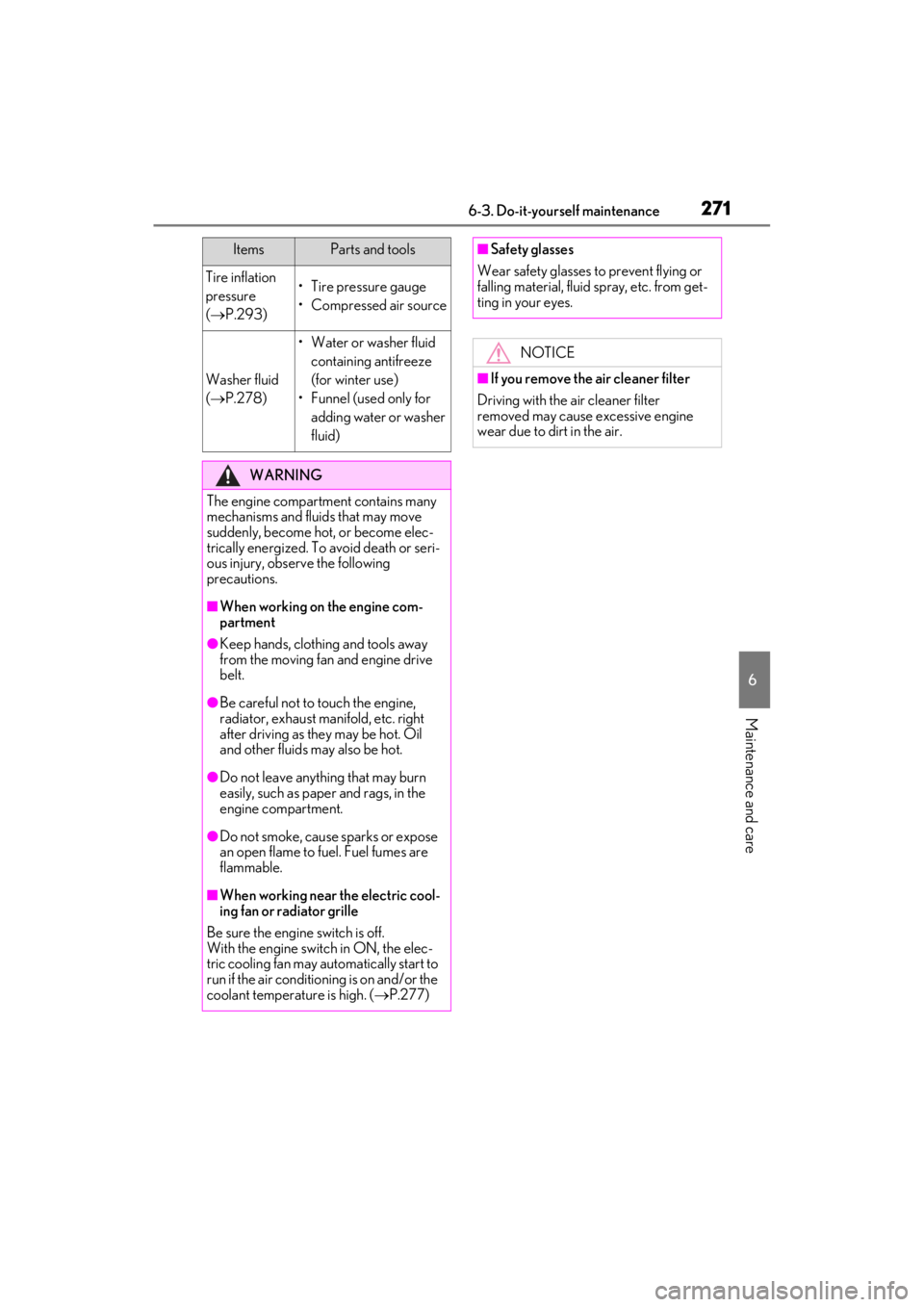
Tire inflation
pressure
( P.293)• Tire pressure gauge
• Compressed air source
Washer fluid
( P.278)
• Water or washer fluid
containing antifreeze
(for winter use)
• Funnel (used only for adding water or washer
fluid)
WARNING
The engine compartment contains many
mechanisms and fluids that may move
suddenly, become hot, or become elec-
trically energized. To avoid death or seri-
ous injury, observe the following
precautions.
■When working on the engine com-
partment
●Keep hands, clothi ng and tools away
from the moving fan and engine drive
belt.
●Be careful not to touch the engine,
radiator, exhaust manifold, etc. right
after driving as they may be hot. Oil
and other fluids may also be hot.
●Do not leave anything that may burn
easily, such as paper and rags, in the
engine compartment.
●Do not smoke, cause sparks or expose
an open flame to fuel. Fuel fumes are
flammable.
■When working near the electric cool-
ing fan or radiator grille
Be sure the engine switch is off.
With the engine switch in ON, the elec-
tric cooling fan may automatically start to
run if the air conditioning is on and/or the
coolant temperature is high. ( P.277)
ItemsParts and tools■Safety glasses
Wear safety glasses to prevent flying or
falling material, fluid spray, etc. from get-
ting in your eyes.
NOTICE
■If you remove the air cleaner filter
Driving with the air cleaner filter
removed may cause excessive engine
wear due to dirt in the air.
Page 298 of 410
2966-3. Do-it-yourself maintenance
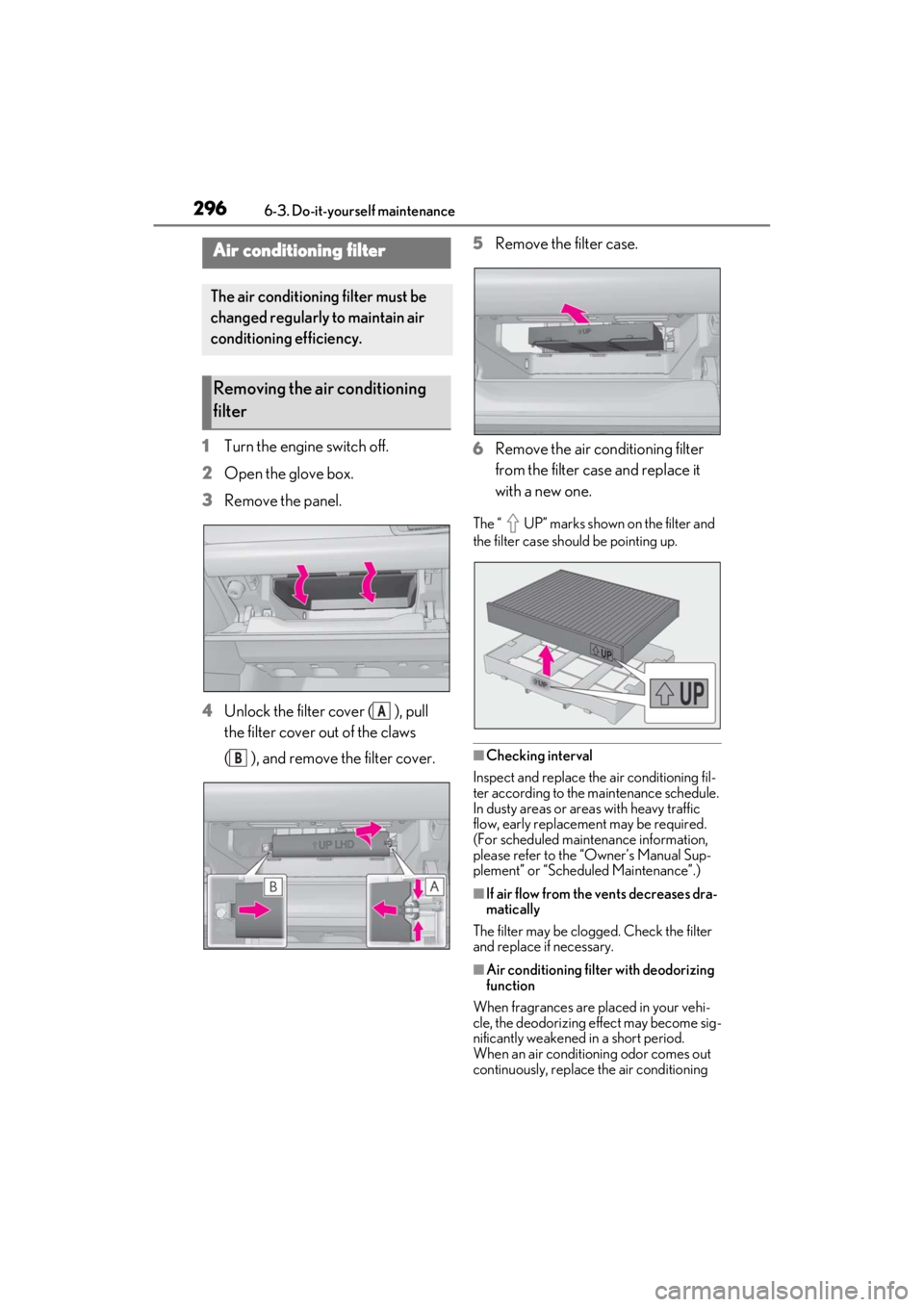
1Turn the engine switch off.
2 Open the glove box.
3 Remove the panel.
4 Unlock the filter cover ( ), pull
the filter cover out of the claws
( ), and remove the filter cover. 5
Remove the filter case.
6 Remove the air conditioning filter
from the filter case and replace it
with a new one.
The “ UP” marks shown on the filter and
the filter case should be pointing up.
■Checking interval
Inspect and replace the air conditioning fil-
ter according to the maintenance schedule.
In dusty areas or areas with heavy traffic
flow, early replacement may be required.
(For scheduled maintenance information,
please refer to the “Owner’s Manual Sup-
plement” or “Scheduled Maintenance”.)
■If air flow from the vents decreases dra-
matically
The filter may be clogged. Check the filter
and replace if necessary.
■Air conditioning filt er with deodorizing
function
When fragrances are placed in your vehi-
cle, the deodorizing effect may become sig-
nificantly weakened in a short period.
When an air conditioning odor comes out
continuously, replace the air conditioning
Air conditioning filter
The air conditioning filter must be
changed regularly to maintain air
conditioning efficiency.
Removing the air conditioning
filter
A
B
Page 299 of 410
2976-3. Do-it-yourself maintenance
6
Maintenance and care
filter.
■If the electronic key battery is depleted
The following symptoms may occur:
●The smart access system with push-but-
ton start and wireless remote control will
not function properly.
●The operational range will be reduced.
■When the card key battery needs to be
replaced (if equipped)
The battery for the card key is available only
at Lexus dealers. Your Lexus dealer can
replace the battery for you.
Prepare the following before replacing
the battery:
Flathead screwdriver
Small flathead screwdriver
Lithium battery CR2032
■Use a CR2032 lithium battery
●Batteries can be purchased at your Lexus
dealer, local electrical appliance shops or
camera stores.
●Replace only with the same or equivalent
type recommended by the manufacturer.
●Dispose of used batteries according to
the local laws.
NOTICE
■When using the air conditioning sys-
tem
Make sure that a filter is always installed.
Using the air conditioning system with-
out a filter may cause damage to the sys-
tem.
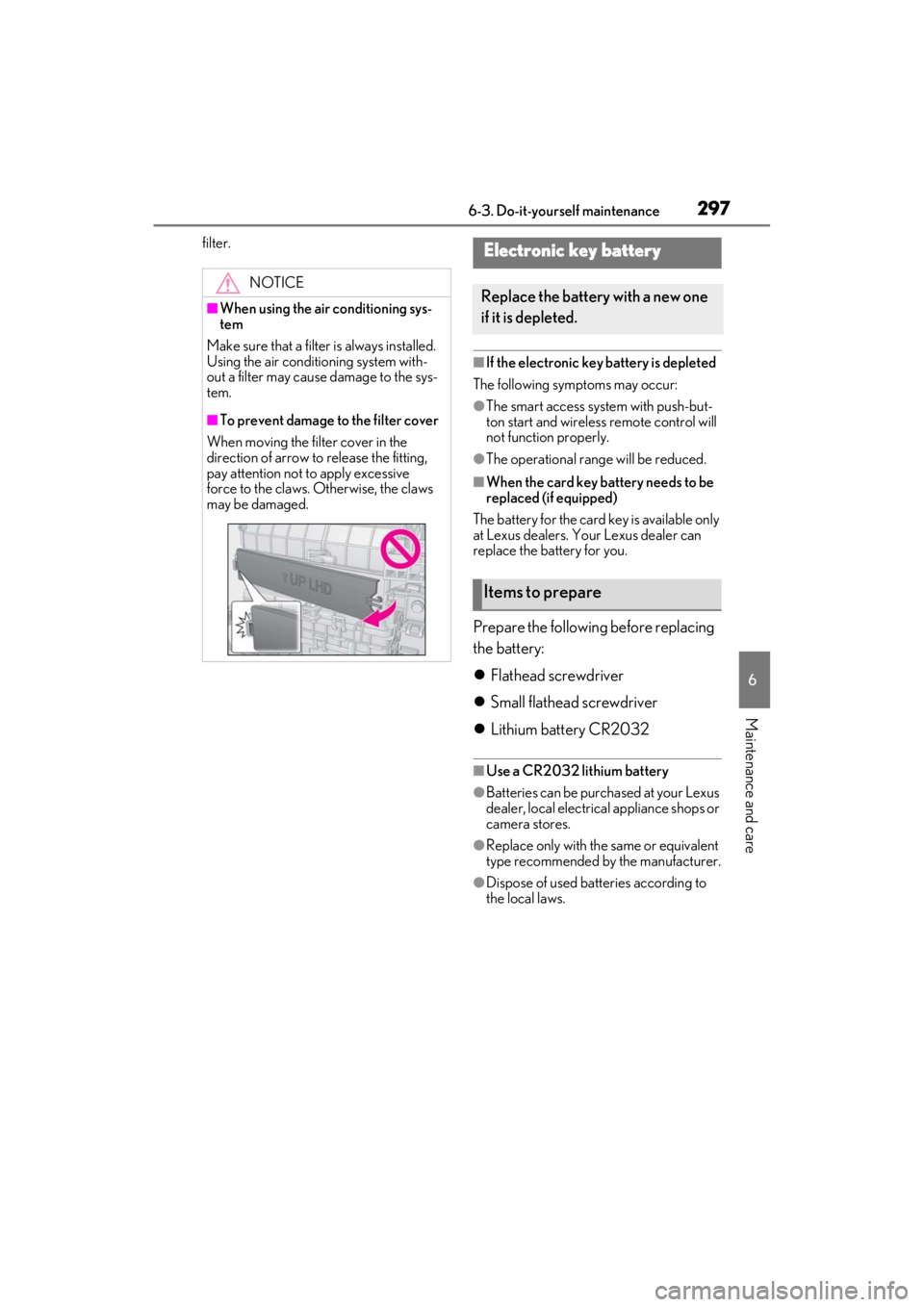
■To prevent damage to the filter cover
When moving the filter cover in the
direction of arrow to release the fitting,
pay attention not to apply excessive
force to the claws. Otherwise, the claws
may be damaged.
Electronic key battery
Replace the battery with a new one
if it is depleted.
Items to prepare
Page 328 of 410

3267-2. Steps to take in an emergency
may appear if the vehicle is stopped on a slope. Move the vehicle to a level surface and
check to see if the message disappears.
■If a message that indicates the need for referring to Owner’s Manual is shown
●If any of the following messages is shown on the multi-information display, follow the
instructions.
• “Engine Coolant Temp High” ( P.345)
• “Battery low” ( P.332)
• “Transmission Fluid Temp High” ( P.150)
●If any of the following messages is shown on the multi-information di splay, it may indicate
a malfunction. Have the vehicle inspected by your Lexus dealer immediately.
• “Access System with Elec. Key Malfunction”
• “Shift system malfunction”
• “P switch malfunction”
• “Shift system unavailable”
●If any of the following messages is shown on the multi-information di splay, it may indicate
a malfunction. Immediately stop the vehicle and contact your Lexus dealer.
• “Braking Power Low”
• “Charging System Malfunction”
• “Oil Pressure Low”
●If “Battery low” is shown, the battery charge is insufficient . Recharge or replace the bat-
tery.
■If a message that indicates the need for visiting your Lexus dealer is shown
The system or part shown on the multi-information display is malfunctioning. Have the vehi-
cle inspected by your Lexus dealer immediately.
■Warning buzzer
In some cases, the buzzer may not be heard du e to being in a noisy location or audio sound.
NOTICE
■While the engine oil level warning message is displayed
Continued engine operation with low engine oil will damage the engine.
■If “High Power Consumption Partial Limit On AC/Heater Operation” is shown fre-
quently
Air conditioning, heater and other operations are temporarily limited due to high power
consumption. Turn off unnecessary electronic equipment to reduce power consumption,
and wait until the power supply returns to normal. If this message is frequently displayed,
have the vehicle inspected at your Lexus dealer.