lights lexus LC500C 2021 / LEXUS 2021 LC500 CONVERTIBLE (OM11498U) Service Manual
[x] Cancel search | Manufacturer: LEXUS, Model Year: 2021, Model line: LC500C, Model: Lexus LC500C 2021Pages: 410, PDF Size: 8.71 MB
Page 227 of 410
225
5
5
Interior features
Interior features
5-1. Remote TouchRemote Touch ............................ 226
5-2. Lexus Climate Concierge Lexus Climate Concierge ..... 230
5-3. Using the air conditioning system Automatic air conditioning system........................................................ 232
Heated steering wheel/seat heat- ers/seat ventilators/neck heat-
ers ................................................. 240
5-4. Using the interior lights Interior lights list......................... 244
5-5. Using the storage features List of storage features............ 246
Trunk features............................. 248
5-6. Using the other interior features Other interior features ........... 249
Garage door opener............... 250
Page 246 of 410
2445-4. Using the interior lights
5-4.Using the interior lights
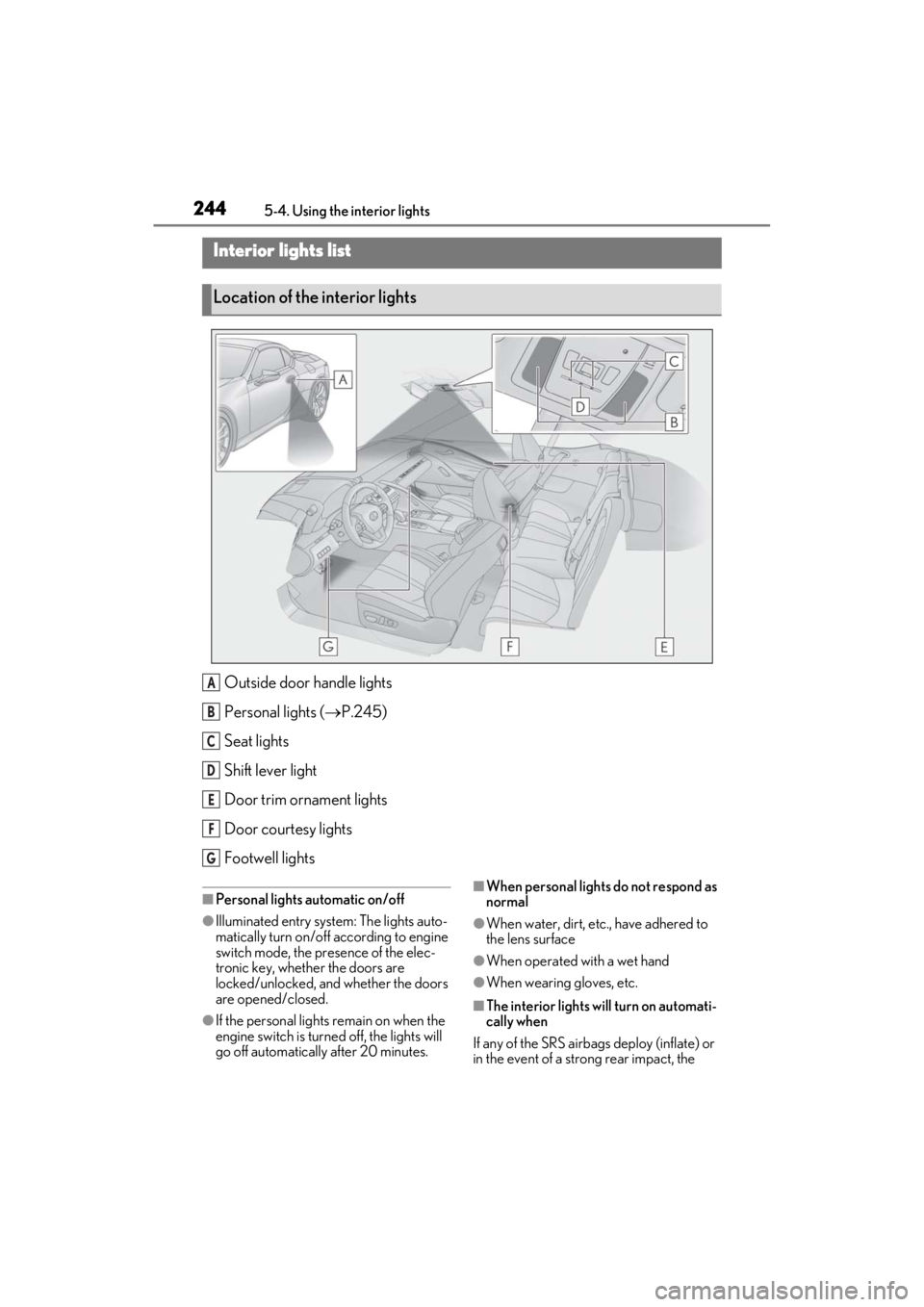
Outside door handle lights
Personal lights ( P.245)
Seat lights
Shift lever light
Door trim ornament lights
Door courtesy lights
Footwell lights
■Personal lights automatic on/off
●Illuminated entry system: The lights auto-
matically turn on/off according to engine
switch mode, the presence of the elec-
tronic key, whether the doors are
locked/unlocked, and whether the doors
are opened/closed.
●If the personal lights remain on when the
engine switch is turned off, the lights will
go off automatically after 20 minutes.
■When personal lights do not respond as
normal
●When water, dirt, etc., have adhered to
the lens surface
●When operated with a wet hand
●When wearing gloves, etc.
■The interior lights will turn on automati-
cally when
If any of the SRS airbag s deploy (inflate) or
in the event of a strong rear impact, the
Interior lights list
Location of the interior lights
A
B
C
D
E
F
G
Page 247 of 410
2455-4. Using the interior lights
5
Interior features
interior lights will turn on automatically. The
interior lights will turn off automatically after
approximately 20 minutes. The interior
lights can be turned off manually. However,
in order to help prevent further collisions, it
is recommended that they be left on until
safety can be ensured. (The interior lights
may not turn on automatically depending
on the force of the impact and conditions of
the collision.)
■Customization
Setting (e.g. the time elapsed before lights
turn off) can be changed.
(Customizable features: P.367)
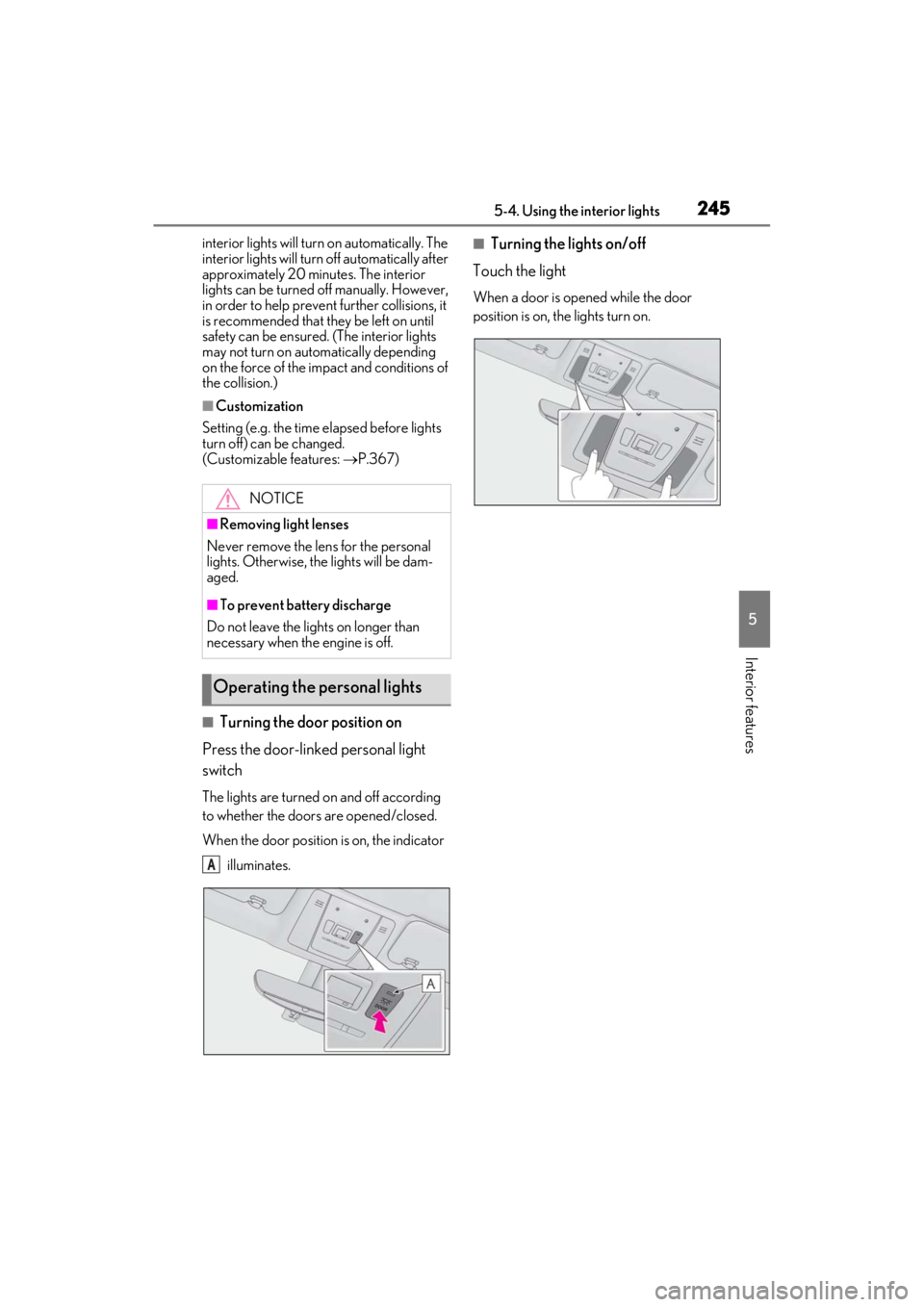
■Turning the door position on
Press the door-linked personal light
switch
The lights are turned on and off according
to whether the doors are opened/closed.
When the door position is on, the indicator
illuminates.
■Turning the lights on/off
Touch the light
When a door is opened while the door
position is on, the lights turn on.
NOTICE
■Removing light lenses
Never remove the lens for the personal
lights. Otherwise, th e lights will be dam-
aged.
■To prevent battery discharge
Do not leave the lights on longer than
necessary when the engine is off.
Operating the personal lights
A
Page 248 of 410
2465-5. Using the storage features
5-5.Using the storage features
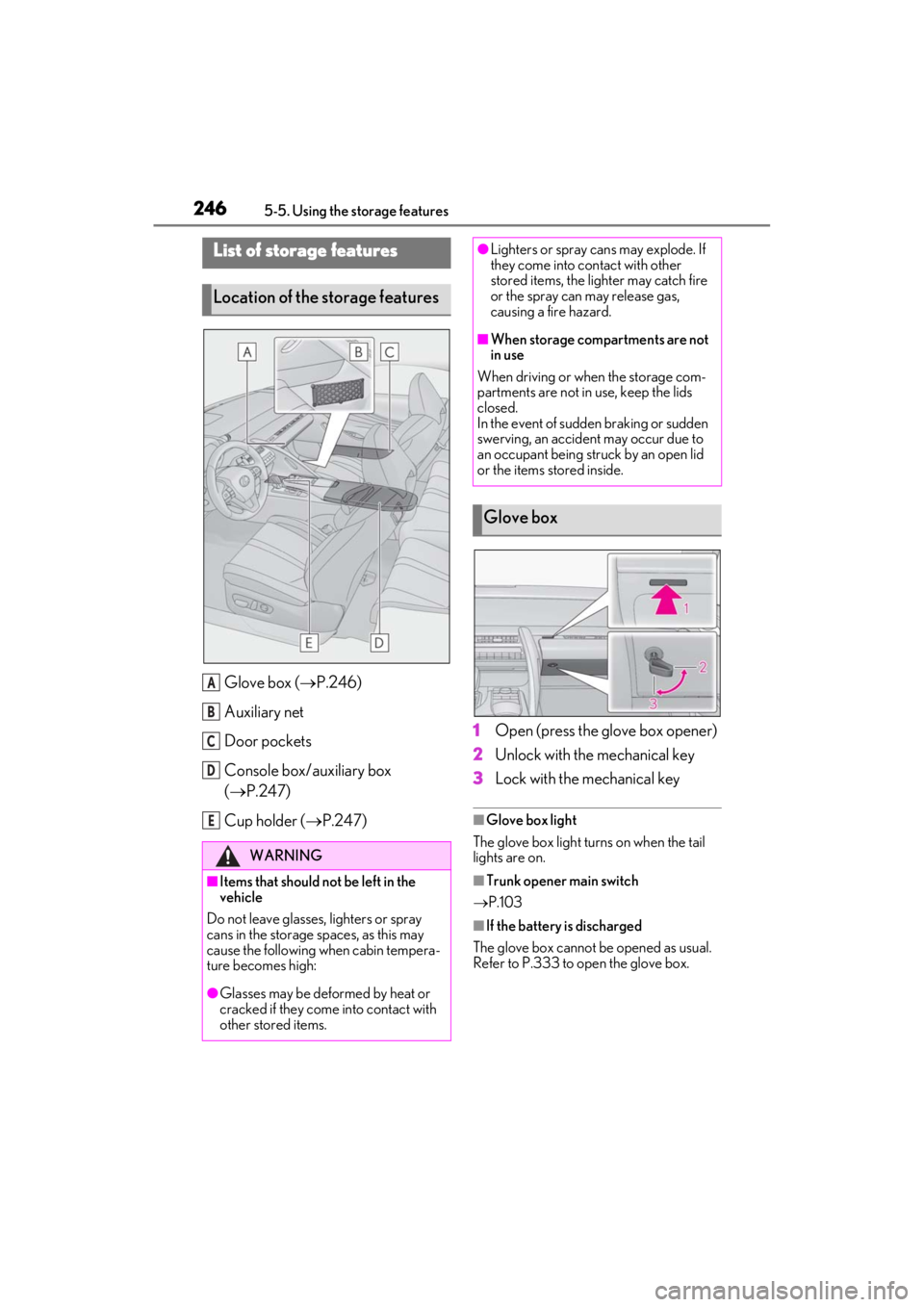
Glove box (P.246)
Auxiliary net
Door pockets
Console box/auxiliary box
( P.247)
Cup holder ( P.247) 1
Open (press the glove box opener)
2
Unlock with the mechanical key
3
Lock with the mechanical key
■Glove box light
The glove box light turns on when the tail
lights are on.
■Trunk opener main switch
P.103
■If the battery is discharged
The glove box cannot be opened as usual.
Refer to P.333 to open the glove box.
List of storage features
Location of the storage features
WARNING
■Items that should not be left in the
vehicle
Do not leave glasses, lighters or spray
cans in the storage spaces, as this may
cause the following when cabin tempera-
ture becomes high:
●Glasses may be deformed by heat or
cracked if they come into contact with
other stored items.
A
B
C
D
E
●Lighters or spray ca ns may explode. If
they come into contact with other
stored items, the lighter may catch fire
or the spray can may release gas,
causing a fire hazard.
■When storage compartments are not
in use
When driving or when the storage com-
partments are not in use, keep the lids
closed.
In the event of sudden braking or sudden
swerving, an accident may occur due to
an occupant being struck by an open lid
or the items stored inside.
Glove box
Page 249 of 410
2475-5. Using the storage features
5
Interior features
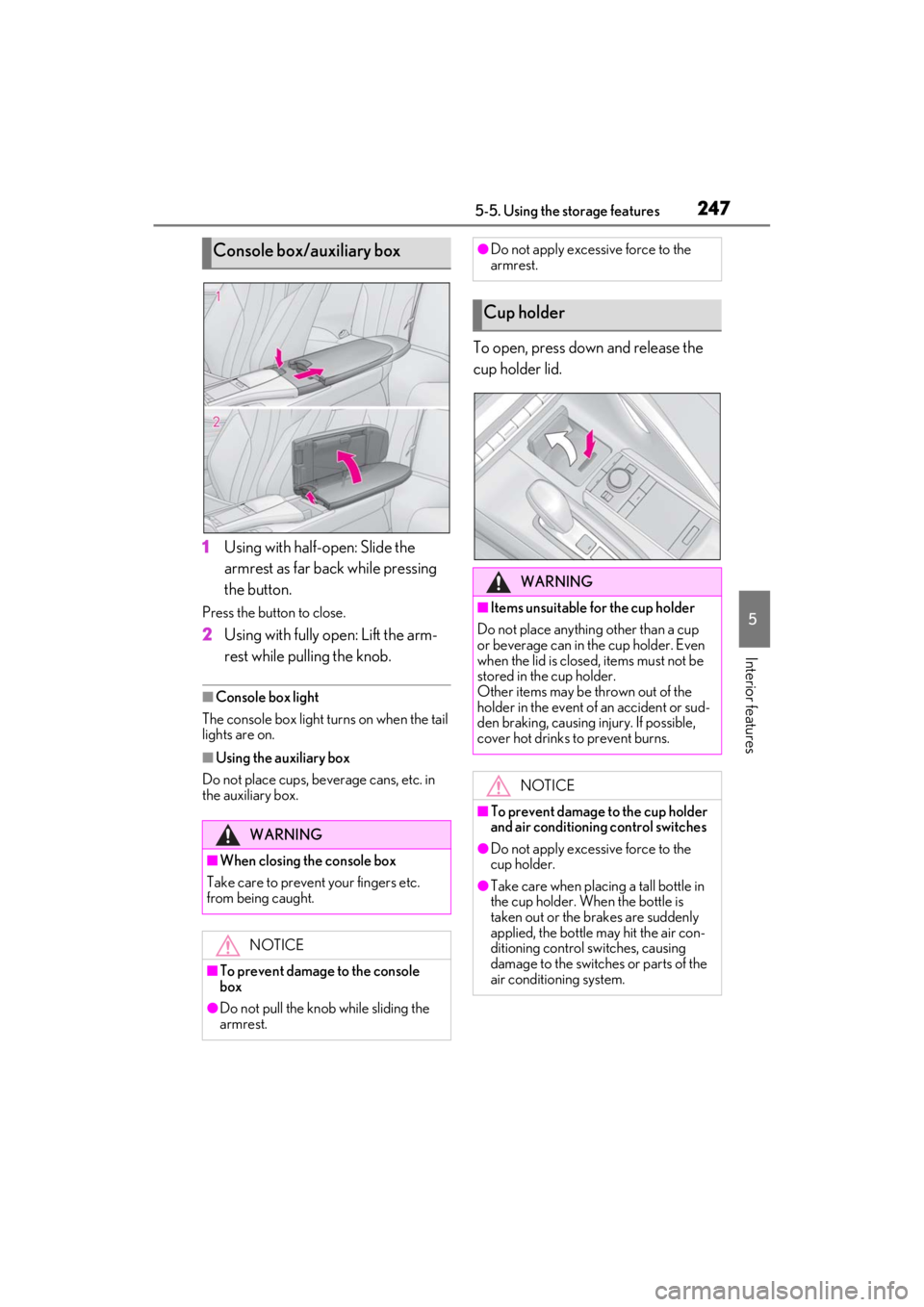
1Using with half-open: Slide the
armrest as far back while pressing
the button.
Press the button to close.
2Using with fully open: Lift the arm-
rest while pulling the knob.
■Console box light
The console box light turns on when the tail
lights are on.
■Using the auxiliary box
Do not place cups, beverage cans, etc. in
the auxiliary box.
To open, press down and release the
cup holder lid.
Console box/auxiliary box
WARNING
■When closing the console box
Take care to prevent your fingers etc.
from being caught.
NOTICE
■To prevent damage to the console
box
●Do not pull the knob while sliding the
armrest.
●Do not apply excessive force to the
armrest.
Cup holder
WARNING
■Items unsuitable for the cup holder
Do not place anything other than a cup
or beverage can in the cup holder. Even
when the lid is closed, items must not be
stored in the cup holder.
Other items may be thrown out of the
holder in the event of an accident or sud-
den braking, causing injury. If possible,
cover hot drinks to prevent burns.
NOTICE
■To prevent damage to the cup holder
and air conditioning control switches
●Do not apply excessive force to the
cup holder.
●Take care when placing a tall bottle in
the cup holder. When the bottle is
taken out or the brakes are suddenly
applied, the bottle may hit the air con-
ditioning control switches, causing
damage to the switches or parts of the
air conditioning system.
Page 251 of 410
2495-6. Using the other interior features
5
Interior features
5-6.Using the other interior features
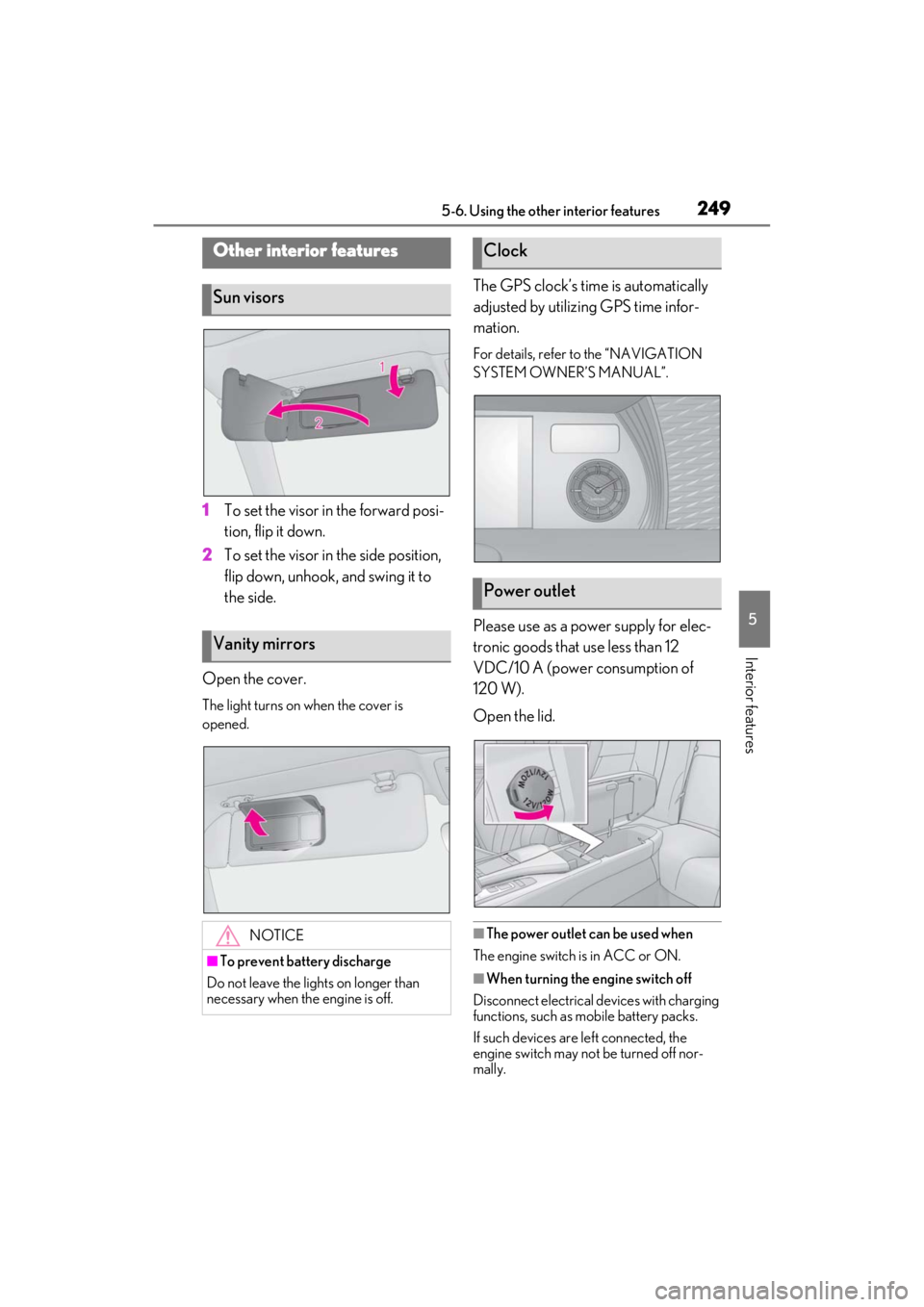
1To set the visor in the forward posi-
tion, flip it down.
2
To set the visor in the side position,
flip down, unhook, and swing it to
the side.
Open the cover.
The light turns on when the cover is
opened.
The GPS clock’s time is automatically
adjusted by utilizing GPS time infor-
mation.
For details, refer to the “NAVIGATION
SYSTEM OWNER’S MANUAL”.
Please use as a power supply for elec-
tronic goods that use less than 12
VDC/10 A (power consumption of
120 W).
Open the lid.
■The power outlet can be used when
The engine switch is in ACC or ON.
■When turning the engine switch off
Disconnect electrical devices with charging
functions, such as mobile battery packs.
If such devices are left connected, the
engine switch may not be turned off nor-
mally.
Other interior features
Sun visors
Vanity mirrors
NOTICE
■To prevent battery discharge
Do not leave the lights on longer than
necessary when the engine is off.
Clock
Power outlet
Page 263 of 410
2616-1. Maintenance and care
6
Maintenance and care
NOTICE
●Do not open the soft top roof with dirt
or snow adhered.
■Cleaning the soft top roof
Do not strongly press a soft brush such
as a horsehair brush or an adhesive roller
to the soft top roof. Doing so may cause
damage to the soft top roof.
■Cleaning the exterior lights
●Wash carefully. Do not use organic
substances or scrub with a hard brush.
This may damage the surfaces of the
lights.
●Do not apply wax to the surfaces of the
lights.
Wax may cause damage to the lenses.
■When using an automatic car wash
Set the wiper switch to the off position.
If the wiper switch is in “AUTO”, the wip-
ers may operate and the wiper blades
may be damaged.
■When using a high-pressure car wash
●When washing the vehicle, do not let
water from the high -pressure washer
directly hit the camera, the area
around the camera or inside of the
outside door handles. Due to the
shock from high-pressure water, it is
possible that the device may not oper-
ate normally.
●Do not bring the nozzle tip close to
boots (rubber or re sin manufactured
cover), connectors or the following
parts. The parts may be damaged if
they come into contact with high-pres-
sure water.
• Traction related parts
• Steering parts
• Suspension parts
• Brake parts
●Keep the cleaning nozzle at least 11.9
in. (30 cm) away from the vehicle
body. Otherwise resin section, such as
moldings and bumpers, may be
deformed and damaged. Also, do not
continuously hold the nozzle in the
same place.
●Do not spray the lower part of the
windshield continuously. If water
enters the air conditioning system
intake located near the lower part of
the windshield, the air conditioning
system may not operate correctly.
●Do not wash the underside of the vehi-
cle using a high pressure car washer.
Page 269 of 410
2676-2. Maintenance
6
Maintenance and care
Radiator/con-
denser
The radiator and con-
denser should be free
from foreign objects.
( P.277)
Washer fluid
Is there sufficient
washer fluid?
( P.278)
Trunk
ItemsCheck points
Battery
Check the battery fluid
level and connections.
( P.279)
Vehicle interior
ItemsCheck points
Accelerator
pedal
• The accelerator
pedal should move
smoothly (without
uneven pedal effort
or catching).
Automatic trans-
mission “Park”
mechanism
•When parked on a slope and the shift
position is in P, is the
vehicle securely
stopped?
Brake pedal
•Does the brake pedal move
smoothly?
•Does the brake
pedal have appro-
priate clearance
from the floor?
•Does the brake pedal have the cor-
rect amount of free
play?
ItemsCheck points
Brakes
•The vehicle should not pull to one side
when the brakes are
applied.
• The brakes should work effectively.
• The brake pedal should not feel
spongy.
• The brake pedal should not get too
close to the floor
when the brakes are
applied.
Head restraints
•Do the head restraints move
smoothly and lock
securely?
Indicators/buzz-
ers•Do the indicators and buzzers function
properly?
Lights
• Do all the lights come on?
• Are the headlights aimed correctly?
Parking brake
• Move smoothly?
• When parked on a slope and the park-
ing brake is on, is the
vehicle securely
stopped?
Seat belts
• Do the seat belts operate smoothly?
• The seat belts should not be damaged.
ItemsCheck points
Page 303 of 410
3016-3. Do-it-yourself maintenance
6
Maintenance and care
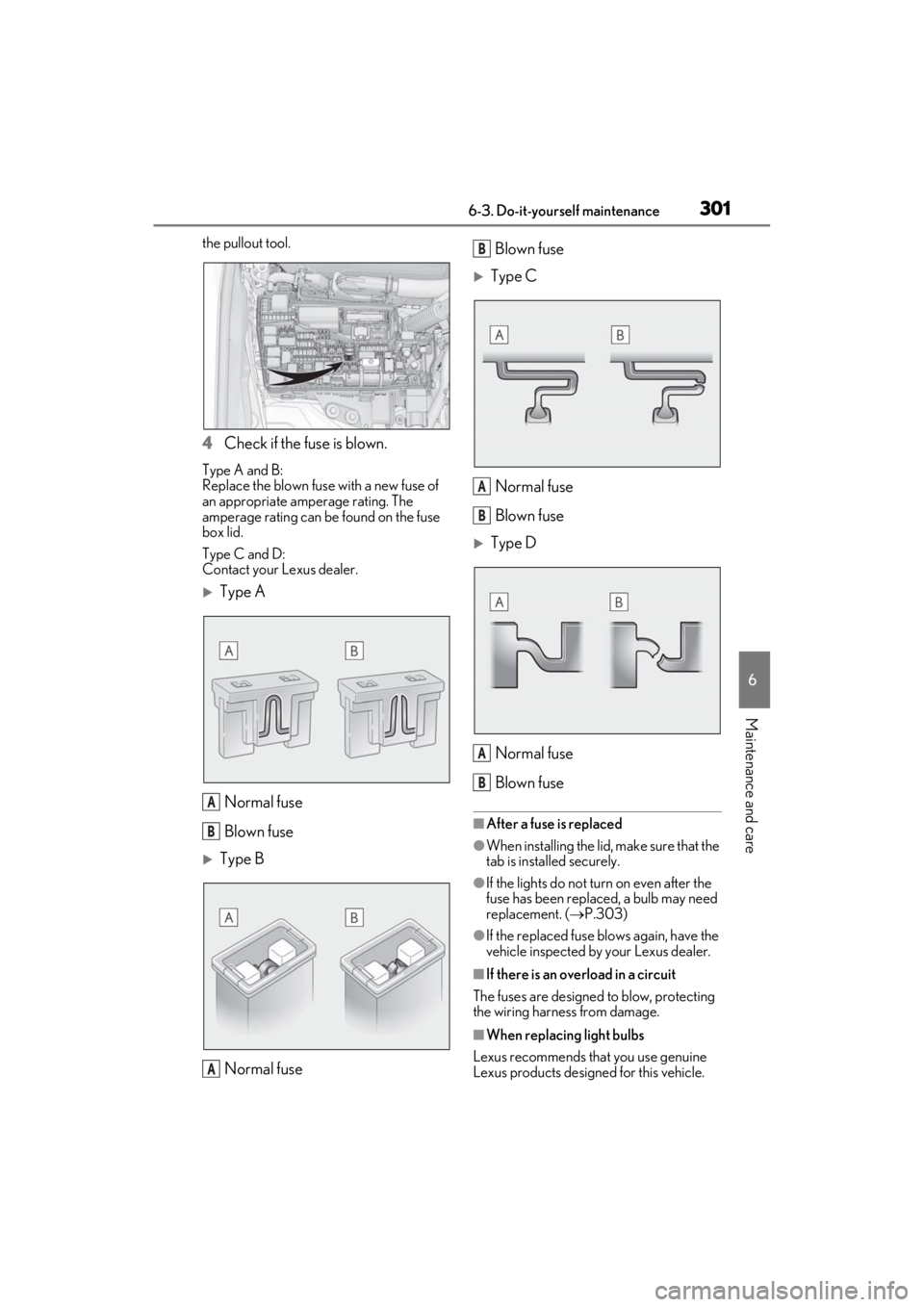
the pullout tool.
4Check if the fuse is blown.
Type A and B:
Replace the blown fuse with a new fuse of
an appropriate amperage rating. The
amperage rating can be found on the fuse
box lid.
Type C and D:
Contact your Lexus dealer.
Type A
Normal fuse
Blown fuse
Type BNormal fuse Blown fuse
Type C
Normal fuse
Blown fuse
Type DNormal fuse
Blown fuse
■After a fuse is replaced
●When installing the lid, make sure that the
tab is installed securely.
●If the lights do not turn on even after the
fuse has been replaced, a bulb may need
replacement. ( P.303)
●If the replaced fuse blows again, have the
vehicle inspected by your Lexus dealer.
■If there is an overload in a circuit
The fuses are designed to blow, protecting
the wiring harness from damage.
■When replacing light bulbs
Lexus recommends that you use genuine
Lexus products designed for this vehicle.
A
B
A
B
A
B
A
B
Page 305 of 410
3036-3. Do-it-yourself maintenance
6
Maintenance and care
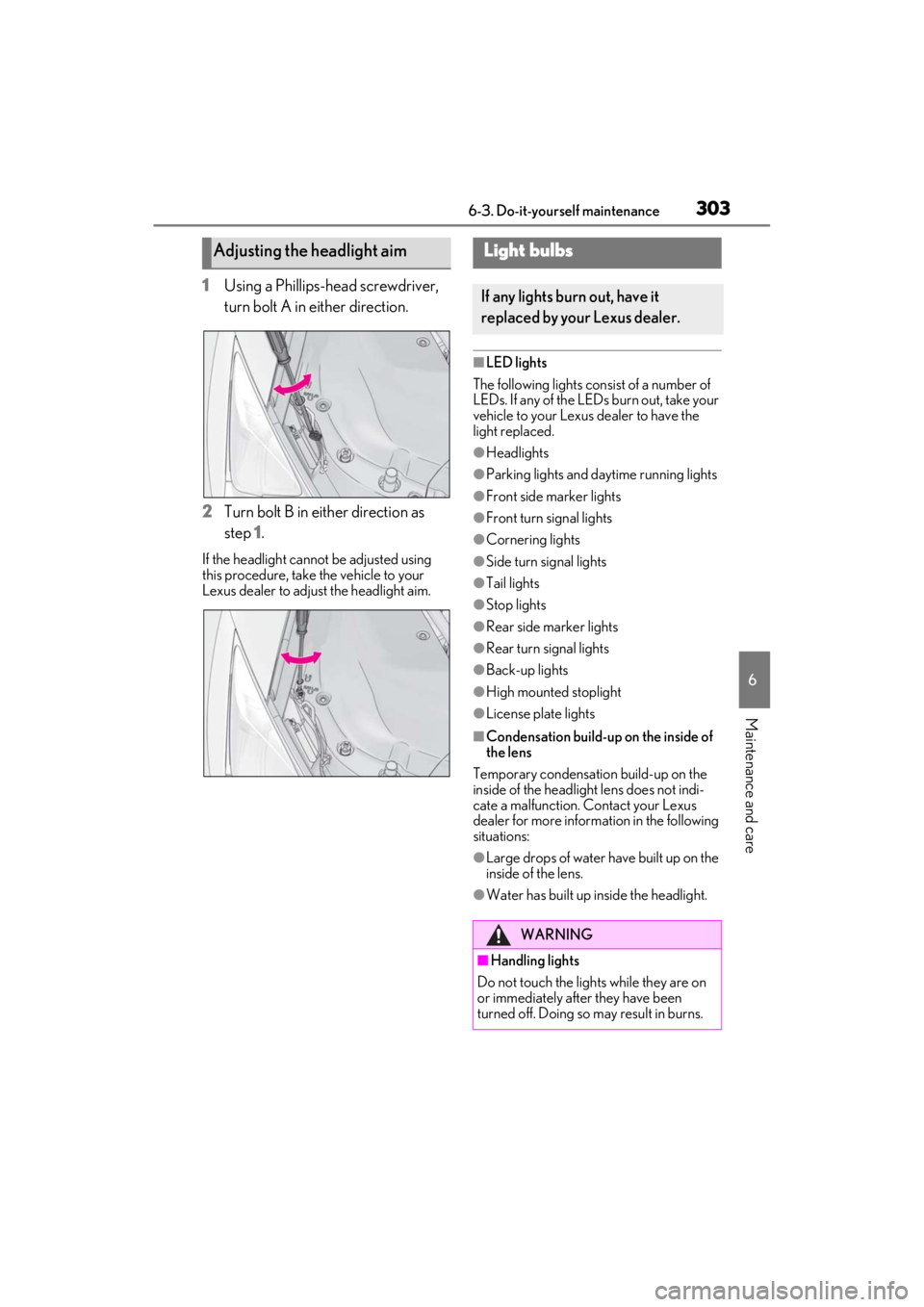
1Using a Phillips-head screwdriver,
turn bolt A in either direction.
2
Turn bolt B in either direction as
step 1
.
If the headlight cannot be adjusted using
this procedure, take the vehicle to your
Lexus dealer to adjust the headlight aim.
■LED lights
The following lights consist of a number of
LEDs. If any of the LEDs burn out, take your
vehicle to your Lexus dealer to have the
light replaced.
●Headlights
●Parking lights and daytime running lights
●Front side marker lights
●Front turn signal lights
●Cornering lights
●Side turn signal lights
●Tail lights
●Stop lights
●Rear side marker lights
●Rear turn signal lights
●Back-up lights
●High mounted stoplight
●License plate lights
■Condensation build-up on the inside of
the lens
Temporary condensation build-up on the
inside of the headlight lens does not indi-
cate a malfunction. Contact your Lexus
dealer for more information in the following
situations:
●Large drops of water have built up on the
inside of the lens.
●Water has built up inside the headlight.
Adjusting the headlight aimLight bulbs
If any lights burn out, have it
replaced by your Lexus dealer.
WARNING
■Handling lights
Do not touch the lights while they are on
or immediately after they have been
turned off. Doing so may result in burns.