cruise control LEXUS LS430 2003 Factory Manual PDF
[x] Cancel search | Manufacturer: LEXUS, Model Year: 2003, Model line: LS430, Model: LEXUS LS430 2003Pages: 4500, PDF Size: 87.45 MB
Page 2449 of 4500
![LEXUS LS430 2003 Factory Manual PDF Fig. 17: [Display NORM]
Courtesy of TOYOTA MOTOR SALES, U.S.A., INC.
3.INSPECT STEERING PAD SWITCH ASSY
a. Turn the ignition switch to the ON position.
b. Push on the ON-OFF button of the cruise](/img/36/57050/w960_57050-2448.png "LEXUS LS430 2003 Factory Manual PDF Fig. 17: [Display NORM]
Courtesy of TOYOTA MOTOR SALES, U.S.A., INC.
3.INSPECT STEERING PAD SWITCH ASSY
a. Turn the ignition switch to the ON position.
b. Push on the ON-OFF button of the cruise")
Fig. 17: [Display NORM]
Courtesy of TOYOTA MOTOR SALES, U.S.A., INC.
3.INSPECT STEERING PAD SWITCH ASSY
a. Turn the ignition switch to the ON position.
b. Push on the ON-OFF button of the cruise control main switch.
c. Push on the distance control switch (DISP2) of the steering pad switch.
d. Check that the indication of vehicle-to-vehicle distance, which is shown in the multi-information
displa
y on the combination meter, changes from "LONG", "MIDDLE" to "SHORT" in that order.
Page 2458 of 4500
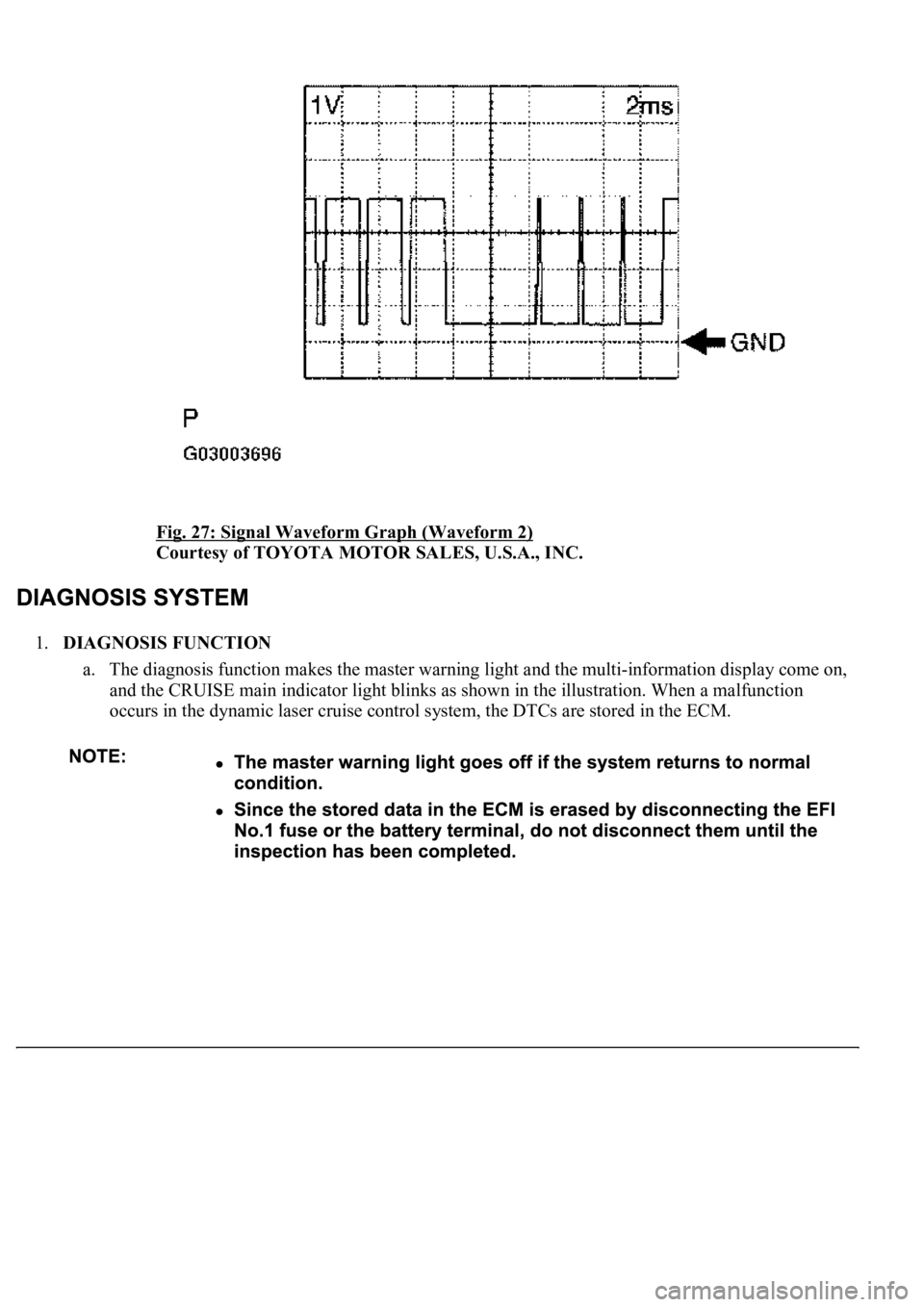
Fig. 27: Signal Waveform Graph (Waveform 2)
Courtesy of TOYOTA MOTOR SALES, U.S.A., INC.
1.DIAGNOSIS FUNCTION
a. The diagnosis function makes the master warning light and the multi-information display come on,
and the CRUISE main indicator light blinks as shown in the illustration. When a malfunction
occurs in the dynamic laser cruise control system, the DTCs are stored in the ECM.
Page 2460 of 4500
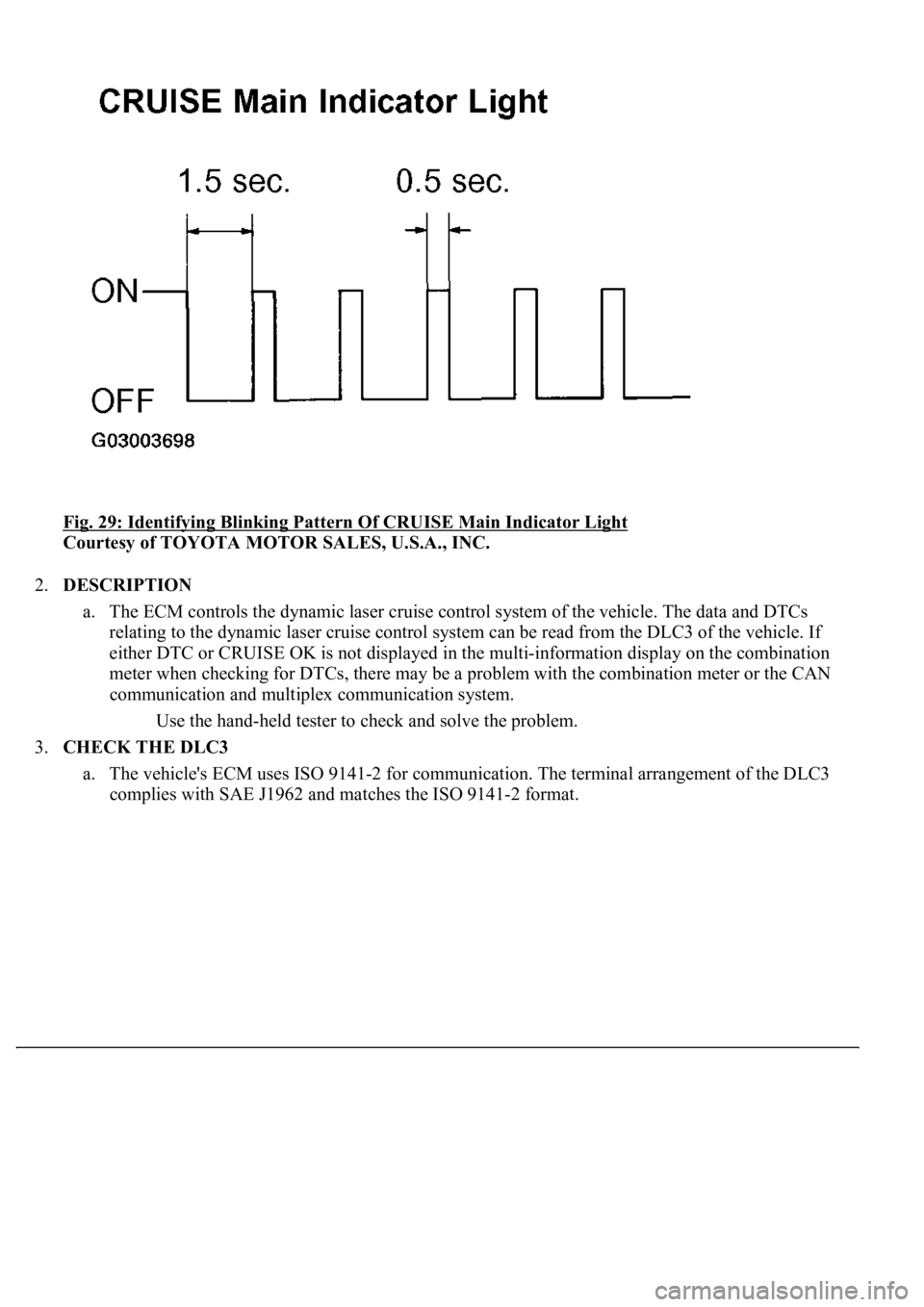
Fig. 29: Identifying Blinking Pattern Of CRUISE Main Indicator Light
Courtesy of TOYOTA MOTOR SALES, U.S.A., INC.
2.DESCRIPTION
a. The ECM controls the dynamic laser cruise control system of the vehicle. The data and DTCs
relating to the dynamic laser cruise control system can be read from the DLC3 of the vehicle. If
either DTC or CRUISE OK is not displayed in the multi-information display on the combination
meter when checking for DTCs, there may be a problem with the combination meter or the CAN
communication and multiplex communication system.
Use the hand-held tester to check and solve the problem.
3.CHECK THE DLC3
a. The vehicle's ECM uses ISO 9141-2 for communication. The terminal arrangement of the DLC3
complies with SAE J1962 and matches the ISO 9141-2 format.
Page 2463 of 4500
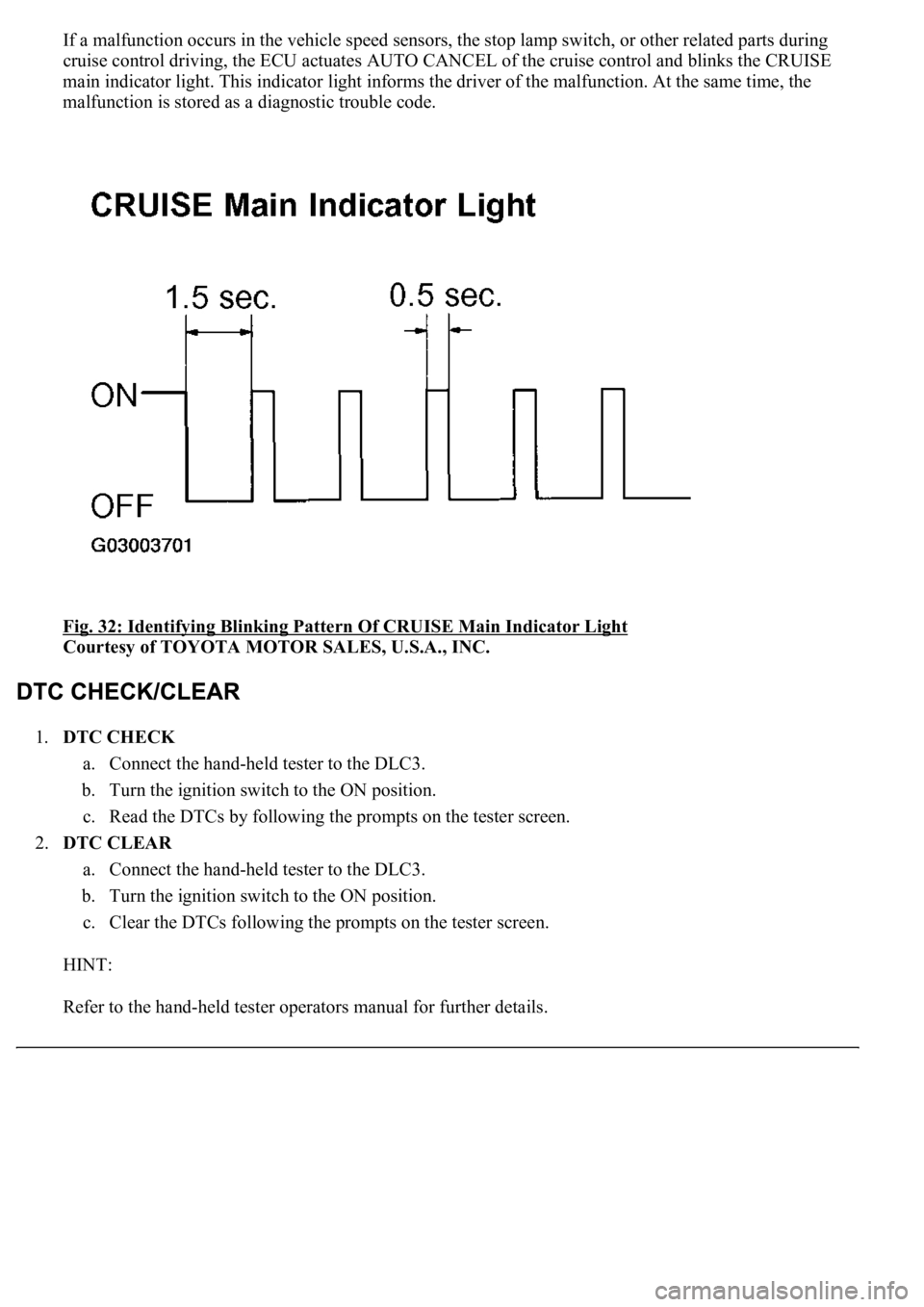
If a malfunction occurs in the vehicle speed sensors, the stop lamp switch, or other related parts during
cruise control driving, the ECU actuates AUTO CANCEL of the cruise control and blinks the CRUISE
main indicator light. This indicator light informs the driver of the malfunction. At the same time, the
malfunction is stored as a diagnostic trouble code.
Fig. 32: Identifying Blinking Pattern Of CRUISE Main Indicator Light
Courtesy of TOYOTA MOTOR SALES, U.S.A., INC.
1.DTC CHECK
a. Connect the hand-held tester to the DLC3.
b. Turn the ignition switch to the ON position.
c. Read the DTCs by following the prompts on the tester screen.
2.DTC CLEAR
a. Connect the hand-held tester to the DLC3.
b. Turn the ignition switch to the ON position.
c. Clear the DTCs following the prompts on the tester screen.
HINT:
Refer to the han
d-held tester operators manual for further details.
Page 2464 of 4500
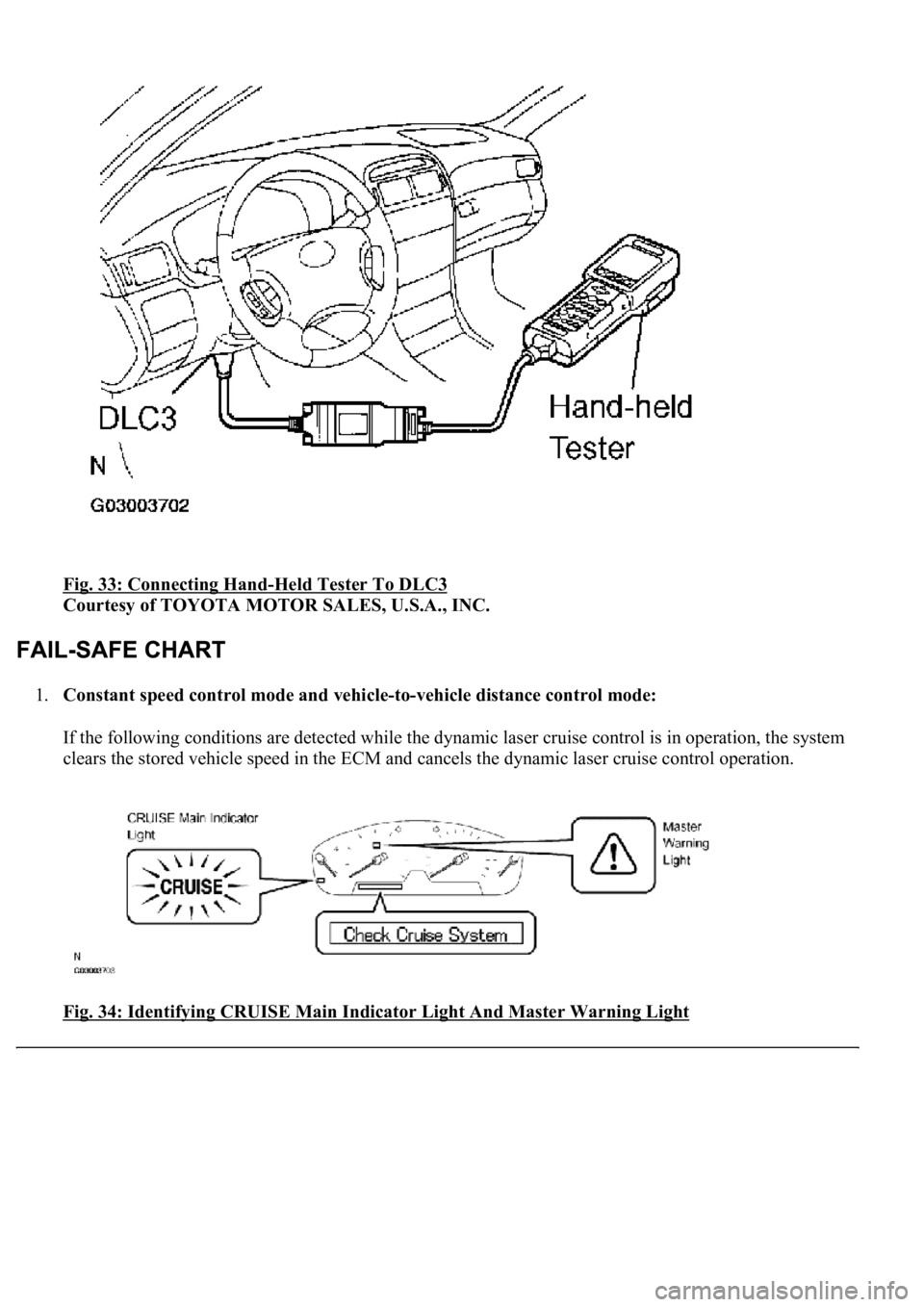
Fig. 33: Connecting Hand-Held Tester To DLC3
Courtesy of TOYOTA MOTOR SALES, U.S.A., INC.
1.Constant speed control mode and vehicle-to-vehicle distance control mode:
If the following conditions are detected while the dynamic laser cruise control is in operation, the system
clears the stored vehicle speed in the ECM and cancels the dynamic laser cruise control operation.
Fig. 34: Identifying CRUISE Main Indicator Light And Master Warning Light
Page 2465 of 4500
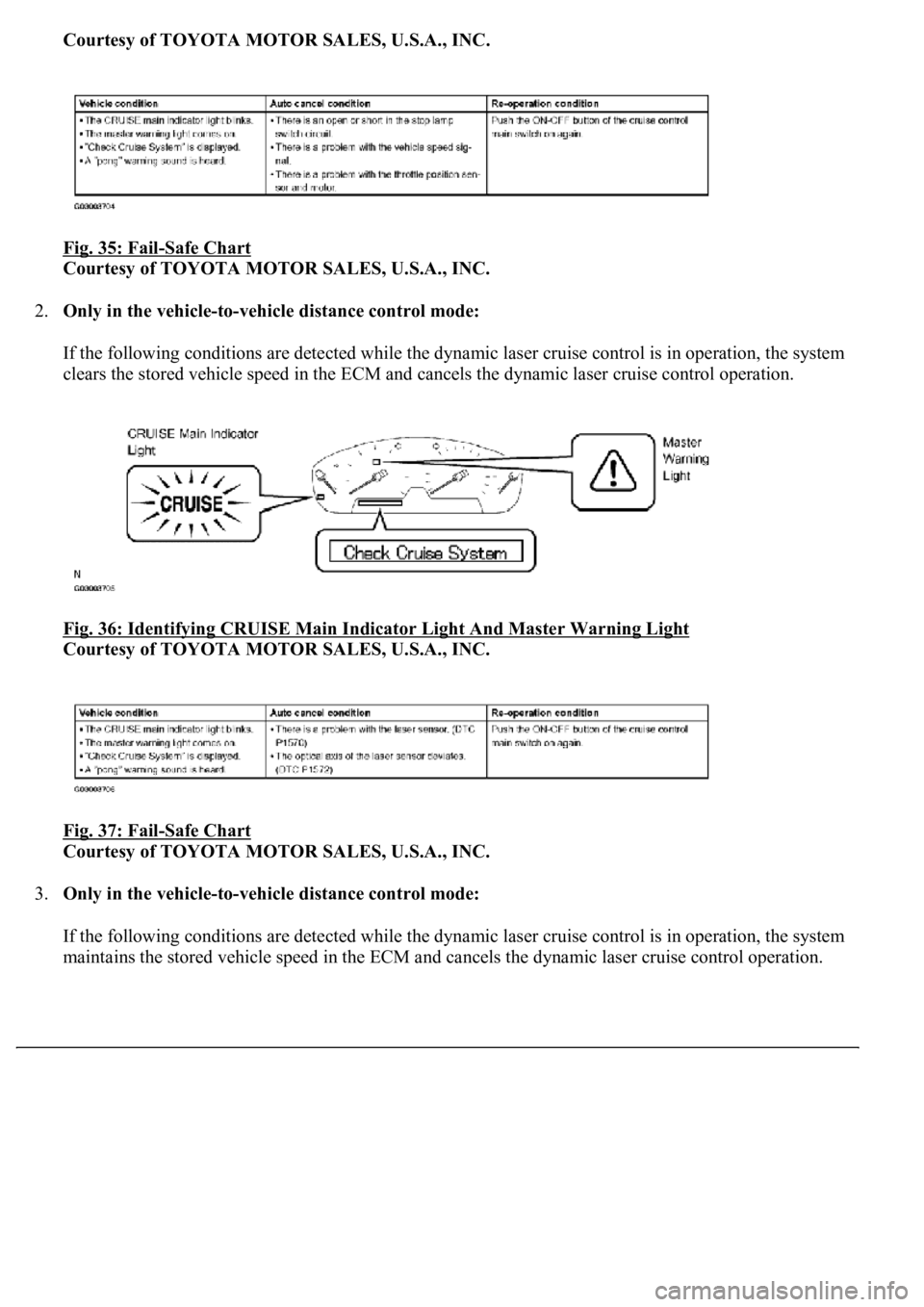
Courtesy of TOYOTA MOTOR SALES, U.S.A., INC.
Fig. 35: Fail
-Safe Chart
Courtesy of TOYOTA MOTOR SALES, U.S.A., INC.
2.Only in the vehicle-to-vehicle distance control mode:
If the following conditions are detected while the dynamic laser cruise control is in operation, the system
clears the stored vehicle speed in the ECM and cancels the dynamic laser cruise control operation.
Fig. 36: Identifying CRUISE Main Indicator Light And Master Warning Light
Courtesy of TOYOTA MOTOR SALES, U.S.A., INC.
Fig. 37: Fail
-Safe Chart
Courtesy of TOYOTA MOTOR SALES, U.S.A., INC.
3.Only in the vehicle-to-vehicle distance control mode:
If the following conditions are detected while the dynamic laser cruise control is in operation, the system
maintains the stored vehicle speed in the ECM and cancels the d
ynamic laser cruise control operation.
Page 2466 of 4500
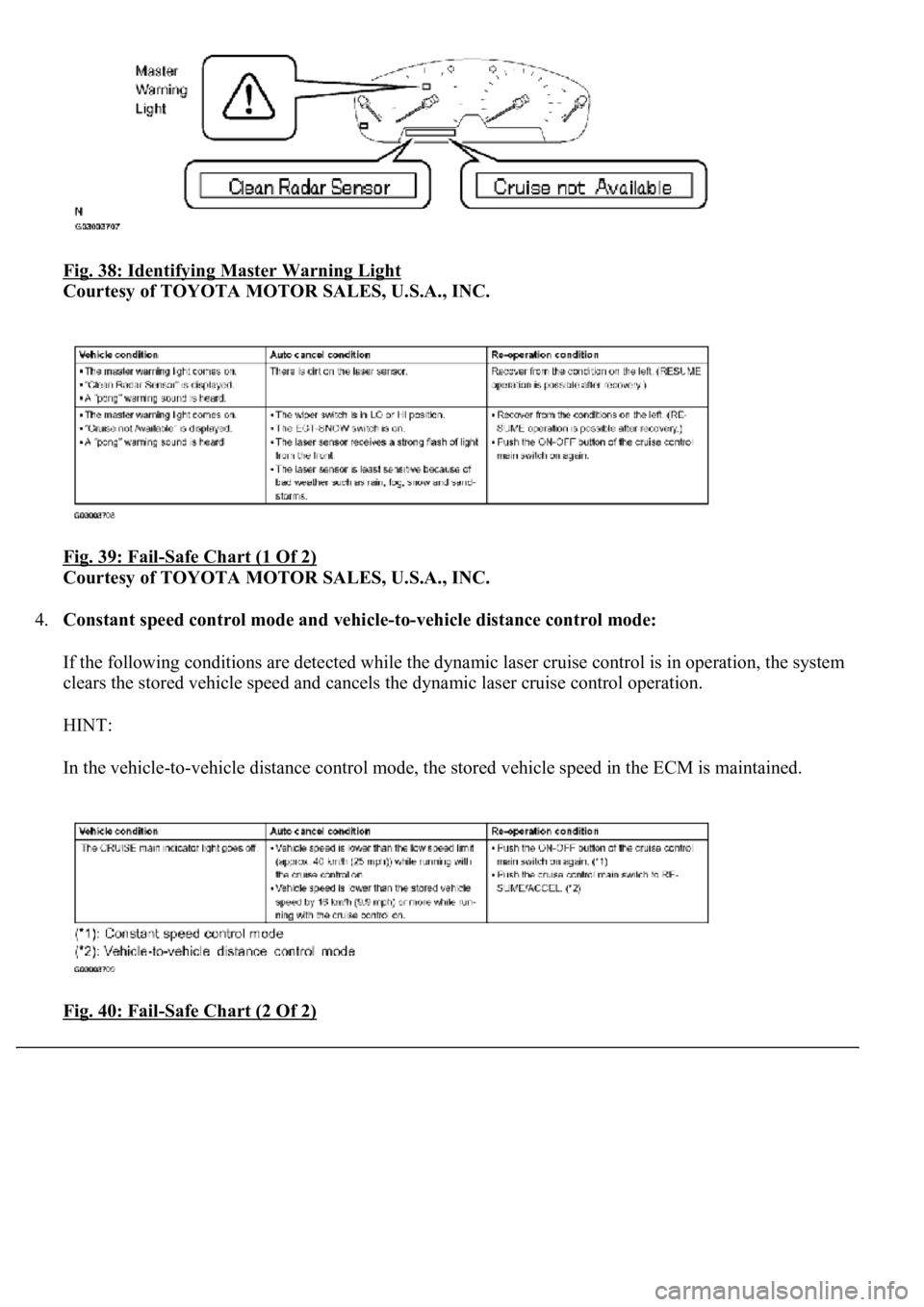
Fig. 38: Identifying Master Warning Light
Courtesy of TOYOTA MOTOR SALES, U.S.A., INC.
Fig. 39: Fail
-Safe Chart (1 Of 2)
Courtesy of TOYOTA MOTOR SALES, U.S.A., INC.
4.Constant speed control mode and vehicle-to-vehicle distance control mode:
If the following conditions are detected while the dynamic laser cruise control is in operation, the system
clears the stored vehicle speed and cancels the dynamic laser cruise control operation.
HINT:
In the vehicle-to-vehicle distance control mode, the stored vehicle speed in the ECM is maintained.
Fig. 40: Fail
-Safe Chart (2 Of 2)
Page 2467 of 4500

Courtesy of TOYOTA MOTOR SALES, U.S.A., INC.
1.DATA LIST
HINT:
From the DATA LIST displayed on the hand-held tester, the value of components such as the switch,
sensor, and actuator can be read without parts removal. Reading the DATA LIST as the first step of
troubleshooting is one way to shorten labor time.
a. Connect the hand-held tester to the DLC3.
b. Turn the ignition switch to the ON position.
c. According to the display on the tester, read the "DATA LIST".
CC (ECM):
DATA LIST (CC (ECM))
Item
Measurement Item /
Display (Range)
Normal ConditionDiagnostic Note
ACCEL REQUESTAccelerator request signal /
min.: -2621.44 k/h/s, max.:
2621.36 k/h/sNo vehicle in front-
VEHICLE
DISTANCELaser sensor / min.: 0 m (0ft),
max.: 255m (836.65 ft)Distance to the vehicle in front-
L/C OPTION FLAGLaser cruise option flag / NO,
YESYES: Vehicle to vehicle distance
mode-
DISTANCE TIMECar distance time setting
condition /SHRT, MID,
LONG, NOThe vehicle selected by distance
control switch-
O/D CUT RQSTO/D cut request / NOT REQ,
REQUESTNOT REQ: Idling-
3RD SHIFT DOWNShift down request to 3rd
gear / NOT REQ, REQUESTNOT REQ: Idling-
4TH SHIFT DOWNShift down request to 4th
gear / NOT REQ, REQUESTNOT REQ: Idling-
ALARM RQSTAlarm request signal / NOT
REQ, REQUESTREQUEST: When beeping NOT
REQ: When not beeping-
THROTTLE CLOSEAll throttle close request /
NOT REQ, REQUESTON: REQUEST OFF: NOT
REQUEST-
BRAKE CTRL RQSTBrake control request / NOT
REQ, REQUESTON: REQUEST OFF: NOT
REQUEST-
TARG DECL SLOPECruise target deceleration
slope / 0.03, 0.06, 0.11, 0.160.03, 0.06, 0.11, 0.16-
Page 2468 of 4500
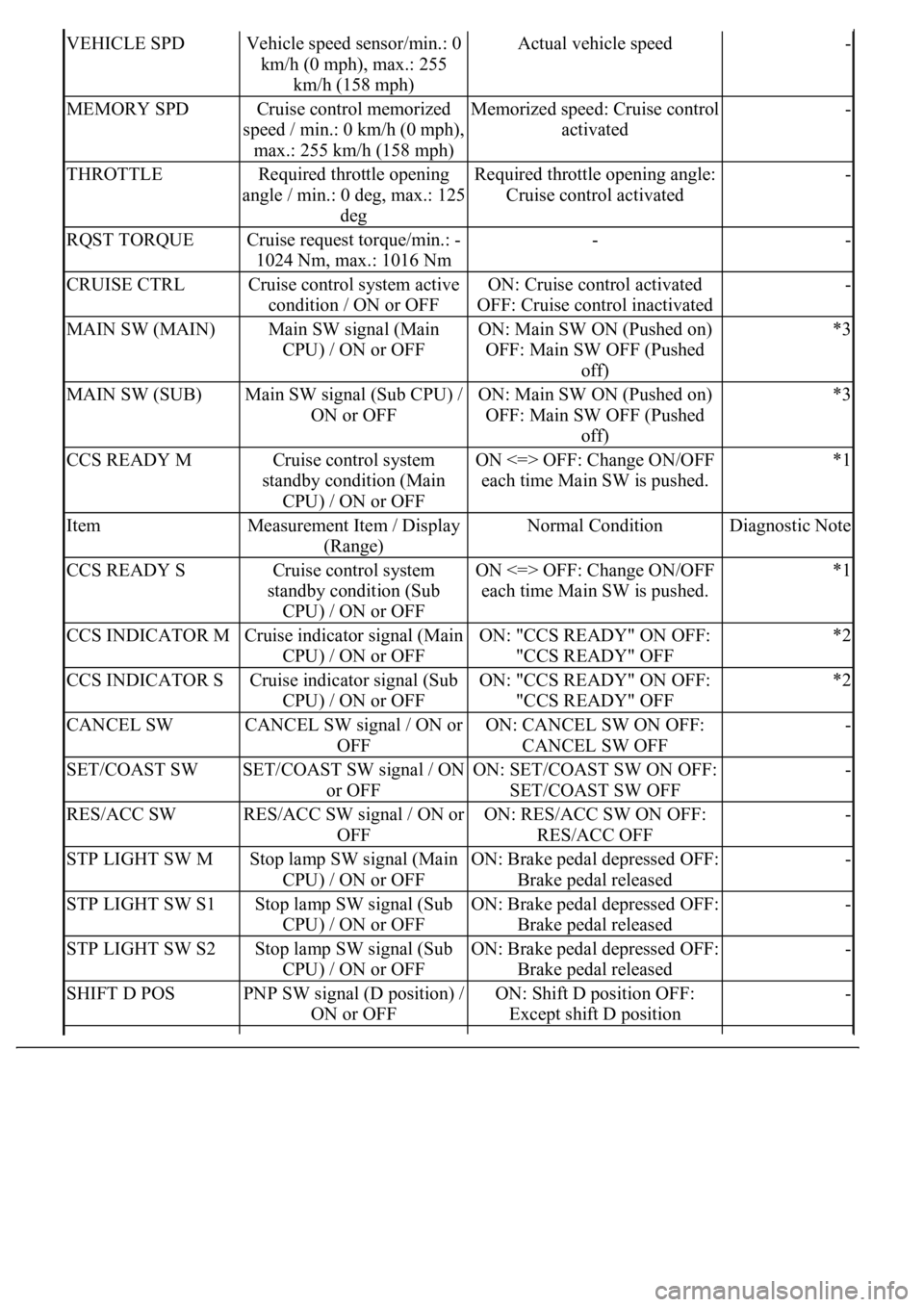
VEHICLE SPDVehicle speed sensor/min.: 0
km/h (0 mph), max.: 255
km/h (158 mph)Actual vehicle speed-
MEMORY SPDCruise control memorized
speed / min.: 0 km/h (0 mph),
max.: 255 km/h (158 mph)Memorized speed: Cruise control
activated-
THROTTLERequired throttle opening
angle / min.: 0 deg, max.: 125
degRequired throttle opening angle:
Cruise control activated-
RQST TORQUECruise request torque/min.: -
1024 Nm, max.: 1016 Nm--
CRUISE CTRLCruise control system active
condition / ON or OFFON: Cruise control activated
OFF: Cruise control inactivated-
MAIN SW (MAIN)Main SW signal (Main
CPU) / ON or OFFON: Main SW ON (Pushed on)
OFF: Main SW OFF (Pushed
off)*3
MAIN SW (SUB)Main SW signal (Sub CPU) /
ON or OFFON: Main SW ON (Pushed on)
OFF: Main SW OFF (Pushed
off)*3
CCS READY MCruise control system
standby condition (Main
CPU) / ON or OFFON <=> OFF: Change ON/OFF
each time Main SW is pushed.*1
ItemMeasurement Item / Display
(Range)Normal ConditionDiagnostic Note
CCS READY SCruise control system
standby condition (Sub
CPU) / ON or OFFON <=> OFF: Change ON/OFF
each time Main SW is pushed.*1
CCS INDICATOR MCruise indicator signal (Main
CPU) / ON or OFFON: "CCS READY" ON OFF:
"CCS READY" OFF*2
CCS INDICATOR SCruise indicator signal (Sub
CPU) / ON or OFFON: "CCS READY" ON OFF:
"CCS READY" OFF*2
CANCEL SWCANCEL SW signal / ON or
OFFON: CANCEL SW ON OFF:
CANCEL SW OFF-
SET/COAST SWSET/COAST SW signal / ON
or OFFON: SET/COAST SW ON OFF:
SET/COAST SW OFF-
RES/ACC SWRES/ACC SW signal / ON or
OFFON: RES/ACC SW ON OFF:
RES/ACC OFF-
STP LIGHT SW MStop lamp SW signal (Main
CPU) / ON or OFFON: Brake pedal depressed OFF:
Brake pedal released-
STP LIGHT SW S1Stop lamp SW signal (Sub
CPU) / ON or OFFON: Brake pedal depressed OFF:
Brake pedal released-
STP LIGHT SW S2Stop lamp SW signal (Sub
CPU) / ON or OFFON: Brake pedal depressed OFF:
Brake pedal released-
SHIFT D POSPNP SW signal (D position) /
ON or OFFON: Shift D position OFF:
Except shift D position-
Page 2469 of 4500

HINT:
*3 is OK, but *1 is NG --> ECM failure
*1 is OK, but *2 is NG --> DTC output or ECM failure
*3 is OK, but CRUISE main indicator light does not come on --> Indicator, W/H, or ECM failure
MULTI-INFORMATION DISPLAY CONTROL SWITCH (STEERING PAD SWITCH
MODULATOR):
DATA LIST (MULTI-INFORMATION DISPLAY CONTROL SWITCH (STEERING PAD
SWITCH MODULATOR))
2.ACTIVE TEST
HINT:
Performing the ACTIVE TEST using the hand-held tester allows components such as the relay, VSV, and
actuator to operate without parts removal. Performing the ACTIVE TEST as the first step of
troubleshooting is one way to shorten labor time.
It is possible to display the DATA LIST during the ACTIVE TEST.
a. Connect the hand-held tester to the DLC3.
b. Turn the ignition switch to the ON position.
c. According to the display on the tester, perform the "ACTIVE TEST".
HINT:
The ignition switch must be turned to the ON position to proceed to the ACTIVE TEST using the hand-
held tester.
COMBINATION METER ASSY:
ACTIVE TEST DETAIL (COMBINATION METER ASSY)
VSC FAIL SAFEVSC fail-safe flag/ON or
OFF--
ItemMeasurement Item / Display
(Range)Normal ConditionDiagnostic
Note
MULTI
DSP2 SWSteering pad switch (DISP2)
signal / ON or OFFON <=> OFF: Change ON/OFF each time
steering pad switch (DISP2) SW is pushed.-
ItemVehicle Condition / Test DetailsDiagnostic Note
CRUISE INDIC"CRUISE" indicator is ON / OFF-