height LEXUS NX300h 2015 Owners Manual
[x] Cancel search | Manufacturer: LEXUS, Model Year: 2015, Model line: NX300h, Model: LEXUS NX300h 2015Pages: 681, PDF Size: 9.14 MB
Page 35 of 681
351-1. For safe use
1
For safety and security
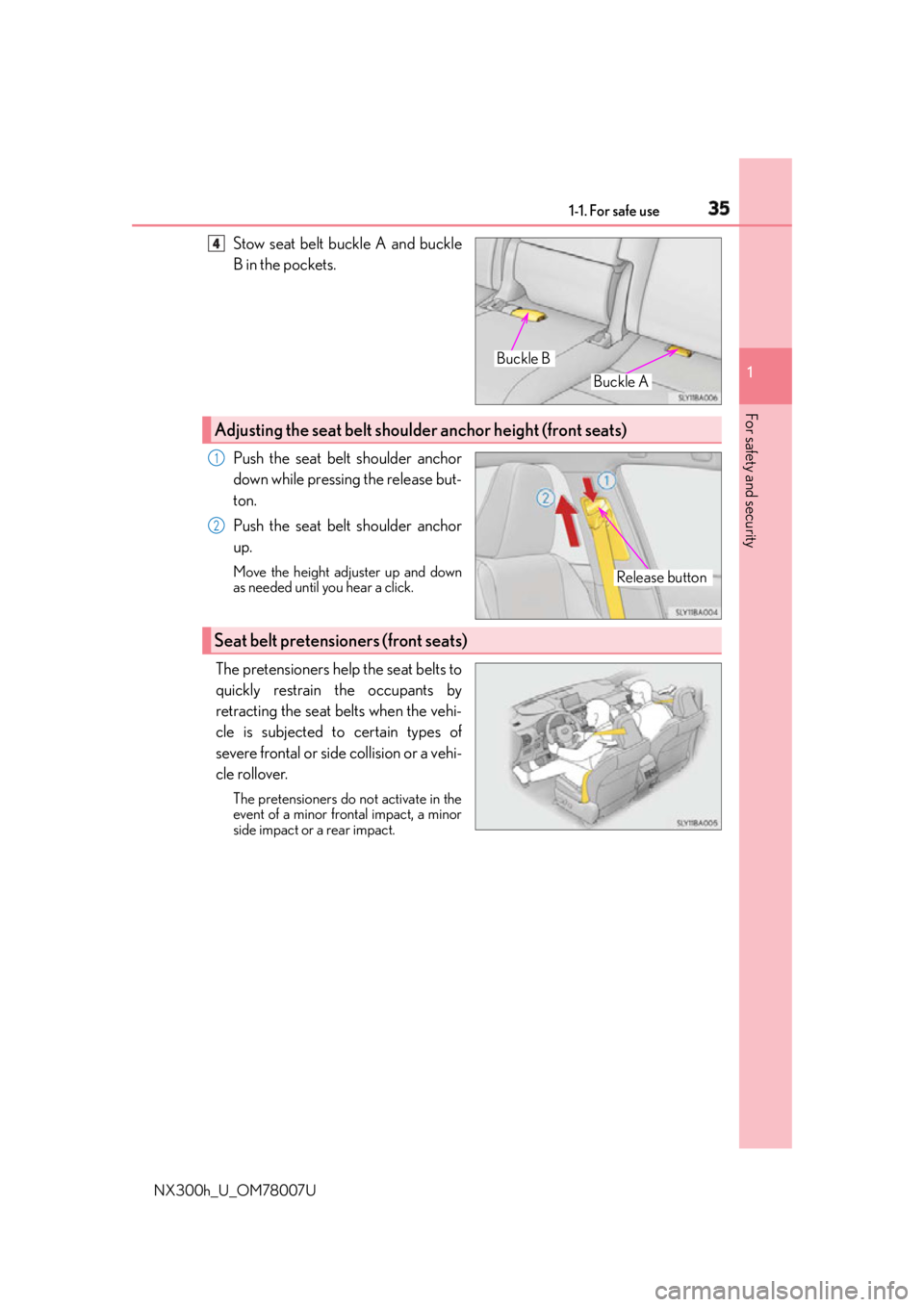
NX300h_U_OM78007U Stow seat belt buckle A and buckle
B in the pockets.
Push the seat belt shoulder anchor
down while pressing the release but-
ton.
Push the seat belt shoulder anchor
up. Move the height adjuster up and down
as needed until you hear a click.
The pretensioners help the seat belts to
quickly restrain the occupants by
retracting the seat belts when the vehi-
cle is subjected to certain types of
severe frontal or side collision or a vehi-
cle rollover. The pretensioners do not activate in the
event of a minor frontal impact, a minor
side impact or a rear impact. Buckle ABuckle B4
Adjusting the seat belt shoulder anchor height (front seats)
Release button1
2
Seat belt pretensioners (front seats)
Page 146 of 681
146 3-3. Adjusting the seats
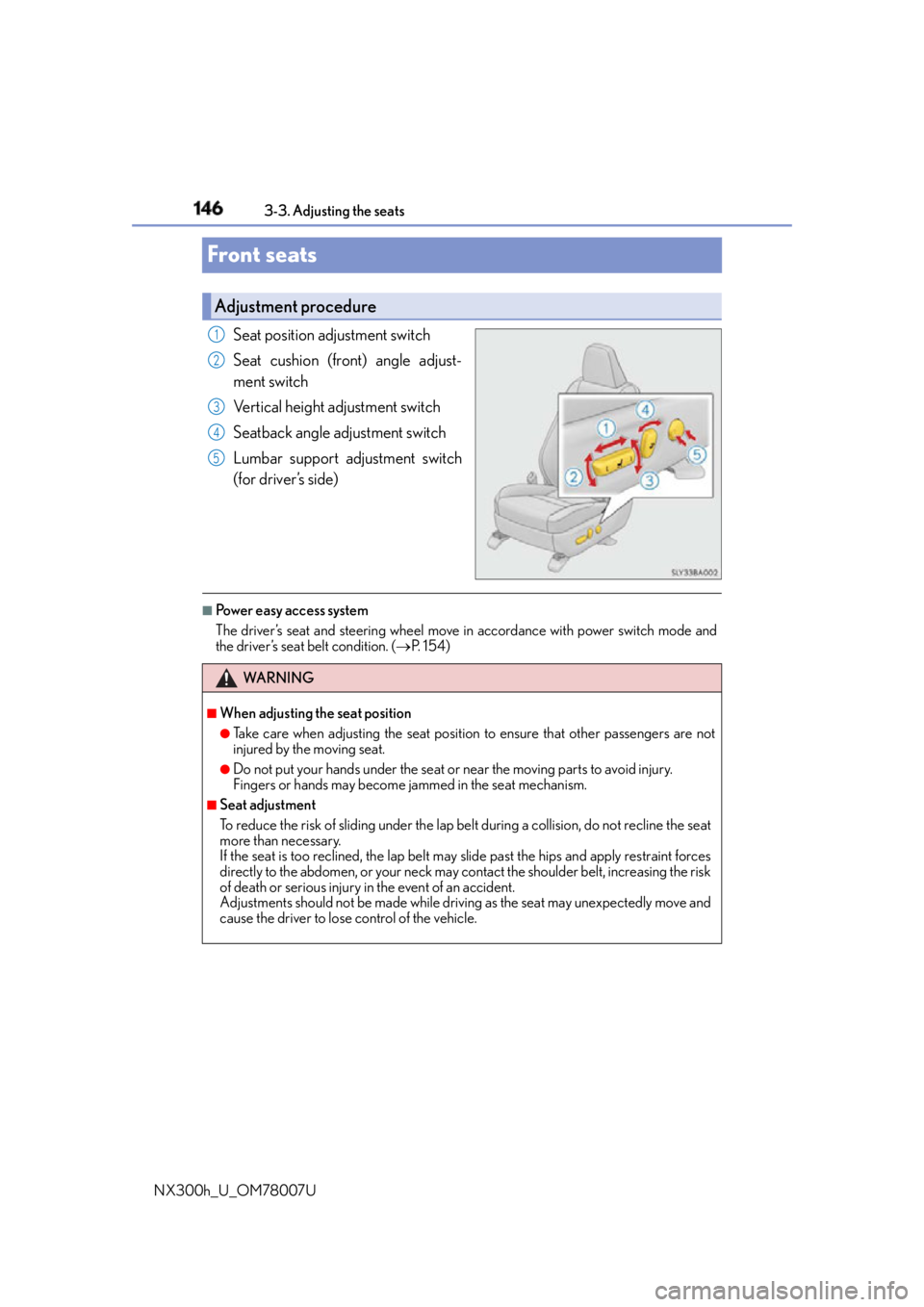
NX300h_U_OM78007UFront seats Seat position adjustment switch
Seat cushion (front) angle adjust-
ment switch
Vertical height adjustment switch
Seatback angle adjustment switch
Lumbar support adjustment switch
(for driver’s side) ■
Power easy access system
The driver’s seat and steering wheel move in accordance with power switch mode and
the driver’s seat belt condition. ( P. 1 5 4 )Adjustment procedure 1
2
3
4
5
WA R N I N G ■
When adjusting the seat position ●
Take care when adjusting the seat position to ensure that other passengers are not
injured by the moving seat. ●
Do not put your hands under the seat or near the moving parts to avoid injury.
Fingers or hands may become jammed in the se at mechanism.■
Seat adjustment
To reduce the risk of sliding under the lap belt during a co llision, do not recline the seat
more than necessary.
If the seat is too rec lined, the lap belt may slide past the hips and apply restraint forces
directly to the abdomen, or your neck may contact the shoulder belt, increasing the risk
of death or serious injury in the event of an accident.
Adjustments should not be ma de while driving as the seat may unexpectedly move and
cause the driver to lose control of the vehicle.
Page 158 of 681
158 3-3. Adjusting the seats
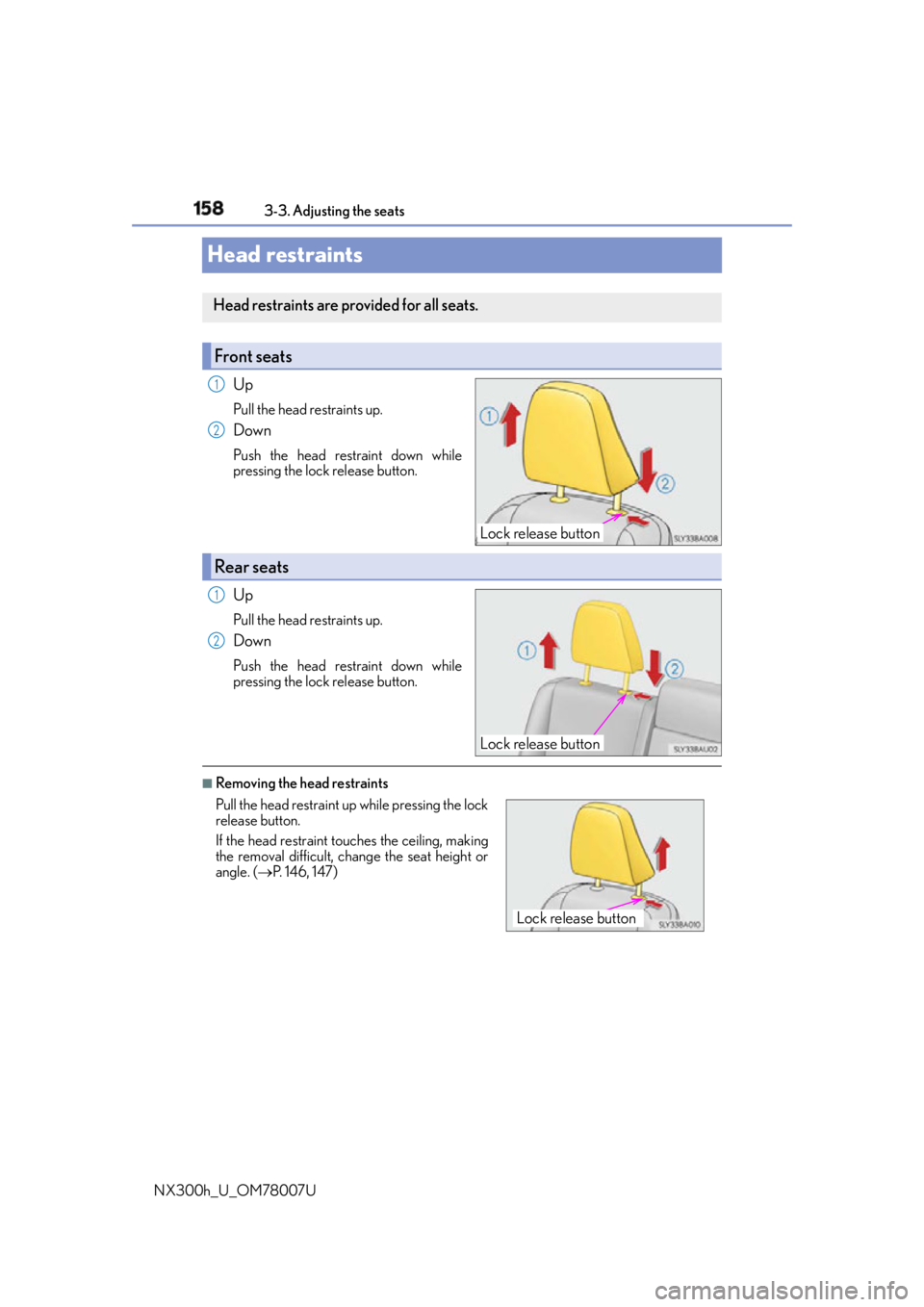
NX300h_U_OM78007UHead restraints Up Pull the head restraints up.
Down Push the head restraint down while
pressing the lock release button.
Up Pull the head restraints up.
Down Push the head restraint down while
pressing the lock release button.
■
Removing the head restraintsHead restraints are provided for all seats.
Front seats
Lock release button1
2
Rear seats
Lock release button1
2
Pull the head restraint up while pressing the lock
release button.
If the head restraint to uches the ceiling, making
the removal difficult, change the seat height or
angle. ( P. 1 4 6 , 1 4 7 )
Lock release button
Page 159 of 681
1593-3. Adjusting the seats
3
Operation of each component
NX300h_U_OM78007U ■
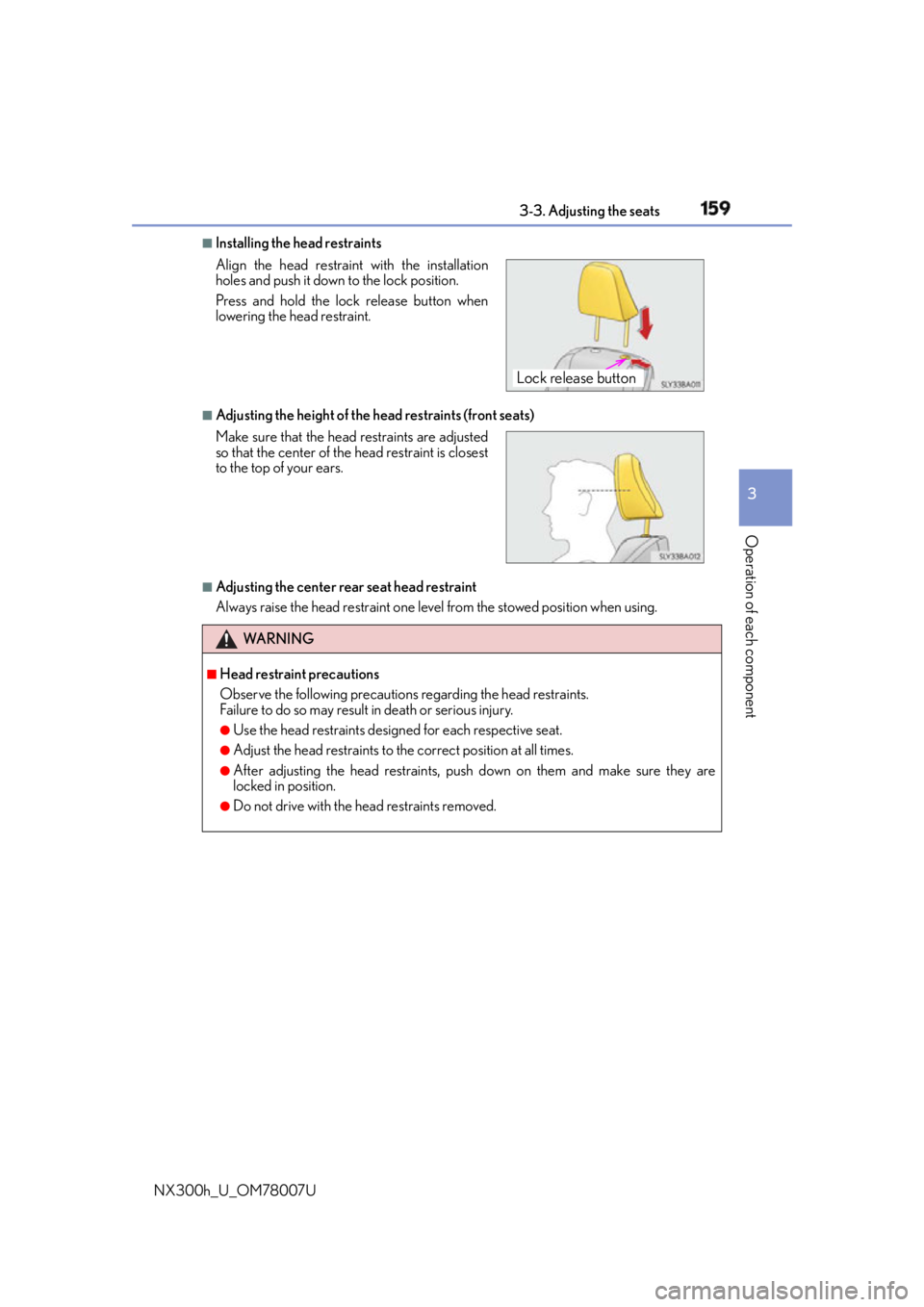
Installing the head restraints
■
Adjusting the height of the he ad restraints (front seats)
■
Adjusting the center rear seat head restraint
Always raise the head restraint one level from the stowed position when using.Align the head restrain t with the installation
holes and push it down to the lock position.
Press and hold the lock release button when
lowering the head restraint.
Make sure that the head restraints are adjusted
so that the center of the head restraint is closest
to the top of your ears.
WA R N I N G ■
Head restraint precautions
Observe the following precautions regarding the head restraints.
Failure to do so may result in death or serious injury.●
Use the head restraints design ed for each respective seat.●
Adjust the head restraints to the correct position at all times. ●
After adjusting the head restraints, push down on them and make sure they are
locked in position. ●
Do not drive with the head restraints removed. Lock release button
Page 161 of 681
1613-4. Adjusting the steering wheel and mirrors
3
Operation of each component
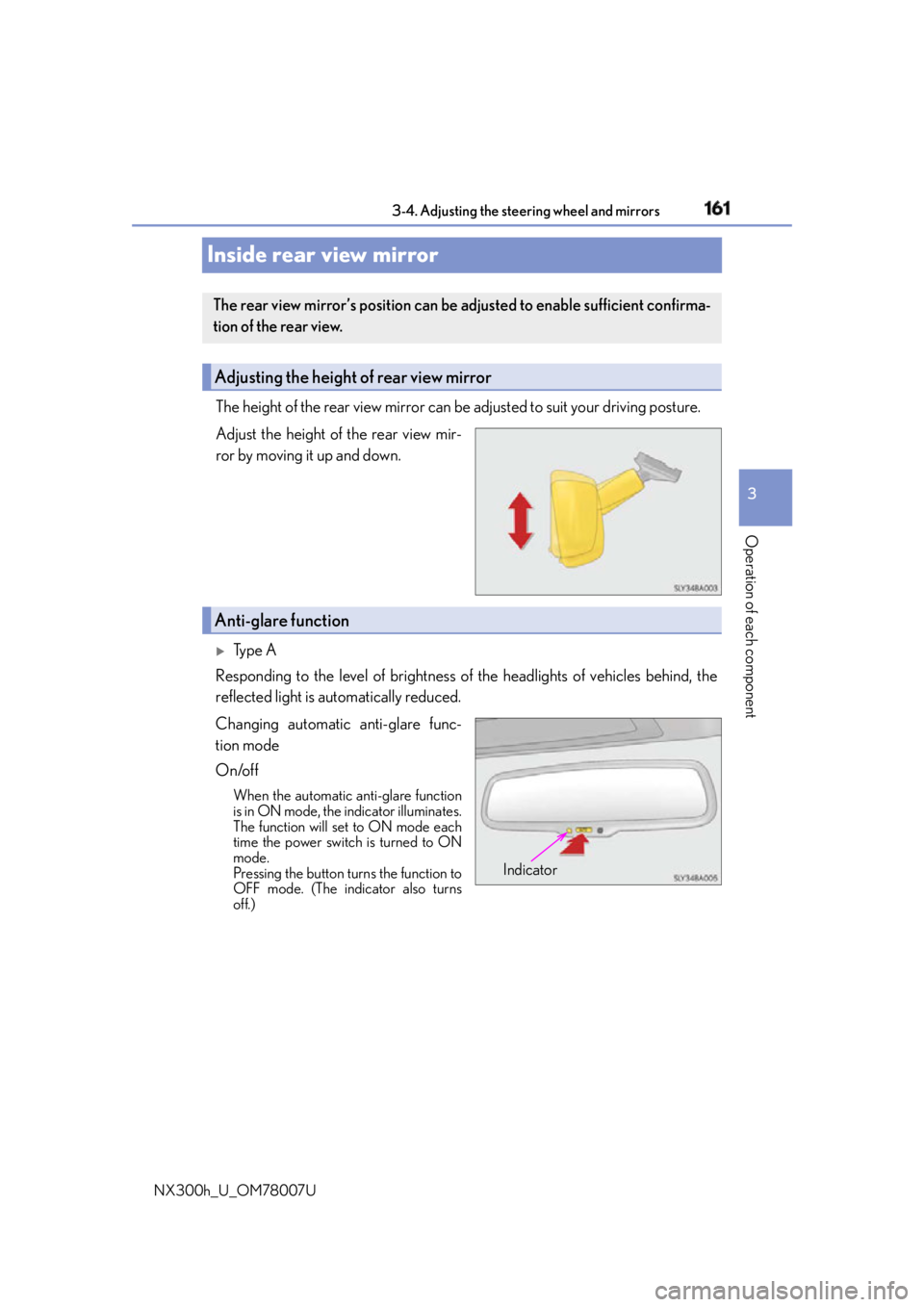
NX300h_U_OM78007UInside rear view mirror The height of the rear view mirror can be adjusted to suit your driving posture.
Adjust the height of the rear view mir-
ror by moving it up and down.
Ty p e A
Responding to the level of brightness of the headlights of vehicles behind, the
reflected light is automatically reduced.
Changing automatic anti-glare func-
tion mode
On/off When the automatic anti-glare function
is in ON mode, the indicator illuminates.
The function will set to ON mode each
time the power switch is turned to ON
mode.
Pressing the button turns the function to
OFF mode. (The indicator also turns
off.)The rear view mirror’s position can be adjusted to enable sufficient confirma-
tion of the rear view.
Adjusting the height of rear view mirror
Anti-glare function
Indicator
Page 195 of 681
1954-1. Before driving
4
Driving
NX300h_U_OM78007U ■
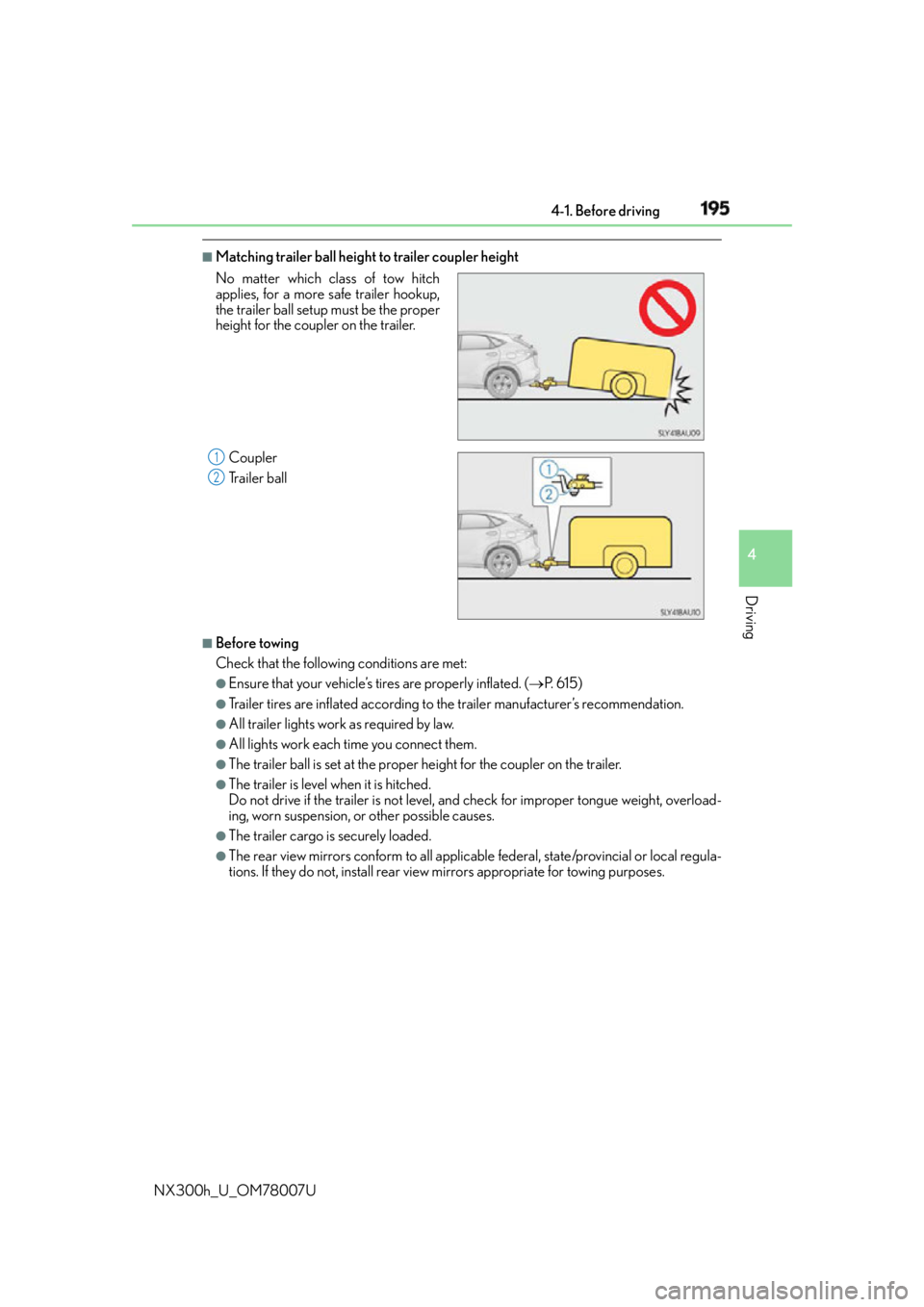
Matching trailer ball height to trailer coupler height
■
Before towing
Check that the followin g conditions are met:●
Ensure that your vehicle’s tires are properly inflated. ( P. 6 1 5 )●
Trailer tires are inflated according to the trailer manufacturer’s recommendation. ●
All trailer lights work as required by law. ●
All lights work each time you connect them. ●
The trailer ball is set at the proper height for the coupler on the trailer.●
The trailer is level when it is hitched.
Do not drive if the trailer is not level, an d check for improper to ngue weight, overload-
ing, worn suspension, or other possible causes. ●
The trailer cargo is securely loaded. ●
The rear view mirrors conform to all applicable federal, state/provincial or local regula-
tions. If they do not, install rear view mirrors appropriate for towing purposes.No matter which class of tow hitch
applies, for a more safe trailer hookup,
the trailer ball setup must be the proper
height for the coupler on the trailer.
Coupler
Trailer ball 1
2
Page 312 of 681

312 4-5. Using the driving support systems
NX300h_U_OM78007U ■
The pre-collision system is operational when
The pre-collision system is on ( P. 311) and the following conditions are met:●
Pre-collision warning:
• Vehicle speed is greater th an about 10 mph (15 km/h).
• The speed at which your vehicle is approaching the obstacle or the vehicle running
ahead of you is greater than about 7 mph (10 km/h). ●
Pre-collision brake assist:
• The VSC is not turned off.
• Vehicle speed is greater than about 19 mph (30 km/h).
• The speed at which your vehicle is approaching the obstacle or the vehicle running
ahead of you is greater than about 19 mph (30 km/h).
• The brake pedal is depressed. ●
Pre-collision braking:
• The VSC is not turned off.
• Vehicle speed is greater th an about 10 mph (15 km/h).
• The speed at which your vehicle is approaching the obstacle or the vehicle running
ahead of you is greater than about 7 mph (10 km/h).■
Conditions that may trigger the system even if there is no possibility of a collision
If the following obstructs the front of the sens or, the system judges that a collision may be
possible and operates. ●
When passing by a vehicle while making left or right turns or passing a vehicle in an
opposite lane. ●
When the vehicle rapidly approaches an object in front of it (such as another vehicle,
toll gate, etc.) ●
When climbing a steep hill, etc., and there are structures in the upper region of the road
(billboards, low ceilings , street lamps, etc.)●
When driving through narrow passages or places with low ceilings (bridges, tunnels,
overhead passes, etc.) ●
When driving on an uneven road surface ●
When metal objects are on the road surface causing level differences or protrusions in
the road ●
When an extreme change in vehicle height occurs ●
When the radar sensor moves off position du e to its surrounding area being subjected
to a strong impact. ●
When there is an obstacle on the side of an entrance of a curb for road (guardrails, etc.) ●
When your vehicle is tilted upwards (due to towing a trailer or during emergency tow-
ing, heavy loads in the lu ggage compartment, etc.).
When the system is activated in the situations described above, ther e is also a possibility
that the brakes will be applied wi th a force greater than normal.■
Obstacles not detected
The sensor cannot detect plasti c obstacles such as traffic co nes. There may also be occa-
sions when the sensor cannot detect pedestrians, animals, bicycles, motorcycles, trees,
or snowdrifts.
Page 313 of 681
3134-5. Using the driving support systems
4
Driving
NX300h_U_OM78007U ■
Situations in which the pre-collision system does not function properly
The system may not function effectively in situations such as the following:●
On roads with sharp bends or uneven surfaces ●
If a vehicle suddenly moves in front of your vehicle, such as at an intersection ●
If a vehicle suddenly cuts in front of your vehicle, such as when overtaking ●
In inclement weather such as heav y rain, fog, snow or sand storms●
When your vehicle is skidding with the VSC system off ●
When an extreme change in vehicle height occurs ●
When the radar sensor moves off position du e to its surrounding area being subjected
to a strong impact ●
Due to greatly turning the wheel when an obstacle suddenly appears ahead ■
Automatic cancelation of the pre-collision system
When a malfunction occurs due to sensor contamination, etc., that results in the sensors
being unable to detect obstacles, the pre-collision syst em will be automatically disabled.
In this case, the system will not activate even if there is a collision possibility.■
When there is a malfunction in the system, or if the system is temporarily unavailable
The PCS warning light flashes and a warning message is shown on the multi-information
display. If a warning message is shown on th e multi-information display, read the message
and follow the instructions. ■
When the TRAC and VSC are turned off ●
When the TRAC and VSC operations are turned off ( P. 307), the pre-collision brake
assist and pre-collision braking are also turned off. However, the alert function oper-
ates. ●
The PCS warning light turns on and the “V SC Turned Off Pre-Collision Brake System
Unavailable” is shown on the multi-information display. ■
Certification
For vehicles sold in the U.S.A.
FCC ID: HYQDNMWR007
This device complies with part 15 of the FC C Rules. Operation is subject to the following
two conditions: (1) This device may not caus e harmful interference, and (2) this device
must accept any interference received, incl uding interference that may cause undesired
operation.
FCC WARNING
Changes or modifications not expressly approved by the party responsible for compli-
ance could void the user’s authority to operate the equipment.
Radio frequency radiation exposure Information:
This equipment complies with FCC radiation exposure limits set forth for an uncontrolled
environment.
This equipment should be installed and operated with minimum distance of 20 cm
between the radiator (antenna) and your body.
This transmitter must not be co-located or operating in conjunction with any other
antenna or transmitter.
For vehicles sold in Canada
This device complies with Industry Canada licence-exempt RSS standard(s).
Operation is subject to the following two co nditions: (1) this device may not cause inter-
ference, and (2) this device must accept any interference, including interference that
may cause undesired operation of the device.
Page 320 of 681

320 4-5. Using the driving support systems
NX300h_U_OM78007U ■
The Blind Spot Monitor function is operational when ●
The BSM main switch is set to on ●
Vehicle speed is greater than approximately 10 mph (16 km/h). ■
The Blind Spot Monitor function will detect a vehicle when ●
A vehicle in an adjacent lane overtakes your vehicle. ●
Another vehicle enters the detection area when it changes lanes. ■
Conditions under which the Blind Spot Monitor function will not detect a vehicle
The Blind Spot Monitor function is not designed to detect the following types of vehicles
and/or objects: ●
Small motorcycles, bicycles, pedestrians, etc.
*●
Vehicles traveling in the opposite direction ●
Guardrails, walls, signs, parked vehi cles and similar stationary objects
*●
Following vehicles that are in the same lane
*●
Vehicles driving 2 lanes across from your vehicle
*
* : Depending on conditions, detection of a vehicle and/or object may occur. ■
Conditions under which the Bl ind Spot Monitor function may not function correctly●
The Blind Spot Monitor function may not dete ct vehicles correctly in the following con-
ditions:
• During bad weather such as heavy rain, fog, snow, etc.
• When ice or mud, etc., is attached to the rear bumper
• When driving on a road surface that is wet due to rain, standing water, etc.
• When there is a significant difference in speed between your vehicle and the vehicle
that enters the detection area
• When a vehicle is in the detection area from a stop and remains in the detection
area as your vehicle accelerates
• When driving up or down consecutive steep inclines, such as hills , a dip in the road,
etc.
• When multiple vehicles approach with only a small gap between each vehicle
• When vehicle lanes are wide, and the vehicle in the next lane is too far away from
your vehicle
• When the vehicle that enters the detection area is traveling at about the same speed
as your vehicle
• When there is a significant difference in height between your vehicle and the vehicle
that enters the detection area
• Directly after the BSM main switch is set to on ●
Instances of the Blind Spot Monitor function unnecessarily detecting a vehicle and/or
object may increase under the following conditions:
• When there is only a short distance between your vehicle and a guardrail, wall, etc.
• When there is only a short distance between your vehicle and a following vehicle
• When vehicle lanes are narrow and a vehicle driving 2 lanes across from your vehi-
cle enters the detection area
• When items such as a bicycle carrier ar e installed on the rear of the vehicle
Page 330 of 681

330 4-6. Driving tips
NX300h_U_OM78007UUtility vehicle precautions ●
Specific design characteristics give it a higher center of gravity than ordinary
passenger cars. This vehicle design feat ure causes this type of vehicle to be
more likely to rollover. Utility vehicles have a significantly higher rollover rate
than other types of vehicles. ●
It is not designed for cornering at the same speeds as ordinary passenger cars
any more than low-slung sports cars designed to perform satisfactorily under
off-road conditions. Therefore, shar p turns at excessive speeds may cause
rollover.This vehicle belongs to the utility vehicl e class, which has higher ground clear-
ance and narrower tread in relation to the height of its center of gravity.
Utility vehicle feature
WA R N I N G ■
Utility vehicle precautions
Always observe the following precautions to minimize the risk of death or serious
injury or damage to your vehicle: ●
In a rollover crash, an unbelted person is si gnificantly more likely to die than a person
wearing a seat belt. Therefore, the driver and all passengers should always fasten
their seat belts. ●
Avoid sharp turns or abrupt maneuvers, if at all possible.
Failure to operate this vehicle correctly may re sult in loss of control or vehicle rollover
causing death or serious injury. ●
Loading cargo on the roof luggage carrier (i f equipped) will make the center of the
vehicle gravity higher. Avoid high speeds, su dden starts, sharp turns, sudden braking
or abrupt maneuvers, otherwise it may result in loss of control or vehicle rollover due
to failure to operate this vehicle correctly. ●
Always slow down in gusty crosswinds. Be cause of its profile and higher center of
gravity, your vehicle is more sensitive to side winds than an ordinary passenger car.
Slowing down will allow you to have better control. ●
Do not drive horizontally across steep slopes . Driving straight up or straight down is
preferred. Your vehicle (or any similar off-road vehicle) can tip over sideways much
more easily than forward or backward.