warning light LEXUS NX300H 2016 Owner's Manual
[x] Cancel search | Manufacturer: LEXUS, Model Year: 2016, Model line: NX300H, Model: LEXUS NX300H 2016Pages: 680, PDF Size: 10.23 MB
Page 96 of 680

962. Instrument cluster
NX300h_OM_USA_OM78082U
*5: In order to confirm operation, the BSM outside rear view mirror indicators illuminate in the following situations:
• When the power switch is turned to ON mode while the BSM main switch is set to
ON.
• When the BSM main switch is set to ON while the power switch is in ON mode.
If the system is functioning correctly, the BSM outside rear view mirror indicators will
turn off after a few seconds.
If the BSM outside rear view mirror indica tors do not illuminate or do not turn off,
there may be a malfunction in the system.
If this occurs, have the vehicle inspected by your Lexus dealer.
*6: This light illuminates on the outside rear view mirrors.
*7: This light illuminates on the center panel.
*8: This light illuminates on the multi-information display.
WA R N I N G
■If a safety system warning light does not come on
Should a safety system light such as the ABS and SRS airbag warning light not come on
when you start the hybrid system, this could mean that these systems are not available
to help protect you in an a ccident, which could result in death or serious injury. Have
the vehicle inspected by your Lexus dealer immediately if this occurs.
Page 128 of 680
1283-2. Opening, closing and locking the doors
NX300h_OM_USA_OM78082U
■Impact detection door lock release system
In the event that the vehicle is subject to a strong impact, all the doors are unlocked.
Depending on the force of the impact or the type of accident, however, the system may
not operate.
■Using the mechanical key
The doors can also be locked and unlocked with the mechanical key. ( P. 5 9 1 )
■Open door warning buzzer
If the vehicle speed reaches 3 mph (5 km/h), the master warning light flashes and a
buzzer sounds to indicate that door (s) or the hood in not fully closed.
The open door(s) or hood is displa yed on the multi-information display.
■Conditions affecting the operation of the sm art access system with push-button start
or wireless remote control
P. 1 4 2
■Customization
Settings (e.g. unlocking function using a key) can be changed.
(Customizable features: P. 6 3 1 )
WA R N I N G
■To prevent an accident
Observe the following precautions while driving the vehicle.
Failure to do so may result in a door open ing and an occupant falling out, resulting in
death or serious injury.
●Ensure that all doors are properly closed and locked.
●Do not pull the inside handle of the doors while driving.
Be especially careful for the front doors, as the doors may be opened even if the
inside lock buttons ar e in locked position.
●Set the rear door child-protector locks wh en children are seated in the rear seats.
■When opening or closing a door
Check the surroundings of the vehicle such as whether the vehicle is on an incline,
whether there is enough space for a door to open and whether a strong wind is blow-
ing. When opening or closing the door, hold the door handle tightly to prepare for any
unpredictable movement.
Page 215 of 680
2154-2. Driving procedures
4
Driving
NX300h_OM_USA_OM78082U
■Changing the mode
When changing the automatic mode on/off, the message will be shown on the multi-
information display and the buzzer sounds.
■Parking brake engaged warning buzzer
A buzzer will sound if the vehicle is driven with the parking brake engaged. “Release
Parking Brake” is displayed on the multi-information display.
■Warning messages and buzzers
Warning messages and buzzers are used to indicate a system malfunction or to inform
the driver of the need for caution. If a warn ing message is shown on the multi-information
display, read the message and follow the instructions.
■If the brake system warning light comes on
P. 5 6 5
■Usage in winter time
P. 3 2 7
WA R N I N G
■When parking the vehicle
Do not leave a child in the vehicle alone. The parking brake may be released uninten-
tionally and there is the danger of the vehicle moving that may lead to an accident
resulting in death or serious injury.
NOTICE
■When parking the vehicle
Before you leave the vehicle, shift the shif t lever to P, set the parking brake and make
sure that the vehicle does not move.
■When the system malfunctions
Stop the vehicle in a safe place and check the warning messages.
■When the parking brake cannot be released due to a malfunction
Driving the vehicle with the parking brake set will lead to brake components overheat-
ing, which may affect braking performance and increase brake wear. Have the vehicle
inspected by contact your Lexus de aler immediately if this occurs.
Page 216 of 680
2164-2. Driving procedures
NX300h_OM_USA_OM78082U
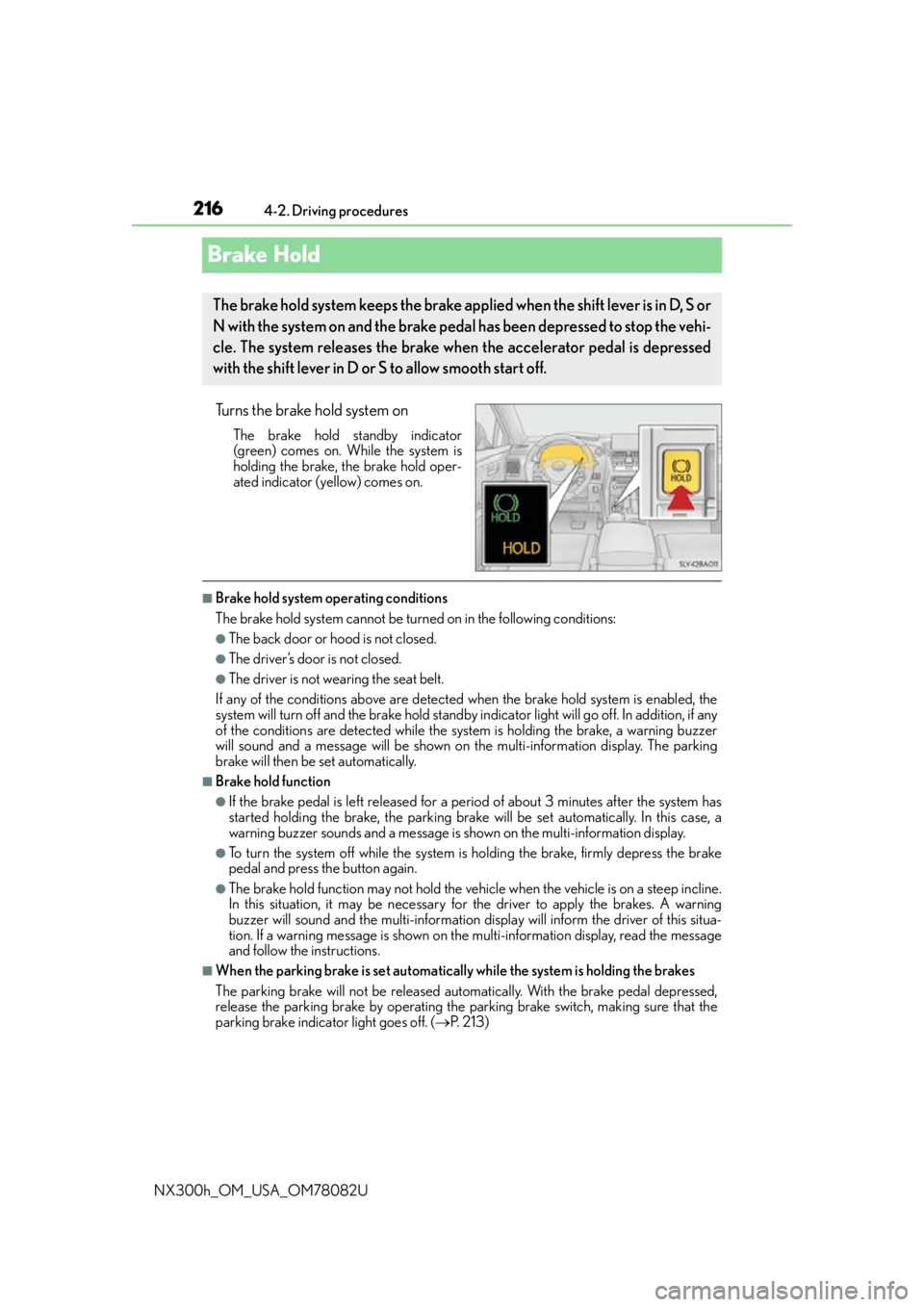
Brake Hold
Turns the brake hold system on
The brake hold standby indicator
(green) comes on. While the system is
holding the brake, the brake hold oper-
ated indicator (yellow) comes on.
■Brake hold system operating conditions
The brake hold system cannot be turn ed on in the following conditions:
●The back door or hood is not closed.
●The driver’s door is not closed.
●The driver is not wearing the seat belt.
If any of the conditions above are detected when the brake hold system is enabled, the
system will turn off and the brake hold standby indicator light will go of f. In addition, if any
of the conditions are detected while the sy stem is holding the brake, a warning buzzer
will sound and a message will be shown on th e multi-information display. The parking
brake will then be set automatically.
■Brake hold function
●If the brake pedal is left released for a period of about 3 minutes after the system has
started holding the brake, the parking brake w ill be set automatically. In this case, a
warning buzzer sounds and a message is shown on the multi-information display.
●To turn the system off while the system is holding the brake, firmly depress the brake
pedal and press the button again.
●The brake hold function may not hold the vehicle when the vehicle is on a steep incline.
In this situation, it may be necessary for the driver to apply the brakes. A warning
buzzer will sound and the multi-information di splay will inform the driver of this situa-
tion. If a warning message is shown on the multi-information display, re a d t h e m e s s a g e
and follow the instructions.
■When the parking brake is set automatically while the system is holding the brakes
The parking brake will not be released automatically. With the brake pedal depressed,
release the parking brake by operating the parking brake switch, making sure that the
parking brake indicator light goes off. ( P. 2 1 3 )
The brake hold system keeps the brake applied when the shift lever is in D, S or
N with the system on and the brake pedal has been depressed to stop the vehi-
cle. The system releases the brake when the accelerator pedal is depressed
with the shift lever in D or S to allow smooth start off.
Page 241 of 680
2414-5. Using the driving support systems
4
Driving
NX300h_OM_USA_OM78082U
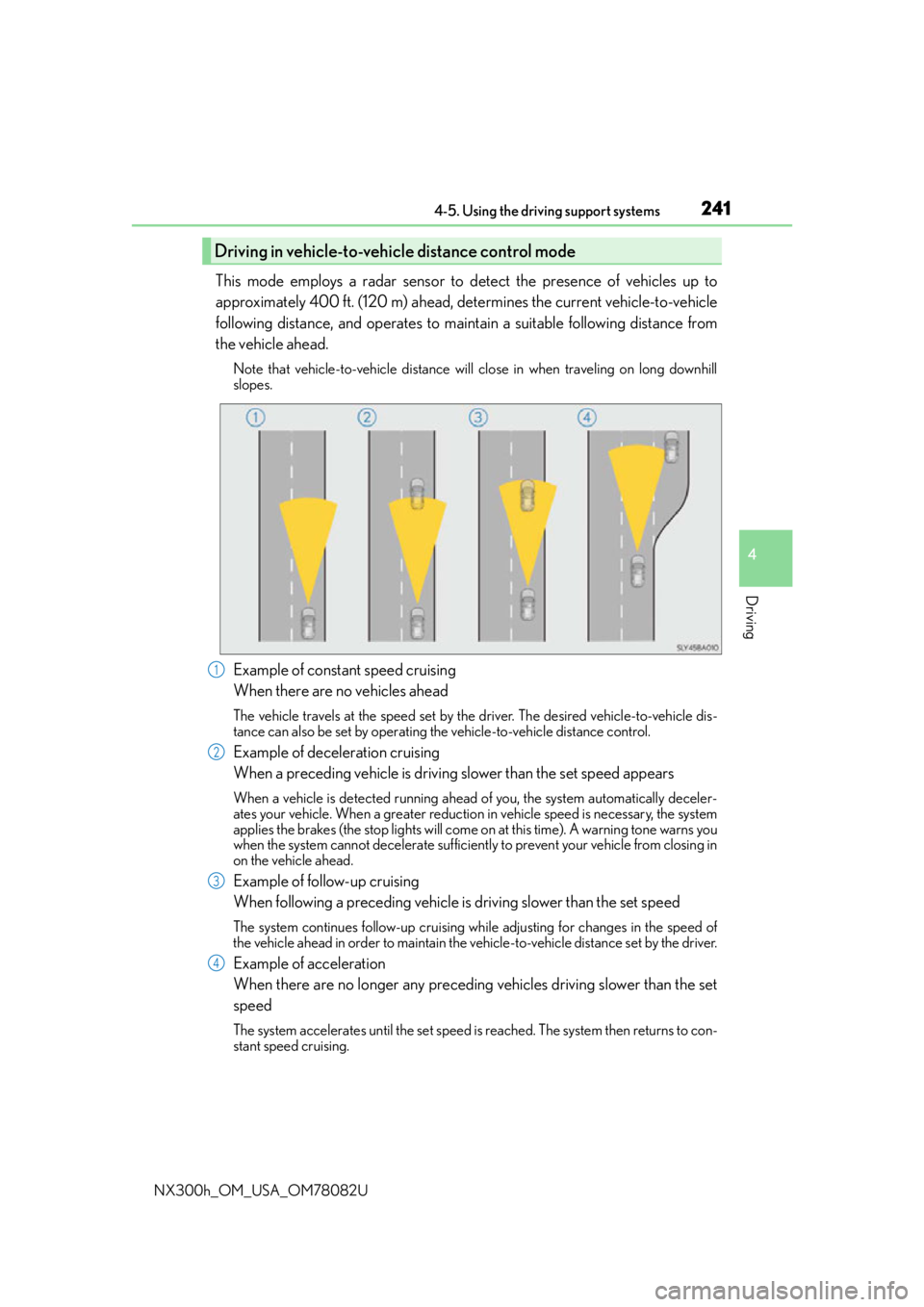
This mode employs a radar sensor to detect the presence of vehicles up to
approximately 400 ft. (120 m) ahead, determines the current vehicle-to-vehicle
following distance, and operates to maintain a suitable following distance from
the vehicle ahead.
Note that vehicle-to-vehicle distance will close in when traveling on long downhill
slopes.
Example of constant speed cruising
When there are no vehicles ahead
The vehicle travels at the speed set by the driver. The desired vehicle-to-vehicle dis-
tance can also be set by operating the vehicle-to-vehicle distance control.
Example of deceleration cruising
When a preceding vehicle is driving slower than the set speed appears
When a vehicle is detected running ahead of you, the system automatically deceler-
ates your vehicle. When a greater reduction in vehicle speed is necessary, the system
applies the brakes (the stop lights will come on at this time). A warning tone warns you
when the system cannot decelera te sufficiently to prevent your vehicle from closing in
on the vehicle ahead.
Example of follow-up cruising
When following a preceding vehicle is driving slower than the set speed
The system continues follow-up cruising wh ile adjusting for changes in the speed of
the vehicle ahead in order to maintain the vehicle-to-vehicle distance set by the driver.
Example of acceleration
When there are no longer any preceding vehicles driving slower than the set
speed
The system accelerates until the set speed is reached. The system then returns to con-
stant speed cruising.
Driving in vehicle-to-vehicle distance control mode
1
2
3
4
Page 254 of 680

2544-5. Using the driving support systems
NX300h_OM_USA_OM78082U
This mode employs a radar sensor to detect the presence of vehicles up to
approximately 400 ft. (120 m) ahead, determines the current vehicle-to-vehicle
following distance, and operates to main tain a suitable following distance from
the vehicle ahead.
Note that vehicle-to-vehicle distance will close in when traveling on long downhill
slopes.
Example of constant speed cruising
When there are no vehicles ahead
The vehicle travels at the speed set by the driver. The desired vehicle-to-vehicle dis-
tance can also be set by operating the vehicle-to-vehicle distance control.
Example of deceleration cruising and follow-up cruising
When a preceding vehicle is driving slower than the set speed appears
When a vehicle is detected running ahead of you, the system automatically deceler-
ates your vehicle. When a greater reduction in vehicle speed is necessary, the system
applies the brakes (the stop lights will come on at this time). The system will respond to
changes in the speed of the vehicle ahead in order to maintain the vehicle-to-vehicle
distance set by the driver. A warning tone warns you when the system cannot deceler-
ate sufficiently to prevent your vehicl e from closing in on the vehicle ahead.
When the vehicle ahead of you stops, your ve hicle will also stop (vehicle is stopped by
system control). After the vehicle ahead starts off, pushing the cruise control lever up
or depressing the accelerator peda l will resume follow-up cruising.
Example of acceleration
When there are no longer any preceding vehicles driving slower than the set
speed
The system accelerates until the set speed is reached. The system then returns to con-
stant speed cruising.
Driving in vehicle-to-vehicle distance control mode
1
2
3
Page 271 of 680
2714-5. Using the driving support systems
4
Driving
NX300h_OM_USA_OM78082U
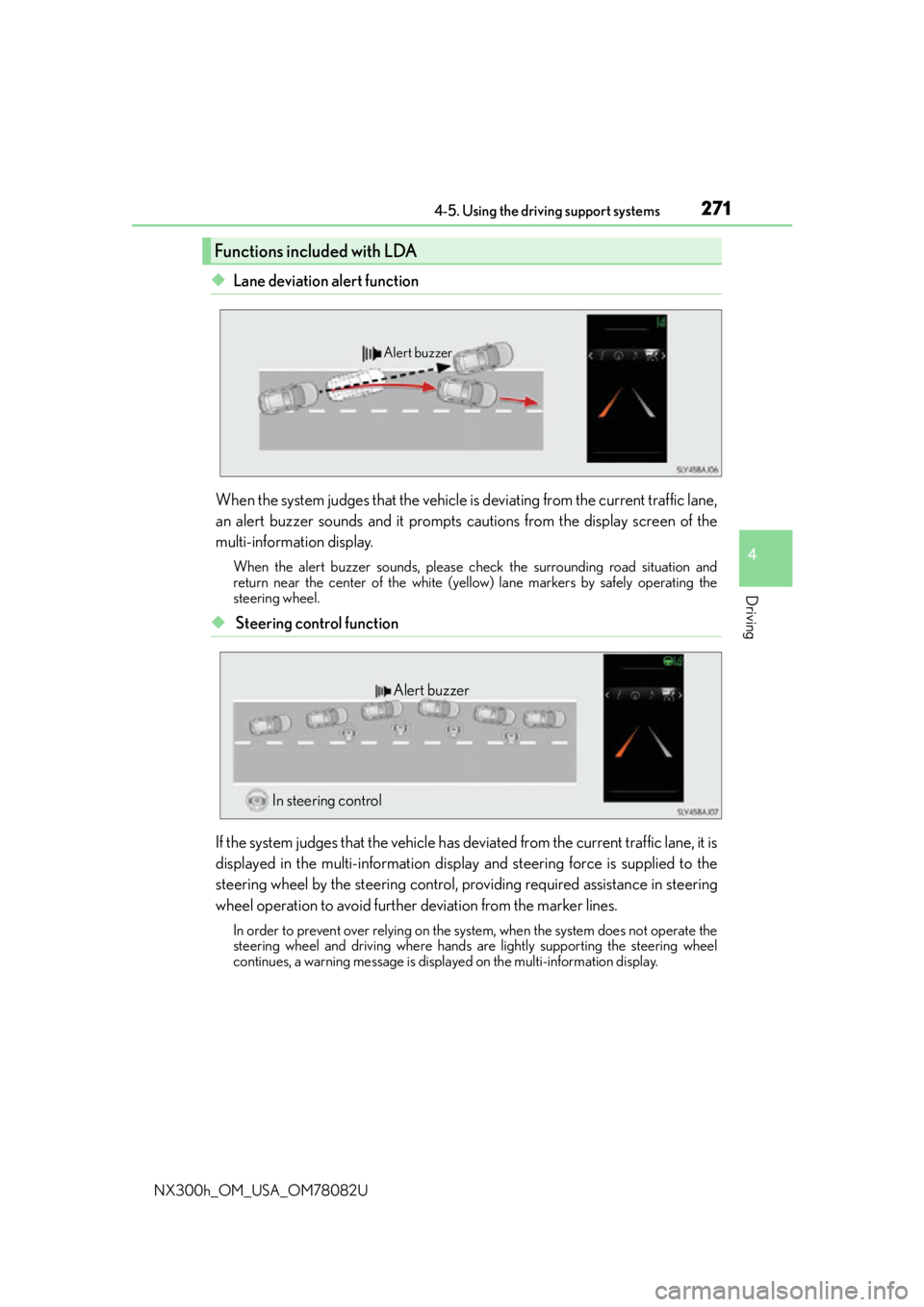
◆Lane deviation alert function
When the system judges that the vehicle is deviating from the current traffic lane,
an alert buzzer sounds and it prompts cautions from the display screen of the
multi-information display.
When the alert buzzer sounds, please ch eck the surrounding road situation and
return near the center of the white (yello w) lane markers by safely operating the
steering wheel.
◆ Steering control function
If the system judges that the vehicle has de viated from the current traffic lane, it is
displayed in the multi-information displa y and steering force is supplied to the
steering wheel by the steering control, pr oviding required assistance in steering
wheel operation to avoid further deviation from the marker lines.
In order to prevent over relying on the system, when the system does not operate the
steering wheel and driving where hands are lightly supporting the steering wheel
continues, a warning message is displa yed on the multi-information display.
Functions included with LDA
Alert buzzer
Alert buzzer
In steering control
Page 276 of 680
2764-5. Using the driving support systems
NX300h_OM_USA_OM78082U
●When the lane markers are on a curb, etc.
●When driving on a particularly brig ht road surface, such as concrete
●When driving on a road surface that is bright due to reflected light
●When driving in a location where the light level changes rapi dly, such as the entrance to
or exit from a tunnel
●When sunlight or the headlights of oncoming vehicles are shining directly into the cam-
era lens
●When driving on roads that are branching or merging
●When driving on a hill
●When driving on winding roads or roads that are uneven
●When driving on rough or unpaved roads
●When driving on a sharp curve
●When lane markers are extremely narrow or extremely wide
●When the vehicle leans to one side an unus ual amount due to a heavy load or improper
tire inflation pressure
●When the following distance between your vehicle and the vehicle ahead is extremely
short
●When the vehicle experiences strong up-and -down motion such as when driving on an
extremely rough road or on a seam in the pavement
● When headlight brightness at nighttime is reduced due to dirt on the lenses, or when
the headlights are misaligned
●When receiving a side wind
■When changing the tires
Depending on the tires used such as snow ti res, etc., sufficient performance may not be
maintainable.
■Warning messages for the LDA
Warning messages are used to indicate a syst em malfunction or to inform the driver of
the need for caution while driving. If a wa rning message is shown on the multi-informa-
tion display, read the message and follow the instructions.
Also, even if a warning message is displayed, it will not impede normal driving.
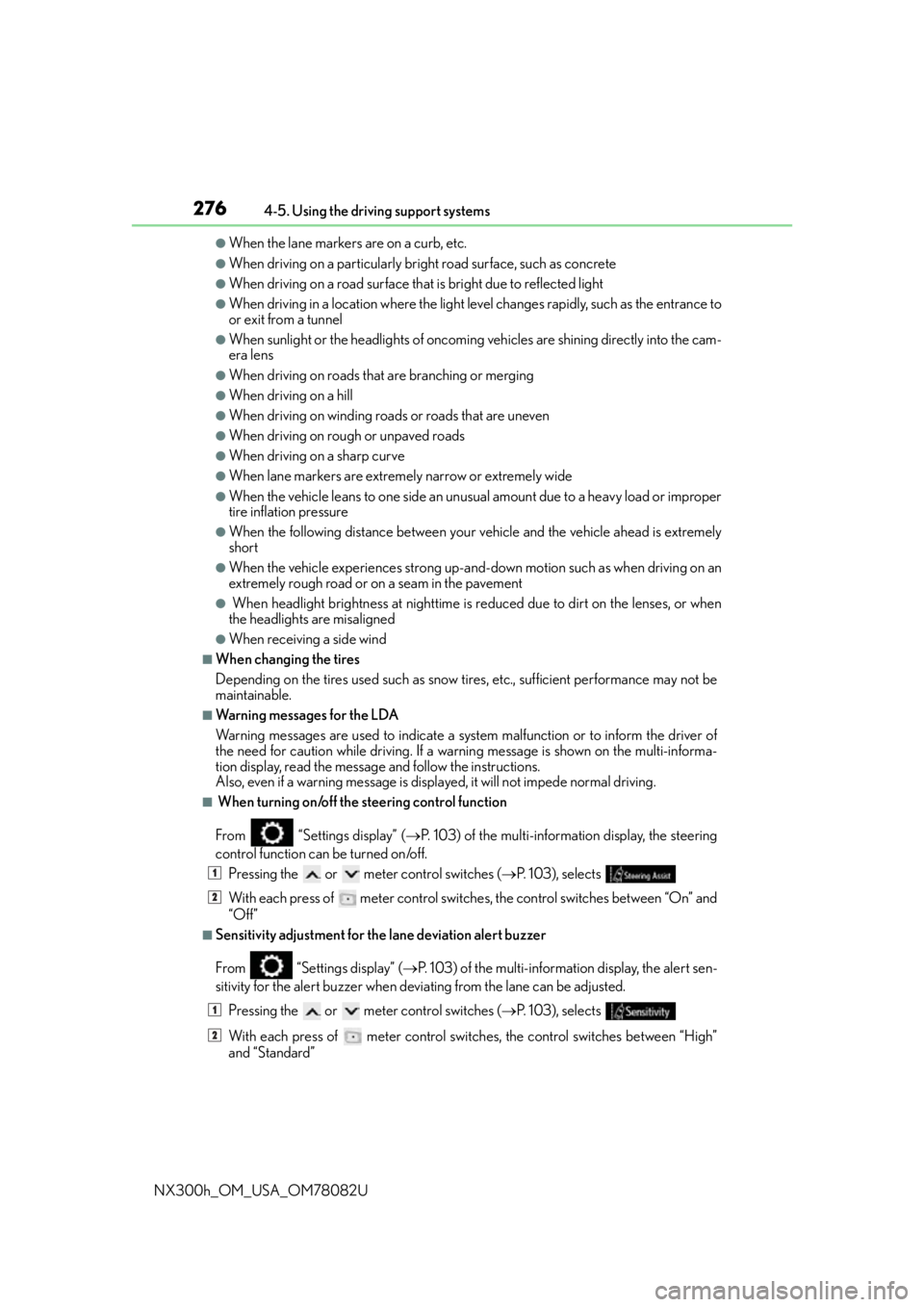
■ When turning on/off the steering control function
From “Settings display” ( P. 103) of the multi-information display, the steering
control function can be turned on/off.
Pressing the or meter control switches ( P. 103), selects
With each press of meter control switch es, the control switches between “On” and
“Off”
■Sensitivity adjustment for th e lane deviation alert buzzer
From
“Settings display” ( P. 103) of the multi-inform ation display, the alert sen-
sitivity for the alert buzzer when deviating from the lane can be adjusted.
Pressing the or meter control switches ( P. 103), selects
With each press of meter control switches, the control switches between “High”
and “Standard”
1
2
1
2
Page 311 of 680
3114-5. Using the driving support systems
4
Driving
NX300h_OM_USA_OM78082U
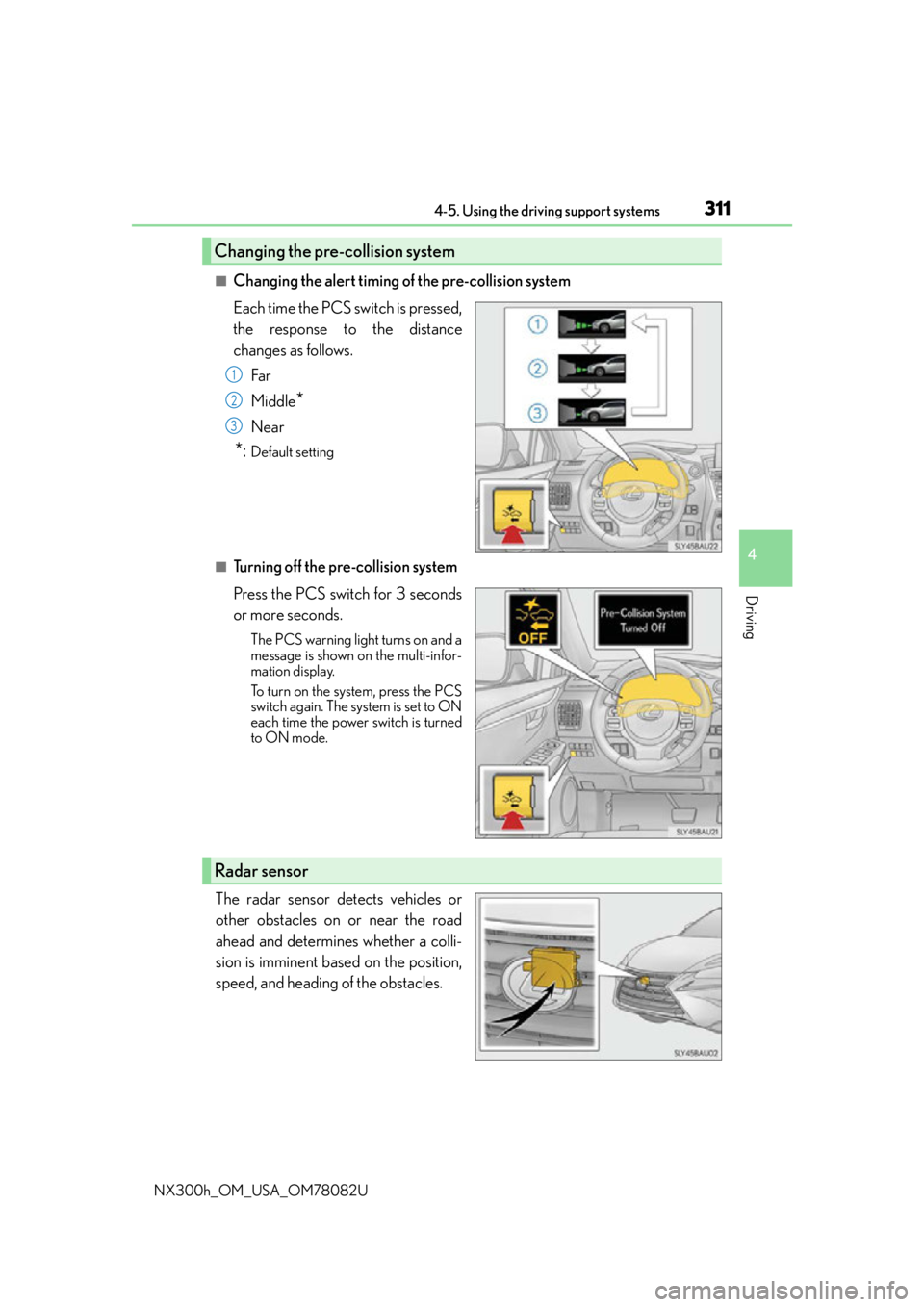
■Changing the alert timing of the pre-collision system
Each time the PCS switch is pressed,
the response to the distance
changes as follows.Far
Middle
*
Near
*:Default setting
■Turning off the pre-collision system
Press the PCS switch for 3 seconds
or more seconds.
The PCS warning light turns on and a
message is shown on the multi-infor-
mation display.
To turn on the system, press the PCS
switch again. The system is set to ON
each time the power switch is turned
to ON mode.
The radar sensor detects vehicles or
other obstacles on or near the road
ahead and determines whether a colli-
sion is imminent based on the position,
speed, and heading of the obstacles.
Changing the pre-collision system
1
2
3
Radar sensor
Page 312 of 680

3124-5. Using the driving support systems
NX300h_OM_USA_OM78082U
■The pre-collision system is operational when
The pre-collision system is on ( P. 311) and the following conditions are met:
●Pre-collision warning:
• Vehicle speed is greater th an about 10 mph (15 km/h).
• The speed at which your vehicle is approaching the obstacle or the vehicle running ahead of you is greater than about 7 mph (10 km/h).
●Pre-collision brake assist:
• The VSC is not turned off.
• Vehicle speed is greater than about 19 mph (30 km/h).
• The speed at which your vehicle is approaching the obstacle or the vehicle running
ahead of you is greater than about 19 mph (30 km/h).
• The brake pedal is depressed.
●Pre-collision braking:
• The VSC is not turned off.
• Vehicle speed is greater th an about 10 mph (15 km/h).
• The speed at which your vehicle is approaching the obstacle or the vehicle running ahead of you is greater than about 7 mph (10 km/h).
■Conditions that may trigger the system even if there is no possibility of a collision
In any of the following situations where the fr ontal area of the radar sensor is interrupted,
the radar sensor may detect possibility of a fr ontal collision and the system may be acti-
vated.
●When passing by an oncoming vehicle in a curve or a turn to the right or the left
●When rapidly approaching an obstacle ahead (e.g. preceding vehicle, toll gate barrier,
etc.)
●When there is a structural ob ject (billboard, low ceiling, fluorescent light, etc.) above
the uphill road ahead
●When driving on a narrow road or through under a low overhead structure (bridge,
tunnel, fly-under, etc.)
●When driving on an uneven road surface
●When there is a metal object, bump, or protrusion on the road surface
●When vehicle’s front part is raised or lowered depending on loading conditions
●When the direction of radar sensor is misa ligned by strong impact applied on an area
around the radar sensor, etc.
●When there is an obstacle (guard rail, etc.) by the roadside at the entrance to a curve
●When the front of your vehicle is pointing upwards (caused by towing a trailer or put-
ting a heavy load in the luggage compartment, etc.)
When the system is activated in the situations described above, there is also a possibility
that the brakes may be applied with a force greater than normal.
■Obstacles not detected
The sensor cannot detect plasti c obstacles such as traffic cones. There may also be occa-
sions when the sensor cannot detect pedestrians, animals, bicycles, motorcycles, trees,
or snowdrifts.