remote control LEXUS RX350 2016 Owner's Guide
[x] Cancel search | Manufacturer: LEXUS, Model Year: 2016, Model line: RX350, Model: LEXUS RX350 2016Pages: 748, PDF Size: 12.36 MB
Page 341 of 748
3414-5. Using the driving support systems
4
Driving
RX350_U_OM48E90U ●
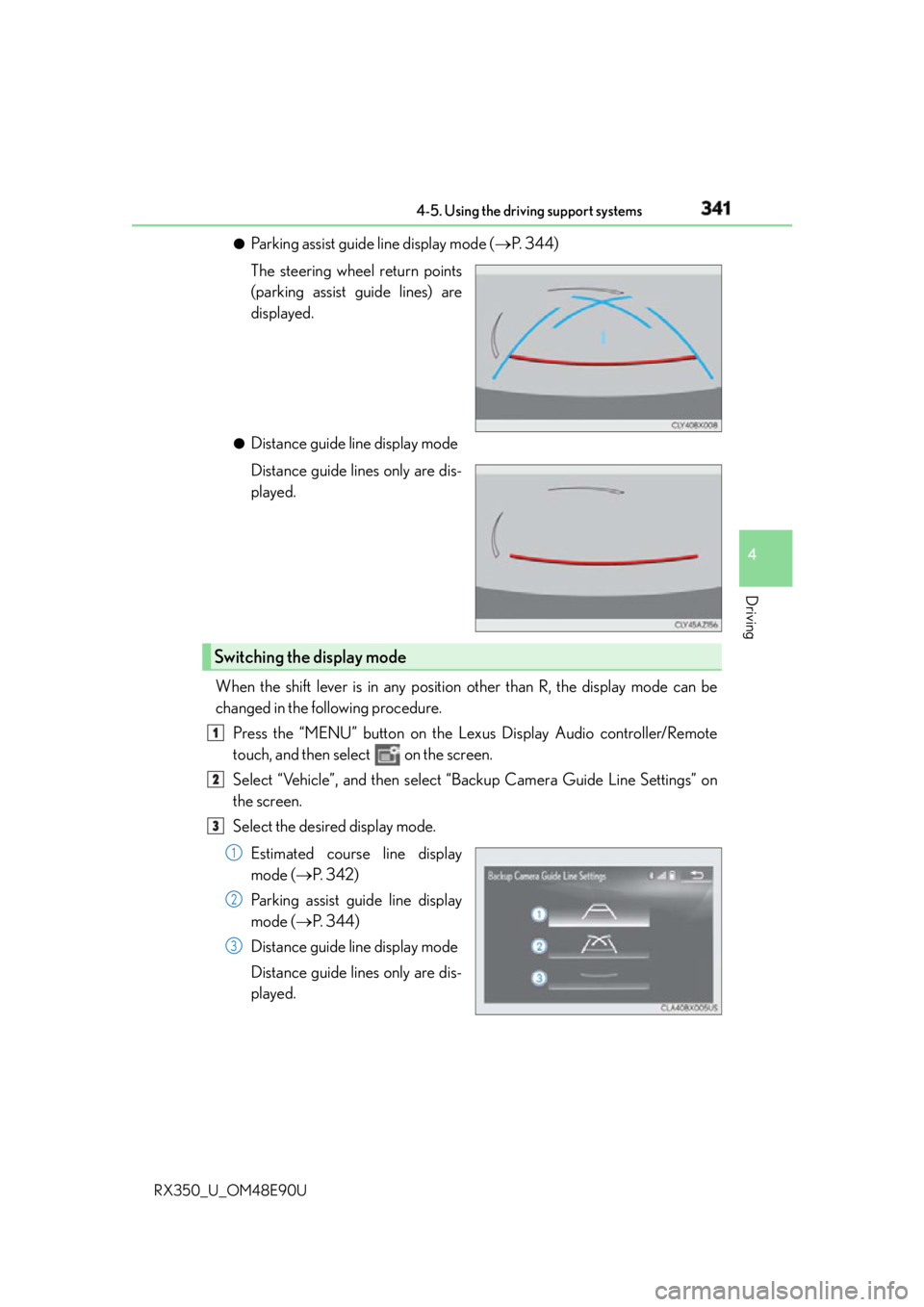
Parking assist guide line display mode ( P. 344)
The steering wheel return points
(parking assist guide lines) are
displayed. ●
Distance guide line display mode
Distance guide lines only are dis-
played.
When the shift lever is in any position other than R, the display mode can be
changed in the following procedure.
Press the “MENU” button on the Le xus Display Audio controller/Remote
touch, and then select on the screen.
Select “Vehicle”, and then select “B ackup Camera Guide Line Settings” on
the screen.
Select the desired display mode.
Estimated course line display
mode ( P. 3 4 2 )
Parking assist guide line display
mode ( P. 3 4 4 )
Distance guide line display mode
Distance guide lines only are dis-
played.Switching the display mode 1
2
3
1
2
3
Page 473 of 748
4735-11. Bluetooth ®
5
Lexus Display Audio system
RX350_U_OM48E90U ■
Compatible models
The Bluetooth ®
audio system supports portable audi o players with the following specifi-
cations ●
Bluetooth ®
specifications:
Ver. 2.0 or higher (Recommended: Ver. 3.0 +EDR or higher) ●
Profiles:
• A2DP (Advanced Audio Distribution Profile) Ver. 1.0, or higher
(Recommended: Ver. 1.3 or higher)
This is a profile to transmit stereo audio or high quality sound to the audio system.
• AVRCP (Audio/Video Remote Control Profile) Ver. 1.0 or higher
(Recommended: Ver. 1.5 or higher)
This is a profile to allow remote control the A/V equipment.
However, please note that some functions may be limited depending on the type of por-
table audio player connected.
The hands-free system supports cellular phones with the following specifications. ●
Bluetooth ®
specification:
Ver. 2.0 or higher (Recommended: Ver. 3.0 +EDR or higher) ●
Profiles:
• HFP (Hands Free Profile) Ver. 1.0 or higher (Recommended: Ver. 1.6 or higher)
This is a profile to allow ha nds-free phone calls using a cellular phone or head set. It
has outgoing and incoming call functions.
• OPP (Object Push Profile) Ver. 1.1 or higher (Recommended: Ver. 1.2)
This is a profile to transfer phonebook data. When a Bluetooth ®
compatible cellular
phone has both PBAP and OPP, OPP cannot be used.
• PBAP (Phone Book Access Profile) Ver. 1.0 or higher (Recommended: Ver. 1.1)
This is a profile to tr ansfer phonebook data.
• MAP (Message Access Profile) Ver.1.0 or higher
This is a profile to using phone message.
If the cellular phone does not support HFP, you cannot register it with the hands-free sys-
tem. OPP, PBAP or MAP services must be selected individually.■
Reconnecting the portable audio player
If the portable audio player is disconnected due to poor reception when the engine
switch is in ACCESSORY or IGNITION ON mode, the system automatically recon-
nects the portable audio player.
If you have switched off the portable audio player yourself, follow the instructions below
to reconnect: ●
Select the portable audio player again ●
Enter the portable audio player ■
When you sell your car
Be sure to delete your personal data. ( P. 4 0 5 )
Page 491 of 748
4916-1. Basic operation of the Remote Touch screen
6
Interior features
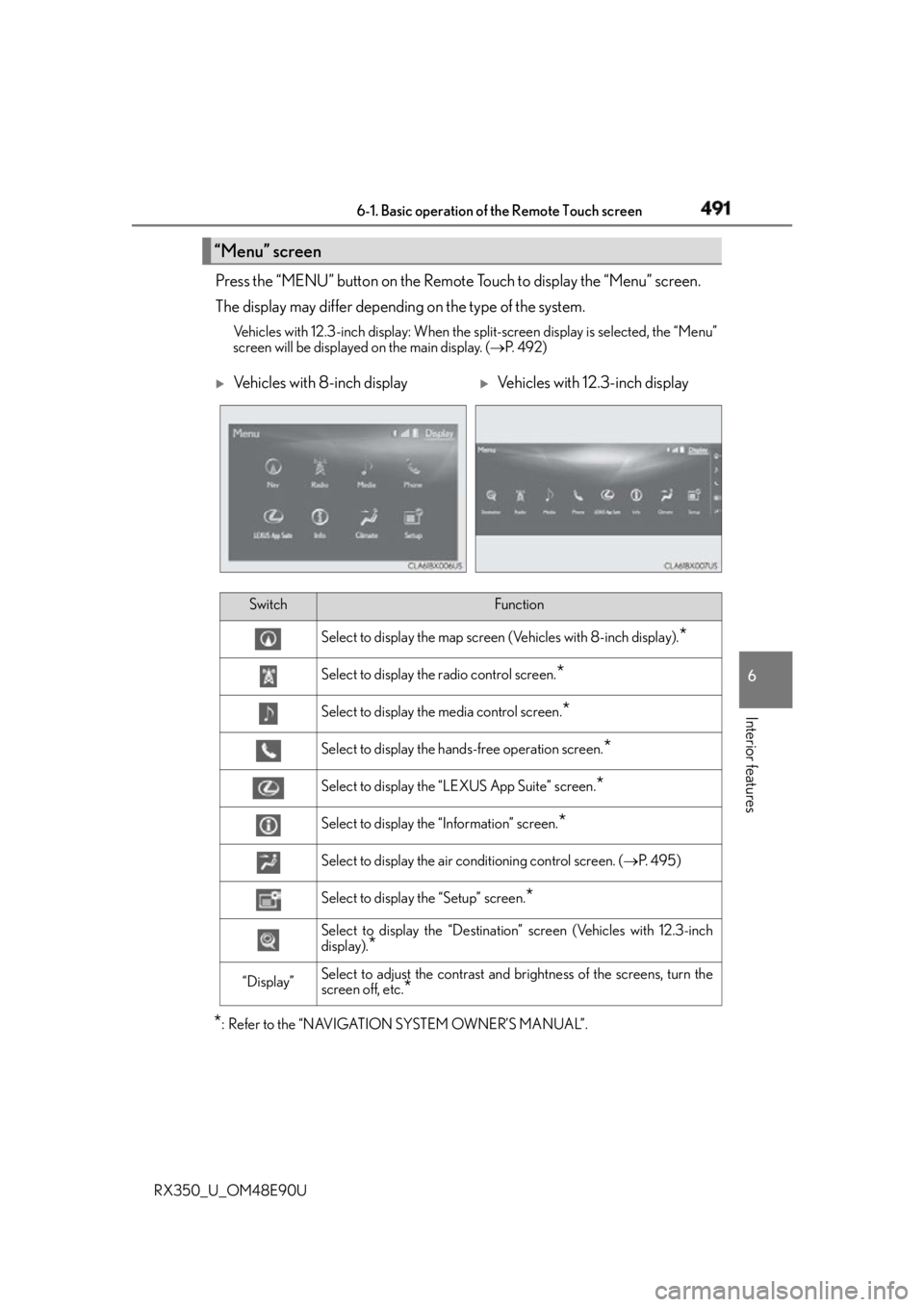
RX350_U_OM48E90U Press the “MENU” button on the Remote Touch to display the “Menu” screen.
The display may differ depending on the type of the system. Vehicles with 12.3-inch display: When the split-screen display is selected, the “Menu”
screen will be displayed on the main display. ( P. 4 9 2 )
* : Refer to the “NAVIGATION SYSTEM OWNER’S MANUAL”.“Menu” screen
Vehicles with 8-inch display
Vehicles with 12.3-inch display
Switch Function
Select to display the map screen (Vehicles with 8-inch display).
*Select to display the radio control screen.
*Select to display the media control screen.
*Select to display the hands-free operation screen.
*Select to display the “LEXUS App Suite” screen.
*Select to display the “Information” screen.
*Select to display the air conditioning control screen. ( P. 4 9 5 )
Select to display the “Setup” screen.
*Select to display the “Destination” screen (Vehicles with 12.3-inch
display).
*“Display” Select to adjust the contrast and br ightness of the screens, turn the
screen off, etc.
*
Page 495 of 748
4956-2. Using the air conditioning system and defogger
6
Interior features
RX350_U_OM48E90U ■
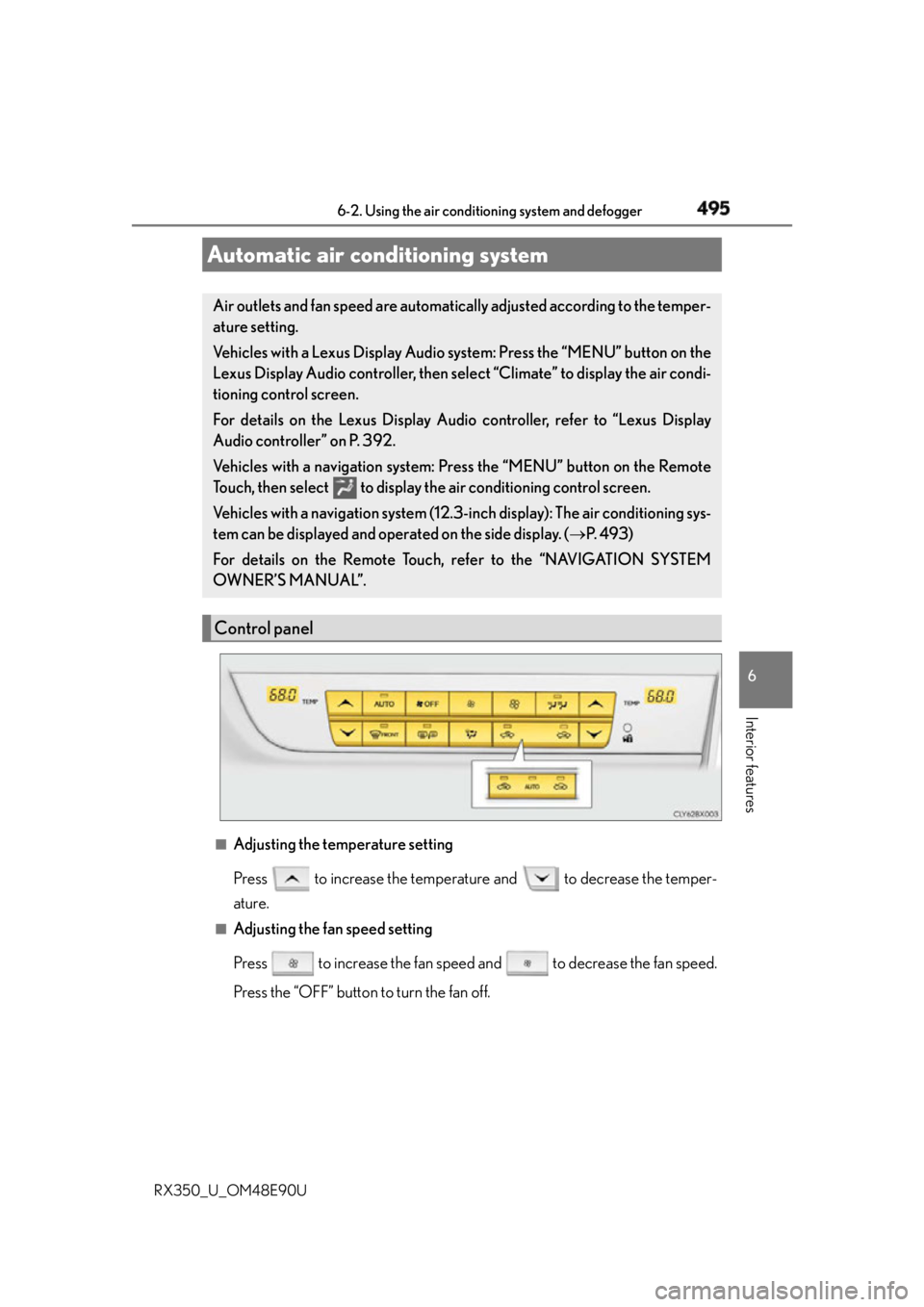
Adjusting the temperature setting
Press to increase the temperature and to decrease the temper-
ature. ■
Adjusting the fan speed setting
Press to increase the fan speed and to decrease the fan speed.
Press the “OFF” button to turn the fan off.Automatic air conditioning system Air outlets and fan speed are automatica lly adjusted according to the temper-
ature setting.
Vehicles with a Lexus Display Audio sy stem: Press the “MENU” button on the
Lexus Display Audio controller, then select “Climate” to display the air condi-
tioning control screen.
For details on the Lexus Display Audio controller, refer to “Lexus Display
Audio controller” on P. 392.
Vehicles with a navigati on system: Press the “MENU” button on the Remote
Touch, then select to display th e air conditioning control screen.
Vehicles with a navigation system (12.3- inch display): The air conditioning sys-
tem can be displayed and operated on the side display. ( P. 4 9 3 )
For details on the Remote Touch, refer to the “NAVIGATION SYSTEM
OWNER’S MANUAL”.
Control panel
Page 536 of 748
536 6-5. Using the other interior features
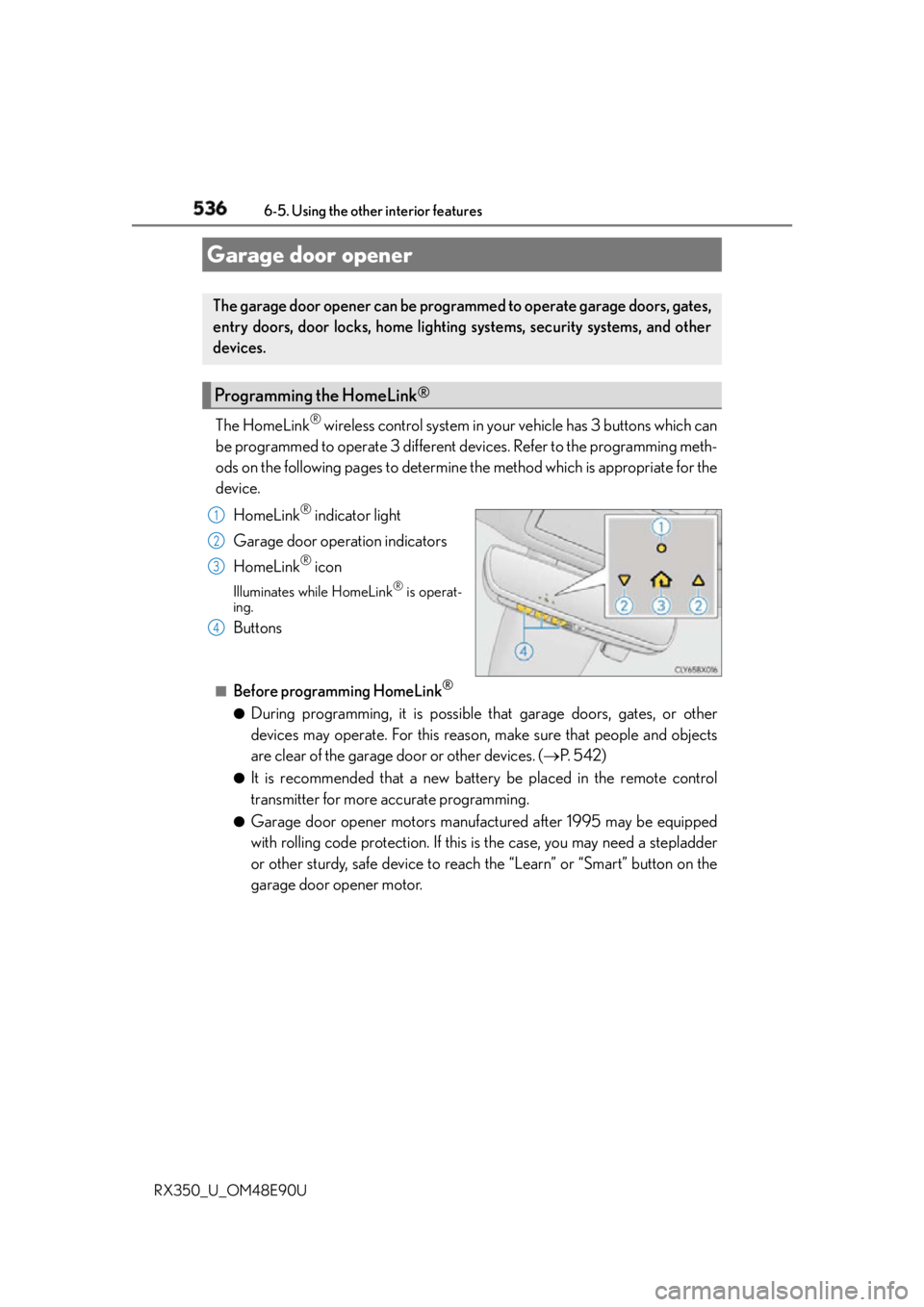
RX350_U_OM48E90U The HomeLink ®
wireless control system in your vehicle has 3 buttons which can
be programmed to operate 3 different devices. Refer to the programming meth-
ods on the following pages to determine the method which is appropriate for the
device.
HomeLink ®
indicator light
Garage door operation indicators
HomeLink ®
iconIlluminates while HomeLink ®
is operat-
ing.
Buttons ■
Before programming HomeLink ®
●
During programming, it is possible th at garage doors, gates, or other
devices may operate. For this reason, make sure that people and objects
are clear of the garage door or other devices. ( P. 5 4 2 )●
It is recommended that a new battery be placed in the remote control
transmitter for more accurate programming. ●
Garage door opener motors manufactured after 1995 may be equipped
with rolling code protection. If this is the case, you may need a stepladder
or other sturdy, safe device to reach the “Learn” or “Smart” button on the
garage door opener motor.Garage door opener The garage door opener can be programmed to operate garage doors, gates,
entry doors, door locks, home lighting systems, security systems, and other
devices.
Programming the HomeLink ®
1
2
3
4
Page 537 of 748
5376-5. Using the other interior features
6
Interior features
RX350_U_OM48E90U ■
Programming HomeLink ®
Press and release the HomeLink ®
button you want to program and check
that the HomeLink ®
indicator light flashes (orange).Pe r f o r m
within 60 seconds of
, or the indicator light will stop flashing and
programming will not be able to be completed.
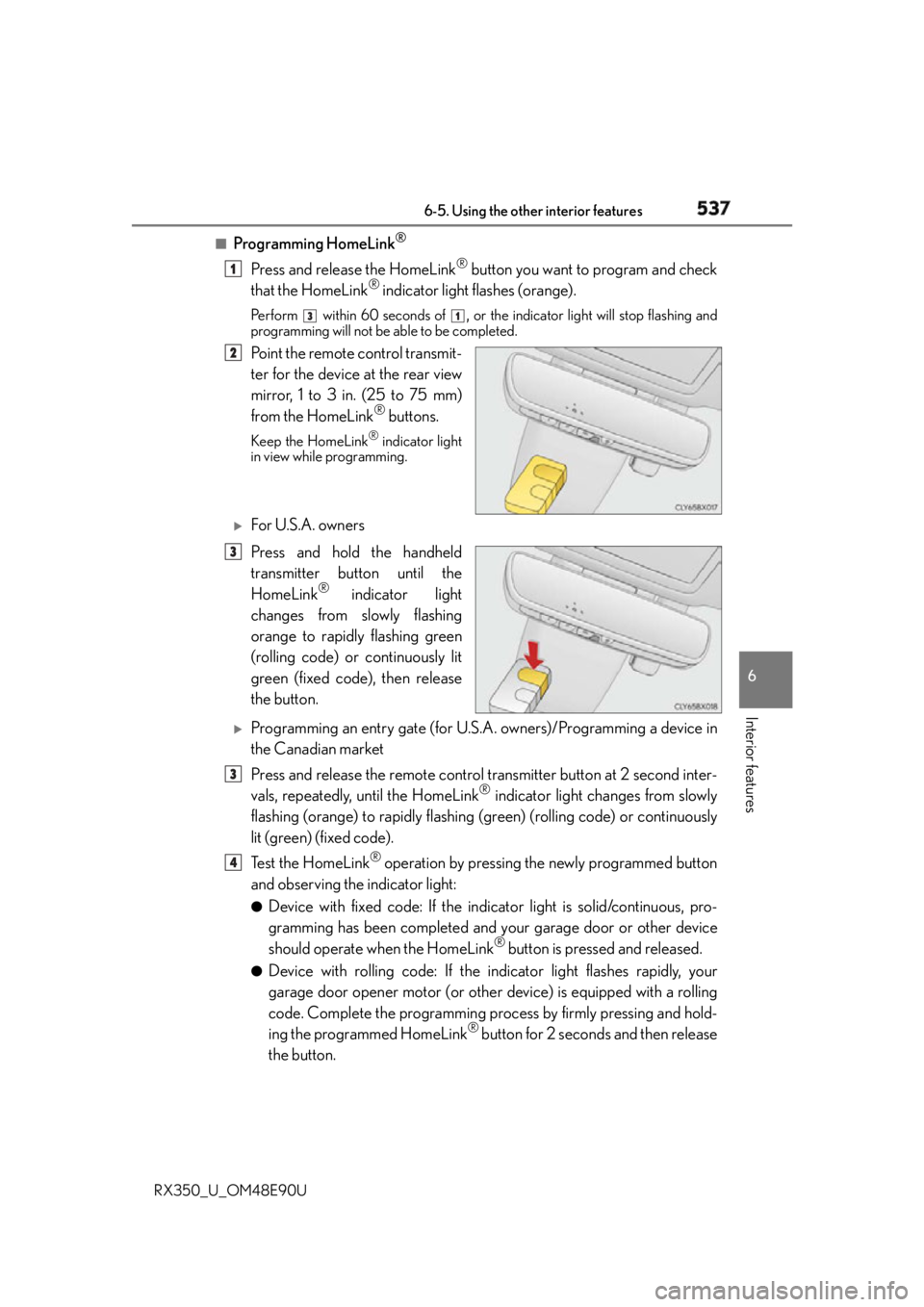
Point the remote control transmit-
ter for the device at the rear view
mirror, 1 to 3 in. (25 to 75 mm)
from the HomeLink ®
buttons.Keep the HomeLink ®
indicator light
in view while programming.
For U.S.A. owners
Press and hold the handheld
transmitter button until the
HomeLink ®
indicator light
changes from slowly flashing
orange to rapidly flashing green
(rolling code) or continuously lit
green (fixed code), then release
the button.
Programming an entry gate (for U.S. A. owners)/Programming a device in
the Canadian market
Press and release the remote control transmitter button at 2 second inter-
vals, repeatedly, until the HomeLink ®
indicator light changes from slowly
flashing (orange) to rapidly flashing (green) (rolling code) or continuously
lit (green) (fixed code).
Te s t t h e H o m e L i n k ®
operation by pressing the newly programmed button
and observing the indicator light: ●
Device with fixed code: If the indi cator light is solid/continuous, pro-
gramming has been completed and your garage door or other device
should operate when the HomeLink ®
button is pressed and released.●
Device with rolling code: If the indicator light flashes rapidly, your
garage door opener motor (or other device) is equipped with a rolling
code. Complete the programming process by firmly pressing and hold-
ing the programmed HomeLink ®
button for 2 seconds and then release
the button. 1 3 1
2
3
3
4
Page 542 of 748

542 6-5. Using the other interior features
RX350_U_OM48E90U WA R N I N G ■
When programming a garage door or other remote control device
The garage door or other device may operat e, so ensure people and objects are out of
danger to prevent injury or potential harm. ■
Conforming to federal safety standards
Do not use the HomeLink ®
compatible transceiver with any garage door opener or
device that lacks safety stop and reverse fe atures as required by federal safety stan-
dards.
This includes any garage door that canno t detect an interfer ing object. A door or
device without these features increases the risk of death or serious injury. ■
When operating or programming HomeLink ®
Never allow a child to operate or play with the HomeLink ®
buttons.
Page 552 of 748
552 6-5. Using the other interior features
RX350_U_OM48E90U After you sign the Telematics Subscription Service Agreement, download the
Lexus Enform Remote app from your cellular phone’s app store, and register
within the app (or enroll and complete registration at the dealer), you can begin
using these services. ( P. 5 4 7 )
A variety of subscription terms are available. Contact your Lexus dealer, or call 1-
800-25-LEXUS (1-800-255-3987) fo r further subscription details.LEXUS Enform Remote
: If equippedLexus Enform Remote is a cellular phone application that lets you view and
remotely control certain aspects of your vehicle.
For details about the functions and serv ices of this application, refer to
http://www.lexus.com/enform/
.
Function of the Lexus Enform Remote is achieved by using an embedded cel-
lular device in the vehicle (D CM: Data Communication Module).
Subscription
Page 581 of 748
5817-3. Do-it-yourself maintenance
7
Maintenance and care
RX350_U_OM48E90U Check the battery as follows. ■
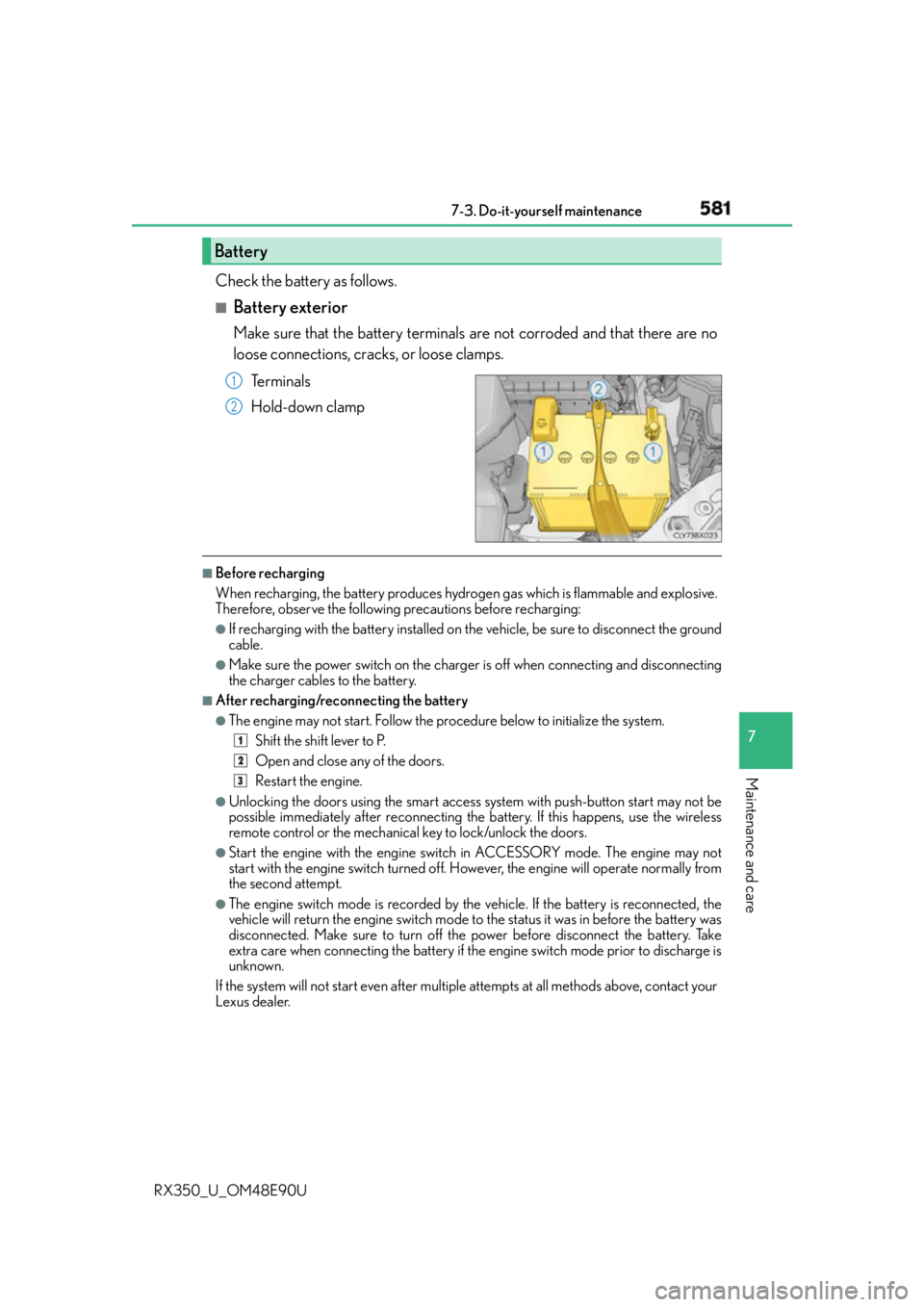
Battery exterior Make sure that the battery terminals are not corroded and that there are no
loose connections, cracks, or loose clamps.
Te r m i n a l s
Hold-down clamp ■
Before recharging
When recharging, the battery produces hydrogen gas which is flammable and explosive.
Therefore, observe the following precautions before recharging: ●
If recharging with the battery installed on the vehicle, be sure to disconnect the ground
cable. ●
Make sure the power switch on the charger is off when connecting and disconnecting
the charger cables to the battery. ■
After recharging/reconnecting the battery ●
The engine may not start. Follow the pr ocedure below to initialize the system.
Shift the shift lever to P.
Open and close any of the doors.
Restart the engine.●
Unlocking the doors using the smart access system with push-button start may not be
possible immediately after reconnecting the battery. If this happens, use the wireless
remote control or the mechanical key to lock/unlock the doors. ●
Start the engine with the engine switch in ACCESSORY mode. The engine may not
start with the engine switch turned off. However, the engine will operate normally from
the second attempt. ●
The engine switch mode is recorded by the vehicle. If the battery is reconnected, the
vehicle will return the engine switch mode to the status it was in before the battery was
disconnected. Make sure to turn off the power before disconnect the battery. Take
extra care when connecting the battery if the engine switch mode prior to discharge is
unknown.
If the system will not start even after multiple attempts at all methods above, contact your
Lexus dealer.Battery 1
2
1
2
3
Page 604 of 748
604 7-3. Do-it-yourself maintenance
RX350_U_OM48E90U ■
Use a CR2032 lithium battery ●
Batteries can be purchased at your Lexus dealer, local electrical appliance shops or
camera stores. ●
Replace only with the same or equivalent type recommended by the manufacturer. ●
Dispose of used batteries according to the local laws. ■
If the electronic key battery is depleted
The following symptoms may occur: ●
The smart access system with push-button start and wireless remote control will not
function properly. ●
The operational range will be reduced.
WA R N I N G ■
Removed battery and other parts
These parts are small and if swallowed by a child, they can cause choking. Keep away
from children. Failure to do so could result in death or serious injury.
NOTICE ■
For normal operation afte r replacing the battery
Observe the following precautions to prevent accidents: ●
Always work with dry hands.
Moisture may cause the battery to rust. ●
Do not touch or move any other component inside the remote control. ●
Do not bend either of the battery terminals.