lights LINCOLN MKT 2017 Owner's Manual
[x] Cancel search | Manufacturer: LINCOLN, Model Year: 2017, Model line: MKT, Model: LINCOLN MKT 2017Pages: 558, PDF Size: 4.59 MB
Page 423 of 558

Defrost: A pop up appears on the screen to display the defrost options.
C
MAX Defrost:
Touch the button to maximize defrosting. Outside air flows through the wi\
ndshield vents, the fan automatically adjusts
to the highest speed and the temperature dial returns to the full heat p\
osition. You can use this setting to defog or clear a thin
covering of ice from the windshield. The heated rear window also automat\
ically turns on when you select MAX Defrost.
Defrost:
Touch to clear the windshield of fog and thin ice. Touch again to return to the previous airflow selection. When on, defrost\
provides outside air to reduce window fogging and distributes air throug\
h the windshield defroster vents and demister vents.
Note:
To prevent window fogging, you cannot select recirculated air when Defros\
t is on.
Heated rear window: Turns the heated rear window on and off. See the Heated Windows and Mirrors chapter in your owner manual.
AUTO:
Touch the button to switch on automatic operation. Select the desired tem\
perature using the temperature control. The
system adjusts fan speed, air distribution, air conditioning operation, \
and selects outside air or recirculated air to heat or cool the
vehicle in order to maintain the desired temperature.
D
Power:
Touch the button to switch the system on and off. Switching off the climate control system prevents outside air from enteri\
ng
the vehicle.
E
DUAL:
This button lights up when the passenger controls are active. To switch the dual zone operation off and link the passenger
temperature to the driver temperature, touch the DUAL button to switch it off.
F
Passenger temperature:
Touch up or down to adjust the temperature.
G
Passenger heated and climate controlled seats:
H
Touch the heated seat icon to adjust the heated seat off and on (if equi\
pped).
Touch the climate-controlled seat icon to adjust the climate-controlled s\
eat off and on (if equipped).
Fan speed:
Touch up or down to increase or decrease the volume of air circulated in \
your vehicle.
I
Rear:
A pop up appears on the screen to display the rear control options.
J
420
MKT (TP4) , enUSA, First Printing SYNC™ 3
Page 434 of 558
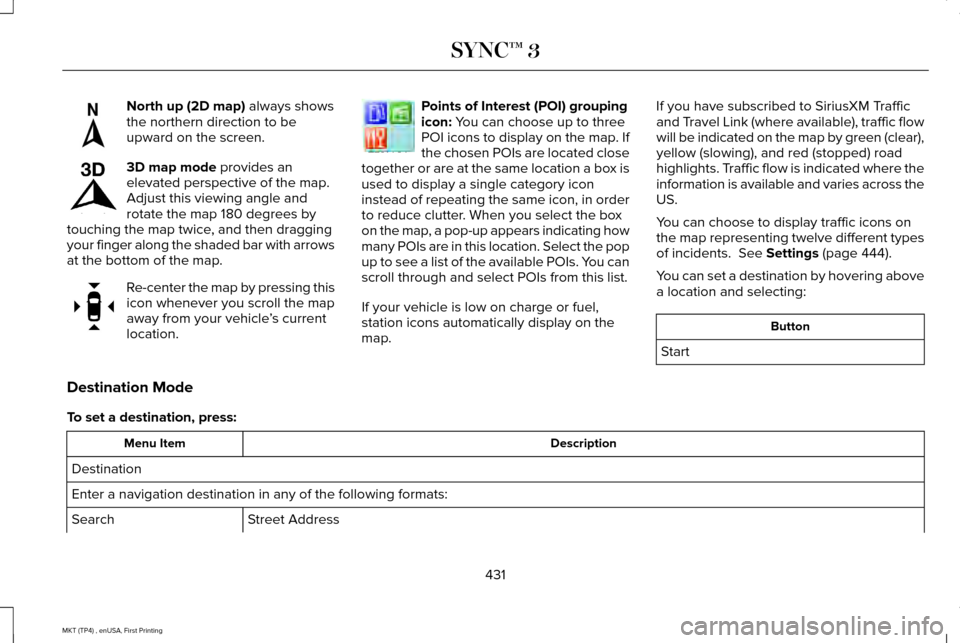
North up (2D map) always shows
the northern direction to be
upward on the screen. 3D map mode
provides an
elevated perspective of the map.
Adjust this viewing angle and
rotate the map 180 degrees by
touching the map twice, and then dragging
your finger along the shaded bar with arrows
at the bottom of the map. Re-center the map by pressing this
icon whenever you scroll the map
away from your vehicle
’s current
location. Points of Interest (POI) grouping
icon:
You can choose up to three
POI icons to display on the map. If
the chosen POIs are located close
together or are at the same location a box is
used to display a single category icon
instead of repeating the same icon, in order
to reduce clutter. When you select the box
on the map, a pop-up appears indicating how
many POIs are in this location. Select the pop
up to see a list of the available POIs. You can
scroll through and select POIs from this list.
If your vehicle is low on charge or fuel,
station icons automatically display on the
map. If you have subscribed to SiriusXM Traffic
and Travel Link (where available), traffic flow
will be indicated on the map by green (clear),
yellow (slowing), and red (stopped) road
highlights. Traffic flow is indicated where the
information is available and varies across the
US.
You can choose to display traffic icons on
the map representing twelve different types
of incidents.
See Settings (page 444).
You can set a destination by hovering above
a location and selecting: Button
Start
Destination Mode
To set a destination, press: Description
Menu Item
Destination
Enter a navigation destination in any of the following formats: Street Address
Search
431
MKT (TP4) , enUSA, First Printing SYNC™ 3E207749 E207748 E207751 E207754
Page 487 of 558
Make sure to change your vehicle
’s oils and
fluids at the specified intervals or in
conjunction with a repair. Flushing is a viable
way to change fluid for many vehicle
sub-systems during scheduled maintenance. It is critical that systems are flushed only with
new fluid that is the same as that required
to fill and operate the system or using a
Ford-approved flushing chemical.
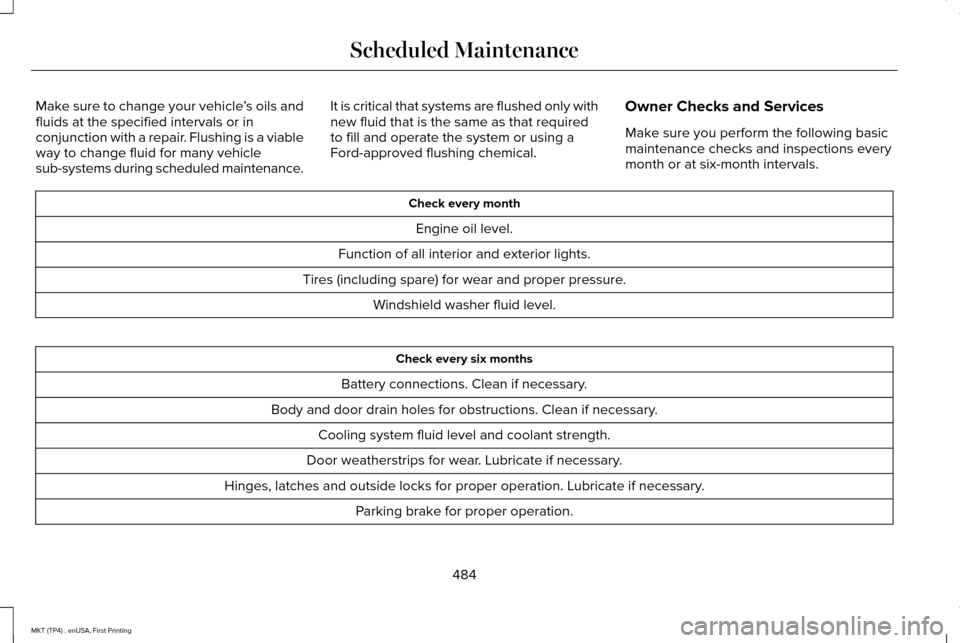
Owner Checks and Services
Make sure you perform the following basic
maintenance checks and inspections every
month or at six-month intervals. Check every month
Engine oil level.
Function of all interior and exterior lights.
Tires (including spare) for wear and proper pressure. Windshield washer fluid level. Check every six months
Battery connections. Clean if necessary.
Body and door drain holes for obstructions. Clean if necessary. Cooling system fluid level and coolant strength.
Door weatherstrips for wear. Lubricate if necessary.
Hinges, latches and outside locks for proper operation. Lubricate if necessary. Parking brake for proper operation.
484
MKT (TP4) , enUSA, First Printing Scheduled Maintenance
Page 550 of 558
Under Hood..........................................................313
Cleaning the Instrument Panel and Instrument Cluster Lens............................316
Cleaning the Interior.....................................314 Cleaning Black Label or Presidential
Interior................................................................315
Cleaning the Wheels....................................317
Cleaning the Windows and Wiper Blades............................................................314
Clearing All MyKeys.......................................67
Climate.............................................................418
Climate Control
..............................................130
Climate Controlled Seats............................153 Cooled Seats........................................................153
Heated Seats........................................................153
Collision Warning System...........................231 PRINCIPLE OF OPERATION.............................
231
Coolant Check See: Engine Coolant Check............................
294
Crash Sensors and Airbag Indicator
..........57
Creating a MyKey...........................................66 Programming/Changing Configurable
Settings...............................................................66
Cross Traffic Alert.........................................227 False Alerts..........................................................230
Switching the System Off and On..................230
System Errors......................................................230 System Lights, Messages and Audible
Alerts.................................................................229
System Limitations.............................................229
Using the System...............................................227
Cruise Control
.................................................85
Principle of Operation.......................................209
Type 1.......................................................................85
Type 2......................................................................86
Cruise control See: Using Cruise Control...............................209
Customer Assistance
..................................259
D
Data Recording
..................................................9
Event Data Recording...........................................10
Service Data Recording.........................................9
Daytime Running Lamps
...............................94
Direction Indicators........................................97
Lane Change..........................................................97
Doors and Locks.............................................72
Drive Control
.................................................234
LINCOLN DRIVE CONTROL............................234
Driver Alert
......................................................218
Using Driver Alert................................................218
Driver and Passenger Airbags.....................51 Children and Airbags...........................................52 Proper Driver and Front Passenger Seating
Adjustment.........................................................52
Driving Aids....................................................218
Driving Hints...................................................251
Driving Through Water
................................251
DRL See: Daytime Running Lamps...........................94
E
Economical Driving
.......................................251
Emission Control System.............................177 On-Board Diagnostics (OBD-II)........................178
Readiness for Inspection and Maintenance
(I/M) Testing......................................................179
End User License Agreement
....................514
VEHICLE SOFTWARE END USER LICENSE
AGREEMENT (EULA) .....................................514
Engine Block Heater....................................168 Using the Engine Block Heater.......................169
Engine Coolant Check................................294 Adding Coolant...................................................294
Coolant Change.................................................296
Engine Coolant Temperature
Management...................................................298
Fail-Safe Cooling................................................296
Recycled Coolant...............................................296
Severe Climates.................................................296
547
MKT (TP4) , enUSA, First Printing Index
Page 557 of 558
Tires
See: Wheels and Tires.......................................321
Towing a Trailer.............................................242 Load Placement..................................................242
Towing the Vehicle on Four Wheels - 3.5L Ecoboost™/3.7L...........................................248
Emergency Towing............................................248
Recreational Towing..........................................249
Towing.............................................................242
Traction Control.............................................194 Principle of Operation........................................194
Trailer Sway Control....................................243
Transmission Code Designation..............356
Transmission...................................................180
Transmission See: Transmission...............................................180
U
Under Hood Overview - 3.5L Ecoboost™....................................................288
Under Hood Overview - 3.7L....................290
Universal Garage Door Opener................155 HomeLink Wireless Control System...............155
USB Port..........................................................375
Using Adaptive Cruise Control..................210 Automatic Cancellation......................................214
Blocked Sensor...................................................216 Canceling the Set Speed..................................213
Changing the Set Speed...................................
214
Detection Issues..................................................214
Following a Vehicle..............................................211
Hilly Condition Usage........................................214
Overriding the System.......................................213
Resuming the Set Speed...................................214
Setting the Adaptive Cruise Speed.................211
Setting the Gap Distance..................................212
Switching Adaptive Cruise Control Off..........214
Switching Adaptive Cruise Control On...........211
Switching to Normal Cruise Control...............217
System Not Available.........................................216
Using All-Wheel Drive..................................184 Driving In Special Conditions With All-Wheel
Drive (AWD)......................................................186
Operating AWD Vehicles With Mismatched Tires....................................................................186
Operating AWD Vehicles With Spare Tires....................................................................185
Using Cruise Control...................................209 Switching Cruise Control Off............................210
Switching Cruise Control On...........................209
Using MyKey With Remote Start Systems..........................................................70
Using Snow Chains
......................................336
Using Stability Control..................................197 Using Traction Control.................................194
Switching the System Off..................................194
System Indicator Lights and Messages.........
194
Using a Switch......................................................194
Using the Information Display Controls.........194
Using Voice Recognition
............................395
Audio Voice Commands...................................396
Climate Voice Commands................................398
Mobile App Voice Commands........................402
Navigation Voice Commands.........................400
Phone Voice Commands..................................
398
SiriusXM Traffic and Travel Link Voice Commands......................................................402
Voice Settings Commands...............................403
Utilizing the Mediation/Arbitration Program (Canada Only)
.............................................262
V
Vehicle Care
....................................................311
General Information.............................................311
Vehicle Certification Label.........................355
Vehicle Identification Number
..................355
Vehicle Storage.............................................318
Battery....................................................................319
Body........................................................................\
318
Brakes....................................................................319
Cooling system....................................................319
554
MKT (TP4) , enUSA, First Printing Index