spare tire LINCOLN NAVIGATOR 2019 Owner's Manual
[x] Cancel search | Manufacturer: LINCOLN, Model Year: 2019, Model line: NAVIGATOR, Model: LINCOLN NAVIGATOR 2019Pages: 645, PDF Size: 5.02 MB
Page 415 of 645
LocationItem
Under the vehicle, just forward of the rear bumperSpare tire
Under the access panel located in the floor compartment behind therear seatJack and tool kit bag
Tire Change Procedure
WARNING: Only use replacementtires and wheels that are the same size,load index, speed rating and type (such asP-metric versus LT-metric or all-seasonversus all-terrain) as those originallyprovided by Ford. The recommended tireand wheel size may be found on either theSafety Compliance Certification Label(affixed to either the door hinge pillar,door-latch post, or the door edge thatmeets the door-latch post, next to thedriver's seating position), or the Tire Labelwhich is located on the B-Pillar or edge ofthe driver's door. If this information is notfound on these labels, then you shouldcontact your authorized dealer as soon as
possible. Use of any tire or wheel notrecommended by Ford can affect thesafety and performance of your vehicle,which could result in an increased risk ofloss of vehicle control, vehicle rollover,personal injury and death.
WARNING: When one of the frontwheels is off the ground, the transmissionalone will not prevent the vehicle frommoving or slipping off the jack, even if thetransmission is in park (P).
WARNING: To help prevent yourvehicle from moving when changing awheel, shift the transmission into park (P),set the parking brake and use anappropriate block or wheel chock tosecure the wheel diagonally opposite tothe wheel being changed. For example,when changing the front left wheel, placean appropriate block or wheel chock onthe right rear wheel.
WARNING: Do not attempt to changea tire on the side of the vehicle close tomoving traffic. Pull far enough off the roadto avoid the danger of being hit whenoperating the jack or changing the wheel.
412
Navigator (TB9) Canada/United States of America, enUSA, Edition date: 201808, First-Printing
Wheels and Tires
Page 416 of 645
WARNING: Always use the jackprovided as original equipment with yourvehicle. If using a jack other than the oneprovided, make sure the jack capacity isadequate for the vehicle weight, includingany vehicle cargo or modifications. If youare unsure if the jack capacity is adequate,contact the authorized dealer.
WARNING: Switch off the runningboards before jacking or placing any objectunder your vehicle. Never place your handbetween the extended running board andyour vehicle. A moving running board maycause injury.
WARNING: Only use the spare wheelcarrier to stow the wheel provided withyour vehicle. Other wheel sizes couldcause the spare wheel carrier to fail if itdoes not fit securely or is too heavy.
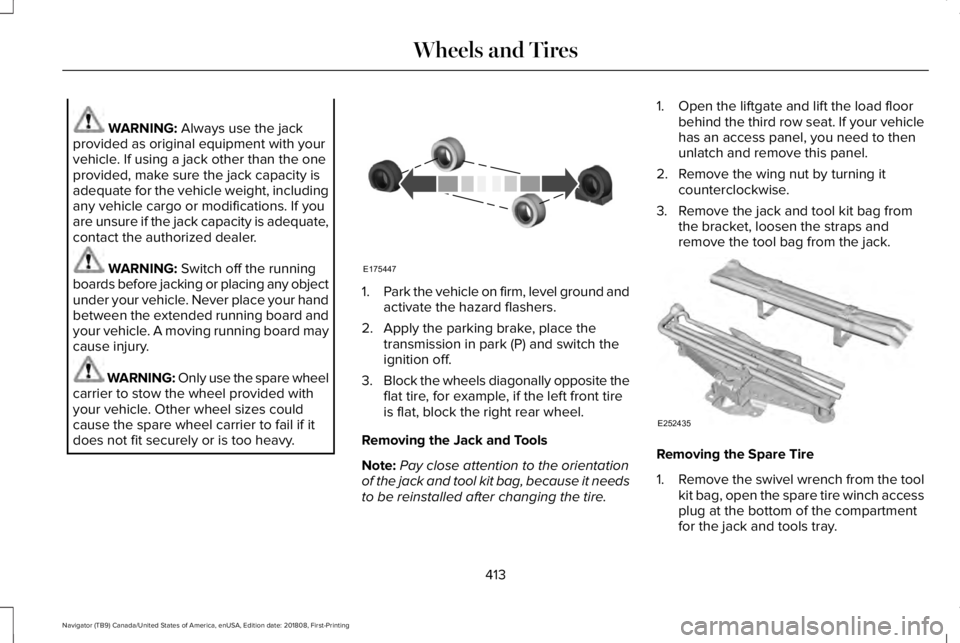
1.Park the vehicle on firm, level ground andactivate the hazard flashers.
2. Apply the parking brake, place thetransmission in park (P) and switch theignition off.
3.Block the wheels diagonally opposite theflat tire, for example, if the left front tireis flat, block the right rear wheel.
Removing the Jack and Tools
Note:Pay close attention to the orientationof the jack and tool kit bag, because it needsto be reinstalled after changing the tire.
1. Open the liftgate and lift the load floorbehind the third row seat. If your vehiclehas an access panel, you need to thenunlatch and remove this panel.
2. Remove the wing nut by turning itcounterclockwise.
3. Remove the jack and tool kit bag fromthe bracket, loosen the straps andremove the tool bag from the jack.
Removing the Spare Tire
1.Remove the swivel wrench from the toolkit bag, open the spare tire winch accessplug at the bottom of the compartmentfor the jack and tools tray.
413
Navigator (TB9) Canada/United States of America, enUSA, Edition date: 201808, First-Printing
Wheels and TiresE175447 E252435
Page 417 of 645
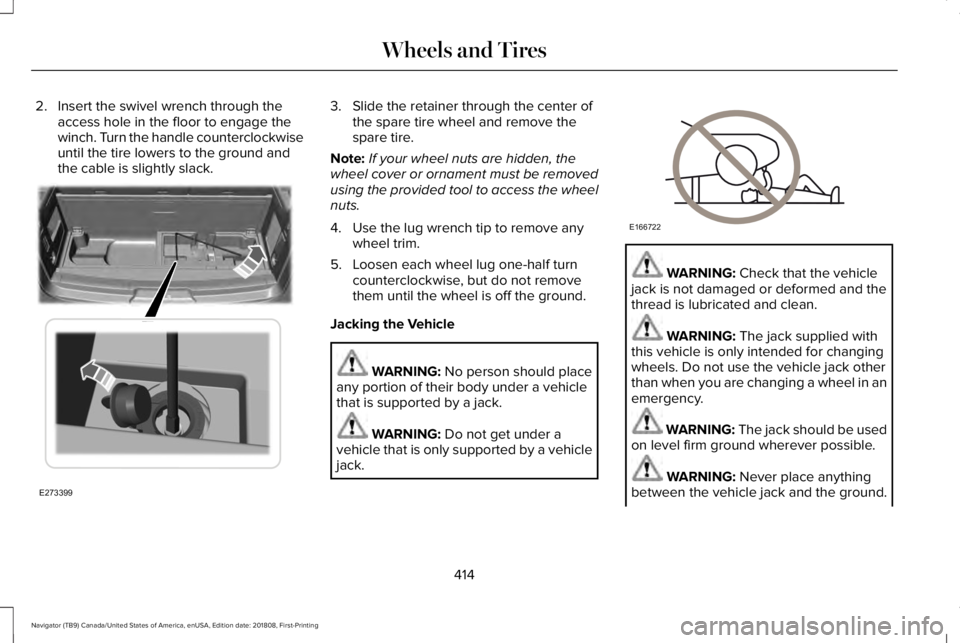
2. Insert the swivel wrench through theaccess hole in the floor to engage thewinch. Turn the handle counterclockwiseuntil the tire lowers to the ground andthe cable is slightly slack.
3. Slide the retainer through the center ofthe spare tire wheel and remove thespare tire.
Note:If your wheel nuts are hidden, thewheel cover or ornament must be removedusing the provided tool to access the wheelnuts.
4. Use the lug wrench tip to remove anywheel trim.
5. Loosen each wheel lug one-half turncounterclockwise, but do not removethem until the wheel is off the ground.
Jacking the Vehicle
WARNING: No person should placeany portion of their body under a vehiclethat is supported by a jack.
WARNING: Do not get under avehicle that is only supported by a vehiclejack.
WARNING: Check that the vehiclejack is not damaged or deformed and thethread is lubricated and clean.
WARNING: The jack supplied withthis vehicle is only intended for changingwheels. Do not use the vehicle jack otherthan when you are changing a wheel in anemergency.
WARNING: The jack should be usedon level firm ground wherever possible.
WARNING: Never place anythingbetween the vehicle jack and the ground.
414
Navigator (TB9) Canada/United States of America, enUSA, Edition date: 201808, First-Printing
Wheels and TiresE273399 E166722
Page 418 of 645
WARNING: Never place anythingbetween the vehicle jack and your vehicle.
WARNING: It is recommended thatthe wheels of the vehicle be chocked, andthat no person should remain in a vehiclethat is being jacked.
WARNING: Failure to follow theseguidelines could result in an increased riskof loss of vehicle control, injury or death.
Note:The jack does not requiremaintenance or additional lubrication overthe service life of your vehicle.
Note:Jack at the specified locations to avoiddamaging your vehicle.
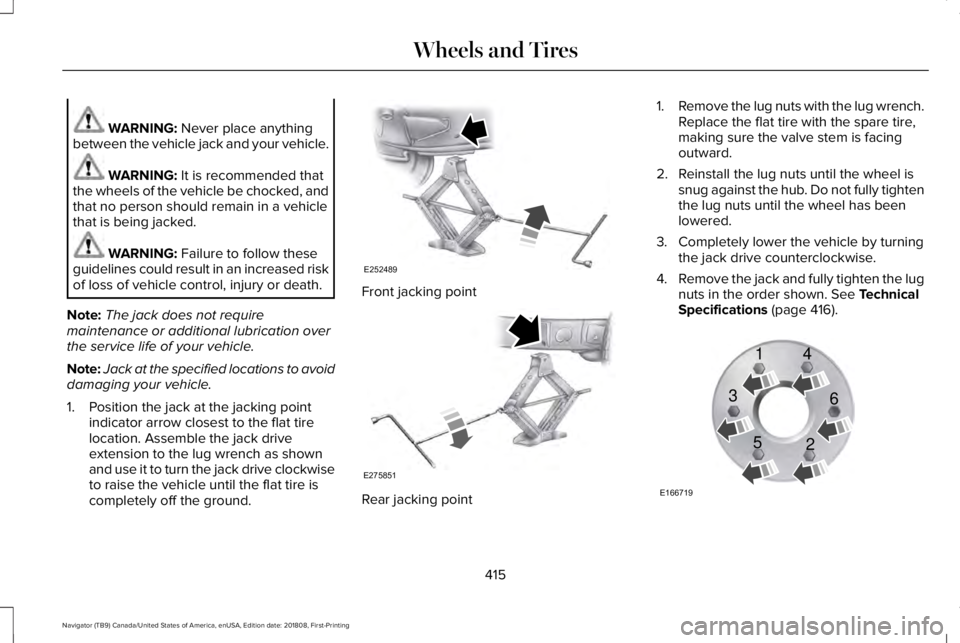
1. Position the jack at the jacking pointindicator arrow closest to the flat tirelocation. Assemble the jack driveextension to the lug wrench as shownand use it to turn the jack drive clockwiseto raise the vehicle until the flat tire iscompletely off the ground.
Front jacking point
Rear jacking point
1.Remove the lug nuts with the lug wrench.Replace the flat tire with the spare tire,making sure the valve stem is facingoutward.
2. Reinstall the lug nuts until the wheel issnug against the hub. Do not fully tightenthe lug nuts until the wheel has beenlowered.
3. Completely lower the vehicle by turningthe jack drive counterclockwise.
4.Remove the jack and fully tighten the lugnuts in the order shown. See TechnicalSpecifications (page 416).
415
Navigator (TB9) Canada/United States of America, enUSA, Edition date: 201808, First-Printing
Wheels and TiresE252489 E275851 E166719
1
3
5 4
6
2
Page 419 of 645
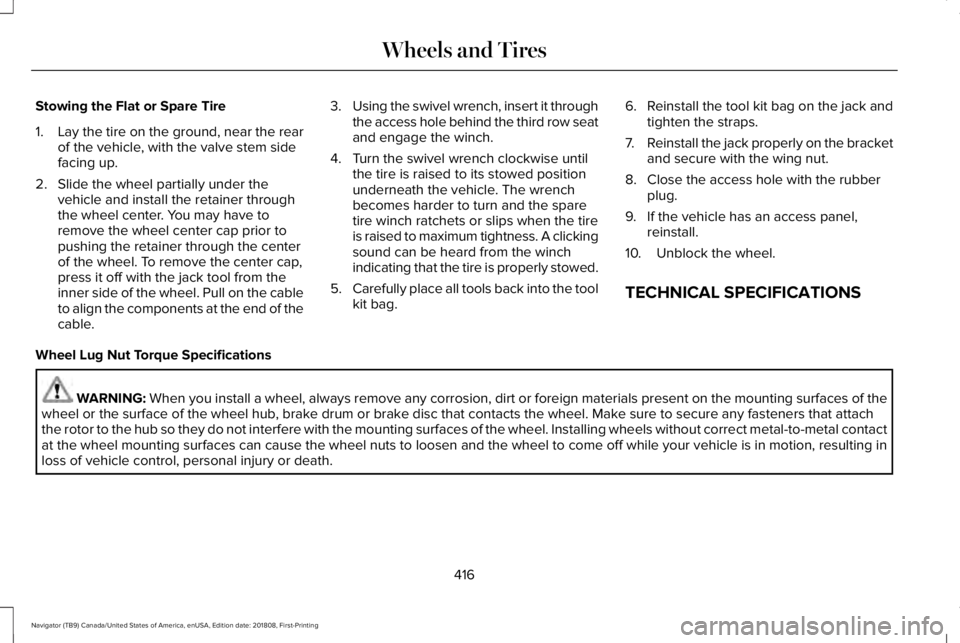
Stowing the Flat or Spare Tire
1.Lay the tire on the ground, near the rearof the vehicle, with the valve stem sidefacing up.
2. Slide the wheel partially under thevehicle and install the retainer throughthe wheel center. You may have toremove the wheel center cap prior topushing the retainer through the centerof the wheel. To remove the center cap,press it off with the jack tool from theinner side of the wheel. Pull on the cableto align the components at the end of thecable.
3.Using the swivel wrench, insert it throughthe access hole behind the third row seatand engage the winch.
4. Turn the swivel wrench clockwise untilthe tire is raised to its stowed positionunderneath the vehicle. The wrenchbecomes harder to turn and the sparetire winch ratchets or slips when the tireis raised to maximum tightness. A clickingsound can be heard from the winchindicating that the tire is properly stowed.
5.Carefully place all tools back into the toolkit bag.
6.Reinstall the tool kit bag on the jack andtighten the straps.
7.Reinstall the jack properly on the bracketand secure with the wing nut.
8. Close the access hole with the rubberplug.
9. If the vehicle has an access panel,reinstall.
10. Unblock the wheel.
TECHNICAL SPECIFICATIONS
Wheel Lug Nut Torque Specifications
WARNING: When you install a wheel, always remove any corrosion, dirt or foreign materials present on the mounting surfaces of thewheel or the surface of the wheel hub, brake drum or brake disc that contacts the wheel. Make sure to secure any fasteners that attachthe rotor to the hub so they do not interfere with the mounting surfaces of the wheel. Installing wheels without correct metal-to-metal contactat the wheel mounting surfaces can cause the wheel nuts to loosen and the wheel to come off while your vehicle is in motion, resulting inloss of vehicle control, personal injury or death.
416
Navigator (TB9) Canada/United States of America, enUSA, Edition date: 201808, First-Printing
Wheels and Tires
Page 552 of 645
Check Every Month
Engine oil level.
Function of all interior and exterior lights.
Tires (including spare) for wear and proper pressure.
Windshield washer fluid level.
Fuel and water separator. Drain if necessary (or if indicated by the information display).
Holes and slots in the tail pipe to make sure they are functional and clear of debris.
Check Every Six Months
Battery connections. Clean if necessary.
Body and door drain holes for obstructions. Clean if necessary.
Cooling system fluid level and coolant strength.
Door weatherstrips for wear. Lubricate if necessary.
Hinges, latches and outside locks for proper operation. Lubricate if necessary.
Parking brake for proper operation.
549
Navigator (TB9) Canada/United States of America, enUSA, Edition date: 201808, First-Printing
Scheduled Maintenance
Page 554 of 645
Multi-Point Inspection
Steering and linkageExterior lamps operation
Tires (including spare) for wear and proper pressure2Fluid levels1; fill if necessary
Windshield for cracks, chips or pitsFor oil and fluid leaks
Washer spray and wiper operationHalf-shaft dust boots
1 Brake, coolant recovery reservoir, automatic transmission and window washer2If your vehicle is equipped with a temporary mobility kit, check the tire sealant expiration Use By date on the canister. Replace as needed.
Be sure to ask your dealership serviceadvisor or technician about the multi-pointvehicle inspection. It is a comprehensive wayto perform a thorough inspection of yourvehicle. Your checklist gives you immediatefeedback on the overall condition of yourvehicle.
NORMAL SCHEDULED
MAINTENANCE
Intelligent Oil-Life Monitor
Your vehicle is equipped with an IntelligentOil-Life Monitor that determines when youshould change the engine oil based on howyour vehicle is used. By using severalimportant factors in its calculations, themonitor helps reduce the cost of owning yourvehicle and reduces environmental waste atthe same time.
This means you do not have to remember tochange the oil on a mileage-based schedule.Your vehicle lets you know when an oilchange is due by displaying a message inthe information display.
The following table provides examples ofvehicle use and its impact on oil changeintervals. It is a guideline only. Actual oilchange intervals depend on several factorsand generally decrease with severity of use.
551
Navigator (TB9) Canada/United States of America, enUSA, Edition date: 201808, First-Printing
Scheduled Maintenance
Page 634 of 645
Capacities and Specifications...................422Alternative Engine Oil for Extremely ColdClimates............................................................428Specifications......................................................424
Cargo Nets.....................................................289Car WashSee: Cleaning the Exterior...............................379
Catalytic Converter......................................207On-Board Diagnostics (OBD-II).......................208Readiness for Inspection and Maintenance(I/M) Testing.....................................................209
Center Console..............................................189Changing a Bulb...........................................376LED Lamps...........................................................376
Changing a Fuse...........................................357Fuses......................................................................357
Changing a Road Wheel.............................410Dissimilar Spare Wheel and Tire AssemblyInformation.........................................................411Location of the Spare Tire and Tools..............411Tire Change Procedure.....................................412
Changing the 12V Battery...........................371Battery Management System..........................373
Changing the Engine Air Filter..................376Changing the Wiper Blades.......................374Checking MyKey System Status.................69MyKey Distance....................................................69Number of Admin Keys.......................................70
Number of MyKeys...............................................69
Checking the Wiper Blades.......................373Childminder Mirror........................................109Child Restraint and SeatbeltMaintenance..................................................48Child Restraint Positioning...........................36Child Safety.......................................................18General Information..............................................18
Child Safety Locks..........................................38Left-Hand Side.......................................................38Right-Hand Side....................................................38
Cleaning Leather Seats..............................384Cleaning Products........................................378Materials................................................................378
Cleaning the Engine.....................................381Cleaning the Exterior...................................379Cleaning the Headlamps..................................379Exterior Chrome Parts.......................................380Exterior Plastic Parts..........................................380Stripes or Graphics............................................380Underbody...........................................................380Under Hood.........................................................380
Cleaning the Instrument Panel andInstrument Cluster Lens...........................384Cleaning the Interior....................................382Cleaning Black Label or PresidentialInterior..............................................................382
Cleaning the Wheels...................................385
Cleaning the Windows and WiperBlades............................................................381Clearing All MyKeys.......................................69Climate Control..............................................152Climate Controlled Seats............................179Ventilated Seats...................................................179
Coolant CheckSee: Engine Coolant Check.............................364
Crash Sensors and Airbag Indicator..........59Creating a MyKey...........................................68Programming and Changing ConfigurableSettings...............................................................69
Cross Traffic Alert.........................................275Blocked Sensors.................................................278Switching the System Off and On..................278System Errors......................................................278System Lights, Messages and AudibleAlerts.................................................................278System Limitations.............................................278Using the Cross Traffic Alert System.............275
Cruise Control.................................................90Principle of Operation.......................................255Type One................................................................90Type Two..................................................................91
Cruise controlSee: Using Cruise Control...............................255
Customer Assistance...................................333
631
Navigator (TB9) Canada/United States of America, enUSA, Edition date: 201808, First-Printing
Index
Page 638 of 645
Remote Start.........................................................143Seats.......................................................................143Stability Control....................................................143Starting System ...................................................144Tire Pressure Monitoring System....................144Trailer......................................................................145Transmission.........................................................146
Installing Child Restraints.............................20Child Seats.............................................................20Combining Seatbelt and LATCH LowerAnchors for Attaching Child SafetySeats....................................................................28Using Lap and Shoulder Belts...........................20Using Lower Anchors and Tethers forCHildren (LATCH).............................................26Using Tether Straps..............................................28
Instrument Cluster..........................................113Instrument Lighting Dimmer........................99Instrument Panel Overview...........................16Interior Lamps................................................103Front Interior Lamp.............................................103Rear Interior Lamps.............................................104
Interior Mirror.................................................108Auto-Dimming Mirror..........................................109
Introduction.........................................................7
J
Jump Starting the Vehicle..........................328Connecting the Jumper Cables......................328Jump Starting......................................................329Preparing Your Vehicle.....................................328Removing the Jumper Cables.........................330
K
Keyless Entry....................................................76Displaying the Factory-Set Code......................78Locking and Unlocking........................................77SECURICODE™ KEYLESS ENTRYKEYPAD...............................................................76
Keyless Starting..............................................191Switching the Ignition On...................................191
Keys and Remote Controls............................61
L
Lane Keeping System.................................265Switching the System On and Off..................266System Display...................................................268System Settings..................................................267Troubleshooting.................................................269
Liftgate...............................................................79
Liftgate Window...............................................111Opening the Liftgate Window............................111
Lighting Control...............................................97Flashing the Headlamp High Beam.................98Headlamp High Beam.........................................98
Lighting..............................................................97General Information.............................................97
Limited Slip Differential..............................224Spare Tire.............................................................224Trailer Towing......................................................224
Lincoln Automotive Financial Services......12Lincoln Protect..............................................544Lincoln Protect (CANADA ONLY)...................545Lincoln Protect Extended Service Plans (U.S.Only)..................................................................544
Load CarriersSee: Roof Racks and Load Carriers...............290
Load Carrying................................................287Load Limit.......................................................292Special Loading Instructions for Owners ofPick-up Trucks and Utility-typeVehicles............................................................296Vehicle Loading - with and without aTrailer................................................................292
Locking and Unlocking..................................72Activating Intelligent Access..............................73Approach Detection Illumination......................76Autolock..................................................................75
635
Navigator (TB9) Canada/United States of America, enUSA, Edition date: 201808, First-Printing
Index
Page 642 of 645
Side Sensing System..................................239Obstacle Distance Indicator............................239
Sitting in the Correct Position....................158Snow ChainsSee: Using Snow Chains..................................404
Spare WheelSee: Changing a Road Wheel..........................410
Special Notices.................................................13New Vehicle Limited Warranty...........................13On Board Diagnostics Data LinkConnector............................................................13Special Instructions...............................................13
Special Operating Conditions ScheduledMaintenance...............................................555Exceptions............................................................558
Speed ControlSee: Cruise Control...........................................255
Stability Control............................................232Principle of Operation.......................................232
Starting a Gasoline Engine.........................192Automatic Engine Shutdown............................193Failure to Start......................................................193Guarding Against Exhaust Fumes...................194Important Ventilating Information...................194Stopping the Engine When Your Vehicle isMoving...............................................................194Stopping the Engine When Your Vehicle isStationary..........................................................194
Starting and Stopping the Engine..............191General Information.............................................191
Steering...........................................................279Electric Power Steering.....................................279
Steering Wheel................................................89Storage Compartments...............................189SunroofSee: Moonroof......................................................110
Sun Visors........................................................110Illuminated Vanity Mirror....................................110
Supplementary Restraints System..............51Principle of Operation..........................................51
Symbols Glossary..............................................7SYNC™ 3...........................................................441General Information............................................441
SYNC™ 3 Troubleshooting..........................524
T
Technical SpecificationsSee: Capacities and Specifications................418
The Better Business Bureau (BBB) AutoLine Program (U.S. Only)..........................335Tire Care.........................................................390Glossary of Tire Terminology...........................391Information About Uniform Tire QualityGrading.............................................................390
Information Contained on the TireSidewall............................................................392Temperature A B C..............................................391Traction AA A B C................................................391Treadwear.............................................................391
Tire Pressure Monitoring System............405Changing Tires With a Tire PressureMonitoring System.........................................407Understanding Your Tire Pressure MonitoringSystem .............................................................407
TiresSee: Wheels and Tires......................................388
Toll Reader......................................................109Installing the Toll Reader...................................109
Towing a Trailer.............................................297Load Placement..................................................297
Towing Points.................................................331Towing the Vehicle on Four Wheels........319Four-wheel-down Towing................................320Recreational Towing...........................................319
Towing.............................................................297Traction Control.............................................231Principle of Operation........................................231
Trailer Reversing Aids.................................298Principle of Operation.......................................298Pro Trailer Backup Assist™...............................298Setting Up Pro Trailer Backup Assist............299Troubleshooting..................................................303
639
Navigator (TB9) Canada/United States of America, enUSA, Edition date: 201808, First-Printing
Index