oil MAZDA MODEL 3 HATCHBACK 2020 Owners Manual (in English)
[x] Cancel search | Manufacturer: MAZDA, Model Year: 2020, Model line: MODEL 3 HATCHBACK, Model: MAZDA MODEL 3 HATCHBACK 2020Pages: 598, PDF Size: 89.37 MB
Page 40 of 598
Do not operate a vehicle with a damaged
seat belt:
Using a damaged seat belt is dangerous.
An accident could damage the belt
webbing of the seat belt in use. A damaged
seat belt cannot provide adequate
protection in a collision. Have an
Authorized Mazda Dealer inspect all seat
belt systems in use during an accident
before they are used again.
Have your seat belts changed immediately
if the pretensioner or load limiter has been
expended:
Always have an Authorized Mazda Dealer
immediately inspect the seat belt
pretensioners and air bags after any
collision. Like the air bags, the seat belt
pretensioners and load limiters will only
function once and must be replaced after
any collision that caused them to deploy. A
seat belt with an expended pretensioner or
load limiter is still better than wearing no
seat belt at all; however, if the seat belt
pretensioners and load limiters are not
replaced, the risk of injury in a collision will
increase.
Positioning the Shoulder Portion of the
Seat Belt:
Improper positioning of the shoulder
portion of the seat belt is dangerous.
Always make sure the shoulder portion of
the seat belt is positioned across your
shoulder and near your neck, but never
under your arm, on your neck, or on your
upper arm.Positioning the Lap Portion of the Seat Belt:
The lap portion of the seat belt worn too
high is dangerous. In a collision, this would
concentrate the impact force directly on
the abdominal area, causing serious injury.
Wear the lap portion of the belt snugly and
as low as possible.
CAUTION
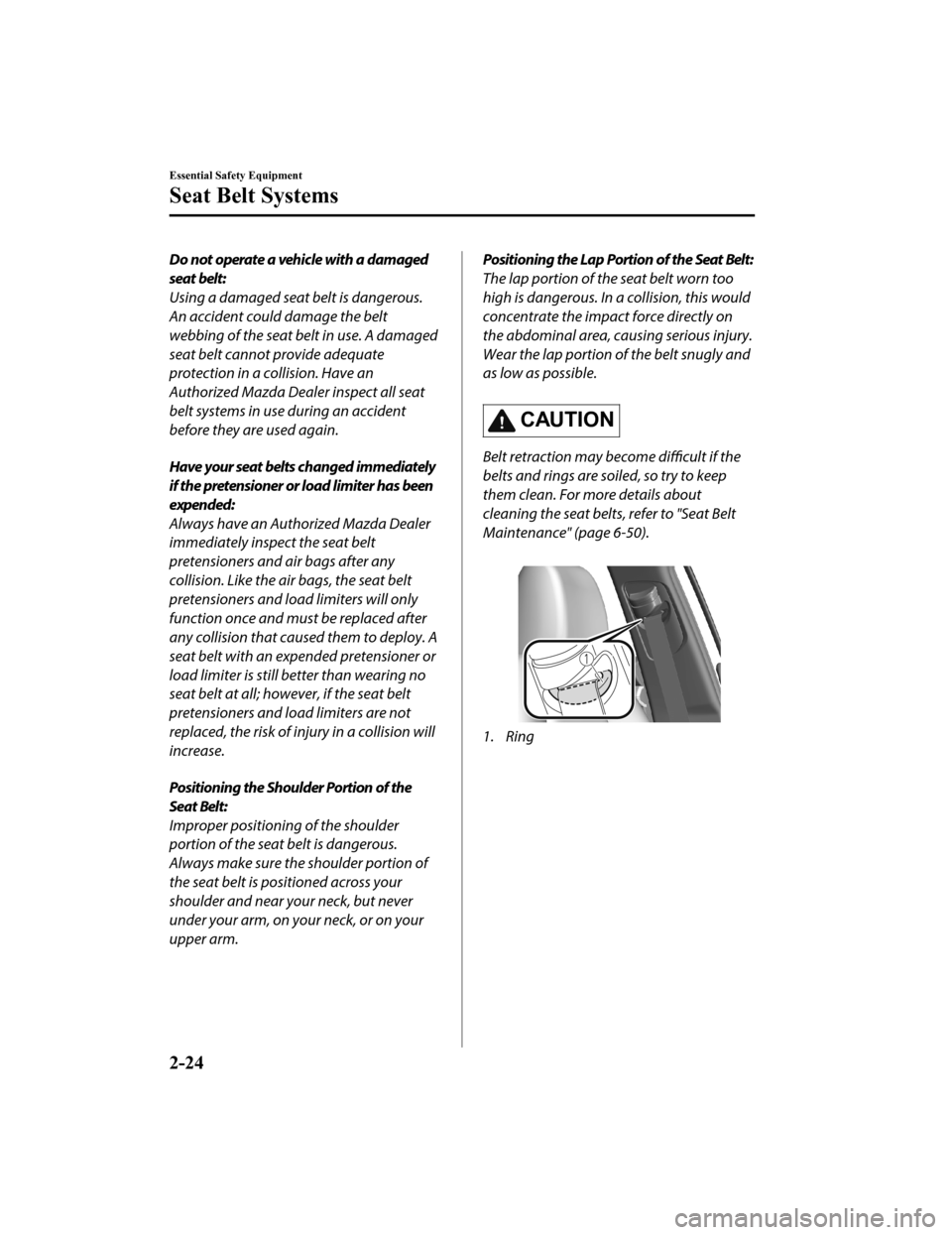
Belt retraction may become difficult if the
belts and rings are soiled, so try to keep
them clean. For more details about
cleaning the seat belts, refer to "Seat Belt
Maintenance" (page 6-50).
1. Ring
Essential Safety Equipment
Seat Belt Systems
2-24
Mazda3_8HZ1-EA-19G_Edition1_old 2019-5-17 13:49:03
Page 139 of 598
Winter Driving
▼Winter Driving
Carry emergency gear, including tire
chains, window scraper, flares, a small
shovel, jumper cables
, and a small bag of
sand or salt.
Ask an Authorized Maz da Dealer to check
the following:
Have the proper ratio of antifreeze in the
radiator.
Refer to Engine Coolant on page 6-17.
Inspect the ba ttery and its cables. Cold
reduces battery capacity.
Use an engine oil appropriate for the
lowest ambient temperatures that the
vehicle will be driven in (page 6-15).
Inspect the ignition system for damage
and loose connections.
Use washer fluid made with
antifreeze―but do not use engine
coolant antifreeze for washer fluid (page
6-19).
NOTE
Remove snow before driving. Snow left
on the windshield is dangerous as it
could obstruct vision.
Do not apply excessive force to a
window scraper when removing ice or
frozen snow on the mirror glass and
windshield.
Never use warm or hot water for
removing snow or ice from windows and
mirrors as it could result in the glass
cracking.
Drive slowly. Braking performance can
be adversely affected if snow or ice
adheres to the brake components. If this
situation occurs, drive the vehicle
slowly, releasing the accelerator pedal
and lightly applying the brakes several
times until the brake performance
returns to normal.
▼ Snow Tires
Use snow tires on all 4 wheels
Do not go faster than 120 km/h (75 mph)
while driving with snow tires. Inflate snow
tires 30 kPa (0.3 kgf/cm
2, 4.3 psi) more
than recommended on the tire pressure
label (driver's door frame), but never more
than the maximum cold-tire pressure
shown on the tires.
Mexico
The vehicle is origin ally equipped with
summer tires designed for optimum
traction on wet and dry roads. If your
vehicle is to be used on snow and ice
covered roads, Mazda recommends that
you replace the tires originally equipped
on your vehicle with snow tires during the
winter months.
Except Mexico
The vehicle is origina lly equipped with all
season radials designed to be used all year
around. In some extreme climates you
may find it necessary to replace them with
snow tires during the winter months to
further improve traction on snow and ice
covered roads.
Before Driving
Driving Tips
3-47
Mazda3_8HZ1-EA-19G_Edition1_old 2019-5-17 13:49:03
Page 155 of 598

Cylinder Deactivation*
▼Cylinder Deactivation
The cylinder deactivation is a function
designed to reduce fuel consumption and
improve fuel economy by deactivating 2
out of the 4 cylinders while driving. The
function constantly determines which is
better for driving; 4 cylinders or 2
cylinders, regardless of the driver's
operations, and it performs the switching
automatically.
When the cylinder de
activation function
does not operate
The cylinder deactivation function does
not operate under the following
conditions.
The selector lever is in the P, N, or R
position (automatic transmission), or 1st
gear (manual transmission).
The engine oil temperature or engine
coolant temperature is low.
After disconnecting the battery
terminals for some reason, such as for
battery replacement.
When Driving
Start/Stop Engine
*Some models.4-11
Mazda3_8HZ1-EA-19G_Edition1_old 2019-5-17 13:49:03
Page 167 of 598
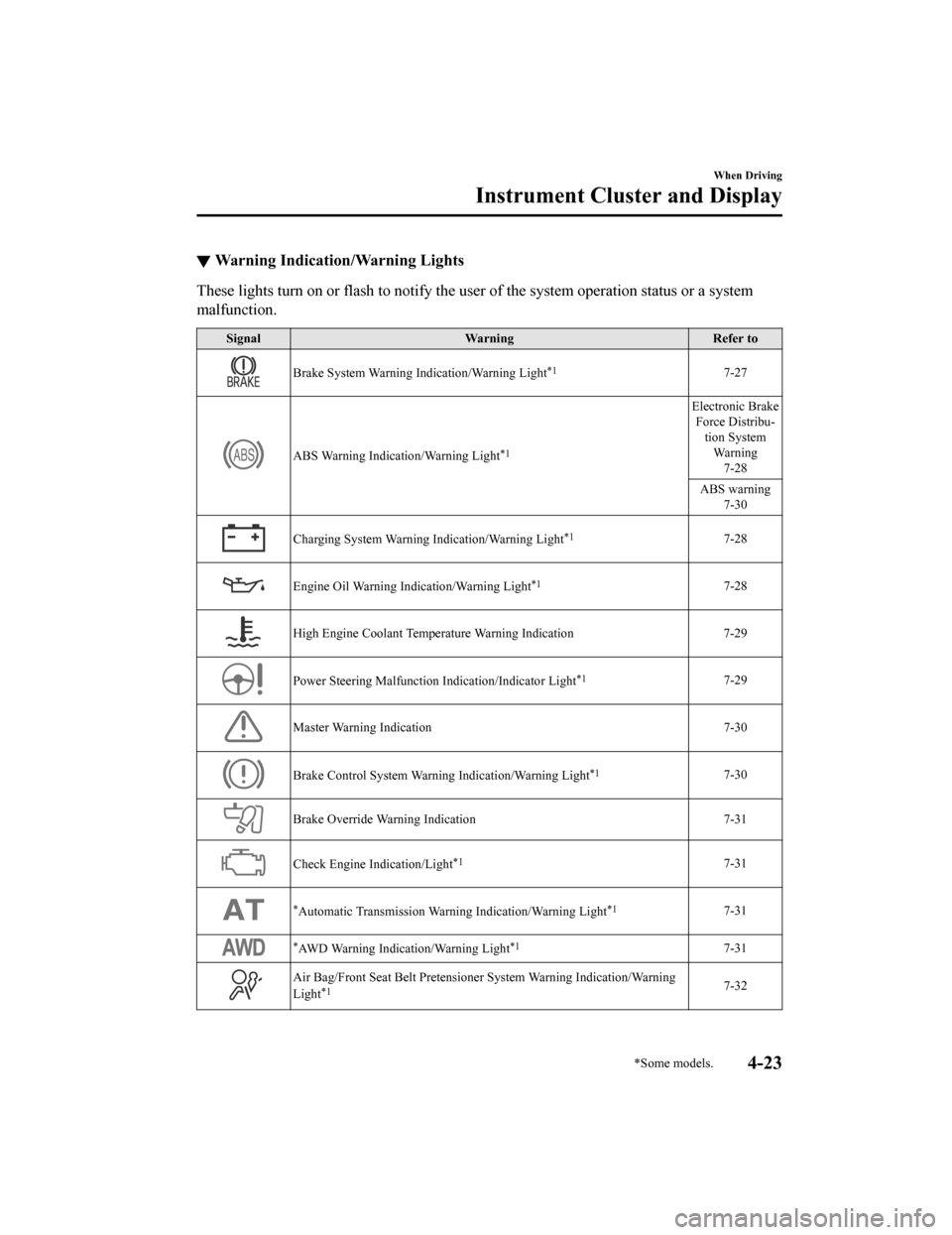
▼Warning Indication/Warning Lights
These lights turn on or flash to
notify the user of the system operation status or a system
malfunction.
Signal Warning Refer to
Brake System Warning Indication/Warning Light*17-27
ABS Warning Indication/Warning Light*1
Electronic Brake
Force Distribu‐ tion SystemWa r n i n g 7-28
ABS warning 7-30
Charging System Warning Indication/Warning Light*17-28
Engine Oil Warning Indication/Warning Light*17-28
High Engine Coolant Temperature Warning Indication 7-29
Power Steering Malfunction Indication/Indicator Light*17-29
Master Warning Indication 7-30
Brake Control System Warning Indication/Warning Light*17-30
Brake Override Warning Indication 7-31
Check Engine Indication/Light*17-31
*Automatic Transmission Warning Indication/Warning Light*17-31
*AWD Warning Indication/Warning Light*17-31
Air Bag/Front Seat Belt Pretensioner System Warning Indication/ Wa r n i n g
Light*17-32
When Driving
Instrument Cluster and Display
*Some models.4-23
Mazda3_8HZ1-EA-19G_Edition1_old 2019-5-17 13:49:03
Page 168 of 598
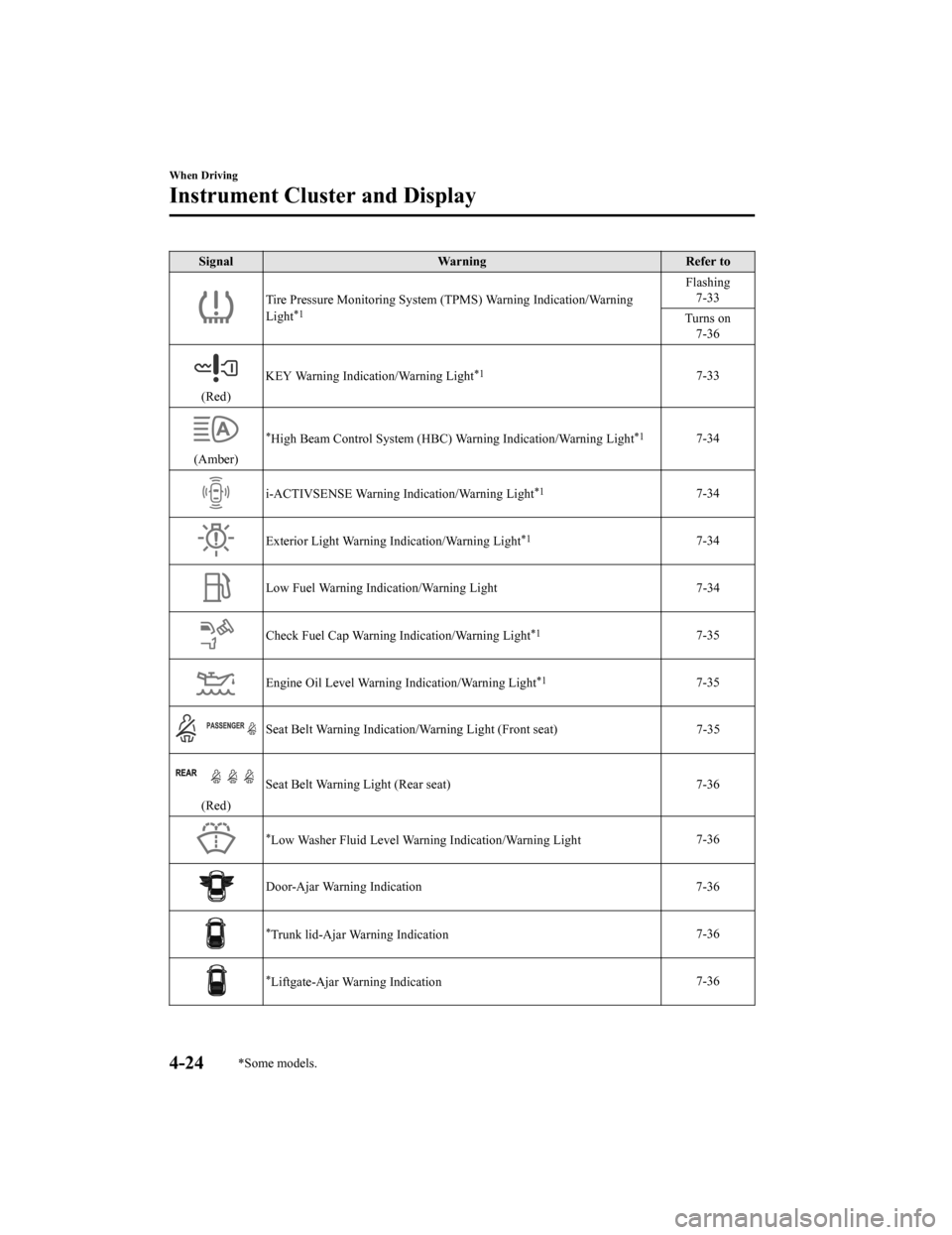
SignalWarning Refer to
Tire Pressure Monitoring System (TPMS) Warning Indication/Warning
Light*1
Flashing 7-33
Turns on 7-36
(Red) KEY Warning Indication/Warning Light
*17-33
(Amber)
*High Beam Control System (HBC) W
arning Indication/Warning Light*17-34
i-ACTIVSENSE Warning Indication/Warning Light*17-34
Exterior Light Warning Indication/Warning Light*17-34
Low Fuel Warning Indication/Warning Light 7-34
Check Fuel Cap Warning Indication/Warning Light*17-35
Engine Oil Level Warning Indication/Warning Light*17-35
Seat Belt Warning Indication/Warning Light (Front seat) 7-35
(Red)Seat Belt Warning Light (Rear seat) 7-36
*Low Washer Fluid Level Warning Indication/Warning Light
7-36
Door-Ajar Warning Indication
7-36
*Trunk lid-Ajar Warning Indication7-36
*Liftgate-Ajar Warning Indication7-36
When Driving
Instrument Cluster and Display
4-24*Some models.
Mazda3_8HZ1-EA-19G_Edition1_old
2019-5-17 13:49:03
Page 172 of 598
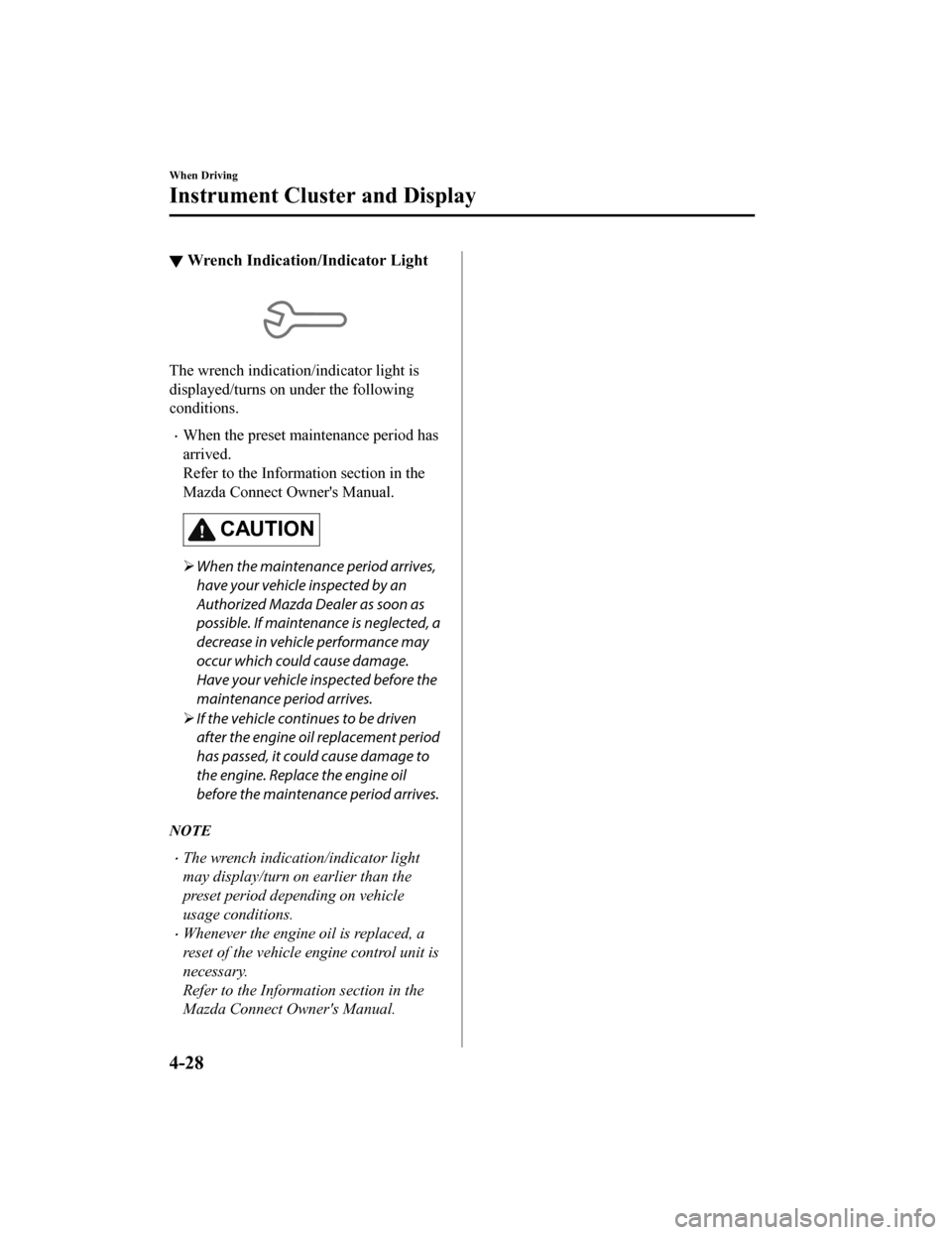
▼Wrench Indication/Indicator Light
The wrench indication/indicator light is
displayed/turns on under the following
conditions.
When the preset maintenance period has
arrived.
Refer to the Information section in the
Mazda Connect Owner's Manual.
CAUTION
When the maintenance period arrives,
have your vehicle inspected by an
Authorized Mazda Dealer as soon as
possible. If maintenance is neglected, a
decrease in vehicle performance may
occur which could cause damage.
Have your vehicle inspected before the
maintenance period arrives.
If the vehicle continues to be driven
after the engine oil replacement period
has passed, it could cause damage to
the engine. Replace the engine oil
before the maintenance period arrives.
NOTE
The wrench indication/indicator light
may display/turn on earlier than the
preset period depending on vehicle
usage conditions.
Whenever the engine oil is replaced, a
reset of the vehicle engine control unit is
necessary.
Refer to the Informat ion section in the
Mazda Connect Owner's Manual.
When Driving
Instrument Cluster and Display
4-28
Mazda3_8HZ1-EA-19G_Edition1_old 2019-5-17 13:49:03
Page 225 of 598
i-ACTIV AWD Operation*
▼i-ACTIV AWD Operation
AWD provides excellent drivability on
snow-covered and ice-packed roads, sand
and mud, as well as on steep slopes and
other slippery surfaces.
A system malfunction or operation
conditions are indicated by a warning.
Refer to Contact a
n Authorized Mazda
Dealer and AWD Warning Indication/
Warning Light on page 7-31.
WA R N I N G
Never spin a wheel that is off the ground:
Spinning a wheel that is off the ground as a
result of the vehicle being stuck or in a
ditch is dangerous. The drive assembly
could be seriously damaged which could
lead to an accident or could even lead to
overheating, oil leakage, and a fire.
▼ AWD Driving
This vehicle has not been designed for the
purpose of off-road driving or rallies. Do
not attempt to drive over uneven or rocky
surfaces, or across rivers.
Although this vehicle is equipped with
AWD, acceleration, steering and braking
operations should be conducted in the
same manner as with a non-AWD vehicle,
with the emphasis placed on safe driving.
▼Tires and Tire Chains
The condition of the tires plays a large role
in the performance of the vehicle.
Moreover, to prevent adverse effects to the
drive assembly, please note the following:
Tires
When replacing tires, always replace all
front and rear tires at the same time.
All tires must be of the same size,
manufacture, brand and tread pattern.
Pay particular attention when equipping
snow or other types of winter tires.
Do not mix tread-worn tires with normal
tires.
Inspect tire inflation pressures at the
specified periods adjust to the specified
pressures.
NOTE
Check the tire inflation pressure label
attached to driver's door frame for the
correct tire inflation pressure.
Make sure to equip the vehicle with
genuine wheels of the specified size, on
all wheels. With AWD, the system is
calibrated for all 4 wheels being of the
same dimensions.
Tire chains
Install tire chains to the front tires.
Do not use tire chains on the rear
wheels.
Do not drive the vehicle faster than 30
km/h (19 mph) with the tire chains
installed.
Do not drive the vehicle with tire chains
on road conditions other than snow or
ice.
▼ To w i n g
If the vehicle requires towing, have it
towed with all 4 wheels completely off the
ground.
Refer to Towing Description on page
7-23.
When Driving
i-ACTIV AWD
*Some models.4-81
Mazda3_8HZ1-EA-19G_Edition1_old
2019-5-17 13:49:03
Page 283 of 598

Stationary objects (stopped vehicles,
obstructions)
If a vehicle ahead is traveling at an
extremely low speed, the system may not
detect it correctly.
If there is a structure on the road or an
object (such as a monorail) at a low
height off the ground in front of the
vehicle, the system may operate.
Therefore, do not use the TJA.
Do not use the TJA under conditions in
which close proximity warnings are
frequently activated.
If it is necessary to accelerate for a lane
change or the vehicle ahead brakes
suddenly causing you to close in on the
vehicle rapidly, accelerate using the
accelerator pedal or decelerate using
the brake pedal depending on the
conditions.
While the TJA is in use, any intended
engine braking does not occur even if
you shift the shift lever (manual
transmission) or the selector lever
(automatic transmission). If
deceleration is required, lower the
vehicle speed setting or depress the
brake pedal.
While braking by the TJA control is
operating, you might hear an operation
sound, however, this does not indicate a
problem.
The brake lights turn on while braking
by the TJA control is operating,
however, they may not turn on while the
vehicle is on a down slope at the set
vehicle speed or traveling at a constant
speed and following a vehicle ahead.
Under the following conditions, the TJA
may not be able to detect white (yellow)
lines or vehicles ahead correctly and the
TJA may not operate normally.
The forward sensing camera (FSC)
cannot recognize the area in front of
the vehicle due to soiling or fog.
The white (yellow) lane lines are less
visible because of dirt or paint
flaking.
White (yellow) lane lines or vehicles
ahead are less visible because of bad
weather (rain, fog, or snow).
The vehicle is driven on a temporary
lane or section with a closed lane
resulting from construction where
there might be multiple white (yellow)
lane lines, or they are interrupted.
The camera picks up an obscure line,
such as a temporary line being used
for construction, or because of shade,
unmelted snow, or grooves filled with
water.
The road surface is wet and shiny
after rain, or there are puddles on the
road.
Heavy luggage is loaded in the trunk/
luggage compartment or on the rear
seat causing the vehicle to tilt.
A vehicle in front of your vehicle is
running near a white (yellow) lane
line making it less visible.
The windshield is dirty or foggy.
The vehicle is driven through an
intersection, a junction, or a fork in
the road.
While white (yellow) lane lines cannot
be detected due to road or weather
conditions.
The surrounding brightness suddenly
changes such as when entering or
exiting a tunnel.
The illumination of the headlights is
weakened because of dirt or the
optical axis is deviated at night.
When Driving
i-ACTIVSENSE
4-139
Mazda3_8HZ1-EA-19G_Edition1_old 2019-5-17 13:49:03
Page 284 of 598
Back-light is reflected off the road
surface or the road surface is wet and
shiny after rain.
The shade of a guardrail parallel to a
white (yellow) lane line is cast on the
road.
The width of a lane is excessively
narrow or wide.
The road is excessively uneven.
The vehicle is shaken after hitting a
road bump.
There are various road markings or
division lines (lane markings) of
various shapes near an intersection.
The area in front of the camera is
soiled or an object that obstructs the
field of view is installed.
Exhaust gas from the vehicle in front,
sand, snow, and water vapor rising
from manholes and grating, and water
splashed into the air.
The surroundings are dark such as
during the early evening or early
morning.
A vehicle ahead with a certain
taillight shape.
A vehicle ahead veers off course from
your vehicle's line of travel.
A vehicle ahead is driving erratically.
The vehicle is driven on roads with
tight curves.
Headway control function
If a vehicle ahead is detected while
traveling at a constant speed, the
vehicle-ahead indication is displayed and
headway control is performed.
Steering assist function
When lane lines are detected, the function
assists the driver in keeping the vehicle
within the lane lines. If lane lines are not
detected, the function provides the driver
driving assistance in keeping the vehicle
along the motion path with the vehicle
ahead.
NOTE
Steering assist limit warning
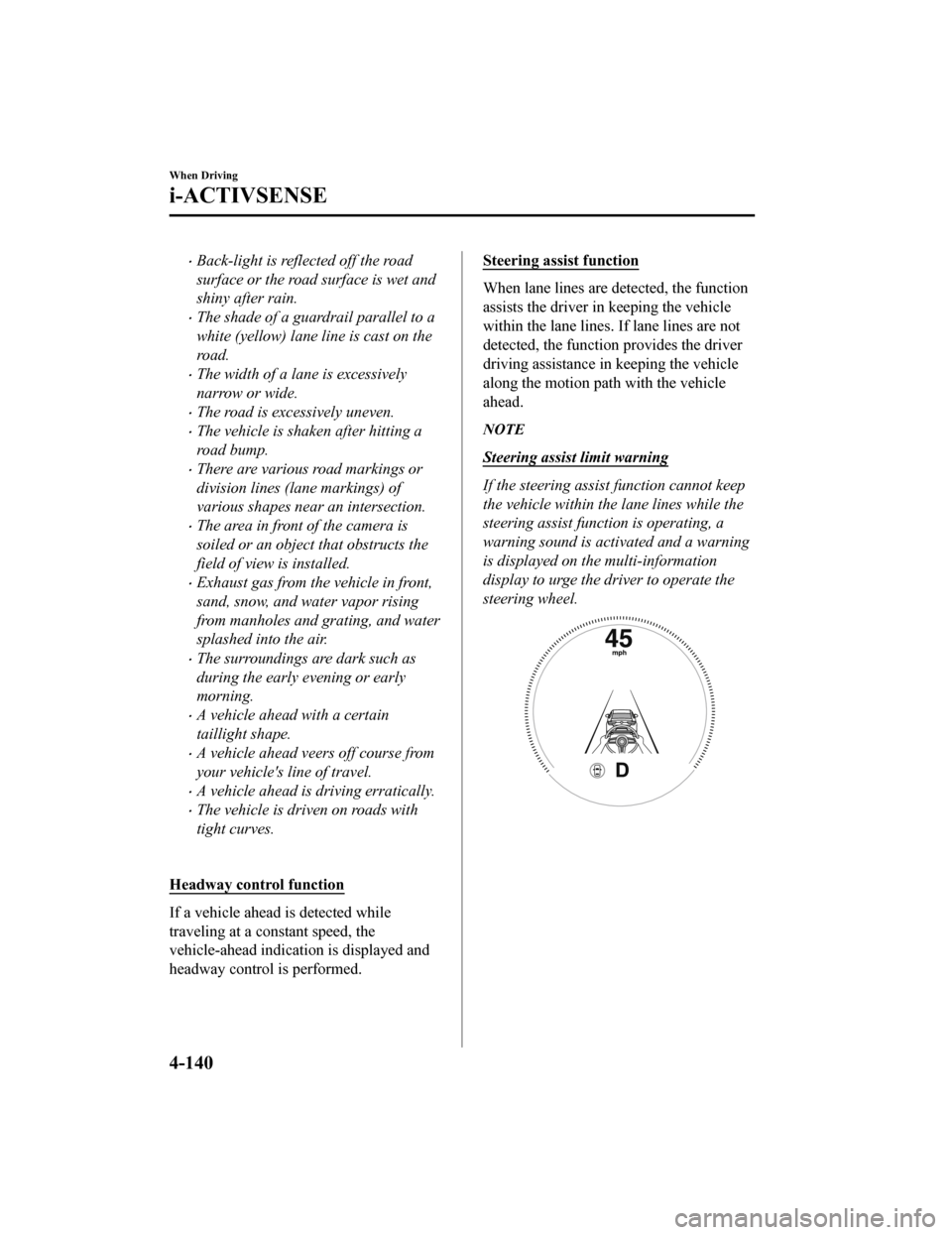
If the steering assist function cannot keep
the vehicle within the lane lines while the
steering assist function is operating, a
warning sound is activated and a warning
is displayed on the multi-information
display to urge the driver to operate the
steering wheel.
When Driving
i-ACTIVSENSE
4-140
Mazda3_8HZ1-EA-19G_Edition1_old 2019-5-17 13:49:03
Page 312 of 598
The camera cover is made of hard
plastic, therefore do not apply oil film
remover, organic solvents, wax, or
coating agents. If any such agent gets on
the camera cover, wipe it
off using a soft
cloth immediately.
Do not rub the camera lens forcefully, or
clean it with an abrasive or hard brush.
Otherwise, it could scratch the camera
lens and negatively affect the images.
Consult an Authorized Mazda Dealer for
repair, painting, or replacement of the
front/rear camera, front/rear bumper
and door mirrors.
Heed the following cautions to assure
that the 360°View Monitor operates
normally.
Do not modify the vehicle suspensions
or lower/raise the vehicle body, or
both.
Always use wheels of the
specified type
and size for the front and rear wheels.
Consult an Authorized Mazda Dealer
for tire replacement.
When the display is cold, images may
leave trails or the screen might be darker
than usual, making it
difficult to check
the vehicle surroundings. Always confirm
the safety at the front and around the
vehicle visually when driving.
The method for parking/stopping the
vehicle using the 360°View Monitor
differs depending on the road
circumstances/conditions and the
vehicle conditions. When and how much
you turn the steering wheel will differ
depending on the situation, , therefore
always check the vehicle surroundings
directly with your eyes while using the
system.Also, before using the system, always
make sure that the vehicle can be
parked/stopped in the parking/stopping
space.
NOTE
If there are water droplets, snow, or mud
on the camera lens, wipe it off using a
soft cloth. If the camera lens is
especially dirty, wash it off with mild
detergent.
If the camera lens is touched or there is
any dirt on it, it could affect the screen
image. Wipe the lens using a soft cloth.
If the area where the camera is
installed, such as the front/rear bumper
or door mirrors, has been damaged in a
vehicle accident, the camera (position,
installation angle) may have shifted.
Always consult an Authorized Mazda
Dealer to have the vehicle inspected.
If the camera is subjected to excessive
changes in temperature such as by
pouring hot water on the camera during
cold weather, the 360°View Monitor may
not operate normally.
If the battery voltage is low, the screen
might be temporarily difficult to view,
however, this does not indicate a
problem.
The 360°View Monitor has limitations.
Objects under the bumper or near both
ends of the bumper cannot be displayed.
Obstructions above the upper image
range of the camera are not displayed.
Under the following conditions, the
screen might be difficult to view,
however this does not indicate a
problem.
When Driving
i-ACTIVSENSE
4-168
Mazda3_8HZ1-EA-19G_Edition1_old 2019-5-17 13:49:03