radio MAZDA MODEL B4000 CAB PLUS 4 TRUCK 2009 Owners Manual
[x] Cancel search | Manufacturer: MAZDA, Model Year: 2009, Model line: MODEL B4000 CAB PLUS 4 TRUCK, Model: MAZDA MODEL B4000 CAB PLUS 4 TRUCK 2009Pages: 288, PDF Size: 3.05 MB
Page 19 of 288
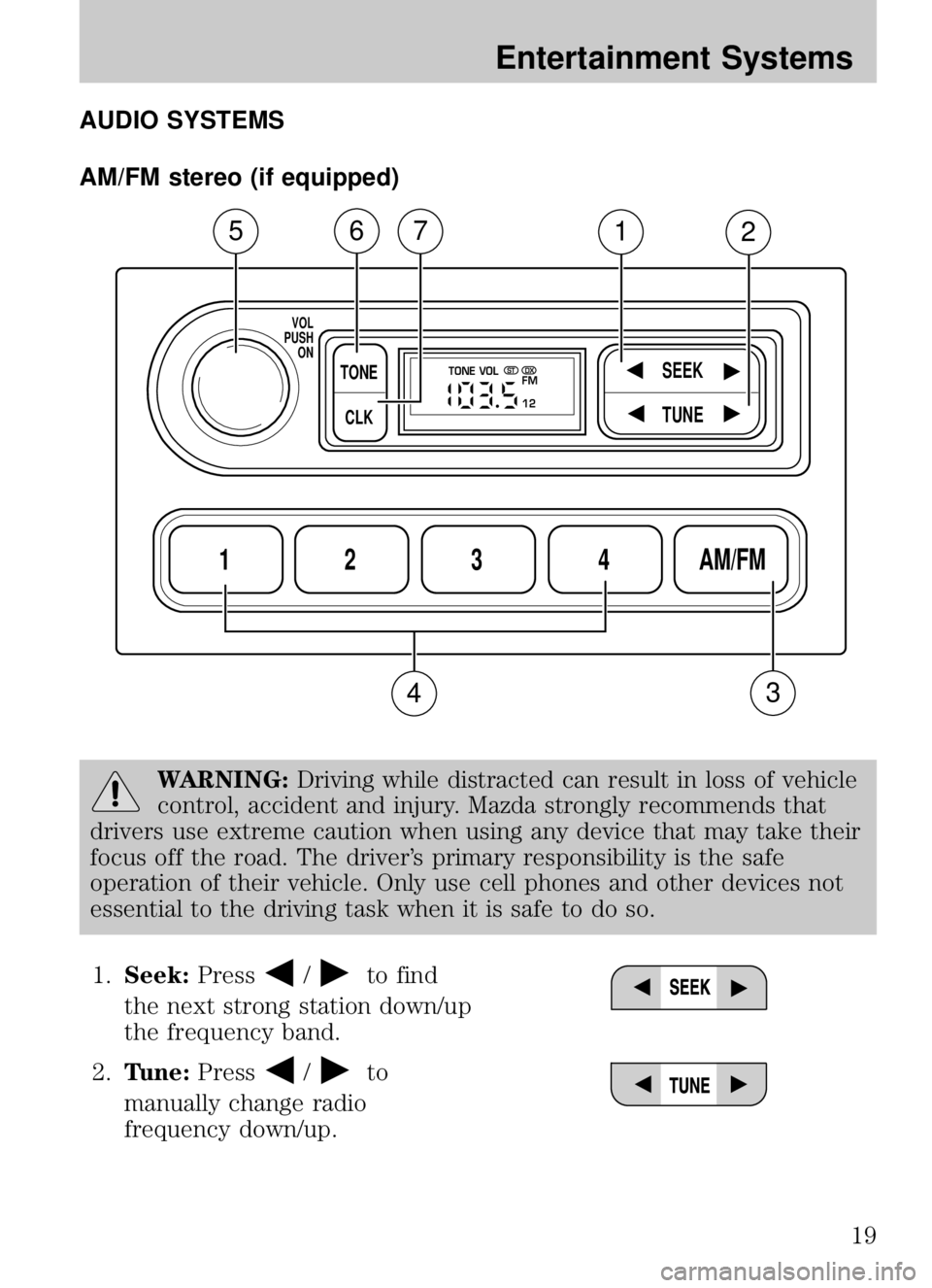
AUDIO SYSTEMS
AM/FM stereo (if equipped)
WARNING:Driving while distracted can result in loss of vehicle
control, accident and injury. Mazda strongly recommends that
drivers use extreme caution when using any device that may take their
focus off the road. The driver’s primary responsibility is the safe
operation of their vehicle. Only use cell phones and other devices not
essential to the driving task when it is safe to do so.
1. Seek: Press
/to find
the next strong station down/up
the frequency band.
2. Tune: Press
/to
manually change radio
frequency down/up.
1234AM/FM
SEEKTONE
CLK
TUNE
TONE VOL
12 FMSTDX
VOL
PUSH ON
5
3
67
4
12
2009 B-Series (mbs)
Owners Guide, 1st Printing
USA (fus)
Entertainment Systems
19
Page 27 of 288
WARNING:Driving while distracted can result in loss of vehicle
control, accident and injury. Mazda strongly recommends that
drivers use extreme caution when using any device that may take their
focus off the road. The driver’s primary responsibility is the safe
operation of their vehicle. Only use cell phones and other devices not
essential to the driving task when it is safe to do so.
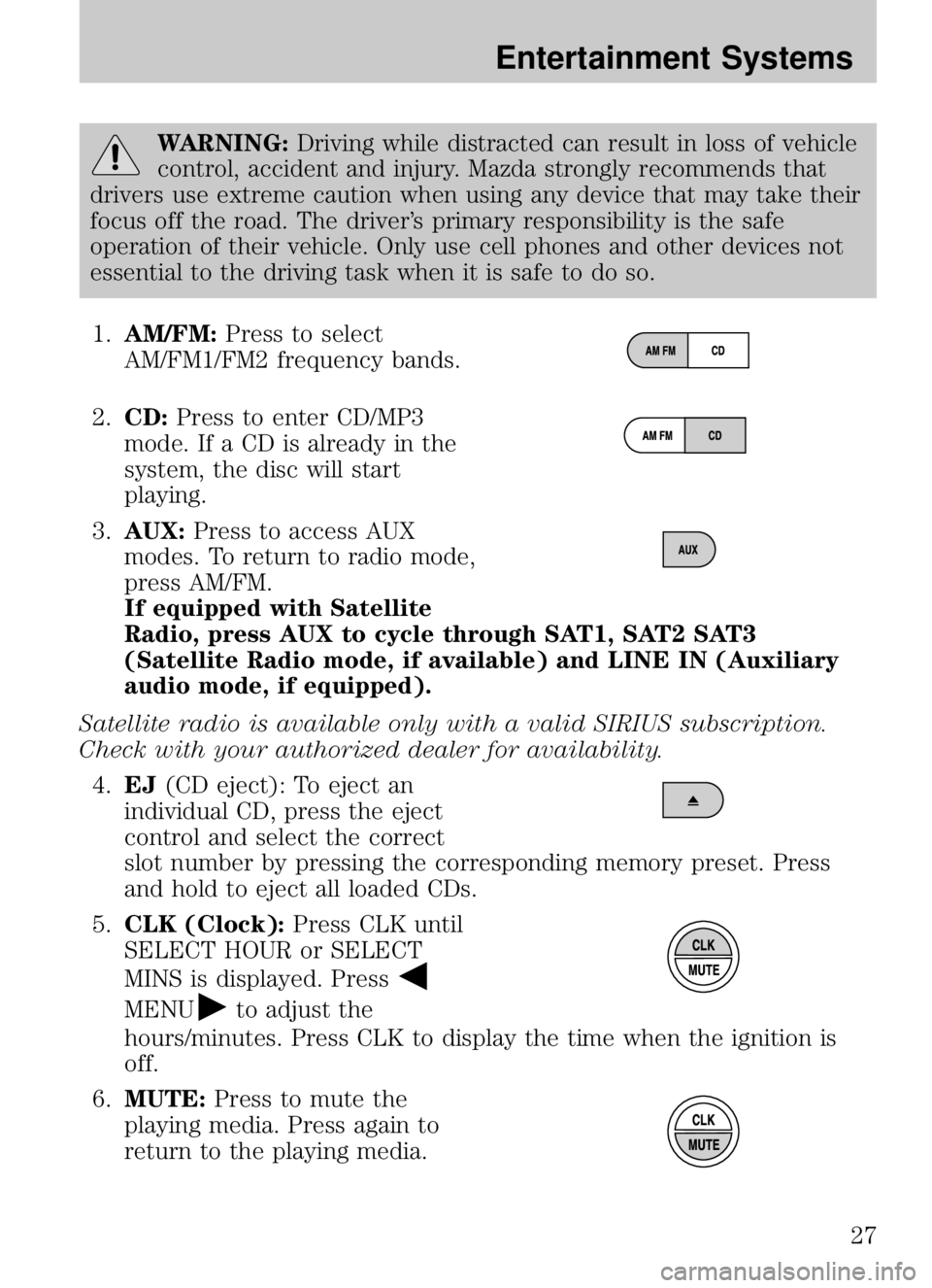
1. AM/FM: Press to select
AM/FM1/FM2 frequency bands.
2. CD: Press to enter CD/MP3
mode. If a CD is already in the
system, the disc will start
playing.
3. AUX: Press to access AUX
modes. To return to radio mode,
press AM/FM.
If equipped with Satellite
Radio, press AUX to cycle through SAT1, SAT2 SAT3
(Satellite Radio mode, if available) and LINE IN (Auxiliary
audio mode, if equipped).
Satellite radio is available only with a valid SIRIUS subscription.
Check with your authorized dealer for availability. 4. EJ (CD eject): To eject an
individual CD, press the eject
control and select the correct
slot number by pressing the corresponding memory preset. Press
and hold to eject all loaded CDs.
5. CLK (Clock): Press CLK until
SELECT HOUR or SELECT
MINS is displayed. Press
MENUto adjust the
hours/minutes. Press CLK to display the time when the ignition is
off.
6. MUTE: Press to mute the
playing media. Press again to
return to the playing media.
2009 B-Series (mbs)
Owners Guide, 1st Printing
USA (fus)
Entertainment Systems
27
Page 32 of 288
18.LOAD: Press to load a CD. To
load a CD disc to a specific slot,
press LOAD and select the slot number by pressing the memory
preset buttons. Press and hold LOAD to autoload up to six discs.
19. CD slot: Insert a CD, label
side up.
Auxiliary input jack (Line in)-(if equipped)
WARNING: Driving while distracted can result in loss of vehicle
control, accident and injury. Mazda strongly recommends that
drivers use extreme caution when using any device that may take their
focus off the road. The driver’s primary responsibility is the safe
operation of their vehicle. Only use cell phones and other devices not
essential to the driving task when it is safe to do so.
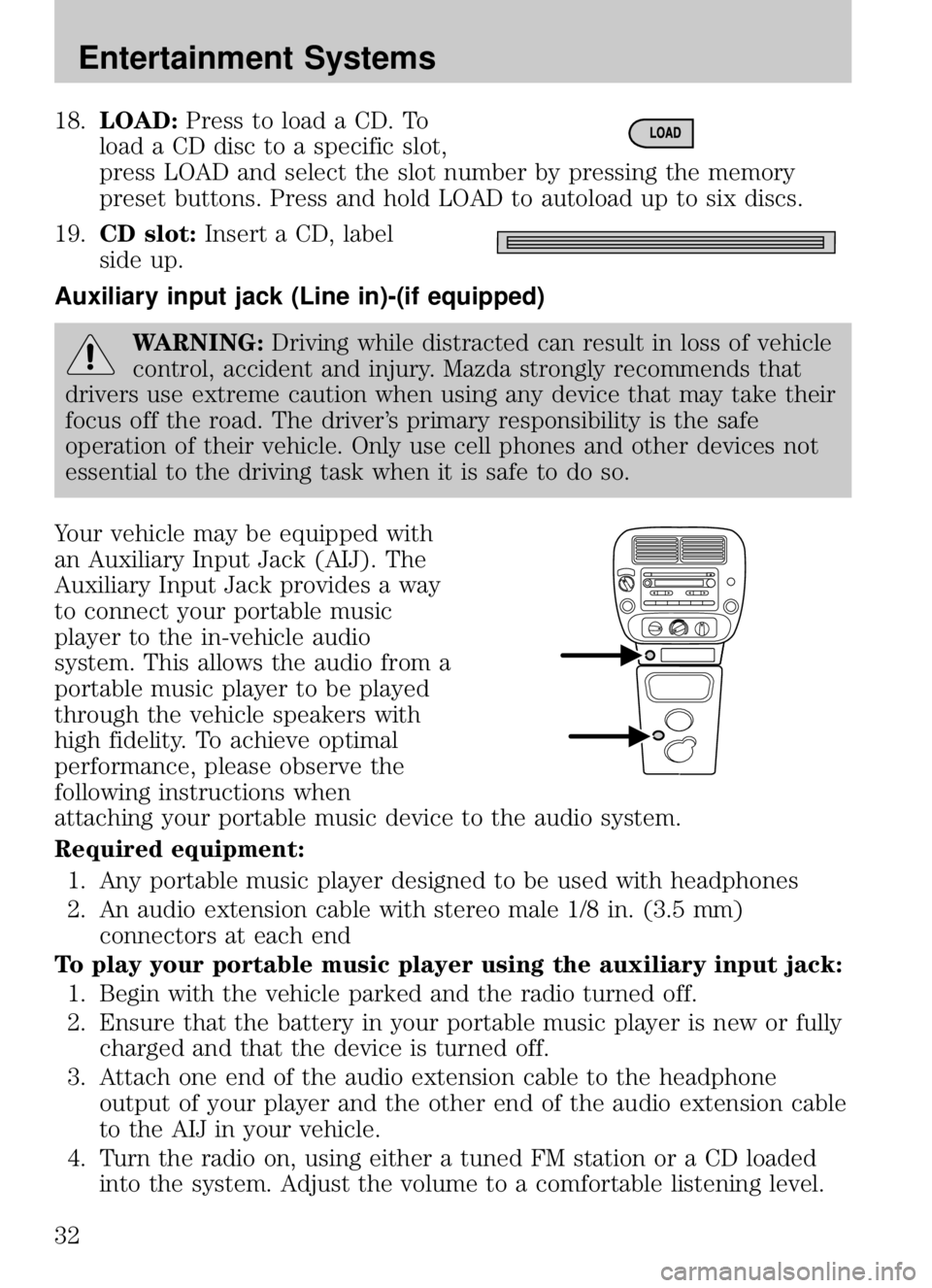
Your vehicle may be equipped with
an Auxiliary Input Jack (AIJ). The
Auxiliary Input Jack provides a way
to connect your portable music
player to the in-vehicle audio
system. This allows the audio from a
portable music player to be played
through the vehicle speakers with
high fidelity. To achieve optimal
performance, please observe the
following instructions when
attaching your portable music device to the audio system.
Required equipment: 1. Any portable music player designed to be used with headphones
2. An audio extension cable with stereo male 1/8 in. (3.5 mm) connectors at each end
To play your portable music player using the auxiliary input jack: 1. Begin with the vehicle parked and the radio turned off.
2. Ensure that the battery in your portable music player is new or fully charged and that the device is turned off.
3. Attach one end of the audio extension cable to the headphone output of your player and the other end of the audio extension cable
to the AIJ in your vehicle.
4. Turn the radio on, using either a tuned FM station or a CD loaded into the system. Adjust the volume to a comfortable listening level.
2009 B-Series (mbs)
Owners Guide, 1st Printing
USA (fus)
Entertainment Systems
32
Page 39 of 288
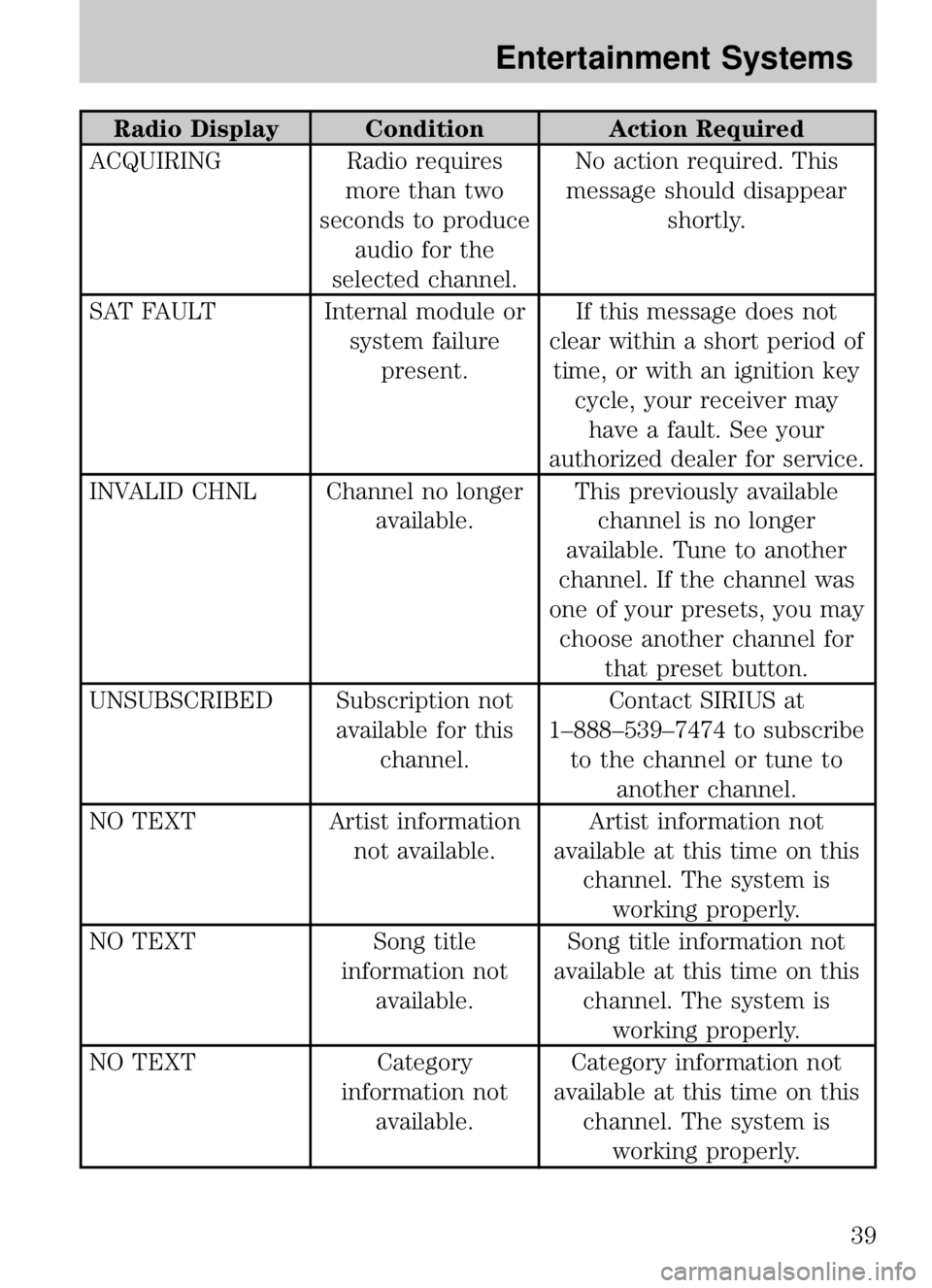
Radio Display ConditionAction Required
ACQUIRING Radio requires
more than two
seconds to produce audio for the
selected channel. No action required. This
message should disappear shortly.
SAT FAULT Internal module or system failurepresent. If this message does not
clear within a short period of time, or with an ignition key cycle, your receiver mayhave a fault. See your
authorized dealer for service.
INVALID CHNL Channel no longer available.This previously available
channel is no longer
available. Tune to another
channel. If the channel was
one of your presets, you may choose another channel for that preset button.
UNSUBSCRIBED Subscription not available for thischannel. Contact SIRIUS at
1–888–539–7474 to subscribe to the channel or tune to another channel.
NO TEXT Artist information
not available. Artist information not
available at this time on this channel. The system isworking properly.
NO TEXT Song title
information not available. Song title information not
available at this time on this channel. The system isworking properly.
NO TEXT Category
information not available. Category information not
available at this time on this channel. The system isworking properly.
2009 B-Series (mbs)
Owners Guide, 1st Printing
USA (fus)
Entertainment Systems
39
Page 40 of 288
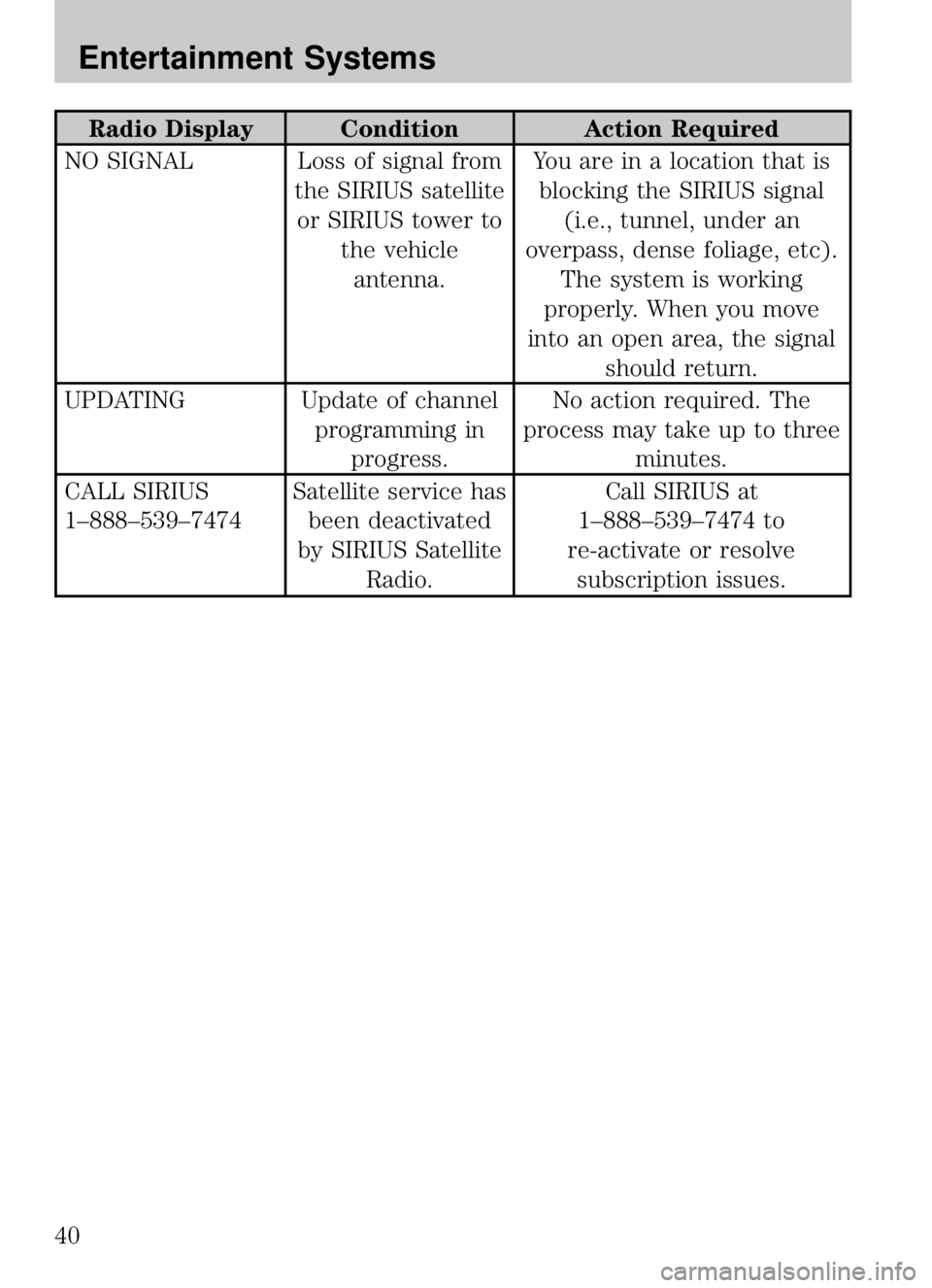
Radio Display ConditionAction Required
NO SIGNAL Loss of signal from the SIRIUS satelliteor SIRIUS tower to the vehicleantenna. You are in a location that is
blocking the SIRIUS signal (i.e., tunnel, under an
overpass, dense foliage, etc). The system is working
properly. When you move
into an open area, the signal should return.
UPDATING Update of channel programming inprogress. No action required. The
process may take up to three minutes.
CALL SIRIUS
1–888–539–7474 Satellite service has
been deactivated
by SIRIUS Satellite Radio. Call SIRIUS at
1–888–539–7474 to
re-activate or resolve subscription issues.
2009 B-Series (mbs)
Owners Guide, 1st Printing
USA (fus)
Entertainment Systems
40
Page 156 of 288
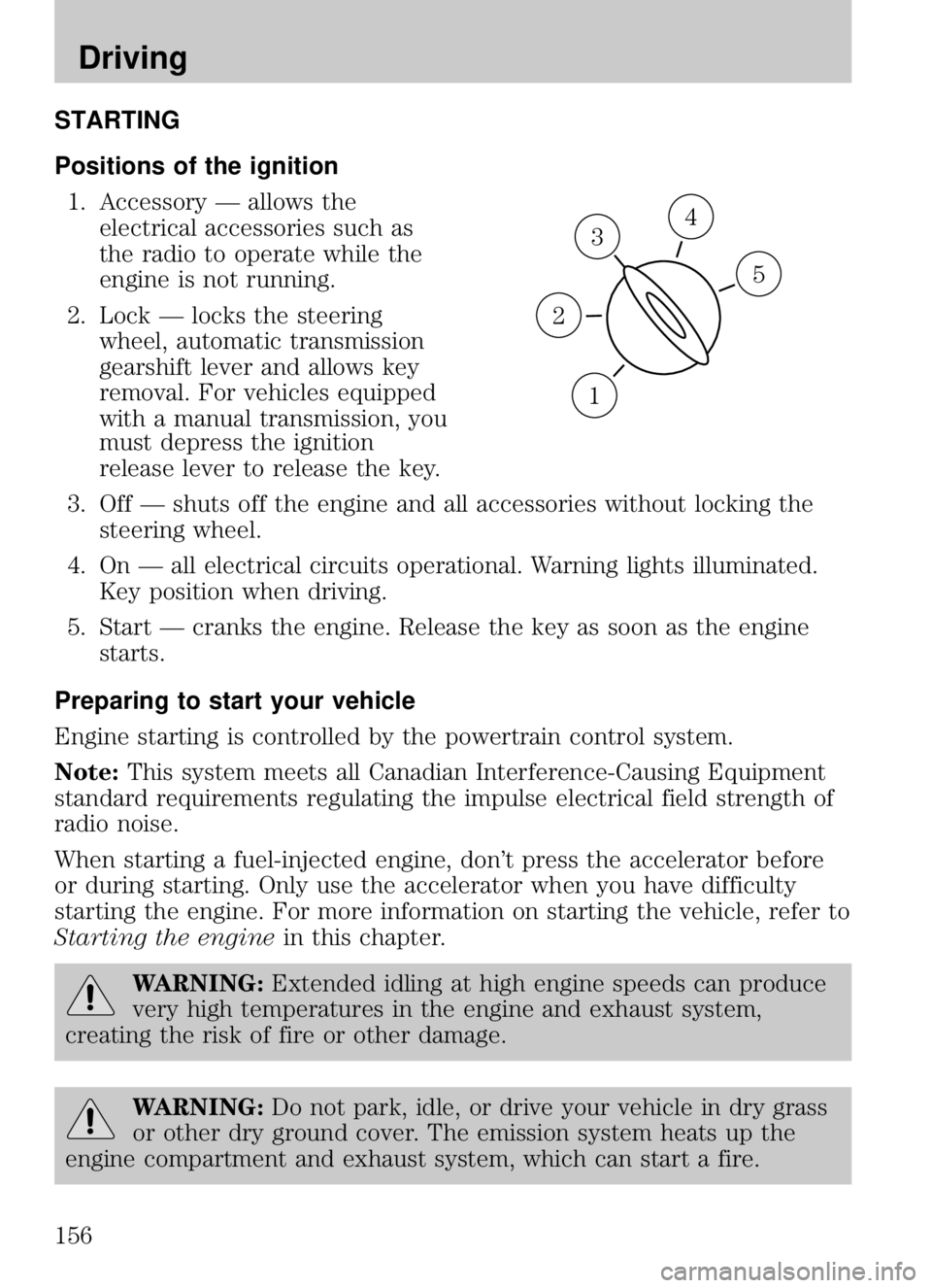
STARTING
Positions of the ignition1. Accessory — allows the electrical accessories such as
the radio to operate while the
engine is not running.
2. Lock — locks the steering wheel, automatic transmission
gearshift lever and allows key
removal. For vehicles equipped
with a manual transmission, you
must depress the ignition
release lever to release the key.
3. Off — shuts off the engine and all accessories without locking the steering wheel.
4. On — all electrical circuits operational. Warning lights illuminated. Key position when driving.
5. Start — cranks the engine. Release the key as soon as the engine starts.
Preparing to start your vehicle
Engine starting is controlled by the powertrain control system.
Note: This system meets all Canadian Interference-Causing Equipment
standard requirements regulating the impulse electrical field strength of
radio noise.
When starting a fuel-injected engine, don’t press the accelerator before
or during starting. Only use the accelerator when you have difficulty
starting the engine. For more information on starting the vehicle, refer to
Starting the engine in this chapter.
WARNING:Extended idling at high engine speeds can produce
very high temperatures in the engine and exhaust system,
creating the risk of fire or other damage.
WARNING: Do not park, idle, or drive your vehicle in dry grass
or other dry ground cover. The emission system heats up the
engine compartment and exhaust system, which can start a fire.
3
1
2
5
4
2009 B-Series (mbs)
Owners Guide, 1st Printing
USA (fus)
Driving
156
Page 167 of 288
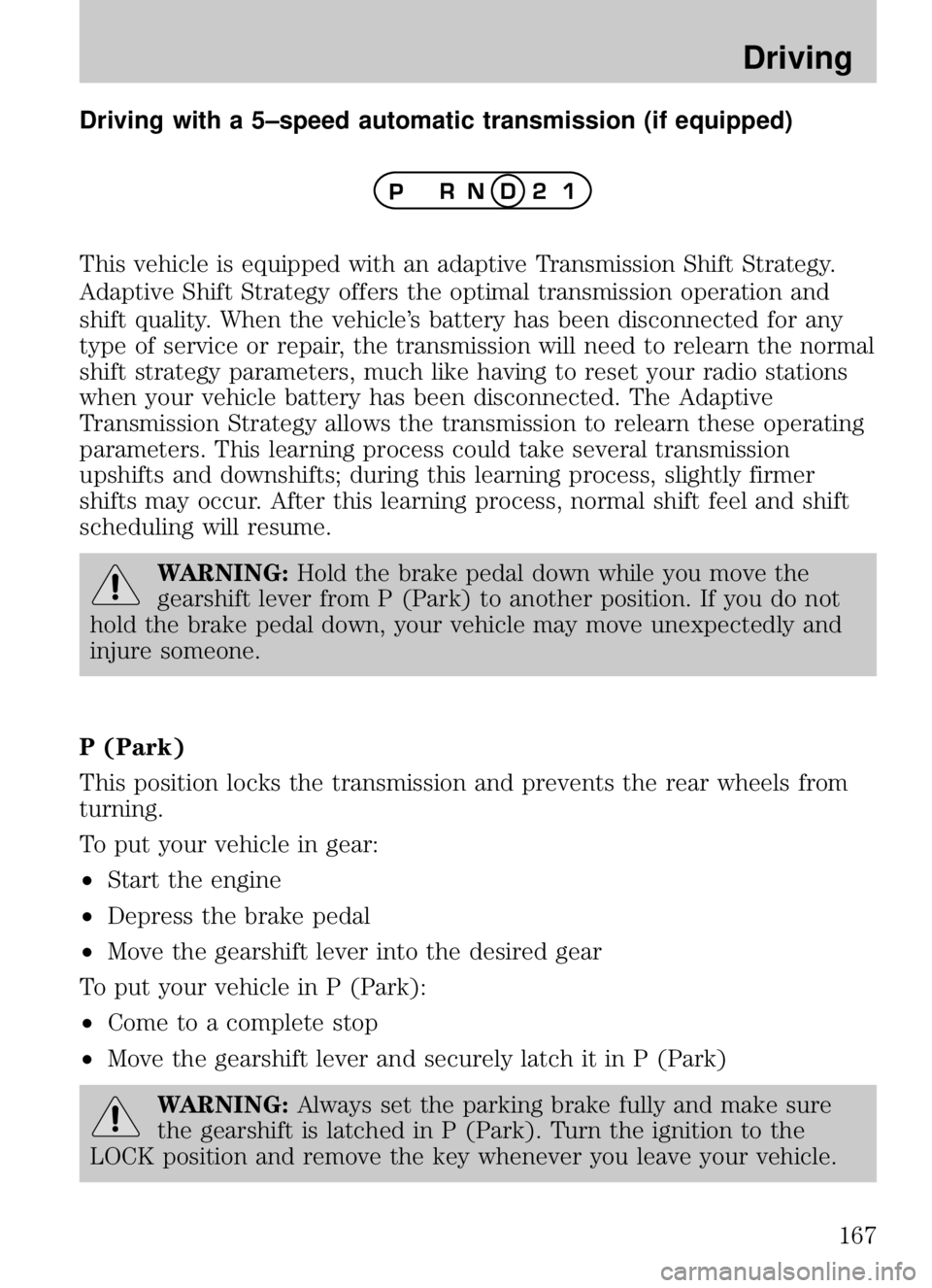
Driving with a 5–speed automatic transmission (if equipped)
This vehicle is equipped with an adaptive Transmission Shift Strategy.
Adaptive Shift Strategy offers the optimal transmission operation and
shift quality. When the vehicle’s battery has been disconnected for any
type of service or repair, the transmission will need to relearn the normal
shift strategy parameters, much like having to reset your radio stations
when your vehicle battery has been disconnected. The Adaptive
Transmission Strategy allows the transmission to relearn these operating
parameters. This learning process could take several transmission
upshifts and downshifts; during this learning process, slightly firmer
shifts may occur. After this learning process, normal shift feel and shift
scheduling will resume.
WARNING:Hold the brake pedal down while you move the
gearshift lever from P (Park) to another position. If you do not
hold the brake pedal down, your vehicle may move unexpectedly and
injure someone.
P (Park)
This position locks the transmission and prevents the rear wheels from
turning.
To put your vehicle in gear:
• Start the engine
• Depress the brake pedal
• Move the gearshift lever into the desired gear
To put your vehicle in P (Park):
• Come to a complete stop
• Move the gearshift lever and securely latch it in P (Park)
WARNING: Always set the parking brake fully and make sure
the gearshift is latched in P (Park). Turn the ignition to the
LOCK position and remove the key whenever you leave your vehicle.
2009 B-Series (mbs)
Owners Guide, 1st Printing
USA (fus)
Driving
167
Page 184 of 288
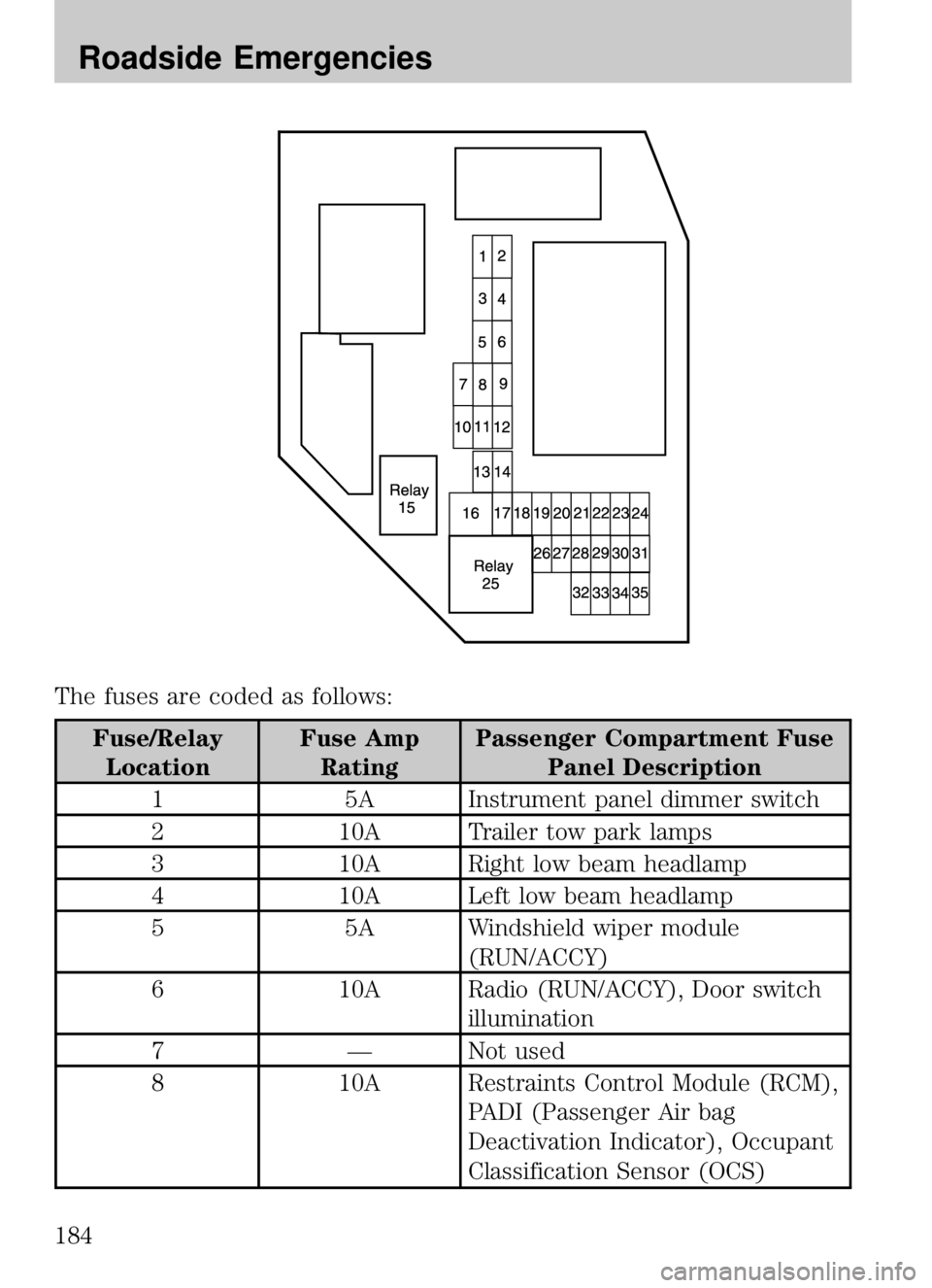
The fuses are coded as follows:
Fuse/RelayLocation Fuse Amp
Rating Passenger Compartment Fuse
Panel Description
1 5A Instrument panel dimmer switch
2 10A Trailer tow park lamps
3 10A Right low beam headlamp
4 10A Left low beam headlamp
5 5A Windshield wiper module
(RUN/ACCY)
6 10A Radio (RUN/ACCY), Door switch
illumination
7 — Not used
8 10A Restraints Control Module (RCM),
PADI (Passenger Air bag
Deactivation Indicator), Occupant
Classification Sensor (OCS)
2009 B-Series (mbs)
Owners Guide, 1st Printing
USA (fus)
Roadside Emergencies
184
Page 185 of 288
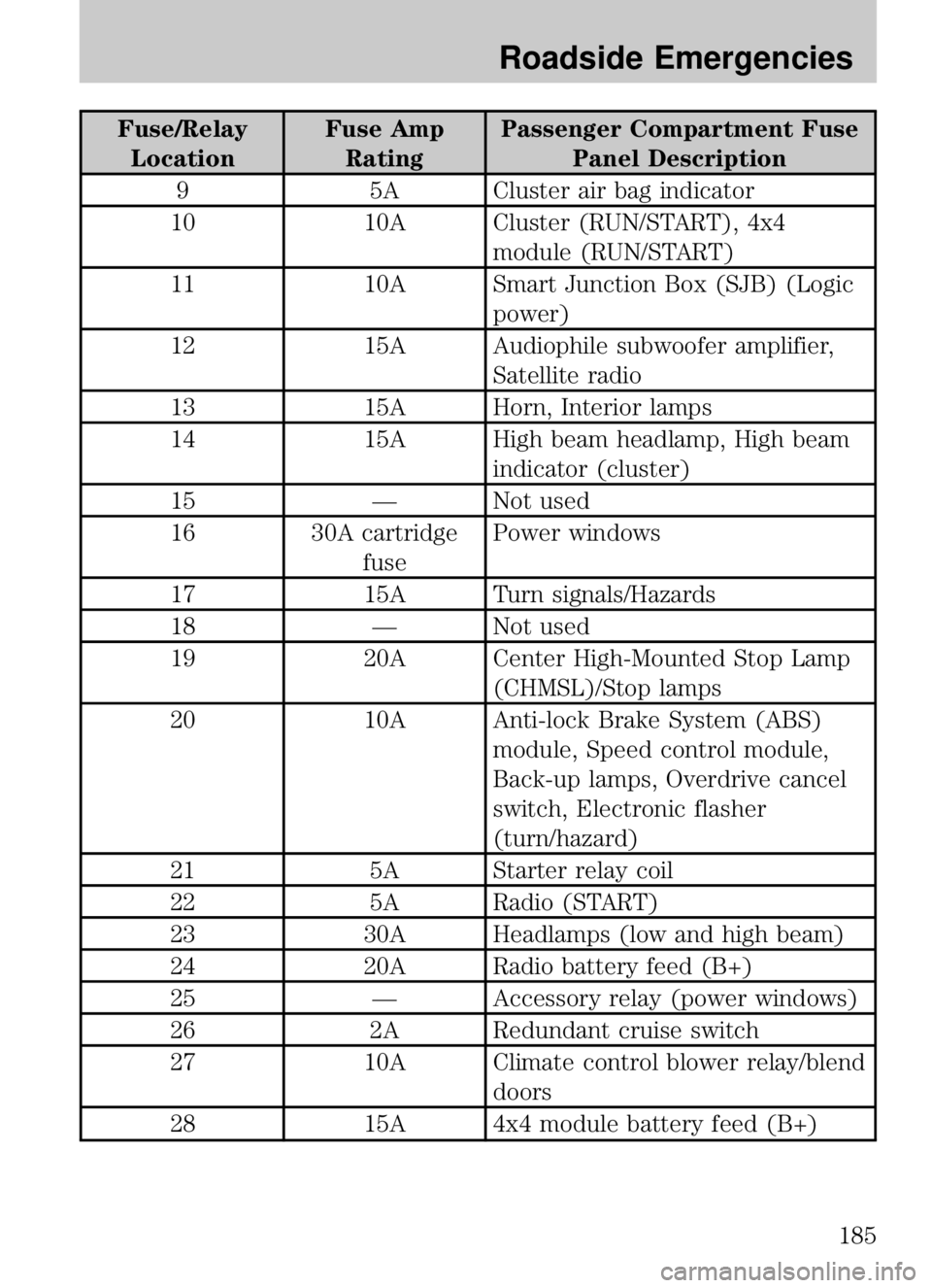
Fuse/RelayLocation Fuse Amp
Rating Passenger Compartment Fuse
Panel Description
9 5A Cluster air bag indicator
10 10A Cluster (RUN/START), 4x4
module (RUN/START)
11 10A Smart Junction Box (SJB) (Logic
power)
12 15A Audiophile subwoofer amplifier,
Satellite radio
13 15A Horn, Interior lamps
14 15A High beam headlamp, High beam
indicator (cluster)
15 — Not used
16 30A cartridge fusePower windows
17 15A Turn signals/Hazards
18 — Not used
19 20A Center High-Mounted Stop Lamp
(CHMSL)/Stop lamps
20 10A Anti-lock Brake System (ABS)
module, Speed control module,
Back-up lamps, Overdrive cancel
switch, Electronic flasher
(turn/hazard)
21 5A Starter relay coil
22 5A Radio (START)
23 30A Headlamps (low and high beam)
24 20A Radio battery feed (B+)
25 — Accessory relay (power windows)
26 2A Redundant cruise switch
27 10A Climate control blower relay/blend
doors
28 15A 4x4 module battery feed (B+)
2009 B-Series(mbs)
Owners Guide, 1st Printing
USA (fus)
Roadside Emergencies
185
Page 220 of 288
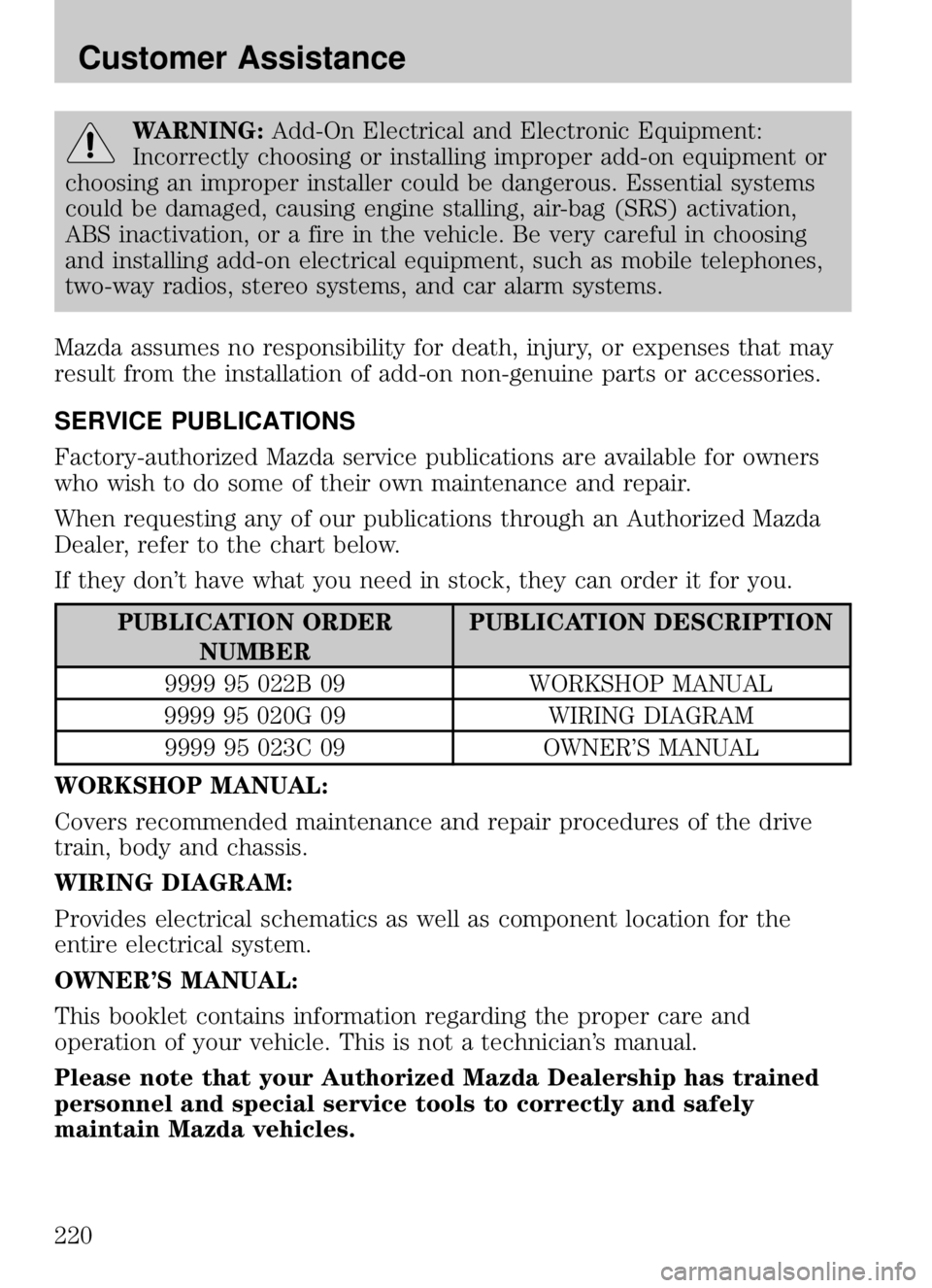
WARNING:Add-On Electrical and Electronic Equipment:
Incorrectly choosing or installing improper add-on equipment or
choosing an improper installer could be dangerous. Essential systems
could be damaged, causing engine stalling, air-bag (SRS) activation,
ABS inactivation, or a fire in the vehicle. Be very careful in choosing
and installing add-on electrical equipment, such as mobile telephones,
two-way radios, stereo systems, and car alarm systems.
Mazda assumes no responsibility for death, injury, or expenses that may
result from the installation of add-on non-genuine parts or accessories.
SERVICE PUBLICATIONS
Factory-authorized Mazda service publications are available for owners
who wish to do some of their own maintenance and repair.
When requesting any of our publications through an Authorized Mazda
Dealer, refer to the chart below.
If they don’t have what you need in stock, they can order it for you.
PUBLICATION ORDER NUMBER PUBLICATION DESCRIPTION
9999 95 022B 09 WORKSHOP MANUAL
9999 95 020G 09 WIRING DIAGRAM
9999 95 023C 09 OWNER’S MANUAL
WORKSHOP MANUAL:
Covers recommended maintenance and repair procedures of the drive
train, body and chassis.
WIRING DIAGRAM:
Provides electrical schematics as well as component location for the
entire electrical system.
OWNER’S MANUAL:
This booklet contains information regarding the proper care and
operation of your vehicle. This is not a technician’s manual.
Please note that your Authorized Mazda Dealership has trained
personnel and special service tools to correctly and safely
maintain Mazda vehicles.
2009 B-Series (mbs)
Owners Guide, 1st Printing
USA (fus)
Customer Assistance
220