brake MAZDA MODEL CX-9 2008 (in English) Owner's Manual
[x] Cancel search | Manufacturer: MAZDA, Model Year: 2008, Model line: MODEL CX-9, Model: MAZDA MODEL CX-9 2008Pages: 506, PDF Size: 11.52 MB
Page 170 of 506

Black plate (170,1)
Automatic Transaxle Controls
Indicates that you must depress the brake pedal to shift (The ignition
switch must be in the ACC or ON position).
Indicates the shift lever can be shifted freely into any position.
Various Lockouts:
NOTE
This Sport AT has an option that is not included in traditional automatic transaxle - giving the driver
the option of selecting each gear instead of leaving it to the transaxle to shift gears. Even if you
intend to use the automatic transaxle functions as a traditional automatic, you should also be aware
that you can inadvertently shift into manual shift mode and an inappropriate gear may be retained as
you change speeds. If you notice the engine speed going higher or hear the engine racing, confirm
you have not accidentally slipped into manual shift mode (page 5-12).
5-10
Driving Your Mazda
Starting and Driving
CX-9_8Z28-EA-07J_Edition2 Page170
Thursday, November 22 2007 12:2 AM
Form No.8Z28-EA-07J
Page 171 of 506

Black plate (171,1)
qTransaxle Ranges
The shift lever must be in P or N to
operate the starter.
P (Park)
P locks the transaxle and prevents the
front wheels from rotating.
WARNING
Always set the shift lever to P and set
the parking brake:
Only setting the shift lever to the P
position without using the parking
brake to hold the vehicle is
dangerous. If P fails to hold, the
vehicle could move and cause an
accident.
CAUTION
ØShifting into P, N or R while the
vehicle is moving can damage
your transaxle.
ØShifting into a driving gear or
reverse when the engine is running
faster than idle can damage the
transaxle.
R (Reverse)
In position R, the vehicle moves only
backward. You must be at a complete stop
before shifting to or from R, except under
rare circumstances as explained in
Rocking the Vehicle (page 4-9).
N (Neutral)
In N, the wheels and transaxle are not
locked. The vehicle will roll freely even
on the slightest incline unless the parking
brake or brakes are on.
WARNING
If the engine is running faster than idle,
do not shift from N or P into a driving
gear:
It's dangerous to shift from N or P
into a driving gear when the engine
is running faster than idle. If this is
done, the vehicle could move
suddenly, causing an accident or
serious injury.
Do not shift into N when driving the
vehicle:
Shifting into N while driving is
dangerous. Engine braking cannot be
applied when decelerating which
could lead to an accident or serious
injury.
CAUTION
Do not shift into N when driving the
vehicle. Doing so can cause transaxle
damage.
NOTE
Apply the parking brake or depress the brake
pedal before moving the shift lever from N to
prevent the vehicle from moving unexpectedly.
D (Drive)
D is the normal driving position. From a
stop, the transaxle will automatically shift
through a 6-gear sequence.
M (Manual)
M is the manual shift mode position.
Gears can be shifted up or down by
operating the shift lever.
Refer to Manual Shift Mode (page 5-12).
Driving Your Mazda
Starting and Driving
5-11
CX-9_8Z28-EA-07J_Edition2 Page171
Thursday, November 22 2007 12:2 AM
Form No.8Z28-EA-07J
Page 172 of 506

Black plate (172,1)
qActive Adaptive Shift (AAS)
Active Adaptive Shift (AAS)
automatically controls the transaxle shift
points to best suit the road conditions and
driver input. This optimizes engine
performance and improves driving
comfort. When cornering the vehicle,
AAS mode will hold the transaxle in the
gear the vehicle was in before entering the
curve, allowing the vehicle to be
accelerated from the same gear after
exiting the curve.
If the driver accelerates rapidly, or
accelerates and decelerates rapidly by
operating the accelerator and brake pedal
for a certain period of time while the
selector lever is in the D position, AAS
mode could activate. When this occurs,
AAS mode will maintain the transaxle in
the optimum gear and the driver may
sense that the transaxle is not shifting,
however this does not indicate an
abnormality.
qShift-Lock System
The shift-lock system prevents shifting
out of P unless the brake pedal is
depressed.
To shift from P:
1. Depress and hold the brake pedal.
2. Start the engine.
3. Move the shift lever.NOTE
lWhen the ignition switch is in the LOCK
position, the shift lever cannot be shifted
from P.
lTo be sure the vehicle is in park,the
ignition key cannot be removed unless the
shift lever is in P.
l(With Advanced Key)
The ignition switch cannot be turned from
the ACC position to the LOCK position
when the shift lever is not in P.
qManual Shift Mode
This mode gives you the feel of driving a
manual transaxle vehicle by operating the
shift lever and allows you to control
engine rpm and torque to the drive wheels
much like a manual transaxle when more
control is desired.
To change to manual shift mode, shift the
lever from D to M.
To return to automatic shift mode, shift
the lever from M to D.
NOTE
If you change to manual shift mode when the
vehicle is stopped, the gear will shift to M1.
5-12
Driving Your Mazda
Starting and Driving
CX-9_8Z28-EA-07J_Edition2 Page172
Thursday, November 22 2007 12:2 AM
Form No.8Z28-EA-07J
Page 175 of 506

Black plate (175,1)
NOTE
The gear does not shift down to M1
automatically while in the second gear fixed
mode.
If the vehicle is kicked down at the
following speeds or lower, the gears shift
down automatically:
Gear Vehicle speed
M6→M5 230 km/h (142 mph)
M5→M4 90 km/h (55 mph)
M4→M3 65 km/h (40 mph)
M3→M2 40 km/h (24 mph)
Recommendations for shifting
Upshifting
For normal acceleration and cruising, we
recommend these shift points.
Gear Vehicle speed
M1 to M2 24 km/h (15 mph)
M2 to M3 40 km/h (25 mph)
M3 to M4 65 km/h (40 mph)
M4 to M5 73 km/h (45 mph)
M5 to M6 80 km/h (50 mph)
Downshifting
When you must slow down in heavy
traffic or on a steepupgrade, downshift
before the engine starts to overwork. This
gives better acceleration when you need
more speed.
On a steepdowngrade, downshifting
helps maintain safe speed and prolongs
brake life.
qDriving Tips
Passing
For extra power when passing another
vehicle or climbing steep grades, depress
the accelerator fully. The transaxle will
shift to a lower gear, depending on vehicle
speed.
Climbing steep grades from a stop
To climb a steep grade from a stopped
position:
1. Depress the brake pedal.
2. Shift to D or M1, depending on the
load weight and grade steepness.
3. Release the brake pedal while
gradually accelerating.
Descending steep grades
When descending a steep grade, shift to
lower gears, depending on load weight
and grade steepness. Descend slowly,
using the brakes only occasionally to
prevent them from overheating.
Driving Your Mazda
Starting and Driving
5-15
CX-9_8Z28-EA-07J_Edition2 Page175
Thursday, November 22 2007 12:2 AM
Form No.8Z28-EA-07J
Page 177 of 506

Black plate (177,1)
qAWD Driving
WARNING
Avoid sharp turns, excessive speed and
abrupt maneuvers when driving this
vehicle:
Sharp turns, excessive speed and
abrupt maneuvering of this vehicle is
dangerous as it could result in the
increased risk of loss of vehicle
control, vehicle roll-over, personal
injury or death.
This vehicle has a higher center of
gravity. Vehicles with a higher center
of gravity such as utility and AWD
vehicles handle differently than
vehicles with a lower center of
gravity.
Utility and AWD vehicles are not
designed for cornering at speeds as
any more than low profile sports cars
are designed to perform satisfactorily
under off-road conditions. In
addition, utility vehicles have a
significantly higher rollover rate than
other types of vehicles.
RSC might help if you get into
trouble, but then it might not be able
to allow you to fully recover, always
drive carefully with the vehicle's
height in mind.
Drive carefully when the vehicle is
loaded by lowering vehicle speed and
applying the brakes earlier:
Abrupt maneuvering and sudden
braking when driving a loaded
vehicle is dangerous as the driving
behavior of a vehicle with a high
center of gravity is different when it is
loaded compared to when it is not,
and could result in the loss of vehicle
control and an accident.
qAWD Warning Light
This warning light stays on for a few
seconds when the ignition switch is turned
to the ON position.
Thereafter, the warning light will
illuminate or flash under the following
conditions:
lIlluminates when there is an
abnormality with the AWD system.
lFlashes when the differential oil
temperature is abnormally high.
lFlashes when there are continually
large differences between front and rear
wheel rotation, such as when trying to
pull away from an icy surface.
If the AWD warning light illuminates:
If the AWD warning light illuminates,
contact an Authorized Mazda Dealer.
If the AWD warning light flashes:
Park the vehicle in a safe place. After a
few moments; if the warning light stops
flashing, you can resume driving. If the
light does not stop flashing, contact an
Authorized Mazda Dealer.
Driving Your Mazda
Starting and Driving
5-17
CX-9_8Z28-EA-07J_Edition2 Page177
Thursday, November 22 2007 12:2 AM
Form No.8Z28-EA-07J
Page 181 of 506

Black plate (181,1)
To increase speed using accelerator
pedal
Depress the accelerator pedal to accelerate
to the desired speed.
Press down or press up on the cruise
control SET +/SET - switch and release it
immediately.
Cruise control switch
NOTE
Accelerate if you want to speed up temporarily
when the cruise control is on. Greater speed
will not interfere with or change the set speed.
Take your foot off the accelerator to return to
the set speed.
qTo Decrease Cruising Speed
Press down the cruise control SET -
switch and hold it. The vehicle will
gradually slow.
Release the switch at the speed you want.
Cruise control switch
Your vehicle has a tap-down feature that
allows you to decrease your current speed
in decrements of 1.6 km/h (1 mph) by a
momentary tap of the cruise control
switch. Multiple taps will decrease your
vehicle speed 1.6 km/h (1 mph) for each
tap.
qTo Resume Cruising Speed at
More Than 30 km/h (19 mph)
If some other method besides the ON/
OFF switch was used to cancel cruising
speed (such as applying the brake pedal)
and the system is still activated, the most
recent set speed will automatically resume
when the RESUME button is pressed.
If vehicle speed is below 30 km/h (19
mph), increase the vehicle speed up to 30
km/h (19 mph) and press the RESUME
button.
qTo Cancel
To cancel the system, useoneof these
methods:
lPull down the ON/OFF switch.lSlightly depress the brake pedal.
Driving Your Mazda
Starting and Driving
5-21
CX-9_8Z28-EA-07J_Edition2 Page181
Thursday, November 22 2007 12:2 AM
Form No.8Z28-EA-07J
Page 182 of 506

Black plate (182,1)
lPress the CANCEL button.
The system is off when the ignition is off.
NOTE
Cruise control will cancel at about 15 km/h (9
mph) below the preset speed (such as may
happen when climbing a long, steep grade) or
below 30 km/h (19 mph).
Traction Control System
(TCS)
The Traction Control System (TCS)
enhances traction and safety by
controlling engine torque and braking.
When the TCS detects driving wheel
slippage, it lowers engine torque and
operates the brakes to prevent loss of
traction.
This means that on a slick surface, the
engine adjusts automatically to provide
optimum power to the drive wheels
without causing them to spin and lose
traction.
WARNING
Do not rely on the traction control
system as a substitute for safe driving:
The traction control system (TCS)
cannot compensate for unsafe and
reckless driving, excessive speed,
tailgating (following another vehicle
too closely), and hydroplaning
(reduced tire friction and road
contact because of water on the road
surface). You can still have an
accident.
Use snow tires or tire chains and drive
at reduced speeds when roads are
covered with ice and/or snow:
Driving without proper traction
devices on snow and/or ice-covered
roads is dangerous. The traction
control system (TCS) alone cannot
provide adequate traction and you
could still have an accident.
5-22
Driving Your Mazda
Starting and Driving
CX-9_8Z28-EA-07J_Edition2 Page182
Thursday, November 22 2007 12:2 AM
Form No.8Z28-EA-07J
Page 183 of 506

Black plate (183,1)
CAUTION
Do not rely on the TCS to maintain
constant control of the vehicle under
severe or maximum handling
conditions. If the TCS operates
frequently due to severe driving
conditions, the TCS may stop
operating to protect the brakes from
overheating. After the brakes have
cooled down, the TCS resumes
normal operation.
qTCS/DSC Indicator Light
This indicator light stays on for a few
seconds when the ignition switch is turned
to the ON position. If the TCS or DSC is
operating, the indicator light flashes.
If the light stays on, the TCS, DSC or the
brake assist system may have a
malfunction and they may not operate
correctly. Take your vehicle to an
Authorized Mazda Dealer.
NOTE
lIn addition to the indicator light flashing, a
slight lugging sound will come from the
engine. This indicates that the TCS is
operating properly.
lOn slippery surfaces, such as fresh snow, it
will be impossible to achieve high rpm
when the TCS is on.
qTCS OFF Indicator Light
This indicator light stays on for a few
seconds when the ignition switch is turned
to the ON position.
It also illuminates when the TCS OFF
switch is pressed and TCS is switched off.
Refer to TCS OFF Switch on page 5-24.
If the light remains illuminated and the
TCS is not switched off, take your vehicle
to an Authorized Mazda Dealer. The
dynamic stability control may have a
malfunction.
NOTE
If the TCS/DSC indicator light and the TCS
OFF indicator light remain illuminated even
after turning the ignition switch to the ON
position, attempt the procedure again. If this
still does not work, consult an Authorized
Mazda Dealer.
Driving Your Mazda
Starting and Driving
5-23
CX-9_8Z28-EA-07J_Edition2 Page183
Thursday, November 22 2007 12:2 AM
Form No.8Z28-EA-07J
Page 201 of 506
Black plate (201,1)
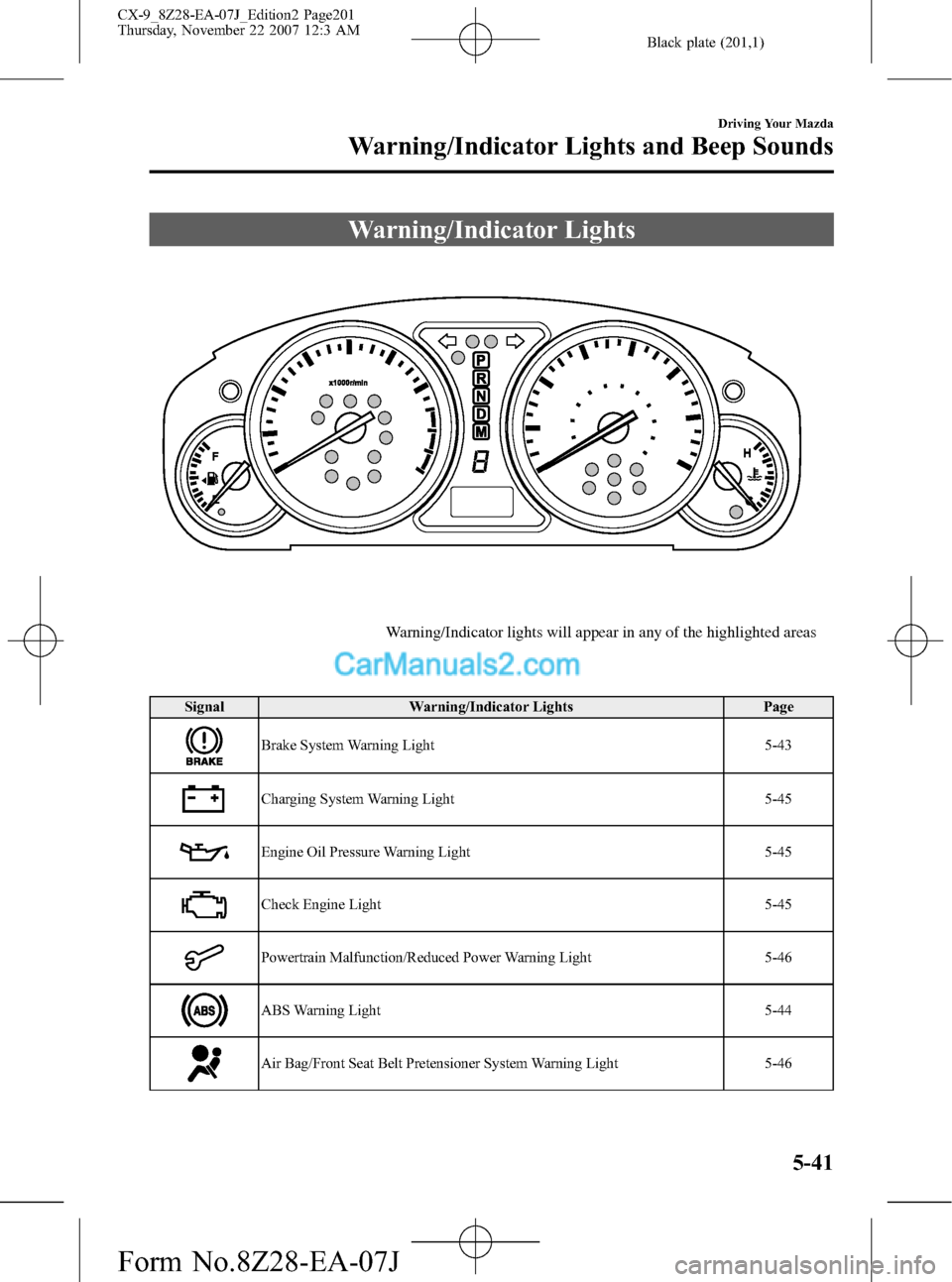
Warning/Indicator Lights
Warning/Indicator lights will appear in any of the highlighted areas
Signal Warning/Indicator Lights Page
Brake System Warning Light 5-43
Charging System Warning Light 5-45
Engine Oil Pressure Warning Light 5-45
Check Engine Light 5-45
Powertrain Malfunction/Reduced Power Warning Light 5-46
ABS Warning Light 5-44
Air Bag/Front Seat Belt Pretensioner System Warning Light 5-46
Driving Your Mazda
Warning/Indicator Lights and Beep Sounds
5-41
CX-9_8Z28-EA-07J_Edition2 Page201
Thursday, November 22 2007 12:3 AM
Form No.8Z28-EA-07J
Page 203 of 506

Black plate (203,1)
Signal Warning/Indicator Lights Page
Light-On Indicator Light 5-56
Turn Signal/Hazard Warning Indicator Lights 5-56
qBrake System Warning Light
This warning has the following functions:
Parking brake warning
The light comes on when the parking
brake is applied with the ignition switch
in the START or ON position. It goes off
when the parking brake is fully released.
Low brake fluid level warning
If the light stays on after the parking brake
is fully released, you may have a brake
problem.
Drive to the side of the road and park off
the right-of-way.
You may notice that the pedal is harder to
push or that it may go closer to the floor.
In either case, it will take longer to stop
the vehicle.
1. With the engine stopped, check the
brake fluid level immediately and add
fluid as required (page 8-23).
2. After adding fluid, check the light
again.If the warning light remains on, or if the
brakes do not operate properly, do not
drive the vehicle. Have it towed to an
Authorized Mazda Dealer.
Even if the light goes out have your brake
system inspected as soon as possible by
an Authorized Mazda Dealer.
NOTE
Having to add brake fluid is sometimes an
indicator of leakage. Consult an Authorized
Mazda Dealer as soon as possible even if the
brake light is no longer illuminated.
WARNING
Do not drive with the brake system
warning light illuminated. Contact an
Authorized Mazda Dealer to have the
brakes inspected as soon as possible:
Driving with the brake system
warning light illuminated is
dangerous. It indicates that your
brakes may not work at all or that
they could completely fail at any
time. If this light remains
illuminated, after checking that the
parking brake is fully released, have
the brakes inspected immediately.
Driving Your Mazda
Warning/Indicator Lights and Beep Sounds
5-43
CX-9_8Z28-EA-07J_Edition2 Page203
Thursday, November 22 2007 12:3 AM
Form No.8Z28-EA-07J