ignition MERCEDES-BENZ A-CLASS HATCHBACK 2015 Manual Online
[x] Cancel search | Manufacturer: MERCEDES-BENZ, Model Year: 2015, Model line: A-CLASS HATCHBACK, Model: MERCEDES-BENZ A-CLASS HATCHBACK 2015Pages: 417, PDF Size: 11.91 MB
Page 260 of 417
Display messages
Introduction
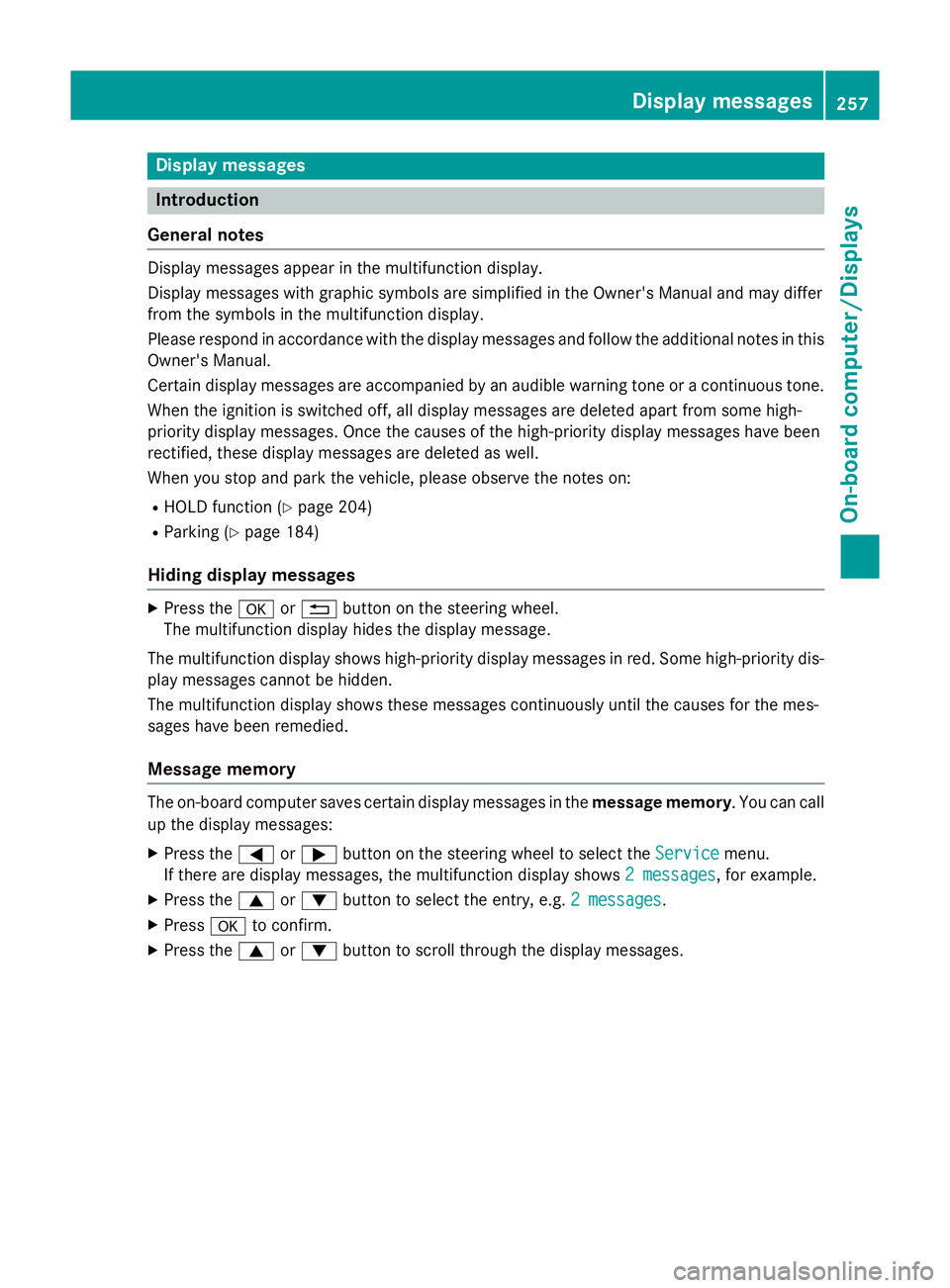
General notes Display messages appear in the multifunction display.
Display messages with graphic symbols are simplified in the Owner's Manual and may differ
from the symbols in the multifunction display.
Please respond in accordance with the display messages and follow the additional notes in this Owner's Manual.
Certain display messages are accompanied by an audible warning tone or a continuous tone.
When the ignition is switched off, all display messages are deleted apart from some high-
priority display messages. Once the causes of the high-priority display messages have been
rectified, these display messages are deleted as well.
When you stop and park the vehicle, please observe the notes on:
R HOLD function (Y page 204)
R Parking (Y page 184)
Hiding display messages X
Press the aor% button on the steering wheel.
The multifunction display hides the display message.
The multifunction display shows high-priority display messages in red. Some high-priority dis- play messages cannot be hidden.
The multifunction display shows these messages continuously until the causes for the mes-
sages have been remedied.
Message memory The on-board computer saves certain display messages in the
message memory. You can call
up the display messages:
X Press the =or; button on the steering wheel to select the Service Servicemenu.
If there are display messages, the multifunction display shows 2 messages
2 messages, for example.
X Press the 9or: button to select the entry, e.g. 2 messages
2 messages.
X Press ato confirm.
X Press the 9or: button to scroll through the display messages. Display
messages
257On-board computer/Displays Z
Page 264 of 417
Display messages
Possible causes/consequences and
M
MSolutions !
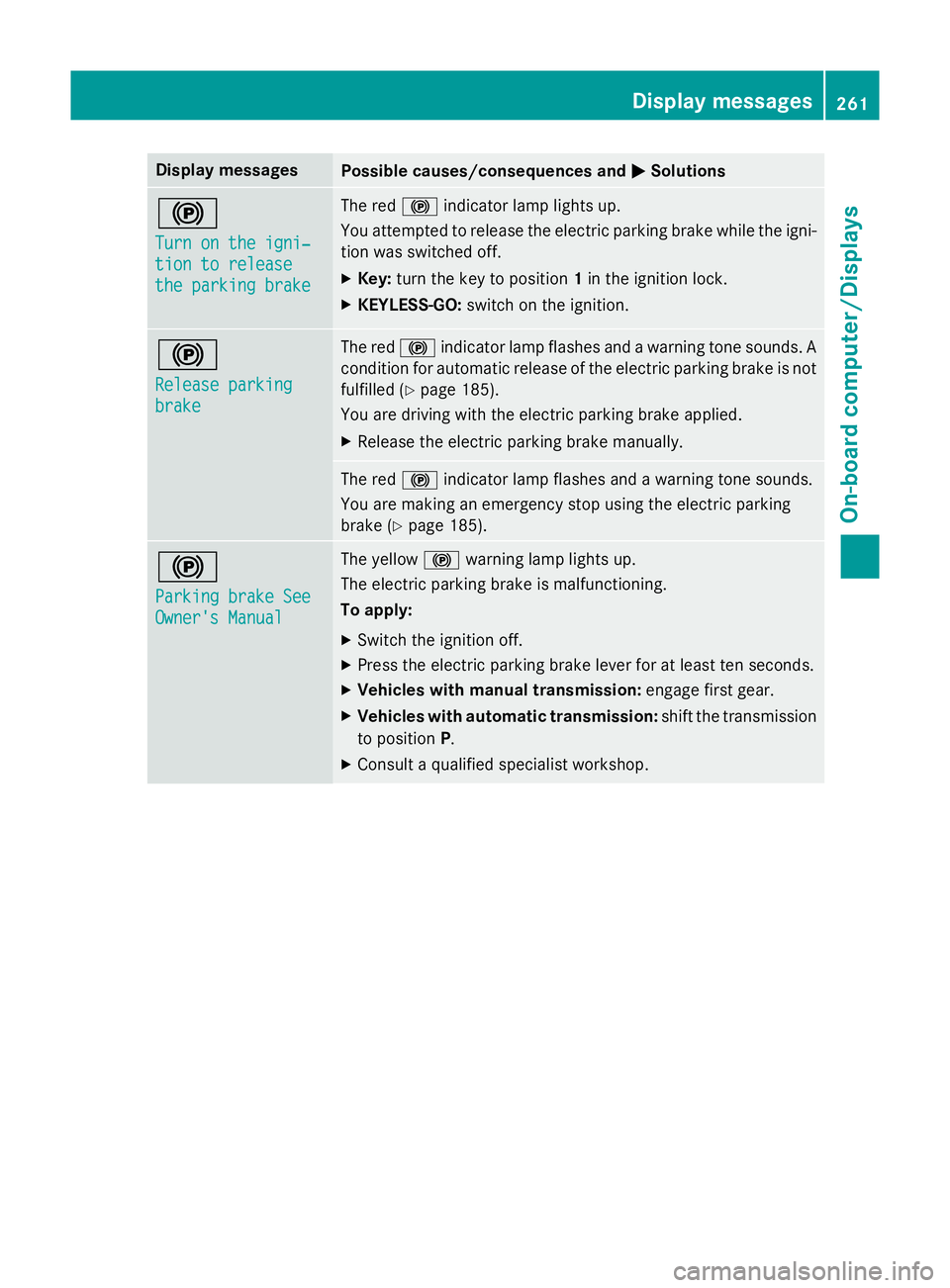
Turn on the igni‐ Turn on the igni‐
tion to release tion to release
the parking brake the parking brake The red
!indicator lamp lights up.
You attempted to release the electric parking brake while the igni-
tion was switched off.
X Key: turn the key to position 1in the ignition lock.
X KEYLESS-GO: switch on the ignition. !
Release parking Release parking
brake brake The red
!indicator lamp flashes and a warning tone sounds. A
condition for automatic release of the electric parking brake is not
fulfilled (Y page 185).
You are driving with the electric parking brake applied.
X Release the electric parking brake manually. The red
!indicator lamp flashes and a warning tone sounds.
You are making an emergency stop using the electric parking
brake (Y page 185). !
Parking brake See Parking brake See
Owner's Manual Owner's Manual The yellow
!warning lamp lights up.
The electric parking brake is malfunctioning.
To apply:
X Switch the ignition off.
X Press the electric parking brake lever for at least ten seconds.
X Vehicles with manual transmission: engage first gear.
X Vehicles with automatic transmission: shift the transmission
to position P.
X Consult a qualified specialist workshop. Display
messages
261On-board computer/Displays Z
Page 265 of 417
Display messages
Possible causes/consequences and
M
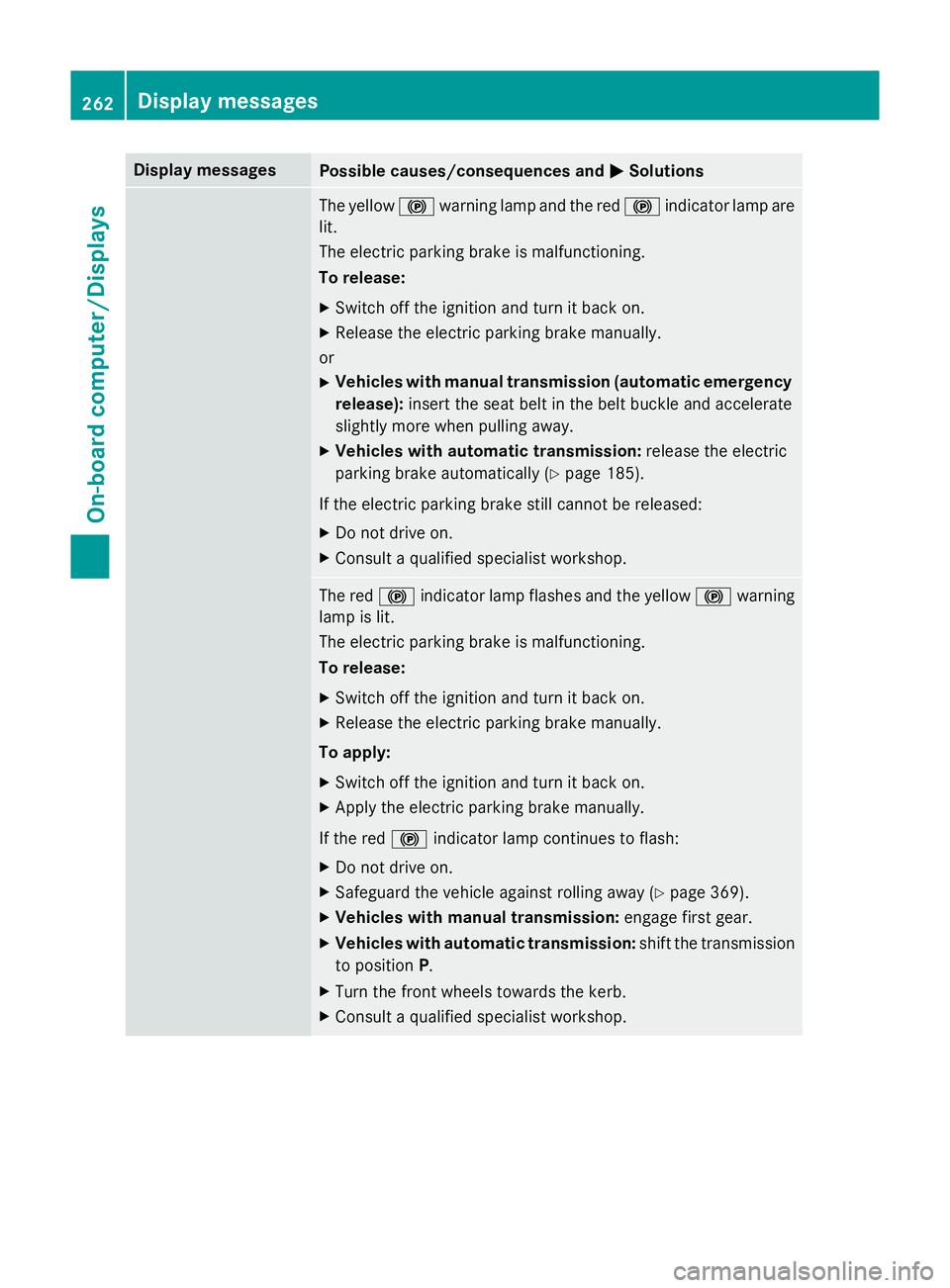
MSolutions The yellow
!warning lamp and the red !indicator lamp are
lit.
The electric parking brake is malfunctioning.
To release:
X Switch off the ignition and turn it back on.
X Release the electric parking brake manually.
or X Vehicles with manual transmission (automatic emergency
release): insert the seat belt in the belt buckle and accelerate
slightly more when pulling away.
X Vehicles with automatic transmission: release the electric
parking brake automatically (Y page 185).
If the electric parking brake still cannot be released: X Do not drive on.
X Consult a qualified specialist workshop. The red
!indicator lamp flashes and the yellow !warning
lamp is lit.
The electric parking brake is malfunctioning.
To release:
X Switch off the ignition and turn it back on.
X Release the electric parking brake manually.
To apply:
X Switch off the ignition and turn it back on.
X Apply the electric parking brake manually.
If the red !indicator lamp continues to flash:
X Do not drive on.
X Safeguard the vehicle against rolling away (Y page 369).
X Vehicles with manual transmission: engage first gear.
X Vehicles with automatic transmission: shift the transmission
to position P.
X Turn the front wheels towards the kerb.
X Consult a qualified specialist workshop. 262
Display
messagesOn-board computer/Displays
Page 266 of 417
Display messages
Possible causes/consequences and
M
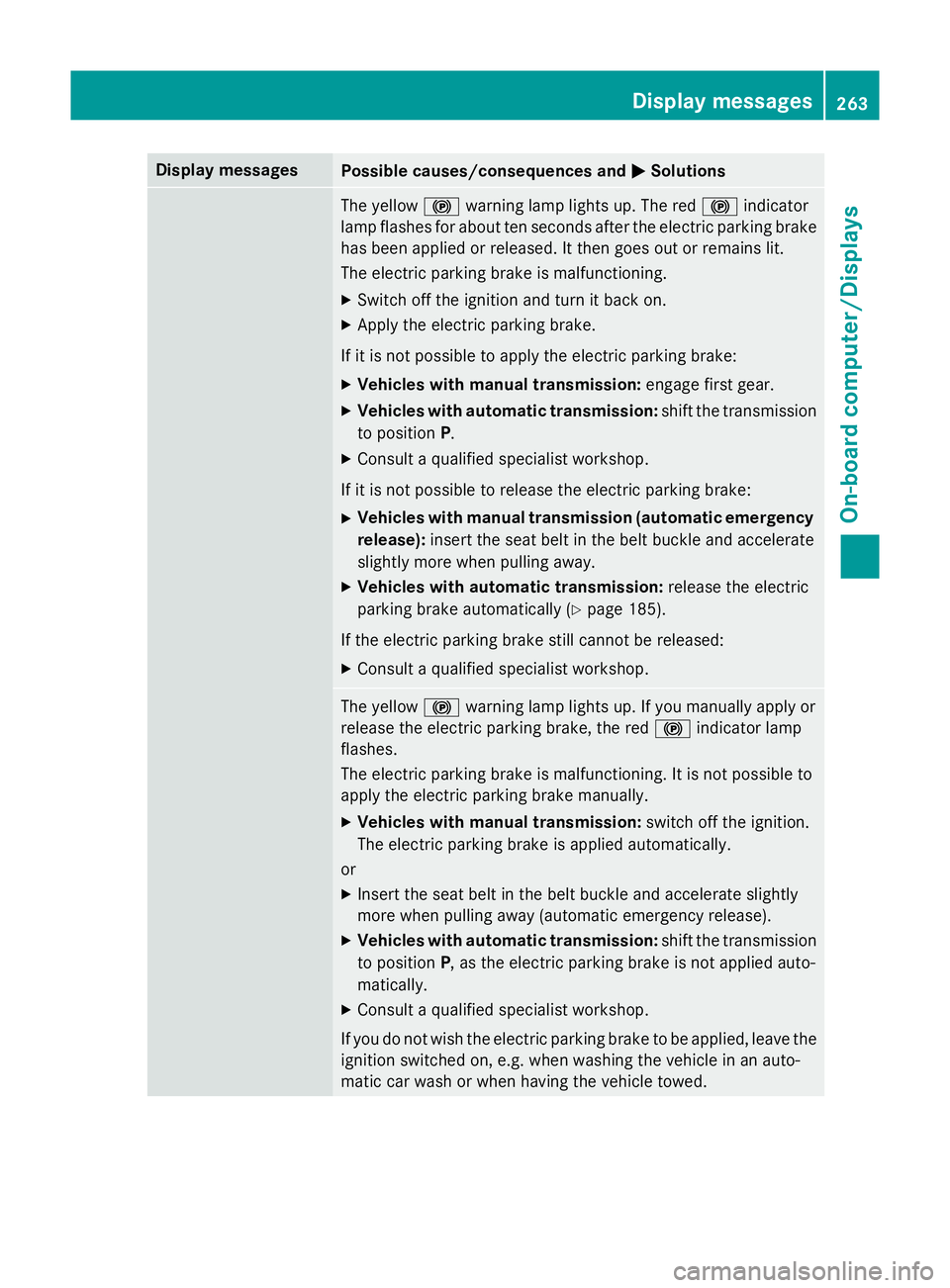
MSolutions The yellow
!warning lamp lights up. The red !indicator
lamp flashes for about ten seconds after the electric parking brake
has been applied or released. It then goes out or remains lit.
The electric parking brake is malfunctioning.
X Switch off the ignition and turn it back on.
X Apply the electric parking brake.
If it is not possible to apply the electric parking brake:
X Vehicles with manual transmission: engage first gear.
X Vehicles with automatic transmission: shift the transmission
to position P.
X Consult a qualified specialist workshop.
If it is not possible to release the electric parking brake: X Vehicles with manual transmission (automatic emergency
release): insert the seat belt in the belt buckle and accelerate
slightly more when pulling away.
X Vehicles with automatic transmission: release the electric
parking brake automatically (Y page 185).
If the electric parking brake still cannot be released: X Consult a qualified specialist workshop. The yellow
!warning lamp lights up. If you manually apply or
release the electric parking brake, the red !indicator lamp
flashes.
The electric parking brake is malfunctioning. It is not possible to
apply the electric parking brake manually.
X Vehicles with manual transmission: switch off the ignition.
The electric parking brake is applied automatically.
or
X Insert the seat belt in the belt buckle and accelerate slightly
more when pulling away (automatic emergency release).
X Vehicles with automatic transmission: shift the transmission
to position P, as the electric parking brake is not applied auto-
matically.
X Consult a qualified specialist workshop.
If you do not wish the electric parking brake to be applied, leave the
ignition switched on, e.g. when washing the vehicle in an auto-
matic car wash or when having the vehicle towed. Display
messages
263On-board computer/Displays Z
Page 267 of 417
Display messages
Possible causes/consequences and
M
MSolutions !
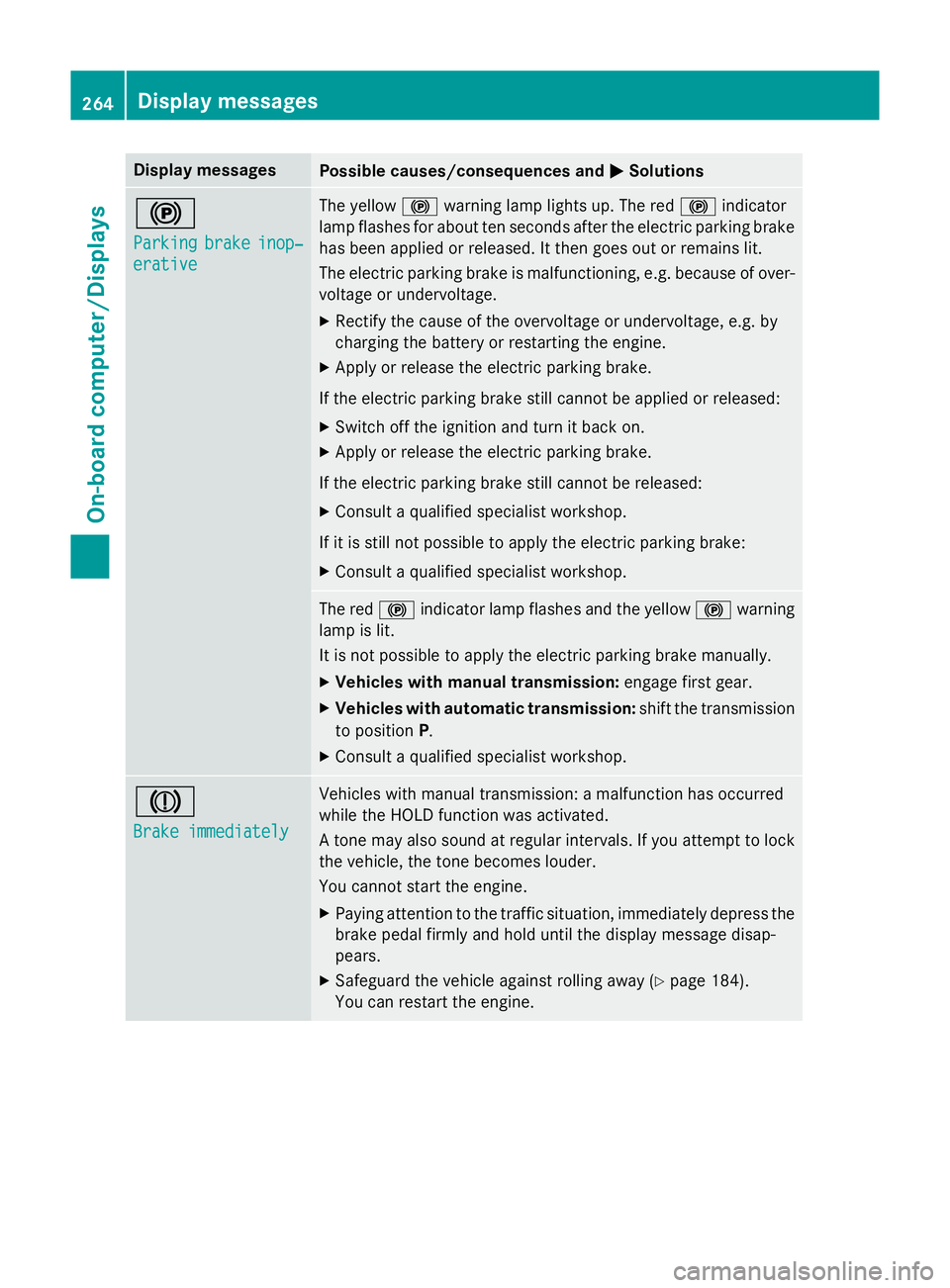
Parking Parking
brake
brakeinop‐
inop‐
erative
erative The yellow
!warning lamp lights up. The red !indicator
lamp flashes for about ten seconds after the electric parking brake
has been applied or released. It then goes out or remains lit.
The electric parking brake is malfunctioning, e.g. because of over- voltage or undervoltage.
X Rectify the cause of the overvoltage or undervoltage, e.g. by
charging the battery or restarting the engine.
X Apply or release the electric parking brake.
If the electric parking brake still cannot be applied or released: X Switch off the ignition and turn it back on.
X Apply or release the electric parking brake.
If the electric parking brake still cannot be released: X Consult a qualified specialist workshop.
If it is still not possible to apply the electric parking brake: X Consult a qualified specialist workshop. The red
!indicator lamp flashes and the yellow !warning
lamp is lit.
It is not possible to apply the electric parking brake manually.
X Vehicles with manual transmission: engage first gear.
X Vehicles with automatic transmission: shift the transmission
to position P.
X Consult a qualified specialist workshop. J
Brake immediately Brake immediately Vehicles with manual transmission: a malfunction has occurred
while the HOLD function was activated.
A tone may also sound at regular intervals. If you attempt to lock the vehicle, the tone becomes louder.
You cannot start the engine.
X Paying attention to the traffic situation, immediately depress the
brake pedal firmly and hold until the display message disap-
pears.
X Safeguard the vehicle against rolling away (Y page 184).
You can restart the engine. 264
Display
messagesOn-board computer/Displays
Page 272 of 417
Display messages
Possible causes/consequences and
M
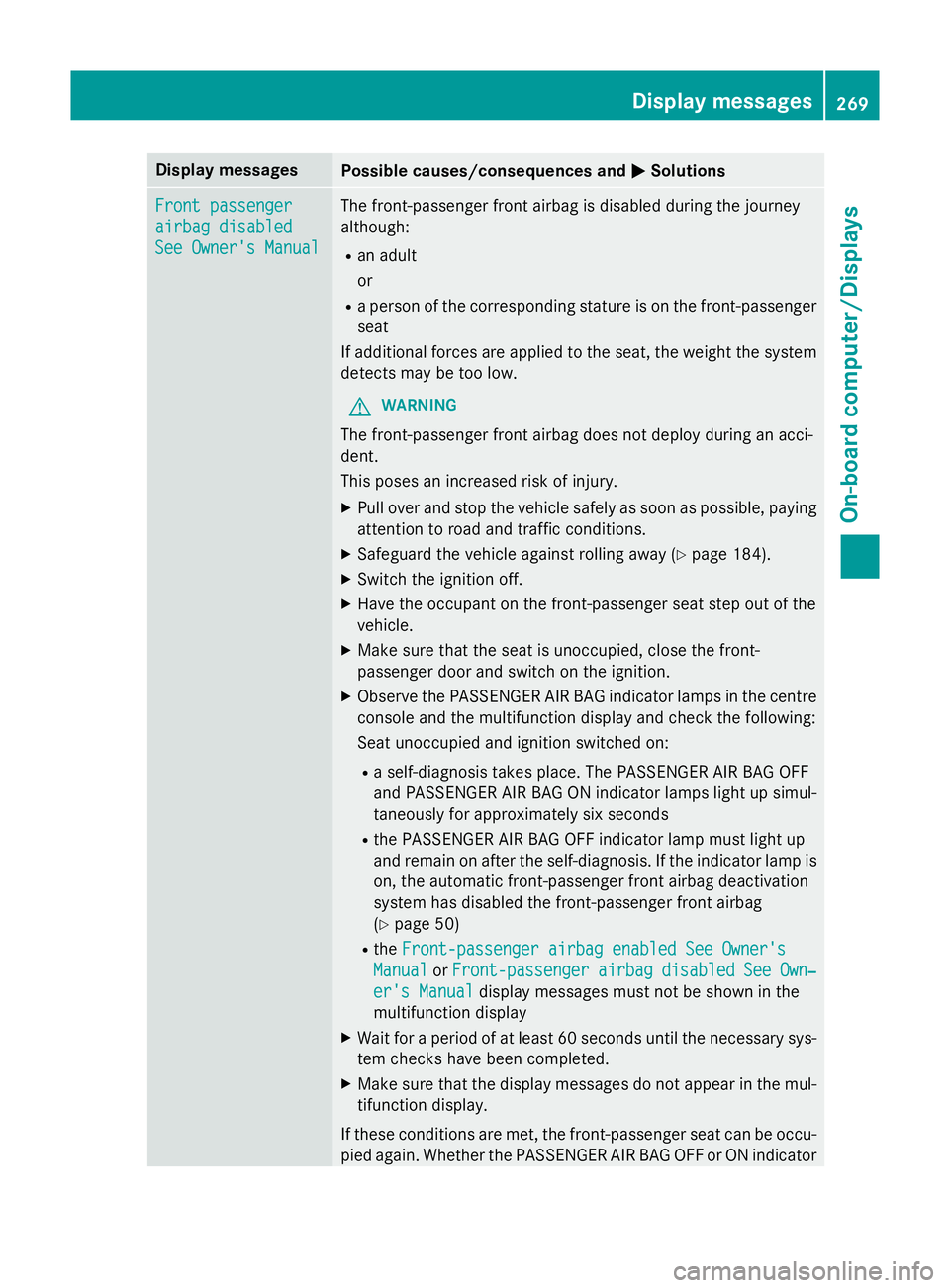
MSolutions Front passenger
Front passenger
airbag disabled airbag disabled
See Owner's Manual See Owner's Manual The front-passenger front airbag is disabled during the journey
although:
R an adult
or
R a person of the corresponding stature is on the front-passenger
seat
If additional forces are applied to the seat, the weight the system detects may be too low.
G WARNING
The front-passenger front airbag does not deploy during an acci-
dent.
This poses an increased risk of injury. X Pull over and stop the vehicle safely as soon as possible, paying
attention to road and traffic conditions.
X Safeguard the vehicle against rolling away (Y page 184).
X Switch the ignition off.
X Have the occupant on the front-passenger seat step out of the
vehicle.
X Make sure that the seat is unoccupied, close the front-
passenger door and switch on the ignition.
X Observe the PASSENGER AIR BAG indicator lamps in the centre
console and the multifunction display and check the following:
Seat unoccupied and ignition switched on:
R a self-diagnosis takes place. The PASSENGER AIR BAG OFF
and PASSENGER AIR BAG ON indicator lamps light up simul-
taneously for approximately six seconds
R the PASSENGER AIR BAG OFF indicator lamp must light up
and remain on after the self-diagnosis. If the indicator lamp is on, the automatic front-passenger front airbag deactivation
system has disabled the front-passenger front airbag
(Y page 50)
R the Front-passenger airbag enabled See Owner's
Front-passenger airbag enabled See Owner's
Manual Manual orFront-passenger
Front-passenger airbag
airbagdisabled
disabled See
See Own‐
Own‐
er's Manual
er's Manual display messages must not be shown in the
multifunction display
X Wait for a period of at least 60 seconds until the necessary sys-
tem checks have been completed.
X Make sure that the display messages do not appear in the mul-
tifunction display.
If these conditions are met, the front-passenger seat can be occu- pied again. Whether the PASSENGER AIR BAG OFF or ON indicator Display
messages
269On-board computer/Displays Z
Page 273 of 417
Display messages
Possible causes/consequences and
M
MSolutions lamp remains lit or goes out depends on how the automatic front-
passenger front airbag deactivation system classifies the occu-
pant.
If the conditions are not met, the system is not operating correctly.
X Consult a qualified specialist workshop immediately.
Further information on the automatic front-passenger front airbag deactivation feature (Y page 49).Front-passenger Front-passenger
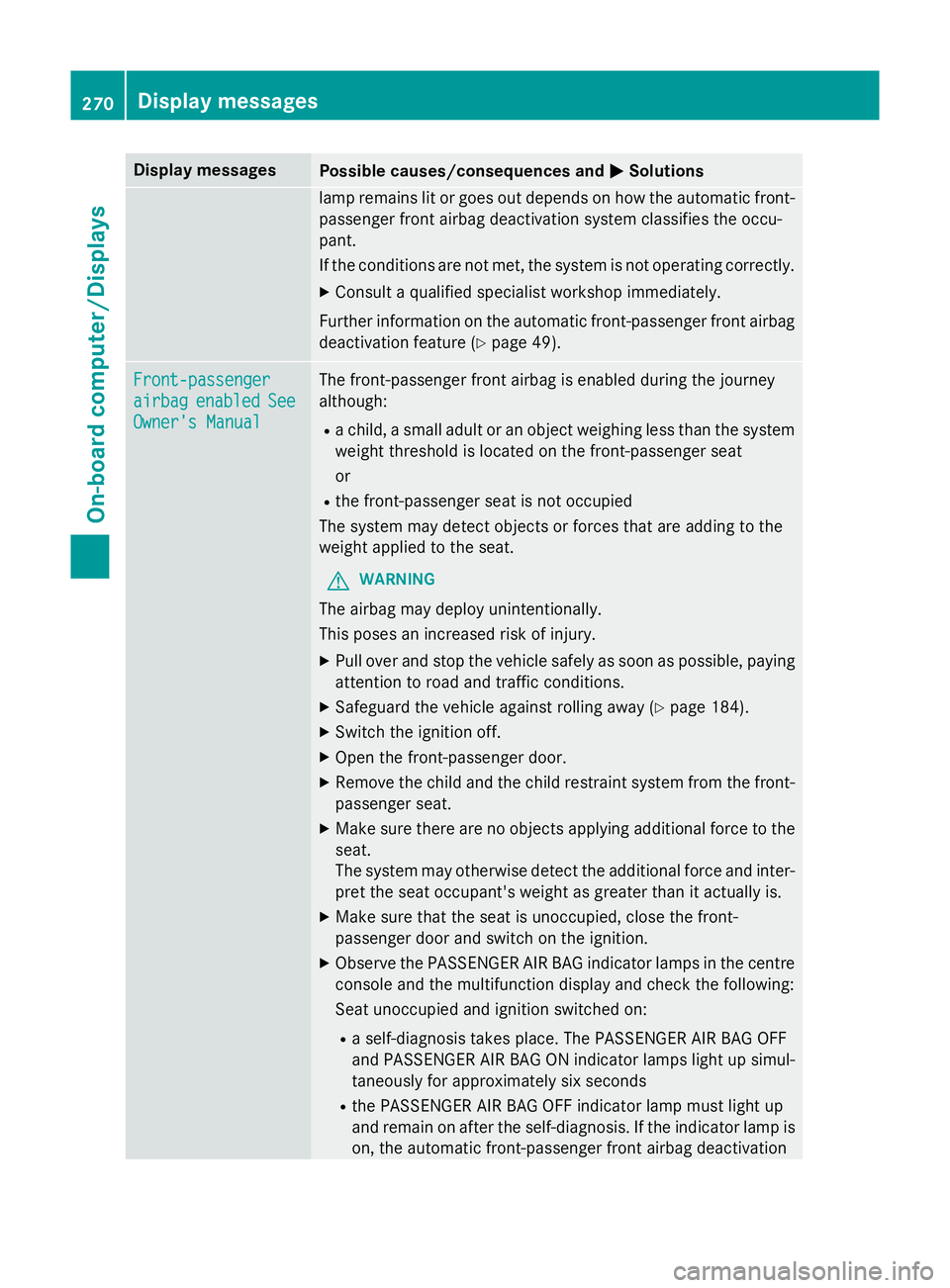
airbag airbag
enabled
enabled See
See
Owner's Manual
Owner's Manual The front-passenger front airbag is enabled during the journey
although:
R a child, a small adult or an object weighing less than the system
weight threshold is located on the front-passenger seat
or
R the front-passenger seat is not occupied
The system may detect objects or forces that are adding to the
weight applied to the seat.
G WARNING
The airbag may deploy unintentionally.
This poses an increased risk of injury. X Pull over and stop the vehicle safely as soon as possible, paying
attention to road and traffic conditions.
X Safeguard the vehicle against rolling away (Y page 184).
X Switch the ignition off.
X Open the front-passenger door.
X Remove the child and the child restraint system from the front-
passenger seat.
X Make sure there are no objects applying additional force to the
seat.
The system may otherwise detect the additional force and inter-
pret the seat occupant's weight as greater than it actually is.
X Make sure that the seat is unoccupied, close the front-
passenger door and switch on the ignition.
X Observe the PASSENGER AIR BAG indicator lamps in the centre
console and the multifunction display and check the following:
Seat unoccupied and ignition switched on:
R a self-diagnosis takes place. The PASSENGER AIR BAG OFF
and PASSENGER AIR BAG ON indicator lamps light up simul-
taneously for approximately six seconds
R the PASSENGER AIR BAG OFF indicator lamp must light up
and remain on after the self-diagnosis. If the indicator lamp is
on, the automatic front-passenger front airbag deactivation 270
Display
messagesOn-board computer/Displays
Page 293 of 417
Display messages
Possible causes/consequences and
M
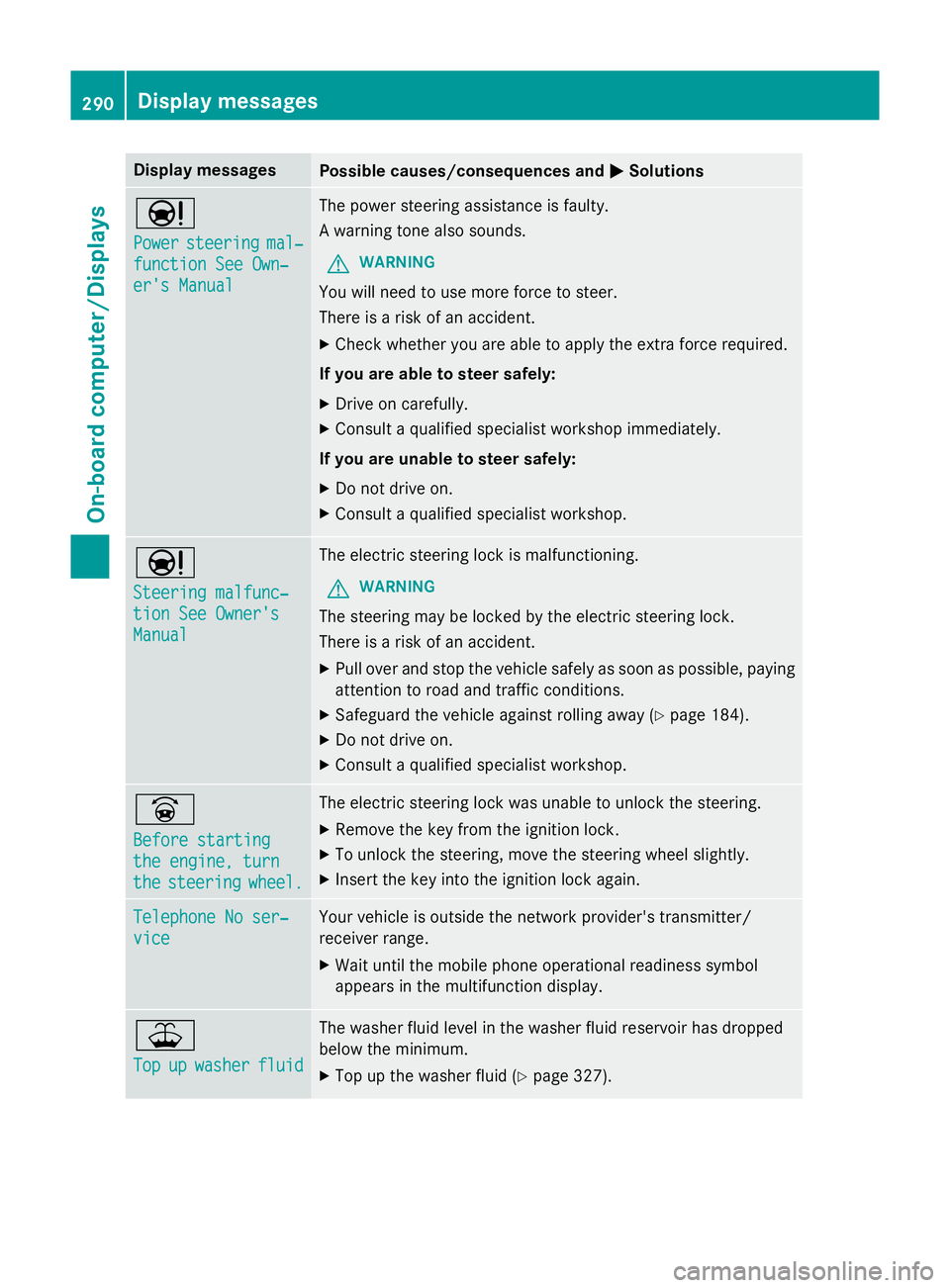
MSolutions Ð
Power Power
steering
steering mal‐
mal‐
function See Own‐
function See Own‐
er's Manual er's Manual The power steering assistance is faulty.
A warning tone also sounds.
G WARNING
You will need to use more force to steer.
There is a risk of an accident. X Check whether you are able to apply the extra force required.
If you are able to steer safely: X Drive on carefully.
X Consult a qualified specialist workshop immediately.
If you are unable to steer safely:
X Do not drive on.
X Consult a qualified specialist workshop. Ð
Steering malfunc‐ Steering malfunc‐
tion See Owner's tion See Owner's
Manual Manual The electric steering lock is malfunctioning.
G WARNING
The steering may be locked by the electric steering lock.
There is a risk of an accident. X Pull over and stop the vehicle safely as soon as possible, paying
attention to road and traffic conditions.
X Safeguard the vehicle against rolling away (Y page 184).
X Do not drive on.
X Consult a qualified specialist workshop. _
Before starting Before starting
the engine, turn the engine, turn
the the
steering
steering wheel.
wheel. The electric steering lock was unable to unlock the steering.
X Remove the key from the ignition lock.
X To unlock the steering, move the steering wheel slightly.
X Insert the key into the ignition lock again. Telephone No ser‐
Telephone No ser‐
vice vice Your vehicle is outside the network provider's transmitter/
receiver range.
X Wait until the mobile phone operational readiness symbol
appears in the multifunction display. ¥
Top Top
up
upwasher
washer fluid
fluid The washer fluid level in the washer fluid reservoir has dropped
below the minimum.
X Top up the washer fluid (Y page 327).290
Display
messagesOn-board computer/Displays
Page 294 of 417
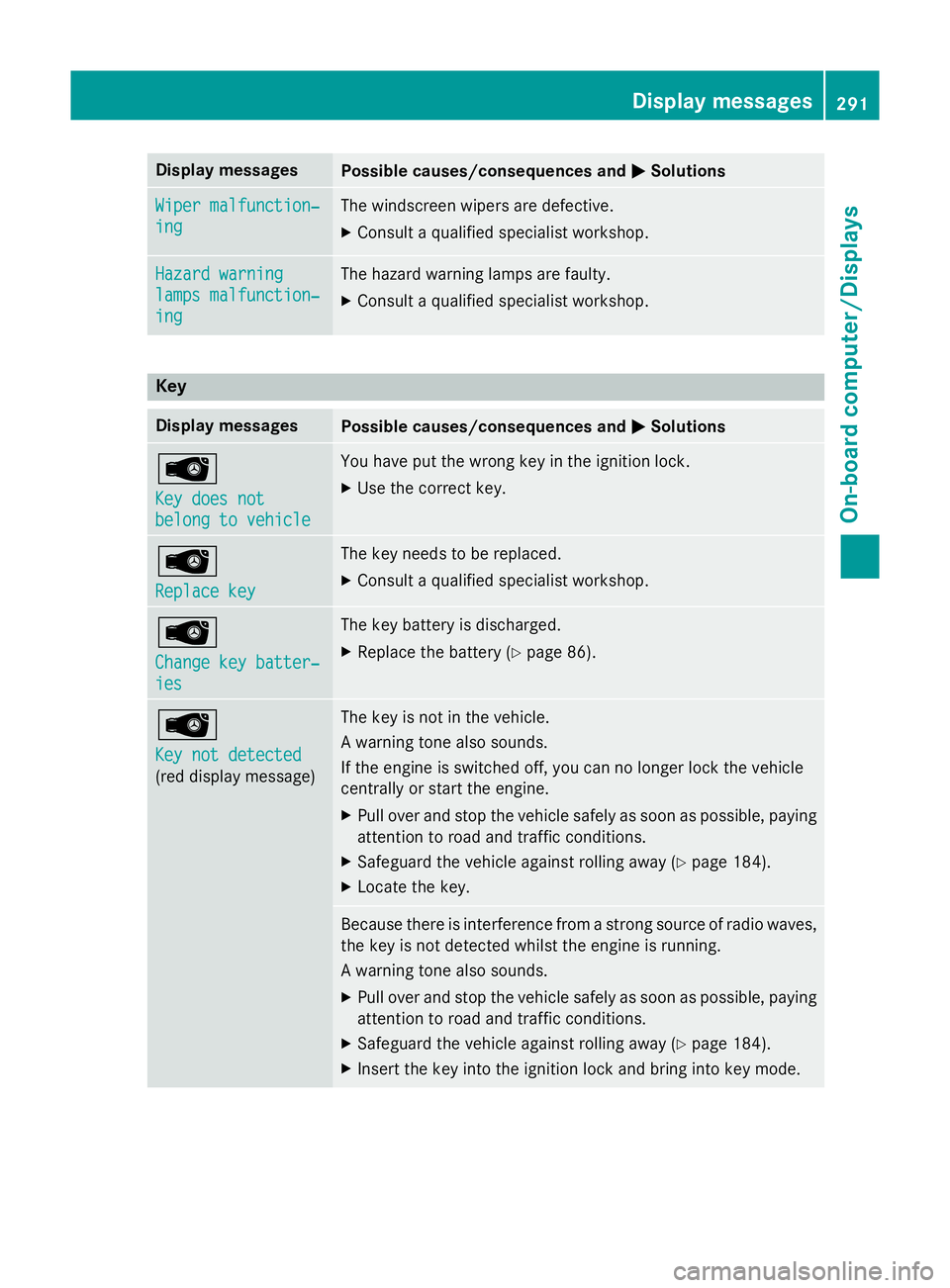
Display messages
Possible causes/consequences and
M
MSolutions Wiper malfunction‐
Wiper malfunction‐
ing ing The windscreen wipers are defective.
X Consult a qualified specialist workshop. Hazard warning
Hazard warning
lamps malfunction‐ lamps malfunction‐
ing ing The hazard warning lamps are faulty.
X Consult a qualified specialist workshop. Key
Display messages
Possible causes/consequences and
M
MSolutions Â
Key does not Key does not
belong to vehicle belong to vehicle You have put the wrong key in the ignition lock.
X Use the correct key. Â
Replace key Replace key The key needs to be replaced.
X Consult a qualified specialist workshop. Â
Change key batter‐ Change key batter‐
ies ies The key battery is discharged.
X Replace the battery (Y page 86).Â
Key not detected Key not detected
(red display message) The key is not in the vehicle.
A warning tone also sounds.
If the engine is switched off, you can no longer lock the vehicle
centrally or start the engine.
X Pull over and stop the vehicle safely as soon as possible, paying
attention to road and traffic conditions.
X Safeguard the vehicle against rolling away (Y page 184).
X Locate the key. Because there is interference from a strong source of radio waves,
the key is not detected whilst the engine is running.
A warning tone also sounds.
X Pull over and stop the vehicle safely as soon as possible, paying
attention to road and traffic conditions.
X Safeguard the vehicle against rolling away (Y page 184).
X Insert the key into the ignition lock and bring into key mode. Display
messages
291On-board computer/Displays Z
Page 295 of 417
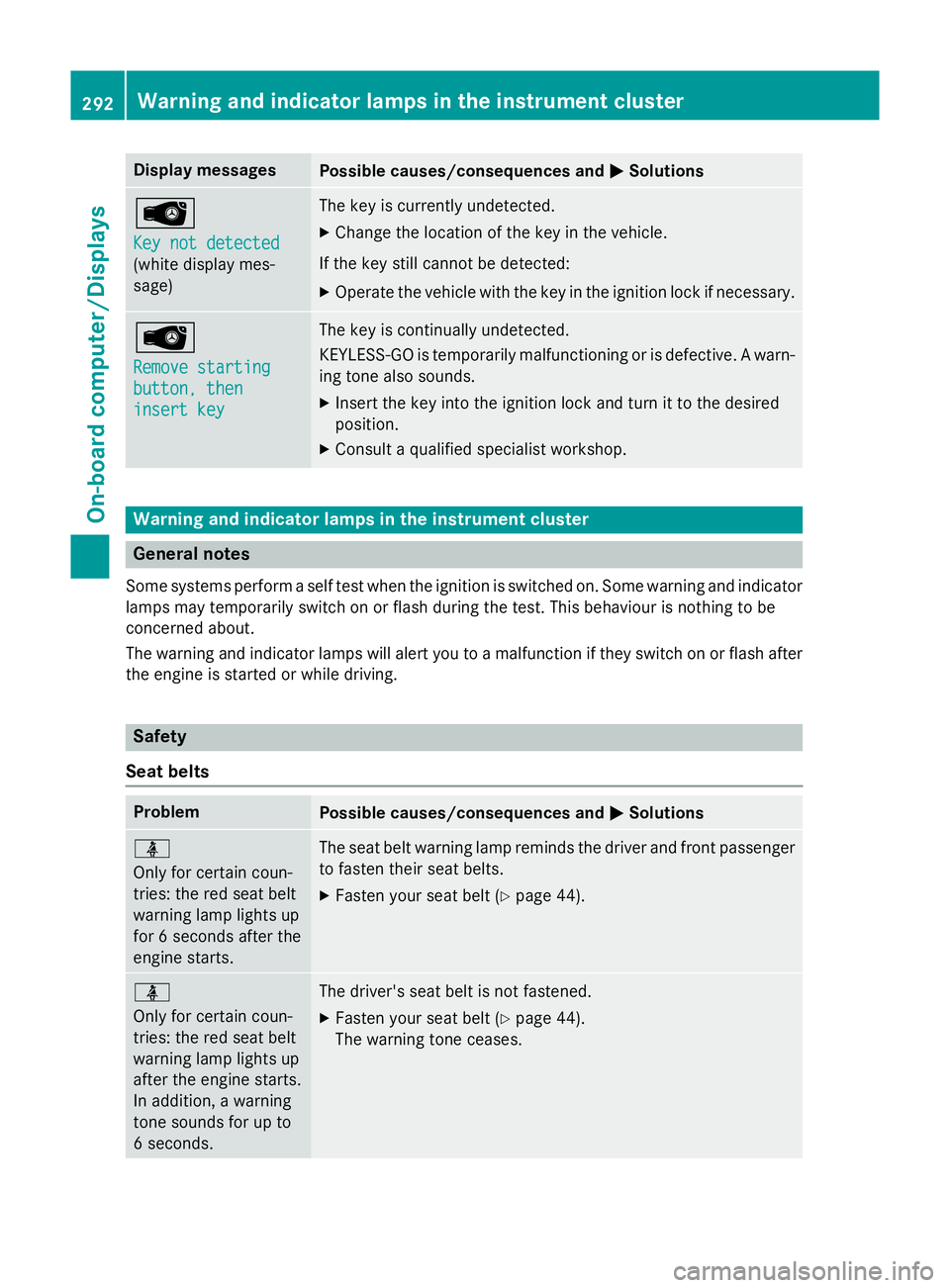
Display messages
Possible causes/consequences and
M
MSolutions Â
Key not detected Key not detected
(white display mes-
sage) The key is currently undetected.
X Change the location of the key in the vehicle.
If the key still cannot be detected: X Operate the vehicle with the key in the ignition lock if necessary. Â
Remove starting Remove starting
button, then button, then
insert key insert key The key is continually undetected.
KEYLESS-GO is temporarily malfunctioning or is defective. A warn-
ing tone also sounds.
X Insert the key into the ignition lock and turn it to the desired
position.
X Consult a qualified specialist workshop. Warning and indicator lamps in the instrument cluster
General notes
Some systems perform a self test when the ignition is switched on. Some warning and indicator
lamps may temporarily switch on or flash during the test. This behaviour is nothing to be
concerned about.
The warning and indicator lamps will alert you to a malfunction if they switch on or flash after the engine is started or while driving. Safety
Seat belts Problem
Possible causes/consequences and
M MSolutions ü
Only for certain coun-
tries: the red seat belt
warning lamp lights up
for 6 seconds after the
engine starts.
The seat belt warning lamp reminds the driver and front passenger
to fasten their seat belts.
X Fasten your seat belt (Y page 44).ü
Only for certain coun-
tries: the red seat belt
warning lamp lights up
after the engine starts.
In addition, a warning
tone sounds for up to
6 seconds. The driver's seat belt is not fastened.
X Fasten your seat belt (Y page 44).
The warning tone ceases. 292
Wa
rning and indi cator lamps in the instrument clusterOn-board computer/Displays