fuel reserve MERCEDES-BENZ A-CLASS HATCHBACK 2015 Owners Manual
[x] Cancel search | Manufacturer: MERCEDES-BENZ, Model Year: 2015, Model line: A-CLASS HATCHBACK, Model: MERCEDES-BENZ A-CLASS HATCHBACK 2015Pages: 417, PDF Size: 11.91 MB
Page 14 of 417
Folding in when locking (on-board
computer) ...................................... 253
Folding in/out (automatically )....... 114
Folding in/out (electrically) ........... 114
Out of position (troubleshooting) ... 114
Parking position ............................. 115
Resetting ....................................... 114
Storing settings (memory func-
tion) ............................................... 116 F
Fault message see Display messages
Filler cap
see Fuel filler flap
Fire extinguisher ............................... 339
First-aid kit ......................................... 338
Fitting a wheel
Fitting a wheel ............................... 371
Lowering the vehicle ...................... 372
Preparing the vehicle ..................... 368
Raising the vehicle ......................... 369
Removing a wheel .......................... 371
Securing the vehicle against roll-
ing away ........................................ 369
Flat tyre
Changing a wheel/fitting the
spare wheel ................................... 367
MOExtended tyre s......................... 340
Preparing the vehicle ..................... 340
TIREFIT kit ...................................... 341
see Emergency spare wheel
Floormat ............................................. 319
Frequencies
Mobile phone ................................. 394
Two-way radio ................................ 394
Front-passenger front airbag deac-
tivation
Display message ............................ 270
Front-passenger front airbag deac-
tivation system
Operation ......................................... 50
Problems ......................................... 54
System self-test ............................... 52
Fuel
Additives ........................................ 399
Consumption information .............. 400 Consumption statistics .................. 242
Displaying the current consump-
tion ................................................ 242
Displaying the range ...................... 242
Driving tip
s.................................... 188
E10 ................................................ 398
Fuel gaug e....................................... 30
Grade (petrol) ................................ 398
Important safety notes .................. 397
Low outside temperatures ............. 400
Notes for Mercedes‑ AMG vehi-
cles ................................................ 398
Problem (malfunction) ................... 183
Quality (diesel )............................... 399
Refuelling ....................................... 180
Tank content/reserve fue l............. 397
Fuel filler flap
Opening ......................................... 181
Fuel filter (white display message) .. 277
Fuel level
Calling up the range (on-board
computer) ...................................... 242
Gauge .............................................. 30
Fuel reserve
see Fuel
Fuel tank
Capacity ........................................ 397
Problem (malfunction) ................... 183
Fuses
Allocation chart ............................. 356
Before changing ............................. 355
Fuse box in the engine compart-
ment .............................................. 355
Fuse box in the front-passenger
footwell .......................................... 356
Important safety notes .................. 355 G
Gear indicator (on-board com-
puter, Mercedes-AMG vehicles) ....... 254
Gearshift program
SETUP (on-board computer) .......... 254
Genuine Mercedes-Benz parts ........... 22
Glove compartment .......................... 307 Index
11
Page 19 of 417
Rain closing feature (panorama
sliding sunroof)
................................. 100
Reading lamp ..................................... 124
Rear bench seat
Folding the backrest forwards/
back ............................................... 310
Rear compartment
Setting the air vents ...................... 154
Rear foglamp
Changing bulb s.............................. 128
Display message ............................ 273
Switching on/of f........................... 121
Rear lamps
see Lights
Rear shelf ........................................... 311
Rear window heating
Problem (fault) ............................... 146
Switching on/of f........................... 145
Rear window wiper
Replacing the wiper blad e.............. 132
Switching on/of f........................... 130
Rear-compartment seat belt sta-
tus indicator ........................................ 46
Rear-view mirror
Anti-dazzle mode (automatic) ........ 114
Dipping (manual) ........................... 113
Refuelling
Fuel gaug e....................................... 30
Important safety notes .................. 180
Notes for Mercedes‑ AMG vehi-
cles ................................................ 398
Refuelling process ......................... 181
see Fuel
Remote control
Auxiliary heating/ventilation .......... 149
Changing the batteries (auxiliary
heating) ......................................... 151
Replacing bulbs
Important safety notes .................. 125
Overview of bulb types .................. 126
Removing/replacing the cover
(front wheel arch) .......................... 127
Replacing the battery (auxiliary
heating remote control) .................... 151
Rescue card ......................................... 25
Reserve (fuel tank)
see Fuel Reserve fuel
Display message ............................ 277
Warning lamp ................................. 301
Residual heat (climate control) ........ 147
Restraint system
Display message ............................ 267
Introduction ..................................... 40
Warning lamp ................................. 300
Warning lamp (function) ................... 41
Rev counter ........................................ 239
Reverse gear
Engaging (manual transmission) .... 168
Reverse gear (selector lever) ........... 172
Reversing camera
Cleaning instructions ..................... 333
Displays in the Audio display ......... 218
Displays in the COMAND display ... 218
Function/note s............................. 217
Switching on/of f........................... 218
Reversing feature
Panorama sliding sunroo f................ 99
Side windows ................................... 94
Reversing function
Roller sunblind ............................... 101
Reversing lamp
Changing bulb s.............................. 128
Reversing lamps
Display message ............................ 273
Roller sunblind
Panorama sliding sunroo f.............. 100
Roof carrier ........................................ 313
Roof lining and carpets (cleaning
instructions) ...................................... 335
Roof load (maximum) ........................ 404 S
Safety Children in the vehicle ..................... 57
Safety system
see Driving safety systems
Seat
Adjusting (Performance Seat) ........ 111
Folding the backrest (rear com-
partment) forwards/back .............. 310
Seat belt
Correct usage .................................. 44 16
Index
Page 24 of 417
LIM (variable SPEEDTRONIC) .........1
95
Overview .......................................... 31
PASSENGER AIR BAG ..................... .41
Reserve fuel .................................. .301
Seat belt ........................................ 292
Tyre pressure monitor ................... 304
Warning triangle ................................ 338
Washer fluid
Display message ............................ 290
Wheel and tyre combinations
Tyres .............................................. 374
Wheel bolt tightening torque ........... 372
Wheel chock ...................................... 369
Wheels
Changing a wheel .......................... 367
Changing/replacing ....................... 367
Checking ........................................ 359
Cleaning ......................................... 331
Emergency spare wheel ................. 389
Fitting a new wheel ........................ 371
General notes ................................ 372
Important safety notes .................. 358
Information on driving .................... 358
Removing a wheel .......................... 371
Storing .......................................... .368
Tightening torque ........................... 372
Wheel size/tyre size ..................... .372
Windowbag
Display message ............................ 268
Operation ......................................... 49
Windows
Cleaning ......................................... 331
see Side windows
Windscreen
Demisting ...................................... 144
Windscreen washer fluid
see Windscreen washer system
Windscreen washer system
Important safety notes .................. 403
Topping up ..................................... 327
Windscreen wipers
Display message ............................ 291
Problem (malfunction) ................... 134
Rear window wiper ........................ 130
Replacing the wiper blades ............ 130
Switching on/off ........................... 129
Winter driving
General notes ................................ 360 Winter operation
Slippery road surfaces ................... 191
Snow chains .................................. 361
Winter tyres
Limiting the speed (on-board com-
puter) ............................................. 251
M+S tyres ...................................... 360
Wiper blades
Cleaning ......................................... 332
Important safety notes .................. 130
Replacing (on the rear window) ..... 132
Replacing (windscreen) .................. 131
Wooden trim (cleaning instruc-
tions) ................................................. .335
Workshop
see Qualified specialist workshop Z
ZONE function Switching on/off ........................... 143 Index
21
Page 34 of 417
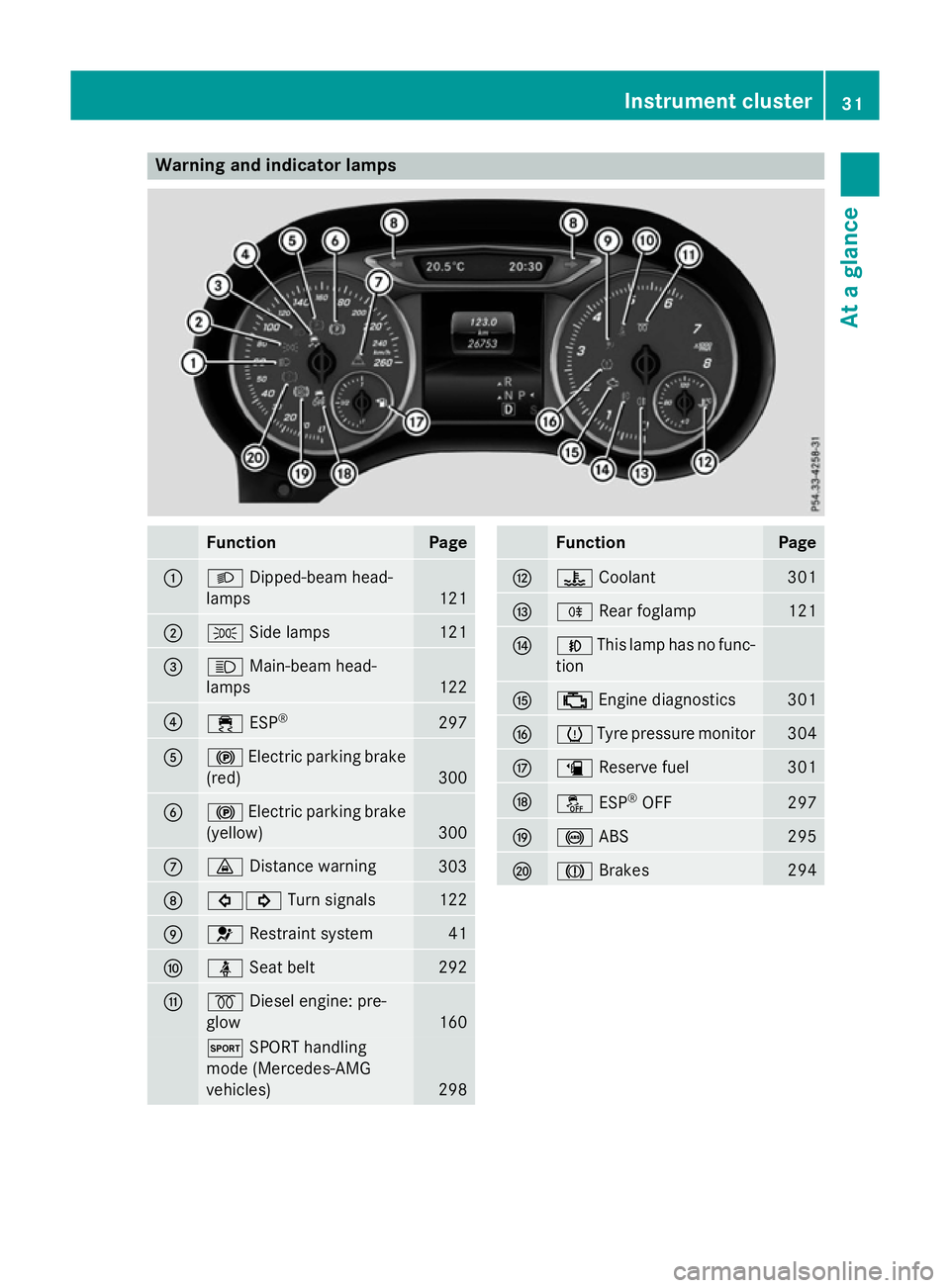
Warning and indicator lamps
Function Page
:
L
Dipped-beam head-
lamps 121
;
T
Side lamps 121
=
K
Main-beam head-
lamps 122
?
÷
ESP® 297
A
!
Electric parking brake
(red) 300
B
!
Electric parking brake
(yellow) 300
C
·
Distance warning 303
D
#!
Turn signals 122
E
6
Restraint system 41
F
ü
Seat belt 292
G
%
Diesel engine: pre-
glow 160
M
SPORT handling
mode (Mercedes-AMG
vehicles) 298 Function Page
H
?
Coolant 301
I
R
Rear foglamp 121
J
N
This lamp has no func-
tion K
;
Engine diagnostics 301
L
h
Tyre pressure monitor 304
M
æ
Reserve fuel 301
N
å
ESP®
OFF 297
O
!
ABS 295
P
J
Brakes 294Instrument cluster
31At a glance
Page 156 of 417
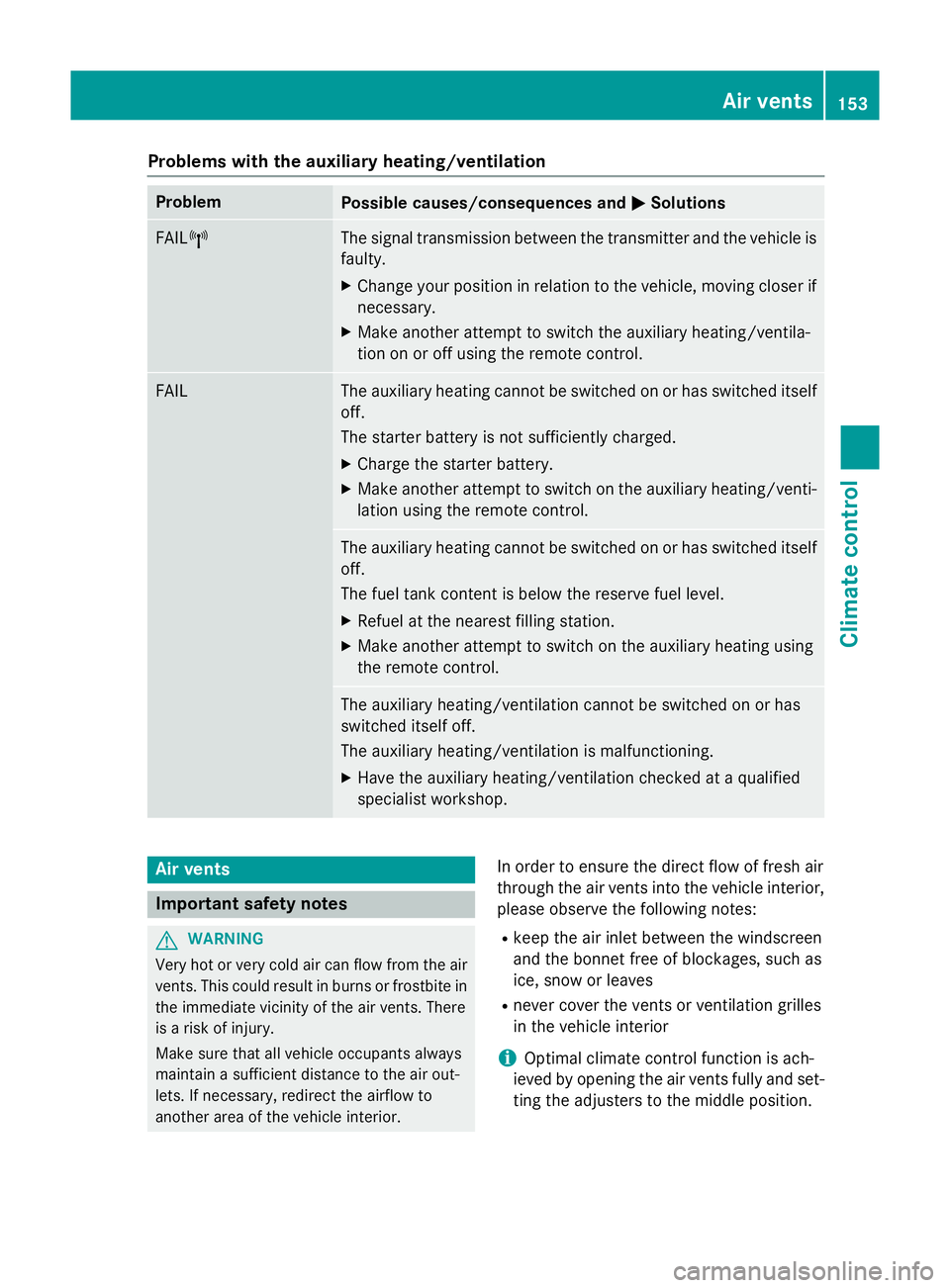
Problems with the auxiliary heating/ventilation
Problem
Possible causes/consequences and
M
MSolutions FAIL¨ The signal transmission between the transmitter and the vehicle is
faulty.
X Change your position in relation to the vehicle, moving closer if
necessary.
X Make another attempt to switch the auxiliary heating/ventila-
tion on or off using the remote control. FAIL The auxiliary heating cannot be switched on or has switched itself
off.
The starter battery is not sufficiently charged.
X Charge the starter battery.
X Make another attempt to switch on the auxiliary heating/venti-
lation using the remote control. The auxiliary heating cannot be switched on or has switched itself
off.
The fuel tank content is below the reserve fuel level.
X Refuel at the nearest filling station.
X Make another attempt to switch on the auxiliary heating using
the remote control. The auxiliary heating/ventilation cannot be switched on or has
switched itself off.
The auxiliary heating/ventilation is malfunctioning.
X Have the auxiliary heating/ventilation checked at a qualified
specialist workshop. Air vents
Important safety notes
G
WARNING
Very hot or very cold air can flow from the air vents. This could result in burns or frostbite in the immediate vicinity of the air vents. There
is a risk of injury.
Make sure that all vehicle occupants always
maintain a sufficient distance to the air out-
lets. If necessary, redirect the airflow to
another area of the vehicle interior. In order to ensure the direct flow of fresh air
through the air vents into the vehicle interior,
please observe the following notes:
R keep the air inlet between the windscreen
and the bonnet free of blockages, such as
ice, snow or leaves
R never cover the vents or ventilation grilles
in the vehicle interior
i Optimal climate control function is ach-
ieved by opening the air vents fully and set- ting the adjusters to the middle position. Air vents
153Climate control Z
Page 168 of 417
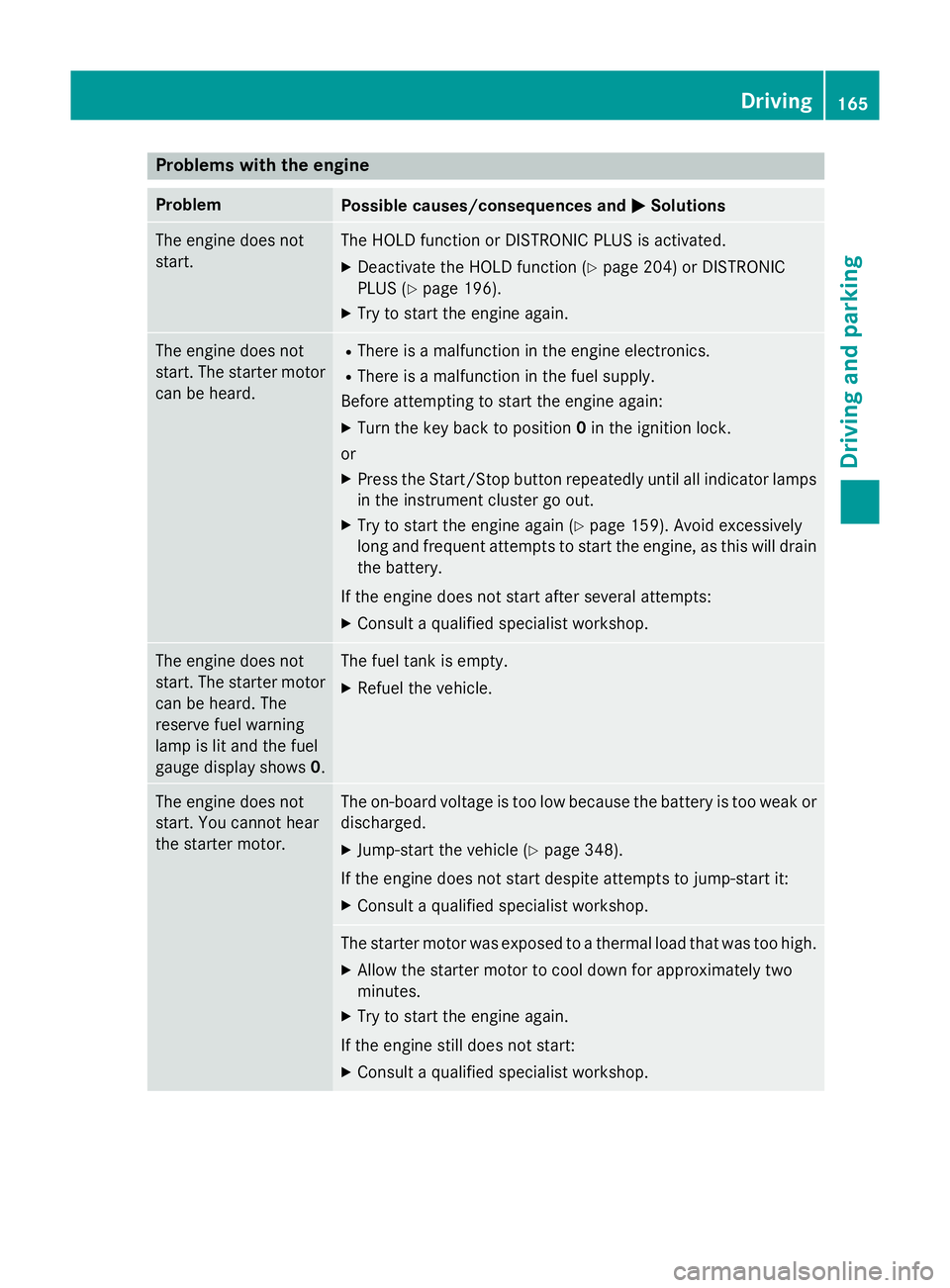
Problems with the engine
Problem
Possible causes/consequences and
M
MSolutions The engine does not
start. The HOLD function or DISTRONIC PLUS is activated.
X Deactivate the HOLD function (Y page 204) or DISTRONIC
PLUS (Y page 196).
X Try to start the engine again. The engine does not
start. The starter motor
can be heard. R
There is a malfunction in the engine electronics.
R There is a malfunction in the fuel supply.
Before attempting to start the engine again:
X Turn the key back to position 0in the ignition lock.
or
X Press the Start/Stop button repeatedly until all indicator lamps
in the instrument cluster go out.
X Try to start the engine again (Y page 159). Avoid excessively
long and frequent attempts to start the engine, as this will drain the battery.
If the engine does not start after several attempts: X Consult a qualified specialist workshop. The engine does not
start. The starter motor
can be heard. The
reserve fuel warning
lamp is lit and the fuel
gauge display shows 0. The fuel tank is empty.
X Refuel the vehicle. The engine does not
start. You cannot hear
the starter motor. The on-board voltage is too low because the battery is too weak or
discharged.
X Jump-start the vehicle (Y page 348).
If the engine does not start despite attempts to jump-start it:
X Consult a qualified specialist workshop. The starter motor was exposed to a thermal load that was too high.
X Allow the starter motor to cool down for approximately two
minutes.
X Try to start the engine again.
If the engine still does not start:
X Consult a qualified specialist workshop. Driving
165Driving and parking Z
Page 191 of 417
Drive sensibly – save fuel
Observe the following tips to save fuel:
R The tyres should always be inflated to the
recommended tyre pressure.
R Remove unnecessary loads.
R Remove roof racks when they are not nee-
ded.
R Warm up the engine at low engine speeds.
R Avoid frequent acceleration or braking.
R Have all maintenance work carried out as
indicated by the service intervals in the
Service Booklet or by the service interval
display.
Fuel consumption also increases when driv-
ing in cold weather, in stop-start traffic, on
short journeys and in hilly terrain. ECO display
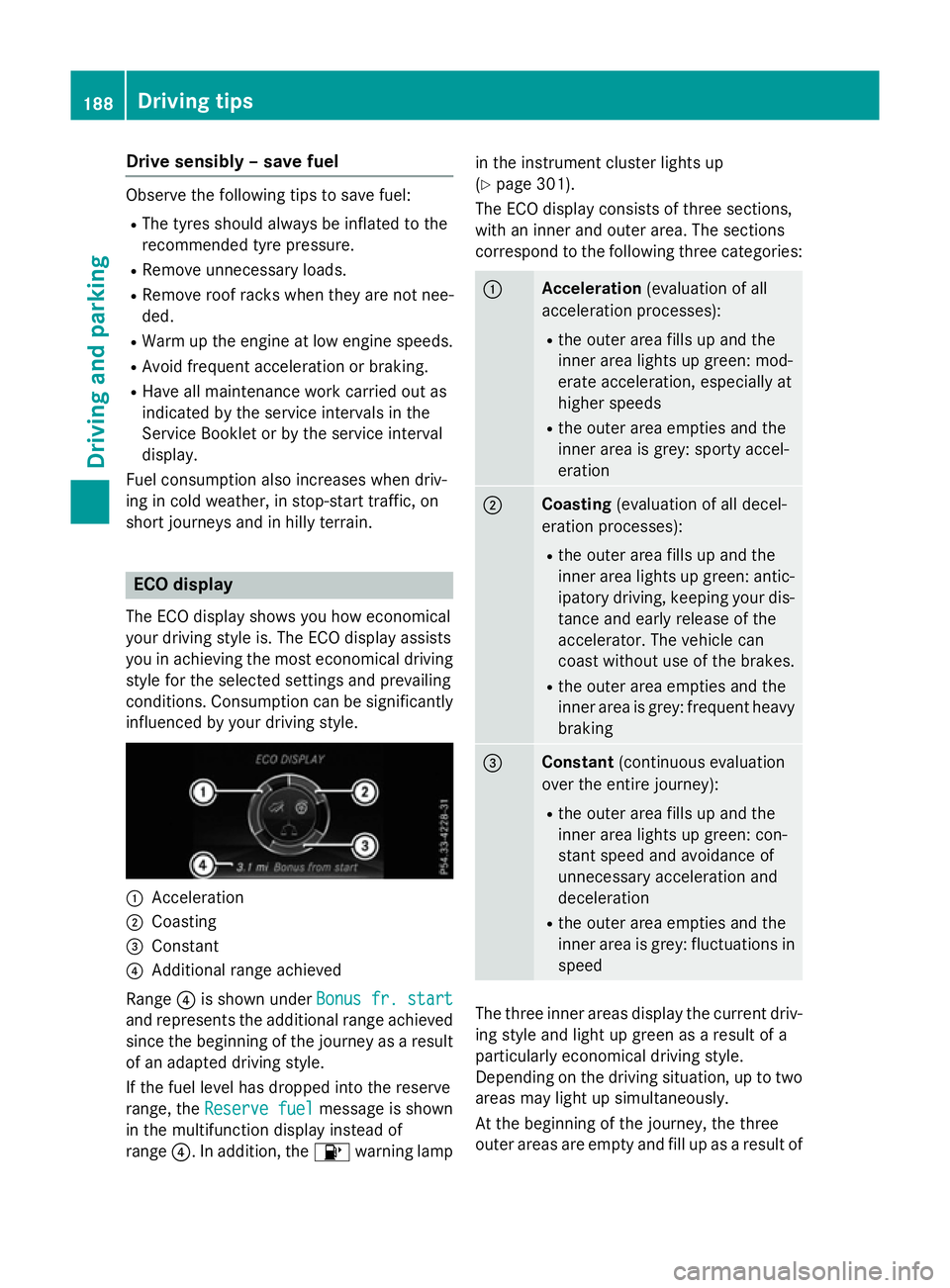
The ECO display shows you how economical
your driving style is. The ECO display assists
you in achieving the most economical driving
style for the selected settings and prevailing
conditions. Consumption can be significantly influenced by your driving style. :
Acceleration
; Coasting
= Constant
? Additional range achieved
Range ?is shown under Bonus fr. start Bonus fr. start
and represents the additional range achieved
since the beginning of the journey as a result of an adapted driving style.
If the fuel level has dropped into the reserve
range, the Reserve fuel Reserve fuel message is shown
in the multifunction display instead of
range ?. In addition, the 8warning lamp in the instrument cluster lights up
(Y
page 301).
The ECO display consists of three sections,
with an inner and outer area. The sections
correspond to the following three categories: :
Acceleration
(evaluation of all
acceleration processes):
R the outer area fills up and the
inner area lights up green: mod-
erate acceleration, especially at
higher speeds
R the outer area empties and the
inner area is grey: sporty accel-
eration ;
Coasting
(evaluation of all decel-
eration processes):
R the outer area fills up and the
inner area lights up green: antic-
ipatory driving, keeping your dis- tance and early release of the
accelerator. The vehicle can
coast without use of the brakes.
R the outer area empties and the
inner area is grey: frequent heavy
braking =
Constant
(continuous evaluation
over the entire journey):
R the outer area fills up and the
inner area lights up green: con-
stant speed and avoidance of
unnecessary acceleration and
deceleration
R the outer area empties and the
inner area is grey: fluctuations in
speed The three inner areas display the current driv-
ing style and light up green as a result of a
particularly economical driving style.
Depending on the driving situation, up to two
areas may light up simultaneously.
At the beginning of the journey, the three
outer areas are empty and fill up as a result of 188
Driving tipsDriving and pa
rking
Page 280 of 417
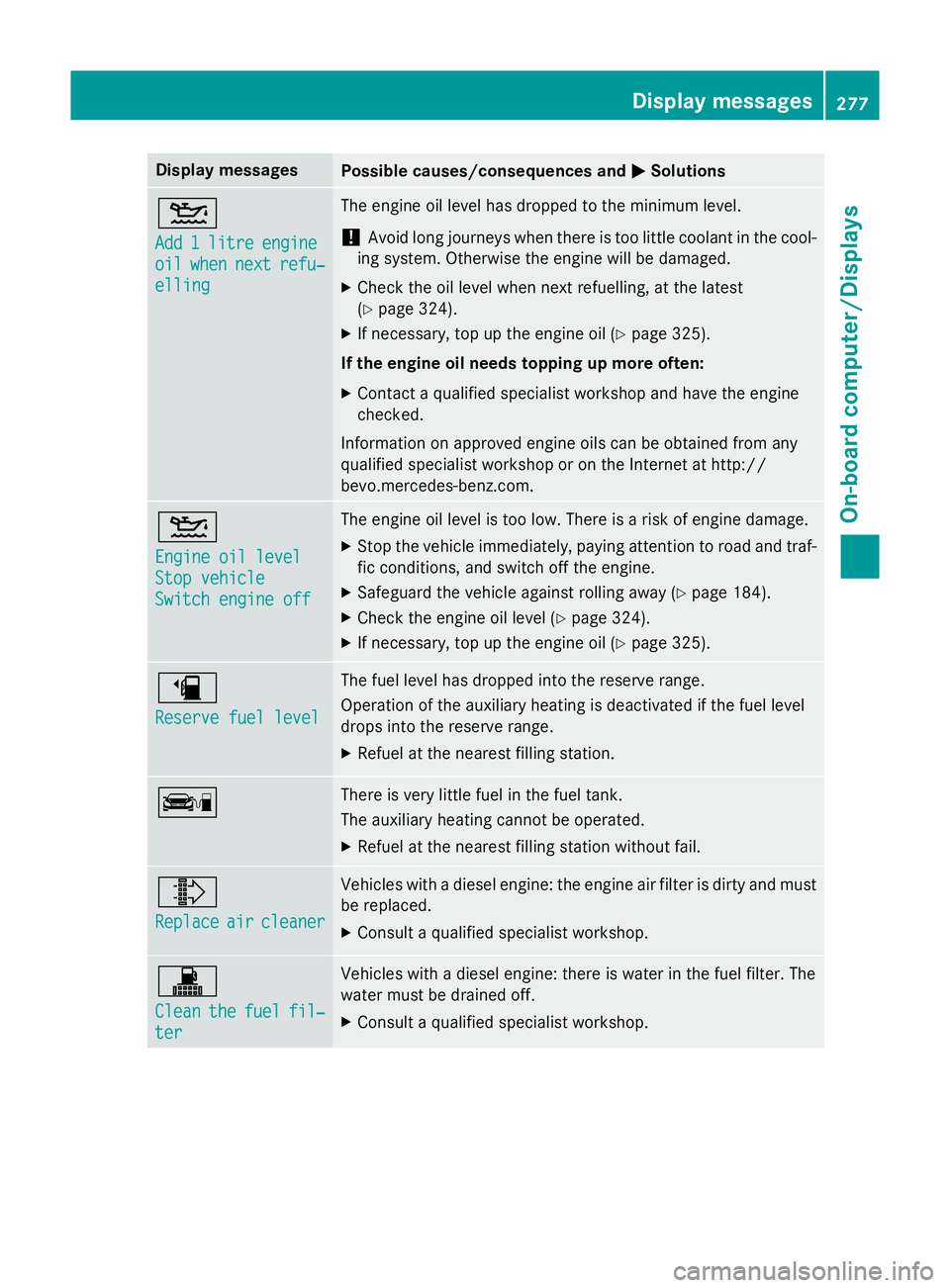
Display messages
Possible causes/consequences and
M
MSolutions 4
Add Add
1
1litre
litre engine
engine
oil
oil when
when next
next refu‐
refu‐
elling
elling The engine oil level has dropped to the minimum level.
! Avoid long journeys when there is too little coolant in the cool-
ing system. Otherwise the engine will be damaged.
X Check the oil level when next refuelling, at the latest
(Y page 324).
X If necessary, top up the engine oil (Y page 325).
If the engine oil needs topping up more often:
X Contact a qualified specialist workshop and have the engine
checked.
Information on approved engine oils can be obtained from any
qualified specialist workshop or on the Internet at http://
bevo.mercedes-benz.co m.4
Engine oil level Engine oil level
Stop vehicle Stop vehicle
Switch engine off Switch engine off The engine oil level is too low. There is a risk of engine damage.
X Stop the vehicle immediately, paying attention to road and traf-
fic conditions, and switch off the engine.
X Safeguard the vehicle against rolling away (Y page 184).
X Check the engine oil level (Y page 324).
X If necessary, top up the engine oil (Y page 325).æ
Reserve fuel level Reserve fuel level The fuel level has dropped into the reserve range.
Operation of the auxiliary heating is deactivated if the fuel level
drops into the reserve range.
X Refuel at the nearest filling station. ç There is very little fuel in the fuel tank.
The auxiliary heating cannot be operated.
X Refuel at the nearest filling station without fail. ¸
Replace Replace
air
aircleaner
cleaner Vehicles with a diesel engine: the engine air filter is dirty and must
be replaced.
X Consult a qualified specialist workshop. !
Clean Clean
the
thefuel
fuel fil‐
fil‐
ter
ter Vehicles with a diesel engine: there is water in the fuel filter. The
water must be drained off.
X Consult a qualified specialist workshop. Display messages
277On-board computer/Displays Z
Page 304 of 417
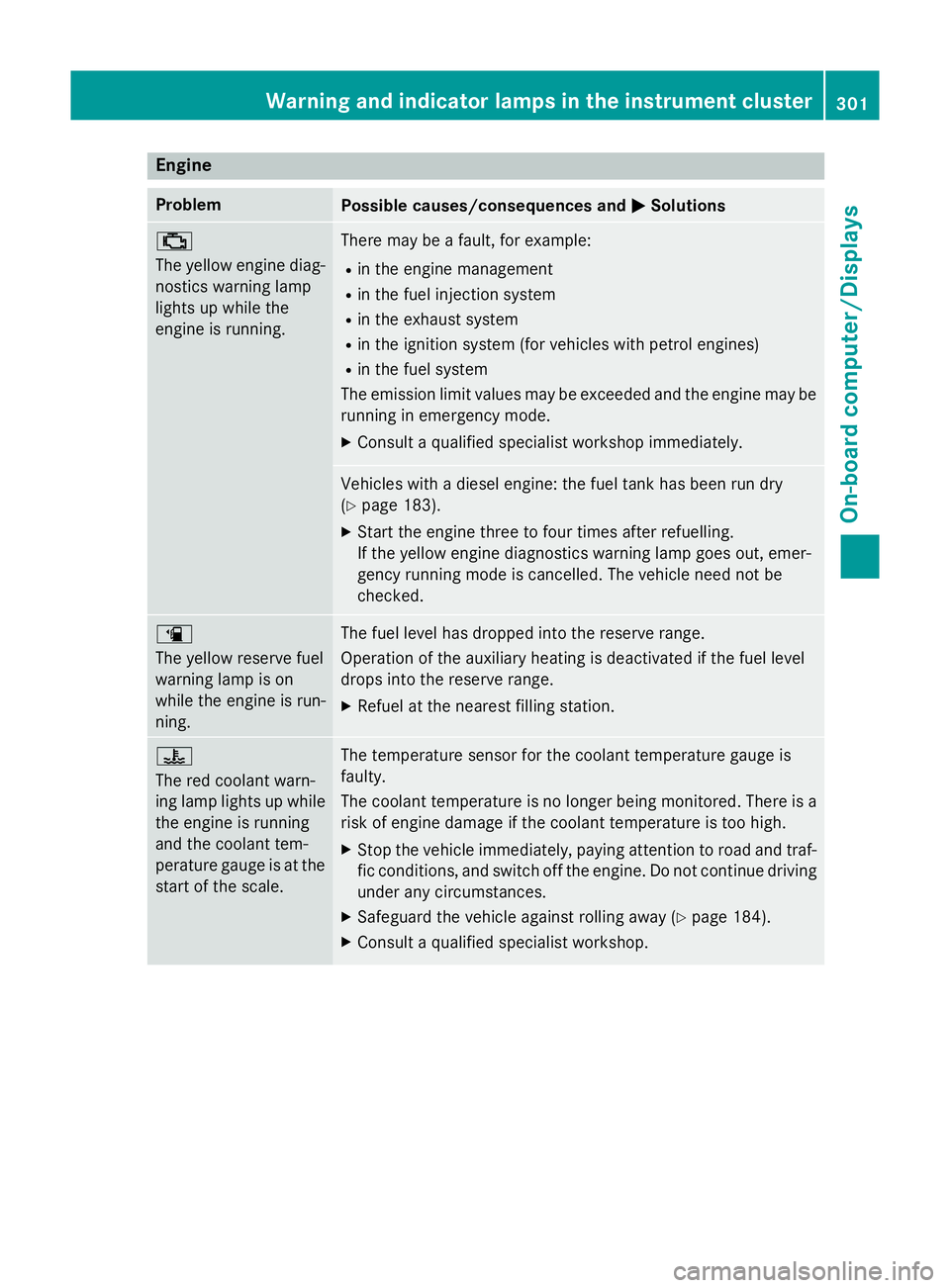
Engine
Problem
Possible causes/consequences and
M
MSolutions ;
The yellow engine diag-
nostics warning lamp
lights up while the
engine is running. There may be a fault, for example:
R in the engine management
R in the fuel injection system
R in the exhaust system
R in the ignition system (for vehicles with petrol engines)
R in the fuel system
The emission limit values may be exceeded and the engine may be running in emergency mode.
X Consult a qualified specialist workshop immediately. Vehicles with a diesel engine: the fuel tank has been run dry
(Y
page 183).
X Start the engine three to four times after refuelling.
If the yellow engine diagnostics warning lamp goes out, emer-
gency running mode is cancelled. The vehicle need not be
checked. æ
The yellow reserve fuel
warning lamp is on
while the engine is run-
ning.
The fuel level has dropped into the reserve range.
Operation of the auxiliary heating is deactivated if the fuel level
drops into the reserve range.
X Refuel at the nearest filling station. ?
The red coolant warn-
ing lamp lights up while
the engine is running
and the coolant tem-
perature gauge is at the start of the scale. The temperature sensor for the coolant temperature gauge is
faulty.
The coolant temperature is no longer being monitored. There is a risk of engine damage if the coolant temperature is too high.
X Stop the vehicle immediately, paying attention to road and traf-
fic conditions, and switch off the engine. Do not continue driving
under any circumstances.
X Safeguard the vehicle against rolling away (Y page 184).
X Consult a qualified specialist workshop. Warning and indicator lamps in the instrument cluster
301On-board computer/Displays Z
Page 334 of 417
X
Remove coolant, brake fluid, tree resins,
oils, fuels and greases by rubbing gently
with a cloth soaked in petroleum ether or
lighter fluid.
X Use tar remover to remove tar stains.
X Use silicone remover to remove wax.
Care and treatment of matt paintwork !
Never polish the vehicle or the light alloy
wheels. Polishing makes the paintwork
shiny.
! The following may cause the paint to
become shiny and thus reduce the matt
effect:
R vigorous rubbing with unsuitable materi-
als
R frequent use of car washes
R washing the vehicle in direct sunlight
! Never use paint cleaner, buffing or pol-
ishing products, or gloss preserver, e.g.
wax. These products are only suitable for
high-gloss surfaces. Their use on vehicles
with matt finish leads to considerable sur-
face damage (shiny, spotted areas).
Always have paintwork repairs carried out
at a qualified specialist workshop.
! Do not use wash programs with a hot wax
treatment under any circumstances.
Observe these notes if your vehicle has a
clear matt finish. This will help you to avoid
damage to the paintwork due to incorrect
treatment.
These notes also apply to light-alloy wheels
with a clear matt finish.
The vehicle should preferably be washed by
hand using a soft sponge, car shampoo and
plenty of water.
Use only insect remover and car shampoo
from the range of approved Mercedes-Benz
care products. Cleaning vehicle parts
Cleaning the wheels G
WARNING
The water jet of circular-jet nozzles (dirt grind- ers) can cause damage not visible from the
outside to tyres or chassis components. Com-
ponents damaged in this way can unexpect-
edly fail. There is a risk of an accident.
Do not use high-pressure cleaners with circu-
lar-jet nozzles to clean the vehicle. Have dam- aged tyres or chassis components replaced
immediately.
! Do not use acidic wheel cleaning products
to remove brake dust. This could damage
wheel bolts and brake components.
! Do not park up the vehicle for an extended
period straight after cleaning it, particularly after having cleaned the wheels with wheel cleaner. Wheel cleaners could cause
increased corrosion of the brake discs and
brake pads/linings. For this reason, you
should drive for a few minutes after clean-
ing. Braking heats the brake discs and the
brake pads/linings, thus drying them. The
vehicle can then be parked up.
Cleaning the windows G
WARNING
If the windscreen wipers are set in motion
when cleaning the windscreen or wiper
blades, you could become trapped. There is a danger of injury.
Always switch off the windscreen wipers and
the ignition before cleaning the windscreen or wiper blades.
! Only fold the windscreen wipers away
from the windscreen when vertical. Other-
wise, you will damage the bonnet.
! Do not use dry cloths, abrasive products,
solvents or cleaning agents containing sol- vents to clean the inside of the windows. Do
not touch the insides of the windows with Care
331Maintenance and care Z