lane assist MERCEDES-BENZ A-CLASS HATCHBACK 2015 Owners Manual
[x] Cancel search | Manufacturer: MERCEDES-BENZ, Model Year: 2015, Model line: A-CLASS HATCHBACK, Model: MERCEDES-BENZ A-CLASS HATCHBACK 2015Pages: 417, PDF Size: 11.91 MB
Page 12 of 417
Emergency locking ........................... 92
Emergency unlocking ....................... 91
Important safety note s.................... 89
Opening (from the inside) ................ 89
Drive program
Display ........................................... 172
Display (DIRECT SELECT lever) ...... 170
Manual transmission ...................... 169
Drive programs
Automatic transmission ................. 175
Driver's door
see Door
Driving abroad
Mercedes-Benz Service ................. 329
Symmetrical dipped beam ............. 120
Driving on flooded roads .................. 191
Driving safety system
COLLISION PREVENTION ASSIST
PLUS ................................................ 70
EBD (electronic brake force distri-bution) ............................................. 77
STEER CONTROL ............................. 77
Driving safety systems
ABS (Anti-lock Braking System) ....... 69
ADAPTIVE BRAK E............................. 77
Adaptive Brake Assist ...................... 72
Adaptive brake lights ....................... 73
BAS (Brake Assist System) .............. 70
Distance warning function ............... 71
ESP ®
(Electronic Stability Pro-
gram) ............................................... 73
Important safety guidelines ............. 69
Overview .......................................... 69
Driving system
Start-off assis t............................... 206
Driving systems
Active Parking Assist ..................... 212
AMG RIDE CONTROL sports sus-
pension .......................................... 207
ATTENTION ASSIST ........................ 222
Blind Spot Assist ............................ 226
Cruise control ................................ 191
Display message ............................ 278
Distronic Plus ................................ 196
HOLD function ............................... 204
Lane Keeping Assist ...................... 228
Lane package ................................ 226
PARKTRONIC ................................. 209 RACE START (AMG vehicles) .......... 206
Reversing camera .......................... 217
SPEEDTRONIC ............................... 194
Traffic Sign Assist .......................... 223
Driving tips
Aquaplaning ................................... 190
Automatic transmission ................. 174
Brakes ........................................... 189
DISTRONIC PLUS ........................... 203
Downhill gradient ........................... 189
Driving abroad ............................... 120
Driving in winter ............................. 191
Driving on flooded roads ................ 191
Driving on wet roads ...................... 190
Fuel ................................................ 188
General .......................................... 187
Icy road surfaces ........................... 191
Limited braking efficiency on sal-
ted roads ....................................... 190
New brake pads/linings ................ 190
Running-in tip s............................... 156
Snow chains .................................. 361
Symmetrical dipped beam ............. 120
The first 1500 km .......................... 156
Towing a trailer .............................. 231
Wet road surface ........................... 190
DVD video
Operating (on-board computer) ..... 245
DYNAMIC SELECT button (all vehi-
cles except Mercedes-AMG vehi-
cles) .................................................... 166
DYNAMIC SELECT controller
(Mercedes-AMG vehicles) ................. 167
DYNAMIC SELECT switch
Climate control (air conditioning) .. 138
Climate control
(THERMOTRONIC) .......................... 140 E
EBD (electronic brake force distri-
bution) Display message ............................ 260
Function/note s................................ 77
ECO display
Function/note s............................. 188
On-board computer ....................... 242 Index
9
Page 16 of 417
Manual gearshifting ....................... 179
Kneebag ............................................... 48 L
Lamps see Warning and indicator lamps
Lane Keeping Assist
Activating/deactivating (on-
board computer) ............................2 49
Display message ............................ 278
Function/informatio n.................... 228
Lane package ..................................... 226
Lap time (RACETIMER) ...................... 254
Lashing eyelets ................................. 311
Licence plate lamp (display mes-
sage) ................................................... 272
Light sensor (display message) ....... 274
Lighting
see Lights
Lights
Adaptive Highbeam Assist ............. 123
Automatic headlamp mode ............ 120
Dipped-beam headlamp s............... 121
Driving abroad ............................... 120
Hazard warning lamps ................... 123
Headlamp flashe r........................... 123
Headlamp range ............................ 122
Light switch ................................... 120
Main-beam headlamp s................... 122
Misted up headlamp s.................... 124
Parking lamps ................................ 121
Rear foglamp ................................. 121
Setting exterior lighting ................. 120
Side lamps ..................................... 121
Switching the daytime driving
lights on/off (on-board com-
puter) ............................................. 251
Turn signals ................................... 122
LIM indicator lamp
Cruise control ................................ 192
DISTRONIC PLUS ........................... 198
Variable SPEEDTRONIC ................. 195
Limiting the speed
see SPEEDTRONIC
Loading guidelines ............................ 306
Locking
see Central locking Locking (doors)
Automatic ........................................ 91
Emergency locking ........................... 92
From inside (central locking but-
ton) .................................................. 90
Locking centrally
see Central locking
Locking verification signal (on-
board computer) ............................... 252
Luggage compartment enlarge-
ment ................................................... 309
Luggage compartment floor
Important safety notes .................. 312
opening/closing ............................ 312
stowage well, under ....................... 312
Lumbar support
Adjusting the 4-way lumbar sup-
port ................................................ 110 M
M+S tyres ........................................... 360
Main-beam headlamps
Adaptive Highbeam Assist ............. 123
Changing bulb s.............................. 127
Display message ............................ 272
Switching on/of f........................... 122
Maintenance
see ASSYST PLUS
Manual transmission
Drive program ................................ 169
DYNAMIC SELECT button .............. 166
Engaging reverse gear ................... 168
Gear lever ...................................... 168
Pulling away ................................... 160
Shift recommendation ................... 168
Shifting to neutral .......................... 168
Starting the engine ........................ 159
Matt finish (cleaning instructions) .. 331
Memory card (audio) ......................... 245
Memory function ............................... 116
Mercedes-Benz emergency call
system
Switch in the overhead control
panel .............................................. 317
Mercedes-Benz Intelligent Drive
Traffic Sign Assist .......................... 223 Index
13
Page 72 of 417
Pets in the vehicle
G
WARNING
If you leave animals unsupervised or unse-
cured in the vehicle, they may push a button
or a switch, for example.
They could:
R activate vehicle equipment and become
trapped, for example
R switch vehicle systems on or off, thus
endangering other road users
In the event of an accident, sudden braking or
abrupt changes of direction, unsecured ani-
mals could be flung around the vehicle, injur-
ing the vehicle occupants. There is a risk of an accident and injury.
Never leave animals unattended in the vehi-
cle. Always secure animals correctly during a
journey, e.g. in an animal transport box. Driving safety systems
Driving safety systems overview
In this section, you will find information about the following driving safety systems:
R ABS ( Anti-lock BrakingSystem)
(Y page 69)
R BAS ( Brake Assist System) (Y page 70)
R COLLISION PREVENTION ASSIST PLUS
(Y page 70)
R Adaptive brake lights (Y page 73)
R ESP ®
(Electronic StabilityProgram)
(Y page 73)
R EBD ( electronic brake force distribution)
(Y page 77)
R ADAPTIVE BRAKE (Y page 77)
R STEER CONTROL (Y page 77) Important safety notes
If you fail to adapt your driving style or if you
are inattentive, the driving safety systems can neither reduce the risk of an accident nor
override the laws of physics. Driving safety
systems are merely aids designed to assist
driving. You are responsible for maintaining
the distance to the vehicle in front, for vehicle speed, for braking in good time, and for stay-ing in lane. Always adapt your driving style to
suit the prevailing road and weather condi-
tions and maintain a safe distance from the
vehicle in front. Drive carefully.
The driving safety systems described only
work as effectively as possible when there is
adequate contact between the tyres and the
road surface. Please pay special attention to
the notes on tyres, recommended minimum
tyre tread depths etc. (Y page 358).
In wintry driving conditions, always use winter
tyres (M+S tyres) and, if necessary, snow
chains. Only in this way will the driving safety systems described in this section work as
effectively as possible. ABS (Anti-lock Braking System)
General notes ABS regulates brake pressure in such a way
that the wheels do not lock when you brake.
This allows you to continue steering the vehi-
cle when braking.
The ! ABS warning lamp in the instrument
cluster lights up when the ignition is switched on. It goes out when the engine is running.
ABS works from a speed of about 8 km/h,
regardless of road-surface conditions. ABS
works on slippery surfaces, even when you
only brake gently.
Important safety notes i
Observe the "Important safety notes" sec-
tion (Y page 69). G
WARNING
If ABS is faulty, the wheels could lock when
braking. The steerability and braking charac-
teristics may be severely impaired. Addition- Driving safety systems
69Safety
Z
Page 206 of 417
X
Select the Assistance graphic
Assistance graphic function
using the on-board computer
(Y page 248).
Tips for driving with DISTRONIC PLUS General notes
The following contains descriptions of certain
road and traffic conditions in which you must be particularly attentive. In such situations,
brake if necessary. DISTRONIC PLUS is then
deactivated.
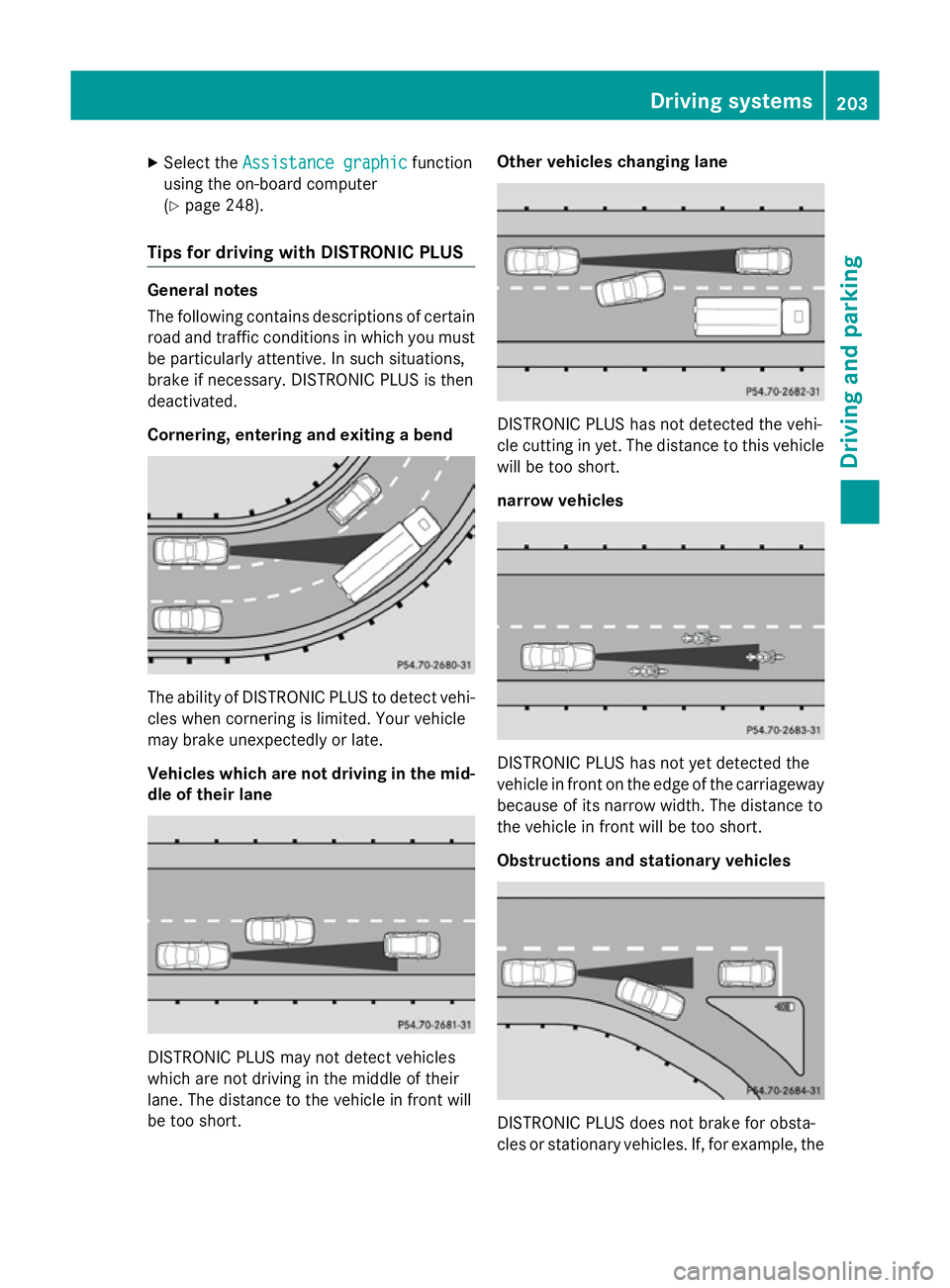
Cornering, entering and exiting a bend The ability of DISTRONIC PLUS to detect vehi-
cles when cornering is limited. Your vehicle
may brake unexpectedly or late.
Vehicles which are not driving in the mid- dle of their lane DISTRONIC PLUS may not detect vehicles
which are not driving in the middle of their
lane. The distance to the vehicle in front will
be too short. Other vehicles changing lane
DISTRONIC PLUS has not detected the vehi-
cle cutting in yet. The distance to this vehicle
will be too short.
narrow vehicles DISTRONIC PLUS has not yet detected the
vehicle in front on the edge of the carriageway
because of its narrow width. The distance to
the vehicle in front will be too short.
Obstructions and stationary vehicles DISTRONIC PLUS does not brake for obsta-
cles or stationary vehicles. If, for example, the Driving systems
203Driving and parking Z
Page 207 of 417
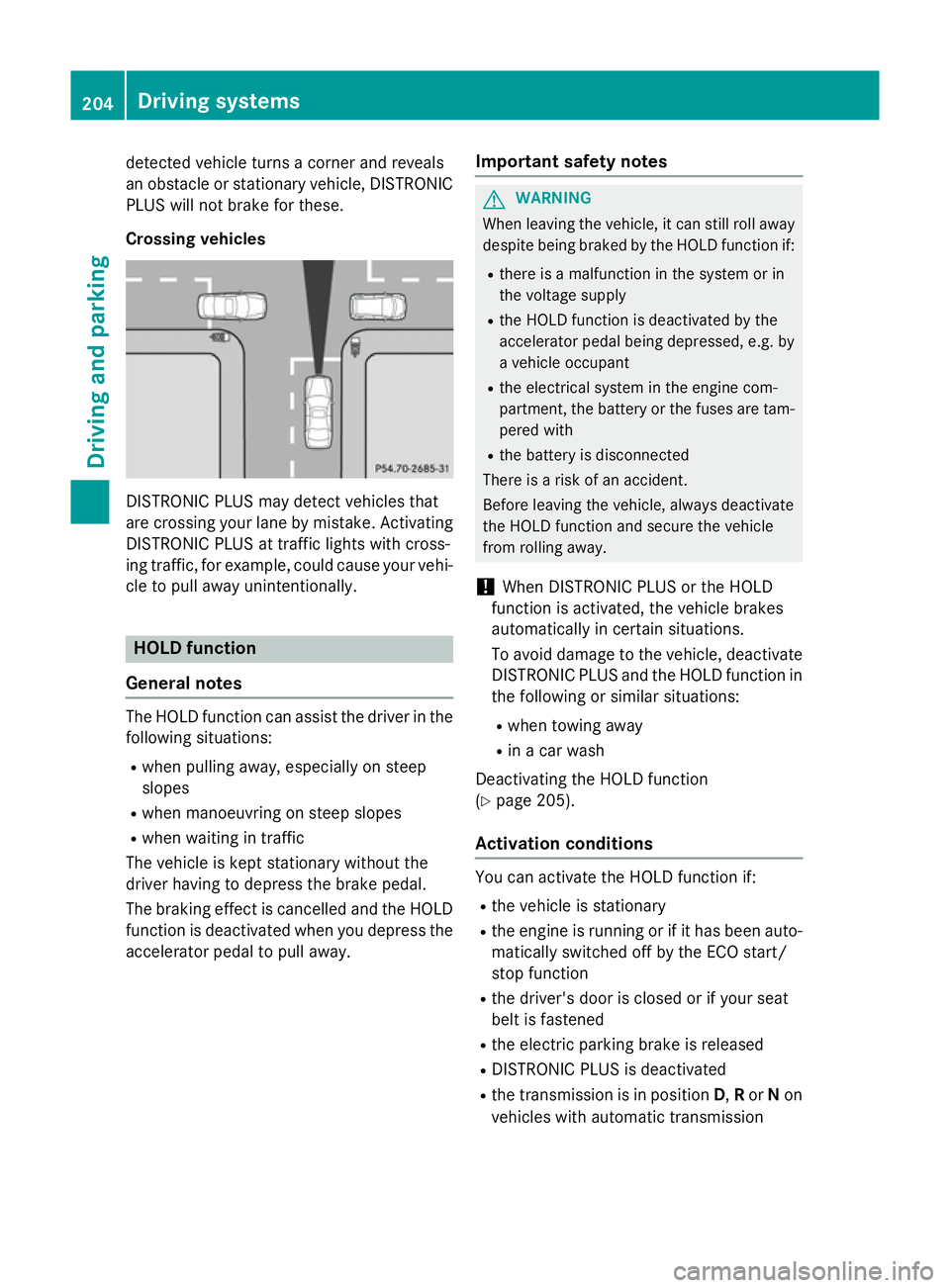
detected vehicle turns a corner and reveals
an obstacle or stationary vehicle, DISTRONIC PLUS will not brake for these.
Crossing vehicles DISTRONIC PLUS may detect vehicles that
are crossing your lane by mistake. Activating DISTRONIC PLUS at traffic lights with cross-
ing traffic, for example, could cause your vehi-
cle to pull away unintentionally. HOLD function
General notes The HOLD function can assist the driver in the
following situations:
R when pulling away, especially on steep
slopes
R when manoeuvring on steep slopes
R when waiting in traffic
The vehicle is kept stationary without the
driver having to depress the brake pedal.
The braking effect is cancelled and the HOLD function is deactivated when you depress theaccelerator pedal to pull away. Important safety notes G
WARNING
When leaving the vehicle, it can still roll away despite being braked by the HOLD function if:
R there is a malfunction in the system or in
the voltage supply
R the HOLD function is deactivated by the
accelerator pedal being depressed, e.g. by
a vehicle occupant
R the electrical system in the engine com-
partment, the battery or the fuses are tam-
pered with
R the battery is disconnected
There is a risk of an accident.
Before leaving the vehicle, always deactivate
the HOLD function and secure the vehicle
from rolling away.
! When DISTRONIC PLUS or the HOLD
function is activated, the vehicle brakes
automatically in certain situations.
To avoid damage to the vehicle, deactivate DISTRONIC PLUS and the HOLD function in
the following or similar situations:
R when towing away
R in a car wash
Deactivating the HOLD function
(Y page 205).
Activation conditions You can activate the HOLD function if:
R the vehicle is stationary
R the engine is running or if it has been auto-
matically switched off by the ECO start/
stop function
R the driver's door is closed or if your seat
belt is fastened
R the electric parking brake is released
R DISTRONIC PLUS is deactivated
R the transmission is in position D,Ror Non
vehicles with automatic transmission 204
Driving systemsDriving and parking
Page 215 of 417
Problems with PARKTRONIC
Problem
Possible causes/consequences and
M
MSolutions Only the red segments
in the PARKTRONIC
warning displays are lit.
You also hear a warning
tone for approximately
two seconds.
PARKTRONIC is then
deactivated and the
indicator lamp on the
PARKTRONIC button
lights up. PARKTRONIC has malfunctioned and has been deactivated.
X If problems persist, have PARKTRONIC checked at a qualified
specialist workshop. Only the red segments
in the PARKTRONIC
warning displays are lit.
PARKTRONIC is then
deactivated. The PARKTRONIC sensors are dirty or there is interference.
X Clean the PARKTRONIC sensors (Y page 332).
X Switch the ignition back on. The problem may be caused by an external source of radio or
ultrasound waves.
X See if PARKTRONIC functions in a different location. Active Parking Assist
General notes Active Parking Assist is an electronic parking
aid with ultrasound. It measures the road on
both sides of the vehicle. A parking symbol
indicates a suitable parking space. Active
steering intervention and brake application
can assist you during parking and when exit-
ing a parking space. You may also use
PARKTRONIC (Y page 209).
i The active braking application is only
available on vehicles with automatic trans-
mission.
Important safety notes Active Parking Assist is only an aid. It is not a
substitute for your attention to the immediate
surroundings. The responsibility for safe
manoeuvring and parking remains with you. Make sure that no persons, animals or
objects are in the manoeuvring range.
When PARKTRONIC is deactivated, Active
Parking Assist is also unavailable. G
WARNING
While parking or pulling out of a parking
space, the vehicle swings out and can drive
onto areas of the oncoming lane. This could
cause you to collide with other road users.
There is a risk of an accident.
Pay attention to other road users. Stop the
vehicle if necessary or cancel the Active Park- ing Assist parking procedure.
! If unavoidable, you should drive over
obstacles such as kerbs slowly and not at a
sharp angle. Otherwise, you may damage
the wheels or tyres. 212
Driving systemsDriving and parking
Page 225 of 417
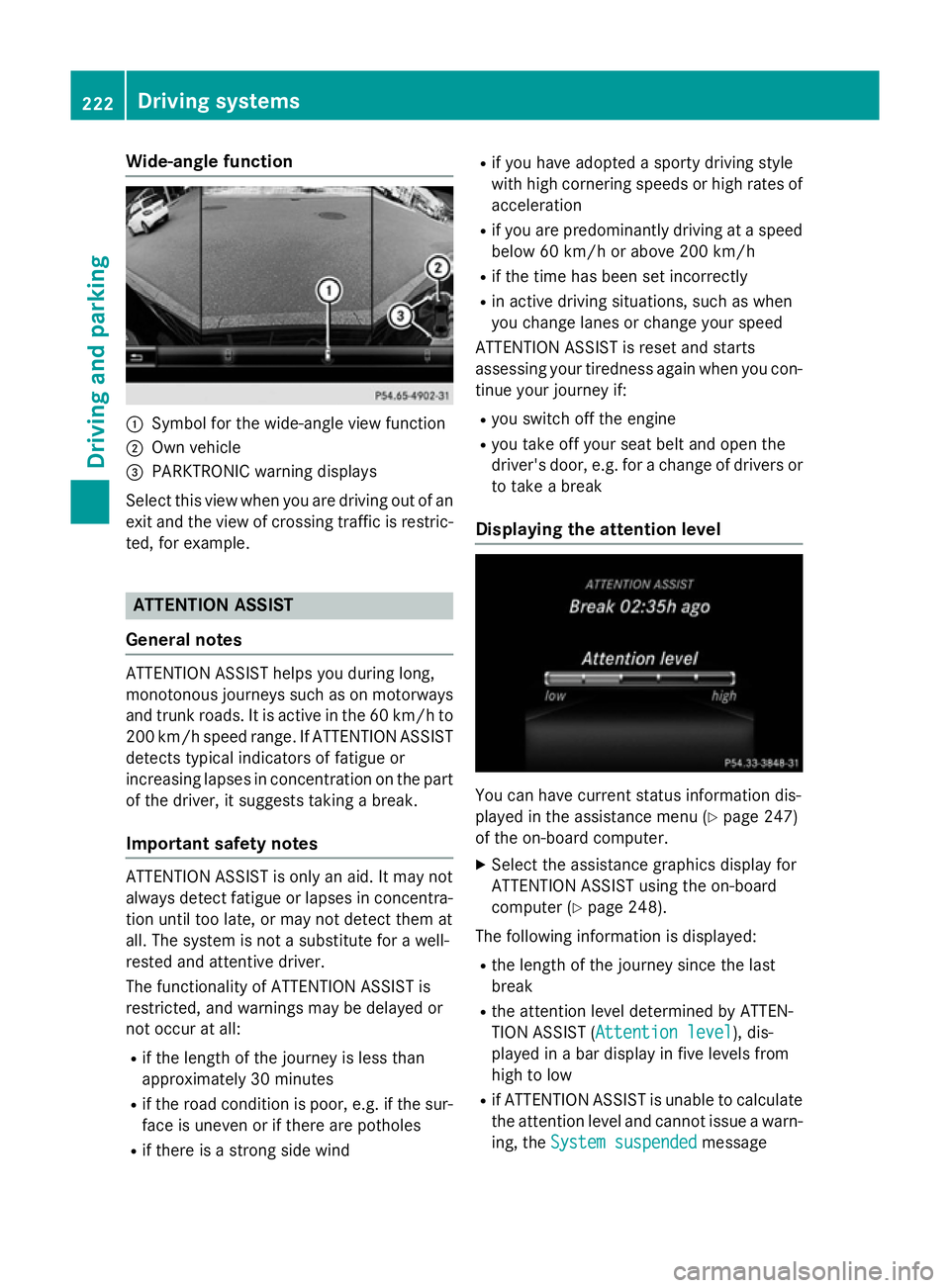
Wide-angle function
:
Symbol for the wide-angle view function
; Own vehicle
= PARKTRONIC warning displays
Select this view when you are driving out of an
exit and the view of crossing traffic is restric- ted, for example. ATTENTION ASSIST
General notes ATTENTION ASSIST helps you during long,
monotonous journeys such as on motorways
and trunk roads. It is active in the 60 km/h to
200 km/h speed range. If ATTENTION ASSIST detects typical indicators of fatigue or
increasing lapses in concentration on the part
of the driver, it suggests taking a break.
Important safety notes ATTENTION ASSIST is only an aid. It may not
always detect fatigue or lapses in concentra-
tion until too late, or may not detect them at
all. The system is not a substitute for a well-
rested and attentive driver.
The functionality of ATTENTION ASSIST is
restricted, and warnings may be delayed or
not occur at all:
R if the length of the journey is less than
approximately 30 minutes
R if the road condition is poor, e.g. if the sur-
face is uneven or if there are potholes
R if there is a strong side wind R
if you have adopted a sporty driving style
with high cornering speeds or high rates of
acceleration
R if you are predominantly driving at a speed
below 60 km/h or above 200 km/h
R if the time has been set incorrectly
R in active driving situations, such as when
you change lanes or change your speed
ATTENTION ASSIST is reset and starts
assessing your tiredness again when you con- tinue your journey if:
R you switch off the engine
R you take off your seat belt and open the
driver's door, e.g. for a change of drivers or
to take a break
Displaying the attention level You can have current status information dis-
played in the assistance menu (Y page 247)
of the on-board computer.
X Select the assistance graphics display for
ATTENTION ASSIST using the on-board
computer (Y page 248).
The following information is displayed: R the length of the journey since the last
break
R the attention level determined by ATTEN-
TION ASSIST ( Attention level Attention level), dis-
played in a bar display in five levels from
high to low
R if ATTENTION ASSIST is unable to calculate
the attention level and cannot issue a warn-
ing, the System suspended System suspended message222
Driving systemsDriving and parking
Page 227 of 417
If a sign indicating the end of a restriction
(speed limit or overtaking restriction) is
passed, the sign is displayed for five seconds.
The currently applicable traffic regulation
continues to be shown in the assistance
graphic display (Y page 248).
The camera also detects traffic signs with a
restriction indicated by an additional sign
(e.g. in wet conditions).
The traffic signs are only displayed with the
restrictions if:
R the regulation must be observed with the
restriction, or
R Traffic Sign Assist is unable to determine
whether the restriction applies
If Traffic Sign Assist is unable to determine a
maximum permitted speed from any of the
available sources, no speed limit is displayed
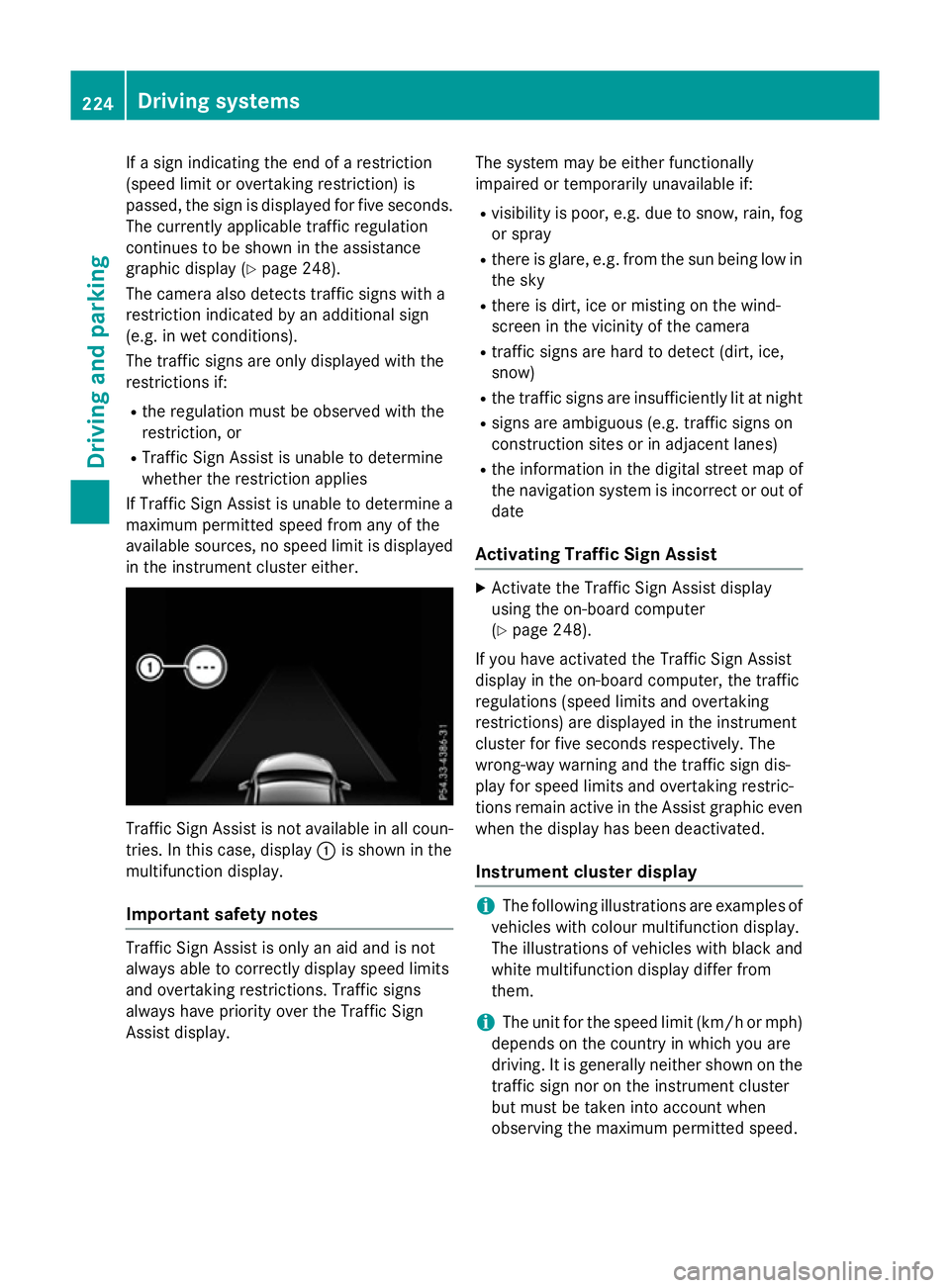
in the instrument cluster either. Traffic Sign Assist is not available in all coun-
tries. In this case, display :is shown in the
multifunction display.
Important safety notes Traffic Sign Assist is only an aid and is not
always able to correctly display speed limits
and overtaking restrictions. Traffic signs
always have priority over the Traffic Sign
Assist display. The system may be either functionally
impaired or temporarily unavailable if:
R visibility is poor, e.g. due to snow, rain, fog
or spray
R there is glare, e.g. from the sun being low in
the sky
R there is dirt, ice or misting on the wind-
screen in the vicinity of the camera
R traffic signs are hard to detect (dirt, ice,
snow)
R the traffic signs are insufficiently lit at night
R signs are ambiguous (e.g. traffic signs on
construction sites or in adjacent lanes)
R the information in the digital street map of
the navigation system is incorrect or out of
date
Activating Traffic Sign Assist X
Activate the Traffic Sign Assist display
using the on-board computer
(Y page 248).
If you have activated the Traffic Sign Assist
display in the on-board computer, the traffic
regulations (speed limits and overtaking
restrictions) are displayed in the instrument
cluster for five seconds respectively. The
wrong-way warning and the traffic sign dis-
play for speed limits and overtaking restric-
tions remain active in the Assist graphic even
when the display has been deactivated.
Instrument cluster display i
The following illustrations are examples of
vehicles with colour multifunction display.
The illustrations of vehicles with black and
white multifunction display differ from
them.
i The unit for the speed limit (km/h or mph)
depends on the country in which you are
driving. It is generally neither shown on the
traffic sign nor on the instrument cluster
but must be taken into account when
observing the maximum permitted speed. 224
Driving systemsDriving and parking
Page 229 of 417
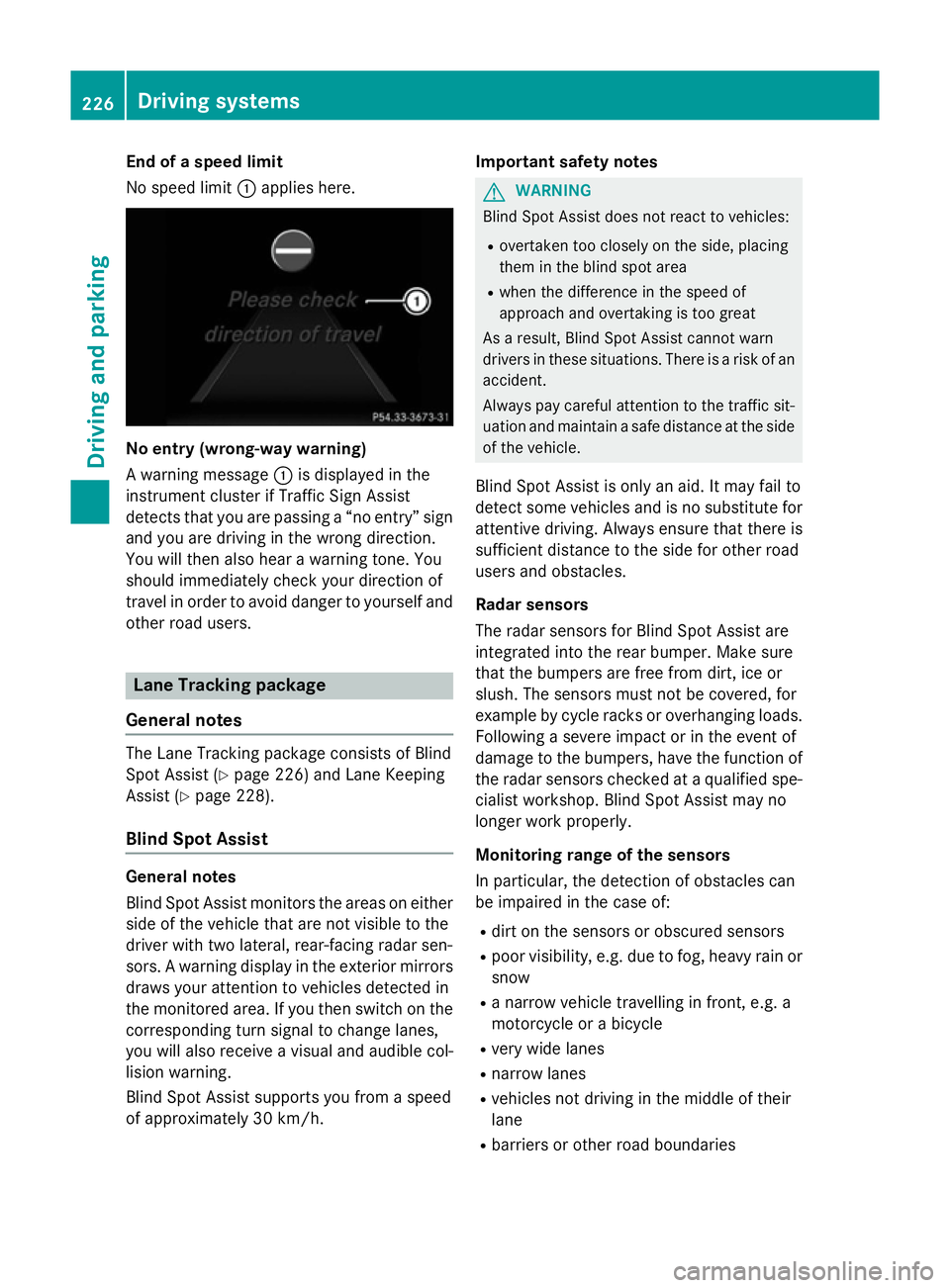
End of a speed limit
No speed limit
:applies here. No entry (wrong-way warning)
A warning message
:is displayed in the
instrument cluster if Traffic Sign Assist
detects that you are passing a “no entry” sign
and you are driving in the wrong direction.
You will then also hear a warning tone. You
should immediately check your direction of
travel in order to avoid danger to yourself and
other road users. Lane Tracking package
General notes The Lane Tracking package consists of Blind
Spot Assist (Y page 226) and Lane Keeping
Assist (Y page 228).
Blind Spot Assist General notes
Blind Spot Assist monitors the areas on either
side of the vehicle that are not visible to the
driver with two lateral, rear-facing radar sen-
sors. A warning display in the exterior mirrors draws your attention to vehicles detected in
the monitored area. If you then switch on the corresponding turn signal to change lanes,
you will also receive a visual and audible col-
lision warning.
Blind Spot Assist supports you from a speed
of approximately 30 km/h. Important safety notes G
WARNING
Blind Spot Assist does not react to vehicles:
R overtaken too closely on the side, placing
them in the blind spot area
R when the difference in the speed of
approach and overtaking is too great
As a result, Blind Spot Assist cannot warn
drivers in these situations. There is a risk of an accident.
Always pay careful attention to the traffic sit- uation and maintain a safe distance at the side
of the vehicle.
Blind Spot Assist is only an aid. It may fail to
detect some vehicles and is no substitute for
attentive driving. Always ensure that there is
sufficient distance to the side for other road
users and obstacles.
Radar sensors
The radar sensors for Blind Spot Assist are
integrated into the rear bumper. Make sure
that the bumpers are free from dirt, ice or
slush. The sensors must not be covered, for
example by cycle racks or overhanging loads.
Following a severe impact or in the event of
damage to the bumpers, have the function of the radar sensors checked at a qualified spe-
cialist workshop. Blind Spot Assist may no
longer work properly.
Monitoring range of the sensors
In particular, the detection of obstacles can
be impaired in the case of:
R dirt on the sensors or obscured sensors
R poor visibility, e.g. due to fog, heavy rain or
snow
R a narrow vehicle travelling in front, e.g. a
motorcycle or a bicycle
R very wide lanes
R narrow lanes
R vehicles not driving in the middle of their
lane
R barriers or other road boundaries 226
Driving systemsDriving and parking
Page 230 of 417
Vehicles in the monitoring range are then not
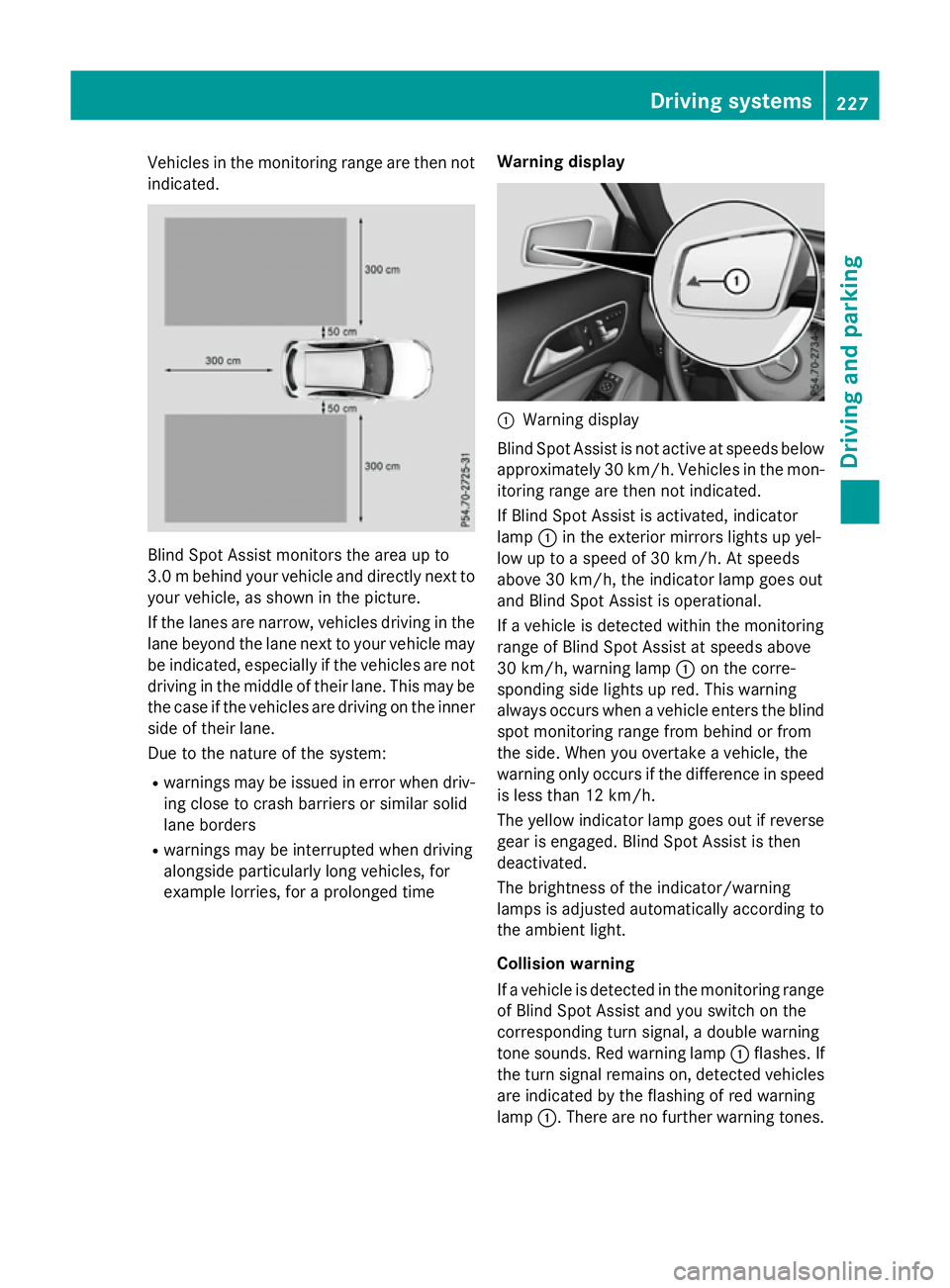
indicated. Blind Spot Assist monitors the area up to
3.0 mbehind your vehicle and directly next to
your vehicle, as shown in the picture.
If the lanes are narrow, vehicles driving in the
lane beyond the lane next to your vehicle may
be indicated, especially if the vehicles are not
driving in the middle of their lane. This may be the case if the vehicles are driving on the inner
side of their lane.
Due to the nature of the system:
R warnings may be issued in error when driv-
ing close to crash barriers or similar solid
lane borders
R warnings may be interrupted when driving
alongside particularly long vehicles, for
example lorries, for a prolonged time Warning display :
Warning display
Blind Spot Assist is not active at speeds below approximately 30 km/h. Vehicles in the mon-
itoring range are then not indicated.
If Blind Spot Assist is activated, indicator
lamp :in the exterior mirrors lights up yel-
low up to a speed of 30 km/h. At speeds
above 30 km/h, the indicator lamp goes out
and Blind Spot Assist is operational.
If a vehicle is detected within the monitoring
range of Blind Spot Assist at speeds above
30 km/h, warning lamp :on the corre-
sponding side lights up red. This warning
always occurs when a vehicle enters the blind
spot monitoring range from behind or from
the side. When you overtake a vehicle, the
warning only occurs if the difference in speed is less than 12 km/h.
The yellow indicator lamp goes out if reverse
gear is engaged. Blind Spot Assist is then
deactivated.
The brightness of the indicator/warning
lamps is adjusted automatically according to the ambient light.
Collision warning
If a vehicle is detected in the monitoring range
of Blind Spot Assist and you switch on the
corresponding turn signal, a double warning
tone sounds. Red warning lamp :flashes. If
the turn signal remains on, detected vehicles
are indicated by the flashing of red warning
lamp :. There are no further warning tones. Driving systems
227Driving and parking Z